Page 160 of 661
159
uuOperating the Switches Around the Steering Wheel uAuto High-Beam System*
Continued
Controls
Auto High-Beam System*
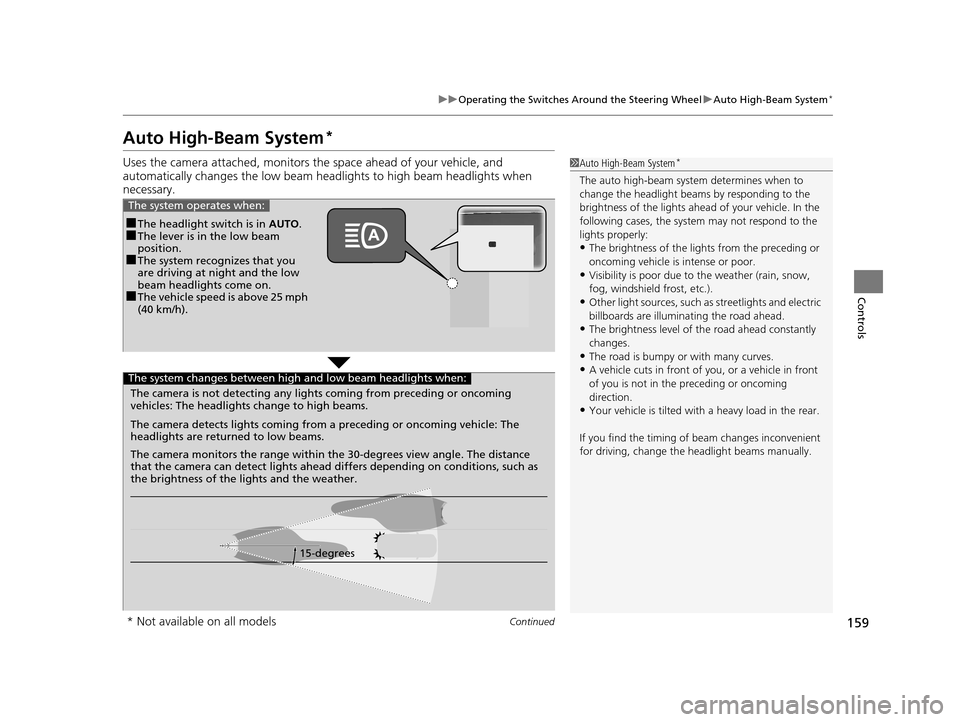
Uses the camera attached, monitors th e space ahead of your vehicle, and
automatically changes the low beam head lights to high beam headlights when
necessary.1 Auto High-Beam System*
The auto high-beam system determines when to
change the headlight beams by responding to the
brightness of the lights ahead of your vehicle. In the
following cases, the system may not respond to the
lights properly:
•The brightness of the lights from the preceding or
oncoming vehicle is intense or poor.
•Visibility is poor due to the weather (rain, snow,
fog, windshield frost, etc.).
•Other light sources, such as streetlights and electric
billboards are illumina ting the road ahead.
•The brightness level of th e road ahead constantly
changes.
•The road is bumpy or with many curves.
•A vehicle cuts in front of you, or a vehicle in front
of you is not in the preceding or oncoming
direction.
•Your vehicle is tilted with a heavy load in the rear.
If you find the timing of beam changes inconvenient
for driving, change the headlight beams manually.
■The headlight switch is in AUTO.■The lever is in the low beam
position.
■The system recognizes that you
are driving at night and the low
beam headlights come on.
■The vehicle speed is above 25 mph
(40 km/h).
The system operates when:
The camera is not detecting any lights coming from preceding or oncoming
vehicles: The headlights change to high beams.
15-degrees
The camera detects lights coming from a preceding or oncoming vehicle: The
headlights are return
ed to low beams.
The camera monitors the range within the 30-degrees view angle. The distance
that the camera can detect lights ahead differs depending on conditions, such as
the brightness of the lights and the weather.
The system changes between high and low beam headlights when:
* Not available on all models
16 PILOT-31TG76000.book 159 ページ 2015年6月15日 月曜日 午前11時30分
Page 462 of 661

461Continued
Driving
When Driving
Starting the Engine
1.Depress the brake pedal.
u Make sure the transmission is in
(P.
1. Check that the shift lever is in
(P, then
depress the brake pedal.
u Although it is possible to start the vehicle
in
(N, it is safer to start it in (P.
2. Press the ENGINE START/STOP button
without depressing the accelerator pedal.
The engine will crank until it starts.
1 Starting the Engine
Keep your foot firmly on the brake pedal when
starting the engine.
The engine is harder to st art in cold weather and in
thinner air found at altitudes above 8,000 feet (2,400
meters).
When starting the engine in cold weather, turn off all
electrical accessories such as the lights, climate control
system, and rear defogger in order to reduce battery drain.
If you live in a region where winter is extremely cold,
an engine block heater will improve starting and
warming of the engine. If temperatures consistently
below -22°F (-30°C) are expected, the coolant
mixture should be changed to a higher concentration
to prevent freezing. Cons ult a dealer for details.
If the exhaust system sounds abnormal or you can
smell exhaust gas inside the vehicle, have your vehicle
checked by a dealer. There may be a problem with
the engine or exhaust system.
Bring the smart entry remote close to the ENGINE
START/STOP button if the battery in the smart entry
remote is weak.
2 If the Smart Entry Remote Battery is Weak
P. 616
The engine may not start if the smart entry remote is
subjected to strong radio waves.
Do not hold the ENGINE START/STOP button to
start the engine.
If the engine does not start, wait at least 10 seconds
before trying again.
Brake Pedal
Models with electronic gear selector
Models without electronic gear selector
All models
16 PILOT-31TG76000.book 461 ページ 2015年6月15日 月曜日 午前11時30分
Page 497 of 661
496
uuWhen Driving uAdaptive Cruise Control (ACC)*
Driving
The system may automatically shut off and the ACC indicator will come on under
certain conditions. Some examples of th ese conditions are listed below. Other
conditions may reduce some of the ACC functions.
2 Front Sensor Camera* P. 489
■Environmental conditions
Driving in bad weather (r ain, fog, snow, etc.).
■Roadway conditions
Driving on a snowy or wet roadway (obscure d lane marking, vehicle tracks, reflected
lights, road spray, high contrast).
■Vehicle conditions
• The outside of the windshie ld is blocked by dirt, mud, leaves, wet snow, etc.
• An abnormal tire or wheel condition (wrong sized, varied size or construction,
improperly inflated, comp act spare tire, etc.).
• The camera temperature gets too hot.
• The parking brake is applied.
■ACC Conditions and Limitations
* Not available on all models
16 PILOT-31TG76000.book 496 ページ 2015年6月15日 月曜日 午前11時30分
Page 506 of 661
505
uuWhen Driving uRoad Departure Mitigation (RDM) System*
Continued
Driving
The system may not properly detect lane ma rkings and the position of your vehicle
under certain conditions. Some examples of these conditions are listed below.
■Environmental conditions
• Driving in bad weather (rain, fog, snow, etc.).
• Sudden changes between light and dark, such as an entrance or exit of a tunnel.
• There is little contrast between lane lines and the roadway surface.
• Driving into low sunlight (e.g., at dawn or dusk).
• Strong light is reflec ted onto the roadway.
• Driving in the shadows of trees, buildings, etc.
• Shadows of adjacent objects are parallel to lane markings.
• Roadway objects or structures are misinterpreted as lane markers.
• Reflections on the interior of the front windshield.
■RDM Conditions and Limitations
16 PILOT-31TG76000.book 505 ページ 2015年6月15日 月曜日 午前11時30分
Page 507 of 661
506
uuWhen Driving uRoad Departure Mitigation (RDM) System*
Driving
■Roadway conditions
• Driving on a snowy or wet roadway (obscured lane marking, vehicle tracks,
reflected lights, road spray, high contrast).
• Driving on a road with temporary lane markings.
• Faint, multiple, or varied lane markings are visible on the roadway due to road
repairs or old lane markings.
• The roadway has merging, split, or crossing lines (e.g., such as at an intersection
or crosswalk).
• The lane markings are extremely narrow, wide, or changing.
• The vehicle in front of you is driving near the lane lines.
• The road is hilly or the vehicle is approaching the crest of a hill.
• Driving on rough or unpaved roads, or over bumpy surfaces.
• When objects on the road (c urb, guard rail, pylons, etc.) are recognized as white
lines (or yellow lines).
• When driving on roads with double lines.
■Vehicle conditions
• Headlight lenses are dirty or the headlights are not properly adjusted.
• The outside of the windshield is streake d or blocked by dirt, mud, leaves, wet
snow, etc.
• The inside of the windshield is fogged.
• The camera temperature gets too hot.
• An abnormal tire or wheel condition (wrong sized, varied size or construction,
improperly inflated, comp act spare tire, etc.).
• The vehicle is tilted due to a heav y load or suspension modifications.
• When tire chains are installed.
16 PILOT-31TG76000.book 506 ページ 2015年6月15日 月曜日 午前11時30分
Page 514 of 661
513
uuWhen Driving uLane Keeping Assist System (LKAS)*
Continued
Driving
The system may not detect lane markings and therefore may not keep the vehicle in
the middle of a lane under certain conditions, including the following:
■Environmental conditions
• Driving in bad weather (rain, fog, snow, etc.).
• Sudden changes between light and dark, such as an entrance or exit of a tunnel.
• There is little contrast between lane lines and the roadway surface.
• Driving into low sunlight (e.g., at dawn or dusk).
• Strong light is reflec ted onto the roadway.
• Driving in the shadows of trees, buildings, etc.
• Shadows of adjacent objects are parallel to lane markings.
• Roadway objects or structures are misinterpreted as lane markers.
• Reflections on the interior of the front windshield.
■LKAS Conditions and Limitations
16 PILOT-31TG76000.book 513 ページ 2015年6月15日 月曜日 午前11時30分
Page 515 of 661
514
uuWhen Driving uLane Keeping Assist System (LKAS)*
Driving
■Roadway conditions
• Driving on a snowy or wet roadway (obscured lane marking, vehicle tracks,
reflected lights, road spray, high contrast).
• Driving on a road with temporary lane markings.
• Faint, multiple, or varied lane markings are visible on the roadway due to road
repairs or old lane markings.
• The roadway has merging, split, or crossing lines (e.g., such as at an intersection
or crosswalk).
• The lane markings are extremely narrow, wide, or changing.
• The vehicle in front of you is driving near the lane lines.
• The road is hilly or the vehicle is approaching the crest of a hill.
• Driving on rough or unpaved roads, or over bumpy surfaces.
• When objects on the road (c urb, guard rail, pylons, etc.) are recognized as white
lines (or yellow lines).
• When driving on roads with double lines.
■Vehicle conditions
• Headlight lenses are dirty or the headlights are not properly adjusted.
• The outside of the windshield is streake d or blocked by dirt, mud, leaves, wet
snow, etc.
• The inside of the windshield is fogged.
• The camera temperature gets too hot.
• An abnormal tire or wheel condition (wrong sized, varied size or construction,
improperly inflated, comp act spare tire, etc.).
• The vehicle is tilted due to a heav y load or suspension modifications.
16 PILOT-31TG76000.book 514 ページ 2015年6月15日 月曜日 午前11時30分
Page 536 of 661

535
uuBraking uCollision Mitigation Braking SystemTM (CMBSTM)*
Continued
Driving
The system may automatically shut off and the CMBSTM indicator will come on under
certain conditions. Some examples of thes e conditions are listed below. Other
conditions may reduce some of the CMBS
TM functions.
2 Front Sensor Camera* P. 489
■Environmental conditions
• Driving in bad weather (rain, fog, snow, etc.).
• Sudden changes between light and dark, such as an entrance or exit of a tunnel.
• There is little contrast between objects and the background.
• Driving into low sunlight (e.g., at dawn or dusk).
• Strong light is reflec ted onto the roadway.
• Driving in the shadows of trees, buildings, etc.
• Roadway objects or structures are misinterpreted as vehicles and pedestrians.
• Reflections on the interior of the front windshield.
■Roadway conditions
• Driving on a snowy or wet roadway (obs cured lane marking, vehicle tracks,
reflected lights, road spray, high contrast).
• The road is hilly or the vehicle is approaching the crest of a hill.
• Driving on curvy, winding, or undulating roads.
■CMBSTM Conditions and Limitations
* Not available on all models
16 PILOT-31TG76000.book 535 ページ 2015年6月15日 月曜日 午前11時30分