Page 78 of 661
77
Instrument Panel
This chapter describes the buttons, indicators, and gauges that are used while driving.
Indicators............................................ 78
Multi-Information Display (MID) Warning and Information Messages ............... 97
Gauges and Multi-Information Display (MID)Gauges ............................................ 113
MID ................................................. 114
16 PILOT-31TG76000.book 77 ページ 2015年6月15日 月曜日 午前11時30分
Page 85 of 661
84
uuIndicators u
Instrument Panel
IndicatorNameOn/BlinkingExplanationMessage
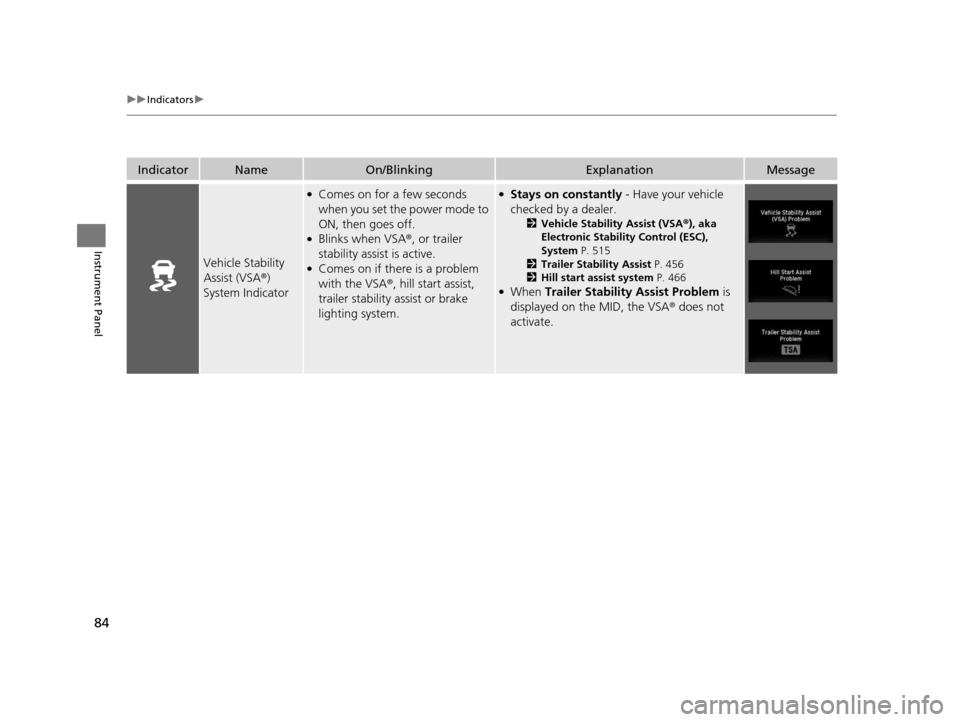
Vehicle Stability
Assist (VSA ®)
System Indicator
●Comes on for a few seconds
when you set the power mode to
ON, then goes off.
●Blinks when VSA ®, or trailer
stability assist is active.
●Comes on if there is a problem
with the VSA ®, hill start assist,
trailer stability assist or brake
lighting system.
●Stays on constantly - Have your vehicle
checked by a dealer.
2 Vehicle Stability Assist (VSA ®), aka
Electronic Stability Control (ESC),
System P. 515
2 Trailer Stability Assist P. 456
2 Hill start assist system P. 466
●When Trailer Stability Assist Problem is
displayed on the MID, the VSA ® does not
activate.
16 PILOT-31TG76000.book 84 ページ 2015年6月15日 月曜日 午前11時30分
Page 96 of 661
95
uuIndicators u
Continued
Instrument Panel
IndicatorNameOn/BlinkingExplanationMessage
Collision
Mitigation Braking
System
TM
(CMBSTM)
Indicator*
●Comes on for a few seconds
when you change the power
mode to ON, then goes off.
●Comes on when you deactivate
the CMBSTM. A multi-information
display message appears for five
seconds.
●Comes on if there is a problem
with the CMBSTM.
●Stays on constantly without the CMBSTM
off - Have your vehicle checked by a dealer.
2Collision Mitigation Braking SystemTM
(CMBSTM)* P. 531
* Not available on all models
16 PILOT-31TG76000.book 95 ページ 2015年6月15日 月曜日 午前11時30分
Page 98 of 661
97
uuIndicators uMulti-Information Display (MID) Warning and Information Messages
Continued
Instrument Panel
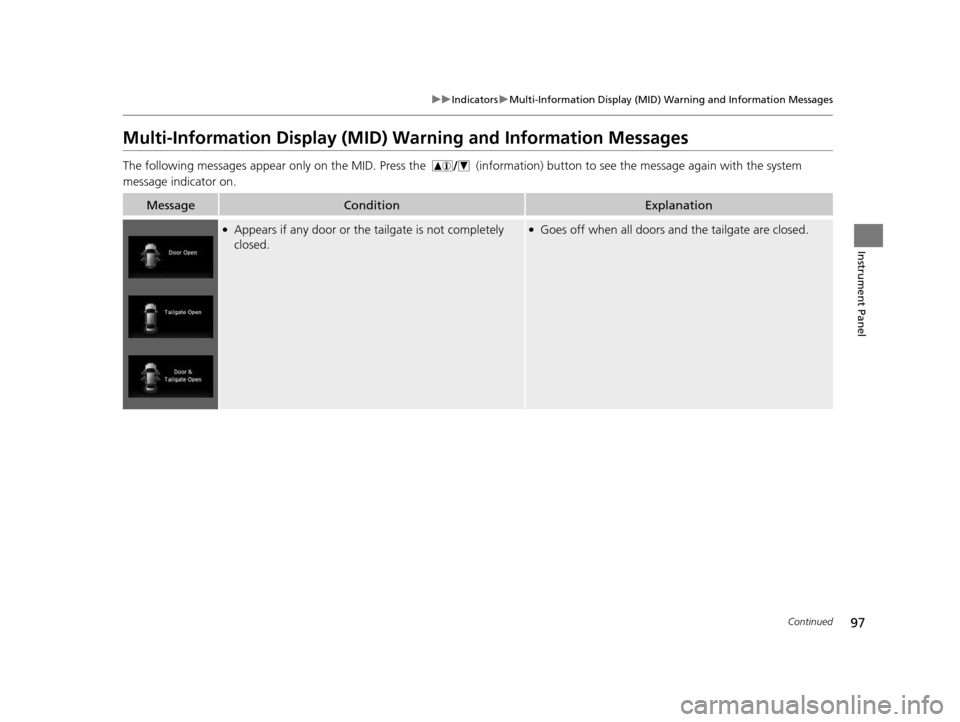
Multi-Information Display (MID) Wa rning and Information Messages
The following messages appear only on th e MID. Press the (information) button to see the message again with the system
message indicator on.
MessageConditionExplanation
●Appears if any door or the tailgate is not completely
closed.●Goes off when all doors and the tailgate are closed.
16 PILOT-31TG76000.book 97 ページ 2015年6月15日 月曜日 午前11時30分
Page 99 of 661
98
uuIndicators uMulti-Information Display (MID) Warning and Information Messages
Instrument Panel
MessageConditionExplanation
●Appears when the washer fluid is low.*●Refill washer fluid.
2 Refilling Window Washer Fluid P. 574
●Appears when there is a problem with the sensor on the
battery.●Have your vehicle ch ecked by a dealer.
2Checking the Battery P. 594
●Appears along with the battery charging system
indicator when the battery is not charging.●Turn off the climate control sy stem and rear defogger to
reduce electricity consumption.
2 If the Charging System Indicator Comes On P. 624
●Appears when the scheduled maintenance is due soon.●Consequently, Maintenance Due Now and
Maintenance Past Due follow.2Maintenance Minder Messages on the Multi-
Information Display (MID) P. 560
●Appears when the engine coolant temperature gets
abnormally high.
2Overheating P. 622
* Not available on all models
16 PILOT-31TG76000.book 98 ページ 2015年6月15日 月曜日 午前11時30分
Page 100 of 661
99
uuIndicators uMulti-Information Display (MID) Warning and Information Messages
Continued
Instrument Panel
MessageConditionExplanation
●Appears when there is a problem with the power
tailgate system.●Manually open or close the power tailgate.●Have your vehicle checked by a dealer.
●Appears if there is a problem with the starter system.●Hold the ENGINE START/STOP button up to 15
seconds to start the engine.
2 Starting the Engine P. 461
Have your vehicle checked by a dealer.
U.S.
Canada
U.S.
Canada
16 PILOT-31TG76000.book 99 ページ 2015年6月15日 月曜日 午前11時30分
Page 101 of 661
100
uuIndicators uMulti-Information Display (MID) Warning and Information Messages
Instrument Panel
MessageConditionExplanation
●Appears when the steering wheel is locked.●Move the steering wheel left and right while pressing
the ENGINE START/STOP button.
●Appears when the power mode is in ACCESSORY.
—
●Appears after the driver’s door is opened when the
power mode is in ACCESSORY.●Press the ENGINE START/STOP button twice with your
foot off the brake pedal to change the power mode to
VEHICLE OFF (LOCK).
●Appears when you close the door with the power mode
is in ON without the smart entry remote inside the
vehicle.●Disappears when you bring the smart entry remote back
inside the vehicle and close the door.
2 Smart Entry Remote Reminder P. 153
●Appears when the smart entry remote battery becomes
weak.●Replace the battery as soon as possible.
2Replacing the Button Battery P. 596
Canadian models
16 PILOT-31TG76000.book 100 ページ 2015年6月15日 月曜日 午前11時30分
Page 102 of 661

101
uuIndicators uMulti-Information Display (MID) Warning and Information Messages
Continued
Instrument Panel
MessageConditionExplanation
●Appears if the smart entry remote battery is too weak to
start the engine or the key is not within operating range
to start the engine.
The beeper sounds six times.●Bring the smart entry remote in front of the ENGINE
START/STOP button.
2If the Smart Entry Remote Battery is Weak P. 616
●Appears three seconds after the To Start, Hold
Remote Near Start Button , then To Start Engine
messages appeared sequentially.●Unless you bring the smart entry remote in front of the
ENGINE START/STOP button, this message does not
appear.
2 If the Smart Entry Remote Battery is Weak P. 616
●Appears if there is a problem with the cooling system.●Drive slowly to prevent overheating and have your
vehicle checked by a dealer as soon as possible.
●Appears when there is a problem with the headlights*.●Appears while driving - The low beam headlights
may not be on. When conditions allow you to drive
safety, have your vehicle chec ked by a dealer as soon as
possible.
●Appears if there is a problem with the parking sensor
system*.
●Check if the area around the sensor(s) is covered with
mud, ice, snow, etc. If the indicator(s) stays on or the
beeper does not stop even after you clean the area,
have the system checked by a dealer.
* Not available on all models
16 PILOT-31TG76000.book 101 ページ 2015年6月15日 月曜日 午前11時30分