372
uuCustomized Features u
Features
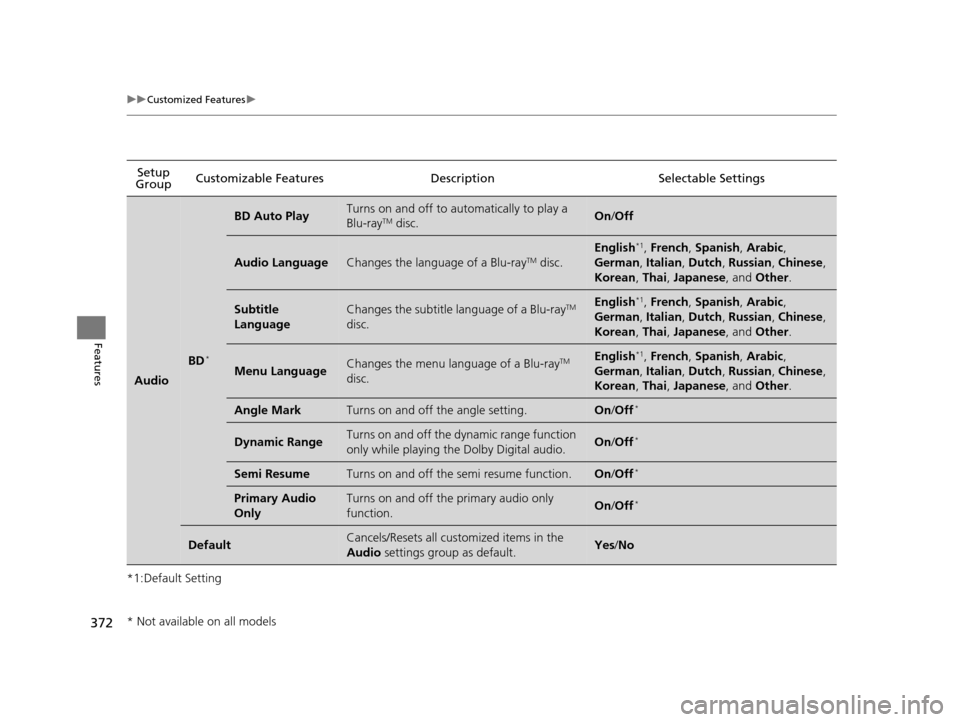
*1:Default SettingSetup
Group Customizable Features Description Selectable Settings
Audio
BD*
BD Auto PlayTurns on and off to automatically to play a
Blu-rayTM disc.On
/Off
Audio LanguageChanges the language of a Blu-rayTM disc.
English*1, French , Spanish , Arabic ,
German , Italian , Dutch , Russian , Chinese ,
Korean , Thai , Japanese , and Other .
Subtitle
LanguageChanges the subtitle language of a Blu-rayTM
disc.English*1, French , Spanish , Arabic ,
German , Italian , Dutch , Russian , Chinese ,
Korean , Thai , Japanese , and Other .
Menu LanguageChanges the menu language of a Blu-rayTM
disc.English*1, French , Spanish , Arabic ,
German , Italian , Dutch , Russian , Chinese ,
Korean , Thai , Japanese , and Other .
Angle MarkTurns on and off the angle setting.On/Off*
Dynamic RangeTurns on and off the dy namic range function
only while playing the Dolby Digital audio.On /Off*
Semi ResumeTurns on and off the semi resume function.On /Off*
Primary Audio
OnlyTurns on and off the primary audio only
function.On /Off*
DefaultCancels/Resets all customized items in the
Audio settings group as default.Yes/No
* Not available on all models
16 PILOT-31TG76000.book 372 ページ 2015年6月15日 月曜日 午前11時30分
uuBluetooth ® HandsFreeLink ®u Using HFL
382
Features
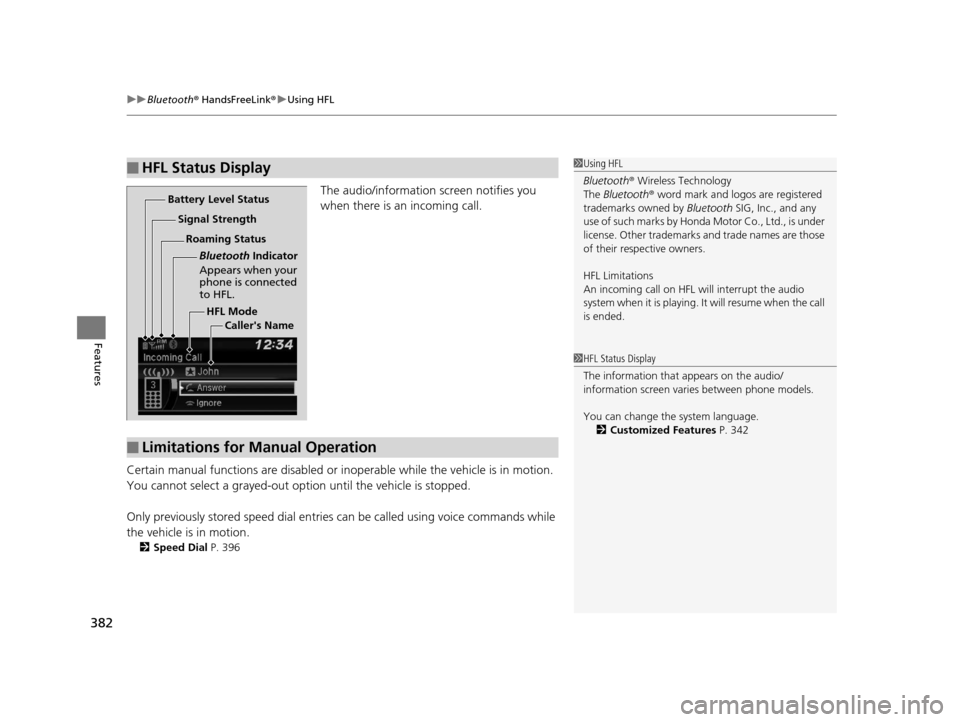
The audio/information screen notifies you
when there is an incoming call.
Certain manual functions are disabled or inoperable while the ve hicle is in motion.
You cannot select a grayed-out option until the vehicle is stopped.
Only previously stored speed dial entries can be called using voice commands while
the vehicle is in motion.
2 Speed Dial P. 396
■HFL Status Display1Using HFL
Bluetooth ® Wireless Technology
The Bluetooth ® word mark and logos are registered
trademarks owned by Bluetooth SIG, Inc., and any
use of such marks by Honda Motor Co., Ltd., is under
license. Other trademarks and trade names are those
of their respective owners.
HFL Limitations
An incoming call on HFL will interrupt the audio
s y s te m wh e n it is p la y i n g . It wi ll re s u m e w h en t h e c a l l
is ended.
HFL Mode
Battery Level Status
Signal Strength
Bluetooth Indicator
Appears when your
phone is connected
to HFL.
Roaming Status
Caller's Name
■Limitations for Manual Operation
1HFL Status Display
The information that appears on the audio/
information screen vari es between phone models.
You can change the system language. 2 Customized Features P. 342
16 PILOT-31TG76000.book 382 ページ 2015年6月15日 月曜日 午前11時30分
uuBluetooth ® HandsFreeLink ®u Using HFL
408
Features
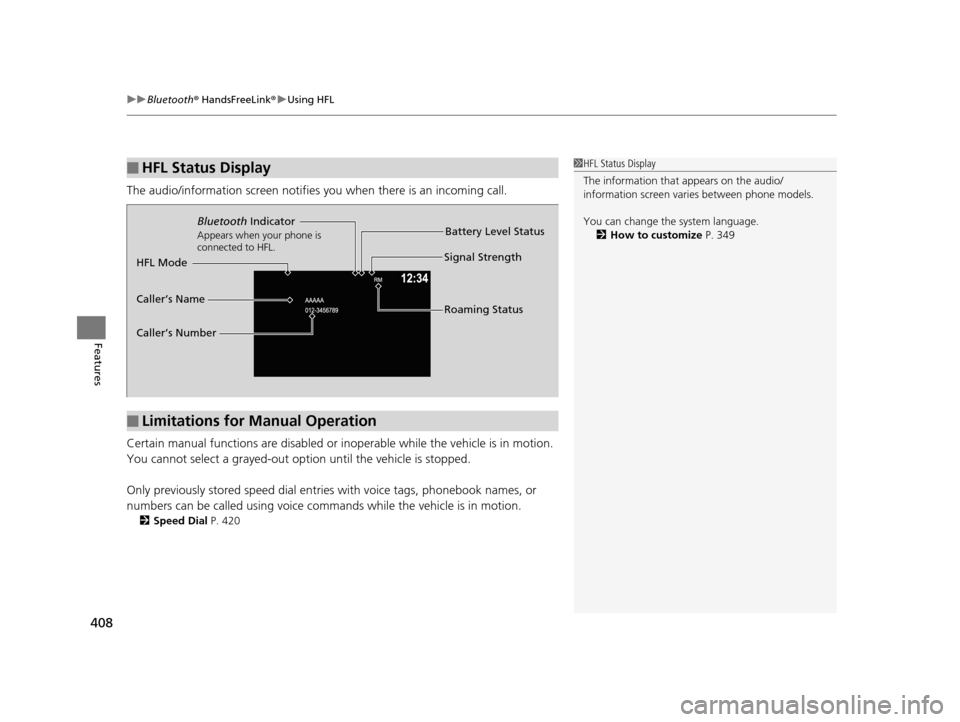
The audio/information screen notifies you when there is an incoming call.
Certain manual functions are disabled or inoperable while the ve hicle is in motion.
You cannot select a grayed-out option until the vehicle is stopped.
Only previously stored speed dial entries with voice tags, phonebook names, or
numbers can be called using voice commands while the vehicle is in motion.
2 Speed Dial P. 420
■HFL Status Display1HFL Status Display
The information that appears on the audio/
information screen vari es between phone models.
You can change the system language. 2 How to customize P. 349
■Limitations for Manual Operation
Bluetooth Indicator
Appears when your phone is
connected to HFL.
Signal Strength
HFL Mode Battery Level Status
Caller’s Name
Caller’s Number Roaming Status
16 PILOT-31TG76000.book 408 ページ 2015年6月15日 月曜日 午前11時30分