Page 345 of 661
344
uuCustomized Features u
Features
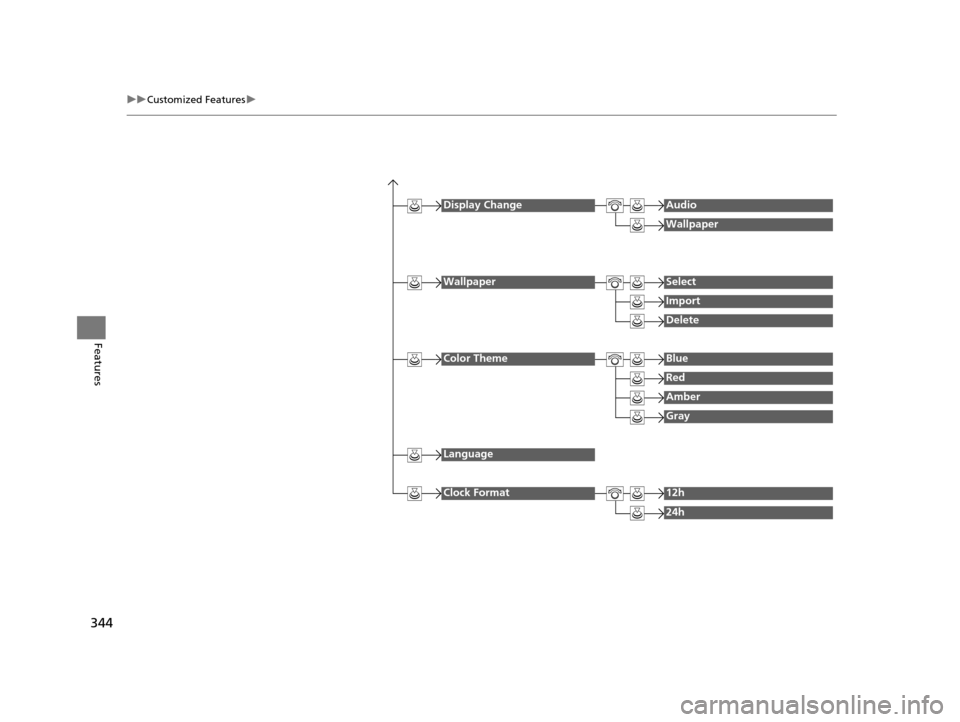
Display ChangeAudio
Wallpaper
WallpaperSelect
Import
Delete
Color ThemeBlue
Red
Amber
Gray
Language
Clock Format12h
24h
16 PILOT-31TG76000.book 344 ページ 2015年6月15日 月曜日 午前11時30分
Page 347 of 661
346
uuCustomized Features u
Features
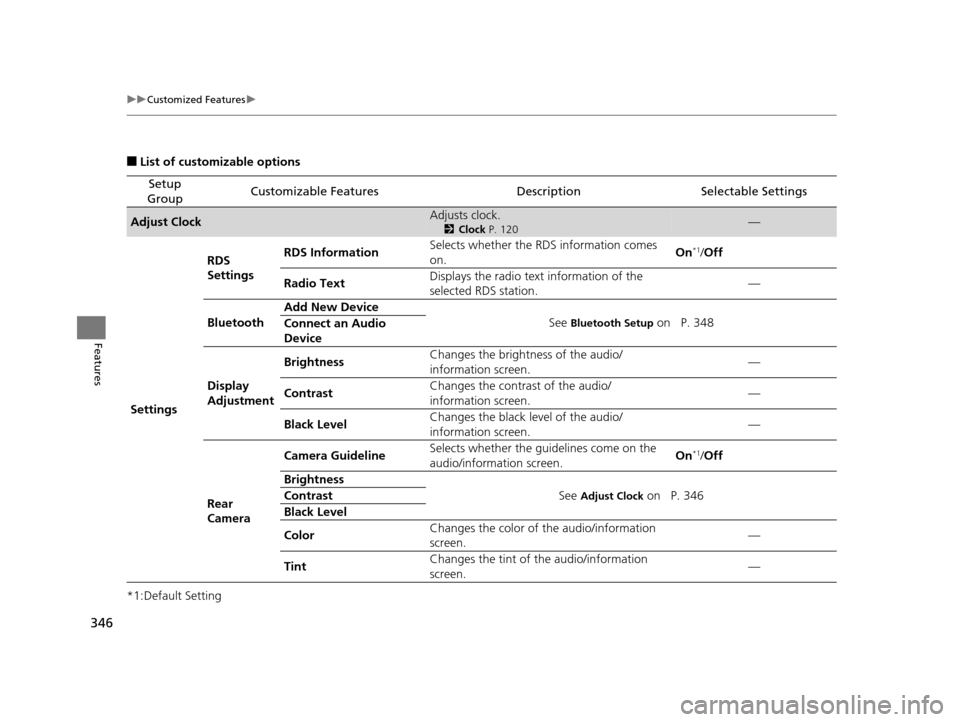
■List of customizable options
*1:Default Setting
Setup
GroupCustomizable FeaturesDescriptionSelectable Settings
Adjust ClockAdjusts clock.
2 Clock P. 120—
Settings RDS
Settings
RDS Information
Selects whether the RDS information comes
on. On
*1/
Off
Radio Text Displays the radio text information of the
selected RDS station. —
Bluetooth Add New Device
See
Bluetooth Setup on P. 348
Connect an Audio
Device
Display
Adjustment Brightness
Changes the brightness of the audio/
information screen. —
Contrast Changes the contrast of the audio/
information screen. —
Black Level Changes the black level of the audio/
information screen.
—
Rear
Camera Camera Guideline
Selects whether the guidelines come on the
audio/information screen. On
*1/
Off
Brightness See
Adjust Clock on P. 346
Contrast
Black Level
Color Changes the color of
the audio/information
screen. —
Tint Changes the tint of
the audio/information
screen. —
16 PILOT-31TG76000.book 346 ページ 2015年6月15日 月曜日 午前11時30分
Page 348 of 661
347
uuCustomized Features u
Continued
Features
*1:Default Setting
Setup
GroupCustomizable FeaturesDescriptionSelectable Settings
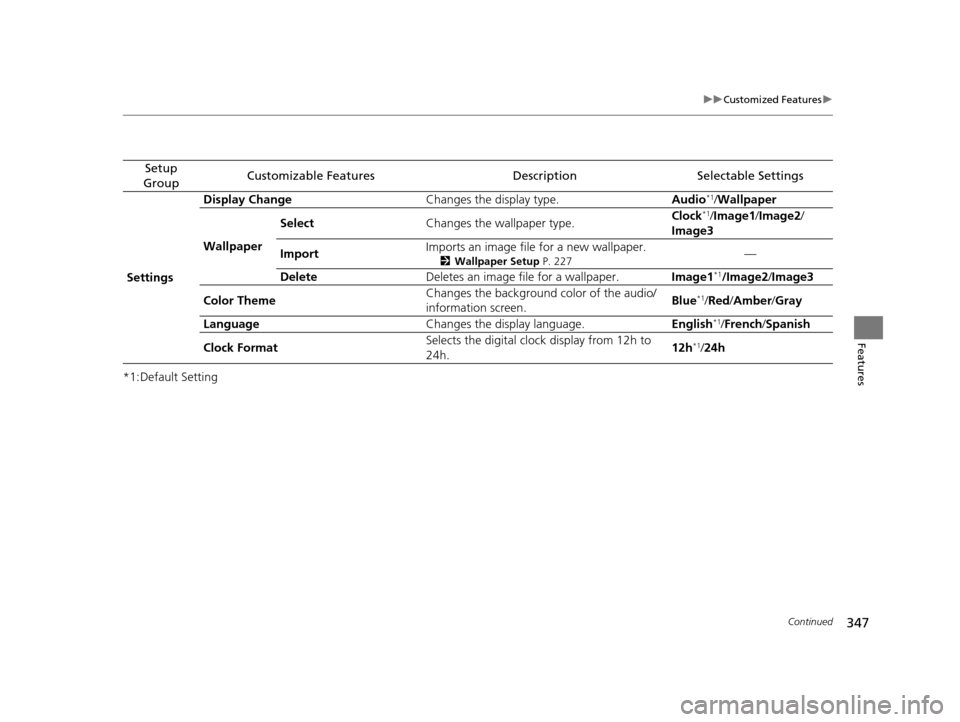
Settings Display Change
Changes the display type. Audio
*1/Wallpaper
Wallpaper Select
Changes the wallpaper type. Clock*1/
Image1 /Image2/
Image3
Import Imports an image file for a new wallpaper.
2
Wallpaper Setup P. 227—
Delete Deletes an image file for a wallpaper. Image1
*1/Image2/Image3
Color Theme Changes the background color of the audio/
information screen.
Blue
*1/
Red /Amber /Gray
Language Changes the display language. English
*1/French /Spanish
Clock Format Selects the digital cloc
k display from 12h to
24h. 12h
*1/
24h
16 PILOT-31TG76000.book 347 ページ 2015年6月15日 月曜日 午前11時30分
Page 352 of 661
351
uuCustomized Features u
Continued
Features
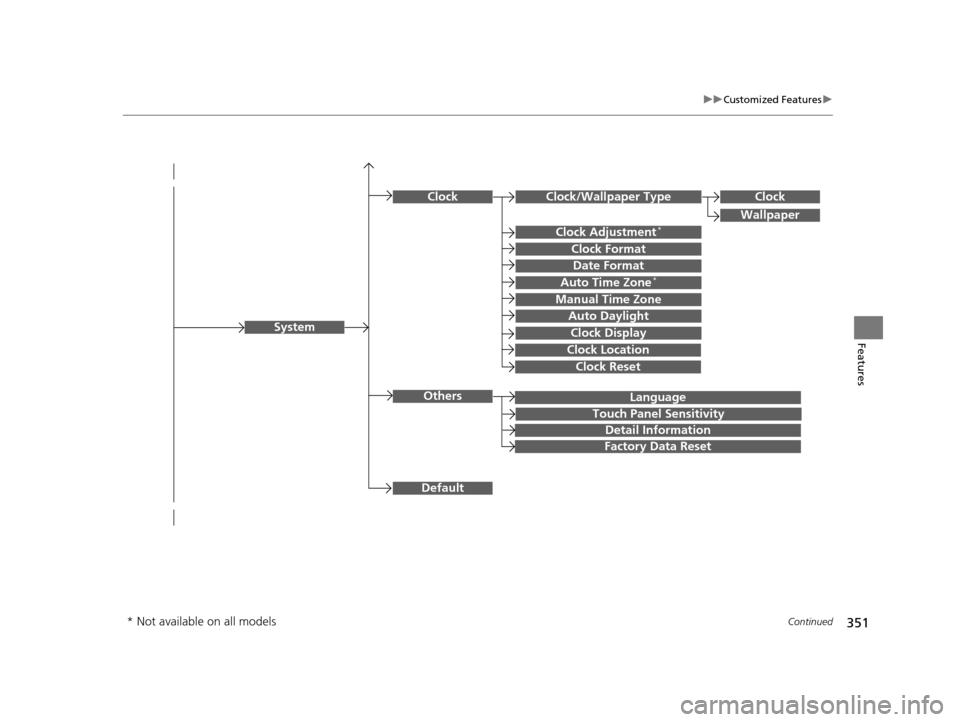
Language
Default
System
Others
Clock/Wallpaper Type
Date Format
Clock Adjustment*
ClockClock
Wallpaper
Manual Time Zone
Auto Daylight
Clock Display
Touch Panel Sensitivity
Clock Format
Auto Time Zone*
Detail Information
Factory Data Reset
Clock Reset
Clock Location
* Not available on all models
16 PILOT-31TG76000.book 351 ページ 2015年6月15日 月曜日 午前11時30分
Page 354 of 661
353
uuCustomized Features u
Continued
Features
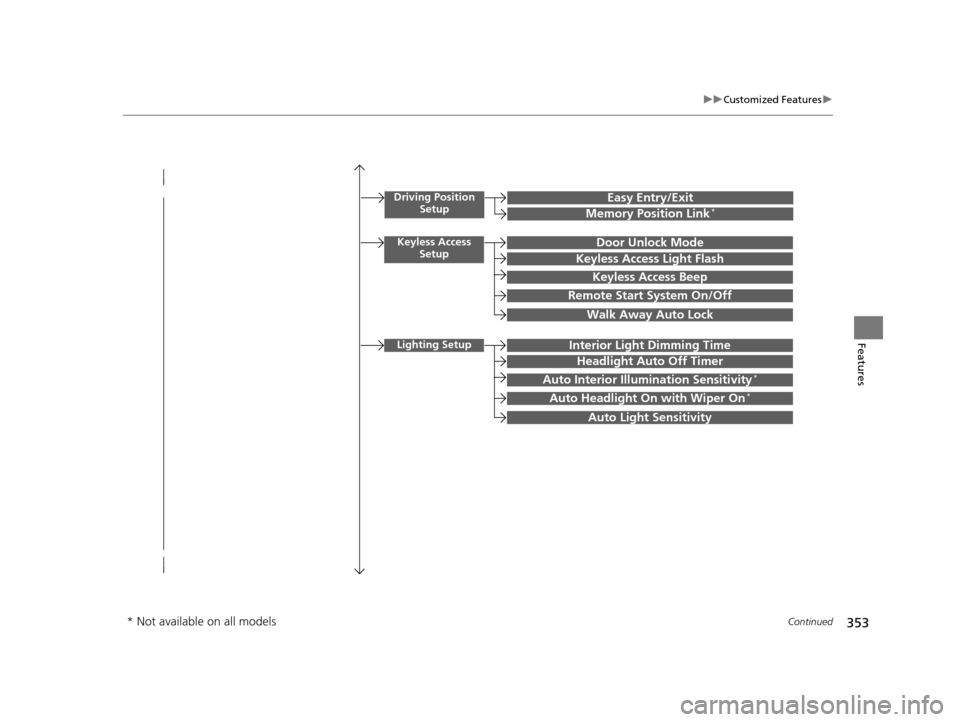
Driving Position
SetupEasy Entry/Exit
Memory Position Link*
Keyless Access SetupDoor Unlock Mode
Keyless Access Light Flash
Keyless Access Beep
Remote Start System On/Off
Walk Away Auto Lock
Lighting SetupInterior Light Dimming Time
Headlight Auto Off Timer
Auto Interior Illu mination Sensitivity*
Auto Headlight On with Wiper On*
Auto Light Sensitivity
* Not available on all models
16 PILOT-31TG76000.book 353 ページ 2015年6月15日 月曜日 午前11時30分
Page 355 of 661
354
uuCustomized Features u
Features
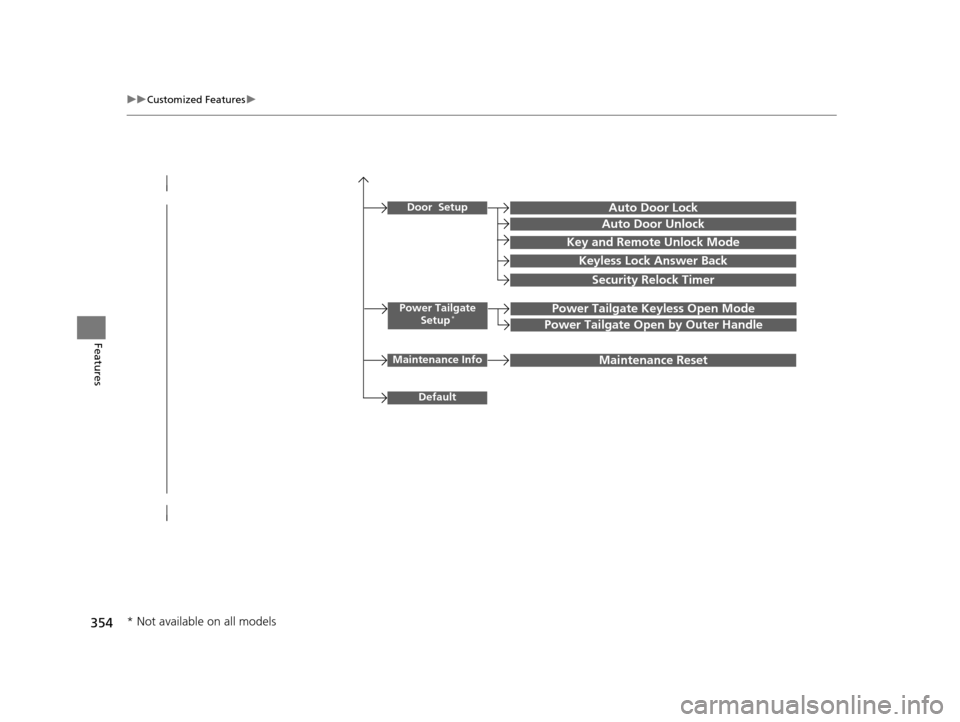
Power Tailgate
Setup*Power Tailgate Keyless Open Mode
Power Tailgate Open by Outer Handle
Door SetupAuto Door Lock
Auto Door Unlock
Key and Remote Unlock Mode
Keyless Lock Answer Back
Security Relock Timer
Maintenance InfoMaintenance Reset
Default
* Not available on all models
16 PILOT-31TG76000.book 354 ページ 2015年6月15日 月曜日 午前11時30分
Page 357 of 661
356
uuCustomized Features u
Features
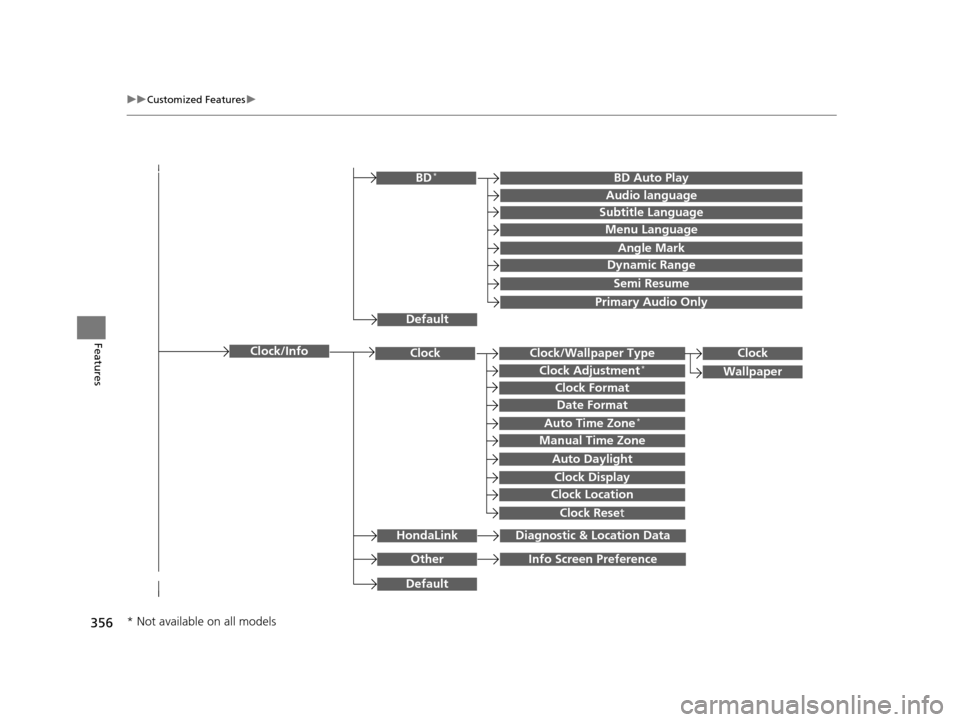
Clock/Wallpaper TypeClockClock
WallpaperClock Adjustment*
Clock Format
Date Format
Auto Time Zone*
Manual Time Zone
Auto Daylight
Clock Display
Clock Location
Clock Reset
OtherInfo Screen Preference
Default
Clock/Info
BD Auto PlayBD*
Audio language
Subtitle Language
Menu Language
Angle Mark
Dynamic Range
Semi Resume
Primary Audio Only
Default
HondaLinkDiagnostic & Location Data
* Not available on all models
16 PILOT-31TG76000.book 356 ページ 2015年6月15日 月曜日 午前11時30分
Page 362 of 661

361
uuCustomized Features u
Continued
Features
*1:Default SettingSetup
Group Customizable Features Description Selectable Settings
SystemClock
Clock/
Wallpaper
TypeClockChanges the clock display type.Analog
/Digital /Small
Digital*1/ Off
Wallpaper
●Changes the wallpaper type.●Imports an image file for a new wallpaper.●Deletes an image file for a wallpaper.
Galaxy*1/ Metallic/ Blank
Clock Adjustment*Adjusts clock.—
Clock FormatSelects the digital clock display from 12H to 24H.12H*1/24H
Date FormatSets the date format.YYYY/MM/DD/ MM/DD/
YYYY*1/ DD/MM/YYYY
Auto Time Zone*Sets the navigation system to automatically adjust
the clock when driving through different time
zones.
On*1/ Off
Manual Time ZoneChanges the time zone manually.—
Auto Daylight
Select On to have the GPS automatically adjust
the clock to daylight savings time. Select Off to
cancel this function.
On*1/ Off
Clock DisplaySelects whether the clock display comes on.On*1/Off
Clock LocationChanges the clock display layout.Upper Right*1/Upper Left /
Lower Right /Lower Left
* Not available on all models
16 PILOT-31TG76000.book 361 ページ 2015年6月15日 月曜日 午前11時30分