2016 HONDA ODYSSEY light
[x] Cancel search: lightPage 60 of 80

112 || 113
HANDLING THE UNEXPECTED
HANDLING THE UNEXPECTED
INDEX
VOICE COMMAND
INDEX
CUSTOMER
INFORMATION
SPECIFICATIONS
MAINTENANCE
HANDLING THE UNEXPECTED
DRIVING
NAVIGATION
TABLE OF CONTENTS
VISUAL INDEX
SAFETY
INFORMATION
INSTRUMENT PANEL
VEHICLE
CONTROLS
AUDIO AND
CONNECTIVITY
BLUETOOTH®
HANDSFREELINK®
HONDALINK®
5. Unscrew the wing bolt, then remove the spare
tire.
6. Place a wheel block or rock in front and rear of
the wheel diagonal to the flat tire.
7. Place the compact spare tire (wheel side up)
under the vehicle body, near the tire that needs
to be replaced.
8. Loosen each wheel nut about one turn using the
wheel nut wrench.
Setting Up the Jack
1. Place the jack under the jacking point closest to
the tire to be changed.
2. Turn the end bracket (as shown in the image)
clockwise until the top of the jack contacts the
jacking point. Make sure that the jacking point
tab is resting in the jack notch.
3. Raise the vehicle, using the jack handle bar and
the jack handle, until the tire is off the ground.
Jack
handle
bar Wheel nut
Wrench as jack handle
The vehicle can easily roll off the jack, seriously injuring anyone unde\
rneath.
Follow the directions for changing a tire exactly, and never get under the
vehicle when it is supported only by the jack.
WARNING
The following instructions must be followed to use the jack safely:
• Do not use the jack with people or luggage in the vehicle.
• Use the jack provided in your vehicle. Other jacks may not support the w\
eight
(“load”) or fit the jacking point.
• Do not use while the engine is running.
• Use only where the ground is firm and level.
• Use only at the jacking points.
• Do not get in the vehicle while using the jack.
• Do not put anything on top of or underneath the jack.
Replacing the Flat Tire
1. Remove the wheel nuts, wheel cover (if
necessary), and flat tire.
2. Mount the compact spare tire. Replace the
wheel nuts, and lightly tighten them.
3. Lower the vehicle and remove the jack. Tighten
the wheel nuts in the order indicated in the
image. Go around, tightening the nuts, two to
three times in this order. Do not overtighten the
wheel nuts.
If you drive with the spare tire installed, the
low tire pressure/TPMS indicator appears. The
indicator stays on until a regular tire is installed.
Page 61 of 80

114 || 115
HANDLING THE UNEXPECTED
HANDLING THE UNEXPECTED
INDEX
VOICE COMMAND
INDEX
CUSTOMER
INFORMATION
SPECIFICATIONS
MAINTENANCE
HANDLING THE UNEXPECTED
DRIVING
NAVIGATION
TABLE OF CONTENTS
VISUAL INDEX
SAFETY
INFORMATION
INSTRUMENT PANEL
VEHICLE
CONTROLS
AUDIO AND
CONNECTIVITY
BLUETOOTH®
HANDSFREELINK®
HONDALINK®
Storing the Flat Tire
The storage bag, bracket, and mounting wing bolts (A and B) are in the\
tool case.
1. Put the flat tire in the storage bag provided with
your vehicle.
2. Pull down the U-shaped carpet piece, fold it, and
tuck the end under the carpet.
3. Remove the plastic screw with a coin.
4. Install the bracket and the mounting wing bolt (A)
on the attachment point, and tighten the bolt.
5. Install the flat tire on the bracket with the inside
of the wheel facing toward you.
6. Install the mounting wing bolt (B) to the bracket
through one of the five wheel nut holes, and
tighten the bolt. Poke a hole in the storage bag as
needed.
Storing a flat tire on the folded third–row seat
1. Turn over the flap on the left side of the cargo
area floor.
2. Pull down the U-shaped carpet piece and remove
the plastic screw with a coin.
3. Place the flat tire face down on the attachment
point.
4. Put the tire mounting wing bolt (B) in the
attachment point through one of the five wheel
nut holes, and tighten the bolt. Poke a hole in the
storage bag as needed.
Loose items can fly around the interior in a crash and can seriously i\
njure the
occupants.
Store the wheel, jack, and tools securely before driving.
WARNING
Plastic screw
Carpet piece
Mounting wing bolt (B)
Bracket Storage bag
Mounting wing bolt (B)
Mounting wing bolt (A)
Bracket
Mounting wing bolt (B)
Mounting wing bolt (A)
Plastic screw
Fuse Locations
If any electrical devices are not working, turn the vehicle off and chec\
k to see if any
applicable fuse is blown. Fuse locations are shown on the fuse box cover\
. Locate the
fuse in question by the fuse number and box cover number.
Engine Compartment Fuse Box - Driver Side
Located under the hood near the battery. Push the tabs to open the box.
*if equipped
Circuit ProtectedAmps
1Main Fuse12 5A
2-1Fan Main 60 A
2-2Passenger Side Fuse Box 2
2-3HondaVACTM*(60 A)
2-4Interior Light, FI Main
2-5Stop & Horn, Hazard
2-6Rear Blower, Battery
Ma nagement System 30
A
30
A
30
A
2-7VSA FSR 30A
50
A
2-8VSA Moto r
3-1Driver Side Fuse Box 250 A
3-2IG1 Main*150 A
3-2Starter Moto r*240 A
3-3Rear Fuse Box 160 A
3-4Passenger Side Fuse Box 150 A
3-5Driver Side Fuse Box 150A
3-6Engine Compartment Fuse
Box (Passenger Side) Main60 A
3-7Passenger’s Side Power
Sliding Door Moto r*(40A )
3-8Front Blower40A
40 A
40
A
4Rear Defroster
5
6I G Main 2*30A
7IG Main 1*30A
*1: M odels without smart entry syste m*2: Models with smart entry system
8 Battery Management
System 7.5
A
9Stop & Hor n20 A
15 A
10 Hazard
11Interior Lights7.5 A
Page 62 of 80
116 || 117
HANDLING THE UNEXPECTED
HANDLING THE UNEXPECTED
INDEX
VOICE COMMAND
INDEX
CUSTOMER
INFORMATION
SPECIFICATIONS
MAINTENANCE
HANDLING THE UNEXPECTED
DRIVING
NAVIGATION
TABLE OF CONTENTS
VISUAL INDEX
SAFETY
INFORMATION
INSTRUMENT PANEL
VEHICLE
CONTROLS
AUDIO AND
CONNECTIVITY
BLUETOOTH®
HANDSFREELINK®
HONDALINK®
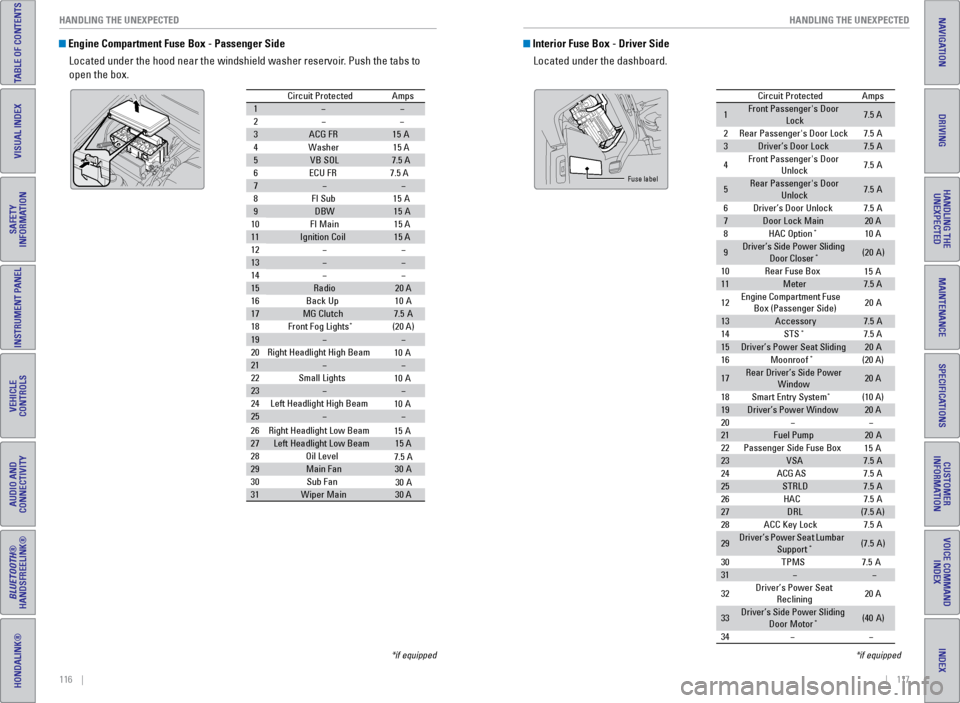
Engine Compartment Fuse Box - Passenger Side
Located under the hood near the windshield washer reservoir. Push the tabs to
open the box.
Circuit Protecte dAmps
1
2
3ACG FR15A
4W ashe
r15 A
5VB SO L7.5 A
6E CU FR 7.5 A
7
8F I Su
b15A
9DBW15A
10 FI Main 15 A
11Ignition Coil15 A
12
13
14
15Radio20 A
16 Back Up 10A
17MG Clutch7.5A
18 Front Fog Lights*(20 A)
19
20 Right Headlight High Beam
21
22 Small Lights
23
24 Left Headlight High Bea m
25
26Right Headlight Low Beam
27Left Headlight Low Beam15 A
28 Oil Level
29Main Fa n30A
30 Sub Fan
31Wiper Main30 A
10 A
10 A
10 A
15 A
7.5 A
30 A
*if equipped
Interior Fuse Box - Driver Side
Located under the dashboard.
Circuit Protecte dAmps
1Front Passenger's Door
Lock7.5 A
2Rear Passenger's Door Lock7.5A
3Driver’s Door Lock7.5A
4Front Passenger's Door
Unlock7. 5A
5Rear Passenger's Door
Unlock7. 5A
6Driver’s Door Unlock7.5A
7Door Lock Main20 A
8HAC Option*10 A
9Driver’s Side Power Sliding
Door Closer*(20A )
10 Rear Fuse Bo x
11Meter7.5 A
12 Engine
Compartment Fuse
Box (Passenger Side) 20
A
13Accessor y7.5A
14 STS*7.5 A
15Driver’s Power Seat Sliding20A
16 Moonroof*(20 A)
17Rear Driver’s Side Power
Window20 A
18 Smart Entry Syste m
*(10 A)
19Driver’s Power Windo w20 A
20
21Fuel Pump20 A
22 Passenger Side Fuse Bo x
23VSA7.5A
24 ACG AS
25STRLD7.5A
26 HAC
27DRL(7.5 A)
28 ACC Key Lock
29Driver’s Power Seat Lumbar
Suppor t*(7.5A)
30 TPM
S7.5A
31
32 Driver’s Power Seat
Reclining 20
A
33Driver’s Side Power Sliding
Door Moto r*(40A )
34
15 A
15 A
7. 5A
7. 5A
7. 5A
Fuse label
*if equipped
Page 63 of 80

118 || 119
HANDLING THE UNEXPECTED
HANDLING THE UNEXPECTED
INDEX
VOICE COMMAND
INDEX
CUSTOMER
INFORMATION
SPECIFICATIONS
MAINTENANCE
HANDLING THE UNEXPECTED
DRIVING
NAVIGATION
TABLE OF CONTENTS
VISUAL INDEX
SAFETY
INFORMATION
INSTRUMENT PANEL
VEHICLE
CONTROLS
AUDIO AND
CONNECTIVITY
BLUETOOTH®
HANDSFREELINK®
HONDALINK®
Interior Fuse Box - Passenger Side
Located on the lower side panel. Take off the cover to open.
Circuit ProtectedAmps
1Premium Amp*(30 A)
2Rear Passenger’s Side Power Window20A
3ACM10A
4
5Seat Heaters*(15A )
6
7Front Passenger’s Power
Seat Sliding(20 A)
8Front Passenger’s Power
Seat Reclining(20 A)
9
10
11
12
13Passenger’s Side Power
Sliding Door Closer*(2 0A )
14 Rear Accessory Power
Socket 15
A
15
16
17
18 Front Passenger’s Power
Window 20
A
19SRS10 A
20 ECU AS
21Headlight Adjuste r*(7.5A)
22
23OPDS*(7.5 A)
24 OPDS*(7.5A)
25Illumination (Interior )7.5A
26
27Front Accessory Power Socket15 A
28
7. 5A
*if equipped
Rear Fuse Box
Located on the left side of the cargo area. Remove the cover by prying o\
n the edge
with a cloth-wrapped flat-tip screwdriver.
Circuit Protecte dAmps
1Power Tailgate Closer*(20 A)
2Trailer Small Light*(7.5 A)
3
4Tailgate*(10 A)
5Rear Driver’s Side Door
Lock7. 5A
6
7
8Traile r*(10 A)
9Trailer Charg e*(20 A)
10 Trailer Back Ligh t*(7.5 A)
11Trailer Hazard*(7.5 A)
12 Rear Wiper
13ECU RR7.5A
14 Power Tailgate Motor*(40 A)
15AC Inverte r*(30A )
16
17
18
10 A
*if equipped
Page 64 of 80

120 || 121
MAINTENANCE
HANDLING THE UNEXPECTED
INDEX
VOICE COMMAND
INDEX
CUSTOMER
INFORMATION
SPECIFICATIONS
MAINTENANCE
HANDLING THE UNEXPECTED
DRIVING
NAVIGATION
TABLE OF CONTENTS
VISUAL INDEX
SAFETY
INFORMATION
INSTRUMENT PANEL
VEHICLE
CONTROLS
AUDIO AND
CONNECTIVITY
BLUETOOTH®
HANDSFREELINK®
HONDALINK®
Inspecting and Changing Fuses
1. Turn the vehicle off, including all lights and
accessories.
2. Remove the fuse box cover.
3. Check the large fuse in the engine compartment.
If the fuse is blown, use a Phillips-head
screwdriver to remove the screws and replace
the fuse with a new one. Reinstall the screws.
4. Inspect the small fuses in the engine
compartment and the vehicle interior.
If there is a burned out fuse, remove it with the
fuse puller and replace it with a new one.
Replacing a fuse with one that has a higher rating greatly increases the\
chances of
damaging the electrical system.
NOTICE
Blown fuse
Blown
fuse
Fuse puller
Learn about basic maintenance that you can perform on the vehicle yourse\
lf, as well
as information about how to best maintain the vehicle.
Safety Precautions
Some of the most important safety precautions are listed below; however, we cannot
warn you of every conceivable hazard that can arise in performing mainte\
nance.
Only you can decide whether or not you should perform a given task.
Maintenance Safety • To reduce the possibility of fire or explosion, keep cigarettes, sparks\
, and flames
away from the battery and all fuel-related parts.
• Never leave rags, towels, or other flammable objects under the hood.
• To clean parts, use a commercially available degreaser or parts cleaner, not
gasoline.
• Wear eye protection and protective clothing when working with the battery\
or
compressed air.
• Do not run the engine in confined spaces where carbon monoxide gas can\
accumulate.
Vehicle Safety
• The vehicle must be stationary, and parked on level ground with the parking
brake set and the engine off.
• Be aware that hot parts can burn you.
• Be aware that moving parts can injure you.
Improperly maintaining this vehicle or failing to correct a problem befo\
re
driving can cause a crash in which you can be seriously hurt or killed. \
Always follow the inspection and maintenance recommendations according
to the schedules in this guide.
WARNING
Failure to properly follow maintenance instructions and precautions can \
cause you to be seriously hurt or killed.
Always follow the procedures and precautions in this guide.
WARNING
MAINTENANCE
Page 73 of 80

138 || 139
SPECIFICATIONS
MAINTENANCE
INDEX
VOICE COMMAND
INDEX
CUSTOMER
INFORMATION
SPECIFICATIONS
MAINTENANCE
HANDLING THE UNEXPECTED
DRIVING
NAVIGATION
TABLE OF CONTENTS
VISUAL INDEX
SAFETY
INFORMATION
INSTRUMENT PANEL
VEHICLE
CONTROLS
AUDIO AND
CONNECTIVITY
BLUETOOTH®
HANDSFREELINK®
HONDALINK®
Testing of Readiness Codes
Your vehicle has “readiness codes” as part of the onboard self-diag\
nostic system.
Some states refer to these codes as a test to see if your vehicle’s emissions
components are working properly. The codes may not be read if you go through the
testing just after the battery has gone dead or been disconnected.
To check if they are set, turn the vehicle on without starting the engine\
. The
malfunction indicator lamp will come on for several seconds. If it goes \
off, the
readiness codes are set. If it blinks five times, the readiness codes \
are not set.
If you are required to have your vehicle tested before the readiness cod\
es are set,
prepare the vehicle for retesting by doing the following:
1. Fill the gas tank to approximately 3/4 full.
2. Park the vehicle and leave the engine off for 6 hours or more.
3. Make sure the ambient temperature is between 40°F and 95°F (4°\
C and 35°C).
4. Start the engine without touching the accelerator pedal, and let it idle\
for 20
seconds.
5. Keep the vehicle in Park (P). Increase the engine speed to 2,000 rpm, \
and hold it
there for about 3 minutes.
6. Let the engine idle with your foot off the accelerator for 20 seconds.
7. Select a nearby, lightly traveled major highway where you can maintain a speed
of 50 to 60 mph (80 to 97 km/h) for at least 20 minutes. Drive on the \
highway with
the vehicle in Drive. Do not use cruise control. When traffic allows, \
drive for 90
seconds without using the accelerator pedal. (Vehicle speed may vary slightly;
this is OK.) If you cannot do this for a continuous 90 seconds because \
of traffic
conditions, drive for at least 30 seconds, then repeat two more times (\
for a total of
90 seconds).
8. Drive in city/suburban traffic for at least 10 minutes. When traffic\
conditions
allow, let the vehicle coast for several seconds without using the accelerator
pedal or the brake pedal.
9. Park the vehicle and leave the engine off for 30 minutes.
The readiness codes are erased when the battery is disconnected, and set\
again
only after several days of driving under a variety of conditions.
If a testing facility determines that the readiness codes are not set, y\
ou may be
requested to return at a later date to complete the test, or see your de\
aler. Vehicle
Engine and Fuel
Tires
Light Bulbs
Fluids
*1 :L X mode l
Mode lHonda Odysse yNo. of Passengers:
Front2
Rear
*1)
3rd Ro w3
Tota l8 (7
*1)Weights:Gross Vehicle
Weight Rating U.S.: 6,019 lbs (2,730 kg)
Canada: 2,730 kg
Gross Axle Weight
Rating (Front )U.S.: 2,910 lbs (1,320 kg)
Canada: 1,320 kg
Gross Axle Weight
Rating (R ear)U.S.: 3,340 lbs (1,515 kg)
Canada: 1,515 kg
Gross Combined
Weight Ratin g
U.S.: 8,565 lbs (3,885 kg)
Canada: 3,885 kg
Air Conditioning:Refrigerant Type HFC-134a (R-134a)Charge Quantity24.9 – 26.6 oz (705 – 755 g)Lubricant TypeND-OIL8
2nd Ro w3 (2
Engine Specication s
FuelDisplacement212 cu-in (3,471 cm3)
Spark Plug sN GKDILZKR7A11 G
Fuel:
TypeUnleaded gasoline, Pump octane
number of 87 or higher
Fuel Tank Capacit y21 US gal (79.5 )
*1:T ouring models
Regula rSizeP235/65R17 103TP235/60R18 102T*1Pressure
psi(kPa[kgf/cm2])33 (23 0 [2.3])
35 (24 0 [2.4])*1
Compact
Spar e Size
T135/80D17 103M
Pressure
ps i(kPa[kgf/cm2]) 60 (42
0 [4.2])
Wheel Siz eRegular17 x 7J
18 x 7J*1Compact Spar e17 x 4T
Headlights (Low Beam )35W (D2S)*55W (H11)
60W (HB3)
21W
5W 21W (Amber)*Head lights (High Beam )Fog Lights*55W (H11)
Front Turn Signal/Park ing/Side
Marker Lights 28/8W
Si
de Turn Si gnal Lights
(on Door Mirrors ) *LED
Brake Lights
Rear Side Marker/Taillight sLED
Rear Turn Signal Lights
Back-Up Lights21W D
E
L
s
t
h
g
i
l
l
i
a
T
High-Mount Brake Ligh t16W
Rear License Plate Lights
Map Lights (F ront)5W
5W
1.4W
1.4W
Map Lights (Rear)
Cargo Area Ligh
t8W
Vanity Mirror Lights
Door Courtesy Lights3.8W (2CP )
Glove Box Li ght
Foot Ligh t*LED
Brake Fluid
Automatic Transmission Flui
d
Specie dHonda Heavy Duty Brake Fluid DOT 3
SpeciedHonda ATF DW- 1
(automatic transmission uid )
Ca pacit yC hange3 .3 US qt (3.1)
Engine Oil
Engine Coolant
Recommended·Honda Genuine Motor Oil 0W-2 0
·API Premium-grade 0W-20 detergent oi l
Capacity Change
4.2 US qt (4.0 )
Change
including
lter 4.5 US qt (4.3 )
SpeciedHonda Long-Life Anti
freeze/Coolant Type2
Ratio 50/50 with distilled wate r
Capacity1.93 US gal (7.3 )
(change in cluding the remaining
0.225 US gal (0.85 ) in the reserve tank)
Washer Fluid
Tank CapacityU.S.: 2.6 US qt (2.5 )
Ca nada: 4.5 US qt (4.3 )
SPECIFICATIONS
*if equipped
Page 74 of 80

140 || 141
CUSTOMER INFORMATION
CUSTOMER INFORMATION
INDEX
VOICE COMMAND
INDEX
CUSTOMER
INFORMATION
SPECIFICATIONS
MAINTENANCE
HANDLING THE UNEXPECTED
DRIVING
NAVIGATION
TABLE OF CONTENTS
VISUAL INDEX
SAFETY
INFORMATION
INSTRUMENT PANEL
VEHICLE
CONTROLS
AUDIO AND
CONNECTIVITY
BLUETOOTH®
HANDSFREELINK®
HONDALINK®
Learn about information specific to you as a Honda customer and how to\
get help.
Frequently Asked Questions/Troubleshooting
Below are some frequently asked questions and troubleshooting items that\
you may
have about the vehicle.
Q: How do I set the vehicle clock?
A: For vehicles without navigation, see page 55. For vehicles with navigati\
on, the
time is automatically set using GPS signals.
Q: Why doesn’t the vehicle start when I press the ENGINE START/STOP button?
A: The brake pedal must be pressed to start the engine.
Q: What is the AUTO setting on my headlight lever?
A: When in the AUTO position, the vehicle’s exterior lights will automatically turn
on or off depending on the ambient lighting.
Q: Why won’t the driver’s door unlock when I grab the door handle, even though
the keyless access remote is within range?
A: If you pull the handle too quickly, the system may not have time to confirm the
door is unlocked. Wait to hear a beep to confirm the door is unlocked. If you are
wearing gloves, the system may be slow to respond.
Q: After my battery was disconnected or went dead, the audio system is aski\
ng for
a code. Where do I find this?
A: In most cases, you do not need to enter a code. Turn on the vehicle and the
audio system, and press and hold the power button until the system react\
ivates.
Q: Why can’t I operate Pandora
® through the audio system?
A: Audio may be streaming through Bluetooth® Audio. Make sure Pandora mode
is selected and the phone cable is properly connected to the USB adapter\
.
Some phones may prompt you to “Allow” a connection.
Q: Is my phone compatible with Bluetooth features?
A: Visit handsfreelink.honda.com (U.S.) or www.handsfreelink.ca (Canada) to
check phone compatibility for Bluetooth
® Audio, Bluetooth® HandsFreeLink®,
and SMS text messaging.
Q: Every time I press the Talk button, the system gives me voice prompts. Can I turn
these off?*
A: Press the SETTINGS button. Use the interface dial to select System Setti\
ngs
then Voice Rec. For the Voice Prompt option, select Off.
CUSTOMER INFORMATION
*if equipped
Contact Us
Honda dealer personnel are trained professionals. They should be able to\
answer
all your questions. If you encounter a problem that your dealership does\
not solve
to your satisfaction, please discuss it with the dealership’s service manager or
general manager. If you are dissatisfied with the decision made by the dealership’\
s
management, contact Honda Automobile Customer Service.
U.S. owners
American Honda Motor Co., Inc.
Honda Automobile Customer Service
1919 Torrance Blvd.
Mail Stop 500-2N-7A
Torrance, CA 90501-2746
Tel: (800) 999-1009
In Puerto Rico and
the U.S. Virgin Islands
Bella International
P.O. Box 190816
San Juan, PR 00919-0816
Tel: (787) 620-7546
When you call or write, please give us the following information:
• Vehicle identification number
• Date of purchase
• Odometer reading of your vehicle
• Your name, address, and telephone number
• A detailed description of the problem
• Name of the dealer who sold the vehicle to you Canadian owners
Honda Canada, Inc.
Customer Relations
180 Honda Blvd.
Markham, ON
L6C 0H9
Tel: (888) 946-6329
Fax: (877) 939-0909
e-mail: [email protected]
Q:
Why can’t I select an item using the interface dial?*
A: To prevent driver distraction, certain items are limited or inoperable wh\
ile the
vehicle is moving. Use voice commands or pull over to select the items.
Q: Where can I find the vehicle identification number (VIN)?
A: Check the label on the driver’s doorjamb.
*if equipped
Page 78 of 80

148 || 149
VOICE COMMAND INDEX
VOICE COMMAND INDEX
INDEX
VOICE COMMAND
INDEX
CUSTOMER
INFORMATION
SPECIFICATIONS
MAINTENANCE
HANDLING THE UNEXPECTED
DRIVING
NAVIGATION
TABLE OF CONTENTS
VISUAL INDEX
SAFETY
INFORMATION
INSTRUMENT PANEL
VEHICLE
CONTROLS
AUDIO AND
CONNECTIVITY
BLUETOOTH®
HANDSFREELINK®
HONDALINK®
Audio Commands (continued)
USB Commands
• USB play
• USB play track # (#: 1 to 30)
• USB skip forward
• USB skip back
• USB track random*
• USB track repeat*
• USB track scan*
• USB folder up
• USB folder down
• USB folder random*
• USB folder repeat*
• USB folder scan*
• USB normal play
Pandora
® Commands
• Pandora play
• Pandora skip forward
• Pandora station up
• Pandora station down
• Pandora pause
• Pandora resume
• Pandora thumbs up
• Pandora thumbs down
*These commands toggle the function on and off, so the
command may not match your intended action.
iPod® Commands
• iPod play
• iPod play track # (#: 1-30)
• iPod skip forward
• iPod skip back
• iPod track shuffle*
• iPod album shuffle*
• iPod track repeat*
• iPod normal play
• What/Who am I listening to?
• Who is this?
• What’s playing?
• Who’s playing?
• What album is this? Aha™ Commands
• Aha radio play
• Aha radio skip forward
• Aha radio skip back
• Aha radio station up
• Aha radio station down
• Aha radio pause
• Aha radio like
• Aha radio dislike
Bluetooth
® Audio Commands
• Bluetooth audio play
• Bluetooth audio skip forward
• Bluetooth audio skip back
• Bluetooth audio pause
• Bluetooth audio resume
• Bluetooth audio group up
• Bluetooth audio group down
Commands may not work on some
phones or devices.
AUX Commands
• Auxiliary play •
Music search
• List album (specify album)
• List artist (specify artist)
• List composer (specify composer)
• List genre (specify genre)
• List playlist (specify playlist)
• Play album (specify album)
• Play artist (specify artist)
• Play composer (specify composer) •
Play genre (specify genre)
• List playlist (specify playlist)
• Play song (specify song)
• What/Who am I listening to?
• Who is this?
• What’s playing?
• Who’s playing?
• What album is this?
Song By Voice™ Commands
Available for tracks stored on the HDD or iPod
®.
Audio Commands (continued)
Rear Audio Commands
On vehicles with rear entertainment system, voice commands for certain rear
audio functions are available.
To view a list of rear audio commands in the vehicle, press the INFO butt\
on and
use the interface dial to select Voice Info. Select Rear Audio Commands, and
press the interface dial to hear the commands read aloud.
Phone CommandsThe system accepts these commands on most screens.
• Dial/call by number
• Dial/call by voice tag
Info Commands
The system accepts these commands on most screens.
• Trip computer
• Traffic information •
Display clock
• Display wallpaper
On-screen Commands
The system accepts these commands on any screen where applicable. All
available commands are highlighted in yellow when you press the Talk button.
• Next (or Down)
• Previous (or Up)
• Return •
OK (excluding startup screen)
• Delete