Page 194 of 565
193
uuInterior Lights/Interior Convenience Items uInterior Convenience Items
Controls
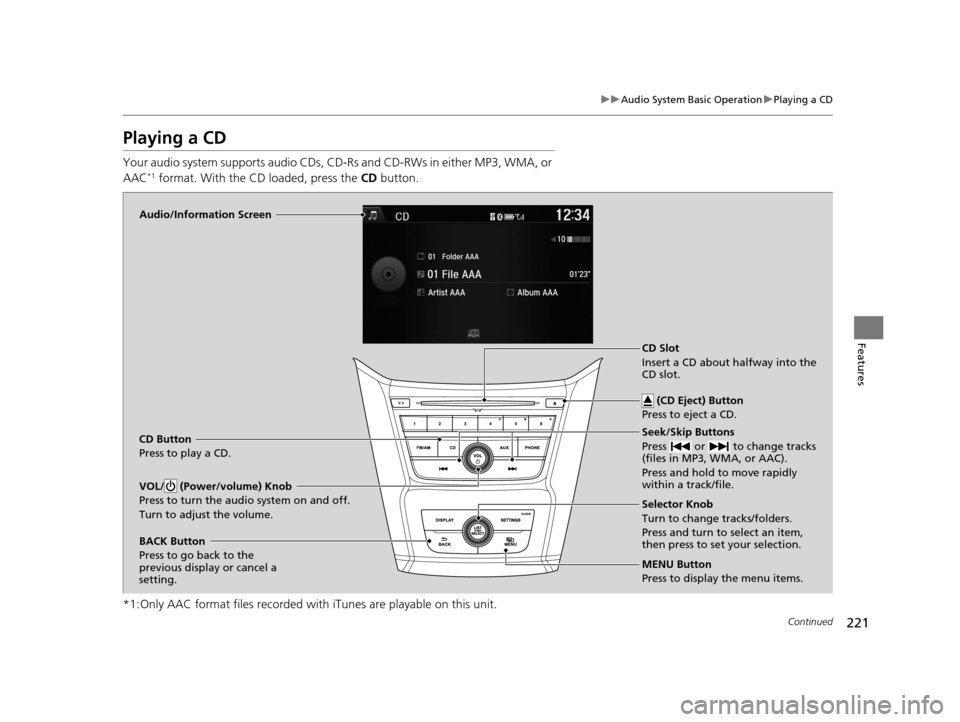
■To empty the canister or change the debris bag
1. Open the lower vacuum lid.
2. Push the lever in.
3. Rotate the canister down, th en slide out from the track.
4.Push the three lid tabs outward and remove
the canister lid.
u The debris bag and canister can be
accessed.
To reinstall the empty canister:
After sliding the canister into the track, push the lever in to lift the canister up.
Release the lever to lock the canister in position.
u The orange unlocked decal should not be visible.1To empty the canister or change the debris bag
Both the debris bag and th e filter are replaceable.
Contact a dealer for component replacement
information.
The vacuum can be used with or without the bag.
If you find the vacuum performance poor or there is
no suction:
•Check if the canister is locked in position.
•Check if the hose is attached to the vacuum.•Empty the canister or change the bag.
•Clean or replace the filter.
•Check the hose for clogs or damage.
Lower Vacuum Lid
Lever
Canister
Canister Lid
Three Lid Tabs
16 US ODYSSEY-31TK86500.book 193 ページ 2015年6月24日 水曜日 午後3時0分
Page 222 of 565
221
uuAudio System Basic Operation uPlaying a CD
Continued
Features
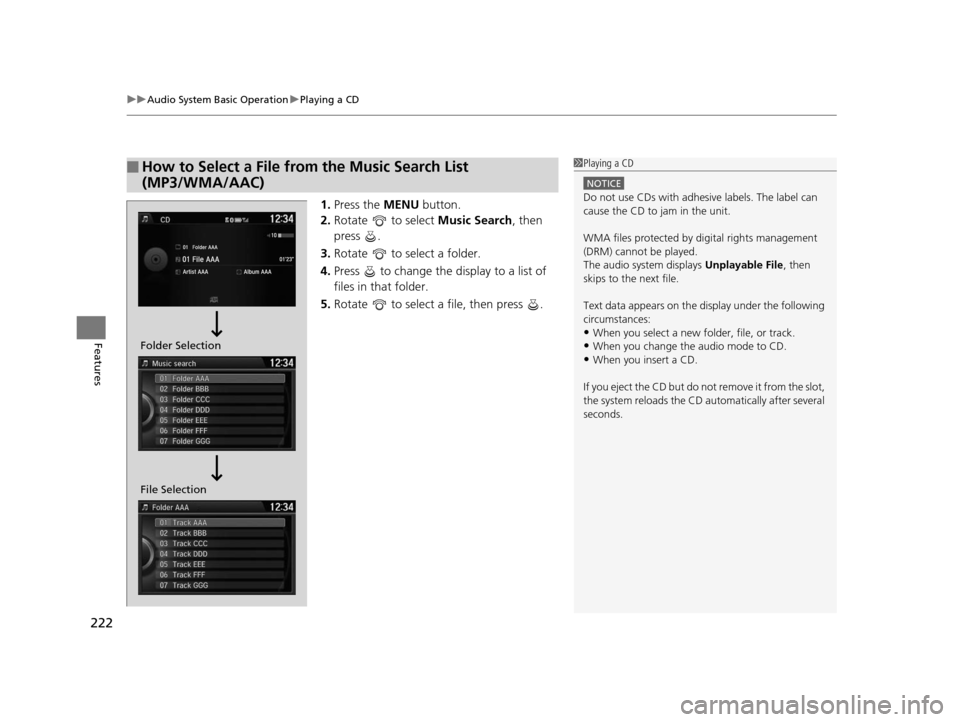
Playing a CD
Your audio system supports audio CDs, CD-Rs and CD-RWs in either MP3, WMA, or
AAC*1 format. With the CD loaded, press the CD button.
*1:Only AAC format files recorded with iTunes are playable on this unit.
Audio/Information Screen
CD Button
Press to play a CD. Seek/Skip Buttons
Press or to change tracks
(files in MP3, WMA, or AAC).
Press and hold to move rapidly
within a track/file.
MENU Button
Press to display the menu items. Selector Knob
Turn to change tracks/folders.
Press and turn to select an item,
then press to set your selection.
VOL/ (Power/volume) Knob
Press to turn the audio system on and off.
Turn to adjust the volume.
BACK Button
Press to go back to the
previous display or cancel a
setting.CD Slot
Insert a CD about halfway into the
CD slot.
(CD Eject) Button
Press to eject a CD.
16 US ODYSSEY-31TK86500.book 221 ページ 2015年6月24日 水曜日 午後3時0分
Page 223 of 565
uuAudio System Basic Operation uPlaying a CD
222
Features
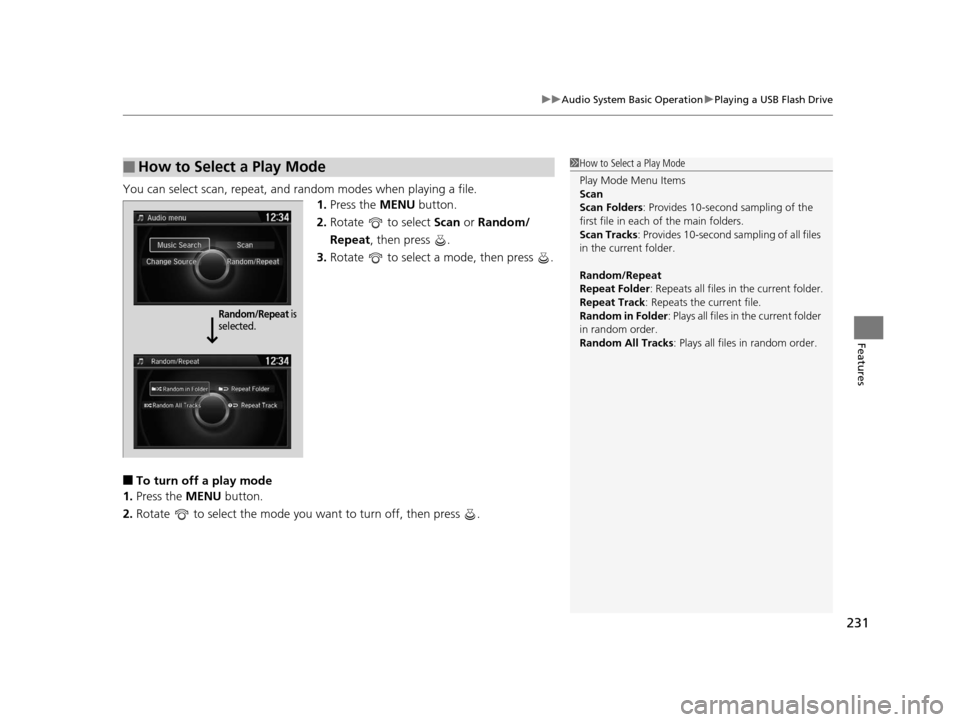
1. Press the MENU button.
2. Rotate to select Music Search, then
press .
3. Rotate to select a folder.
4. Press to change the display to a list of
files in that folder.
5. Rotate to select a file, then press .
■How to Select a File from the Music Search List
(MP3/WMA/AAC)1Playing a CD
NOTICE
Do not use CDs with adhesive labels. The label can
cause the CD to jam in the unit.
WMA files protected by di gital rights management
(DRM) cannot be played.
The audio system displays Unplayable File, then
skips to the next file.
Text data appears on the di splay under the following
circumstances:
•When you select a new folder, file, or track.
•When you change the audio mode to CD.
•When you insert a CD.
If you eject the CD but do not remove it from the slot,
the system reloads the CD automatically after several
seconds.
File Selection Folder Selection
16 US ODYSSEY-31TK86500.book 222 ページ 2015年6月24日 水曜日 午後3時0分
Page 224 of 565
223
uuAudio System Basic Operation uPlaying a CD
Features
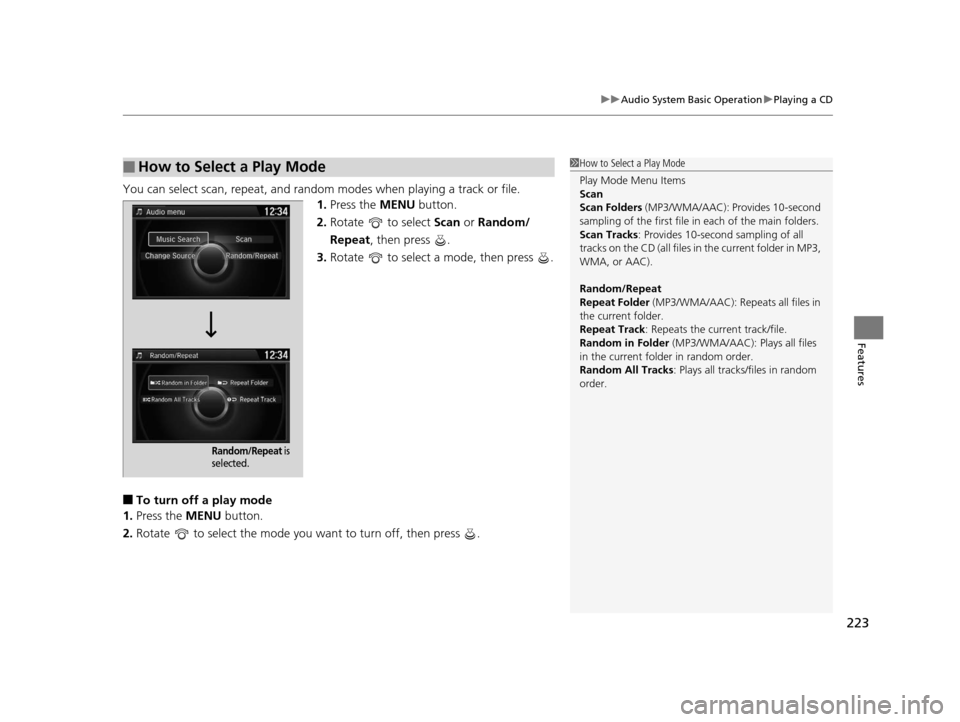
You can select scan, repeat, and random modes when playing a track or file.
1.Press the MENU button.
2. Rotate to select Scan or Random/
Repeat , then press .
3. Rotate to select a mode, then press .
■To turn off a play mode
1. Press the MENU button.
2. Rotate to select the mode you want to turn off, then press .
■How to Select a Play Mode1How to Select a Play Mode
Play Mode Menu Items
Scan
Scan Folders (MP3/WMA/AAC): Provides 10-second
sampling of the first file in each of the main folders.
Scan Tracks: Provides 10-second sampling of all
tracks on the CD (all files in the current folder in MP3,
WMA, or AAC).
Random/Repeat
Repeat Folder (MP3/WMA/AAC): Repeats all files in
the current folder.
Repeat Track: Repeats the current track/file.
Random in Folder (MP3/WMA/AAC): Plays all files
in the current folder in random order.
Random All Tracks : Plays all tracks/files in random
order.
Random/Repeat is
selected.
16 US ODYSSEY-31TK86500.book 223 ページ 2015年6月24日 水曜日 午後3時0分
Page 228 of 565

227
uuAudio System Basic Operation uPlaying Internet Radio
Continued
Features
Playing Internet Radio
Connect a compatible phone through Bluetooth®.
You can also connect the phone using your dock connector to the USB port.
Press the AUX button to select Pandora mode.
U.S. models
Compatible phones only
1Playing Internet Radio
Pandora ®, the Pandora logo, and the Pandora trade
dress are trademarks or registered trademarks of
Pandora Media, Inc., used with permission. Pandora
is currently available exclusively in the United States.
iPhone
Audio/Information Screen
AUX Button
Press to select Pandora®.
Skip Button
Press to skip a song.
MENU Button
Press to display the menu items. Selector Knob
Turn to switch to another station.
VOL/ (Volume/Power) Knob
Press to turn the audio system on and off.
Turn to adjust the volume.
BACK Button
Press to go back to the previous display.
Album Art
USB Indicator
Appears when a phone is
connected.
Rating Icon
Preset Button (1)
Press to switch the mode between
pause and resume.
Preset Button (2)
Press to select Like.
Preset Button (3)
Press to select Dislike.
Preset Button (4)
Press to select Bookmark Track
.
Preset Button (5)
Press to select Bookmark Artist .
16 US ODYSSEY-31TK86500.book 227 ページ 2015年6月24日 水曜日 午後3時0分
Page 229 of 565

uuAudio System Basic Operation uPlaying Internet Radio
228
Features
You can operate some of the Pandora® menu items from your vehicle’s audio
system. The available items are:
• Like
• Dislike
• Station List
• Change Source
• Bookmark Track
• Bookmark Artist
• Play/Pause
■Operating a menu item
1.Press the MENU button.
2. Rotate to select an item, then press .
■Pandora® Menu1Playing Internet Radio
To find out if your phone is compatible with this
feature, visit www.handsfreelink.honda.com , or call
1-888-528-7876.
Pandora ® is a personalized Intern et radio service that
selects music based on an artist, song, or genre a user
enters, and streams what is likely to be of interest.
To use this service in your vehicle, the Pandora ® app
must first be installed on your phone. Visit
www.pandora.com . for more information.
If you cannot operate Pandora® through the audio system,
it may be streaming through Bluetooth® Audio. Make sure
Pandora
® mode on your audio system is selected.
1 Pandora ® Menu
Available operating functi ons vary on software
versions. Some functions ma y not be available on the
vehicle's audio system.
If there is a problem, you may see an error message
on the audio/information screen.
2 Pandora ® P. 269
There are restrictions on the number of songs you
can skip or dislike in a given hour.
16 US ODYSSEY-31TK86500.book 228 ページ 2015年6月24日 水曜日 午後3時0分
Page 232 of 565
231
uuAudio System Basic Operation uPlaying a USB Flash Drive
Features
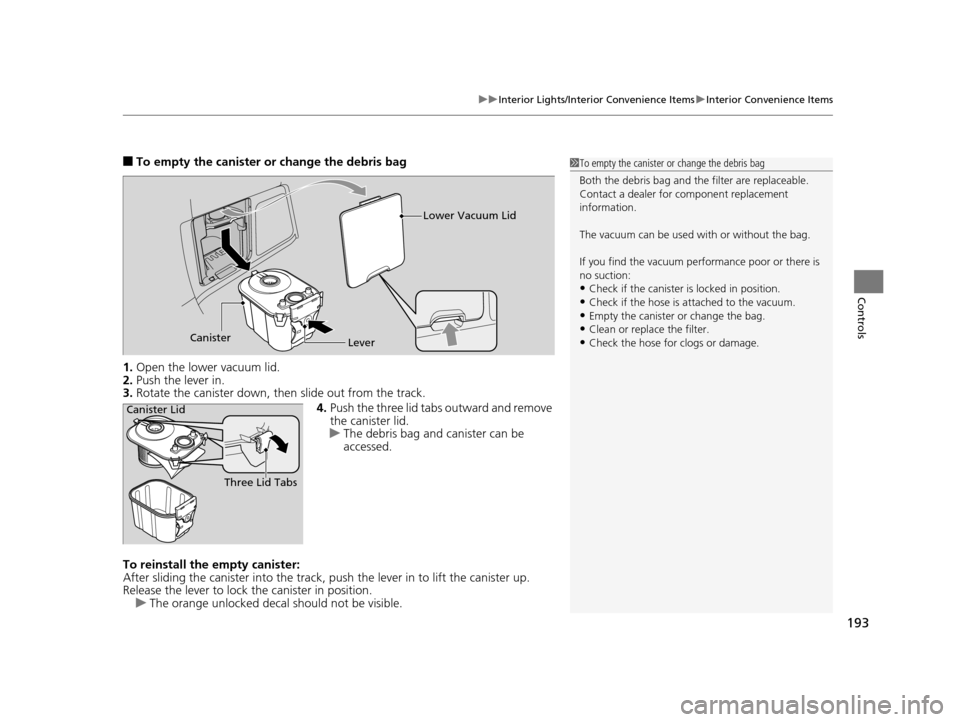
You can select scan, repeat, and random modes when playing a file.
1.Press the MENU button.
2. Rotate to select Scan or Random/
Repeat , then press .
3. Rotate to select a mode, then press .
■To turn off a play mode
1. Press the MENU button.
2. Rotate to select the mode you want to turn off, then press .
■How to Select a Play Mode1How to Select a Play Mode
Play Mode Menu Items
Scan
Scan Folders : Provides 10-second sampling of the
first file in each of the main folders.
Scan Tracks : Provides 10-second sa mpling of all files
in the current folder.
Random/Repeat
Repeat Folder : Repeats all files in the current folder.
Repeat Track: Repeats the current file.
Random in Folder : Plays all files in the current folder
in random order.
Random All Tracks : Plays all files in random order.
Random/Repeat is
selected.
16 US ODYSSEY-31TK86500.book 231 ページ 2015年6月24日 水曜日 午後3時0分
Page 253 of 565
252
uuAudio System Basic Operation uPlaying a CD
Features
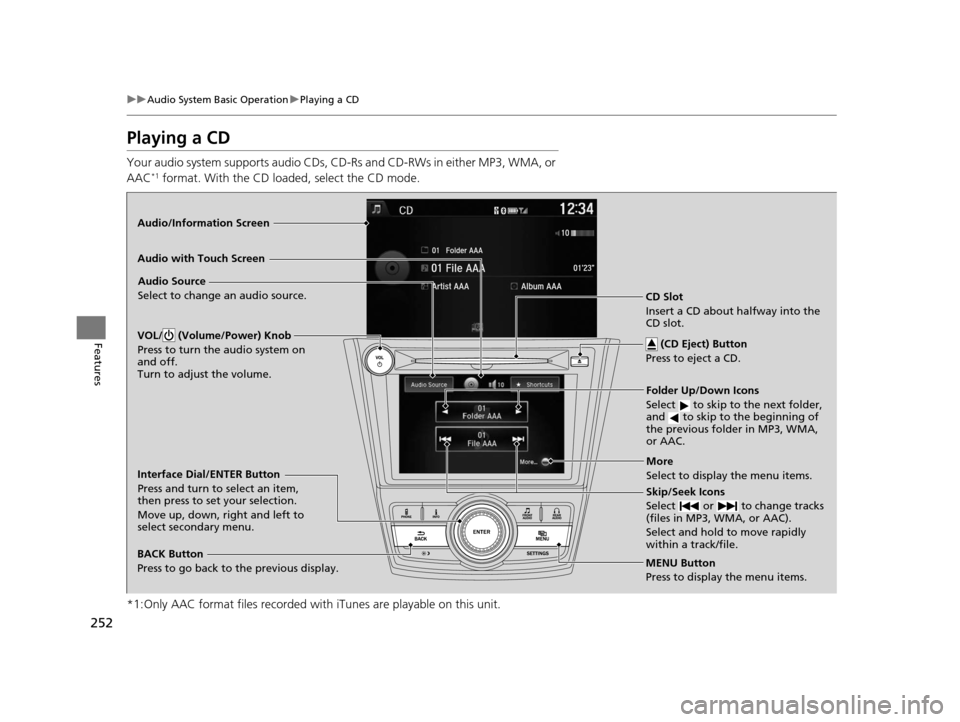
Playing a CD
Your audio system supports audio CDs, CD-Rs and CD-RWs in either MP3, WMA, or
AAC*1 format. With the CD loaded, select the CD mode.
*1:Only AAC format files recorded with iTunes are playable on this unit.
Audio/Information Screen
MENU Button
Press to display the menu items.
CD Slot
Insert a CD about halfway into the
CD slot. (CD Eject) Button
Press to eject a CD.
Folder Up/Down Icons
Select to skip to the next folder,
and to skip to the beginning of
the previous folder in MP3, WMA,
or AAC.
Audio Source
Select to change an audio source.
Skip/Seek Icons
Select or to change tracks
(files in MP3, WMA, or AAC).
Select and hold to move rapidly
within a track/file.
More
Select to display the menu items.
BACK Button
Press to go back to the previous display.
Interface Dial/ENTER Button
Press and turn to select an item,
then press to set your selection.
Move up, down, right and left to
select secondary menu.
Audio with Touch Screen
VOL/ (Volume/Power) Knob
Press to turn the audio system on
and off.
Turn to adjust the volume.
16 US ODYSSEY-31TK86500.book 252 ページ 2015年6月24日 水曜日 午後3時0分