Page 296 of 565
295Continued
Features
Customized Features
See the Navigation System Manual for the customized features except for the
Vehicle Settings .
Use the audio/information screen to customize certain features.
■How to customize
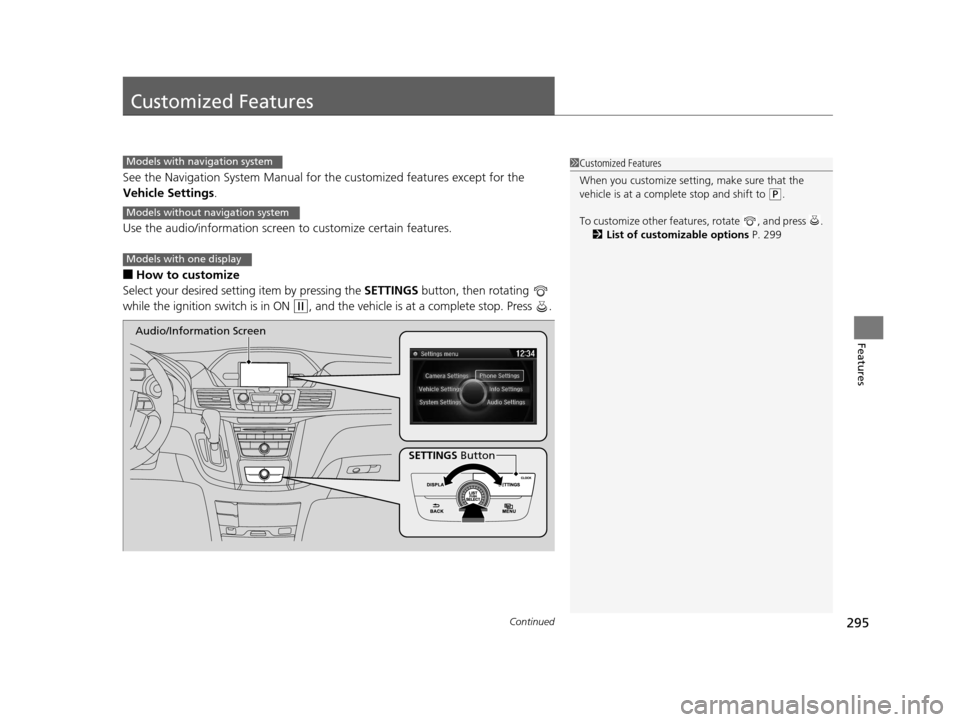
Select your desired setting item by pressing the SETTINGS button, then rotating
while the ignition switch is in ON
(w, and the vehicle is at a complete stop. Press .
1 Customized Features
When you customize setting, make sure that the
vehicle is at a complete stop and shift to
(P.
To customize other featur es, rotate , and press .
2 List of customizable options P. 299
Models with navigation system
Models without navigation system
Models with one display
SETTINGS Button
Audio/Information Screen
16 US ODYSSEY-31TK86500.book 295 ページ 2015年6月24日 水曜日 午後3時0分
Page 330 of 565

329
uuBluetooth ® HandsFreeLink ®u HFL Menus
Continued
Features
HFL Menus
The ignition switch mu st be in ACCESSORY (q or ON (w to use HFL.
■Phone Settings screen
1.Press the SETTINGS button.
2. Rotate to select Phone Settings, then
press .
1 HFL Menus
To use HFL, you must first pair your Bluetooth-
compatible cell phone to th e system while the vehicle
is parked.
Some functions are limited while driving. A message
appears on the screen when the vehicle is moving
and the operation is canceled.
Pair a phone to the system.
Replace a previously paired phone with a
new phone.Connect Phone*1
Bluetooth
Device List
Add Bluetooth Device
Edit PIN
(Existing entry list)
Disconnect
Connect a phone to the system.
Disconnect a paired phone from the system.
*1:
(Existing
entry list)*1
Replace This Device
Delete This DeviceDelete a previously paired phone.Create a security PIN for a paired phone.
Add
Bluetooth Device
Appears only when a phone is connected to HFL.
Pair a phone to the system.
16 US ODYSSEY-31TK86500.book 329 ページ 2015年6月24日 水曜日 午後3時0分
Page 409 of 565
uuWhen Driving uStarting the Engine
408
Driving
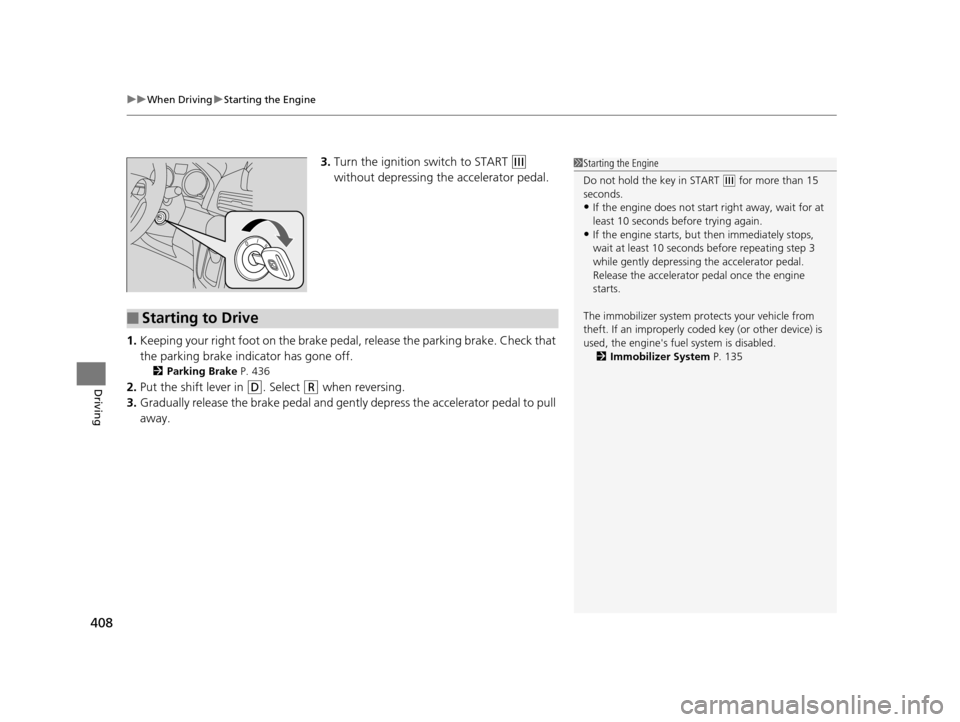
3. Turn the ignition switch to START (e
without depressing the accelerator pedal.
1. Keeping your right foot on the brake peda l, release the parking brake. Check that
the parking brake indicator has gone off.
2 Parking Brake P. 436
2.Put the shift lever in (D. Select (R when reversing.
3. Gradually release the brake pedal and gently depress the accelerator pedal to pull
away.
1Starting the Engine
Do not hold the key in START
(e for more than 15
seconds.
•If the engine does not start right away, wait for at
least 10 seconds before trying again.
•If the engine starts, but then immediately stops,
wait at least 10 seconds before repeating step 3
while gently depressing the accelerator pedal.
Release the accelerator pedal once the engine
starts.
The immobilizer system pr otects your vehicle from
theft. If an improperly code d key (or other device) is
used, the engine's fuel system is disabled.
2 Immobilizer System P. 135
■Starting to Drive
16 US ODYSSEY-31TK86500.book 408 ページ 2015年6月24日 水曜日 午後3時0分
Page 412 of 565
411
uuWhen Driving uPrecautions While Driving
Driving
Precautions While Driving
Avoid driving in deep water and on flooded roads. This can damage the engine or
driveline, or cause electrical component failure.
If there is a strong impact with something under the vehicle, stop in a safe location.
Check the underside of the vehicle for damage or any fluid leaks.
*1: Models with the smart entry system have an ENGINE START/STOP button instead of an
ignition switch.
■In Rain
■Other Precautions
1 Precautions While Driving
NOTICE
Do not operate the shift lever while pressing the
accelerator pedal. You could damage the
transmission.
If the ignition switch is turned to ACCESSORY
( q *1
while driving, the engine will shut down and all
steering and brake power a ssist functions will stop,
making it difficult to control the vehicle.
Do not put the shift lever in
( N, as you will lose
engine braking (and acceleration) pe rformance.
During the first 600 miles (1,000 km) of operation,
avoid sudden acceleration or full throttle operation so
as to not damage the engine or powertrain.
Avoid hard braking for the first 200 miles (300 km).
You should also follow this when the brake pads are
replaced.
16 US ODYSSEY-31TK86500.book 411 ページ 2015年6月24日 水曜日 午後3時0分
Page 414 of 565
413
uuWhen Driving uShifting
Continued
Driving
Shifting
Change the shift position in accordance with your driving needs.
■Shift lever positions
*1: Models with the smart entry system have an ENGINE START/STOP button instead of an
ignition switch.
1 Shifting
You cannot turn the ignition switch to LOCK
(0*1
and remove the key unless the shift lever is in
( P.
The vehicle may move forward very slightly even in
(N while the engine is cold.
Depress the brake pe dal firmly and, when necessary,
apply the parking brake.
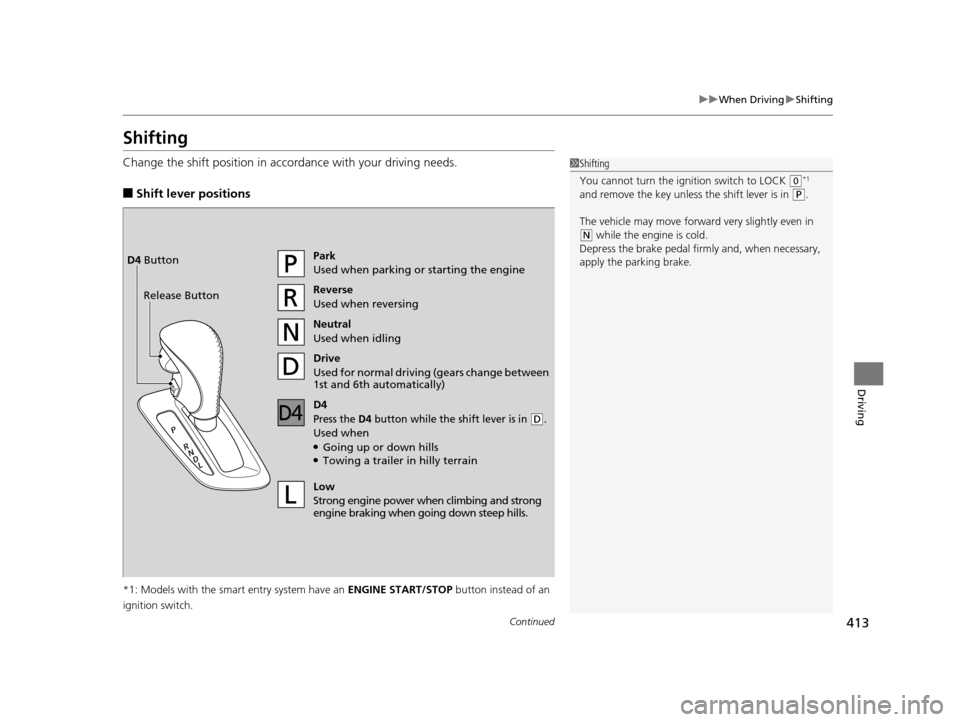
Park
Used when parking or starting the engine
Reverse
Used when reversing
Neutral
Used when idling
Drive
Used for normal drivin g (gears change between
1st and 6th automatically)
Low
Strong engine power wh en climbing and strong
engine braking when going down steep hills.
Release ButtonD4 Button
D4
Press the D4 button while the sh
ift lever is in (D.
Used when●Going up or down hills●Towing a trailer in hilly terrain
16 US ODYSSEY-31TK86500.book 413 ページ 2015年6月24日 水曜日 午後3時0分
Page 456 of 565
455Continued
Maintenance
Maintenance MinderTM
If the engine oil life is less than 15%, you will see the Maintenance Minder messages
appear on the information display* or the multi-information display* every time you
turn the ignition switch to ON
(w*1. The messages notify you when to change the
engine oil, or when to bring your vehi cle to a dealer for indicated maintenance
services.
To Use Maintenance MinderTM
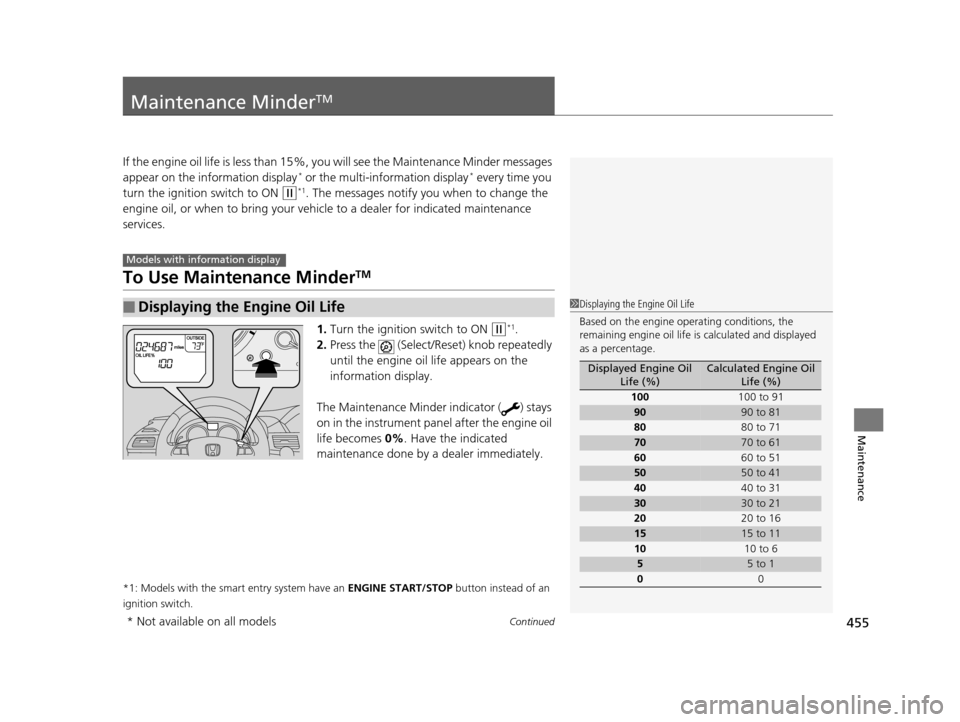
1. Turn the ignition switch to ON (w*1.
2. Press the (Select/Reset) knob repeatedly
until the engine oil life appears on the
information display.
The Maintenance Minder indicator ( ) stays
on in the instrument panel after the engine oil
life becomes 0% . Have the indicated
maintenance done by a dealer immediately.
*1: Models with the smart entry system have an ENGINE START/STOP button instead of an
ignition switch.
■Displaying the Engine Oil Life
Models with info rmation display
1Displaying the Engine Oil Life
Based on the engine ope rating conditions, the
remaining engine oi l life is calculated and displayed
as a percentage.
Displayed Engine Oil Life (%)Calculated Engine Oil Life (%)
100 100 to 91
9090 to 81
80 80 to 71
7070 to 61
60 60 to 51
5050 to 41
40 40 to 31
3030 to 21
20 20 to 16
1515 to 11
10 10 to 6
55 to 1
0 0
* Not available on all models
16 US ODYSSEY-31TK86500.book 455 ページ 2015年6月24日 水曜日 午後3時0分
Page 459 of 565
uuMaintenance MinderTMuTo Use Maintenance MinderTM
458
Maintenance
Reset the engine oil life display if yo u have performed the maintenance service.
1. Turn the ignition switch to ON
(w*1.
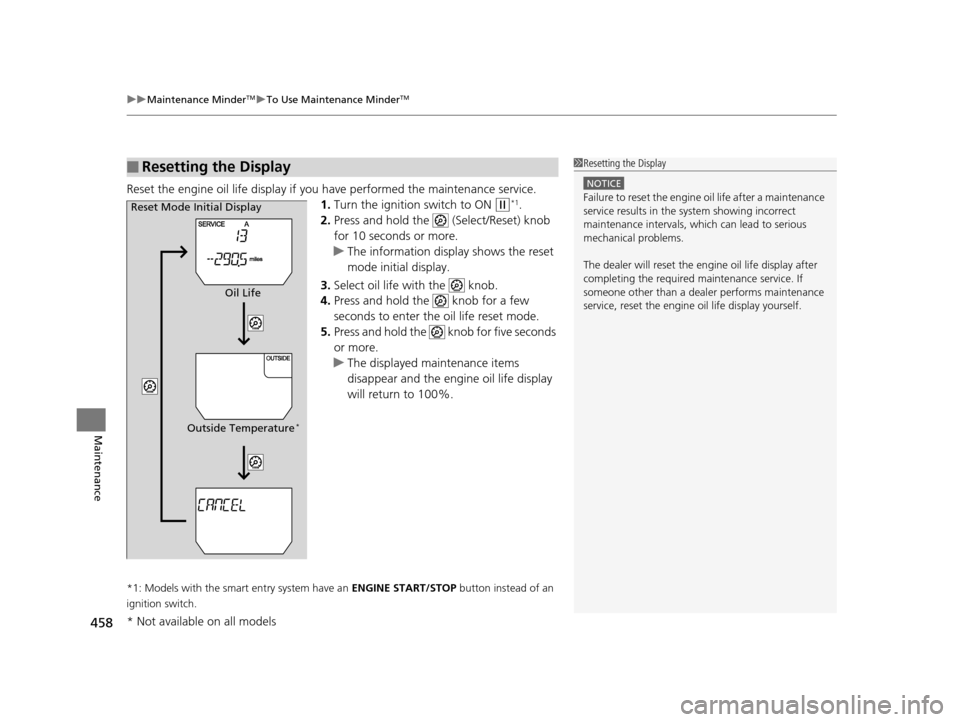
2. Press and hold the (Select/Reset) knob
for 10 seconds or more.
u The information display shows the reset
mode initial display.
3. Select oil life with the knob.
4. Press and hold the knob for a few
seconds to enter the oil life reset mode.
5. Press and hold the knob for five seconds
or more.
u The displayed maintenance items
disappear and the engine oil life display
will return to 100%.
*1: Models with the smart entry system have an ENGINE START/STOP button instead of an
ignition switch.
■Resetting the Display1 Resetting the Display
NOTICE
Failure to reset the engine oil life after a maintenance
service results in the sy stem showing incorrect
maintenance intervals, which can lead to serious
mechanical problems.
The dealer will reset the en gine oil life display after
completing the required ma intenance service. If
someone other than a deal er performs maintenance
service, reset the engine oil life display yourself.Reset Mode Initial Display
Oil Life
Outside Temperature
*
* Not available on all models
16 US ODYSSEY-31TK86500.book 458 ページ 2015年6月24日 水曜日 午後3時0分
Page 512 of 565
511Continued
Handling the Unexpected
If a Tire Goes Flat
Changing a Flat Tire
If a tire goes flat while driving, grasp the steering wheel firmly, and brake gradually
to reduce speed. Then, stop in a safe plac e. Replace the flat tire with a compact
spare tire. Go to a dealer as soon as possib le to have the full-size tire repaired or
replaced.
1. Park the vehicle on firm, level, non-slip pery surface and apply the parking brake.
2. Move the shift lever to
(P.
3. Turn on the hazard warning lights an d turn the ignition switch to LOCK
(0*1.
*1: Models with the smart entry system have an ENGINE START/STOP button instead of an
ignition switch.
1 Changing a Flat Tire
Periodically check the tire pressure of the compact
spare. It should be set to the specified pressure.
Specified Pressure: 60 psi (420 kPa, 4.2 kgf/cm
2)
When driving with the compact spare tire, keep the
vehicle speed under 50 mph (80 km/h). Replace with
a full-size tire as soon as possible.
The compact spare tire and wheel in your vehicle are
specifically for this model. Do not use them with
another vehicle. Do not us e another type of compact
spare tire or wheel with your vehicle.
Do not mount tire chains on a compact spare tire.
If a chain-mounted front tire goes flat, remove one of
the full-size rear tires and replace it with the compact
spare tire. Remove the flat front tire and replace it
with the full-size tire that was removed from the rear.
Mount the tire chains on the front tire.
Do not use a puncture-repairi ng agent on a flat tire,
as it can damage the tire pressure sensor.
16 US ODYSSEY-31TK86500.book 511 ページ 2015年6月24日 水曜日 午後3時0分