2016 HONDA HR-V parking brake
[x] Cancel search: parking brakePage 5 of 77
2 || 3 SAFETY VISUAL INDEX
TABLE OF CONTENTS
INDEX
VISUAL INDEX
VOICE COMMAND
INDEX
SAFETY
INFORMATION
CUSTOMER
INFORMATION
INSTRUMENT PANEL
SPECIFICATIONS
VEHICLE
CONTROLS
MAINTENANCE
AUDIO AND
CONNECTIVITY
HANDLING THE
UNEXPECTED
BLUETOOTH®
HANDSFREELINK®
DRIVING
HONDALINK®
NAVIGATION
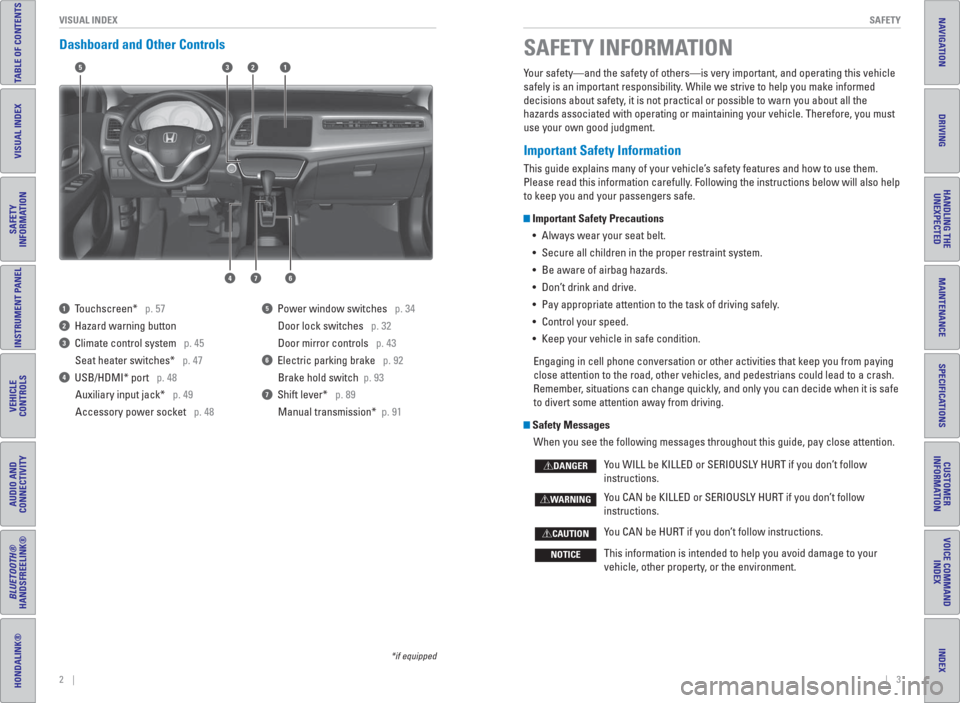
Dashboard and Other Controls
1 Touchscreen* p. 57
2 Hazard warning button
3 Climate control system p. 45
Seat heater switches* p. 47
4 USB/HDMI* port p. 48
Auxiliary input jack* p. 49
Accessory power socket p. 48
5 Power window switches p. 34
Door lock switches p. 32
Door mirror controls p. 43
6 Electric parking brake p. 92
Brake hold switch p. 93
7 Shift lever* p. 89
Manual transmission* p. 91
*if equipped
Your safety—and the safety of others—is very important, and operating this vehicle
safely is an important responsibility. While we strive to help you make informed
decisions about safety, it is not practical or possible to warn you about all the
hazards associated with operating or maintaining your vehicle. Therefore, you must
use your own good judgment.
Important Safety Information
This guide explains many of your vehicle’s safety features and how to use them.
Please read this information carefully. Following the instructions below will also help
to keep you and your passengers safe.
Important Safety Precautions
• Always wear your seat belt.
• Secure all children in the proper restraint system.
• Be aware of airbag hazards.
• Don’t drink and drive.
• Pay appropriate attention to the task of driving safely.
• Control your speed.
• Keep your vehicle in safe condition.
Engaging in cell phone conversation or other activities that keep you from paying
close attention to the road, other vehicles, and pedestrians could lead to a crash.
Remember, situations can change quickly, and only you can decide when it is safe
to divert some attention away from driving.
Safety Messages
When you see the following messages throughout this guide, pay close attention.
You WILL be KILLED or SERIOUSLY HURT if you don’t follow
instructions.
You CAN be KILLED or SERIOUSLY HURT if you don’t follow
instructions.
You CAN be HURT if you don’t follow instructions.
This information is intended to help you avoid damage to your
vehicle, other property, or the environment.
DANGER
WARNING
CAUTION
NOTICE
SAFETY INFORMATION
15
46
32
7
Page 16 of 77

24 || 25 INSTRUMENT PANEL INSTRUMENT PANEL
TABLE OF CONTENTS
INDEX
VISUAL INDEX
VOICE COMMAND
INDEX
SAFETY
INFORMATION
CUSTOMER
INFORMATION
INSTRUMENT PANEL
SPECIFICATIONS
VEHICLE
CONTROLS
MAINTENANCE
AUDIO AND
CONNECTIVITY
HANDLING THE
UNEXPECTED
BLUETOOTH®
HANDSFREELINK®
DRIVING
HONDALINK®
NAVIGATION
Learn about the indicators, gauges, and displays related to driving the vehicle.
INSTRUMENT PANEL
Indicators briefl y appear with each engine start and then go out. Red and amber
indicators are most critical. Blue and green indicators are used for general
information.
Malfunction Indicators
These are the most critical indicators. If they come on and stay lit while driving or at
any other time, there may be a problem. See your dealer if necessary.
Brake system
• Brake fl uid is low.
• The brake system has a problem.
Press the brake pedal lightly to check pedal pressure. If normal, check
the brake fl uid level when you stop. If abnormal, take immediate action. If
necessary, downshift the transmission to slow the vehicle using engine
braking. Have your vehicle repaired immediately.
Low oil pressure
Engine oil pressure is low. Stop in a safe place. Open the hood. Check the oil
level, and add oil if necessary (see page 121). If the indicator does not turn
off, have your vehicle repaired immediately.
Charging system
The battery is not charging. Turn off all electrical items, but do not turn off
the vehicle to prevent further battery discharge. Have your vehicle repaired
immediately.
Supplemental Restraint System (SRS)
There is a problem with one of the airbag systems or seat belt tensioners.
CanadaU.S.
*if equipped
Smart Entry system*
There is a problem with the smart entry system.
Malfunction indicator lamp (check engine light)
• The emissions control system may have a problem, or the fuel cap is loose
or missing.
• (Blinks) A misfi re in the engine’s cylinders is detected. Stop in a safe place,
and wait for the engine to cool down.
Anti-lock Brake System ( ABS)
There is a problem with the anti-lock brake system. Your vehicle still has
normal braking ability, but no anti-lock function.
Tire Pressure Monitoring System ( TPMS) (U.S. models only)
There is a problem with the tire pressure monitoring system, or the vehicle is
fi tted with the compact spare tire.
Forward Collision Warning ( FCW)* (Canadian models only)
There is a problem with the FCW system.
Lane Departure Warning ( LDW)* (Canadian models only)
There is a problem with the LDW system.
Vehicle Stability Assist ( VSA
®)
There is a problem with the VSA system or hill start assist system.
Brake system
There is a problem with the automatic brake hold system.
Electric parking brake system
There is a problem with the electric parking brake system. Avoid using the
parking brake. Have your vehicle inspected immediately.
Electric Power Steering (EPS)
There is a problem with the EPS system. Stop in a safe place, and restart the
vehicle.
Starter system*
There is a problem with the starter system.
All Wheel Drive ( AWD)*
There is a problem with the AWD system. If the indicator blinks, the system
is overheated and inactive. Stop in a safe place, and idle until the indicator
goes off.
High temperature
The engine coolant temperature is high. Drive slowly to prevent overheating.
If the indicator remains on, immediately stop the vehicle in a safe place (see
page 104).
CanadaU.S.
U.S.
Canada
*if equipped
Page 17 of 77

26 || 27 INSTRUMENT PANEL INSTRUMENT PANEL
TABLE OF CONTENTS
INDEX
VISUAL INDEX
VOICE COMMAND
INDEX
SAFETY
INFORMATION
CUSTOMER
INFORMATION
INSTRUMENT PANEL
SPECIFICATIONS
VEHICLE
CONTROLS
MAINTENANCE
AUDIO AND
CONNECTIVITY
HANDLING THE
UNEXPECTED
BLUETOOTH®
HANDSFREELINK®
DRIVING
HONDALINK®
NAVIGATION
Condition Indicators
These indicators may require you to perform an action.
Parking brake
Release the parking brake before driving. You will hear a beep if you drive
with it not fully released.
Seat belt reminder
Make sure seat belts are fastened for you and all passengers. The indicator
blinks and beeps sound continuously if you or your front passenger has not
fastened your seat belts when you begin driving. If the indicator remains on
after seat belts are fastened, see your dealer.
Door/tailgate open
A door or the tailgate is open.
Low fuel
Refuel as soon as possible. If the indicator blinks, there is a problem with the
fuel gauge. See your dealer.
Low tire pressure
Stop in a safe place, check tire pressures, and infl ate tire(s) if necessary. If
the indicator remains on after tire infl ation, you need to calibrate the system
(see page 106). The indicator also appears if your vehicle is fi tted with the
compact spare tire. Have your regular tire repaired or replaced as soon as
possible.
Lane Departure Warning ( LDW)* (Canadian models only)
(Blinks) Take appropriate action to keep the vehicle within the lane.
CanadaU.S.
*if equipped
Washer uid level (Canadian models only)
Washer fl uid is low. Refi ll the reservoir (see page 123).
Brake depress
• During automatic brake hold operation, the automatic brake hold button is
pressed without pressing the brake pedal. Make sure you press the brake
pedal.
• (Blinks) Automatic brake hold is canceled during operation. Immediately
press the brake pedal.
Forward Collision Warning ( FCW)* (Canadian models only)
(Blinks) The system detects a likely collision with a vehicle in front of you,
and a beep sounds. Take appropriate action to prevent a collision.
Maintenance Minder™
Scheduled maintenance for your vehicle is due.
Immobilizer
Your key or remote transmitter cannot be recognized by the vehicle. If the
indicator blinks, you may not be able to start the engine. Turn the vehicle off,
and then on again. If it continues to blink, there may be a problem with the
system. See your dealer.
CVT models
MT models
On/Off Indicators
These indicators remind you when an item is on or off.
VSA off
VSA on (blinks)
CRUISE MAIN on
CRUISE CONTROL on
Turn signals/ hazards on
Fog lights* on
High beams on Exterior lights on
ECON mode* on
Brake hold system on
Brake hold activated
Electric parking brake on
FCW* off
LDW* off
U.S.
Canada
U.S.
Canada
*if equipped
Low temperature
The engine coolant temperature is low. If the indicator remains on, there
may be a problem with temperature sensors.
Page 48 of 77

88 || 89 DRIVING DRIVING
TABLE OF CONTENTS
INDEX
VISUAL INDEX
VOICE COMMAND
INDEX
SAFETY
INFORMATION
CUSTOMER
INFORMATION
INSTRUMENT PANEL
SPECIFICATIONS
VEHICLE
CONTROLS
MAINTENANCE
AUDIO AND
CONNECTIVITY
HANDLING THE
UNEXPECTED
BLUETOOTH®
HANDSFREELINK®
DRIVING
HONDALINK®
NAVIGATION
*if equipped
Changing the Power Mode*
Use the ENGINE START/STOP button to cycle through power modes or start the
engine.
Accessory or On mode: Press ENGINE START/STOP
once without pressing the brake pedal for Accessory
mode. Press it again for On mode.
Starting the engine: Press and hold the brake pedal
(and the clutch for manual transmission), then press
ENGINE START/STOP. Keep your foot fi rmly on the
brake pedal when starting the engine.
Turning the vehicle off: Shift to Park (P) (or apply the parking brake for manual
transmission), then press ENGINE START/STOP.
If you press the button and the shift lever is not in Park (P), the vehicle goes into
Accessory mode.
*if equipped
Shifting
Change the shift position based on your driving needs.
Continuously Variable Transmission ( CVT)*
Park (P): Used for parking or starting/stopping
the engine. Press the brake pedal, then press the
release button to shift.
Reverse (R): Used for reversing.
Neutral (N): Used for idling.
Drive (D): Used for normal driving.
Drive (S): Used for better acceleration, increased
engine braking, driving in hilly terrain, or when using
paddle shifters*.
Low (L)*: Used for stronger engine braking when driving in hilly terrain.
When you change the shift lever from D to R and vice versa, come to a
complete stop and keep the brake pedal pressed. Operating the shift lever
before the vehicle has come to a complete standstill can damage the
transmission.
Do not operate the shift lever while pressing the accelerator pedal. You could
damage the transmission.
NOTICE
Release button
Starting the Ignition*
Insert the key into the ignition and turn to turn on the vehicle or start the engine.
0 LOCK: Insert and remove the key in this position.
I ACCESSORY: Operate the audio system and other
accessories in this position.
II ON: This is the position when driving.
III START: This position is for starting the engine.
The switch returns to ON when you release the key.
Starting to Drive
Turn on the vehicle and start the engine to begin driving.
Before Starting the Engine
Continuously variable transmission (CVT)
Check that the shift lever is in Park (P), then press
the brake pedal. Keep your foot fi rmly on the brake
pedal when starting the engine.
Manual transmission
Check that the shift lever is in Neutral (N). Press
the brake pedal with your right foot, and press the
clutch pedal all the way down with your left foot.
Keep your foot fi rmly on the brake pedal when
starting the engine.Brake pedal
The engine is harder to start in cold weather and in thinner air found at altitudes
above 8,000 feet (2,400 m). When starting the engine in cold weather, turn off
all electrical accessories such as the lights, climate control system, and rear
defogger in order to reduce battery drain.
Brake pedal Clutch pedal
Page 50 of 77

92 || 93 DRIVING DRIVING
TABLE OF CONTENTS
INDEX
VISUAL INDEX
VOICE COMMAND
INDEX
SAFETY
INFORMATION
CUSTOMER
INFORMATION
INSTRUMENT PANEL
SPECIFICATIONS
VEHICLE
CONTROLS
MAINTENANCE
AUDIO AND
CONNECTIVITY
HANDLING THE
UNEXPECTED
BLUETOOTH®
HANDSFREELINK®
DRIVING
HONDALINK®
NAVIGATION
The ABS may not function correctly if you use an incorrect tire type and size.
NOTICE
Brake Assist System
During hard or emergency braking, the system increases braking force. The brake
pedal may move slightly or make a noise; this is normal. Continue to hold the brake
pedal fi rmly down.
Anti-Lock Brake System (ABS)
During hard or emergency braking, the system rapidly pumps the brakes to
prevent wheel lockup and help you maintain steering control. The brake pedal may
pulsate slightly during ABS operation; this is normal. Do not pump the brake pedal,
and continue to hold it fi rmly down.
Automatic Brake Hold
Maintains rear brake hold even after the brake pedal is released. Make sure the
vehicle is on and your seat belt is fastened when operating this feature.
1. Press the BRAKE HOLD button behind the shift
lever. The BRAKE HOLD indicator appears in the
instrument panel.
2. With the shift lever in Drive (D) or Neutral (N),
press the brake pedal and come to a complete
stop. The HOLD indicator appears, and brake
hold is applied. Release the brake pedal.
Press the accelerator pedal (or shift into a gear and release the clutch pedal
for manual transmission) to cancel brake hold and start moving.
To turn off brake hold: Press the brake pedal and press BRAKE HOLD again.
Automatic brake hold cancels when:
• Braking is applied for more than 10 minutes.
• The electric parking brake is engaged.
• The foot brake is pressed and the shift lever is moved to P or R.
• The engine stalls (manual transmission).
• The driver’s seat belt is unfastened.
• The engine is turned off.
Using the automatic brake hold system on steep hills or slippery roads may
still allow the vehicle to move if you remove your foot from the brake pedal.
If a vehicle unexpectedly moves, it may cause a crash resulting in serious
injury or death.
Never use the automatic brake hold system or rely on it to keep a vehicle from
moving when stopped on a steep hill or slippery roads.
WARNING
Using the automatic brake hold system to park the vehicle may result in the
vehicle unexpectedly moving.
If a vehicle moves unexpectedly, it may cause a crash, resulting in serious
injury or death.
Never leave the vehicle when braking is temporarily kept by automatic brake
hold and always park the vehicle by putting the transmission in Park (P) and
applying the parking brake.
WARNING
Electric Parking Brake
Keep your vehicle from moving while parked using a simple switch.
To apply: Pull up the switch. The PARK indicator
appears in the instrument panel.
To release: Press the brake pedal and make sure
your seat belt is fastened. Press the switch down
to release.
You can also lightly press the accelerator
pedal (and release the clutch pedal for manual
transmission) if your seat belt is fastened, the
vehicle is on, and the shift lever is in Drive (D)
or Reverse (R) (or a gear is engaged for manual
transmission).
Pull up to apply.
Push down to release.
Page 55 of 77

102 || 103 HANDLING THE UNEXPECTED HANDLING THE UNEXPECTED
TABLE OF CONTENTS
INDEX
VISUAL INDEX
VOICE COMMAND
INDEX
SAFETY
INFORMATION
CUSTOMER
INFORMATION
INSTRUMENT PANEL
SPECIFICATIONS
VEHICLE
CONTROLS
MAINTENANCE
AUDIO AND
CONNECTIVITY
HANDLING THE
UNEXPECTED
BLUETOOTH®
HANDSFREELINK®
DRIVING
HONDALINK®
NAVIGATION
HANDLING THE UNEXPECTED
*if equipped
WARNING: Battery posts, terminals, and related accessories contain lead and lead
compounds. Wash your hands after handling.
After the Engine Starts
Once your vehicle’s engine has started, remove the jumper cables in the following
order:
1. Disconnect the jumper cable from your vehicle’s stud bolt.
2. Disconnect the other end of the jumper cable from the assisting vehicle’s (-)
terminal.
3. Disconnect the jumper cable from your vehicle’s (+) terminal.
4. Disconnect the other end of the jumper cable from the assisting vehicle’s (+)
terminal.
5. Have your vehicle inspected by a nearby service station or a dealer.
Shift Lever Does Not Move*
Follow the procedure below if you cannot move the shift lever out of Park (P).
1. Set the parking brake.
2. Remove the key from the ignition, or remove the
built-in key from the remote transmitter.
3. Wrap a cloth around the tip of a small fl at-tip
screwdriver. Put it into the shift lock release slot as
shown in the image, and remove the cover.
4. Insert the key into the shift lock release slot.
5. While pushing the key down, press the shift lever
release button and place the shift lever into Neutral
(N). The lock is now released. Have the shift lever
checked by a dealer as soon as possible.
Slot
Release buttonShift lock
release slot
*if equipped
Learn about what to do in critical or emergency situations.
Smart Entry Remote Battery Strength*
If the battery life in your remote transmitter is weak, follow the below steps to start
the engine.
1. Touch the back of the remote transmitter to the
ENGINE START/STOP button while the indicator is
fl ashing.
2. With the brake pedal pressed (and the clutch
pedal for manual transmission), press the ENGINE
START/STOP button within 10 seconds.
Jump Starting
Turn off the power to electric devices, such as audio and lights. Turn off the engine,
then open the hood.
1. Remove the under-hood fuse box cover (see
page 111). Connect the fi rst jumper cable to your
vehicle’s battery (+) terminal.
2. Connect the other end of the fi rst jumper cable
to the booster battery (+) terminal. Use a 12-volt
booster battery only.
3. Connect the second jumper cable to the booster
battery (-) terminal.
4. Connect the other end of the second jumper cable
to the stud bolt as shown. Do not connect this
jumper cable to any other part.
5. If your vehicle is connected to another vehicle,
start the assisting vehicle’s engine and increase its
rpm slightly.
6. Attempt to start your vehicle’s engine. If it turns over slowly, make sure that the
jumper cables have good metal-to-metal contact.
A battery can explode if you do not follow the correct procedure, seriously
injuring anyone nearby.
Keep all sparks, open fl ames, and smoking materials away from the
battery.
WARNING
Booster
batteryCover
Page 57 of 77

106 || 107 HANDLING THE UNEXPECTED HANDLING THE UNEXPECTED
TABLE OF CONTENTS
INDEX
VISUAL INDEX
VOICE COMMAND
INDEX
SAFETY
INFORMATION
CUSTOMER
INFORMATION
INSTRUMENT PANEL
SPECIFICATIONS
VEHICLE
CONTROLS
MAINTENANCE
AUDIO AND
CONNECTIVITY
HANDLING THE
UNEXPECTED
BLUETOOTH®
HANDSFREELINK®
DRIVING
HONDALINK®
NAVIGATION
Tire Pressure Monitoring System ( TPMS)
Monitors the tire pressure while you are driving. Available on U.S.models only.
If your vehicle’s tire pressure becomes signifi cantly
low, the low tire pressure indicator comes on.
Stop your vehicle in a safe place. Check the tire
pressure and adjust the pressure to the specifi ed
level. The specifi ed tire pressure is on a label on the
driver’s doorjamb.
TPMS Calibration
Any time you infl ate, change, or rotate one of more
of the tires, you need to recalibrate the system.
Press and hold the TPMS button. The TPMS
indicator blinks, and calibration begins.
Driving on an extremely underinfl ated tire can cause it to overheat. An overheated
tire can fail. Always infl ate your tires to the specifi ed pressure.
NOTICE
Changing a Flat Tire
If a tire goes fl at while driving, grasp the steering wheel fi rmly, and brake gradually
to reduce speed. Then, stop in a safe place. Replace the fl at tire with the compact
spare tire. Go to a dealer as soon as possible to have the full-size tire repaired or
replaced.
Getting Ready to Change the Tire
Park the vehicle on a fi rm, level, non-slippery surface. Apply the parking brake,
shift to Park (P), and turn the vehicle off. Turn on the hazard warning lights.
1. Open the tailgate. Turn on the cargo lights if
necessary (see page 37).
2. Open the cargo area fl oor lid.
3. Take the tool case out of the cargo area.
2WD models: Take out the wheel nut wrench, jack
handle bar, and jack.
AWD models: Take out the wheel nut wrench and
jack handle bar.
4. Unscrew the wing bolt and remove the spacer
cone. Then remove the spare tire.
5. AWD models: Turn the jack’s end bracket
counter-clockwise to loosen it, then remove the
jack.
6. Place a wheel block or rock in front and rear of
the wheel diagonal to the fl at tire.
7. Place the compact spare tire (wheel side up)
under the vehicle body, near the tire that needs
to be replaced.
8. Loosen each wheel nut about one turn using the
wheel nut wrench.
TPMS button
Low tire pressure/TPMS indicator
2WD models
Tool caseSpare tireJack
AWD models
Tool case Spare tire
AWD models
Jack
Floor lid
Page 62 of 77

116 || 117 MAINTENANCE MAINTENANCE
TABLE OF CONTENTS
INDEX
VISUAL INDEX
VOICE COMMAND
INDEX
SAFETY
INFORMATION
CUSTOMER
INFORMATION
INSTRUMENT PANEL
SPECIFICATIONS
VEHICLE
CONTROLS
MAINTENANCE
AUDIO AND
CONNECTIVITY
HANDLING THE
UNEXPECTED
BLUETOOTH®
HANDSFREELINK®
DRIVING
HONDALINK®
NAVIGATION
Safety Precautions
Some of the most important safety precautions are listed below; however, we cannot
warn you of every conceivable hazard that can arise in performing maintenance.
Only you can decide whether or not you should perform a given task.
Maintenance Safety
• To reduce the possibility of fi re or explosion, keep cigarettes, sparks, and fl ames
away from the battery and all fuel-related parts.
• Never leave rags, towels, or other fl ammable objects under the hood.
• To clean parts, use a commercially available degreaser or parts cleaner, not
gasoline.
• Wear eye protection and protective clothing when working with the battery or
compressed air.
• Do not run the engine in confi ned spaces where carbon monoxide gas can
accumulate.
Vehicle Safety
• The vehicle must be stationary, and parked on level ground with the parking
brake set and the engine off.
• Be aware that hot parts can burn you.
• Be aware that moving parts can injure you.
Improperly maintaining this vehicle or failing to correct a problem before driving
can cause a crash in which you can be seriously hurt or killed.
Always follow the inspection and maintenance recommendations according to
the schedules in this guide.
WARNING
Failure to properly follow maintenance instructions and precautions can cause
you to be seriously hurt or killed.
Always follow the procedures and precautions in this guide.
WARNING
Learn about basic maintenance that you can perform on the vehicle yourself, as well
as information about how to best maintain the vehicle.
MAINTENANCE Maintenance Minder™
Reminds you when indicated maintenance service is due.
When maintenance is due, the Maintenance Minder indicator comes on and a
message appears on the display every time you turn the vehicle on. Press the select/
reset knob to change displays.
Maintenance
Minder indicatorMain items
Sub itemsMaintenance Minder message
• Independent of the Maintenance Minder information, replace the brake fl uid
every 3 years.
• Inspect idle speed every 160,000 miles (256,000 km).
• Adjust the valves during services A, B, 1, 2, or 3 if they are noisy.
U.S. models
Maintenance, replacement, or repair of emissions control devices and systems
may be done by any automotive repair establishment or individuals using parts
that are certi ed to EPA standards.
According to state and federal regulations, failure to perform maintenance on the
maintenance main items marked with # will not void your emissions warranties.
However, all maintenance services should be performed in accordance with the
intervals indicated by the multi-information display.