2016 HONDA FIT ad blue
[x] Cancel search: ad bluePage 36 of 75

64 || 65
AUDIO AND CONNECTIVITY
AUDIO AND CONNECTIVITY
Models with touchscreen
Pandora ®
Play and operate Pandora from your compatible phone through the vehicle’s audio system. Visit
handsfreelink.com to check phone compatibility. Standard data rates
apply with your phone service provider. Available in the U.S. only.
Connect your phone when the vehicle is stopped. For iPhone:
• Connect via Bluetooth®
HandsFreeLink ®
(see page 71) or USB port (see page 47).
• A pop-up may appear on your phone requesting you to allow access for Pandora
to be launched.
• If you cannot operate Pandora through the audio system, it may be streaming through Bluetooth ®
Audio. Make sure Pandora is selected on the audio system.
• If Pandora still does not operate, try rebooting the phone and reconnecting the
cable if necessary.
For other compatible smartphones:
• Connect via Bluetooth®
HandsFreeLink ®
(see page 71).
State, provincial, or local laws may prohibit the operation of handheld electronic devices while operating a vehicle.
Only launch streaming audio on your phone when it is safe to do so.
VO L
HOME
MENU BA CK
Source: Select
the Pandora icon.
Station: Change
the station. Skip:
Go to
the next song. Open/close:
Display or hide information.
MENU: Display
menu options, including the Station List. Like/dislike song
Play/Pause
Models with touchscreen
HDMI Video
Play video from a compatible device while your vehicle is stopped. Connect your
device to the HDMI port (see page 47). From the connected device, launch the video you want to display on the
touchscreen. The device or video resolution must be 720p or lower to view. This feature is limited while the vehicle is moving.
VO L
HOME
MENU BA CK
Source: Select
the HDMI icon from the
SOURCE screen.
Page 37 of 75

66 || 67
BLUETOOTH ®
HANDSFREELINK ®
BLUETOOTH ®
HANDSFREELINK ®
Learn how to operate the vehicle’s hands-free calling system.
Models with color audio system
Basic HFL Operation
Make and receive phone calls using the vehicle’s audio system, without handling your phone. Visit
handsfreelink.com (U.S.) or handsfreelink.ca (Canada) to check
phone compatibility.
To reduce the potential for driver distraction, certain manual functions may be inoperable or grayed out while the vehicle is moving. Stop or pull over to perform the function.
HFL Controls
Use the controls to enter information and make selections.
BLUETOOTH ®
HANDSFREELINK ®
(HFL)
Pick-Up button: Answer an incoming call.
Hang-Up/Back button: End or decline a call, or
cancel an operation.
Talk button: Make a call using a stored voice tag.
Selector knob: Rotate and
press to make selections. Back button: Go back to the
previous display.
PHONE button:
Display the
phone screen.
HFL display
Models with color audio system
Pairing a Phone
To use hands-free phone and streaming audio functions, you must rst pair your phone to the system. This can only be done when the vehicle is stopped. Use the selector knob to make and enter selections.
Pairing the First Phone
1. Press the Phone button to go to the Phone
screen. A prompt appears. Select Yes.
2. Make sure your phone is in discovery mode. Select OK.
3. The system searches for your phone. Select your phone when it appears on the list. If your phone does not appear:
Select Phone Not Found and search for HandsFreeLink from your phone. Connect to HFL.
4. The system gives you a pairing code. Compare it to the code that appears on your phone. Connect to HFL from your phone.
Pairing an Additional Phone
1. Press the Phone button to go to the Phone screen. If a prompt appears asking to connect to a phone, select No.
2. Select Phone Setup.
3. Select Bluetooth Setup.4. Select Add New Device.
5. Make sure your phone is in discovery mode. Select OK.
6. The system searches for your phone. Select it when it appears on the list.
If your phone does not appear:
Select Phone Not Found, and search for HandsFreeLink from your phone. Connect to HFL.
7. The system gives you a pairing code. Enter it on your phone when prompted.
State, provincial, or local laws may prohibit the operation of
handheld electronic devices while operating a vehicle.
12:34
Page 38 of 75

68 || 69
BLUETOOTH ®
HANDSFREELINK ®
BLUETOOTH ®
HANDSFREELINK ®
Models with color audio system
Making a Call
You can make a call using several methods.
Dialing a Number
Enter a 10-digit phone number to call. Use the selector knob to make and enter selections. This method is inoperable while the vehicle is moving.
1. Press the Phone button.
2. Select Dial.
3. Enter the phone number. Select the green phone icon to call.
Using the Phonebook
When your phone is paired, its phonebook is automatically imported to the system.
Use the selector knob to make and enter selections. This method is inoperable while the vehicle is moving.
1. Press the Phone button.
2. Select Phonebook.
3. Scroll through the list to ind the name and number you want to call, and select it to call.
Storing Speed Dial Entries
Store up to 20 numbers for quick dialing. Use the selector knob to make and enter selections. 1. Press the Phone button.
2. Select Phone Setup. 3. Select Speed Dial, then select Add New.
4. Select an entry method.5. If desired, you can create a voice tag for the number. Follow the prompts.
Using Speed Dial
Make calls quickly using stored speed dial entries. Use the selector knob to make and enter selections.
1. Press the Phone button.
2. Select Speed Dial.
3. Scroll through the list to nd the entry you want to call, and select it to call.
Speed dial entries with stored voice tags can be called using the Talk button. Press
the Talk button and follow the prompts.
Models with touchscreen
Basic HFL Operation
Make and receive phone calls using the vehicle’s audio system, without handling your phone. Visit handsfreelink.com (U.S.) or handsfreelink.ca (Canada) to check
phone compatibility.
To reduce the potential for driver distraction, certain manual functions may be inoperable or grayed out while the vehicle is moving. Stop or pull over to perform
the function. Voice commands are also available.
HFL Controls
Use the controls to enter information and make selections.
Pick-Up button: Answer an incoming call.
Hang-Up/Back button: End or decline a call, or cancel
an operation.
Talk button: Make a call using a stored voice tag, or
say voice commands*.
+ / - buttons: Scroll the list after pressing and holding
the Menu button. SOURCE button: Press to enter a selection after
pressing and holding the Menu button.Menu button: From the phone screen, press and hold
to display speed dial, call history, or redial.
*vehicles with navigation
Page 39 of 75
70 || 71
BLUETOOTH ®
HANDSFREELINK ®
BLUETOOTH ®
HANDSFREELINK ®
Talk Button Tips
For a list of available phone commands, see page 140.
• When using the Talk button, wait until you hear a beep before speaking.
• To bypass the system prompts, simply press the Talk button again to say your command.*
• When the Talk button is pressed, all available voice commands are highlighted
in yellow.*
• Speak in a clear, natural voice.
• Reduce all background noise.
• Adjust the dashboard vents away from the microphone on the audio system.• Close the windows and moonroof.
VOL
HOME
MENU BA CK
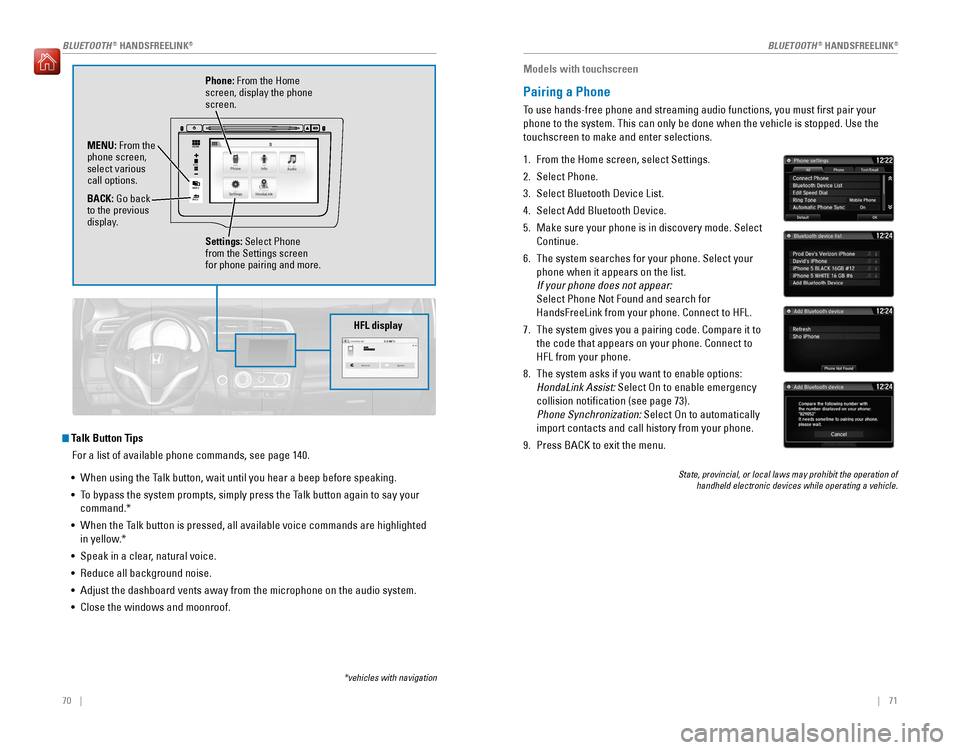
Phone: From the Home
screen, display the phone screen.
MENU: From the
phone screen, select various call options. BACK: Go back
to the previous
display.
Settings: Select Phone
from the Settings screen for phone pairing and more.
*vehicles with navigation
HFL display
Models with touchscreen
Pairing a Phone
To use hands-free phone and streaming audio functions, you must rst pair your phone to the system. This can only be done when the vehicle is stopped. Use the touchscreen to make and enter selections.
1. From the Home screen, select Settings.
2. Select Phone.3. Select Bluetooth Device List.
4. Select Add Bluetooth Device.
5. Make sure your phone is in discovery mode. Select Continue.
6. The system searches for your phone. Select your phone when it appears on the list.
If your phone does not appear:
Select Phone Not Found and search for HandsFreeLink from your phone. Connect to HFL.
7. The system gives you a pairing code. Compare it to the code that appears on your phone. Connect to HFL from your phone.
8. The system asks if you want to enable options:
HondaLink Assist: Select On to enable emergency
collision notication (see page 73). Phone Synchronization: Select On to automatically
import contacts and call history from your phone.
9. Press BACK to exit the menu.
State, provincial, or local laws may prohibit the operation of handheld electronic devices while operating a vehicle.
Page 40 of 75

72 || 73
BLUETOOTH ®
HANDSFREELINK ®
BLUETOOTH ®
HANDSFREELINK ®
Models with touchscreen
Making a Call
You can make a call using several methods.
Dialing a Number
Enter a 10-digit phone number to call.
Using voice commands
Press the Talk button before you say each command.
1. Say “Dial by number.”
2. Say the phone number: For example,
“ 3-1-0-5-5-5-1-2-3-4.”
3. The system begins to dial.
Using the touchscreen
Manual operation is limited while the vehicle is moving. Voice commands are always available.
1. From the Home screen, select Phone. 2.Select MENU.
3. Select Dial.
4. Enter the phone number. Select the green phone icon to call.
Using the Phonebook
When your phone is paired, its entire phonebook can be automatically imported to the system. Phone synchronization must be turned on.
Using voice commands
Press the Talk button before you say each command.
1. Say “Dial by name.”
2. Say the phonebook name and phone type. For example, “John Smith mobile.”
Using the touchscreen
Manual operation is limited while the vehicle is moving. Voice commands are always available.
1. From the Home screen, select Phone.2.Select MENU.
3. Select Phonebook.
4. Scroll through the list to ind the name and number you want to call, and select it to call.
Storing Speed Dial Entries
Store up to 20 numbers for quick dialing.
1. From the Home screen, select Phone. 2.Select MENU.
3. Select Edit Speed Dial, then select New Entry.
4. Select an entry method.5. If desired, you can create a voice tag for the
number. Follow the prompts.
Using Speed Dial
Make calls quickly using stored speed dial entries.
Using voice commands
Press the Talk button before you say each command.
1. Say “Dial by name.”
2. Say the stored voice tag name. For example, “John Smith.”
Using the touchscreen
1. From the Home screen, select Phone.
2. Scroll through the list to nd the entry you want to call, and select it to call.
HondaLink™ Assist
If your vehicle’s airbags deploy or if the unit detects that the vehicle is severely
impacted, your vehicle automatically attempts to connect to an operator. Your phone must be paired to the system and have good cellular connection. Visit www.
hondalink.com (U.S.) or honda.ca/hondalinkassist (Canada) for more information.
1. Make sure your phone is on and paired to Bluetooth®
HandsFreeLink ®
(see page 71).
2. Select Call Now, or the system automatically connects after 10 seconds. The vehicle information
and its position are sent to the operator.
3. Select Talk Now to immediately talk to the operator.
4. When the call is complete, select Hang Up or press the Hang-Up/Back button on the steering wheel.
Page 41 of 75

74 || 75
BLUETOOTH ®
HANDSFREELINK ®
BLUETOOTH ®
HANDSFREELINK ®
Models with touchscreen
SMS Text Messaging and E-Mail*
Receive and send messages from your paired and connected phone. Visit handsfreelink.com
(U.S.) or handsfreelink.ca
(Canada) to check phone compatibility.
Standard message rates apply with your phone service provider. This feature is limited while the vehicle is moving.
Receiving and Responding to Messages
When you receive a new message, a pop-up appears on the touchscreen. You can
view the message when the vehicle is stopped. You can also reply to it using xed
phrases or call the sender.
1. When the prompt appears, select Read.
2. The message is displayed, and the system reads it aloud.
To reply: With the message open, select Reply,
and choose one of the six available responses.
Select Send to send the message. You cannot create a new text message.
To call the sender: With the message open,
select Call.
Selecting an Account
If your phone has both text message and e-mail accounts, you can select only one of them at a time to be active and receive notiications.
1. From the Home screen, select Settings.
2. Select Phone.
3. Select Select Account.
4. Select Text Message or an e-mail account.
*if equipped
Models with touchscreen
Siri™ Eyes Free
Activate Siri through your vehicle when an iPhone®
is paired to the system. Visit
handsfreelink.com (U.S.) or handsfreelink.ca
(Canada) to check phone compatibility.
Here are some examples of Siri commands: “Call John Smith”“Read my new text message”“Find a nearby sushi restaurant” Notes: • Any requests that include visual feedback from Siri on your phone are not
displayed in the vehicle.
• Certain commands rely on the iPhone’s features and existing apps.
• To hear turn-by-turn directions or songs through the vehicle, set the audio source
to Bluetooth ®
Audio.
Siri and iPhone are trademarks of Apple, Inc.
“Remind me to pick up dinner” “Set up a meeting today at 3 p.m.”“Play song XYZ”
Smartphone screen
Talk button: Press and hold to activate Siri Eyes Free mode.
Say your command after you hear the Siri tone.
Hang-Up/Back button:
Press to deactivate Siri Eyes Free mode.
Page 43 of 75

78 || 79
NAVIGATION
NAVIGATION
Voice Prompt Volume
Adjust volume for navigation and voice command conrmation. This does not affect audio or Bluetooth®
HandsFreeLink ®
volume, which is controlled by the
volume bar.
1. From the Home screen, select Settings.
2. Select System.
3. Select Volume.
4. Adjust the level, or select off.
Voice Prompt
Turn the voice feedback feature on or off.
1. From the Home screen, select Settings.
2. Select System.
3. Select Voice Prompt.
4. Select On or Off.
Talk Button Tips
For a full list of navigation commands, see page 135.
• When using the Talk button, wait until you hear a beep before speaking.
• To bypass the system prompts, simply press the Talk button again to say your command.
• When the Talk button is pressed, all available voice commands are highlighted
in yellow.
• Speak in a clear, natural voice.
• Reduce all background noise.
• Adjust the dashboard vents away from the microphone on the audio system. • Close the windows and moonroof.
Entering a Destination
Use multiple methods to enter a destination.
Home Address
Store your home address in the system so you can easily route to it.
1. From the Home screen, select Settings.
2. Select Navigation.3. Select Edit Go Home (1 or 2).
4. Enter the address, and select OK when complete.
When your home address is stored, you can press the Talk button and say “Go
home” at any time. You can also select Go home from the navigation menu.
Street Address
Enter a street address using voice commands. Press the Talk button before saying each command.
You can also enter the address manually when the vehicle is stopped. From the map screen, press MENU and select Address. Follow the prompts.
U.S. models
1. From the Voice Portal screen, say “Address.”
2. The system prompts you to say the entire address. For example, say “1-2-3-4 Main Street,
Los Angeles, California.”
3. The system interprets the address by state, city,
street, and address number. If necessary, you may have to clarify similar matches.
4. Say “Set as destination” to set the route.
Canadian models
1. From the Voice Portal screen, say “Address.”
2. Follow the prompts.
Page 61 of 75

114 || 115
MAINTENANCE
MAINTENANCE
Maintenance Minder Service Codes
These codes indicate what services are due on your vehicle.
*1: If a message SERVICE does not appear more than 12 months after the display is reset, change the engine oil every year.
#: See information on maintenance and emissions warranty.
CODEMaintenance Main Items
A
Replace engine oi l*1
B
Replace engine oil and oil lter
Inspect front and rear brakes/service as necessary
Check parking brake adjustment
Inspect tie rod ends, steering gearbox, and boots
Inspect suspension component s
Inspect driveshaft boot s
Inspect brake hoses and lines (Including ABS/VSA)
Inspect all uid levels and condition of uids
Inspect exhaust system #
Inspect fuel lines and connections #
*2:If you drive in dusty conditions, replace the air cleaner element every 15,000 miles (24,000 km).*3:If you drive primarily in urban areas with high concentrations of soot in the air from industryand diesel-powered vehicles, replace the dust and pollen lter every 15,000 miles (24,000 km).
CODEMaintenance Sub Items
1
Rotate tires
2Replace air cleaner element *2
Replace dust and pollen lte r*3
Inspect drive belt
3
Replace transmission uid
4Replace spark plugs
Inspect valve clearance
5
Replace engine coolan t
Under the Hood
Opening the Hood
1. Park the vehicle on a level surface, and set the
parking brake.
2. Pull the hood release handle under the lower left corner of the dashboard.
3. Push up the hood latch lever in the center of the hood to release the lock mechanism, and open the hood.
4. Remove the support rod from the clamp using the grip. Mount the support rod in the hood.
When closing, remove the support rod, and stow it in the clamp, then gently lower the hood. Remove your hand at a height of approximately 12 inches (30 cm) and let the hood close.
Do not open the hood when the wiper arms are raised. The hood will strike the wipers, and may damage either the hood or the wipers.
NOTICE
Engine coolant reserve tank
Washer uid (blue cap)
Engine oil ll cap Engine oil dipstick (orange)
Brake uid (black cap) Battery
Radiator cap
Lever
Support rod Grip
Clamp