2016 HONDA CIVIC COUPE transmission
[x] Cancel search: transmissionPage 497 of 585
496
uuMaintenance Under the HooduBrake/Clutch*
Fluid
Maintenance
Brake/Clutch *
Fluid
Use the same fluid for bo th the brakes and clutch.
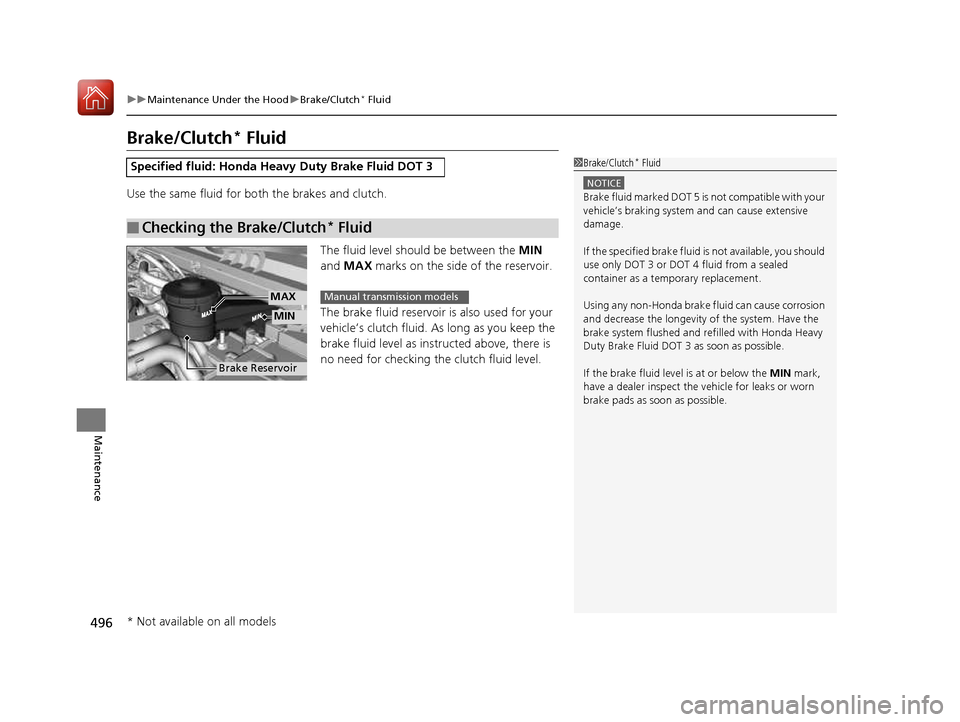
The fluid level should be between the MIN
and MAX marks on the side of the reservoir.
The brake fluid reservoir is also used for your
vehicle’s clutch fluid. As long as you keep the
brake fluid level as instru cted above, there is
no need for checking the clutch fluid level.
Specified fluid: Honda Heavy Duty Brake Fluid DOT 3
■Checking the Brake/Clutch *
Fluid
1Brake/Clutch *
Fluid
NOTICE
Brake fluid marked DOT 5 is not compatible with your
vehicle’s braking system and can cause extensive
damage. If the specified brake fluid is not available, you should
use only DOT 3 or DOT 4 fluid from a sealed
container as a tem porary replacement.
Using any non-Honda brake fluid can cause corrosion
and decrease the longevity of the system. Have the brake system flushed and re filled with Honda Heavy
Duty Brake Fluid DOT 3 as soon as possible.
If the brake fluid level is at or below the MIN mark,
have a dealer inspect the vehicle for leaks or worn
brake pads as soon as possible.
Brake Reservoir
MIN
MAXManual transmission models
* Not available on all models
16 CIVIC 2D HC2 (0A 01 0C)-31TBG6000.book 496 ページ >0>.>/6年>0月>/>0日 金曜日 午後4時>/6分
Page 532 of 585
531
Continued
Handling the Unexpected
If a Tire Goes Flat
Changing a Flat Tire
If a tire goes flat while driving, grasp
the steering wheel firmly, and brake gradually
to reduce speed. Then, stop in a safe plac e. Replace the flat tire with a compact
spare tire. Go to a dealer as soon as possib le to have the full-size tire repaired or
replaced. 1. Park the vehicle on firm, level, and non-slippery surface, and apply the parking brake.
2. Move the shift lever to
(P .
2. Move the shift lever to
(R .
3. Turn on the hazard warning lights an d turn the ignition switch to LOCK
(0*1
.
*1: Models with the smart entry system have an ENGINE START/STOP button instead of an
ignition switch.
1Changing a Flat Tire
Follow compact spare precautions:
Periodically check the tire pressure of the compact
spare. It should be set to the specified pressure.
Specified Pressure: 60 psi (420 kPa, 4.2 kgf/cm 2
)
When driving with the compact spare tire, keep the
vehicle speed under 50 mph (80 km/h). Replace with
a full-size tire as soon as possible.
The compact spare tire and wheel in your vehicle are
specifically for this model. Do not use them with
another vehicle. Do not us e another type of compact
spare tire or wheel with your vehicle.
Do not mount tire chains on a compact spare tire.
If a chain-mounted front tire goes flat, remove one of
the full-size rear tires and replace it with the compact
spare tire. Remove the flat front tire and replace it
with the full-size tire that was removed from the rear.
Mount the tire chains on the front tire.
NOTICE
Do not use the jack if it doesn’t work properly. Call
your dealer or a prof essional towing service.
Continuously variable transmission models
Manual transmission models
All models
16 CIVIC 2D HC2 (0A 01 0C)-31TBG6000.book 531 ページ >0>.>/6年>0月>/>0日 金曜日 午後4時>/6分
Page 539 of 585
538
uuEngine Does Not StartuIf the Smart Entry Remote Battery is Weak
Handling the Unexpected
If the Smart Entry Remote Battery is Weak
If the beeper sounds, the ENGINE START/STOP button flashes, and the engine
won’t start. The To Start, Hold Remote Near Start Button message appears on the driver
information interface.
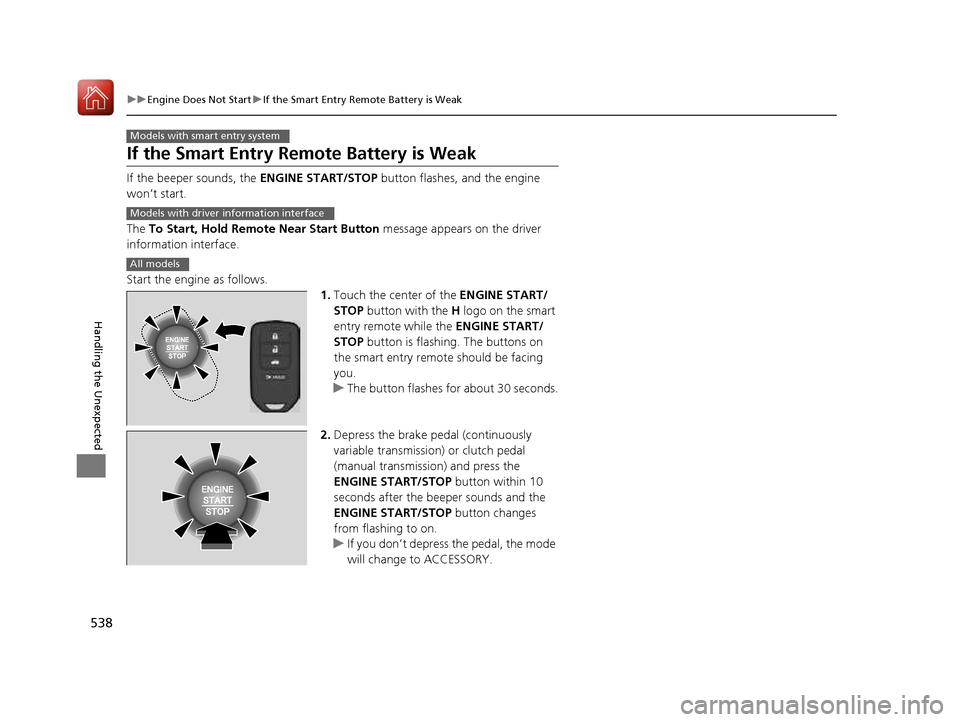
Start the engine as follows. 1.Touch the center of the ENGINE START/
STOP button with the H logo on the smart
entry remote while the ENGINE START/
STOP button is flashing. The buttons on
the smart entry remote should be facing
you.
uThe button flashes for about 30 seconds.
2. Depress the brake pedal (continuously
variable transmission) or clutch pedal
(manual transmission) and press the
ENGINE START/STOP button within 10
seconds after the beeper sounds and the
ENGINE START/STOP button changes
from flashing to on.
uIf you don’t depress the pedal, the mode
will change to ACCESSORY.
Models with smart entry system
Models with driver information interface
All models
16 CIVIC 2D HC2 (0A 01 0C)-31TBG6000.book 538 ページ >0>.>/6年>0月>/>0日 金曜日 午後4時>/6分
Page 540 of 585
539
uuEngine Does Not StartuEmergency Engine Stop
Handling the Unexpected
Emergency Engine Stop The ENGINE START/STOP button may be used to stop the engine due to an
emergency situation even while driving. If you must stop the engine, do either of the
following operations: • Press and hold the ENGINE START/STOP button for about two seconds.
• Firmly press the ENGINE START/STOP button twice.
The steering wheel will not lock. However, because turning off the engine disables
the power assist the engine provides to the steering and braking systems, it will
require significantly more physical effort an d time to steer and slow the vehicle. Use
both feet on the brake pedal to slow down the vehicle and stop immediately in a
safe place. With manual transmission models you can also downshift the
transmission to utilize engine braking.
The power mode is in ACCESSORY when the engine is stopped.
To change the mode to VEHICLE OFF, move the shift lever to
(P after the vehicle
comes to a complete stop. Then press the ENGINE START/STOP button twice without depressing the brake
pedal.
Models with smart entry system
1Emergency Engine Stop
Do not press the button while driving unless it is
absolutely necessary for th e engine to be switched
off.
Canadian models
16 CIVIC 2D HC2 (0A 01 0C)-31TBG6000.book 539 ページ >0>.>/6年>0月>/>0日 金曜日 午後4時>/6分
Page 544 of 585
543
Handling the Unexpected
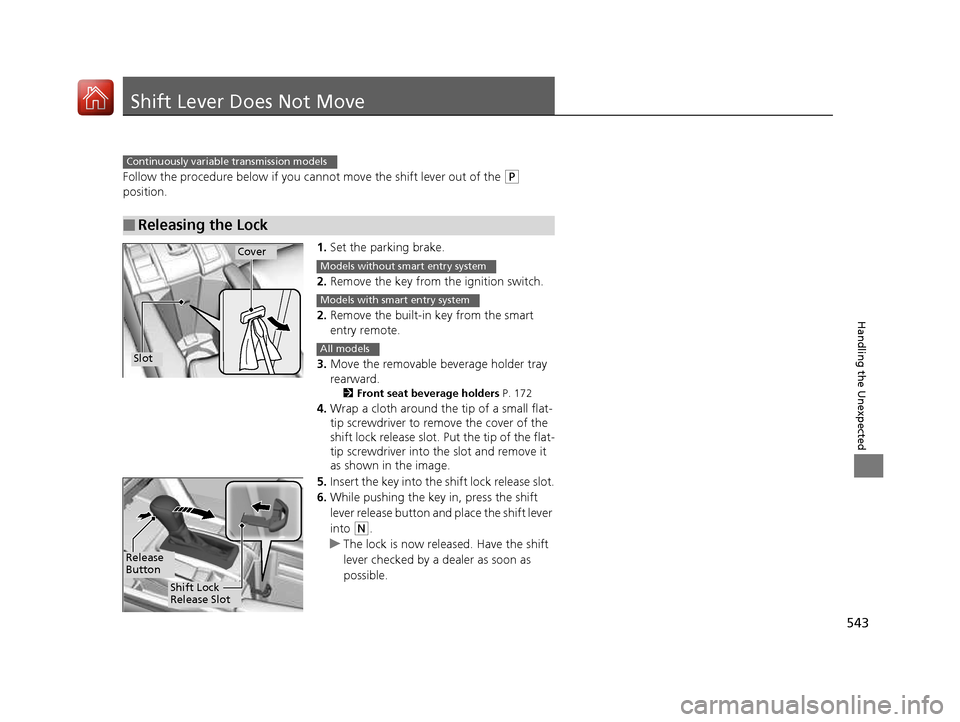
Shift Lever Does Not Move
Follow the procedure below if you cannot move the shift lever out of the (P
position.
1.Set the parking brake.
2. Remove the key from th e ignition switch.
2. Remove the built-in key from the smart entry remote.
3. Move the removable beverage holder tray rearward.
2 Front seat beverage holders P. 172
4. Wrap a cloth around the tip of a small flat-
tip screwdriver to remo ve the cover of the
shift lock release slot. Put the tip of the flat-tip screwdriver into the slot and remove it
as shown in the image.
5. Insert the key into the shift lock release slot.
6. While pushing the key in, press the shift
lever release button and place the shift lever
into
(N .
uThe lock is now released. Have the shift
lever checked by a de aler as soon as
possible.
■Releasing the Lock
Continuously variable transmission models
Slot
Cover
Models without smart entry system
Models with smart entry system
All models
Release
Button
Shift Lock
Release Slot
16 CIVIC 2D HC2 (0A 01 0C)-31TBG6000.book 543 ページ >0>.>/6年>0月>/>0日 金曜日 午後4時>/6分
Page 549 of 585
548
uuIndicator, Coming On/BlinkinguIf the Brake System Indicator (Red) Comes On or Blinks
Handling the Unexpected
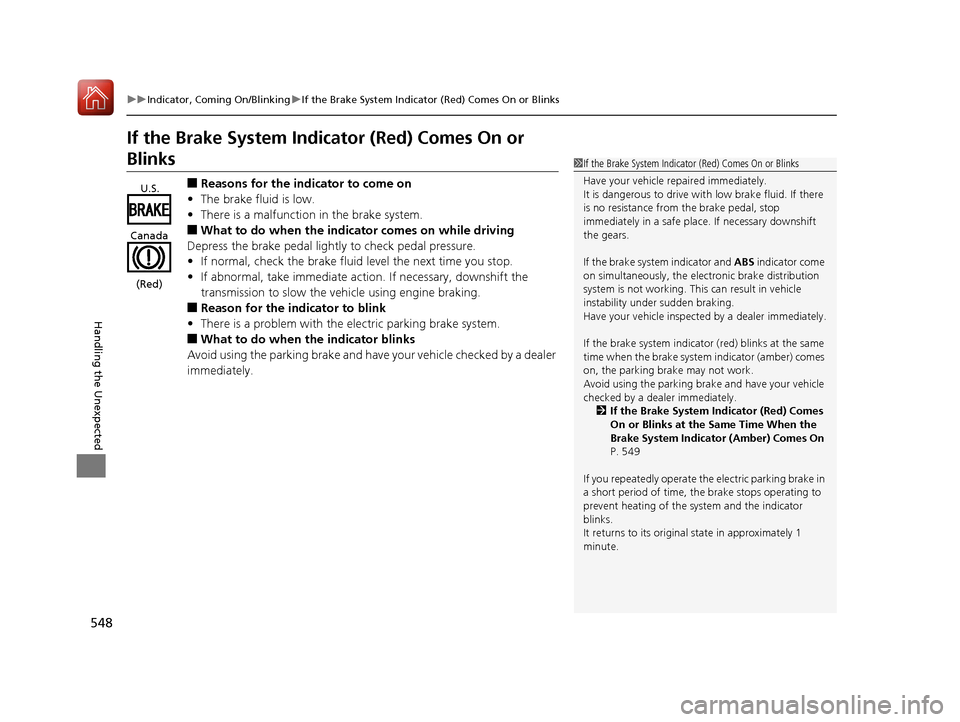
If the Brake System Indicator (Red) Comes On or
Blinks■Reasons for the indicator to come on
• The brake fluid is low.
• There is a malfunction in the brake system.
■ What to do when the indicator comes on while driving
Depress the brake pedal lightly to check pedal pressure.
• If normal, check the brake fluid level the next time you stop.
• If abnormal, take immediate action. If necessary, downshift the
transmission to slow the vehicle using engine braking.
■ Reason for the indicator to blink
• There is a problem with the electric parking brake system.
■ What to do when the indicator blinks
Avoid using the parking brake and have your vehicle checked by a dealer
immediately.1If the Brake System Indicator (Red) Comes On or Blinks
Have your vehicle re paired immediately.
It is dangerous to drive with low brake fluid. If there
is no resistance from the brake pedal, stop
immediately in a safe plac e. If necessary downshift
the gears.
If the brake system indicator and ABS indicator come
on simultaneously, the elec tronic brake distribution
system is not working. Th is can result in vehicle
instability under sudden braking.
Have your vehicle inspecte d by a dealer immediately.
If the brake system indicator (red) blinks at the same
time when the brake system indicator (amber) comes on, the parking br ake may not work.
Avoid using the parking brak e and have your vehicle
checked by a dealer immediately. 2 If the Brake System Indicator (Red) Comes
On or Blinks at the Same Time When the
Brake System Indicator (Amber) Comes On
P. 549
If you repeatedly operate th e electric parking brake in
a short period of time, the brake stops operating to
prevent heating of the system and the indicator blinks.
It returns to its original state in approximately 1
minute.
U.S.
Canada
(Red)
16 CIVIC 2D HC2 (0A 01 0C)-31TBG6000.book 548 ページ >0>.>/6年>0月>/>0日 金曜日 午後4時>/6分
Page 550 of 585
549
uuIndicator, Coming On/BlinkinguIf the Brake System Indicator (Red) Comes On or Blinks at the Same Time When the Brake System Indicator (Amber) Comes On
Handling the Unexpected
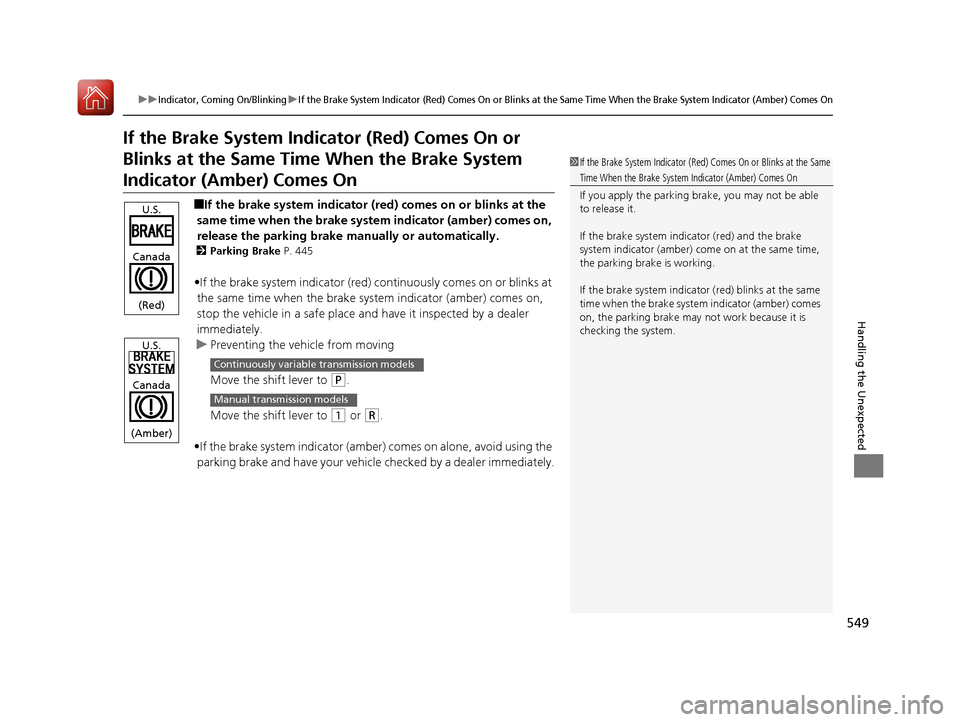
If the Brake System Indicator (Red) Comes On or
Blinks at the Same Time When the Brake System
Indicator (Amber) Comes On
■If the brake system indicator (red ) comes on or blinks at the
same time when the brake syst em indicator (amber) comes on,
release the parking brake ma nually or automatically.
2 Parking Brake P. 445
• If the brake system indicator (red) continuously comes on or blinks at
the same time when the brake system indicator (amber) comes on,
stop the vehicle in a safe place a nd have it inspected by a dealer
immediately.
uPreventing the ve hicle from moving
Move the shift lever to
(P .
Move the shift lever to
(1 or (R.
• If the brake system indicator (amber ) comes on alone, avoid using the
parking brake and have your vehicle checked by a dealer immediately.
1If the Brake System Indicator (Red) Comes On or Blinks at the Same
Time When the Brake System Indicator (Amber) Comes On
If you apply the parking br ake, you may not be able
to release it.
If the brake system indicator (red) and the brake
system indicator (amber) come on at the same time,
the parking brake is working.
If the brake system indicator (red) blinks at the same
time when the brake system indicator (amber) comes on, the parking brake may not work because it is
checking the system.
U.S.
Canada
(Red)
U.S.
Canada
(Amber)
Continuously variable transmission models
Manual transmission models
16 CIVIC 2D HC2 (0A 01 0C)-31TBG6000.book 549 ページ >0>.>/6年>0月>/>0日 金曜日 午後4時>/6分
Page 553 of 585
552
Handling the Unexpected
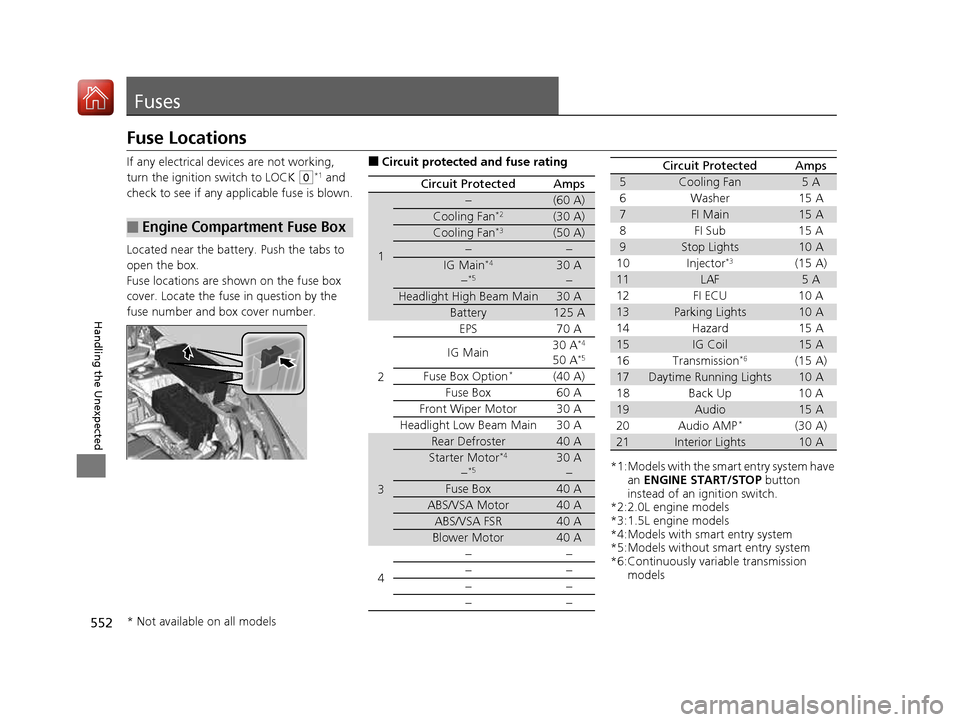
Fuses
Fuse Locations
If any electrical devices are not working,
turn the ignition switch to LOCK
(0*1
and
check to see if any appl icable fuse is blown.
Located near the battery. Push the tabs to
open the box.
Fuse locations are shown on the fuse box
cover. Locate the fuse in question by the
fuse number and box cover number.
■Engine Compartment Fuse Box
■ Circuit protected and fuse rating
Circuit ProtectedAmps
1
−(60 A)
Cooling Fan *2(30 A)
Cooling Fan*3(50 A)
−−
IG Main*4
− *530 A
−
Headlight High Beam Main30 A
Battery125 A
2
EPS70 A
IG Main 30 A
*4
50 A *5
Fuse Box Option *(40 A)
Fuse Box 60 A
Front Wiper Motor30 A
Headlight Low Beam Main 30 A
3
Rear Defroster40 A
Starter Motor *4
− *530 A
−
Fuse Box40 A
ABS/VSA Motor40 A
ABS/VSA FSR40 A
Blower Motor40 A
4 −− −− −−−−
*1:Models with the sma
rt entry system have
an ENGINE START/STOP button
instead of an ignition switch.
*2:2.0L engine models
*3:1.5L engine models
*4:Models with smart entry system
*5:Models without smart entry system
*6:Continuously variable transmission
models
5Cooling Fan5A
6W ash er 1 5A
7FI Main15 A
8F I S ub 1 5A
9Stop Lights10 A
10 Injector *3
(15 A)
11LAF5A
12 FI ECU 10 A
13Parking Lights10 A
14 Hazard 15 A
15IG Coil15 A
16 Transmission *6
(15 A)
17Daytime Running Lights10 A
18 Back Up 10 A
19Audio15 A
20 Audio AMP *
(30 A)
21Interior Lights10 A
Circuit ProtectedAmps
* Not available on all models
16 CIVIC 2D HC2 (0A 01 0C)-31TBG6000.book 552 ページ >0>.>/6年>0月>/>0日 金曜日 午後4時>/6分