2016 HONDA CIVIC COUPE steering wheel
[x] Cancel search: steering wheelPage 422 of 585
Continued421
uuWhen DrivinguAdaptive Cruise Control (ACC) with Low Speed Follow (LSF)*
Driving
■
Automatic ca ncellation
The beeper sounds and a message appears on the driver information interface when
ACC with LSF is automatically canceled. Any of these conditions may cause the ACC
with LSF to automatically cancel: • Bad weather (rain, fog, snow, etc.)
• When the radar sensor in the lower bumper next to the fog light *
gets dirty.
• The vehicle ahead of yo u cannot be detected.
• An abnormal tire condition is detected, or the tires are skidding.
• Driving on a mountainous road, or driving off road for extended periods.
• Abrupt steering wheel movement.
• When the ABS, VSA ® or CMBS TM
is activated.
• When the ABS or VSA ® system indicator comes on.
• When the vehicle is stopped on a very steep slope.
• When you manually apply the parking brake.
• When the detected vehicle within the AC C with LSF range is too close to your
vehicle.
• The camera behind the rearview mirror, or the area around the camera, including
the windshield, gets dirty.
The ACC with LSF automatic cancellation ca n be also triggered by the following
causes. In these cases, the parking brake will be automatically applied.
• The driver’s seat belt is unfastene d when the vehicle is stationary.
• The vehicle stops for more than 10 minutes.
• The engine is turned off.1Automatic cancellation
Even though ACC with LSF has been automatically
canceled, you can still resu me the prior set speed.
Wait until the condition that caused ACC with LSF to
cancel improves, then press the –/SET button.
* Not available on all models
16 CIVIC 2D HC2 (0A 01 0C)-31TBG6000.book 421 ページ >0>.>/6年>0月>/>0日 金曜日 午後4時>/6分
Page 425 of 585
424
uuWhen DrivinguRoad Departure Mitigation (RDM) System*
Driving
Road Departure Mitigation (RDM) System *
Alerts and helps to assist you when the sy stem detects a possibility of your vehicle
unintentionally crossing over detected lane markings.
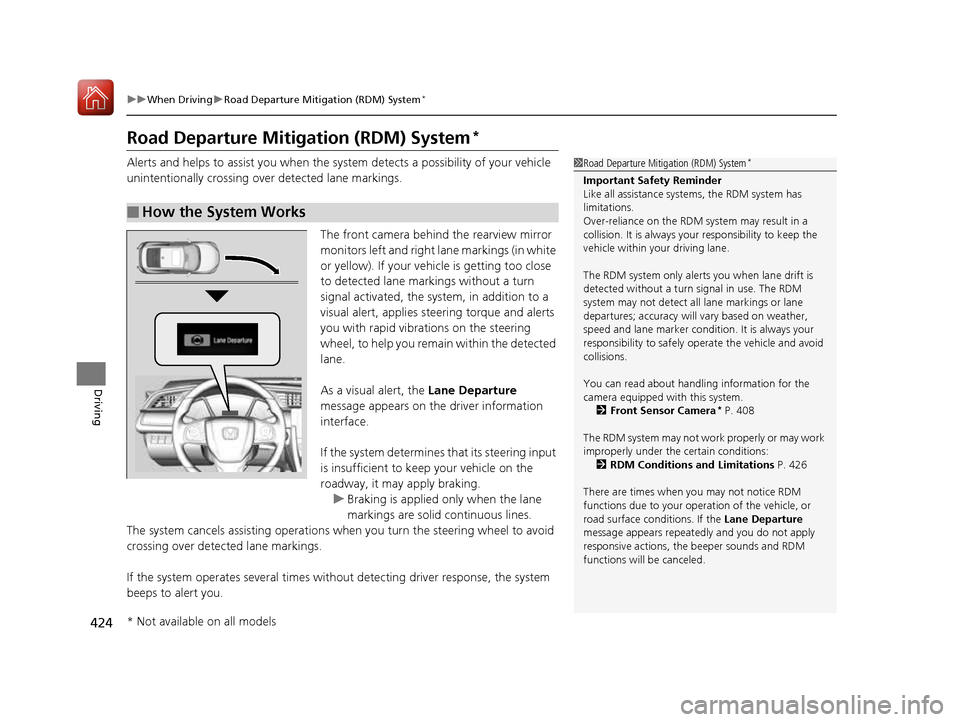
The front camera behind the rearview mirror monitors left and right lane markings (in white
or yellow). If your vehicle is getting too close
to detected lane markings without a turn
signal activated, the sy stem, in addition to a
visual alert, applies st eering torque and alerts
you with rapid vibrations on the steering
wheel, to help you remain within the detected lane.
As a visual alert, the Lane Departure
message appears on the driver information interface.
If the system determines that its steering input
is insufficient to keep your vehicle on the
roadway, it may apply braking.
uBraking is applied only when the lane
markings are solid continuous lines.
The system cancels assisting operations wh en you turn the steering wheel to avoid
crossing over detected lane markings.
If the system operates several times without detecting driver response, the system
beeps to alert you.
■How the System Works
1Road Departure Mitigation (RDM) System *
Important Safety Reminder
Like all assistance systems, the RDM system has
limitations.
Over-reliance on the RDM system may result in a
collision. It is always your responsibility to keep the
vehicle within your driving lane.
The RDM system only alerts you when lane drift is
detected without a turn signal in use. The RDM
system may not detect all lane markings or lane
departures; accuracy will vary based on weather,
speed and lane marker condi tion. It is always your
responsibility to sa fely operate the vehicle and avoid
collisions.
You can read about handling information for the
camera equipped with this system.
2 Front Sensor Camera *
P. 408
The RDM system may not wo rk properly or may work
improperly under the certain conditions: 2 RDM Conditions and Limitations P. 426
There are times when you may not notice RDM
functions due to your opera tion of the vehicle, or
road surface conditions. If the Lane Departure
message appears repeated ly and you do not apply
responsive actions, the beeper sounds and RDM
functions will be canceled.
* Not available on all models
16 CIVIC 2D HC2 (0A 01 0C)-31TBG6000.book 424 ページ >0>.>/6年>0月>/>0日 金曜日 午後4時>/6分
Page 426 of 585
Continued425
uuWhen DrivinguRoad Departure Mitigation (RDM) System*
Driving
The system becomes ready to start sear
ching for lane markings when all the
following conditions are met: • The vehicle is traveling between about 45 and 90 mph (72 and 145 km/h).
• The vehicle is on a straight or slightly curved road.
• The turn signals are off.
• The brake pedal is not depressed.
• The wipers are not in continuous operation.
• The system makes a determination that th e driver is not actively accelerating,
braking or steering.
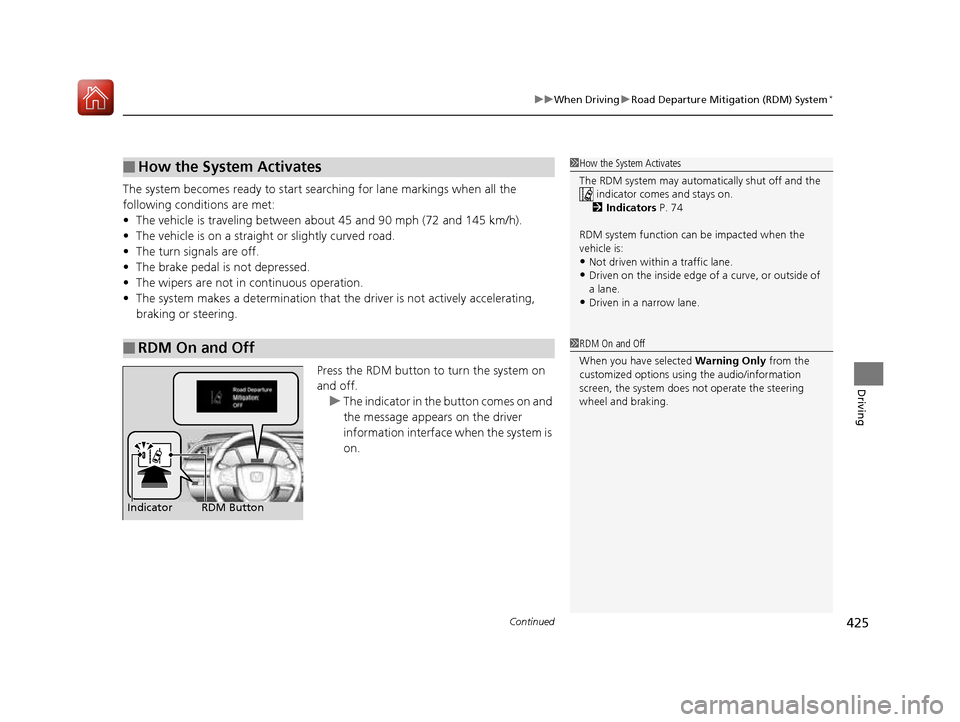
Press the RDM button to turn the system on and off.
uThe indicator in the button comes on and
the message appears on the driver
information interface when the system is
on.
■How the System Activates
■RDM On and Off
1How the System Activates
The RDM system may automa tically shut off and the
indicator comes and stays on.
2 Indicators P. 74
RDM system function can be impacted when the
vehicle is: • Not driven within a traffic lane.
• Driven on the inside edge of a curve, or outside of
a lane.
• Driven in a narrow lane.
1RDM On and Off
When you have selected Warning Only from the
customized options using the audio/information
screen, the system does not operate the steering
wheel and braking.
RDM Button
Indicator
16 CIVIC 2D HC2 (0A 01 0C)-31TBG6000.book 425 ページ >0>.>/6年>0月>/>0日 金曜日 午後4時>/6分
Page 429 of 585
428
uuWhen DrivinguLane Keeping Assist System (LKAS)*
Driving
Lane Keeping Assist System (LKAS) *
Provides steering input to help keep the vehicle in the middle of a detected lane and
provides tactile and visual alerts if the ve hicle is detected drifting out of its lane.
1Lane Keeping Assist System (LKAS)*
Important Safety Reminders
The LKAS is for your convenience only. It is not a
substitute for your vehicl e control. The system does
not work if you take y our hands off the steering
wheel or fail to steer the vehicle.
2 Driver Information Interface Warning and
Information Messages *
P. 93
Do not place objects on the instrument panel.
Objects may reflect on th e front windshield and
prevent correct detectio n of the traffic lanes.
LKAS only alerts you when lane drift is detected
without a turn signal in us e. The LKAS may not detect
all lane markings or lane departures; accuracy will
vary based on weather, speed, and lane marker
condition.It is always your responsibility to safely operate the
vehicle and avoid collisions.
The LKAS is convenient when it is used on freeways.
The LKAS may not work properly or may work
improperly under the certain conditions:
2 LKAS Conditions and Limitations P. 433
You can read about handling information for the
camera equipped with this system. 2 Front Sensor Camera *
P. 408
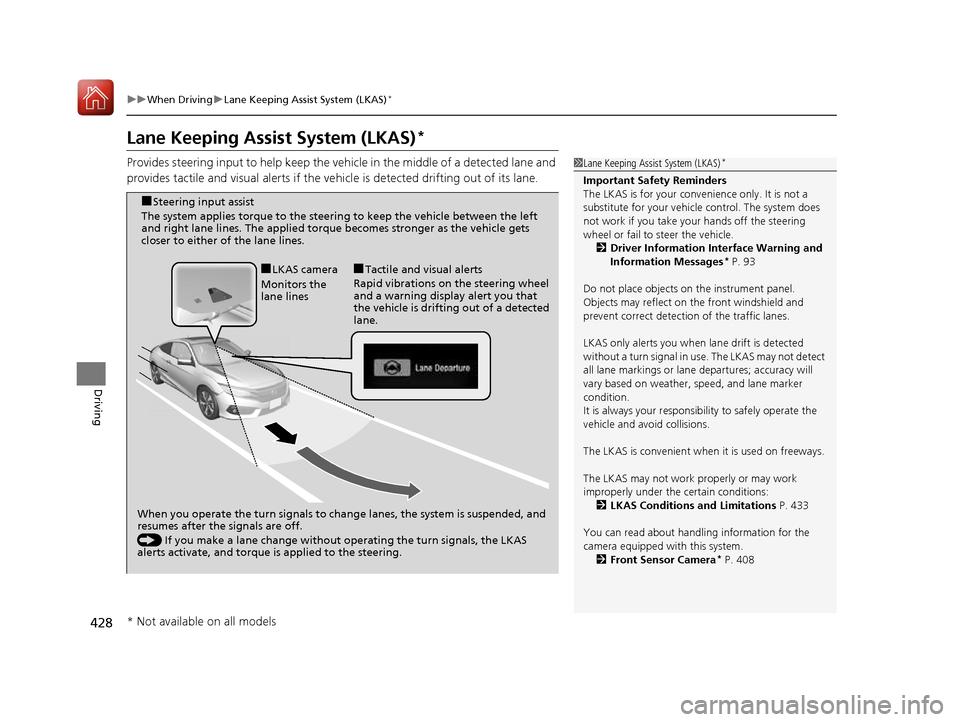
When you operate the turn signals to chan ge lanes, the system is suspended, and
resumes after the signals are off.
() If you make a lane change without operating the turn signals, the LKAS
alerts activate, and torque is applied to the steering.
■
LKAS camera
Monitors the
lane lines ■
Tactile and visual alerts
Rapid vibrations on the steering wheel
and a warning display alert you that
the vehicle is drifting out of a detected lane.
■
Steering input assist
The system applies torque to the steering to keep the vehicle between the left
and right lane lines. The applied torque becomes stronger as the vehicle gets
closer to either of the lane lines.
* Not available on all models
16 CIVIC 2D HC2 (0A 01 0C)-31TBG6000.book 428 ページ >0>.>/6年>0月>/>0日 金曜日 午後4時>/6分
Page 430 of 585
Continued429
uuWhen DrivinguLane Keeping Assist System (LKAS)*
Driving
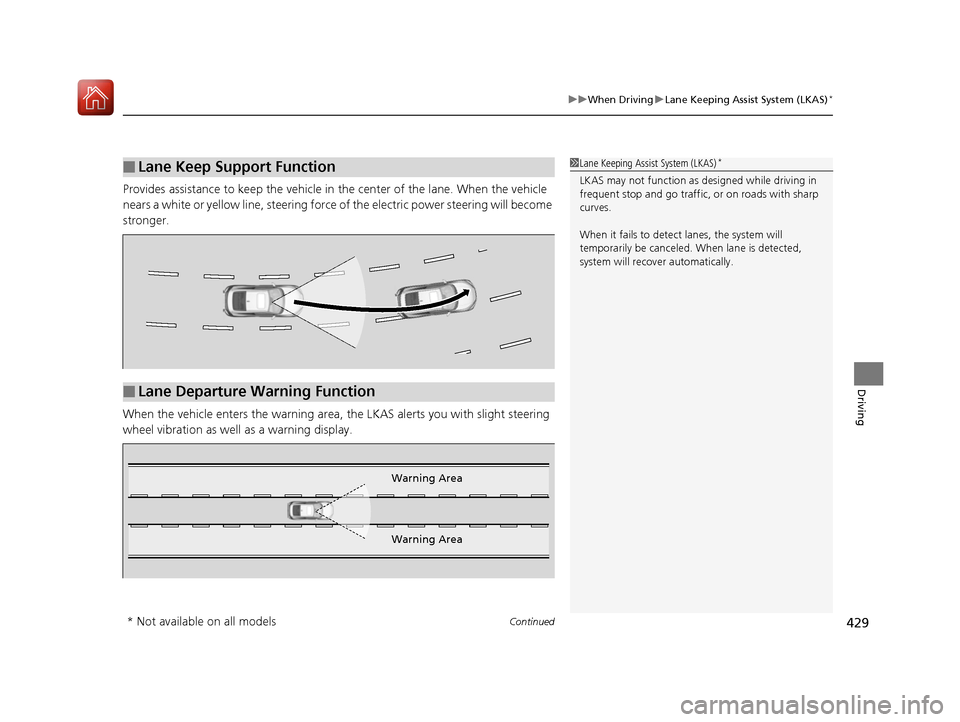
Provides assistance to keep the vehicle in the center of the lane. When the vehicle
nears a white or yellow line, steering force of the electric power steering will become
stronger.
When the vehicle enters the warning area,
the LKAS alerts you with slight steering
wheel vibration as well as a warning display.
■Lane Keep Support Function1Lane Keeping Assist System (LKAS) *
LKAS may not function as designed while driving in
frequent stop and go traffic, or on roads with sharp
curves.
When it fails to detect lanes, the system will
temporarily be canceled. When lane is detected,
system will recover automatically.
■Lane Departure Warning Function
Warning Area
Warning Area
* Not available on all models
16 CIVIC 2D HC2 (0A 01 0C)-31TBG6000.book 429 ページ >0>.>/6年>0月>/>0日 金曜日 午後4時>/6分
Page 433 of 585
432
uuWhen DrivinguLane Keeping Assist System (LKAS)*
Driving
■
The system operation is suspended if
you:
• Set the wipers to continuous operation.
uTurning the wipers off resumes the
LKAS.
• Set the wiper switch to AUTO and the
wipers operate continuously.
uThe LKAS resumes when the wipers stop
or operate intermittently.
• Decrease the vehicle speed to 40 mph (64
km/h) or less.
uIncreasing the vehicle speed to 45 mph
(72 km/h) or more resumes the LKAS.
• Depress the brake pedal.
uThe LKAS resumes and starts detecting
the lane lines again once you release the
brake pedal.
■ The LKAS may automatically be suspended when:
• The system fails to detect lane lines.
• The steering wheel is quickly turned.
• You fail to steer the vehicle.
• The vehicle runs on a curved road over the speed limit.
• Driving through a sharp curve.
• Driving at a speed in excess of approximately 90 mph (145 km/h).
• The ABS or VSA system engages.
Once these conditions no longer exis t, the LKAS automatically resumes.
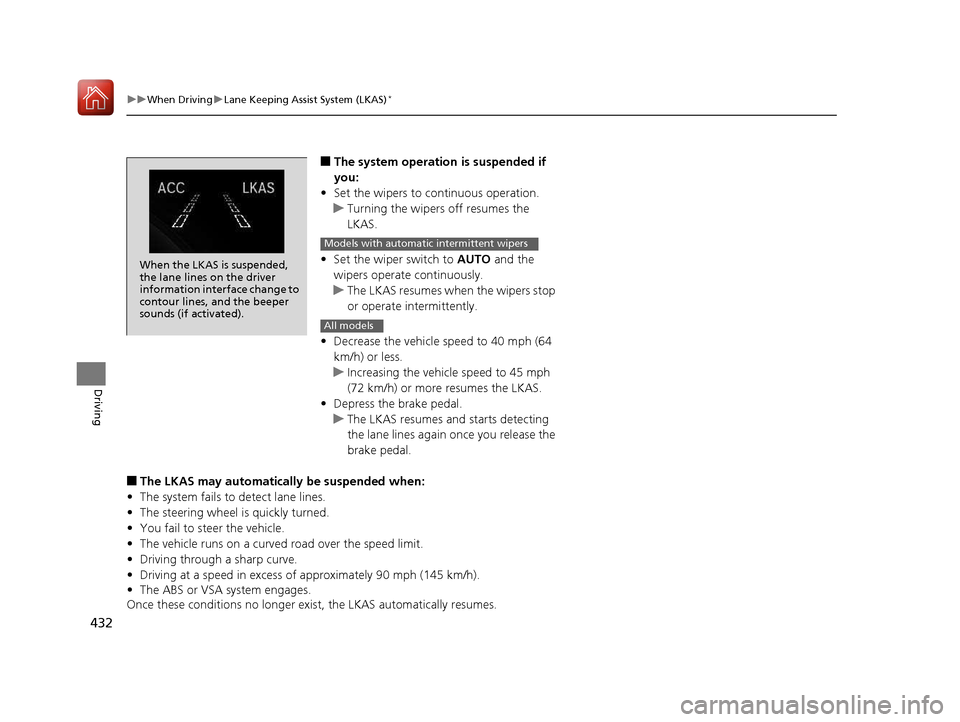
When the LKAS is suspended,
the lane lines on the driver
information interface change to
contour lines, and the beeper
sounds (if activated).
Models with automatic intermittent wipers
All models
16 CIVIC 2D HC2 (0A 01 0C)-31TBG6000.book 432 ページ >0>.>/6年>0月>/>0日 金曜日 午後4時>/6分
Page 438 of 585
437
uuWhen DrivinguAgile Handling Assist System
Driving
Agile Handling Assist System
Lightly brakes selective wheels, as needed, when you turn the steering wheel, and
helps support the vehicle’s stability and performance during cornering.
1Agile Handling Assist System
The agile handling assist system cannot enhance
stability in all driving situat ions. You still need to drive
and corner at speeds appr opriate for the conditions
and always leave a sufficient margin of safety.
When the VSA ® indicator comes on and stays on
while driving, the agile handling assist system does not activate.
You may hear a sound coming from the engine
compartment while the system is activated. This is normal.
16 CIVIC 2D HC2 (0A 01 0C)-31TBG6000.book 437 ページ >0>.>/6年>0月>/>0日 金曜日 午後4時>/6分
Page 441 of 585
440
uuWhen DrivinguTire Pressure Monitoring System (TPMS)
Driving
Tire Pressure Monitoring System (TPMS)
Instead of directly measuring the pressure in each tire, the TPMS on this vehicle
monitors and compares the rolling radius and rotational characteristics of each
wheel and tire while you are driving to determine if one or more tires are
significantly under-inflated. This will caus e the low tire pressure/TPMS indicator to
come on and a message to appear on the driver information interface*
.
You must start TPMS calibration every time you:• Adjust the pressure in one or more tires.
• Rotate the tires.
• Replace one or more tires.
Before calibrating the TPMS: • Set the cold tire pressu re in all four tires.
2 Checking Tires P. 510
Make sure: • The vehicle is at a complete stop.
• The shift lever is in
(N .
• The shift lever is in
(P .
• The ignition switch is in ON
(w *1
.
*1: Models with the smart entry system have an ENGINE START/STOP button instead of an
ignition switch.
■TPMS Calibration
U.S. models
1Tire Pressure Monitoring System (TPMS)
The system does not monitor the tires when driving
at low speed.
Conditions such as low ambient temperature and
altitude change directly a ffect tire pressure and can
trigger the low tire pressure/TPMS indicator to come on.
Tire pressure checked and inflated in: • Warm weather can beco me under-inflated in
colder weather.
• Cold weather can become over-inflated in warmer
weather.
The low tire pressure indica tor will not come on as a
result of over inflation.
The TPMS may not function pr operly if tire type and
size are mixed. Make sure to use the same size and
type of tire. 2 Checking and Maintaining Tires P. 510
The low tire pressure/TPMS indicator may come on
with a delay or may not come on at all when:
• You rapidly accelerate, decelerate, or turn the
steering wheel.
• You drive on snowy or slippery roads.
• Snow chains are used.
The low tire pressure/TPMS indicator may come on
under the following conditions:
• A compact spare tire is used.
• There is a heavier and une ven load on the tires,
such as when towing a trailer, than the condition at calibration.
• Snow chains are used.
Manual transmission models
Continuously variable transmission models
All models
* Not available on all models
16 CIVIC 2D HC2 (0A 01 0C)-31TBG6000.book 440 ページ >0>.>/6年>0月>/>0日 金曜日 午後4時>/6分