Page 175 of 585
uuInterior Lights/Interior Convenience ItemsuInterior Convenience Items
174
Controls
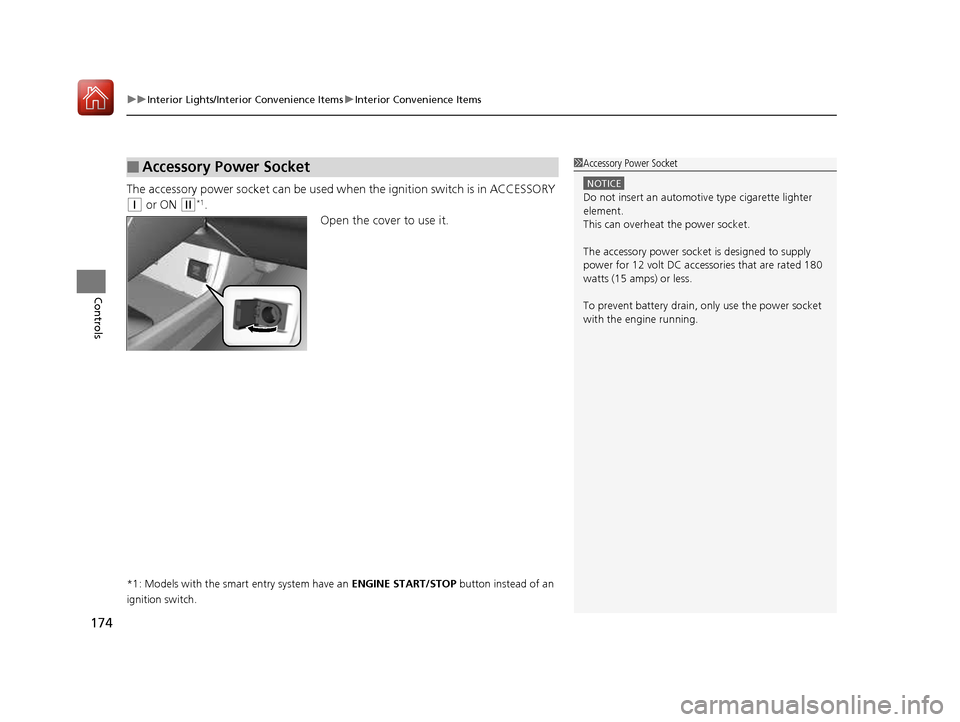
The accessory power socket can be used wh en the ignition switch is in ACCESSORY
(q or ON (w *1
.
Open the cover to use it.
*1: Models with the smart entry system have an ENGINE START/STOP button instead of an
ignition switch.
■Accessory Power Socket1Accessory Power Socket
NOTICE
Do not insert an automotive type cigarette lighter
element.
This can overheat the power socket.
The accessory power socket is designed to supply
power for 12 volt DC access ories that are rated 180
watts (15 amps) or less.
To prevent battery drain, only use the power socket
with the engine running.
16 CIVIC 2D HC2 (0A 01 0C)-31TBG6000.book 174 ページ >0>.>/6年>0月>/>0日 金曜日 午後4時>/6分
Page 176 of 585

Continued175
uuInterior Lights/Interior Convenience ItemsuInterior Convenience Items
Controls
To use the wireless charger, the power mode must be in ACCESSORY or ON.
Charge a compatible device on the ar ea indicated by the mark as follows:
1. To turn the system on and off, press and
hold the (power) button.
uWhen the system is activated, the green
indicator light comes on.
2. Place the device you want to charge on the charging area.
uThe system will au tomatically start
charging the device, and the amber
indicator light will come on.
uMake sure that the device is compatible
with the system, and placed with the
rechargeable side in the center of the
charging area.
3. When charging is completed, the green
indicator light will come on.
uDepending on the device, the amber
indicator light will stay on.
■Wireless Charger *
Canadian models1Wireless Charger
*
This system consumes a lot of power. Do not use the system for a long time when the engine is not
running. This may weaken the battery, making it
difficult to start the engine.
When using the wireless charger, check the user’s manual
that came with the compatible device you want to charge.
3CAUTION
Metal objects between the charge pad
and the device to be charged will get
hot and can burn you. • Always remove foreign objects from
the charge pad before charging the
device.
• Be sure the surface is clear of dust and
other debris before charging.
• Do not spill liquids (i. e. water, drinks,
etc.) on the charger and the device.
• Do not use oil, grease, alcohol,
benzine or thinner for cleaning the
charge pad.
• Do not cover the system with towels,
clothing, or other objects while
charging etc.
• Avoid spraying aerosols which may
come in contact with the charge pad surface.
Green Indicator
Amber Indicator
Charging Area (Power) Button
* Not available on all models
16 CIVIC 2D HC2 (0A 01 0C)-31TBG6000.book 175 ページ >0>.>/6年>0月>/>0日
金曜日 午後4時>/6分
Page 177 of 585
uuInterior Lights/Interior Convenience ItemsuInterior Convenience Items
176
Controls
■ When charging does not start
Perform one of the solution s in the following table.
IndicatorCauseSolution
Green
&
AmberBlinking
simulta- neously
There is an obstacle(s) between
the charging area and the
device.Remove the
obstacle(s).
The device is not within the
charging area. Move the device to the
center of the charging
area where is
located.
AmberBlinkingThe wireless charger is faulty.Contact a dealer for repairs.
1Wireless Charger
*
NOTICE
Do not place any magneti
c recording media or
precision machines within the charging area while charging.
The data on your cards such as credit cards can be
lost because of the magnetic effect. This magnetic
effect can also affect th e operation of precision
machines such as watches.
“Qi” and marks are the registered trademarks
owned by Wire less Power Consortium (WPC).
In the following cases, ch arging may stop or not start:
• The device is already fully charged.
• The temperature of the device is extremely high while charging.
• You are at a place that emits strong
electromagnetic wave or noises, such as a TV
station, electric power plant, or gas station.
A device may not charge if the size or shape of its rechargeable
side is not appropriate for use with the charging area.
Not all devices are compatible with the system.
During the charging phase, it is normal for the charging area and device to heat up.
Changing may be briefl y interrupted when:
• Both doors and the trunk are closed
- to avoid interference with the proper functioning
of the smart entry system.
• The position of the device is altered.
Do not charge more than one device at a time on a
charging area.
* Not available on all models
16 CIVIC 2D HC2 (0A 01 0C)-31TBG6000.book 176 ページ >0>.>/6年>0月>/>0日 金曜日 午後4時>/6分
Page 178 of 585
Continued177
uuInterior Lights/Interior Convenience ItemsuInterior Convenience Items
Controls
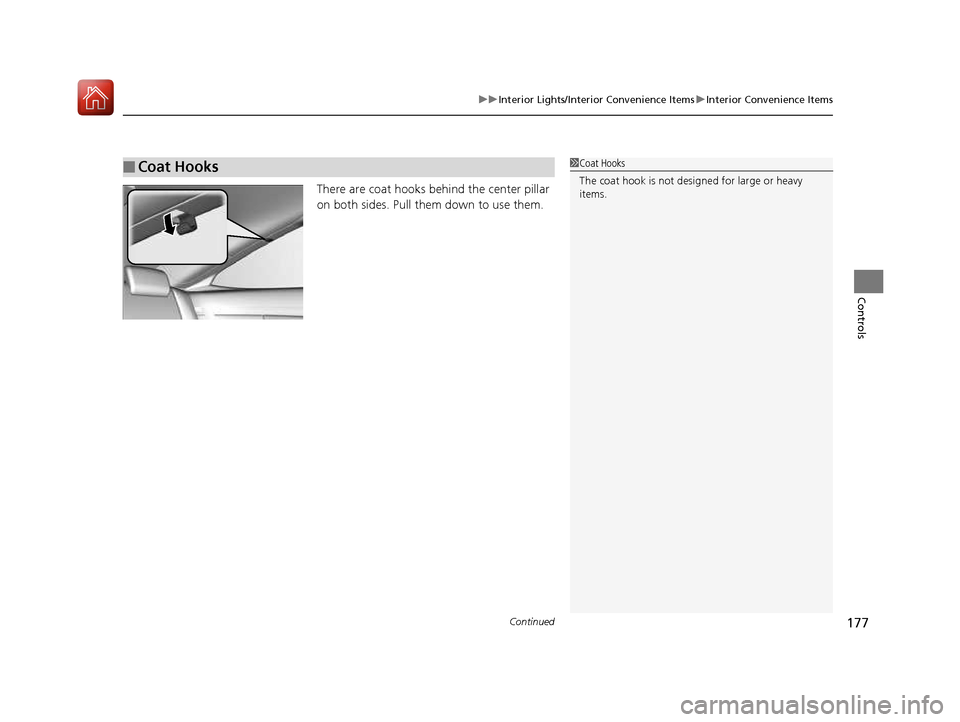
There are coat hooks behind the center pillar
on both sides. Pull them down to use them.
■Coat Hooks1Coat Hooks
The coat hook is not designed for large or heavy
items.
16 CIVIC 2D HC2 (0A 01 0C)-31TBG6000.book 177 ページ >0>.>/6年>0月>/>0日 金曜日 午後4時>/6分
Page 179 of 585
uuInterior Lights/Interior Convenience ItemsuInterior Convenience Items
178
Controls
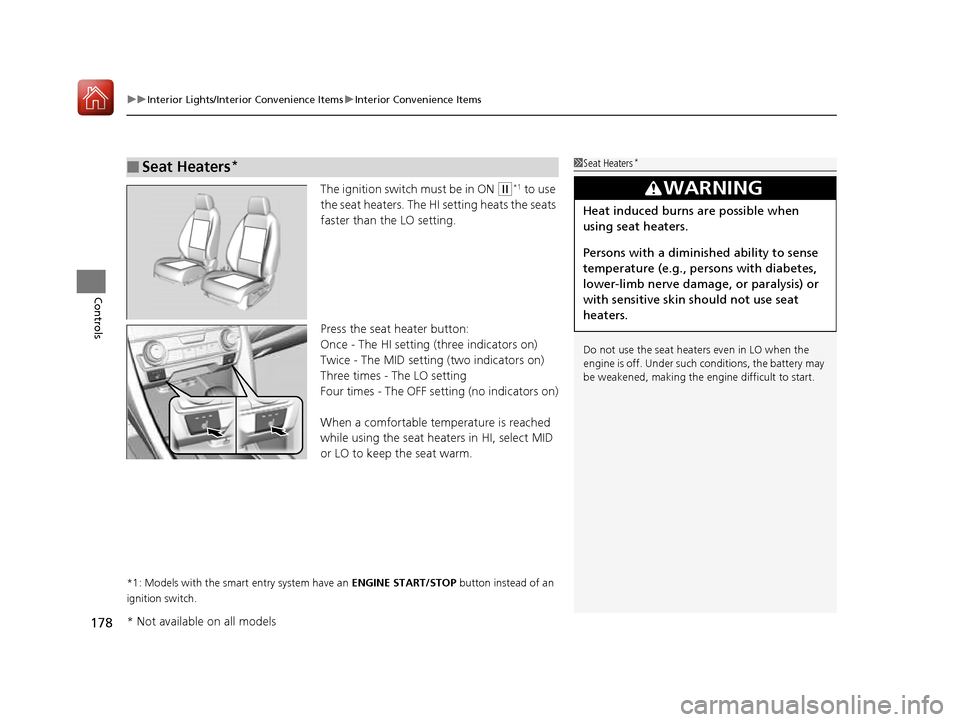
The ignition switch must be in ON (w *1
to use
the seat heaters. The HI setting heats the seats
faster than the LO setting.
Press the seat heater button:
Once - The HI setting (three indicators on)
Twice - The MID setting (two indicators on)
Three times - The LO setting
Four times - The OFF se tting (no indicators on)
When a comfortable temperature is reached
while using the seat heaters in HI, select MID
or LO to keep the seat warm.
*1: Models with the smart entry system have an ENGINE START/STOP button instead of an
ignition switch.
■Seat Heaters *1Seat Heaters
*
Do not use the seat heaters even in LO when the
engine is off. Under such conditions, the battery may
be weakened, making the engine difficult to start.
3WARNING
Heat induced burns are possible when
using seat heaters.
Persons with a diminished ability to sense
temperature (e.g., persons with diabetes,
lower-limb nerve damage, or paralysis) or
with sensitive skin should not use seat
heaters.
* Not available on all models
16 CIVIC 2D HC2 (0A 01 0C)-31TBG6000.book 178 ページ >0>.>/6年>0月>/>0日 金曜日 午後4時>/6分
Page 239 of 585
238
uuAudio System Basic OperationuVoice Control Operation
Features
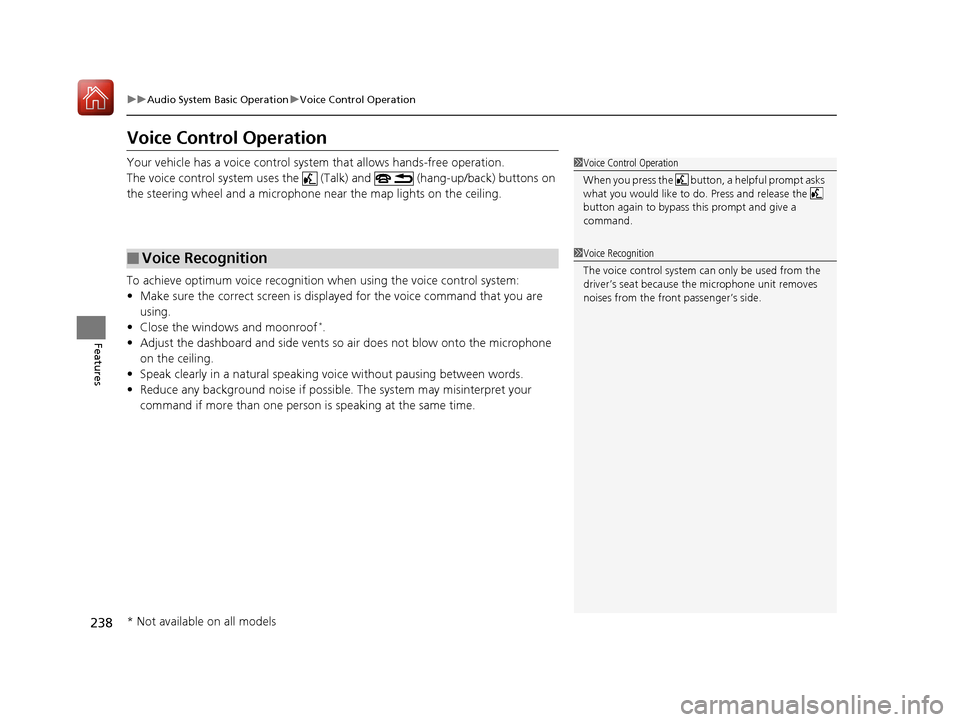
Voice Control Operation
Your vehicle has a voice control system that allows hands-free operation.
The voice control system uses the (Talk) and (hang-up/back) buttons on
the steering wheel and a microphone near the map lights on the ceiling.
To achieve optimum voice recognition when using the voice control system: • Make sure the correct screen is displa yed for the voice command that you are
using.
• Close the windows and moonroof *
.
• Adjust the dashboard and side vents so air does not blow onto the microphone
on the ceiling.
• Speak clearly in a natural speaking vo ice without pausing between words.
• Reduce any background noise if possible. The system may misinterpret your
command if more than one person is speaking at the same time.
■Voice Recognition
1Voice Control Operation
When you press the button, a helpful prompt asks what you would like to do. Press and release the
button again to bypass th is prompt and give a
command.
1Voice Recognition
The voice control system can only be used from the driver’s seat because the microphone unit removes
noises from the front passenger’s side.
* Not available on all models
16 CIVIC 2D HC2 (0A 01 0C)-31TBG6000.book 238 ページ >0>.>/6年>0月>/>0日 金曜日 午後4時>/6分
Page 321 of 585
320
uuCustomized Featuresu
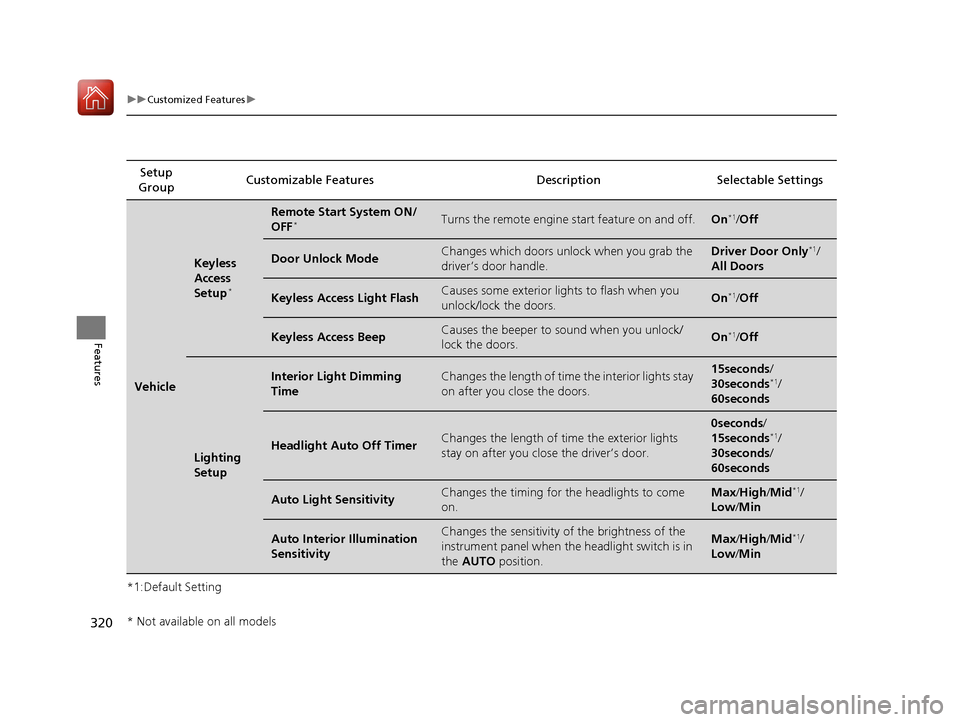
Features
*1:Default SettingSetup
Group Customizable Features Desc
ription Selectable Settings
Vehicle
Keyless
Access
Setup*
Remote Start System ON/ OFF
*Turns the remote engine start feature on and off.On*1
/Off
Door Unlock ModeChanges which doors unlock when you grab the
driver’s door handle.Driver Door Only *1
/
All Doors
Keyless Access Light FlashCauses some exterior lights to flash when you
unlock/lock the doors.On *1
/Off
Keyless Access BeepCauses the beeper to sound when you unlock/
lock the doors.On *1
/Off
Lighting
Setup
Interior Light Dimming TimeChanges the length of time the interior lights stay
on after you close the doors.15seconds /
30seconds *1
/
60seconds
Headlight Auto Off TimerChanges the length of ti me the exterior lights
stay on after you close the driver’s door.
0seconds /
15seconds *1
/
30seconds /
60seconds
Auto Light SensitivityChanges the timing for the headlights to come
on.Max /High /Mid *1
/
Low /Min
Auto Interior Illumination SensitivityChanges the sensitivity of the brightness of the
instrument panel when the headlight switch is in
the AUTO position.Max/High /Mid *1
/
Low /Min
* Not available on all models
16 CIVIC 2D HC2 (0A 01 0C)-31TBG6000.book 320 ページ >0>.>/6年>0月>/>0日 金曜日 午後4時>/6分
Page 322 of 585
321
uuCustomized Featuresu
Features
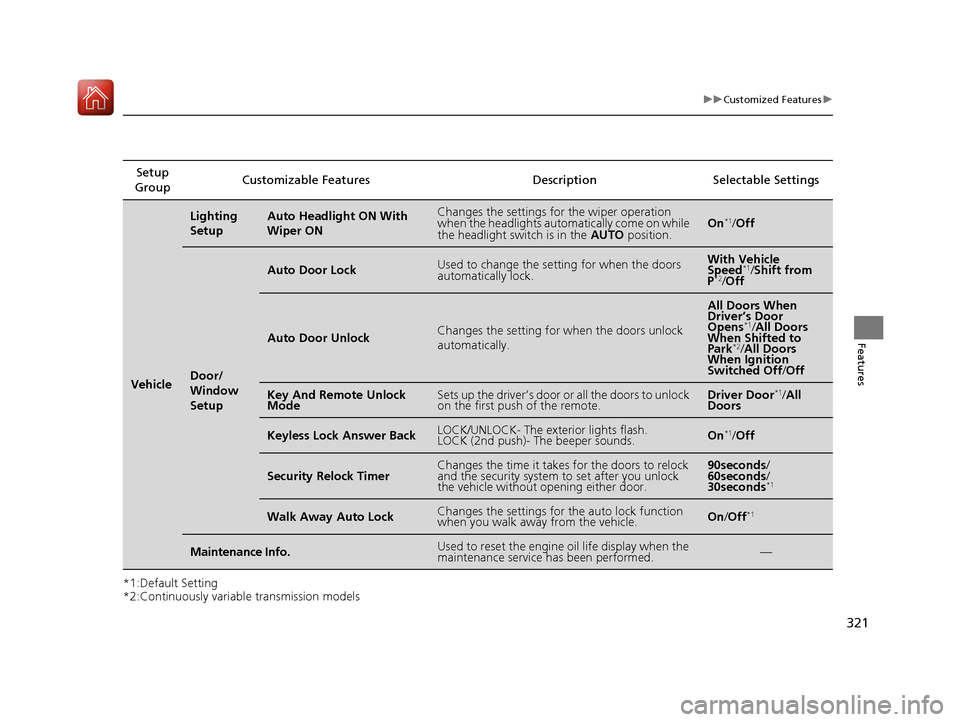
*1:Default Setting
*2:Continuously variable transmission modelsSetup
Group Customizable Features Description Selectable Settings
Vehicle
Lighting
SetupAuto Headlight ON With Wiper ONChanges the settings for the wiper operation
when the headlights automa
tically come on while
the headlight switch is in the AUTO position.On*1
/Off
Door/
Window
Setup
Auto Door LockUsed to change the sett ing for when the doors
automatically lock.With Vehicle
Speed *1
/Shift from
P *2
/Off
Auto Door UnlockChanges the setting for when the doors unlock
automatically.
All Doors When
Driver’s Door
Opens *1
/All Doors
When Shifted to Park *2
/All Doors
When Ignition
Switched Off /Off
Key And Remote Unlock
ModeSets up the driver’s door or all the doors to unlock
on the first push of the remote.Driver Door *1
/All
Doors
Keyless Lock Answer BackLOCK/UNLOCK- The exterior lights flash.
LOCK (2nd push)- The beeper sounds.On *1
/Off
Security Relock TimerChanges the time it takes for the doors to relock
and the security system to set after you unlock
the vehicle without opening either door.90seconds /
60seconds /
30seconds *1
Walk Away Auto LockChanges the settings for the auto lock function
when you walk away from the vehicle.On
/Off *1
Maintenance Info.Used to reset the engine
oil life display when the
maintenance service has been performed.—
16 CIVIC 2D HC2 (0A 01 0C)-31TBG6000.book 321 ページ >0>.>/6年>0月>/>0日 金曜日 午後4時>/6分