Page 294 of 585
293
uuCustomized Featuresu
Continued
Features
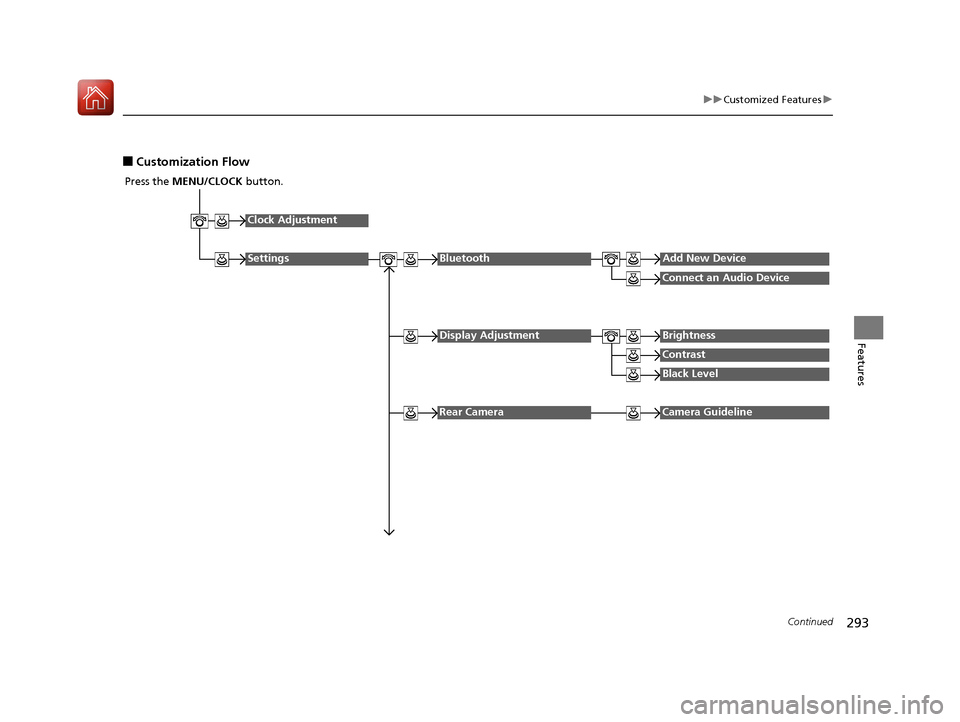
■Customization Flow
Press the MENU/CLOCK button.
Clock Adjustment
SettingsBluetoothAdd New Device
Connect an Audio Device
Display AdjustmentBrightness
Contrast
Black Level
Rear CameraCamera Guideline
16 CIVIC 2D HC2 (0A 01 0C)-31TBG6000.book 293 ページ >0>.>/6年>0月>/>0日 金曜日 午後4時>/6分
Page 295 of 585
294
uuCustomized Featuresu
Features
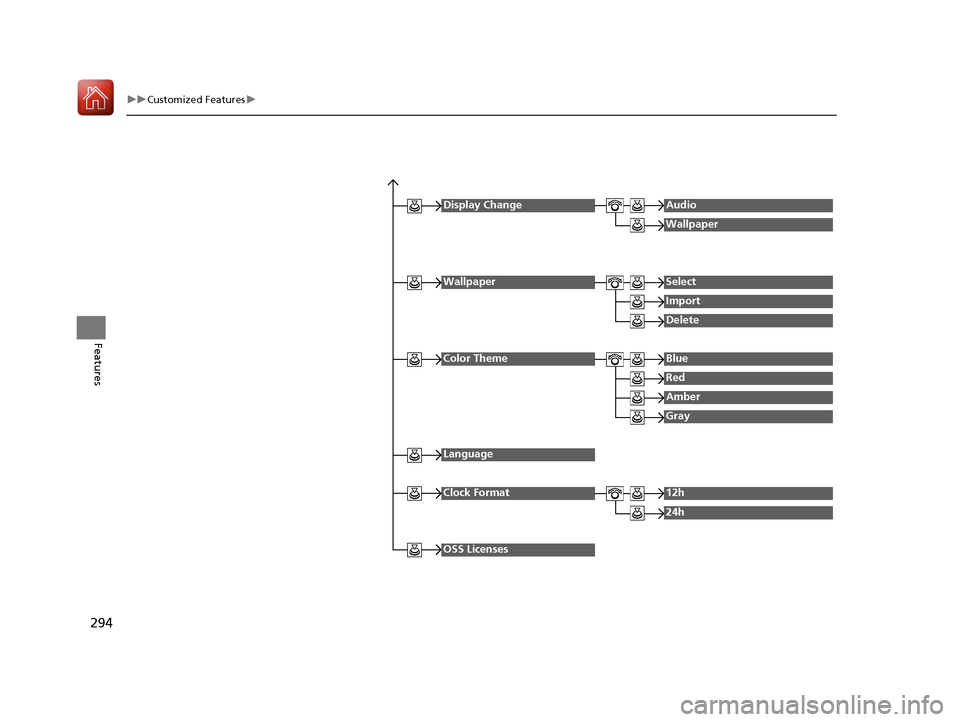
Display ChangeAudio
Wallpaper
WallpaperSelect
Import
Delete
Color ThemeBlue
Red
Amber
Gray
Language
Clock Format12h
24h
OSS Licenses
16 CIVIC 2D HC2 (0A 01 0C)-31TBG6000.book 294 ページ >0>.>/6年>0月>/>0日 金曜日 午後4時>/6分
Page 297 of 585
296
uuCustomized Featuresu
Features
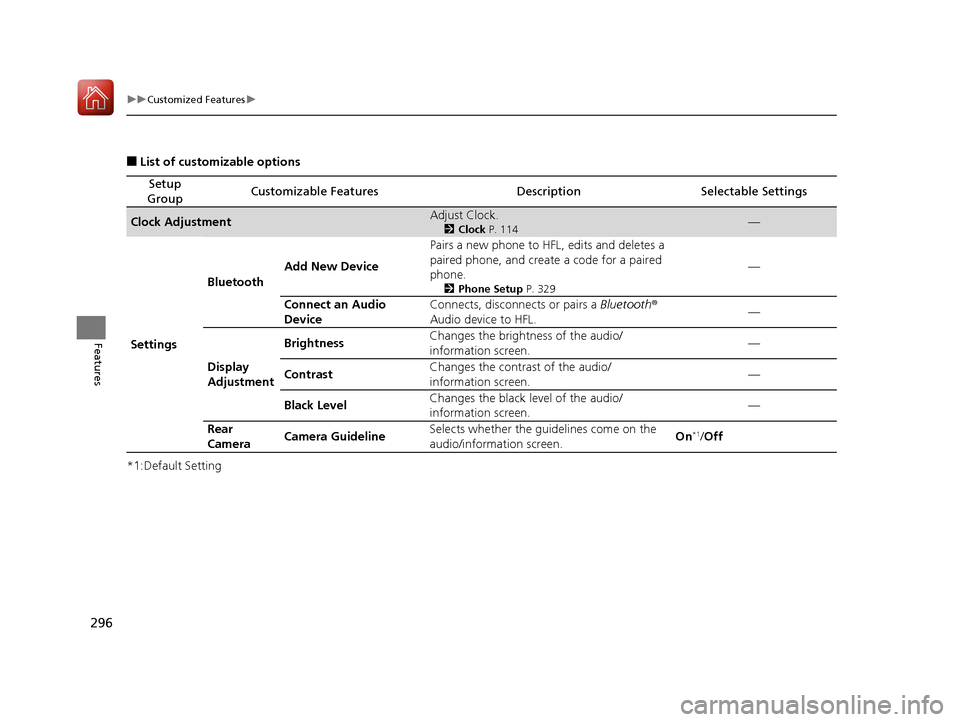
■List of customizable options
*1:Default Setting
Setup
GroupCustomizable FeaturesDescriptionSelectable Settings
Clock AdjustmentAdjust Clock. 2Clock P. 114—
Settings Bluetooth
Add New Device Pairs a new phone to HFL, edits and deletes a
paired phone, and create a code for a paired
phone.
2Phone Setup P. 329 —
Connect an Audio
Device Connects, disconnects or pairs a
Bluetooth®
Audio device to HFL. —
Display
Adjustment Brightness
Changes the brightness of the audio/
information screen.
—
Contrast Changes the contrast of the audio/
information screen. —
Black Level Changes the black level of the audio/
information screen. —
Rear
Camera Camera Guideline Selects whether the guidelines come on the
audio/information screen.
On
*1
/Off
16 CIVIC 2D HC2 (0A 01 0C)-31TBG6000.book 296 ページ >0>.>/6年>0月>/>0日 金曜日 午後4時>/6分
Page 298 of 585
297
uuCustomized Featuresu
Continued
Features
*1:Default Setting
Setup
GroupCustomizable FeaturesDescriptionSelectable Settings
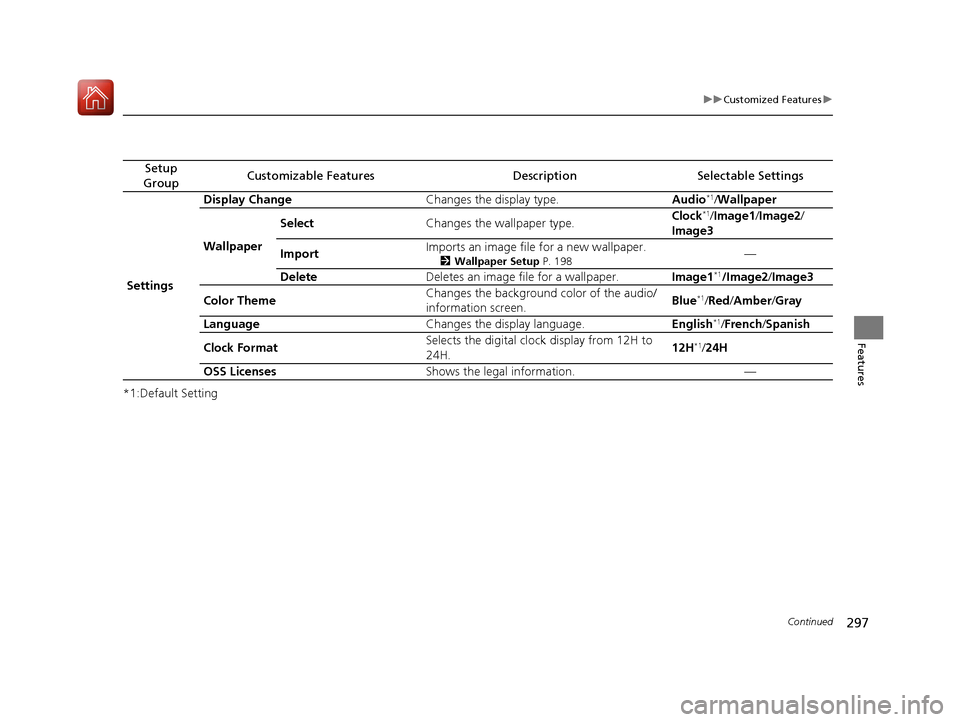
Settings Display Change
Changes the display type. Audio*1
/Wallpaper
Wallpaper Select
Changes the wallpaper type. Clock
*1
/Image1 /Image2 /
Image3
Import Imports an image file for a new wallpaper.
2Wallpaper Setup P. 198 —
Delete Deletes an image file for a wallpaper. Image1*1
/Image2 /Image3
Color Theme Changes the background color of the audio/
information screen.
Blue
*1
/Red /Amber /Gray
Language Changes the display language. English*1
/French /Spanish
Clock Format Selects the digital clock display from 12H to
24H.
12H
*1
/24H
OSS Licenses Shows the legal information. —
16 CIVIC 2D HC2 (0A 01 0C)-31TBG6000.book 297 ページ >0>.>/6年>0月>/>0日 金曜日 午後4時>/6分
Page 301 of 585
300
uuCustomized Featuresu
Features
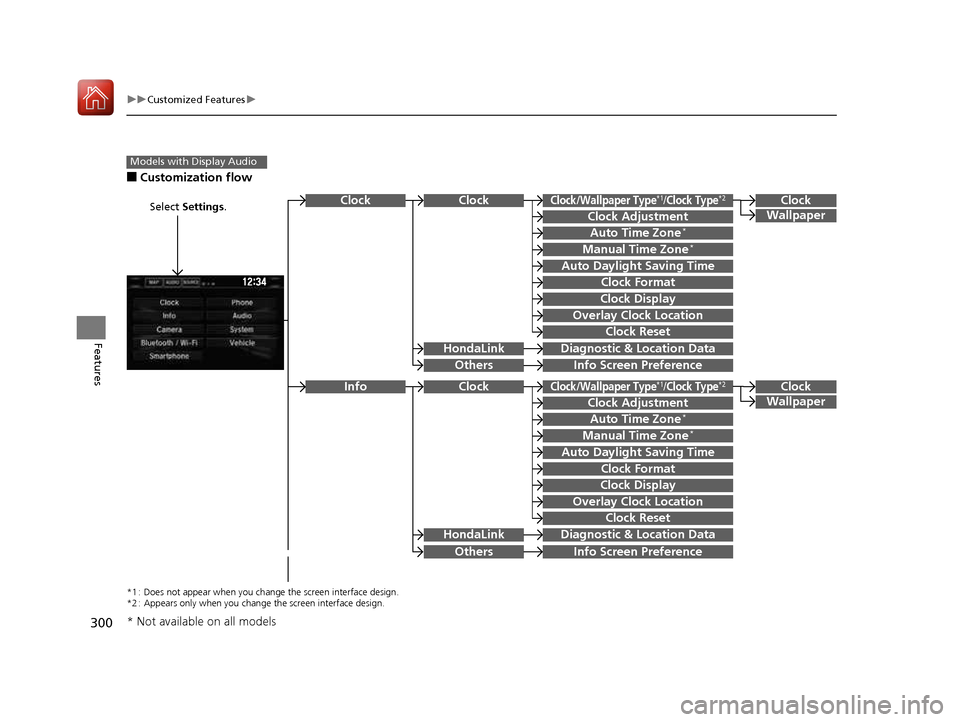
■Customization flow
Models with Display Audio
Select Settings .Clock
Wallpaper
Others
Clock/Wallpaper Type*1/Clock Type*2
Clock Adjustment
Clock Format
ClockClock
Auto Time Zone *
Manual Time Zone *
Auto Daylight Saving Time
Clock Display
Overlay Clock Location
Clock Reset
Info Screen Preference
Clock
Wallpaper
Others
Clock/Wallpaper Type*1/Clock Type*2
Clock Adjustment
Clock Format
Clock
Auto Time Zone*
Manual Time Zone *
Auto Daylight Saving Time
Clock Display
Overlay Clock Location
Clock Reset
Info Screen Preference
Info
HondaLinkDiagnostic &
Location Data
HondaLinkDiagnostic & Location Data
*1 : Does not appear when you chang e the screen interface design.
*2 : Appears only when you change the screen interface design.
* Not available on all models
16 CIVIC 2D HC2 (0A 01 0C)-31TBG6000.book 300 ページ >0>.>/6年>0月>/>0日 金曜日 午後4時>/6分
Page 305 of 585
304
uuCustomized Featuresu
Features
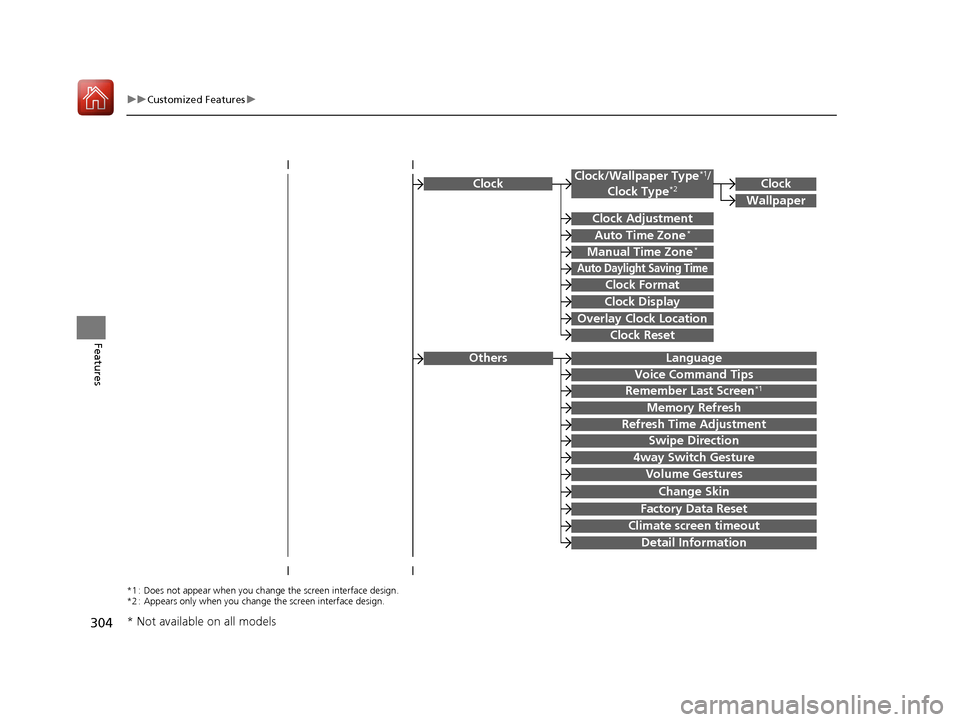
ClockClock/Wallpaper Type*1
/
Clock Type *2
Clock Adjustment
Clock Format
Auto Time Zone *
Manual Time Zone *
Auto Daylight Saving Time
Clock Display
Overlay Clock Location
Clock Reset
Clock
Wallpaper
*1 : Does not appear when you chang
e the screen interface design.
*2 : Appears only when you change the screen interface design.
Language
Voice Command Tips
Remember Last Screen *1
Memory Refresh
Refresh Time Adjustment
Swipe Direction
Change Skin
Factory Data Reset
Climate screen timeout
4way Switch Gesture
Volume Gestures
Detail Information
Others
* Not available on all models
16 CIVIC 2D HC2 (0A 01 0C)-31TBG6000.book 304 ページ >0>.>/6年>0月>/>0日
金曜日 午後4時>/6分
Page 308 of 585
307
uuCustomized Featuresu
Continued
Features
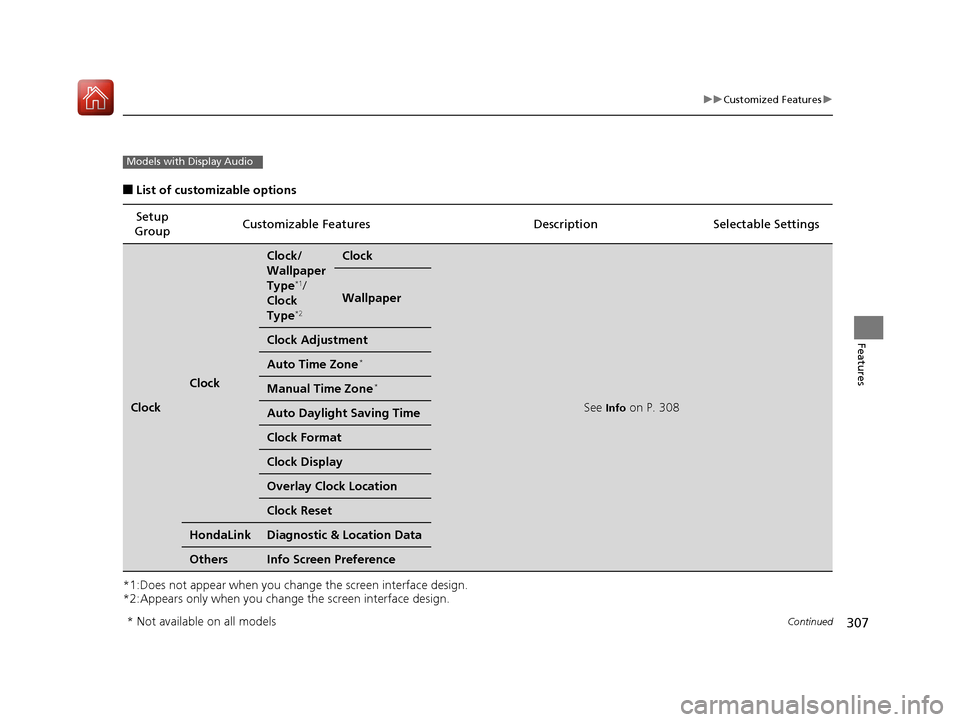
■List of customizable options
*1:Does not appear when you chan ge the screen interface design.
*2:Appears only when you change the screen interface design. Setup
Group Customizable Features Desc
ription Selectable Settings
Clock
Clock
Clock/
Wallpaper
Type*1
/
Clock
Type *2Clock
See
Info on P. 308
Wallpaper
Clock Adjustment
Auto Time Zone *
Manual Time Zone *
Auto Daylight
Saving Time
Clock Format
Clock Display
Overlay Clock Location
Clock Reset
HondaLinkDiagnostic & Location Data
OthersInfo Screen Preference
Models with Display Audio
* Not available on all models
16 CIVIC 2D HC2 (0A 01 0C)-31TBG6000.book 307 ページ >0>.>/6年>0月>/>0日 金曜日 午後4時>/6分
Page 309 of 585
308
uuCustomized Featuresu
Features
*1:Default Setting
*2:Does not appear when you change the screen interface design.
*3:Appears only when you change the screen interface design.Setup
Group Customizable Features Desc
ription Selectable Settings
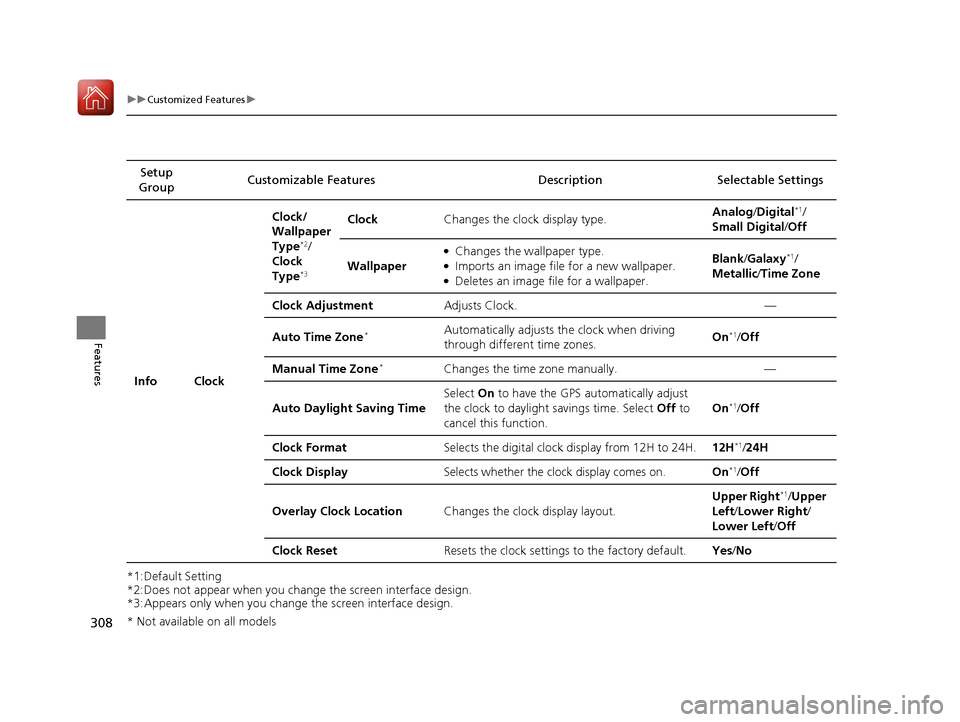
Info Clock Clock/
Wallpaper
Type
*2
/
Clock
Type *3 Clock
Changes the clock display type. Analog
/Digital *1
/
Small Digital /Off
Wallpaper ●
Changes the wallpaper type.
● Imports an image file for a new wallpaper.
● Deletes an image file for a wallpaper. Blank
/Galaxy *1
/
Metallic /Time Zone
Clock Adjustment Adjusts Clock. —
Auto Time Zone *Automatically adjusts th
e clock when driving
through different time zones. On
*1
/Off
Manual Time Zone *
Changes the time zone manually. —
Auto Daylight Saving Time Select
On to have the GPS automatically adjust
the clock to daylight savings time. Select Off to
cancel this function. On
*1
/Off
Clock Format Selects the digital clock display from 12H to 24H. 12H*1
/24H
Clock Display Selects whether the clock display comes on. On*1
/Off
Overlay Clock Location Changes the clock display layout. Upper Right
*1
/Upper
Left /Lower Right /
Lower Left /Off
Clock Reset Resets the clock settings to the factory default. Yes/No
* Not available on all models
16 CIVIC 2D HC2 (0A 01 0C)-31TBG6000.book 308 ページ >0>.>/6年>0月>/>0日 金曜日 午後4時>/6分