2016 HONDA CIVIC COUPE brake light
[x] Cancel search: brake lightPage 450 of 585
449
uuBrakinguBrake System
Continued
Driving
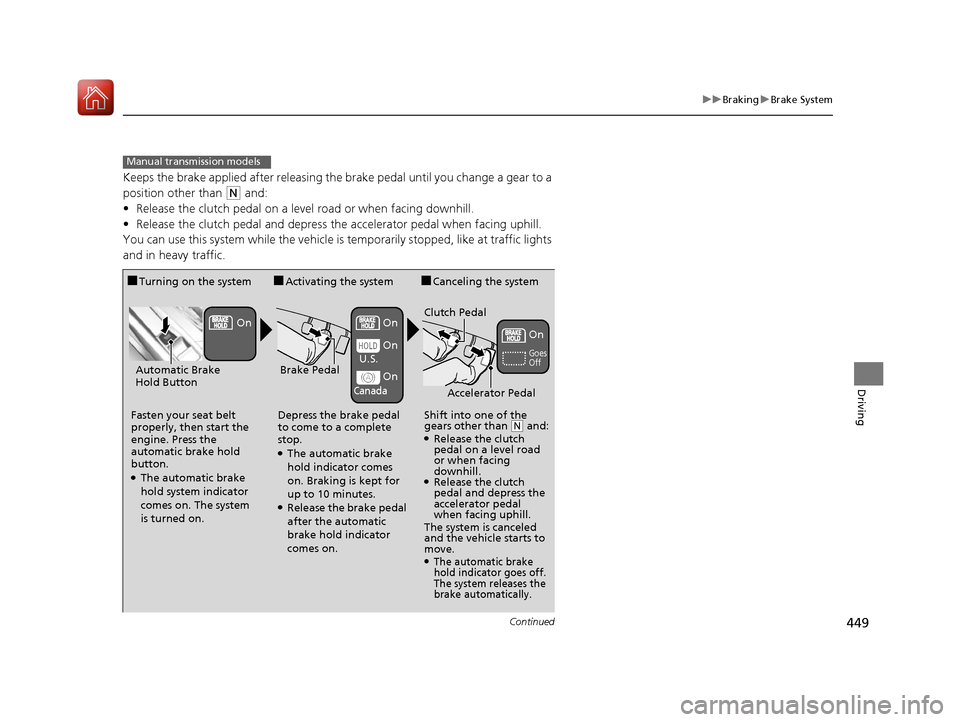
Keeps the brake applied after releasing the brake pedal until you change a gear to a
position other than
(N and:
• Release the clutch pedal on a level road or when facing downhill.
• Release the clutch pedal and depress the accelerator pedal when facing uphill.
You can use this system while the vehicle is temporarily stopped, like at traffic lights
and in heavy traffic.
Manual transmission models
■ Turning on the system
Fasten your seat belt
properly, then start the
engine. Press the
automatic brake hold
button.
● The automatic brake
hold system indicator
comes on. The system is turned on. ■
Activating the system
Depress the brake pedal
to come to a complete
stop.
● The automatic brake
hold indicator comes
on. Braking is kept for
up to 10 minutes.
● Release the brake pedal
after the automatic
brake hold indicator
comes on. ■
Canceling the system
Shift into one of the
gears other than
(N and:
● Release the clutch
pedal on a level road
or when facing
downhill.
● Release the clutch
pedal and depress the
accelerator pedal
when facing uphill.
The system is canceled
and the vehicle starts to
move.
●The automatic brake
hold indicator goes off.
The system releases the
brake automatically.
Accelerator Pedal
Brake PedalAutomatic Brake
Hold Button
Goes Off
On On On
On On
U.S.
Canada
Clutch Pedal
16 CIVIC 2D HC2 (0A 01 0C)-31TBG6000.book 449 ページ >0>.>/6年>0月>/>0日
金曜日 午後4時>/6分
Page 452 of 585
451
uuBrakinguAnti-lock Brake System (ABS)
Driving
Anti-lock Brake System (ABS)
Helps prevent the wheels from locking up, and helps you retain steering control by
pumping the brakes rapidly, much faster than you.
The electronic brake distribu tion (EBD) system, which is part of the ABS, also
balances the front-to-rear braking distribution according to vehicle loading.
You should never pump the brake pedal. Let the ABS work for you by always
keeping firm, steady pressure on the brake pe dal. This is sometimes referred to as
“stomp and steer.” ■ ABS operation
The brake pedal may pulsate slightly when the ABS is working. Keep holding the
pedal firmly down. On dry pavement, you will need to press on the brake pedal very
hard before the ABS activates. However, you may feel the ABS activate immediately
if you are trying to stop on snow or ice.
When the vehicle speed goes under 6 mph (10 km/h), the ABS stops.
■ABS1Anti-lock Brake System (ABS)
NOTICE
The ABS may not function correctly if you use an
incorrect tire type and size.
When the ABS indicator comes on while driving,
there may be a problem with the system.
While normal braking is not affected, there is a
possibility of the ABS not operating. Have the vehicle
checked by a dealer immediately.
The ABS does not reduce the ti me or distance it takes
to stop the vehicle. It only helps with steering control
during hard braking.
In the following cases, yo ur vehicle may need more
stopping distance than a vehicle without the ABS:
• When driving on rough road surfaces, including
when driving on uneven surf aces, such as gravel or
snow.
• When snow chains are installed.
You may hear a motor sound coming from the
engine compartment while system checks are being
performed immediately after starting the engine or
while driving. This is normal.
16 CIVIC 2D HC2 (0A 01 0C)-31TBG6000.book 451 ページ >0>.>/6年>0月>/>0日 金曜日 午後4時>/6分
Page 453 of 585
452
uuBrakinguBrake Assist System
Driving
Brake Assist System
Designed to assist the driver by generating greater braking force when you depress
the brake pedal hard during emergency braking. ■Brake assist system operation
Press the brake pedal firmly for more powerful braking.
When brake assist operates, the pedal ma y wiggle slightly and an operating noise
may be heard. This is normal. Keep holding the brake pedal firmly down.
■Brake Assist System
16 CIVIC 2D HC2 (0A 01 0C)-31TBG6000.book 452 ページ >0>.>/6年>0月>/>0日 金曜日 午後4時>/6分
Page 454 of 585
453
uuBrakinguCollision Mitigation Braking SystemTM
(CMBS TM
)*
Continued
Driving
Collision Mitigation Braking System TM
(CMBS TM
)*
Can assist you when there is a possibility of your vehicle colliding with a vehicle or a
pedestrian detected in front of yours. The CMBS TM
is designed to alert you when a
potential collision is determined, as well as to reduce your vehicle speed to help
minimize collision severity when a collision is deemed unavoidable.
■ How the system works
1Collision Mitigation Braking System TM
(CMBS TM
)*
Important Safety Reminder
The CMBS TM
is designed to reduce the severity of an
unavoidable collision. It doe s not prevent collision nor
stop the vehicle automatically. It is still your
responsibility to operate the brake pedal and steering
wheel appropriately acco rding to the driving
conditions.
The CMBS TM
may not activate or may not detect a
vehicle in front of y our vehicle under certain
conditions:
2 CMBS TM
Conditions and Limitations P. 457
You can read about handling information for the
camera equipped with this system. 2 Front Sensor Camera *
P. 408
Be careful not to have the radar sensor cover strongly
impacted.
1How the system works
Rapid vibrations on the steering wheel alert you
when your vehicle speed is between 19 and 62 mph
(30 and 100 km/h) with an oncoming vehicle
detected in front of you.
When the CMBS TM
activates, it may automatically
apply the brake. It will be canceled when your vehicle
stops or a potential coll ision is not determined.
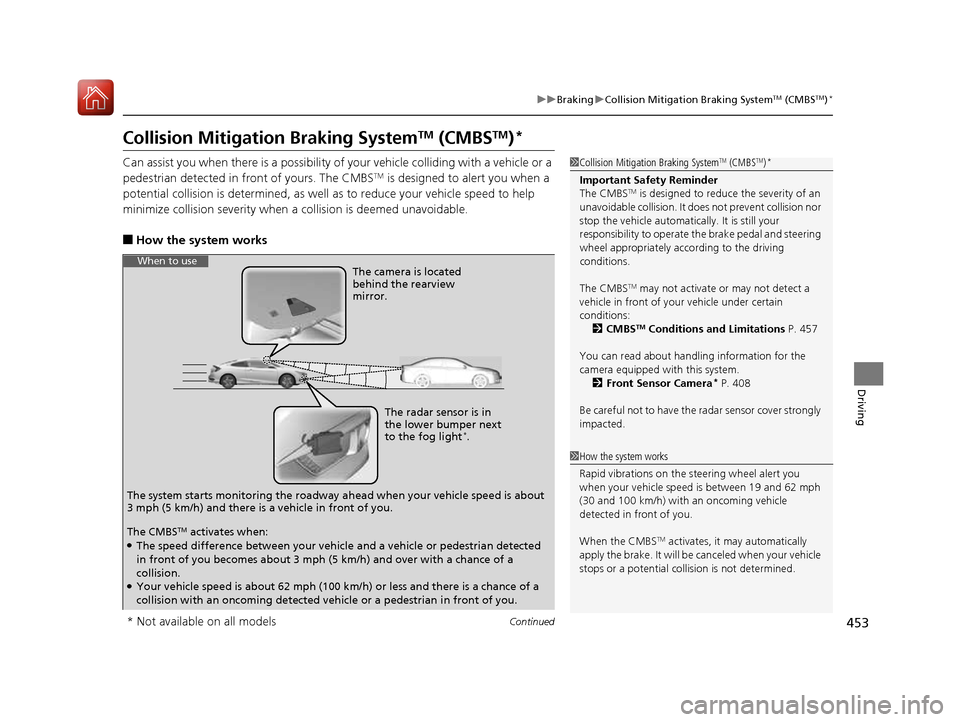
The radar sensor is in
the lower bumper next
to the fog light*
.
The camera is located
behind the rearview mirror.
The system starts monitoring the roadway ah ead when your vehicle speed is about
3 mph (5 km/h) and there is a vehicle in front of you.
When to use
The CMBS TM
activates when:
● The speed difference between your vehicle and a vehicle or pedestrian detected
in front of you becomes about 3 mph (5 km/h) and over with a chance of a
collision.
● Your vehicle speed is about 62 mph (100 km/h) or less and there is a chance of a
collision with an oncoming detected ve hicle or a pedestrian in front of you.
* Not available on all models
16 CIVIC 2D HC2 (0A 01 0C)-31TBG6000.book 453 ページ >0>.>/6年>0月>/>0日 金曜日 午後4時>/6分
Page 459 of 585
458
uuBrakinguCollision Mitigation Braking SystemTM
(CMBS TM
)*
Driving
■
Vehicle conditions
• Headlight lenses are dirty or the headlights are not properly adjusted.
• The outside of the windshie ld is blocked by dirt, mud, leaves, wet snow, etc.
• The inside of the windshield is fogged.
• An abnormal tire or wheel condition (wrong size, varied size or construction,
improperly inflated, comp act spare tire, etc.).
• When tire chains are installed.
• The vehicle is tilted due to a heav y load or suspension modifications.
• The camera temperature gets too high.
• Driving with the parking brake applied.
• When the radar sensor in the lower bumper gets dirty.
■ Detection limitations
• A vehicle or pedestrian suddenly crosses in front of you.
• The distance between your vehicle and the vehicle or pedestrian ahead of you is
too short.
• A vehicle cuts in front of you at a slow speed, and it brakes suddenly.
• When you accelerate rapidly and approach the vehicle or pedestrian ahead of you
at high speed.
• The vehicle ahead of you is a motorcycle, bicycle, mobility scooter or other small
vehicle.
• When there are animals in front of your vehicle.
• When you drive on a curved, wi nding or undulating road that makes it difficult for
the sensor to properly detect a vehicle in front of you.
• The speed difference between your vehicle an d a vehicle or pedestrian in front of
you is significantly large.
• An oncoming vehicle suddenly comes in front of you.
• Another vehicle suddenly comes in front of you at an intersection, etc.
• Your vehicle abruptly crosses over in front of an oncoming vehicle.
• When driving through a narrow iron bridge.
• When the lead vehicle suddenly slows down.
16 CIVIC 2D HC2 (0A 01 0C)-31TBG6000.book 458 ページ >0>.>/6年>0月>/>0日 金曜日 午後4時>/6分
Page 470 of 585
469
Maintenance
This chapter discusses basic maintenance.
Before Performing Maintenance Inspection and Maintenance ............ 470
Safety When Performing Maintenance .... 471Parts and Fluids Used in Maintenance Service ........................................... 472
Maintenance Minder TM
..................... 473
Maintenance Under the Hood
Maintenance Items Un der the Hood .... 483Opening the Hood ........................... 485
Recommended Engine Oil ................ 486
Oil Check ......................................... 487
Adding Engine Oil ............................ 489
Changing the Engine Oil and Oil Filter..... 490
Engine Coolant ................................ 493
Transmission Fluid ............................ 495
Brake/Clutch*
Fluid .......................... 496
Refilling Window Wa sher Fluid......... 497
Replacing Light Bulbs ....................... 498
Checking and Maintaining Wiper
Blades .......................................... 507
Checking and Maintaining Tires
Checking Tires ................................. 510
Tire and Loading Information Label ..... 511Tire Labeling .................................... 511DOT Tire Quality Grading (U.S. Vehicles) ...... 513Wear Indicators................................ 515 Tire Service Life ................................ 515
Tire and Wheel Replacement ........... 516
Tire Rotation .................................... 517
Winter Tires ..................................... 518
Battery ............................................... 519
Remote Transmitter Care
Replacing the Button Battery ........... 521
Climate Control System Maintenance.... 523Cleaning
Interior Care .................................... 524
Exterior Care.................................... 526
* Not available on all models
16 CIVIC 2D HC2 (0A 01 0C)-31TBG6000.book 469 ページ >0>.>/6年>0月>/>0日 金曜日 午後4時>/6分
Page 471 of 585
470
Maintenance
Before Performing Maintenance
Inspection and Maintenance
For your safety, perform all listed inspections and maintenance to keep your vehicle
in good condition. If you become aware of any abnormality (noise, smell, insufficient
brake fluid, oil residue on the ground, etc.), have your vehicle inspected by a dealer. (Note, however, that service at a dealer is not mandatory to keep your warranties in
effect.) ■ Daily inspections
Perform inspections before long distance tri ps, when washing the vehicle, or when
refueling. ■ Periodic inspections
• Check the continuously variable transmission fluid level monthly.
2 Continuously Variable Transmission Fluid P. 495
• Check the brake/clutch *
fluid level monthly.
2 Brake/Clutch *
Fluid P. 496
• Check the tire pressure monthly. Examin e the tread for wear and foreign objects.
2 Checking and Maintaining Tires P. 510
• Check the operation of the exterior lights monthly.
2 Replacing Light Bulbs P. 498
• Check the condition of the wiper bl ades at least every six months.
2 Checking and Maintaining Wiper Blades P. 507
■Types of Inspection and Maintenance
1Inspection and Maintenance
Maintenance, replacement, or repair of
emissions control devices and systems may be
done by any automotive repair establishment or
individuals using parts that are “certified” to
EPA standards.
According to state and federal regulations, failure to
perform maintenance on the maintenance main
items marked with # will not void your emissions
warranties. However, all ma intenance services should
be performed in accordan ce with the intervals
indicated by the information display *
/driver
information interface *
.
2 Maintenance Service Items P. 475, 480
If you want to perform complex maintenance tasks
that require more skills a nd tools, you can purchase a
subscription to the Service Express website at
www.techinfo.honda.com .
2 Authorized Manuals P. 573
If you want to perform ma intenance yourself, make
sure that you have the necessary tools and skills first.
After performing ma intenance, update the records in
the separate maintenance booklet.
U.S. models
* Not available on all models
16 CIVIC 2D HC2 (0A 01 0C)-31TBG6000.book 470 ページ >0>.>/6年>0月>/>0日 金曜日 午後4時>/6分
Page 486 of 585
485
uuMaintenance Under the HooduOpening the Hood
Maintenance
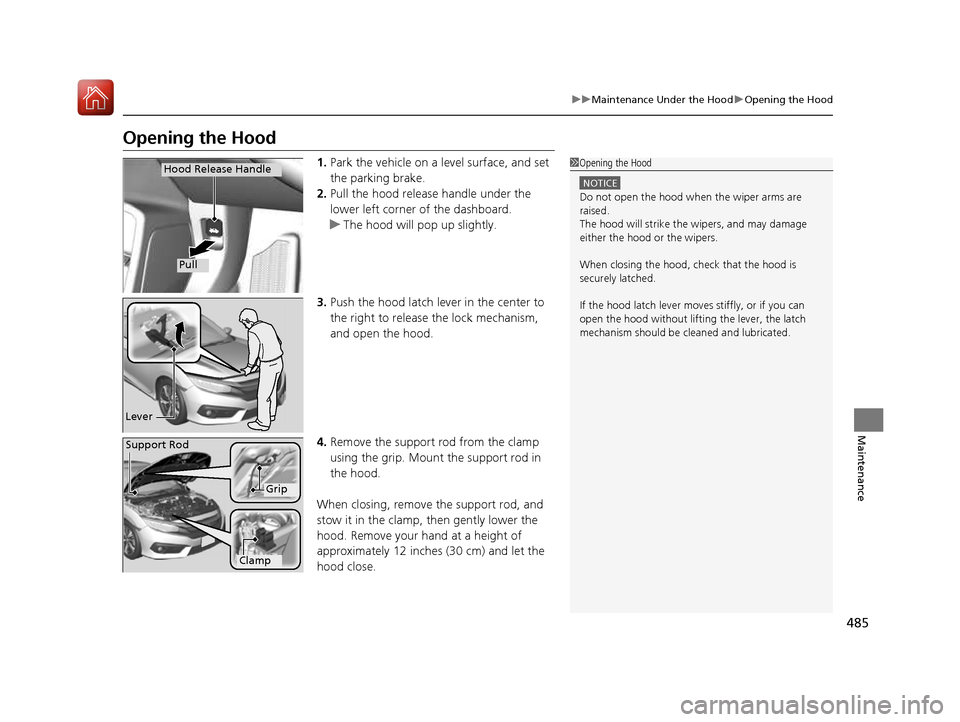
Opening the Hood1.Park the vehicle on a level surface, and set the parking brake.
2. Pull the hood release handle under the
lower left corner of the dashboard.
uThe hood will pop up slightly.
3. Push the hood latch lever in the center to the right to release the lock mechanism,
and open the hood.
4. Remove the support rod from the clamp
using the grip. Mount the support rod in
the hood.
When closing, remove the support rod, and
stow it in the clamp, then gently lower the
hood. Remove your hand at a height of
approximately 12 inches (30 cm) and let the
hood close.
1Opening the Hood
NOTICE
Do not open the hood when the wiper arms are
raised.
The hood will strike the wipers, and may damage
either the hood or the wipers.
When closing the hood, check that the hood is
securely latched. If the hood latch lever moves stiffly, or if you can
open the hood without lifti ng the lever, the latch
mechanism should be cl eaned and lubricated.
Hood Release Handle
Pull
Lever
Support Rod
Grip
Clamp
16 CIVIC 2D HC2 (0A 01 0C)-31TBG6000.book 485 ページ >0>.>/6年>0月>/>0日 金曜日 午後4時>/6分