2016 HONDA CIVIC COUPE turn signal
[x] Cancel search: turn signalPage 320 of 585
319
uuCustomized Featuresu
Continued
Features
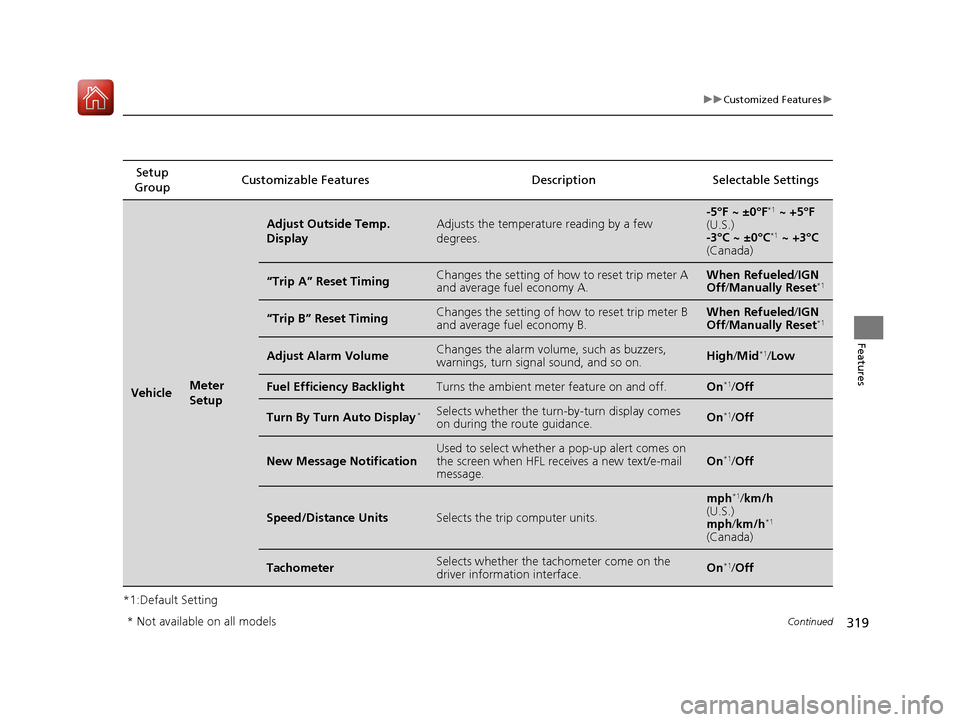
*1:Default SettingSetup
Group Customizable Features Description Selectable Settings
VehicleMeter
Setup
Adjust Outside Temp. DisplayAdjusts the temperature reading by a few degrees.-5°F ~ ±0°F
*1
~ +5°F
(U.S.)
-3°C ~ ±0°C *1
~ +3°C
(Canada)
“Trip A” Reset TimingChanges the setting of how to reset trip meter A and average fuel economy A.When Refueled /IGN
Off /Manually Reset *1
“Trip B” Reset TimingChanges the setting of how to reset trip meter B and average fuel economy B.When Refueled
/IGN
Off /Manually Reset *1
Adjust Alarm VolumeChanges the alarm volu
me, such as buzzers,
warnings, turn signal sound, and so on.High /Mid *1
/Low
Fuel Efficiency BacklightTurns the ambient meter feature on and off.On *1
/Off
Turn By Turn Auto Display *Selects whether the turn
-by-turn display comes
on during the route guidance.On *1
/Off
New Message NotificationUsed to select whether a pop-up alert comes on
the screen when HFL receives a new text/e-mail message.On *1
/Off
Speed/Distance UnitsSelects the trip computer units.
mph *1
/km/h
(U.S.) mph /km/h *1
(Canada)
TachometerSelects whether the tach ometer come on the
driver information interface.On *1
/Off
* Not available on all models
16 CIVIC 2D HC2 (0A 01 0C)-31TBG6000.book 319 ページ >0>.>/6年>0月>/>0日 金曜日 午後4時>/6分
Page 425 of 585
424
uuWhen DrivinguRoad Departure Mitigation (RDM) System*
Driving
Road Departure Mitigation (RDM) System *
Alerts and helps to assist you when the sy stem detects a possibility of your vehicle
unintentionally crossing over detected lane markings.
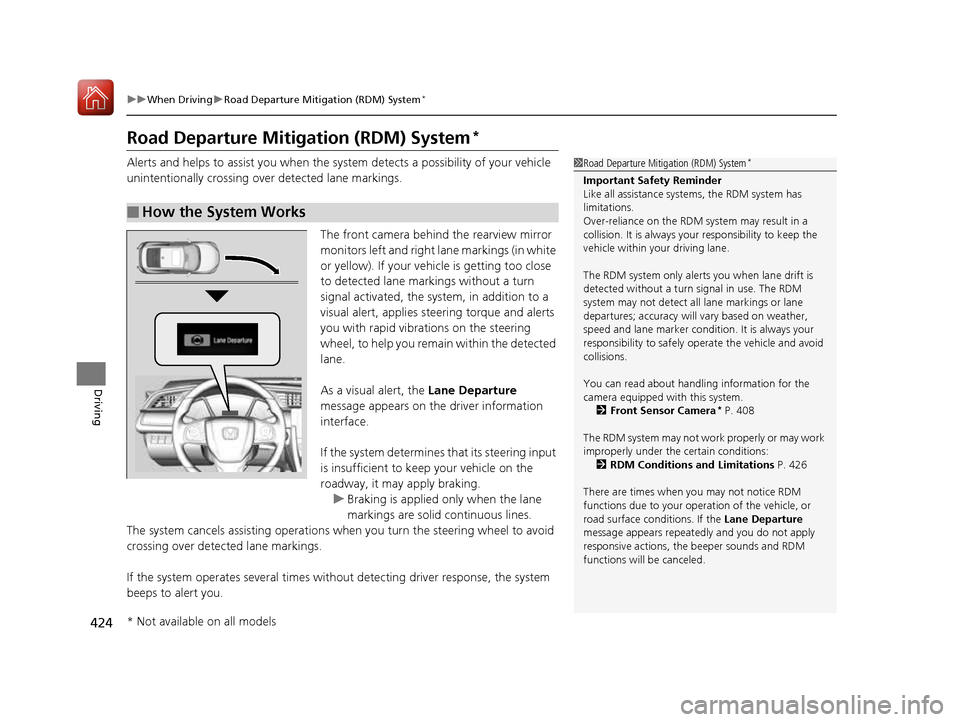
The front camera behind the rearview mirror monitors left and right lane markings (in white
or yellow). If your vehicle is getting too close
to detected lane markings without a turn
signal activated, the sy stem, in addition to a
visual alert, applies st eering torque and alerts
you with rapid vibrations on the steering
wheel, to help you remain within the detected lane.
As a visual alert, the Lane Departure
message appears on the driver information interface.
If the system determines that its steering input
is insufficient to keep your vehicle on the
roadway, it may apply braking.
uBraking is applied only when the lane
markings are solid continuous lines.
The system cancels assisting operations wh en you turn the steering wheel to avoid
crossing over detected lane markings.
If the system operates several times without detecting driver response, the system
beeps to alert you.
■How the System Works
1Road Departure Mitigation (RDM) System *
Important Safety Reminder
Like all assistance systems, the RDM system has
limitations.
Over-reliance on the RDM system may result in a
collision. It is always your responsibility to keep the
vehicle within your driving lane.
The RDM system only alerts you when lane drift is
detected without a turn signal in use. The RDM
system may not detect all lane markings or lane
departures; accuracy will vary based on weather,
speed and lane marker condi tion. It is always your
responsibility to sa fely operate the vehicle and avoid
collisions.
You can read about handling information for the
camera equipped with this system.
2 Front Sensor Camera *
P. 408
The RDM system may not wo rk properly or may work
improperly under the certain conditions: 2 RDM Conditions and Limitations P. 426
There are times when you may not notice RDM
functions due to your opera tion of the vehicle, or
road surface conditions. If the Lane Departure
message appears repeated ly and you do not apply
responsive actions, the beeper sounds and RDM
functions will be canceled.
* Not available on all models
16 CIVIC 2D HC2 (0A 01 0C)-31TBG6000.book 424 ページ >0>.>/6年>0月>/>0日 金曜日 午後4時>/6分
Page 426 of 585
Continued425
uuWhen DrivinguRoad Departure Mitigation (RDM) System*
Driving
The system becomes ready to start sear
ching for lane markings when all the
following conditions are met: • The vehicle is traveling between about 45 and 90 mph (72 and 145 km/h).
• The vehicle is on a straight or slightly curved road.
• The turn signals are off.
• The brake pedal is not depressed.
• The wipers are not in continuous operation.
• The system makes a determination that th e driver is not actively accelerating,
braking or steering.
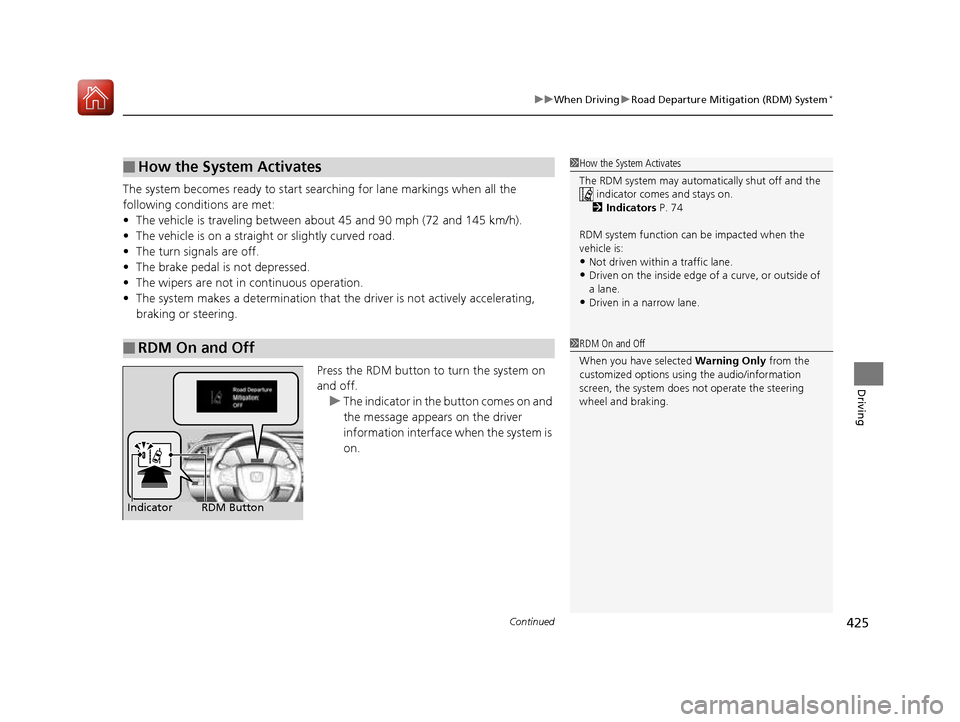
Press the RDM button to turn the system on and off.
uThe indicator in the button comes on and
the message appears on the driver
information interface when the system is
on.
■How the System Activates
■RDM On and Off
1How the System Activates
The RDM system may automa tically shut off and the
indicator comes and stays on.
2 Indicators P. 74
RDM system function can be impacted when the
vehicle is: • Not driven within a traffic lane.
• Driven on the inside edge of a curve, or outside of
a lane.
• Driven in a narrow lane.
1RDM On and Off
When you have selected Warning Only from the
customized options using the audio/information
screen, the system does not operate the steering
wheel and braking.
RDM Button
Indicator
16 CIVIC 2D HC2 (0A 01 0C)-31TBG6000.book 425 ページ >0>.>/6年>0月>/>0日 金曜日 午後4時>/6分
Page 429 of 585
428
uuWhen DrivinguLane Keeping Assist System (LKAS)*
Driving
Lane Keeping Assist System (LKAS) *
Provides steering input to help keep the vehicle in the middle of a detected lane and
provides tactile and visual alerts if the ve hicle is detected drifting out of its lane.
1Lane Keeping Assist System (LKAS)*
Important Safety Reminders
The LKAS is for your convenience only. It is not a
substitute for your vehicl e control. The system does
not work if you take y our hands off the steering
wheel or fail to steer the vehicle.
2 Driver Information Interface Warning and
Information Messages *
P. 93
Do not place objects on the instrument panel.
Objects may reflect on th e front windshield and
prevent correct detectio n of the traffic lanes.
LKAS only alerts you when lane drift is detected
without a turn signal in us e. The LKAS may not detect
all lane markings or lane departures; accuracy will
vary based on weather, speed, and lane marker
condition.It is always your responsibility to safely operate the
vehicle and avoid collisions.
The LKAS is convenient when it is used on freeways.
The LKAS may not work properly or may work
improperly under the certain conditions:
2 LKAS Conditions and Limitations P. 433
You can read about handling information for the
camera equipped with this system. 2 Front Sensor Camera *
P. 408
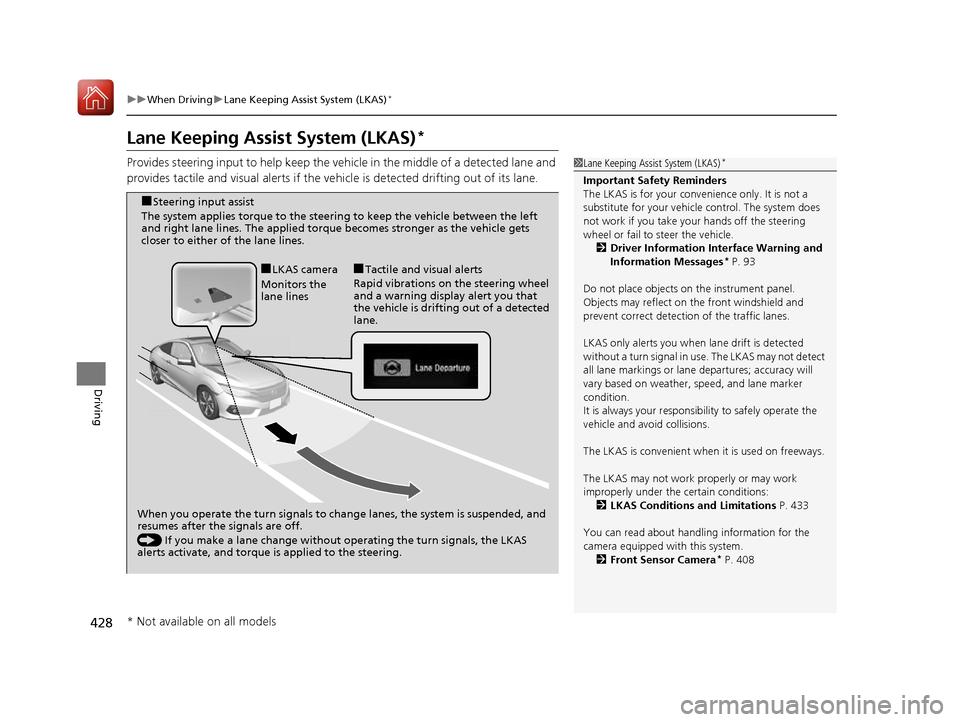
When you operate the turn signals to chan ge lanes, the system is suspended, and
resumes after the signals are off.
() If you make a lane change without operating the turn signals, the LKAS
alerts activate, and torque is applied to the steering.
■
LKAS camera
Monitors the
lane lines ■
Tactile and visual alerts
Rapid vibrations on the steering wheel
and a warning display alert you that
the vehicle is drifting out of a detected lane.
■
Steering input assist
The system applies torque to the steering to keep the vehicle between the left
and right lane lines. The applied torque becomes stronger as the vehicle gets
closer to either of the lane lines.
* Not available on all models
16 CIVIC 2D HC2 (0A 01 0C)-31TBG6000.book 428 ページ >0>.>/6年>0月>/>0日 金曜日 午後4時>/6分
Page 431 of 585
uuWhen DrivinguLane Keeping Assist System (LKAS)*
430
Driving
The system can be used when the following conditions are met.
• The lane in which you are driving has dete ctable lane markers on both sides, and
your vehicle is in the center of the lane.
• The vehicle speed is between 45 and 90 mph (72 and 145 km/h).
• You are driving on a straight or slightly curved road.
• The turn signals are off.
• The brake pedal is not depressed.
• The wipers are not in continuous operation.
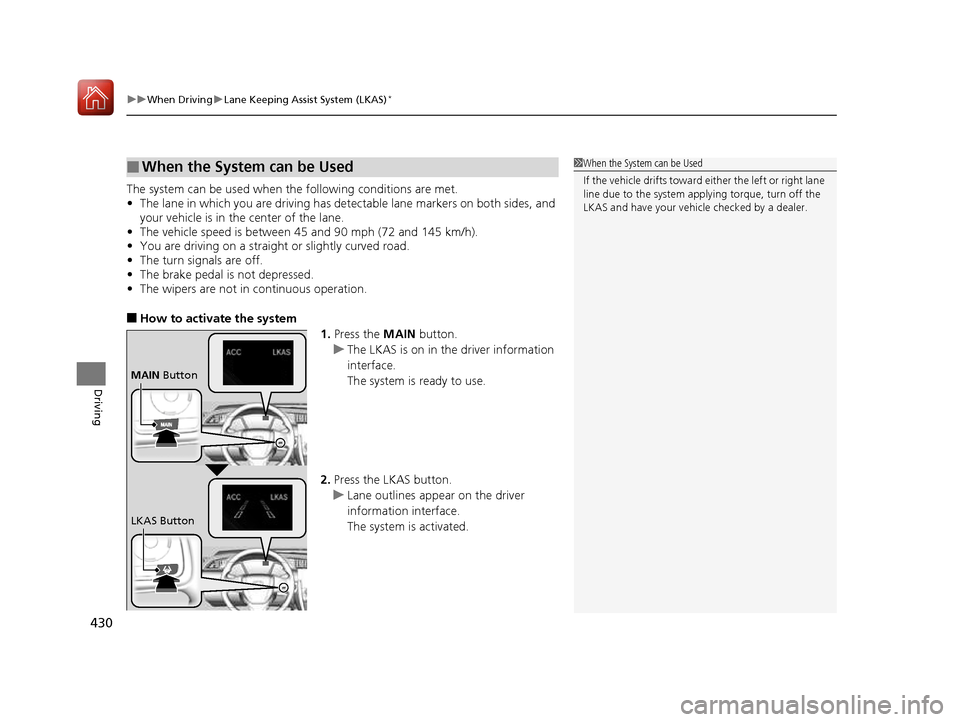
■ How to activate the system
1.Press the MAIN button.
uThe LKAS is on in the driver information interface.
The system is ready to use.
2. Press the LKAS button.
uLane outlines appear on the driver
information interface.
The system is activated.
■When the System can be Used1When the System can be Used
If the vehicle drifts toward either the left or right lane line due to the system appl ying torque, turn off the
LKAS and have your vehi cle checked by a dealer.
MAIN Button
LKAS Button
16 CIVIC 2D HC2 (0A 01 0C)-31TBG6000.book 430 ページ >0>.>/6年>0月>/>0日 金曜日 午後4時>/6分
Page 439 of 585
438
uuWhen DrivinguLaneWatchTM
*
Driving
LaneWatch TM
*
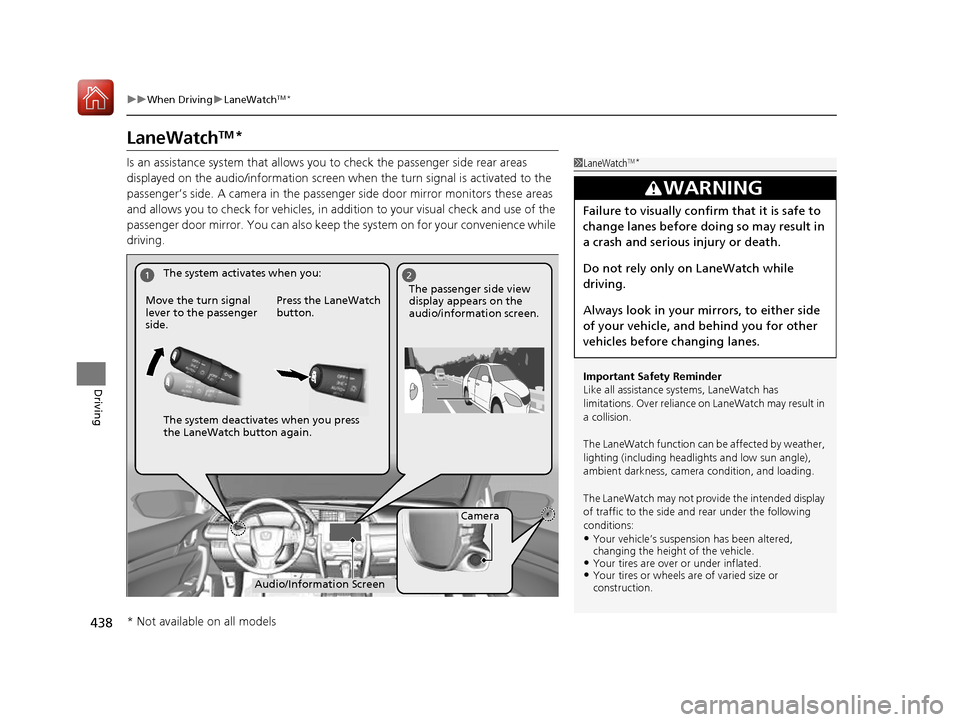
Is an assistance system that allows y ou to check the passenger side rear areas
displayed on the audio/information screen when the turn signal is activated to the
passenger’s side. A camera in the passenger side door mirror monitors these areas
and allows you to check for vehicles, in addition to your visual check and use of the
passenger door mirror. You can also keep th e system on for your convenience while
driving.
1LaneWatch TM
*
Important Safety Reminder
Like all assistance systems, LaneWatch has
limitations. Over reliance on LaneWatch may result in
a collision.
The LaneWatch function can be affected by weather,
lighting (including headli ghts and low sun angle),
ambient darkness, camera condition, and loading.
The LaneWatch may not prov ide the intended display
of traffic to the side a nd rear under the following
conditions: • Your vehicle’s suspensi on has been altered,
changing the height of the vehicle.
• Your tires are over or under inflated.
• Your tires or wheels are of varied size or construction.
3WARNING
Failure to visually confirm that it is safe to
change lanes before doing so may result in
a crash and serious injury or death.
Do not rely only on LaneWatch while
driving.
Always look in your mi rrors, to either side
of your vehicle, and behind you for other
vehicles before changing lanes.
12
Camera
Audio/Information Screen
Move the turn signal
lever to the passenger side.
Press the LaneWatch
button.
The passenger side view display appears on the
audio/information screen.
The system activates when you:
The system deactivates when you press
the LaneWatch button again.
* Not available on all models
16 CIVIC 2D HC2 (0A 01 0C)-31TBG6000.book 438 ページ >0>.>/6年>0月>/>0日
金曜日 午後4時>/6分
Page 440 of 585
439
uuWhen DrivinguLaneWatchTM
*
Driving
■ Customizing the La neWatch settings
You can customize the following items using the audio/information screen. • Show with Turn Signal : Selects whether LaneWatch monitor comes on when
you operate the turn signal light lever.
• Display Time after Turn Signal Off : Changes the length of time the LaneWatch
display stays on after you pull the turn signal lever back.
• Reference Line : Selects whether the reference lines appear on the LaneWatch
monitor.
• Display : Allows for display adjustments of items, such as brightness, contrast and
black level. This setting is part of the System setup group.
2 Customized Features P. 292
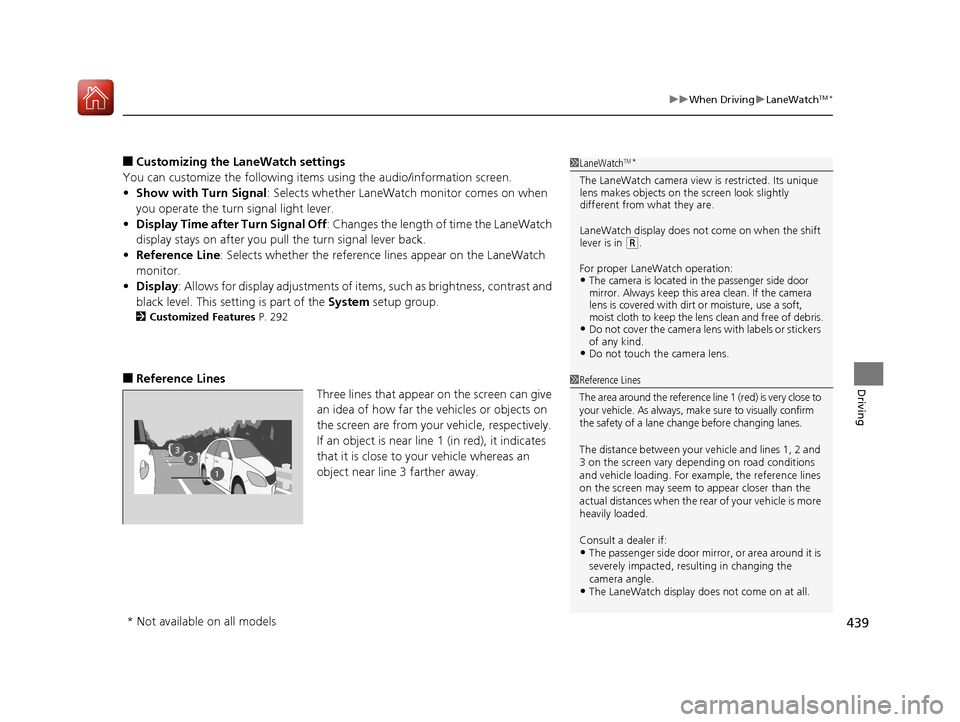
■ Reference Lines
Three lines that appear on the screen can give
an idea of how far the vehicles or objects on
the screen are from your vehicle, respectively.
If an object is near line 1 (in red), it indicates
that it is close to your vehicle whereas an
object near line 3 farther away.1LaneWatchTM
*
The LaneWatch camera view is restricted. Its unique
lens makes objects on the screen look slightly
different from what they are.
LaneWatch display does not come on when the shift
lever is in
(R .
For proper LaneWatch operation: • The camera is located in the passenger side door
mirror. Always keep this area clean. If the camera
lens is covered with dirt or moisture, use a soft,
moist cloth to keep the lens clean and free of debris.
• Do not cover the camera lens with labels or stickers
of any kind.
• Do not touch the camera lens.
23
1
1Reference Lines
The area around the reference lin e 1 (red) is very close to
your vehicle. As always, m ake sure to visually confirm
the safety of a lane chan ge before changing lanes.
The distance betwee n your vehicle and lines 1, 2 and
3 on the screen vary depending on road conditions
and vehicle loading. For ex ample, the reference lines
on the screen may seem to appear closer than the
actual distances when the rear of your vehicle is more
heavily loaded. Consult a dealer if:
• The passenger side door mirr or, or area around it is
severely impacted, resulting in changing the camera angle.
• The LaneWatch display doe s not come on at all.
* Not available on all models
16 CIVIC 2D HC2 (0A 01 0C)-31TBG6000.book 439 ページ >0>.>/6年>0月>/>0日 金曜日 午後4時>/6分
Page 503 of 585
502
uuReplacing Light BulbsuFront Turn Signal Light Bulbs
Maintenance
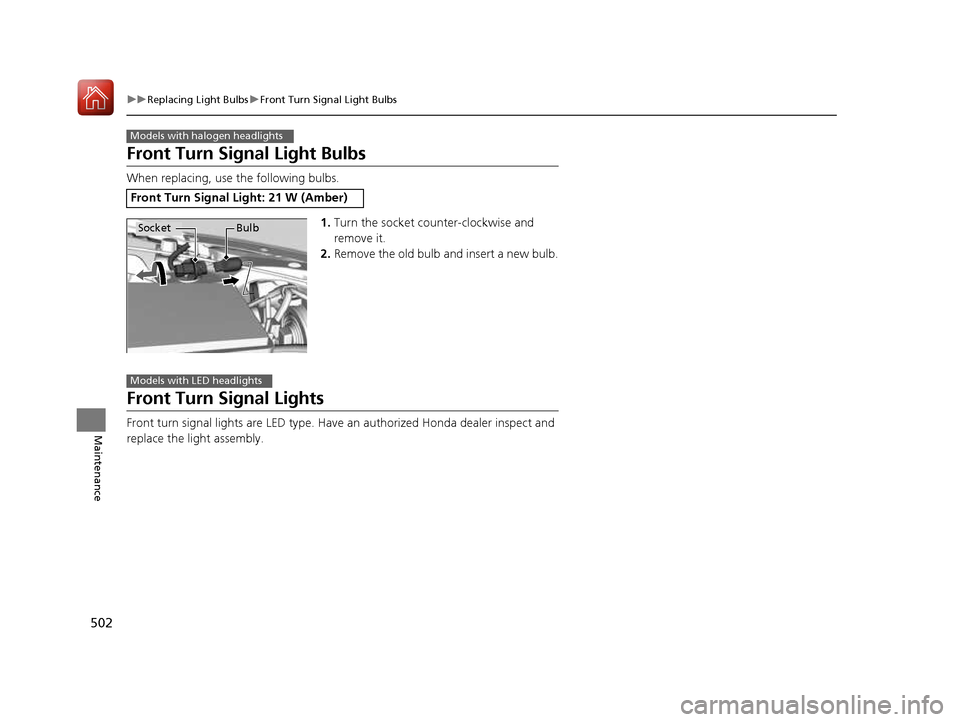
Front Turn Signal Light Bulbs
When replacing, use the following bulbs.1.Turn the socket counter-clockwise and
remove it.
2. Remove the old bulb and insert a new bulb.
Front Turn Signal Lights
Front turn signal lights are LED type. Have an authorized Honda dealer inspect and
replace the light assembly.
Front Turn Signal Light: 21 W (Amber)
Models with halogen headlights
Socket Bulb
Models with LED headlights
16 CIVIC 2D HC2 (0A 01 0C)-31TBG6000.book 502 ページ >0>.>/6年>0月>/>0日 金曜日 午後4時>/6分