2016 HONDA CIVIC COUPE engine oil
[x] Cancel search: engine oilPage 322 of 585
321
uuCustomized Featuresu
Features
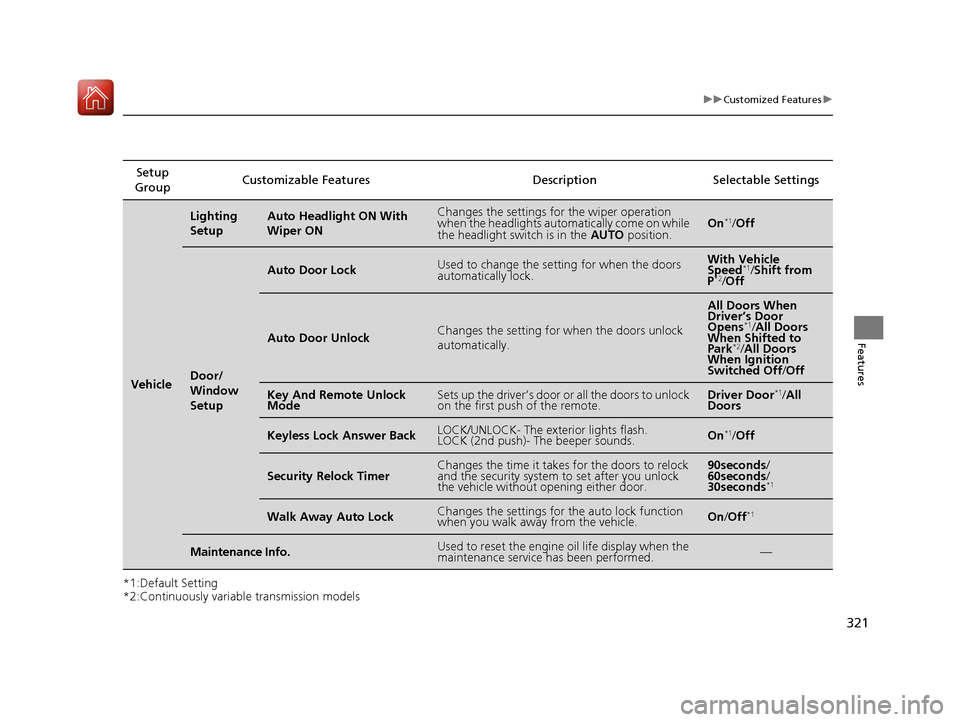
*1:Default Setting
*2:Continuously variable transmission modelsSetup
Group Customizable Features Description Selectable Settings
Vehicle
Lighting
SetupAuto Headlight ON With Wiper ONChanges the settings for the wiper operation
when the headlights automa
tically come on while
the headlight switch is in the AUTO position.On*1
/Off
Door/
Window
Setup
Auto Door LockUsed to change the sett ing for when the doors
automatically lock.With Vehicle
Speed *1
/Shift from
P *2
/Off
Auto Door UnlockChanges the setting for when the doors unlock
automatically.
All Doors When
Driver’s Door
Opens *1
/All Doors
When Shifted to Park *2
/All Doors
When Ignition
Switched Off /Off
Key And Remote Unlock
ModeSets up the driver’s door or all the doors to unlock
on the first push of the remote.Driver Door *1
/All
Doors
Keyless Lock Answer BackLOCK/UNLOCK- The exterior lights flash.
LOCK (2nd push)- The beeper sounds.On *1
/Off
Security Relock TimerChanges the time it takes for the doors to relock
and the security system to set after you unlock
the vehicle without opening either door.90seconds /
60seconds /
30seconds *1
Walk Away Auto LockChanges the settings for the auto lock function
when you walk away from the vehicle.On
/Off *1
Maintenance Info.Used to reset the engine
oil life display when the
maintenance service has been performed.—
16 CIVIC 2D HC2 (0A 01 0C)-31TBG6000.book 321 ページ >0>.>/6年>0月>/>0日 金曜日 午後4時>/6分
Page 392 of 585
Continued391
uuWhen DrivinguStarting the Engine
Driving
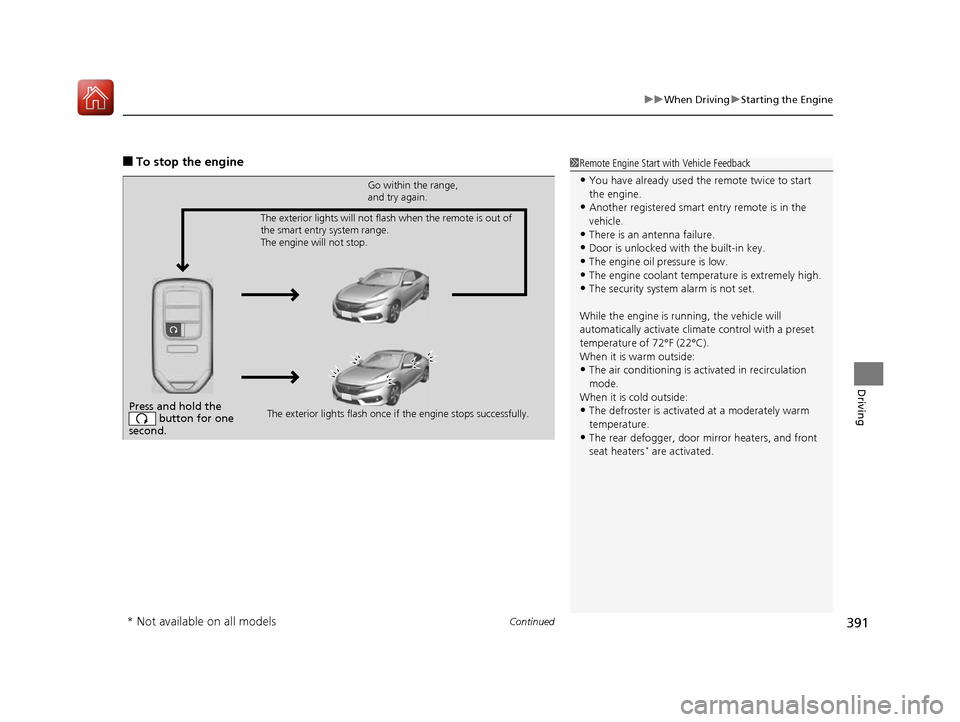
■To stop the engine1Remote Engine Start with Vehicle Feedback
• You have already used the remote twice to start the engine.
• Another registered smart entry remote is in the
vehicle.
• There is an antenna failure.
• Door is unlocked with the built-in key.
• The engine oil pressure is low.
• The engine coolant temper ature is extremely high.
• The security system alarm is not set.
While the engine is running, the vehicle will
automatically activate climate control with a preset
temperature of 72°F (22°C).
When it is warm outside:
• The air conditioning is acti vated in recirculation
mode.
When it is cold outside:
• The defroster is activated at a moderately warm
temperature.
• The rear defogger, door mi rror heaters, and front
seat heaters *
are activated.
Press and hold the
button for one
second.
Go within the range,
and try again.
The exterior lights flash once if the engine stops successfully.
The exterior lights will not flash when the remote is out of
the smart entry system range.
The engine will not stop.
* Not available on all models
16 CIVIC 2D HC2 (0A 01 0C)-31TBG6000.book 391 ページ >0>.>/6年>0月>/>0日
金曜日 午後4時>/6分
Page 462 of 585
461
Driving
Parking Your Vehicle
When Stopped 1.Depress the brake pedal firmly.
2. With the brake pedal depressed, pull up th e electric parking brake switch slowly,
but fully.
3. Move the shift lever from
(D to (P.
3. Move the shift lever to
(R or (1.
4. Turn off the engine.
uThe parking brake indicator goes off in about 15 seconds.
Always confirm the electric parking brake is set, in particular if you are parked on an
incline.
1Parking Your Vehicle
Do not park your vehicle near flammable objects,
such as dry grass, oil, or timber.
Heat from the exhaust can cause a fire.
1When Stopped
NOTICE
The following can dama ge the transmission:
• Depressing the accelera tor and brake pedals
simultaneously.
• Holding the vehicle in place when facing uphill by
depressing the accelerator pedal.
• Moving the shift lever into
(P before the vehicle
stops completely.
Continuously variable transmission models
Continuously variable transmission models
Manual transmission models
All models
16 CIVIC 2D HC2 (0A 01 0C)-31TBG6000.book 461 ページ >0>.>/6年>0月>/>0日 金曜日 午後4時>/6分
Page 468 of 585
467
Driving
Fuel Economy
Improving Fuel Economy
Fuel economy depends on several conditions, including driving conditions, your
driving habits, the condition of your vehicle, and loading. Depending on these and
other conditions, you may or may not achieve the rated fuel economy of this vehicle.
You can optimize your fuel economy with proper maintenance of your vehicle.
Always maintain your vehicle in accordance with the messages displayed on the
information display *
/driver information interface *
.
• Use the recommended viscosity engine oil, displaying the API Certification Seal.
• Maintain the specified tire pressure.
• Do not load the vehicle with excess cargo.
• Keep your vehicle clean. A buildup of snow or mud on your vehicle's underside adds weight and increases wind resistance.
■Maintenance and Fuel Economy
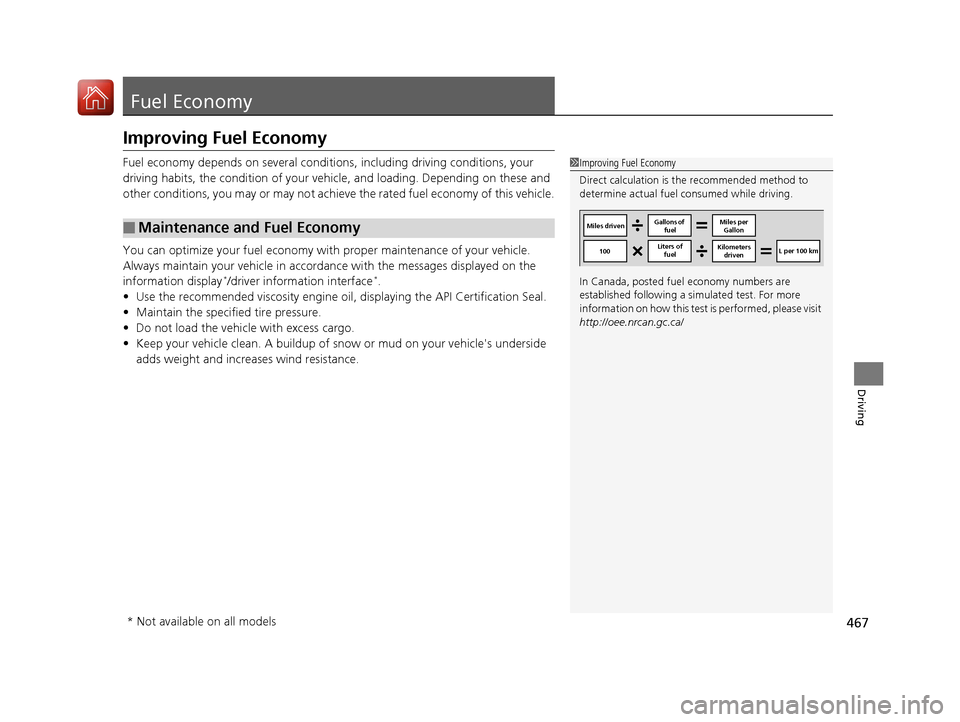
1Improving Fuel Economy
Direct calculation is the recommended method to
determine actual fuel consumed while driving.
In Canada, posted fuel economy numbers are
established following a simulated test. For more
information on how this test is performed, please visit
http://oee.nrcan.gc.ca/
Miles driven Gallons of
fuel Miles per
Gallon
100 Liters of
fuel Kilometers
driven L per 100 km
* Not available on all models
16 CIVIC 2D HC2 (0A 01 0C)-31TBG6000.book 467 ページ >0>.>/6年>0月>/>0日
金曜日 午後4時>/6分
Page 470 of 585
469
Maintenance
This chapter discusses basic maintenance.
Before Performing Maintenance Inspection and Maintenance ............ 470
Safety When Performing Maintenance .... 471Parts and Fluids Used in Maintenance Service ........................................... 472
Maintenance Minder TM
..................... 473
Maintenance Under the Hood
Maintenance Items Un der the Hood .... 483Opening the Hood ........................... 485
Recommended Engine Oil ................ 486
Oil Check ......................................... 487
Adding Engine Oil ............................ 489
Changing the Engine Oil and Oil Filter..... 490
Engine Coolant ................................ 493
Transmission Fluid ............................ 495
Brake/Clutch*
Fluid .......................... 496
Refilling Window Wa sher Fluid......... 497
Replacing Light Bulbs ....................... 498
Checking and Maintaining Wiper
Blades .......................................... 507
Checking and Maintaining Tires
Checking Tires ................................. 510
Tire and Loading Information Label ..... 511Tire Labeling .................................... 511DOT Tire Quality Grading (U.S. Vehicles) ...... 513Wear Indicators................................ 515 Tire Service Life ................................ 515
Tire and Wheel Replacement ........... 516
Tire Rotation .................................... 517
Winter Tires ..................................... 518
Battery ............................................... 519
Remote Transmitter Care
Replacing the Button Battery ........... 521
Climate Control System Maintenance.... 523Cleaning
Interior Care .................................... 524
Exterior Care.................................... 526
* Not available on all models
16 CIVIC 2D HC2 (0A 01 0C)-31TBG6000.book 469 ページ >0>.>/6年>0月>/>0日 金曜日 午後4時>/6分
Page 474 of 585
473
Continued
Maintenance
Maintenance Minder TM
Select the Maintenance Minder to see maintenance items that are due soon and to
see the percentage of life
remaining in the engine oil.
When the engine oil life is less than 15%, a Maintenance Minder message will
appear every time you turn the ignition switch to ON
(w *1
, reminding you to bring
your vehicle to a dealer for service.
To Use Maintenance Minder TM
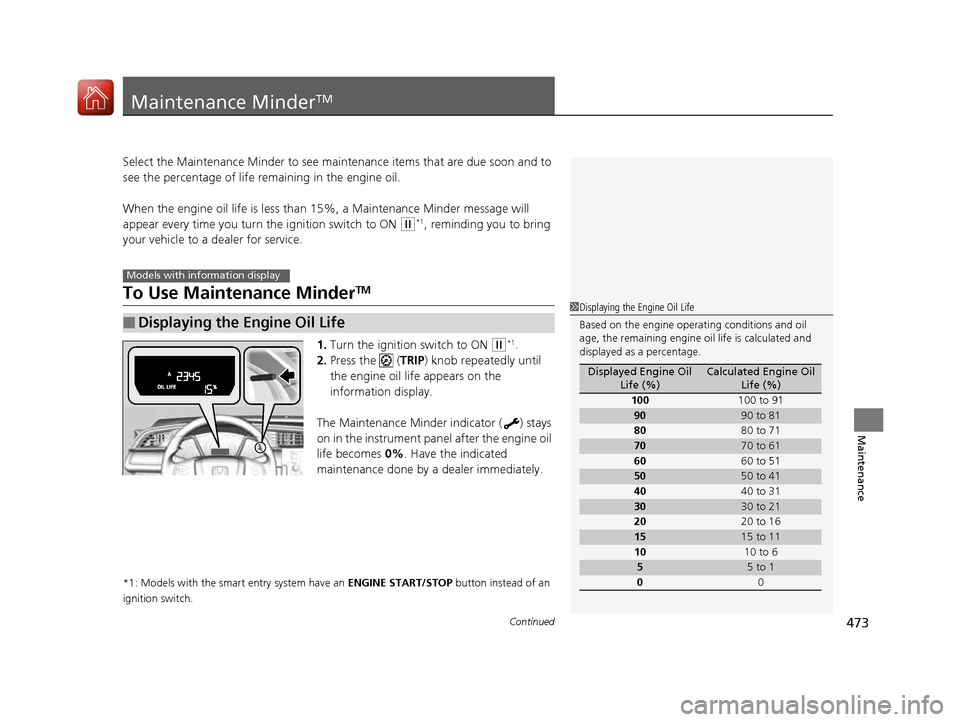
1. Turn the ignition switch to ON
(w *1
.
2. Press the ( TRIP) knob repeatedly until
the engine oil life appears on the
information display.
The Maintenance Minder indicator ( ) stays
on in the instrument panel after the engine oil
life becomes 0%. Have the indicated
maintenance done by a dealer immediately.
*1: Models with the smart entry system have an ENGINE START/STOP button instead of an
ignition switch.
■Displaying the Engine Oil Life
Models with info rmation display
1Displaying the Engine Oil Life
Based on the engine opera ting conditions and oil
age, the remaining engine oi l life is calculated and
displayed as a percentage.
Displayed Engine Oil Life (%)Calculated Engine Oil Life (%)
100 100 to 91
9090 to 81
80 80 to 71
7070 to 61
60 60 to 51
5050 to 41
40 40 to 31
3030 to 21
20 20 to 16
1515 to 11
10 10 to 6
55 to 1
0 0
16 CIVIC 2D HC2 (0A 01 0C)-31TBG6000.book 473 ページ >0>.>/6年>0月>/>0日 金曜日 午後4時>/6分
Page 475 of 585
474
uuMaintenance MinderTMuTo Use Maintenance Minder TM
Maintenance
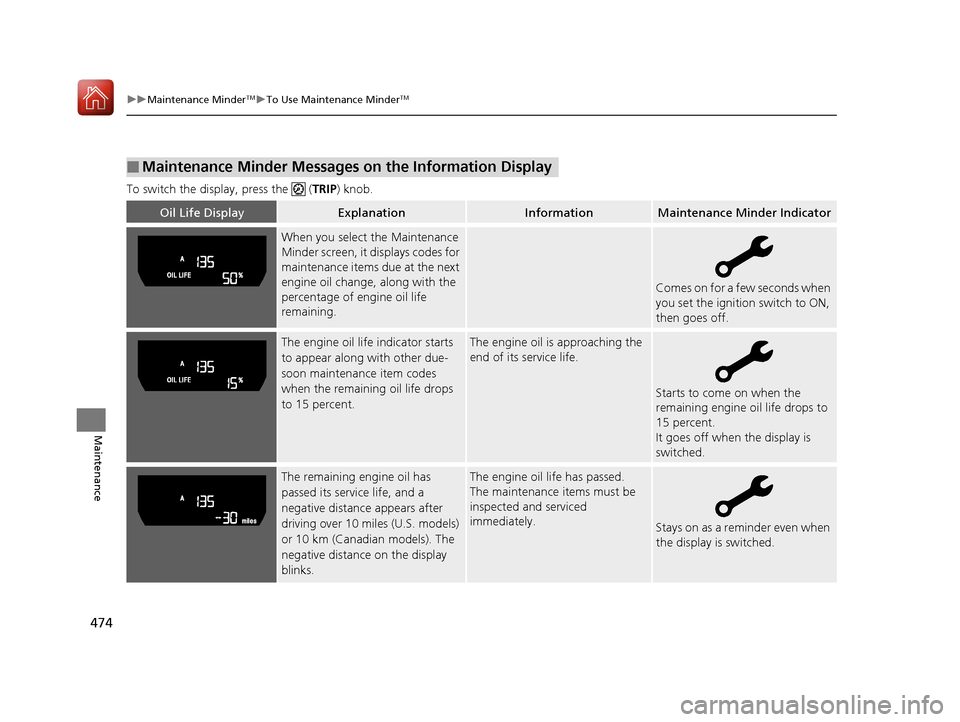
To switch the display, press the (
TRIP) knob.
■Maintenance Minder Messages on the Information Display
Oil Life DisplayExplanationInformationMaintenance Minder Indicator
When you select the Maintenance
Minder screen, it displays codes for
maintenance items due at the next
engine oil change, along with the
percentage of engine oil life
remaining.
Comes on for a few seconds when
you set the ignition switch to ON,
then goes off.
The engine oil life indicator starts
to appear along with other due-
soon maintenance item codes
when the remaining oil life drops
to 15 percent.The engine oil is approaching the
end of its service life.
Starts to come on when the
remaining engine oil life drops to
15 percent.
It goes off when the display is switched.
The remaining engine oil has
passed its service life, and a
negative distance appears after
driving over 10 miles (U.S. models)
or 10 km (Canadian models). The
negative distance on the display
blinks.The engine oil life has passed.
The maintenance items must be inspected and serviced
immediately.
Stays on as a reminder even when
the display is switched.
16 CIVIC 2D HC2 (0A 01 0C)-31TBG6000.book 474 ページ >0>.>/6年>0月>/>0日 金曜日 午後4時>/6分
Page 476 of 585
475
uuMaintenance MinderTMuTo Use Maintenance Minder TM
Continued
Maintenance
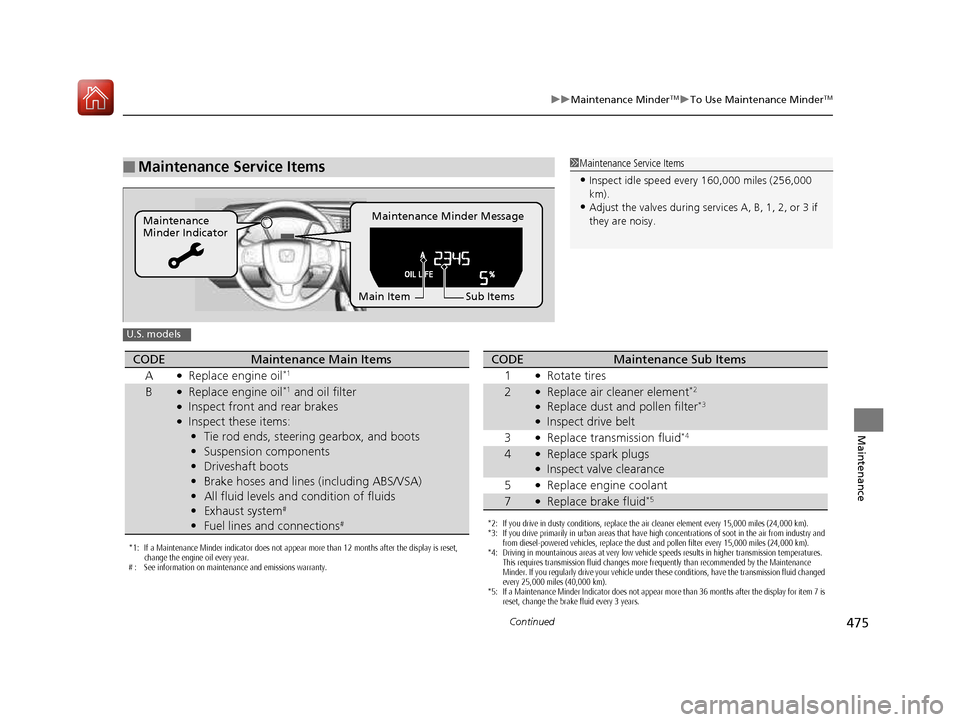
■Maintenance Service Items1Maintenance Service Items
• Inspect idle speed every 160,000 miles (256,000 km).
• Adjust the valves during services A, B, 1, 2, or 3 if
they are noisy.
Maintenance Minder Message
Maintenance
Minder Indicator
Sub Items
Main Item
U.S. models
*1: If a Maintenance Minder indicator does not appear more than 12 months after the display is reset,
change the engine oil every year.
# : See information on maintenance and emissions warranty.
CODEMaintenance Main Items
A ●
Replace engine oil *1
B●
Replace engine oil *1
and oil filter
● Inspect front and rear brakes
● Inspect these items:
• Tie rod ends, steering gearbox, and boots
• Suspension components
• Driveshaft boots
• Brake hoses and lines (including ABS/VSA)
• All fluid levels and condition of fluids
• Exhaust system #
• Fuel lines and connections #
*2: If you drive in dusty conditions, replace the air cleaner element every 15,000 miles (24,000 km).
*3: If you drive primarily in urban areas that have high concentrations of soot in the air from industry and
from diesel-powered vehicles, replace the dust and pollen filter every 15,000 miles (24,000 km).
*4: Driving in mountainous areas at very low vehicle speeds results in higher transmission temperatures. This requires transmission fluid changes more frequently than recommended by the Maintenance
Minder. If you regularly drive your vehicle under these conditions, have the transmission fluid changed
every 25,000 miles (40,000 km).
*5: If a Maintenance Minder Indicator does not appear more than 36 months after the display for item 7 is reset, change the brake fluid every 3 years.
CODEMaintenance Sub Items
1 ●
Rotate tires
2●Replace air cleaner element *2
● Replace dust and pollen filter *3
● Inspect drive belt
3 ●
Replace transmission fluid *4
4●
Replace spark plugs
● Inspect valve clearance
5 ●
Replace engine coolant
7●Replace brake fluid *5
16 CIVIC 2D HC2 (0A 01 0C)-31TBG6000.book 475 ページ >0>.>/6年>0月>/>0日
金曜日 午後4時>/6分