Page 60 of 585
59
uuChild SafetyuProtecting Child Passengers
Safe Driving
•Any child who is too small to wear a seat belt correctly must be restrained in an
approved child seat that is properly secured to the vehicle using either the lap belt
portion of the lap/shoulder belt or the lower anchors of the LATCH system.
• Never hold a child on your lap because it is impossible to protect them in the
event of a collision.
• Never put a seat belt over yourself and a child. During a crash, the belt would
likely press deep into the child and cause serious or fatal injuries.
• Never let two children use the same seat belt. Both children could be very
seriously injured in a crash.
• Do not allow children to operate the doors, windows or seat adjustments.
• Do not leave children in the vehicle unattended, especially in hot weather when
the inside of the vehicle can get hot enough to kill them. They could also activate
vehicle controls causing it to move unexpectedly.1Protecting Child Passengers
To deactivate a lockable retractor, release the buckle
and allow the seat belt to wind up all the way.
To remind you of the pa ssenger's front airbag
hazards and child safety, your vehicle has warning
labels on the dashboard (U.S. models) and on the
front visors. Please read and follow the instructions
on these labels.
2 Safety Labels P. 71
3WARNING
Allowing a child to play with a seat belt or
wrap one around their neck can result in
serious injury or death.
Instruct children not to play with any seat
belt and make sure any unused seat belt a
child can reach is buckled, fully retracted,
and locked.
16 CIVIC 2D HC2 (0A 01 0C)-31TBG6000.book 59 ページ >0>.>/6年>0月>/>0日 金 曜日 午後4時>/6分
Page 72 of 585
71
Safe Driving
Safety Labels
Label Locations
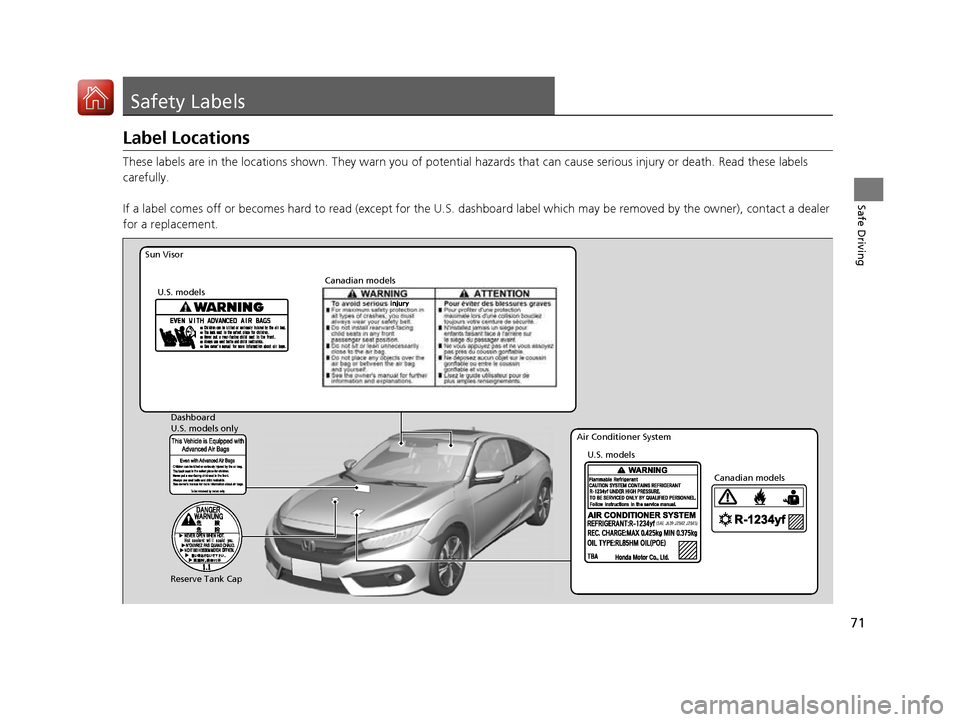
These labels are in the locations shown. They warn you of potential hazards that can cause serious injury or death. Read these labels
carefully.
If a label comes off or becomes hard to read (except for the U. S. dashboard label which may be removed by the owner), contact a dealer
for a replacement.
(SAE J639 J2842 J2845)
Sun Visor
U.S. models Canadian models
Reserve Tank Cap U.S. models
U.S. models only
Dashboard
Canadian models
Air Conditioner System
16 CIVIC 2D HC2 (0A 01 0C)-31TBG6000.book 71 ページ >0>.>/6年>0月>/>0日 金
曜日 午後4時>/6分
Page 147 of 585
uuOperating the Switches Around the Steering WheeluENGINE START/STOP Button*
146
Controls
If you open the driver’s doo r when the power mode is set to ACCESSORY, a warning
beep sounds.
Warning buzzers may sound from inside or/
and outside the vehicle to remind you that the
smart entry remote is out of the vehicle. If the
buzzer continues even after the remote is put
back inside, place it to be within its
operational range.
■ When the power mode is in ON
If the smart entry remote is taken out of the
vehicle, and the driver’s door is closed,
warning buzzers sound from both inside and
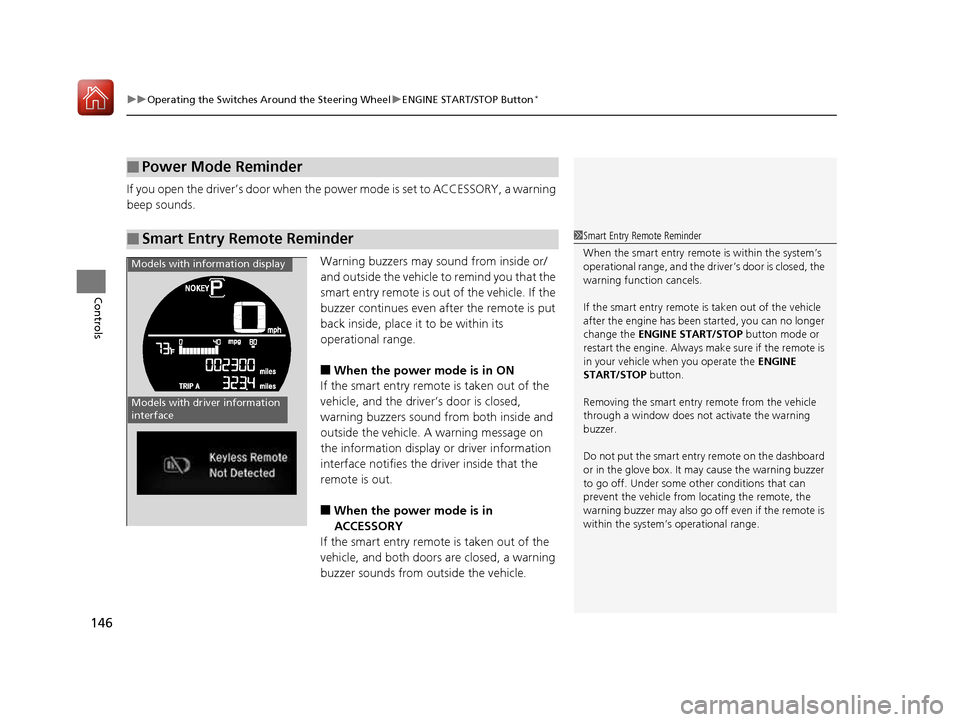
outside the vehicle. A warning message on
the information display or driver information
interface notifies the driver inside that the
remote is out. ■ When the power mode is in
ACCESSORY
If the smart entry remote is taken out of the
vehicle, and both doors are closed, a warning
buzzer sounds from outside the vehicle.
■Power Mode Reminder
■Smart Entry Remote Reminder1Smart Entry Remote Reminder
When the smart entry remote is within the system’s
operational range, and the driv er’s door is closed, the
warning function cancels.
If the smart entry remote is taken out of the vehicle
after the engine has been started, you can no longer change the ENGINE START/STOP button mode or
restart the engine. Always make sure if the remote is
in your vehicle when you operate the ENGINE
START/STOP button.
Removing the smart entry remote from the vehicle through a window does not activate the warning
buzzer.
Do not put the smart entr y remote on the dashboard
or in the glove box. It may cause the warning buzzer
to go off. Under some other conditions that can
prevent the vehicle from locating the remote, the
warning buzzer may al so go off even if the remote is
within the system’s operational range.
Models with driver information
interface
Models with information display
16 CIVIC 2D HC2 (0A 01 0C)-31TBG6000.book 146 ページ >0>.>/6年>0月>/>0日 金曜日 午後4時>/6分
Page 160 of 585
159
Continued
Controls
Adjusting the Seats
Front Seats
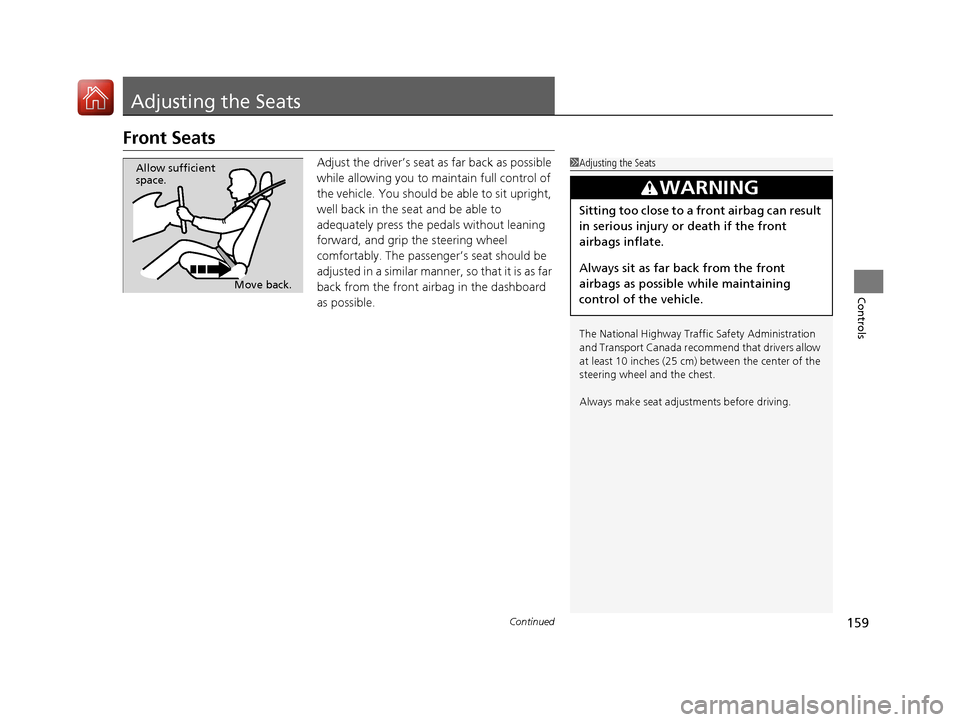
Adjust the driver’s seat as far back as possible
while allowing you to ma intain full control of
the vehicle. You should be able to sit upright,
well back in the seat and be able to
adequately press the pedals without leaning
forward, and grip the steering wheel
comfortably. The passenger’s seat should be
adjusted in a similar manner, so that it is as far
back from the front airbag in the dashboard
as possible.
1Adjusting the Seats
The National Highway Traffic Safety Administration
and Transport Cana da recommend that drivers allow
at least 10 inches (25 cm) between the center of the
steering wheel and the chest.
Always make seat adjustments before driving.
3WARNING
Sitting too close to a front airbag can result
in serious injury or death if the front
airbags inflate.
Always sit as far back from the front
airbags as possible while maintaining
control of the vehicle.
Move back.
Allow sufficient
space.
16 CIVIC 2D HC2 (0A 01 0C)-31TBG6000.book 159 ページ >0>.>/6年>0月>/>0日
金曜日 午後4時>/6分
Page 239 of 585
238
uuAudio System Basic OperationuVoice Control Operation
Features
Voice Control Operation
Your vehicle has a voice control system that allows hands-free operation.
The voice control system uses the (Talk) and (hang-up/back) buttons on
the steering wheel and a microphone near the map lights on the ceiling.
To achieve optimum voice recognition when using the voice control system: • Make sure the correct screen is displa yed for the voice command that you are
using.
• Close the windows and moonroof *
.
• Adjust the dashboard and side vents so air does not blow onto the microphone
on the ceiling.
• Speak clearly in a natural speaking vo ice without pausing between words.
• Reduce any background noise if possible. The system may misinterpret your
command if more than one person is speaking at the same time.
■Voice Recognition
1Voice Control Operation
When you press the button, a helpful prompt asks what you would like to do. Press and release the
button again to bypass th is prompt and give a
command.
1Voice Recognition
The voice control system can only be used from the driver’s seat because the microphone unit removes
noises from the front passenger’s side.
* Not available on all models
16 CIVIC 2D HC2 (0A 01 0C)-31TBG6000.book 238 ページ >0>.>/6年>0月>/>0日 金曜日 午後4時>/6分
Page 486 of 585
485
uuMaintenance Under the HooduOpening the Hood
Maintenance
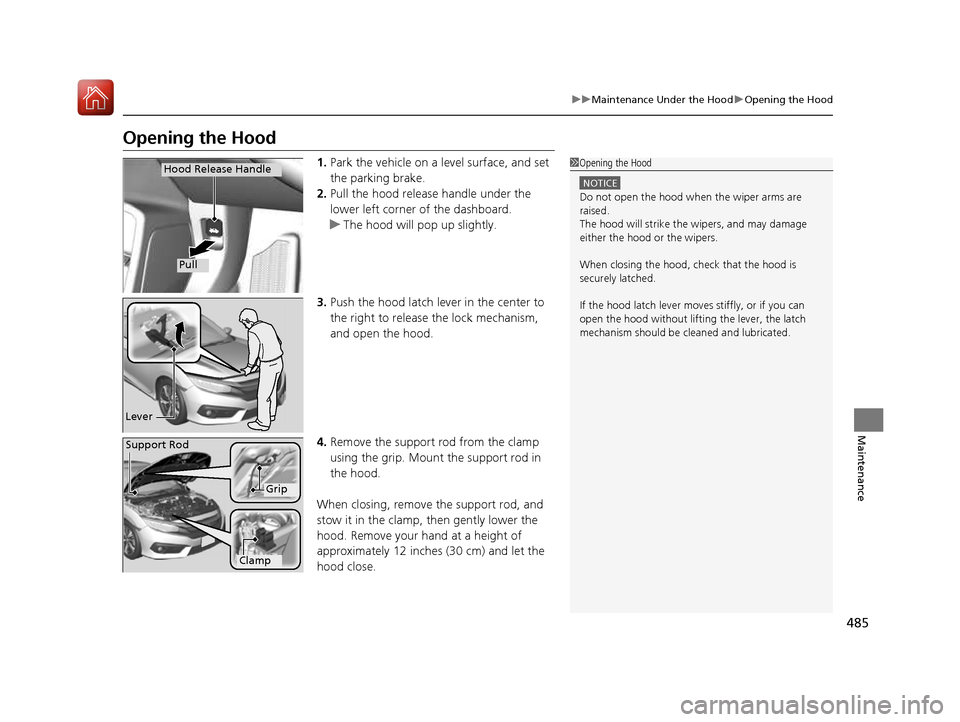
Opening the Hood1.Park the vehicle on a level surface, and set the parking brake.
2. Pull the hood release handle under the
lower left corner of the dashboard.
uThe hood will pop up slightly.
3. Push the hood latch lever in the center to the right to release the lock mechanism,
and open the hood.
4. Remove the support rod from the clamp
using the grip. Mount the support rod in
the hood.
When closing, remove the support rod, and
stow it in the clamp, then gently lower the
hood. Remove your hand at a height of
approximately 12 inches (30 cm) and let the
hood close.
1Opening the Hood
NOTICE
Do not open the hood when the wiper arms are
raised.
The hood will strike the wipers, and may damage
either the hood or the wipers.
When closing the hood, check that the hood is
securely latched. If the hood latch lever moves stiffly, or if you can
open the hood without lifti ng the lever, the latch
mechanism should be cl eaned and lubricated.
Hood Release Handle
Pull
Lever
Support Rod
Grip
Clamp
16 CIVIC 2D HC2 (0A 01 0C)-31TBG6000.book 485 ページ >0>.>/6年>0月>/>0日 金曜日 午後4時>/6分
Page 554 of 585
553
uuFusesuFuse Locations
Continued
Handling the Unexpected
*3:1.5L engine models
Circuit ProtectedAmps
22 Front Fog Lights *
(15 A)
23A/C Compressor(10 A)
24 Horn 10 A
25Left Headlight Low Beam10 A
26 Right Headlight Low Beam 10 A
27VB ACT *3(10 A)
28 Left Headlight High Beam 10 A
29Right Headlight High Beam10 A
30 − −
31−(15 A)
32 − (20 A)
33−(20 A)
34 − −
35−−
36 − −
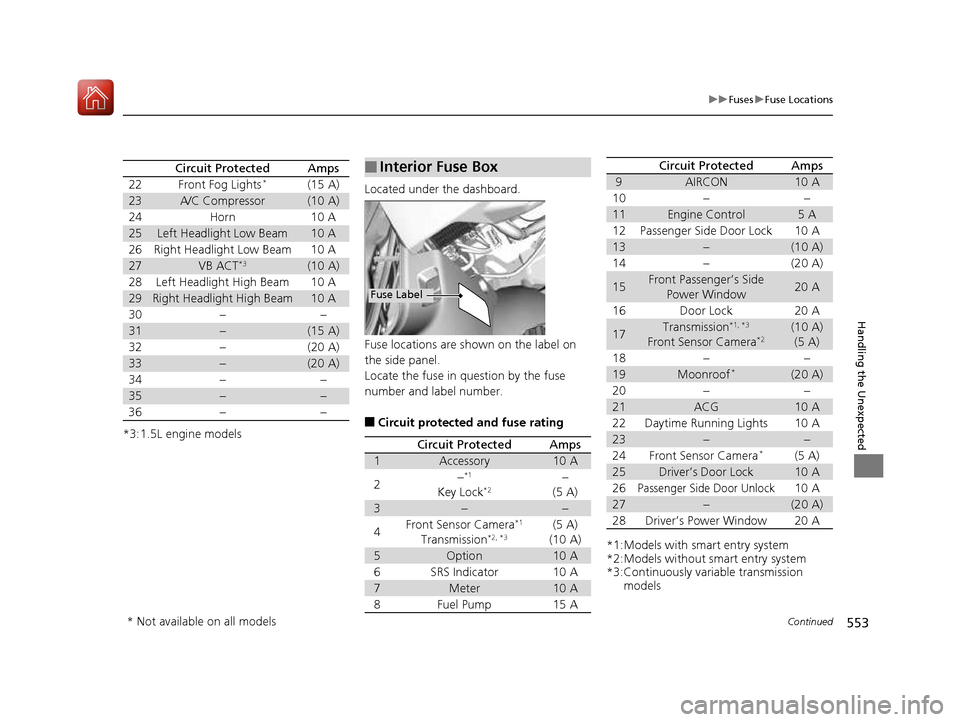
Located under the dashboard.
Fuse locations are shown on the label on
the side panel.
Locate the fuse in question by the fuse
number and label number. ■ Circuit protected and fuse rating
■Interior Fuse Box
Fuse Label
Circuit ProtectedAmps
1Accessory10 A
2−*1
Key Lock *2−
(5 A)
3−−
4Front Sensor Camera *1
Transmission *2, *3(5 A)
(10 A)
5Option10 A
6SRS Indicator10 A
7Meter10 A
8Fuel Pump15 A
*1:Models with smart entry system
*2:Models without smart entry system
*3:Continuously variable transmission models
9AIRCON10 A
10−−
11Engine Control5A
12Passenger Side Door Lock10 A
13−(10 A)
14−(20 A)
15Front Passenger’s Side
Power Window20 A
16Door Lock20 A
17Transmission *1, *3
Front Sensor Camera *2(10 A)
(5 A)
18−−
19Moonroof *(20 A)
20−−
21ACG10 A
22Daytime Running Lights10 A
23−−
24Front Sensor Camera *(5 A)
25Driver’s Door Lock10 A
26Passenger Side Door Unlock10 A
27−(20 A)
28Driver’s Power Window20 A
Circuit ProtectedAmps
* Not available on all models
16 CIVIC 2D HC2 (0A 01 0C)-31TBG6000.book 553 ページ >0>.>/6年>0月>/>0日
金曜日 午後4時>/6分