2016 HONDA ACCORD AUX
[x] Cancel search: AUXPage 29 of 83
50 || 51
AUDIO AND CONNECTIVITY
AUDIO AND CONNECTIVITY
AUDIO AND CONNECTIVITY
*if equipped
Learn how to operate the vehicle’s audio system.
Basic Audio Operation
Connect audio devices and operate buttons and displays for the audio system.
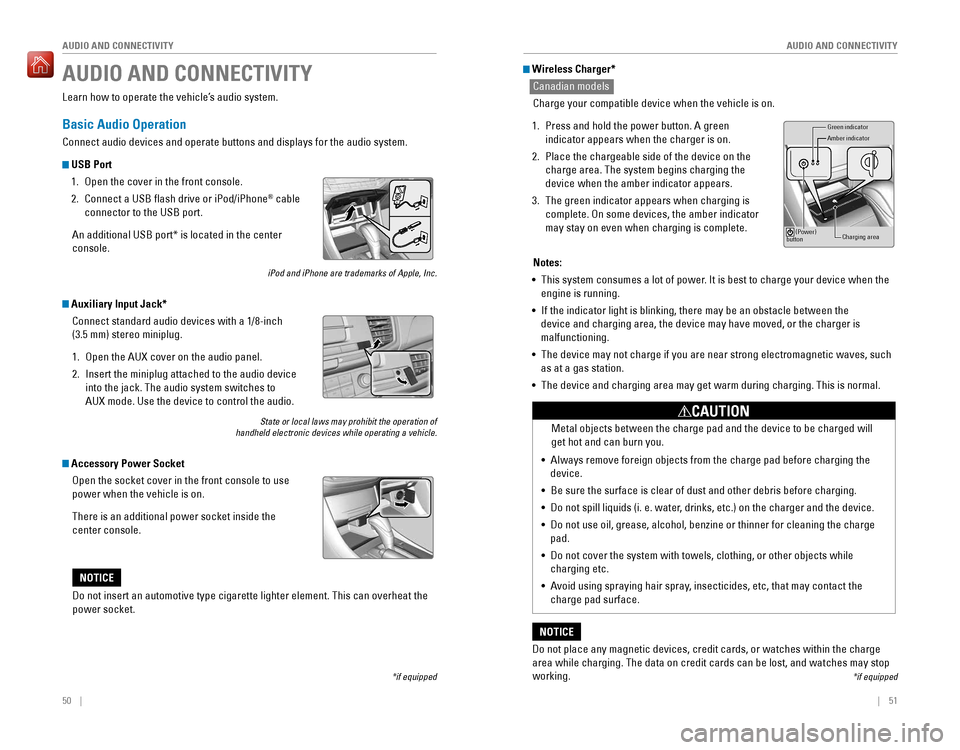
USB Port
1. open the cover in the front console.
2. Connect a USB flash drive or iPod/iPhone® cable
connector to the USB port.
An additional USB port* is located in the center
console.
iPod and iPhone are trademarks of Apple, Inc.
Auxiliary Input Jack*
Connect standard audio devices with a 1/8-inch
(3.5 mm) stereo miniplug.
1. open the AUX cover on the audio panel.
2. Insert the miniplug attached to the audio device
into the jack. The audio system switches to
AUX mode. Use the device to control the audio.
State or local laws may prohibit the operation of handheld electronic devices while operating a vehicle.
Accessory Power Socket
open the socket cover in the front console to use
power when the vehicle is on.
There is an additional power socket inside the
center console.
Do not insert an automotive type cigarette lighter element. This can ove\
rheat the
power socket.
NOTICE
Wireless Charger*
Canadian models
Charge your compatible device when the vehicle is on.
1. Press and hold the power button. A green
indicator appears when the charger is on.
2. Place the chargeable side of the device on the
charge area. The system begins charging the
device when the amber indicator appears.
3. The green indicator appears when charging is
complete. On some devices, the amber indicator
may stay on even when charging is complete.
Gr een indicator
Amber indicator
Charging area
(Power)
button
Notes:
• This system consumes a lot of power. It is best to charge your device when the
engine is running.
•
If the indicator light is blinking, there may be an obstacle between the
device and charging area, the device may have moved, or the charger is
malfunctioning.
• The device may not charge if you are near strong electromagnetic waves, \
such
as at a gas station.
• The device and charging area may get warm during charging. This is norma\
l.
Do not place any magnetic devices, credit cards, or watches within the c\
harge
area while charging. The data on credit cards can be lost, and watches may stop
working.
NOTICE
Metal objects between the charge pad and the device to be charged will
get hot and can burn you.
• Always remove foreign objects from the charge pad before charging the
device.
•
Be sure the surface is clear of dust and other debris before charging.
• Do not spill liquids (i. e. water, drinks, etc.) on the charger and the device.
• Do not use oil, grease, alcohol, benzine or thinner for cleaning the charge
pad.
•
Do not cover the system with towels, clothing, or other objects while
charging etc.
• Avoid using spraying hair spray, insecticides, etc, that may contact the
charge pad surface.
CAUTION
*if equipped
Page 32 of 83
56 || 57
AUDIO AND CONNECTIVITY
AUDIO AND CONNECTIVITY
Models with one display
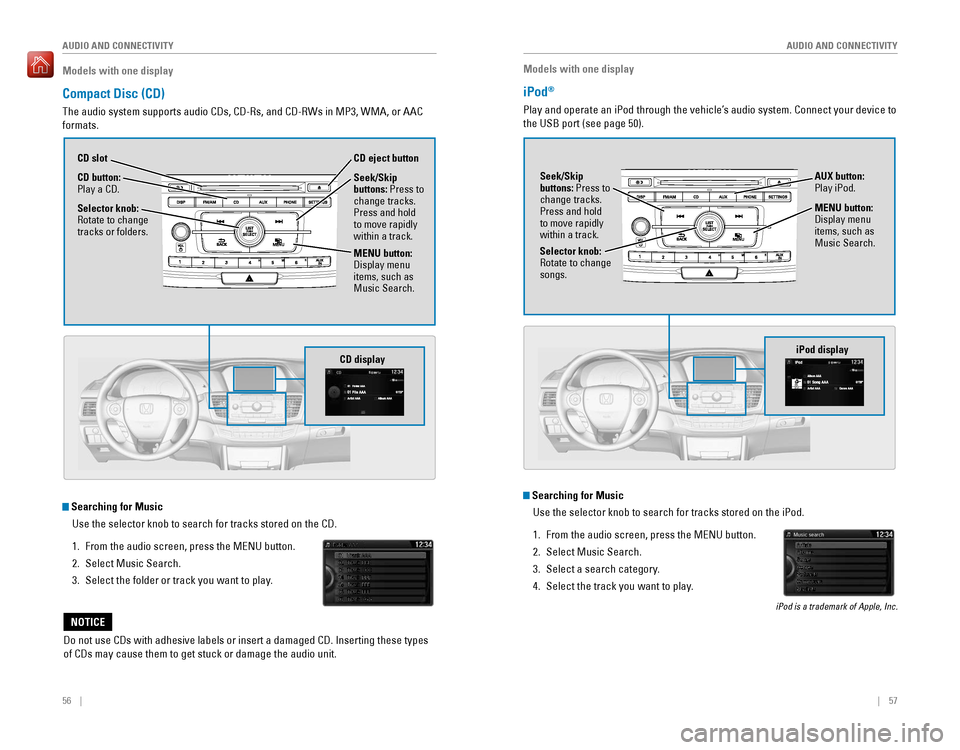
Compact Disc (CD)
The audio system supports audio CDs, CD-Rs, and CD-RWs in MP3, WMA, or AAC
formats.
Do not use CDs with adhesive labels or insert a damaged CD. Inserting these types
of CDs may cause them to get stuck or damage the audio unit.
NOTICE
Searching for Music
Use the selector knob to search for tracks stored on the CD.
1. From the audio screen, press the MENU button.
2. Select Music Search.
3. Select the folder or track you want to play.
Models with one display
iPod®
Play and operate an iPod through the vehicle’s audio system. Connect your device to
the USB port (see page 50).
MENU button:
Display menu
items, such as
Music Search.
Selector knob:
rotate to change songs. Seek/Skip
buttons: Press to
change tracks.
Press and hold
to move rapidly
within a track.
AUX button: Play iPod.
Searching for Music
Use the selector knob to search for tracks stored on the iPod.
1. From the audio screen, press the MENU button.
2. Select Music Search.
3. Select a search category.
4. Select the track you want to play.
iPod is a trademark of Apple, Inc.
CD display
CD button: Play a CD. CD eject button
CD slot
Selector knob:
rotate to change tracks or folders.
MENU button:
Display menu
items, such as
Music Search. Seek/Skip
buttons: Press to
change tracks.
Press and hold
to move rapidly
within a track.
iPod display
Page 33 of 83

58 || 59
AUDIO AND CONNECTIVITY
AUDIO AND CONNECTIVITY
Models with one display
USB Flash Drive
Play and operate a USB flash drive through the vehicle’s audio system. only MP3,
WMA, or AAC formats are supported. Connect your device to the USB port (see
page 50).
Searching for Music
Use the selector knob to search for tracks stored on the USB flash drive.
1. From the audio screen, press the MENU button.
2. Select Music Search.
3. Select a folder.
4. Select the track you want to play.
Selector knob: rotate to change folders. Seek/Skip
buttons: Press to
change tracks.
Press and hold
to move rapidly
within a track.
AUX button: Play
a connected USB
drive.
MENU button:
Display menu
items, such as
Music Search.
Models with one display
Bluetooth® Audio
Play streaming or stored audio from your compatible phone through the vehicle’s
audio system. Connect your phone to Bluetooth® HandsFreeLink® (see page
75). visit handsfreelink.com (U.S.) or handsfreelink.ca (Canada) to check phone
compatibility. Standard data rates apply.
State or local laws may prohibit the operation of handheld electronic devices while operating a vehicle. Only launch streaming audio on your phone when it is safe to do so.
Notes:
• Make sure the volume on your phone is properly adjusted.
•
You may need to enable additional settings on your phone for playback.
• The resume/pause function and remote audio controls are not supported on all phones.
USB displayBluetooth Audio display
Preset button 1: resume playing.
AUX button:
Play Bluetooth®
Audio.
Seek/Skip
buttons: Press to
change tracks.
Preset button 2:
Pause playing.
Page 34 of 83

60 || 61
AUDIO AND CONNECTIVITY
AUDIO AND CONNECTIVITY
Models with one display
Pandora®
Play and operate Pandora from your phone through the vehicle’s audio system. visit
handsfreelink.com to check phone compatibility. Standard data rates apply.
Available in the U.S. only.
Connect your phone when the vehicle is stopped.
For iPhone:
• Connect via Bluetooth
® HandsFreeLink® (see page 75) or USB port (see page 50).
•
A pop-up may appear on your phone requesting you to allow access for Pandora to be launched.
• If you cannot operate Pandora through the audio system, it may be streaming through Bluetooth® Audio. Make sure Pandora is selected on the audio system.
•
If Pandora still does not operate, try rebooting the phone and reconnecting the cable if necessary.
For Android or BlackBerry:
• Connect via Bluetooth® HandsFreeLink® (see page 75).
State or local laws may prohibit the operation of handheld electronic devices while operating a vehicle. Only launch streaming audio on your phone when it is safe to do so.
Selector knob: rotate to change the station.
Models with touchscreen
Touchscreen Operation
Use simple gestures—including touching, swiping, and scrolling—to \
operate certain
audio functions.
Some items may be grayed out during driving to reduce the potential for distraction.
You can select them when the vehicle is stopped or use voice commands* (see page
155).
Wearing gloves may limit or prevent touchscreen response.
*if equipped
Press the display button to change displays.USB display
AUX button:
Play Pandora.
Skip button:
Go to the
next song.
Preset buttons: Press the button for each function.
(1) Pause/resume(2) Dislike song
(3) Like song
(4) Bookmark track
(5) Bookmark artist
Power button:
Turn audio on
or off.
HOME
(shown)
MENU: Display
menu items for the
selected screen.
BACK:
Go back to the previous
screen.
button: Change screen
brightness.
Settings: Choose
Audio for options. Audio: Display
current audio
information.
Volume
Left arrow:
Display apps or
widgets.
Page 81 of 83

154 || 155
VOICE COMMAND INDEX
VOICE COMMAND INDEX
Voice Portal Commands
When you press the Talk button, the Voice Portal screen appears. Say one of the
options, and follow the system prompts.
Navigation Commands*
The system accepts these commands on most screens. You only need to press the
Talk button once for navigation commands.
Learn about all available voice commands to help you operate the vehicle. Available
on vehicles with touchscreen.
Press the Talk button before you say a command.
VOICE COMMAND INDEX
• Phone call
• Music search
• Audio
• Climate control
• Navigation* • voice setting
• voice help
• What is today’s date?
• What time is it?
• view map
•
Find place
• Find category
• Find intersection
•
recently found
• Go home
• Find address
• Find city
• Find saved places
*models with navigation**These commands toggle the function on and off, so the command may not match your intended action.
Climate Control Commands
The system accepts these commands on most screens.
•
Climate control on**
• Climate control off**
• Air conditioner on**
• Air conditioner off**
• Defrost on**
• Defrost off**
• Fan speed # (#: 1 to 7)
• Temperature # degrees
(#: 57 to 87°F)
• Temperature max heat
• Temperature max cool
Phone Commands
The system accepts these commands on most screens. Not available during use
of Apple Car Play or Android Auto.
•
Call by number
• Call by name
• Call (number)
• Call (name)
Audio Commands*
The system accepts these commands on most screens. Audio volume levels
cannot be controlled using voice commands.
FM/AM Radio Commands
•
Audio on**
• Audio off**
• radio FM
• radio AM
• Radio tune to # FM (#: frequency,
e.g., 95.5)
•
Radio tune to # AM (#: frequency,
e.g., 1020)
•
radio FM preset # (#: 1 to 12)
• radio AM preset # (#: 1 to 6)
SiriusXM® Radio Commands
•
radio SXM
• SXM channel # (#: 0 to 255)
• SXM channel (channel name)
•
radio SXM preset # (#: 1 to 12)
Disc (CD) Commands
• Disc
• Disc play
• Disc play track # (#: 1 to 30)
USB Commands***
• USB
• USB play
• USB play track # (#: 1 to 30)
Pandora
® Commands (U.S. only)***
• Pandora
• Pandora play iPod
® Commands***
• iPod
• iPod play
• iPod play track # (#: 1-30)
Bluetooth
® Audio Commands
• Bluetooth audio play
(may not work on all phones)
AUX Commands
• Aux audio play
• Music search
•
List album (specify album)
• List artist (specify artist)
• List composer (specify composer)
• List genre (specify genre)
• List playlist (specify playlist)
•
Play album (specify album)
• Play artist (specify artist)
• Play composer (specify composer) •
Play genre (specify genre)
• Play playlist (specify playlist)
• Play song (specify song)
•
What/Who am I listening to?
• Who is this?
• What’s playing?
• Who’s playing?
• What album is this?
Song By Voice™ Commands***
Available for tracks stored on an iPod® or USB device.
*models with navigation**These commands toggle the function on and off, so the command may not match your intended action.***Not available during use of Apple Car Play.
Page 82 of 83

156 || 157
INDEX
INDEX
INDEX
ABS .....................................................24, 104ACC .......................................................24, 26
Accessory Power Socket ...............................50
Adaptive Cruise Control (ACC) ...............24, 107Address .............................................................89Advanced Airbags .............................................8Aha™ radio ......................................................64Airbags ...............................................................8Airbag Care ...................................................13Airbag System Components .......................12Airbag System Indicators ...........................10Ambient Meter................................................ 105
Android Auto .....................................................66
Anti-Lock Brake System (ABS) ..............24, 104
Apple CarPlay ...................................................65Apps .............................................................62
Audio Commands ...........................................155Audio operation ...............................................50Aha™ radio ..................................................64
Android Auto .................................................66
Apple CarPlay .................................................5Auxiliary Input Jack .....................................50
Bluetooth® Audio ...................................59, 72
Compact Disc (CD) .................................56, 69FM/AM Radio ..........................................55, 67
HondaLink® ...................................................63
iPod® .......................................................57, 70one Display Audio operation .....................54
Pandora® .................................................60, 73
SiriusXM® radio ...........................................68Sound .............................................................53Steering Wheel Controls .............................52Touchscreen operation ..............................61
USB Flash Drive ......................................58, 71
USB Port ........................................................50Wi-Fi Connection ..........................................64Wireless Charger .........................................51
Auto High-Beam System .....................24, 26, 36
Automatic (AUTO) Rain-Sensing Wipers .....38Automatic Dimming rearview Mirror ...........44
AUX Commands .............................................. 155
Auxiliary Input Jack .........................................50Battery ...........................................................139
Bluetooth® Audio .......................................59, 72
Bluetooth® Audio Commands ......................155
Bluetooth® HandsFreeLink® (HFL) .................74
Call History ..............................................77, 83Dialing a Number ...................................76, 82e-Mail .............................................................84
HFL Controls ............................................74, 79
HondaLink® Assist .......................................85
Making a Call ..........................................76, 82
Pairing a Phone ......................................75, 81 Phonebook
..............................................77, 83Siri eyes Free ................................................86
SMS Text Messaging ............................78, 84
Speed Dial ...............................................76, 82
Talk Button Tips ............................................80
Brake Assist System ...................................... 104
Brake Fluid
......................................................138
Brake system ..............................................23, 24Braking ...........................................................104
Brightness Control ...........................................35
Call History ..................................................77, 83Carbon Monoxide Gas....................................... 4
Changing a Flat Tire .......................................123
Changing Settings ............................................48
Charging system ............................................... 23
Childproof Door Locks
.....................................32
Child Safety .......................................................14
Child Seat ..........................................................16
Adding Security with a Tether ...................19LATCH-Compatible Child Seat ....................17
Climate Control Commands ..........................154
Climate Control System ...................................46Clock .............................................................49
Clutch Fluid ...................................................... 138
Collision Mitigation Braking System™ (CMBS™)
.............................24, 26, 112
Compact Disc (CD) .....................................56, 69
Compact Disc (CD) Commands ....................155Condition Indicators ........................................25
Contact Us .......................................................152Continuously Variable Transmission (CVT)... 101
Cruise Control ...........................................26, 106Customer Information.................................... 151Customized Features .......................................48Dashboard and Other Controls ........................2
Destination ........................................................89Dialing a Number .......................................76, 82
Door Mirrors .....................................................44
Door open ..........................................................25Door operation ...........................................31, 32DoT Tire Quality Grading ..............................145Driving .............................................................94
Adaptive Cruise Control (ACC) .................107
Braking .........................................................104
Collision Mitigation Braking System™ (CMBS™)
.........................................112Continuously Variable Transmission (CvT) .................................................101
Cruise Control .............................................106eco Assist System ......................................105ENGINE START/STOP button ...................101
Ignition .........................................................100
Lane Keeping Assist System (LKAS) .......110 LaneWatch™
..............................................111
Manual Transmission ................................103
Maximum Load Limit ....................................96Multi-view rear Camera ..........................114
Paddle Shifters ...........................................102
Parking Sensor System .............................113
Power Mode ...............................................101refueling ......................................................115remote engine Start ....................................99road Departure Mitigation (rDM) ..........109
Shifting .........................................................101
Towing a Trailer ............................................98Vehicle Stability Assist (VSA®) ................105
Driving Position Memory System ..................43eco Assist System.......................................... 105eCoN Button ...................................................105eCoN mode .......................................................26electric Power Steering (ePS) .......................24Electronic Stability Control (ESC) ................105e-Mail .............................................................84emergency engine Stop ................................120emergency Towing ........................................120engine and Fuel ......................................148, 150engine Coolant................................................ 137engine oil......................................................... 134ENGINE START/STOP button .......................101exterior lights ..............................................26, 35
Fastening a Seat Belt ........................................7Flat Tire ...........................................................123
Floor Mats .........................................................40Fluids ...................................................149, 150FM/AM Radio ..............................................55, 67FM/AM Radio Commands .............................155
Fog lights ...........................................................26
Foot Brake .......................................................104Frequently Asked Questions ........................151Front Airbags (SRS) ...........................................8Front Door Inner Handle .................................32Fuel Information .............................................115
Fuse Locations ................................................ 126
Garage opener .................................................45Hazards .............................................................26Headlight-Wiper Integration ..........................37Head restraints ................................................41High beams .......................................................26
High temperature .............................................24
Home Address ..................................................89
HomeLink® Garage opener ............................45
HondaLink® .......................................................63
HondaLink® Assist ...........................................85Honda roadside Assistance ........................152Hood ...........................................................132Ignition ...........................................................100
Immobilizer ........................................................26Information Display.......................................... 27
Instrument Panel ..............................................23Interior Lights.................................................... 35Intermittent Wipers..........................................37
iPod® .......................................................57, 70
iPod® Commands ...........................................155
Jump Starting .................................................117Key .............................................................30
Lane Keeping Assist System (LKAS) ....25, 110
LaneWatch™ ..................................................111Lap/Shoulder Seat Belts ...................................5LATCH-Compatible Child Seat ........................17Light Bulbs............................................... 148, 150
Light control ......................................................24Lights .......................................................26, 35LKAS .......................................................25, 26Lock Tab .............................................................32Low fuel .............................................................25
Low oil pressure ...............................................23
Low temperature ..............................................24
Low tire pressure .............................................25
Maintenance ................................................... 129
Battery
.........................................................139
Brake Fluid ..................................................138
Clutch Fluid ..................................................138engine Coolant ............................................137engine oil .....................................................134
Maintenance Minder™ .............................130
Service Codes .............................................131
Under the Hood ..........................................132Window Washer Fluid ...............................139
Making a Call ..............................................76, 82
Malfunction indicator lamp ............................24Malfunction Indicators.................................... 23
Manual Seats .................................................... 40
Manual Transmission
....................................103
Map Legend ......................................................92
Master Door Lock Switch ...............................32
Maximum Load Limit ........................................ 96
Mirrors .............................................................44
Moonroof ...........................................................34Multi-Information Display (MID).................... 28Multi-view rear Camera ..............................114
Music search ..................................................155
Navigation .........................................................87
Display and Controls ....................................88entering a Destination .................................89
Home Address ..............................................89
Map Legend ..................................................92
Place Category .............................................90recent Places ...............................................90routing ...........................................................92
Saved Places ................................................91Steering Wheel Controls .............................87
Street Address ..............................................89System Guidance volume ...........................87