2016 HONDA ACCORD lane
[x] Cancel search: lanePage 6 of 609

5
Quick Reference Guide
❙(+ / (- / / Buttons (P 190)
❙SOURCE Button (P 190)
❙Bluetooth® HandsFreeLink ® System
Voice Control Buttons
(P 343, 374)
❙Navigation System Voice Control Buttons*
(P 235), () See Navigation System Manual
❙Steering Wheel Adjustments (P 157)
❙SEL/RESET Button* (P 100)
❙ (Information) Buttons* (P 99)
❙Paddle Shifter (Shift up)* (P 434)
❙Brightness Control (P 153)
❙ (Select/Reset) Knob (P 96)
❙ (Display) Button (P 193, 216)
❙Paddle Shifter (Shift down)* (P 434)
❙LaneWatchTM *(P 473)
❙Fog Lights* (P 146)
❙Headlights/Turn Signals (P 144)
❙Adaptive Cruise Control (ACC) Buttons*
(P 448)
❙MENU Button* (P 190)
❙Cruise Control Buttons (P 442)
❙Lane Keeping Assist System (LKAS) Button*
(P 466)
❙Horn (Press an area around .)
❙Distance Button* (P 455)
❙Wipers/Washers (P 151)
* Not available on all models
16 US ACCORD 4D (KA KC KL)-31T2A6300.book 5 ページ 2015年7月28日 火曜日 午後3時3分
Page 12 of 609

11
Quick Reference Guide
Instrument Panel (P 67)
CanadaU.S.
Low Fuel Indicator
Anti-lock Brake
System (
ABS)
Indicator
Parking Brake
and Brake System
Indicator (Red)
Canada U.S.
Washer Level
Indicator
*
System Indicators
Malfunction
Indicator Lamp
Low Oil Pressure
Indicator
Charging System
Indicator
Vehicle Stability
Assist (VSA ®) System
Indicator
VSA ® OFF Indicator
Low Tire Pressure/
TPMS Indicator Electric Power
Steering (EPS) System
Indicator
Lights Indicators
Lights On Indicator
High Beam Indicator
Fog Light Indicator
*
Immobilizer System
Indicator Seat Belt Reminder
Indicator
System Indicators
CRUISE CONTROL
Indicator*
Adaptive Cruise Control
(ACC) Indicator (Amber)*
CRUISE MAIN
Indicator*
Tachometer Speedometer
Fuel Gauge
Security System
Alarm Indicator
Shift Lever
Position
Indicator
*
Gauges (P 95)/Information Display* (P 96)/
Multi-Information Display
* (P 99)/System Indicators (P 68) Turn Signal and
Hazard Warning
Indicators
System Indicators
Temperature Gauge
M (7-speed manual
shift mode) Indicator/
Shift Indicator
*
Maintenance Minder
Indicator*
Smart Entry System
Indicator*
Starter System
Indicator*
System Message
Indicator*
ECON mode Indicator
Road Departure Mitigation
(RDM) Indicator*
Collision Mitigation Braking
SystemTM (CMBSTM) Indicator*Light Control Indicator*
Door and Trunk
Open Indicator Brake System
Indicator (Amber)
Supplemental
Restraint System
Indicator
Canada
U.S.
Models with
information
displayModels with
information
display
Auto High-Beam
Indicator (Green)*/
Auto High-Beam
Indicator (Amber)
*
Lane Keeping Assist System
(LKAS) Indicator (Amber)*
Lane Keeping Assist System
(LKAS) Indicator (White)*
Parking Sensor
System Indicator*
Adaptive Cruise Control
(ACC) Indicator (White)*
* Not available on all models
16 US ACCORD 4D (KA KC KL)-31T2A6300.book 11 ページ 2015年7月28日 火曜日 午後3時3分
Page 84 of 609

83
uuIndicators u
Continued
Instrument Panel
*1:Models with the smart entry system have an ENGINE START/STOP button instead of an ignition switch.
IndicatorNameOn/BlinkingExplanationMessage*
Lane Keeping
Assist System
(LKAS ) Indicator
(Amber)
*
●Comes on for a few seconds when
you turn the igniti on switch to ON
(w*1, then goes off.●Comes on if there is a problem
with the LKAS.
●Stays on constantly - Have your vehicle
checked by a dealer.
Lane Keeping
Assist System
( LKAS ) Indicator
(White)
*
●Comes on when you press the
MAIN button.
2Lane Keeping Assist System (LKAS)*
P. 464—
* Not available on all models
16 US ACCORD 4D (KA KC KL)-31T2A6300.book 83 ページ 2015年7月28日 火曜日 午後3時3分
Page 93 of 609
92
uuIndicators uMulti-Information Display Warn ing and Information Messages*
Instrument Panel
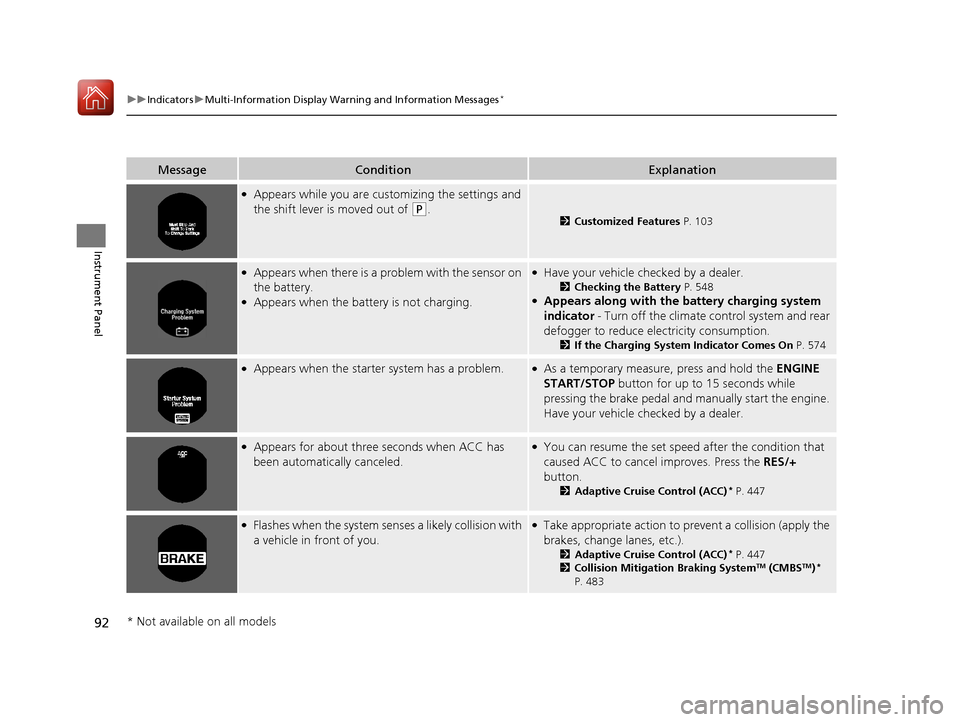
MessageConditionExplanation
●Appears while you are customizing the settings and
the shift lever is moved out of
(P.2Customized Features P. 103
●Appears when there is a problem with the sensor on
the battery.
●Appears when the battery is not charging.
●Have your vehicle checked by a dealer.
2Checking the Battery P. 548●Appears along with the ba ttery charging system
indicator - Turn off the climate control system and rear
defogger to reduce electricity consumption.
2 If the Charging System Indicator Comes On P. 574
●Appears when the starter system has a problem.●As a temporary measure, press and hold the ENGINE
START/STOP button for up to 15 seconds while
pressing the brake pedal and manually start the engine.
Have your vehicle ch ecked by a dealer.
●Appears for about three seconds when ACC has
been automatically canceled.●You can resume the set speed after the condition that
caused ACC to cancel improves. Press the RES/+
button.
2 Adaptive Cruise Control (ACC)* P. 447
●Flashes when the system senses a likely co llision with
a vehicle in front of you.●Take appropriate action to prev ent a collision (apply the
brakes, change lanes, etc.).
2 Adaptive Cruise Control (ACC)* P. 447
2 Collision Mitigation Braking SystemTM (CMBSTM)*
P. 483
* Not available on all models
16 US ACCORD 4D (KA KC KL)-31T2A6300.book 92 ページ 2015年7月28日 火曜日 午後3時3分
Page 94 of 609

93
uuIndicators uMulti-Information Display Warn ing and Information Messages*
Continued
Instrument Panel
MessageConditionExplanation
●Appears when the area around the camera is
blocked by dirt, mud, etc. Stop your vehicle in a safe
place, and wipe it off with a soft cloth.
●May appear when driving in bad weather (rain,
snow, fog, etc.).
●Have your vehicle checked by a dealer if the message
appears again after you cleaned the area around the
camera.
●Appears if the temperature inside the camera is too
high.
●ACC/LKAS has been automatically canceled.
●Use the climate control system to cool down the camera.●Goes off - The camera has been cooled down. Pressing
the MAIN/LKAS button can resume the system.
2Front Sensor Camera* P. 445
2 Adaptive Cruise Control (ACC)* P. 447
2 Lane Keeping Assist System (LKAS)* P. 464
●Appears when the vehicle is driving out of a detected
line. The steering wheel vibrates rapidly.
●Keep the vehicle within the lane you are driving.●The color of either line changes from white to amber as
the vehicle gets closer to that side of the lane line.
2 Lane Keeping Assist System (LKAS)* P. 464
●Appears when the vehicle is driving out of a detected
line.
- The steering wheel vibrates rapidly when the
vehicle is drifting out of a detected line.
- The steering wheel vibrates rapidly when the
vehicle is drifting out of a detected line. The system
also steers the vehicle to help you remain within
your driving lane.
●Keep the vehicle within the lane you are driving.●The color of either line changes from white to amber as
the vehicle gets closer to that side of the lane line.
2 Road Departure Mitigation (RDM) System* P. 460●You can change the setting for the road departure
mitigation system. Normal, Wide , and Warning Only
can be selected.
2 Customized Features P. 103, 298, 316
Lane Keeping Assist System (LKAS)
Road Departure Mitigation (RDM) System
When you selected Warning Only
When you selected Normal or Wide
* Not available on all models
16 US ACCORD 4D (KA KC KL)-31T2A6300.book 93 ページ 2015年7月28日 火曜日 午後3時3分
Page 105 of 609

104
uuGauges and Displays uMulti-Information Display*
Instrument Panel
■Customization flow
Press the button.
SEL/RESETVehicle Settings
“Trip A” Reset Timing
Language Selection
Adjust Outside Temp. Display
Memory Position Link
Door Unlock Mode
Keyless Access Light Flash
4
4
4
4
TPMS Calibration
Driver Assist System Setup
Meter Setup
Position Setup
Keyless Access Setup
SEL/RESET
SEL/RESET
SEL/RESET
SEL/RESET
“Trip B” Reset Timing
Fuel Efficiency Backlight
4
ACC Pre-Running Car Detect Beep
ACC Display Speed Unit
4Keyless Start Guidance Screens
SEL/RESET
Keyless Access Beep
Forward Collision Warning Distance
4
4
4
Lane Keep Assist Suspend Beep
Road Departure Mi tigation Setting
Remote Start System ON/OFF*
* Not available on all models
16 US ACCORD 4D (KA KC KL)-31T2A6300.book 104 ページ 2015年7月28日 火曜日 午後3時3分
Page 107 of 609

106
uuGauges and Displays uMulti-Information Display*
Instrument Panel
■List of customizable options
*1:Default Setting Setup Group Customizable Features Description Selectable Settings
TPMS
Calibration—Calibrates the TPMS.Cancel
/Calibrate
Driver Assist
System
Setup
Forward Collision
Warning DistanceChanges at which distance the CMBSTM alerts.Long /Normal*1/Short
ACC Pre-Running Car
Detect BeepCauses the system to beep when the system detects a
vehicle, or when the vehi cle goes out of ACC range.On/Off*1
ACC Display Speed UnitChanges the ACC display speed unit.
mph*1/km/h
(U.S.)
mph /km /h
*1
(Canada)
Road Departure
Mitigation Setting Changes the setting for the road departure
mitigation system. Normal
*1/
Wide /Warning
Only
Lane Keep Assist
Suspend Beep Causes the system to beep when the LKAS is
suspended.
On
/Off
*1
16 US ACCORD 4D (KA KC KL)-31T2A6300.book 106 ページ 2015年7月28日 火曜日 午後3時3分
Page 145 of 609

144
uuOperating the Switches Around the Steering Wheel uTurn Signals
Controls
Turn Signals
The turn signals can be used when the ignition
switch is in ON
(w*1.
■One-touch turn signal
When you lightly push up or down and release
the turn signal lever, th e exterior turn signals
and turn signal indicator blink three times.
This feature can be used when signaling for a
lane change.
Light Switches
Rotating the light switch turns the lights on
and off, regardless of the position of the
ignition switch
*1.
■High beams
Push the lever forward until you hear a click.
■Low beams
When in high beams, pull the lever back to
return to low beams.
■Flashing the high beams
Pull the lever back, and release it.
*1: Models with the smart entry system have an ENGINE START/STOP button instead of an
ignition switch.
Right Turn
Left Turn
■Manual Operation
1 Light Switches
If you remove the key from the ignition switch while
the lights are on, a chime sounds when the driver’s
door is opened.
When the lights are on, the lights on indicator in the
instrument pane l will be on.
2 Lights On Indicator P. 76
If you sense that the le vel of the headlights is
abnormal, have the vehicl e inspected by a dealer.
Do not leave the lights on when the engine is off
because it will cause the battery to discharge.
High Beams
Flashing the high beams
Low Beams
Turns on parking, side marker,
tail, and rear license plate lights
Turns on headlights, parking, side
marker, tail, and rear license plate
lights
16 US ACCORD 4D (KA KC KL)-31T2A6300.book 144 ページ 2015年7月28日 火曜日 午後3時3分