2016 FORD SUPER DUTY radio controls
[x] Cancel search: radio controlsPage 4 of 510
Introduction
About This Manual...........................................7
Symbols Glossary
.............................................7
Data Recording
..................................................9
California Proposition 65..............................11
Perchlorate.........................................................11
Ford Credit
..........................................................11
Replacement Parts Recommendation
........................................11
Special Notices................................................12
Mobile Communications Equipment.....................................................13
Export Unique Options..................................13
Environment
Protecting the Environment........................14
Child Safety
General Information
.......................................15
Installing Child Restraints
............................16
Booster Seats
..................................................24
Child Restraint Positioning
.........................26
Child Safety Locks..........................................27
Seatbelts
Principle of Operation
..................................28
Fastening the Seatbelts..............................29
Seatbelt Height Adjustment......................32
Seatbelt Warning Lamp and Indicator Chime
..............................................................32
Seatbelt Reminder
.........................................33
Child Restraint and Seatbelt Maintenance
................................................35
Supplementary Restraints System
Principle of Operation..................................36
Driver and Passenger Airbags....................37
Side Airbags.....................................................42
Safety Canopy ™
............................................43Crash Sensors and Airbag Indicator.......44
Airbag Disposal...............................................45
Keys and Remote Controls
General Information on Radio
Frequencies.................................................46
Remote Control
..............................................46
Replacing a Lost Key or Remote Control...........................................................49
MyKey ™
Principle of Operation..................................50
Creating a MyKey.............................................51
Clearing All MyKeys.......................................52
Checking MyKey System Status...............52
Using MyKey With Remote Start Systems.........................................................54
MyKey Troubleshooting
...............................54
Locks
Locking and Unlocking.................................55
Keyless Entry
...................................................56
Tailgate
Tailgate Lock....................................................59
Removing the Tailgate
.................................59
Tailgate Step...................................................60
Bed Extender
....................................................61
Security
Passive Anti-Theft System
.........................63
Anti-Theft Alarm
............................................64
Steering Wheel
Adjusting the Steering Wheel
...................65
Audio Control..................................................65
Voice Control...................................................66
Cruise Control
.................................................66
Information Display Control
......................66
Heated Steering Wheel................................67
1
Super Duty (TFA) Canada/United States of America, enUSA, Second Printing Table of Contents
Page 49 of 510
GENERAL INFORMATION ON
RADIO FREQUENCIES
This device complies with Part 15 of the
FCC Rules and with Industry Canada
license-exempt RSS standard(s).
Operation is subject to the following two
conditions: (1) This device may not cause
harmful interference, and (2) This device
must accept any interference received,
including interference that may cause
undesired operation.
Note:
Changes or modifications not
expressively approved by the party
responsible for compliance could void the
user's authority to operate the equipment.
The term IC before the radio certification
number only signifies that Industry Canada
technical specifications were met.
The typical operating range for your
transmitter is approximately 33 feet (10
meters). Vehicles with the remote start
feature will have a greater range. One of
the following could cause a decrease in
operating range:
• weather conditions
• nearby radio towers
• structures around the vehicle
• other vehicles parked next to your
vehicle
The radio frequency used by your remote
control can also be used by other short
distance radio transmissions, for example
amateur radios, medical equipment,
wireless headphones, remote controls and
alarm systems. If the frequencies are
jammed, you will not be able to use your
remote control. You can lock and unlock
the doors with the key.
Note: Make sure to lock your vehicle before
leaving it unattended.
Note: If you are in range, the remote control
will operate if you press any button
unintentionally. Note:
The remote control contains sensitive
electrical components. Exposure to moisture
or impact may cause permanent damage.
REMOTE CONTROL
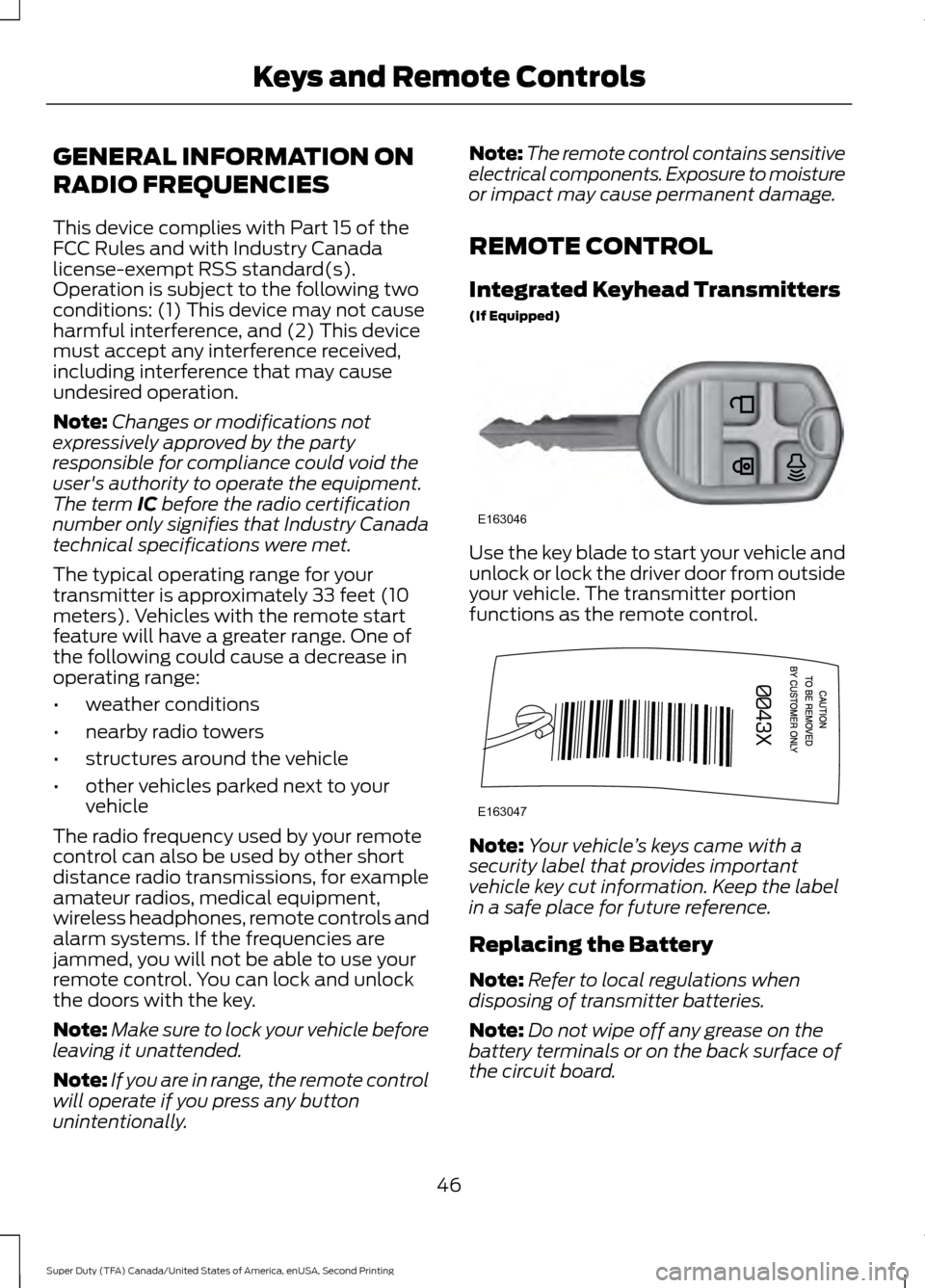
Integrated Keyhead Transmitters
(If Equipped) Use the key blade to start your vehicle and
unlock or lock the driver door from outside
your vehicle. The transmitter portion
functions as the remote control.
Note:
Your vehicle ’s keys came with a
security label that provides important
vehicle key cut information. Keep the label
in a safe place for future reference.
Replacing the Battery
Note: Refer to local regulations when
disposing of transmitter batteries.
Note: Do not wipe off any grease on the
battery terminals or on the back surface of
the circuit board.
46
Super Duty (TFA) Canada/United States of America, enUSA, Second Printing Keys and Remote ControlsE163046 E163047
Page 51 of 510

Many states and provinces have
restrictions for the use of remote start.
Check your local and state or provincial
laws for specific requirements regarding
remote start systems.
The remote start system will not work if:
•
the ignition is on
• the alarm system is triggered
• you disable the feature
• the hood is open
• the transmission is not in P
• the vehicle battery voltage is too low
• the service engine soon indicator is on.
Remote Starting the Vehicle
Note: You must press each button within
three seconds of each other. Your vehicle
will not remote start and the horn will not
sound if you do not follow this sequence. The label on your transmitter details the
starting procedure.
To remote start your vehicle:
1. Press the lock button to lock all the
doors.
2. Press the remote start button twice. The exterior lamps will flash twice.
The horn will sound if the system fails to
start. Note:
If you remote start your vehicle with
an integrated keyhead transmitter, you must
switch the ignition on before driving your
vehicle. If you remote start your vehicle with
an intelligent access transmitter, you must
press the
START/STOP button on the
instrument panel once while applying the
brake pedal before driving your vehicle.
The power windows will not work during
the remote start and the radio will not turn
on automatically.
The parking lamps will remain on and the
vehicle will run for 5, 10, or 15 minutes,
depending on the setting.
Extending the Vehicle Run Time
Repeat Steps 1 and 2 with the vehicle still
running to extend the run time for another
remote start duration. If the duration is set
to last 10 minutes, the duration will extend
by another 10 minutes. For example, if the
vehicle had been running from the first
remote start for five minutes, the vehicle
will continue to run now for a total of 20
minutes.
Wait at least five seconds before remote
starting after a vehicle shutdown.
Turning the Vehicle Off After Remote
Starting Press the button once. The
parking lamps will turn off.
You may have to be closer to the
vehicle than when starting due to ground
reflection and the added noise of the
running vehicle.
You can disable or enable the remote start
system through the information display.
See
General Information (page 88).
48
Super Duty (TFA) Canada/United States of America, enUSA, Second Printing Keys and Remote ControlsE138626 E138625
Page 325 of 510
AUDIO UNIT - VEHICLES WITH:
AM/FM/CD/TOUCHSCREEN
DISPLAY WARNING
Driving while distracted can result in
loss of vehicle control, crash and
injury. We strongly recommend that
you use extreme caution when using any
device that may take your focus off the
road. Your primary responsibility is the safe
operation of your vehicle. We recommend
against the use of any hand-held device
while driving and encourage the use of
voice-operated systems when possible.
Make sure you are aware of all applicable
local laws that may affect the use of
electronic devices while driving. Note:
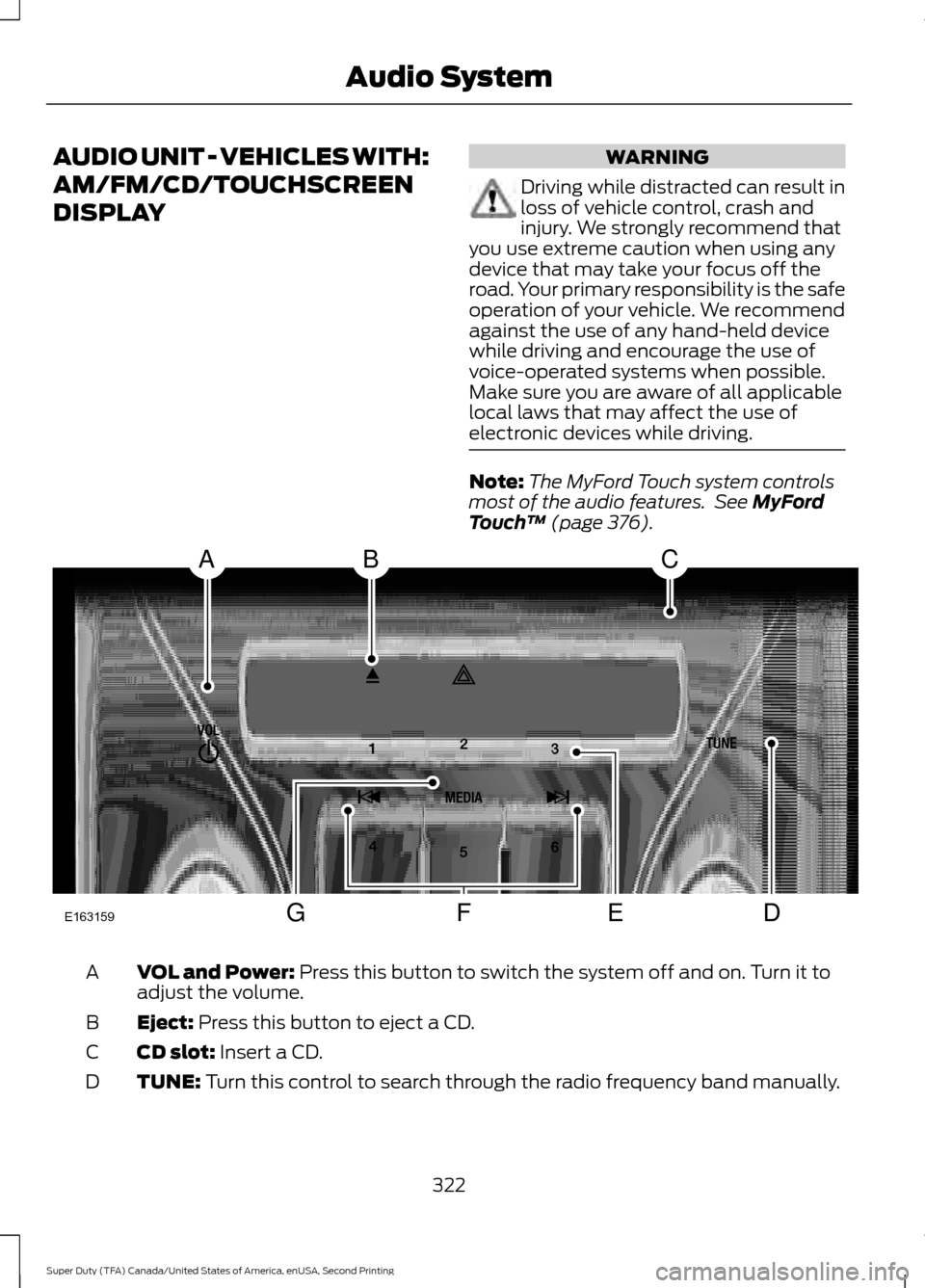
The MyFord Touch system controls
most of the audio features. See MyFord
Touch ™ (page 376). VOL and Power:
Press this button to switch the system off and on. Turn it to
adjust the volume.
A
Eject:
Press this button to eject a CD.
B
CD slot:
Insert a CD.
C
TUNE:
Turn this control to search through the radio frequency band manually.
D
322
Super Duty (TFA) Canada/United States of America, enUSA, Second Printing Audio SystemE163159
ABC
DFEG
Page 400 of 510
ENTERTAINMENT
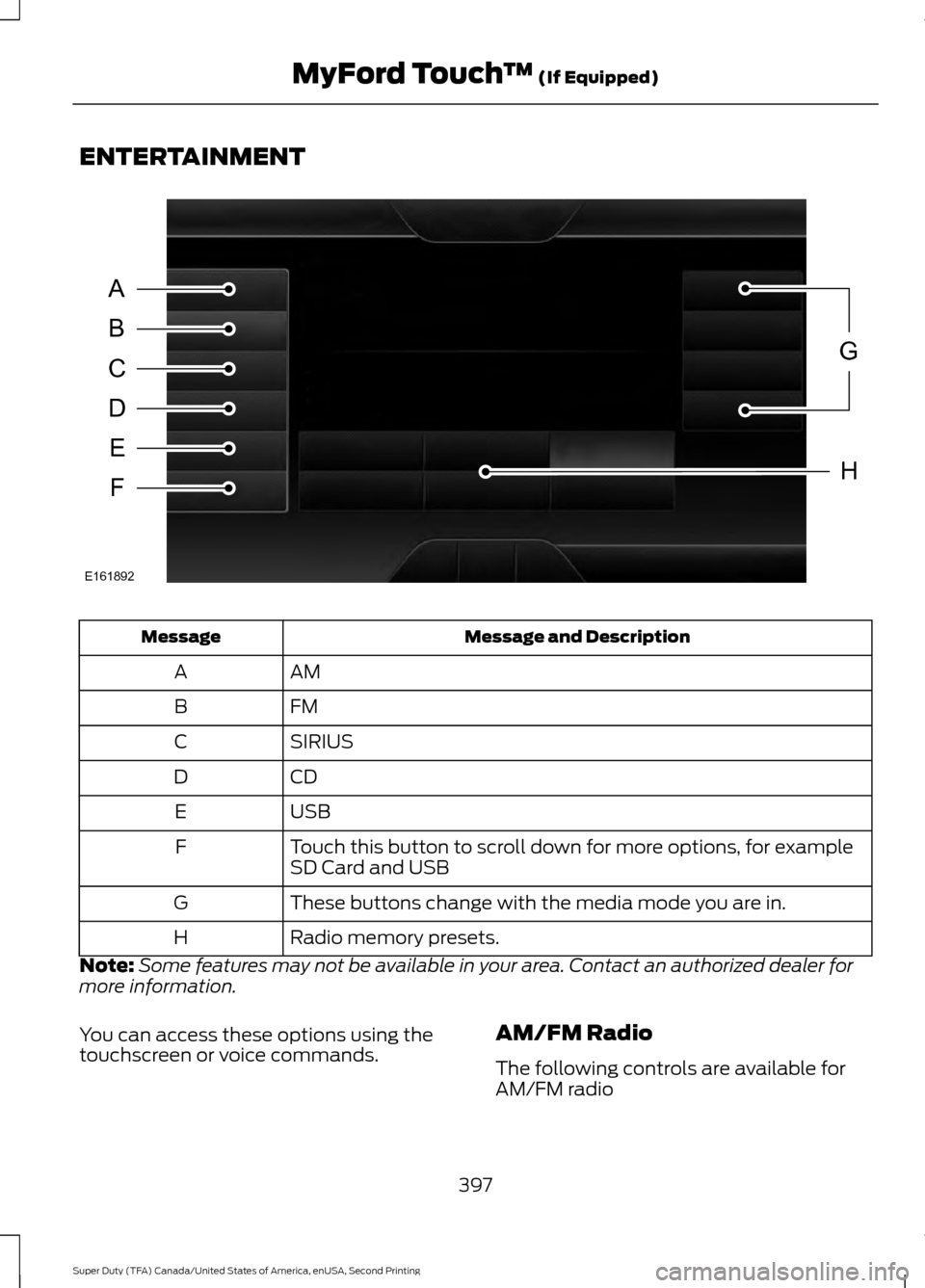
Message and Description
Message
AM
A
FM
B
SIRIUS
C
CD
D
USB
E
Touch this button to scroll down for more options, for example
SD Card and USB
F
These buttons change with the media mode you are in.
G
Radio memory presets.
H
Note: Some features may not be available in your area. Contact an authorized dealer for
more information.
You can access these options using the
touchscreen or voice commands. AM/FM Radio
The following controls are available for
AM/FM radio
397
Super Duty (TFA) Canada/United States of America, enUSA, Second Printing MyFord Touch
™ (If Equipped)A
B
C
D
E
F
G
H
E161892
Page 410 of 510
Troubleshooting tips
Action
Cause
Message
Contact SIRIUS at 1-888-539-
7474 to resolve subscription
issues.
Your satellite service is no
longer available.
Questions? Call
1-888-539-7474
Use the channel guide to turn
off the Lock or Skip function on
that station.
All the channels in the selected
category are either skipped or
locked.
None found
Check Channel Guide
No action required.
SIRIUS has updated the chan-
nels available for your vehicle.
Subscription Updated
SIRIUS Satellite Radio Voice
Commands If you are listening to SIRIUS
satellite radio, press the voice
button on the steering wheel
controls. You will hear a prompt, you can
then say any of the commands in the
following table.
If you are not listening to SIRIUS
satellite radio, press the voice button
and, after the tones press the voice
button and when prompted say: Voice command
Sirius
You can then say any of the following
or a similar command:
SAT 1 Voice command
Sports Games
Tune
Help
You can also say the name of any Sirius
station, such as “The Highway” or “Deep
Tracks” , to listen to that station.
CD
To access, press the lower left corner
on the touchscreen, then select: Menu Item
CD
407
Super Duty (TFA) Canada/United States of America, enUSA, Second Printing MyFord Touch
™ (If Equipped)E142599
Page 416 of 510
WARNINGS
Store the portable music player in a
secure location, such as the center
console or the glove box, when your
vehicle is moving. Hard objects may
become projectiles in a crash or sudden
stop, which may increase the risk of serious
injury. The audio extension cable must be
long enough to allow the portable music
player to be safely stored while your
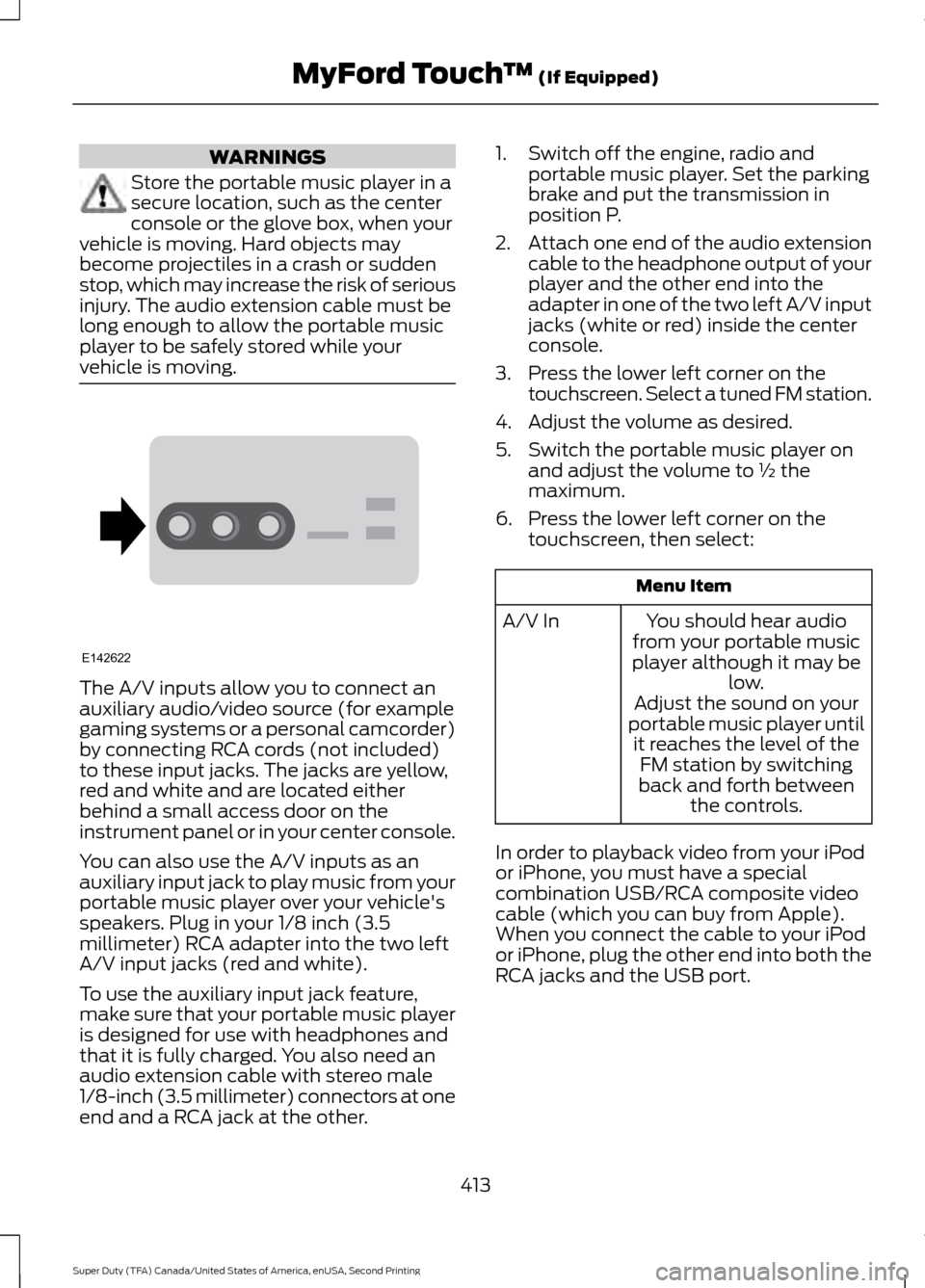
vehicle is moving. The A/V inputs allow you to connect an
auxiliary audio/video source (for example
gaming systems or a personal camcorder)
by connecting RCA cords (not included)
to these input jacks. The jacks are yellow,
red and white and are located either
behind a small access door on the
instrument panel or in your center console.
You can also use the A/V inputs as an
auxiliary input jack to play music from your
portable music player over your vehicle's
speakers. Plug in your 1/8 inch (3.5
millimeter) RCA adapter into the two left
A/V input jacks (red and white).
To use the auxiliary input jack feature,
make sure that your portable music player
is designed for use with headphones and
that it is fully charged. You also need an
audio extension cable with stereo male
1/8-inch (3.5 millimeter) connectors at one
end and a RCA jack at the other. 1. Switch off the engine, radio and
portable music player. Set the parking
brake and put the transmission in
position P.
2. Attach one end of the audio extension
cable to the headphone output of your
player and the other end into the
adapter in one of the two left A/V input
jacks (white or red) inside the center
console.
3. Press the lower left corner on the touchscreen. Select a tuned FM station.
4. Adjust the volume as desired.
5. Switch the portable music player on and adjust the volume to ½ the
maximum.
6. Press the lower left corner on the touchscreen, then select: Menu Item
You should hear audio
from your portable music
player although it may be low.
A/V In
Adjust the sound on your
portable music player until it reaches the level of the FM station by switching
back and forth between the controls.
In order to playback video from your iPod
or iPhone, you must have a special
combination USB/RCA composite video
cable (which you can buy from Apple).
When you connect the cable to your iPod
or iPhone, plug the other end into both the
RCA jacks and the USB port.
413
Super Duty (TFA) Canada/United States of America, enUSA, Second Printing MyFord Touch
™ (If Equipped)E142622