2016 FORD SUPER DUTY USB port
[x] Cancel search: USB portPage 396 of 510
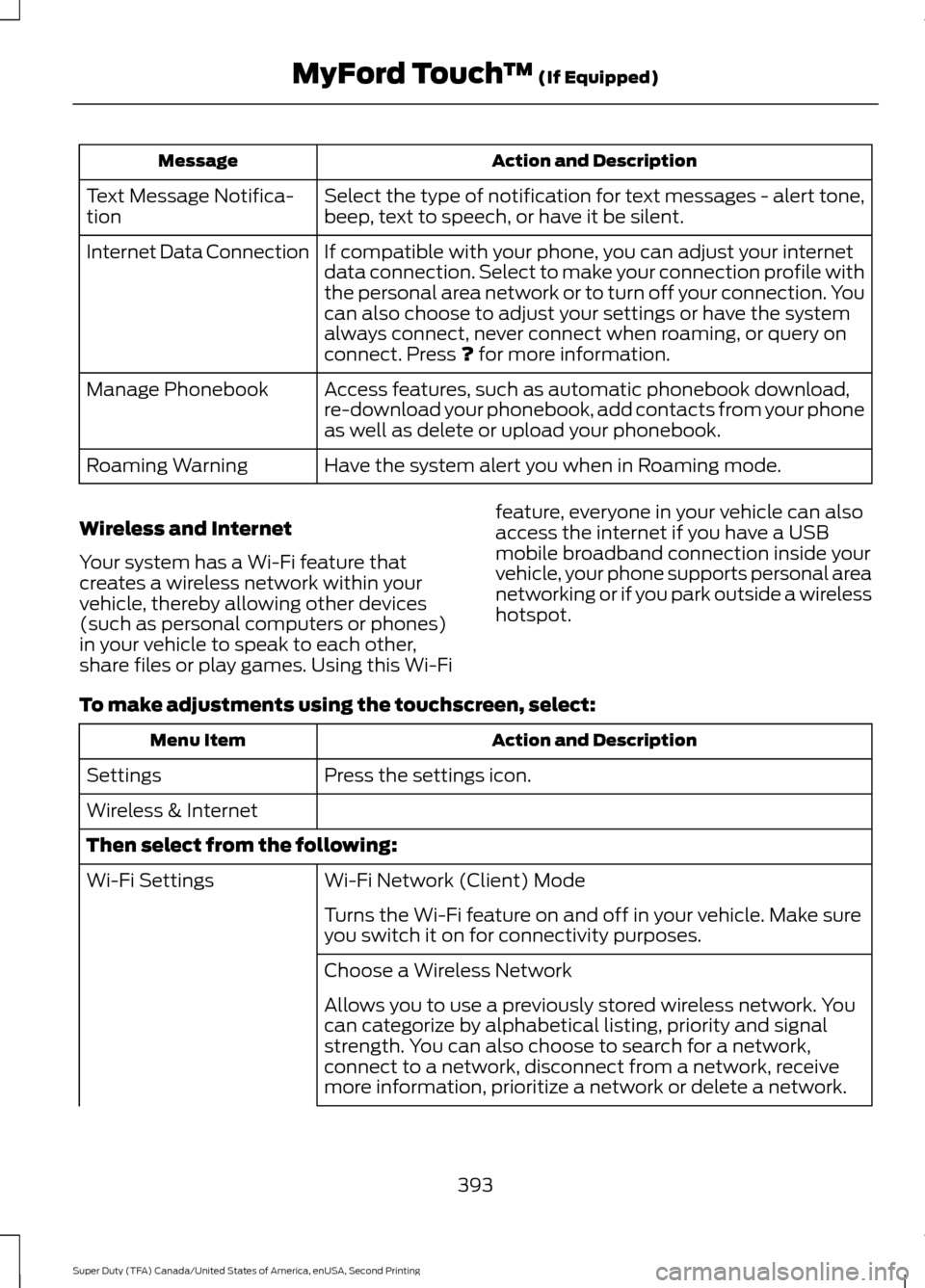
Action and Description
Message
Select the type of notification for text messages - alert tone,
beep, text to speech, or have it be silent.
Text Message Notifica-
tion
If compatible with your phone, you can adjust your internet
data connection. Select to make your connection profile with
the personal area network or to turn off your connection. You
can also choose to adjust your settings or have the system
always connect, never connect when roaming, or query on
connect. Press ? for more information.
Internet Data Connection
Access features, such as automatic phonebook download,
re-download your phonebook, add contacts from your phone
as well as delete or upload your phonebook.
Manage Phonebook
Have the system alert you when in Roaming mode.
Roaming Warning
Wireless and Internet
Your system has a Wi-Fi feature that
creates a wireless network within your
vehicle, thereby allowing other devices
(such as personal computers or phones)
in your vehicle to speak to each other,
share files or play games. Using this Wi-Fi feature, everyone in your vehicle can also
access the internet if you have a USB
mobile broadband connection inside your
vehicle, your phone supports personal area
networking or if you park outside a wireless
hotspot.
To make adjustments using the touchscreen, select: Action and Description
Menu Item
Press the settings icon.
Settings
Wireless & Internet
Then select from the following:
Wi-Fi Network (Client) Mode
Wi-Fi Settings
Turns the Wi-Fi feature on and off in your vehicle. Make sure
you switch it on for connectivity purposes.
Choose a Wireless Network
Allows you to use a previously stored wireless network. You
can categorize by alphabetical listing, priority and signal
strength. You can also choose to search for a network,
connect to a network, disconnect from a network, receive
more information, prioritize a network or delete a network.
393
Super Duty (TFA) Canada/United States of America, enUSA, Second Printing MyFord Touch
™
(If Equipped)
Page 412 of 510
Voice command
Previous Track
Help
* This applies to WMA or MP3 files only.
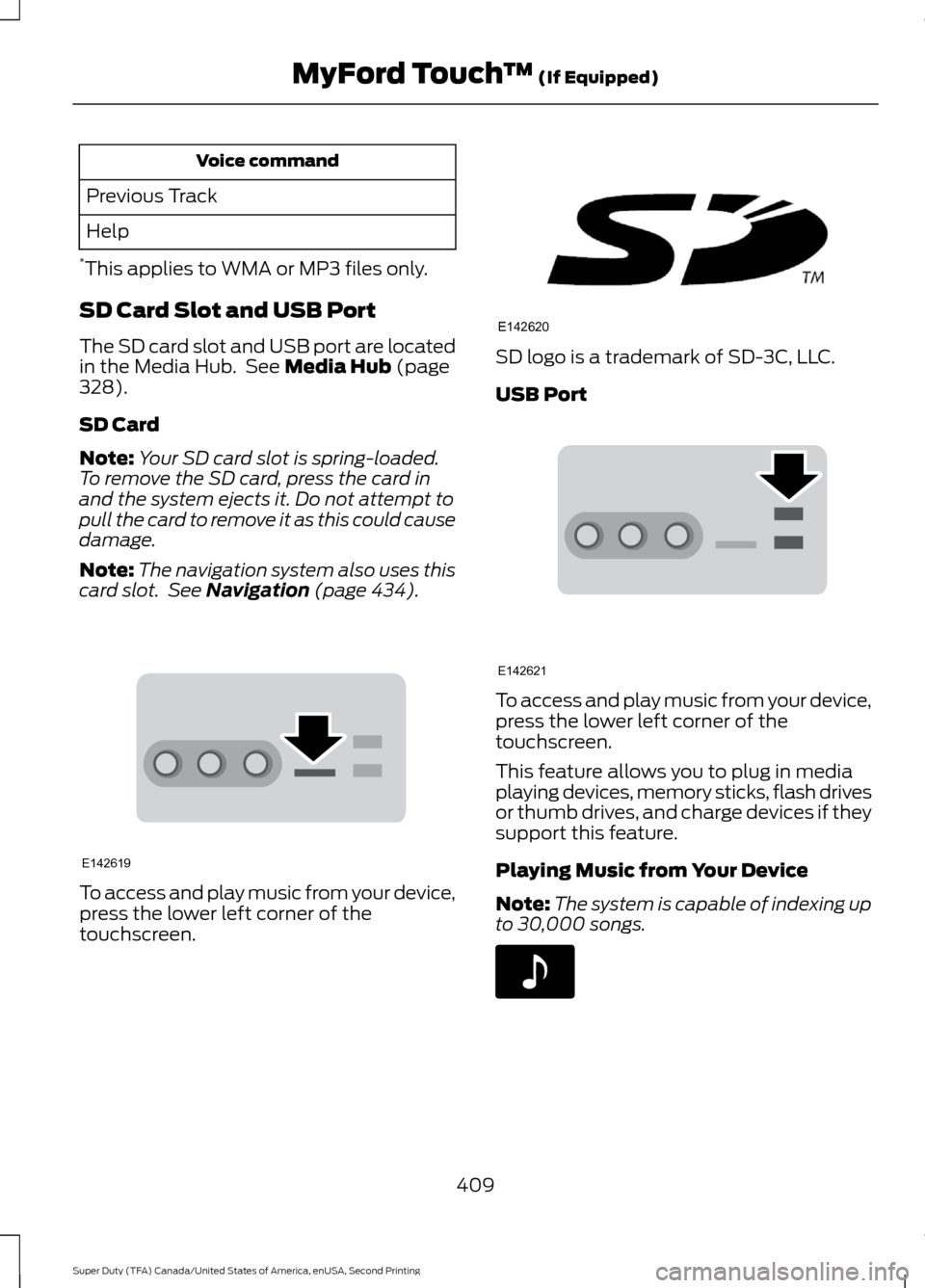
SD Card Slot and USB Port
The SD card slot and USB port are located
in the Media Hub. See Media Hub (page
328).
SD Card
Note: Your SD card slot is spring-loaded.
To remove the SD card, press the card in
and the system ejects it. Do not attempt to
pull the card to remove it as this could cause
damage.
Note: The navigation system also uses this
card slot. See
Navigation (page 434). To access and play music from your device,
press the lower left corner of the
touchscreen. SD logo is a trademark of SD-3C, LLC.
USB Port
To access and play music from your device,
press the lower left corner of the
touchscreen.
This feature allows you to plug in media
playing devices, memory sticks, flash drives
or thumb drives, and charge devices if they
support this feature.
Playing Music from Your Device
Note:
The system is capable of indexing up
to 30,000 songs. 409
Super Duty (TFA) Canada/United States of America, enUSA, Second Printing MyFord Touch
™
(If Equipped)E142619 E142620 E142621 E142611
Page 415 of 510
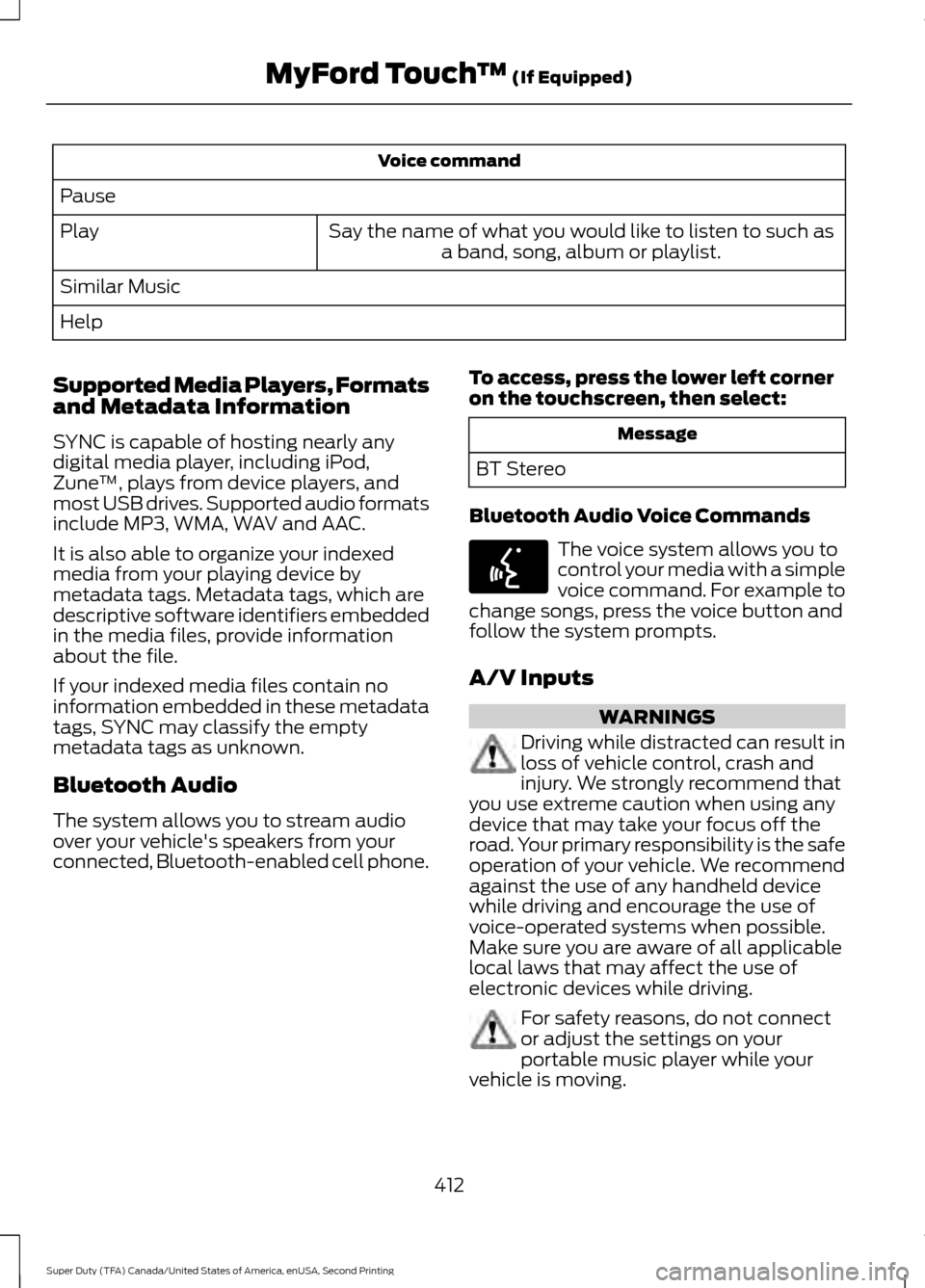
Voice command
Pause Say the name of what you would like to listen to such asa band, song, album or playlist.
Play
Similar Music
Help
Supported Media Players, Formats
and Metadata Information
SYNC is capable of hosting nearly any
digital media player, including iPod,
Zune ™, plays from device players, and
most USB drives. Supported audio formats
include MP3, WMA, WAV and AAC.
It is also able to organize your indexed
media from your playing device by
metadata tags. Metadata tags, which are
descriptive software identifiers embedded
in the media files, provide information
about the file.
If your indexed media files contain no
information embedded in these metadata
tags, SYNC may classify the empty
metadata tags as unknown.
Bluetooth Audio
The system allows you to stream audio
over your vehicle's speakers from your
connected, Bluetooth-enabled cell phone. To access, press the lower left corner
on the touchscreen, then select: Message
BT Stereo
Bluetooth Audio Voice Commands The voice system allows you to
control your media with a simple
voice command. For example to
change songs, press the voice button and
follow the system prompts.
A/V Inputs WARNINGS
Driving while distracted can result in
loss of vehicle control, crash and
injury. We strongly recommend that
you use extreme caution when using any
device that may take your focus off the
road. Your primary responsibility is the safe
operation of your vehicle. We recommend
against the use of any handheld device
while driving and encourage the use of
voice-operated systems when possible.
Make sure you are aware of all applicable
local laws that may affect the use of
electronic devices while driving. For safety reasons, do not connect
or adjust the settings on your
portable music player while your
vehicle is moving.
412
Super Duty (TFA) Canada/United States of America, enUSA, Second Printing MyFord Touch
™ (If Equipped)E142599
Page 416 of 510
WARNINGS
Store the portable music player in a
secure location, such as the center
console or the glove box, when your
vehicle is moving. Hard objects may
become projectiles in a crash or sudden
stop, which may increase the risk of serious
injury. The audio extension cable must be
long enough to allow the portable music
player to be safely stored while your
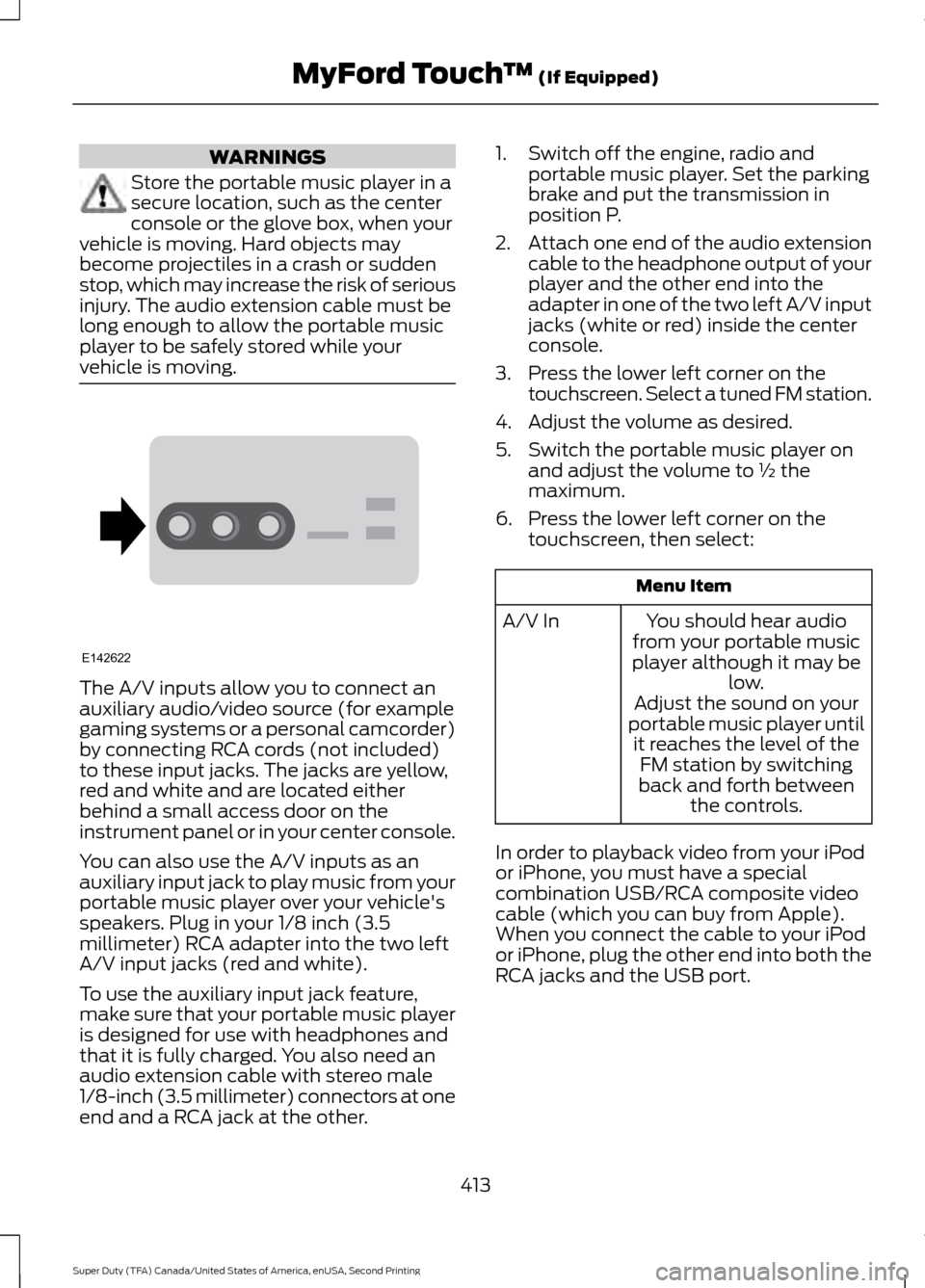
vehicle is moving. The A/V inputs allow you to connect an
auxiliary audio/video source (for example
gaming systems or a personal camcorder)
by connecting RCA cords (not included)
to these input jacks. The jacks are yellow,
red and white and are located either
behind a small access door on the
instrument panel or in your center console.
You can also use the A/V inputs as an
auxiliary input jack to play music from your
portable music player over your vehicle's
speakers. Plug in your 1/8 inch (3.5
millimeter) RCA adapter into the two left
A/V input jacks (red and white).
To use the auxiliary input jack feature,
make sure that your portable music player
is designed for use with headphones and
that it is fully charged. You also need an
audio extension cable with stereo male
1/8-inch (3.5 millimeter) connectors at one
end and a RCA jack at the other. 1. Switch off the engine, radio and
portable music player. Set the parking
brake and put the transmission in
position P.
2. Attach one end of the audio extension
cable to the headphone output of your
player and the other end into the
adapter in one of the two left A/V input
jacks (white or red) inside the center
console.
3. Press the lower left corner on the touchscreen. Select a tuned FM station.
4. Adjust the volume as desired.
5. Switch the portable music player on and adjust the volume to ½ the
maximum.
6. Press the lower left corner on the touchscreen, then select: Menu Item
You should hear audio
from your portable music
player although it may be low.
A/V In
Adjust the sound on your
portable music player until it reaches the level of the FM station by switching
back and forth between the controls.
In order to playback video from your iPod
or iPhone, you must have a special
combination USB/RCA composite video
cable (which you can buy from Apple).
When you connect the cable to your iPod
or iPhone, plug the other end into both the
RCA jacks and the USB port.
413
Super Duty (TFA) Canada/United States of America, enUSA, Second Printing MyFord Touch
™ (If Equipped)E142622
Page 449 of 510
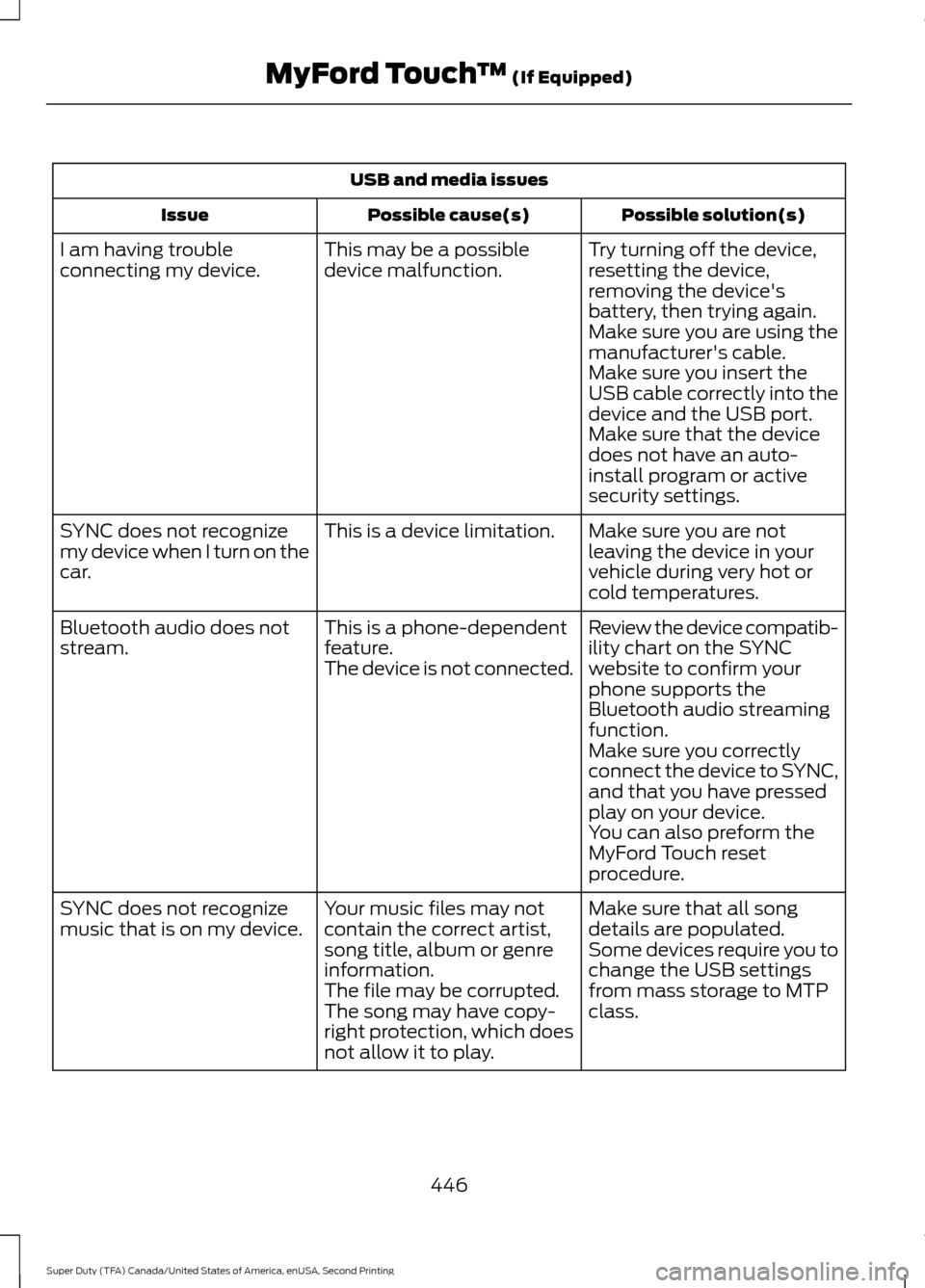
USB and media issues
Possible solution(s)
Possible cause(s)
Issue
Try turning off the device,
resetting the device,
removing the device's
battery, then trying again.
This may be a possible
device malfunction.
I am having trouble
connecting my device.
Make sure you are using the
manufacturer's cable.
Make sure you insert the
USB cable correctly into the
device and the USB port.
Make sure that the device
does not have an auto-
install program or active
security settings.
Make sure you are not
leaving the device in your
vehicle during very hot or
cold temperatures.
This is a device limitation.
SYNC does not recognize
my device when I turn on the
car.
Review the device compatib-
ility chart on the SYNC
website to confirm your
phone supports the
Bluetooth audio streaming
function.
This is a phone-dependent
feature.
The device is not connected.
Bluetooth audio does not
stream.
Make sure you correctly
connect the device to SYNC,
and that you have pressed
play on your device.
You can also preform the
MyFord Touch reset
procedure.
Make sure that all song
details are populated.
Your music files may not
contain the correct artist,
song title, album or genre
information.
SYNC does not recognize
music that is on my device.
Some devices require you to
change the USB settings
from mass storage to MTP
class.
The file may be corrupted.
The song may have copy-
right protection, which does
not allow it to play.
446
Super Duty (TFA) Canada/United States of America, enUSA, Second Printing MyFord Touch
™ (If Equipped)
Page 502 of 510
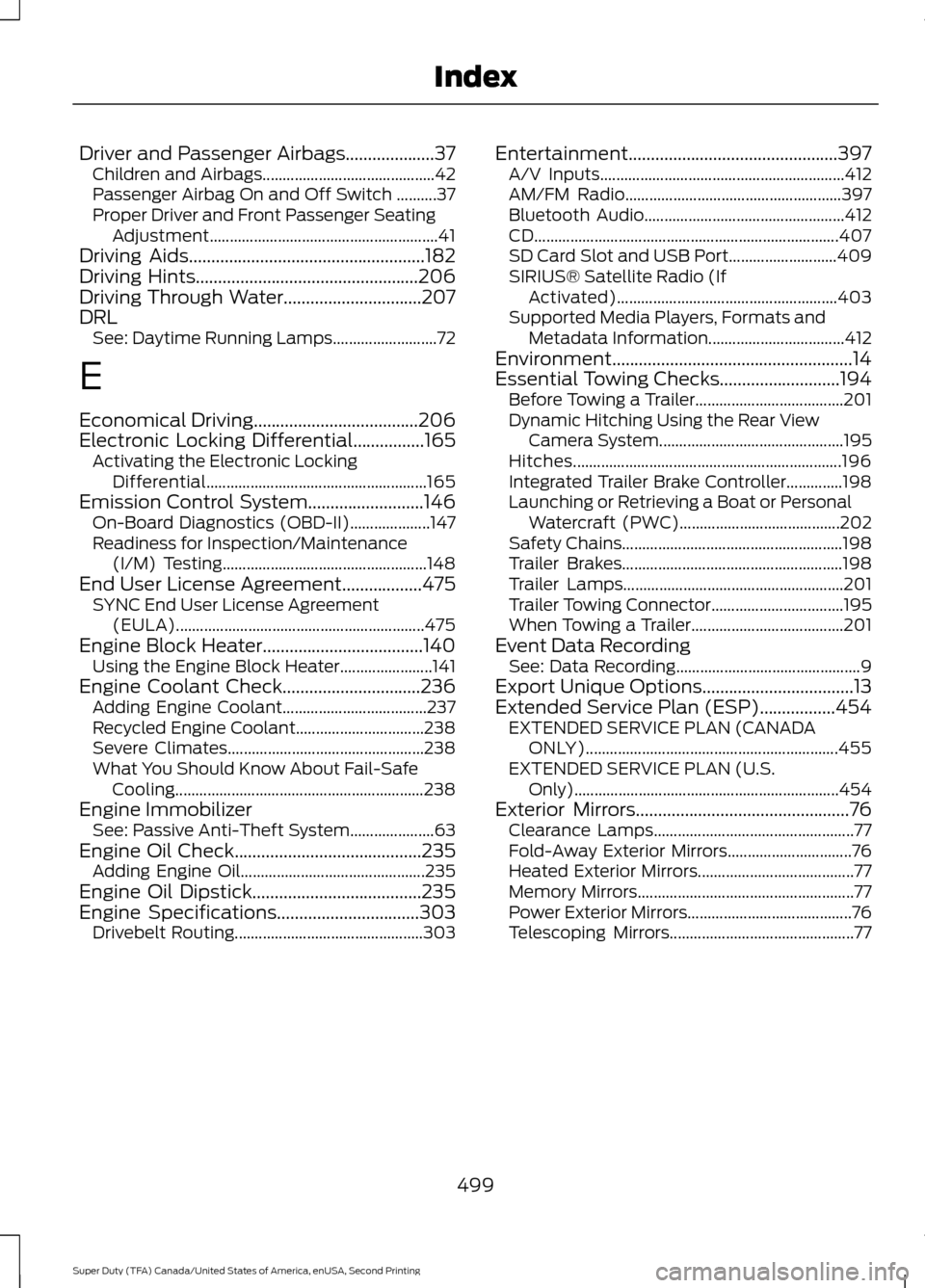
Driver and Passenger Airbags....................37
Children and Airbags........................................... 42
Passenger Airbag On and Off Switch ..........37
Proper Driver and Front Passenger Seating Adjustment......................................................... 41
Driving Aids.....................................................182
Driving Hints..................................................206
Driving Through Water...............................207
DRL See: Daytime Running Lamps.......................... 72
E
Economical Driving
.....................................206
Electronic Locking Differential................165
Activating the Electronic Locking
Differential....................................................... 165
Emission Control System..........................146 On-Board Diagnostics (OBD-II).................... 147
Readiness for Inspection/Maintenance (I/M) Testing................................................... 148
End User License Agreement
..................475
SYNC End User License Agreement
(EULA).............................................................. 475
Engine Block Heater....................................140 Using the Engine Block Heater....................... 141
Engine Coolant Check
...............................236
Adding Engine Coolant.................................... 237
Recycled Engine Coolant................................ 238
Severe Climates................................................. 238
What You Should Know About Fail-Safe Cooling.............................................................. 238
Engine Immobilizer See: Passive Anti-Theft System..................... 63
Engine Oil Check
..........................................235
Adding Engine Oil.............................................. 235
Engine Oil Dipstick......................................235
Engine Specifications
................................303
Drivebelt Routing............................................... 303Entertainment...............................................397
A/V Inputs............................................................. 412
AM/FM Radio...................................................... 397
Bluetooth Audio.................................................. 412
CD........................................................................\
.... 407
SD Card Slot and USB Port........................... 409
SIRIUS® Satellite Radio (If Activated)....................................................... 403
Supported Media Players, Formats and Metadata Information.................................. 412
Environment......................................................14
Essential Towing Checks...........................194 Before Towing a Trailer..................................... 201
Dynamic Hitching Using the Rear View Camera System.............................................. 195
Hitches................................................................... 196
Integrated Trailer Brake Controller..............198
Launching or Retrieving a Boat or Personal Watercraft (PWC)........................................ 202
Safety Chains....................................................... 198
Trailer Brakes....................................................... 198
Trailer Lamps....................................................... 201
Trailer Towing Connector................................. 195
When Towing a Trailer...................................... 201
Event Data Recording See: Data Recording.............................................. 9
Export Unique Options..................................13
Extended Service Plan (ESP).................454 EXTENDED SERVICE PLAN (CANADA
ONLY)............................................................... 455
EXTENDED SERVICE PLAN (U.S. Only).................................................................. 454
Exterior Mirrors
................................................76
Clearance Lamps.................................................. 77
Fold-Away Exterior Mirrors............................... 76
Heated Exterior Mirrors....................................... 77
Memory Mirrors...................................................... 77
Power Exterior Mirrors......................................... 76
Telescoping Mirrors.............................................. 77
499
Super Duty (TFA) Canada/United States of America, enUSA, Second Printing Index
Page 508 of 510
Sun Visors.........................................................79
Illuminated Vanity Mirror................................... 79
Slide-on-rod........................................................... 79
Supplementary Restraints System.........36 Principle of Operation........................................ 36
Symbols Glossary.............................................7
SYNC™ Applications and Services.......347 911 Assist............................................................... 347
SYNC Services: Traffic, Directions & Information (TDI) (If Equipped, United
States Only)..................................................... 351
Vehicle Health Report (If Equipped, United States Only)................................................... 349
SYNC™ AppLink ™
.....................................355
SYNC Mobile Apps............................................ 355
SYNC™............................................................329 General Information......................................... 329
SYNC™ Troubleshooting..........................367
T
Tailgate Lock....................................................59
Tailgate Step...................................................60 Closing the step................................................... 60
Opening the step................................................. 60
Tailgate..............................................................59
Technical Specifications See: Capacities and Specifications............303
Terrain Response
...........................................175
Principle of Operation....................................... 175
The Better Business Bureau (BBB) Auto Line Program (U.S. Only)........................218
Tire Care
..........................................................267
Glossary of Tire Terminology........................ 268
Information About Uniform Tire Quality Grading.............................................................. 267
Information Contained on the Tire Sidewall........................................................... 269
Temperature A B C............................................ 268
Traction AA A B C............................................... 267
Treadwear............................................................. 267
Tire Pressure Monitoring System..........284 Changing Tires With a Tire Pressure
Monitoring System....................................... 286
Understanding Your Tire Pressure Monitoring System ...................................... 286
Tires See: Wheels and Tires..................................... 264Towing a Trailer.............................................190
Load Placement................................................. 190
Towing Points
...............................................202
Towing the Vehicle on Four Wheels
.........................................................204
Emergency Towing........................................... 204
Recreational Towing........................................ 204
Towing..............................................................190
Traction Control
............................................170
Principle of Operation....................................... 170
Trailer Sway Control
.....................................191
Transfer Case Fluid Check........................243
Transmission Code Designation...........306
Transmission..................................................149
Transmission See: Transmission.............................................. 149
Transporting the Vehicle...........................203
U
Under Hood Overview - 6.2L...................233
Under Hood Overview - 6.8L..................234
Universal Garage Door Opener................127 CAR2U® Home Automation System...........127
HomeLink Wireless Control System...........130
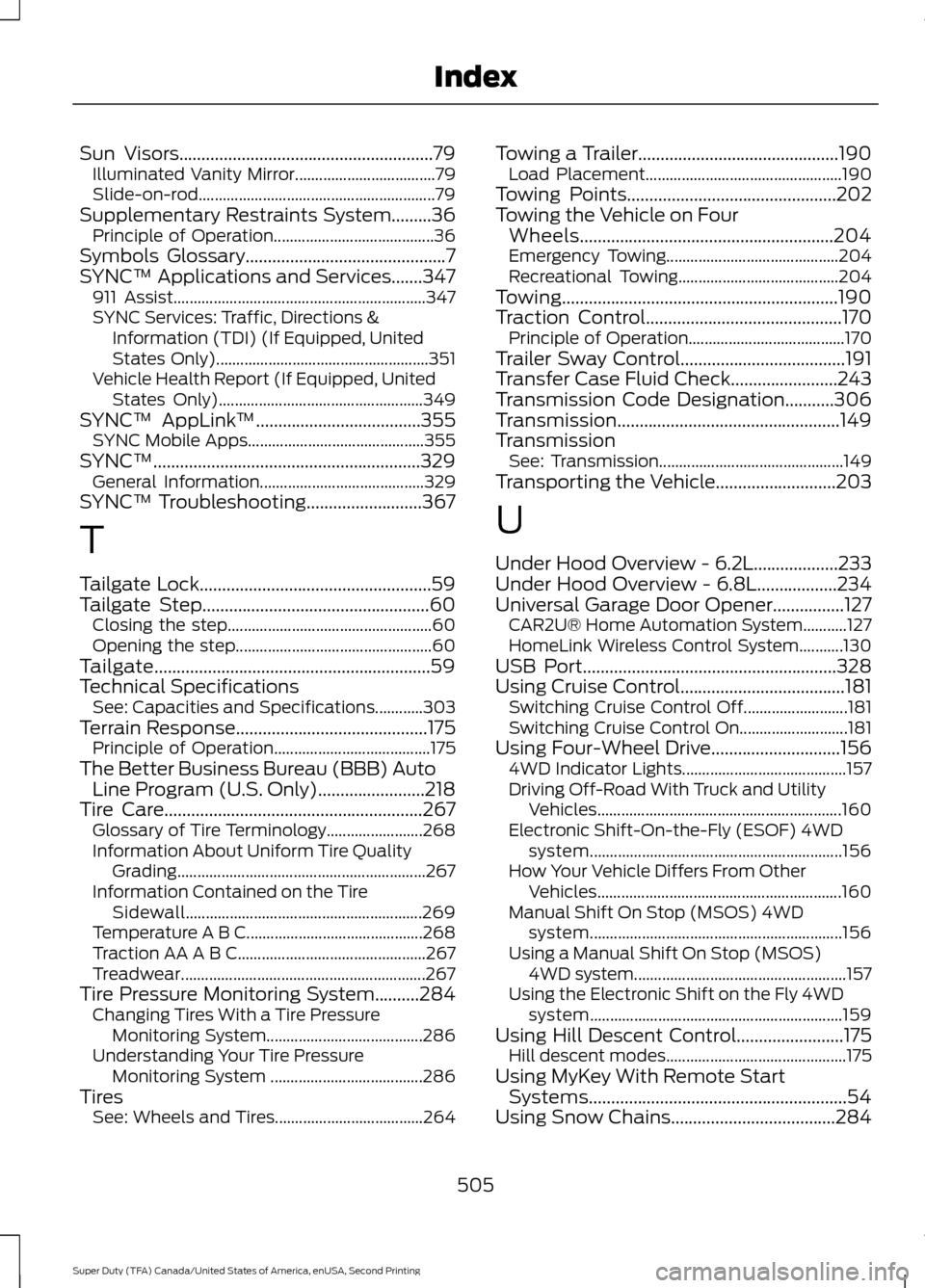
USB Port
.........................................................328
Using Cruise Control.....................................181
Switching Cruise Control Off.......................... 181
Switching Cruise Control On........................... 181
Using Four-Wheel Drive.............................156 4WD Indicator Lights......................................... 157
Driving Off-Road With Truck and Utility Vehicles............................................................. 160
Electronic Shift-On-the-Fly (ESOF) 4WD system............................................................... 156
How Your Vehicle Differs From Other Vehicles............................................................. 160
Manual Shift On Stop (MSOS) 4WD system............................................................... 156
Using a Manual Shift On Stop (MSOS) 4WD system..................................................... 157
Using the Electronic Shift on the Fly 4WD system............................................................... 159
Using Hill Descent Control........................175 Hill descent modes............................................. 175
Using MyKey With Remote Start Systems..........................................................54
Using Snow Chains
.....................................284
505
Super Duty (TFA) Canada/United States of America, enUSA, Second Printing Index
Page 509 of 510
Using Stability Control................................172
AdvanceTrac® with Roll Stability Control ™
(RSC®)............................................................... 172
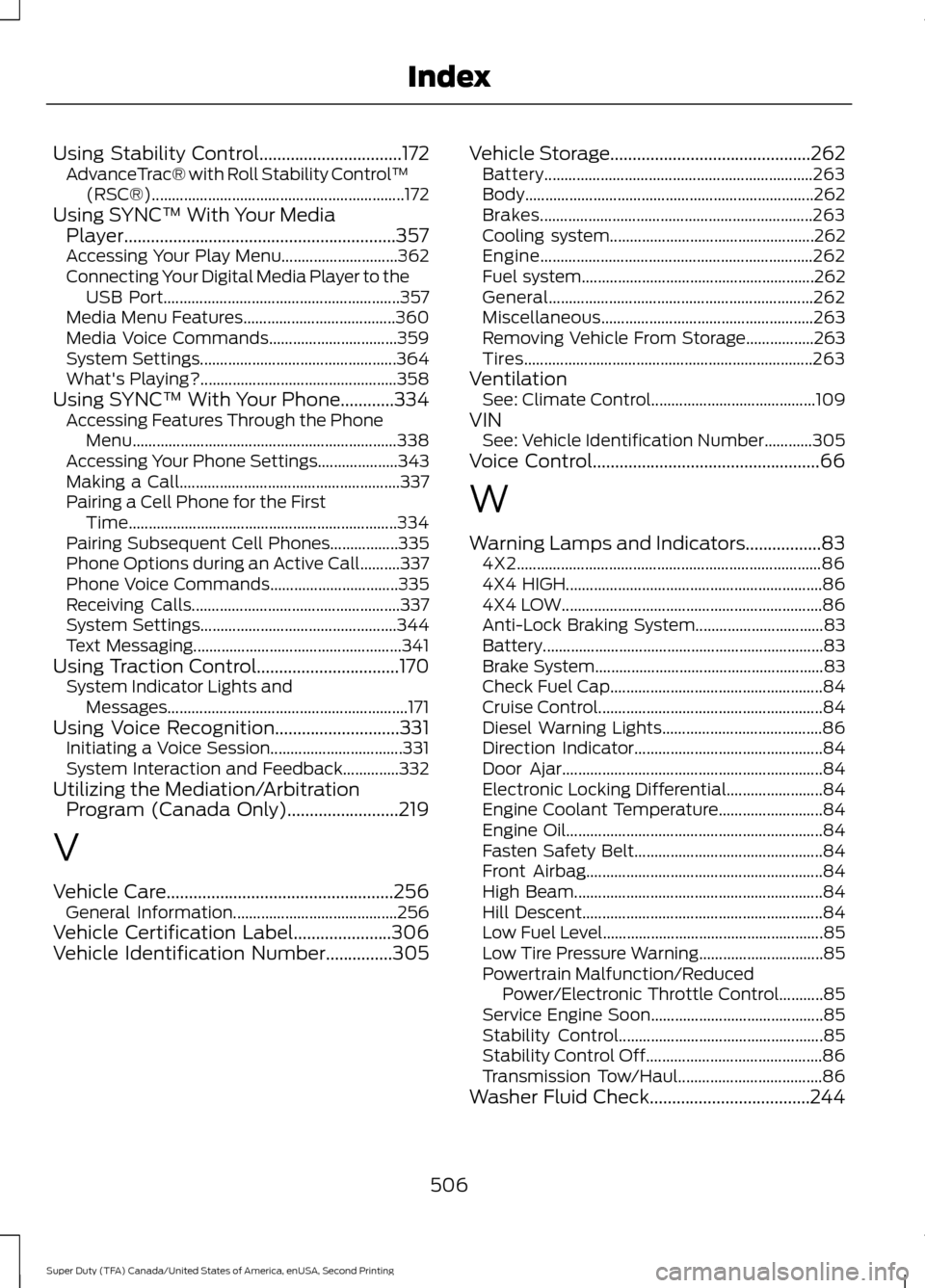
Using SYNC™ With Your Media Player.............................................................357
Accessing Your Play Menu............................. 362
Connecting Your Digital Media Player to the USB Port........................................................... 357
Media Menu Features...................................... 360
Media Voice Commands................................ 359
System Settings................................................. 364
What's Playing?................................................. 358
Using SYNC™ With Your Phone............334 Accessing Features Through the Phone
Menu.................................................................. 338
Accessing Your Phone Settings.................... 343
Making a Call....................................................... 337
Pairing a Cell Phone for the First Time................................................................... 334
Pairing Subsequent Cell Phones.................335
Phone Options during an Active Call..........337
Phone Voice Commands................................ 335
Receiving Calls.................................................... 337
System Settings................................................. 344
Text Messaging.................................................... 341
Using Traction Control................................170 System Indicator Lights and
Messages............................................................ 171
Using Voice Recognition............................331 Initiating a Voice Session................................. 331
System Interaction and Feedback..............332
Utilizing the Mediation/Arbitration Program (Canada Only).........................219
V
Vehicle Care...................................................256 General Information......................................... 256
Vehicle Certification Label
......................306
Vehicle Identification Number...............305 Vehicle Storage
.............................................262
Battery................................................................... 263
Body........................................................................\
262
Brakes.................................................................... 263
Cooling system................................................... 262
Engine.................................................................... 262
Fuel system.......................................................... 262
General.................................................................. 262
Miscellaneous..................................................... 263
Removing Vehicle From Storage.................263
Tires........................................................................\
263
Ventilation See: Climate Control......................................... 109
VIN See: Vehicle Identification Number............305
Voice Control...................................................66
W
Warning Lamps and Indicators.................83 4X2........................................................................\
.... 86
4X4 HIGH................................................................ 86
4X4 LOW................................................................. 86
Anti-Lock Braking System................................ 83
Battery...................................................................... 83
Brake System......................................................... 83
Check Fuel Cap..................................................... 84
Cruise Control........................................................ 84
Diesel Warning Lights........................................ 86
Direction Indicator............................................... 84
Door Ajar................................................................. 84
Electronic Locking Differential........................ 84
Engine Coolant Temperature.......................... 84
Engine Oil................................................................ 84
Fasten Safety Belt............................................... 84
Front Airbag........................................................... 84
High Beam.............................................................. 84
Hill Descent............................................................ 84
Low Fuel Level....................................................... 85
Low Tire Pressure Warning............................... 85
Powertrain Malfunction/Reduced Power/Electronic Throttle Control...........85
Service Engine Soon........................................... 85
Stability Control................................................... 85
Stability Control Off............................................ 86
Transmission Tow/Haul.................................... 86
Washer Fluid Check....................................244
506
Super Duty (TFA) Canada/United States of America, enUSA, Second Printing Index