2016 FORD SUPER DUTY set clock
[x] Cancel search: set clockPage 322 of 510
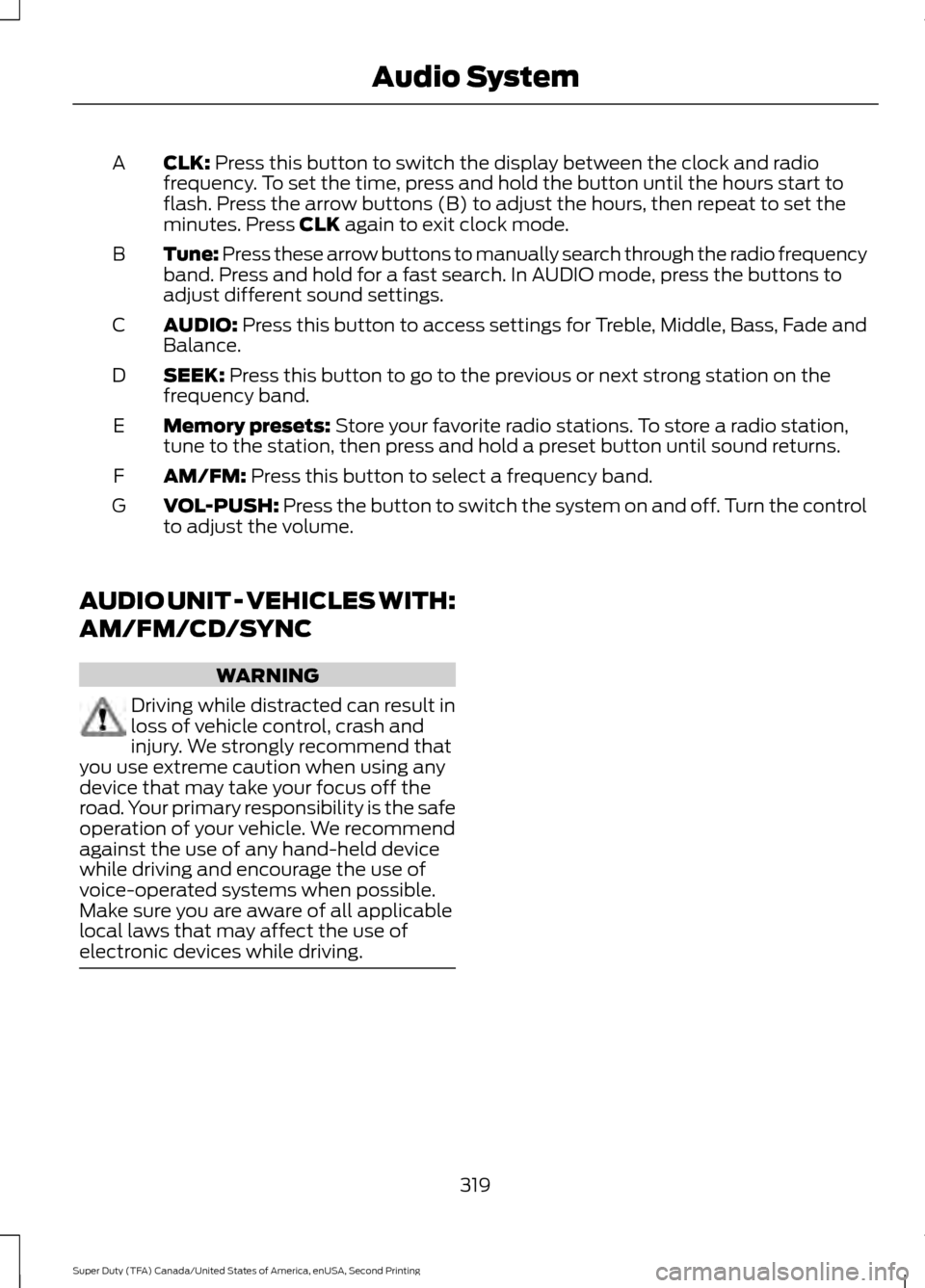
CLK: Press this button to switch the display between the clock and radio
frequency. To set the time, press and hold the button until the hours start to
flash. Press the arrow buttons (B) to adjust the hours, then repeat to set the
minutes. Press
CLK again to exit clock mode.
A
Tune: Press these arrow buttons to manually search through the radio frequency
band. Press and hold for a fast search. In AUDIO mode, press the buttons to
adjust different sound settings.
B
AUDIO:
Press this button to access settings for Treble, Middle, Bass, Fade and
Balance.
C
SEEK:
Press this button to go to the previous or next strong station on the
frequency band.
D
Memory presets:
Store your favorite radio stations. To store a radio station,
tune to the station, then press and hold a preset button until sound returns.
E
AM/FM:
Press this button to select a frequency band.
F
VOL-PUSH:
Press the button to switch the system on and off. Turn the control
to adjust the volume.
G
AUDIO UNIT - VEHICLES WITH:
AM/FM/CD/SYNC WARNING
Driving while distracted can result in
loss of vehicle control, crash and
injury. We strongly recommend that
you use extreme caution when using any
device that may take your focus off the
road. Your primary responsibility is the safe
operation of your vehicle. We recommend
against the use of any hand-held device
while driving and encourage the use of
voice-operated systems when possible.
Make sure you are aware of all applicable
local laws that may affect the use of
electronic devices while driving. 319
Super Duty (TFA) Canada/United States of America, enUSA, Second Printing Audio System
Page 380 of 510

This system uses a four-corner strategy to
provide quick access to several vehicle
features and settings. The touchscreen
provides easy interaction with your cell
phone, entertainment, information and
system settings. The corners display active
modes within the menus, for example; your
cell phone's status.
Note:
Some features are not available while
your vehicle is moving.
Note: You can access the entertainment
features for 30 minutes after you switch the
ignition off, and no doors are opened.
PHONE
Press to select any of the following: Message
Phone
Quick Dial
Phonebook
History
Messaging
Settings
NAVIGATION
Press to select any of the following: Message
My Home
Favorites
Previous Destinations
Point of Interest
Emergency
Street Address
Intersection Message
City Center
Map
Edit Route
Cancel Route
CLIMATE
Press the corresponding icons to control
the following options:
• Driver Settings
• Recirculated Air
• Auto
• Dual
• Passenger Settings
• A/C
• Defrost
SETTINGS Press to select any of the following:
Message
Clock
Display
Sound
Vehicle
Settings
Help
HOME Press to access the home
screen.
377
Super Duty (TFA) Canada/United States of America, enUSA, Second Printing MyFord Touch
™ (If Equipped)E142607 E142613
Page 387 of 510
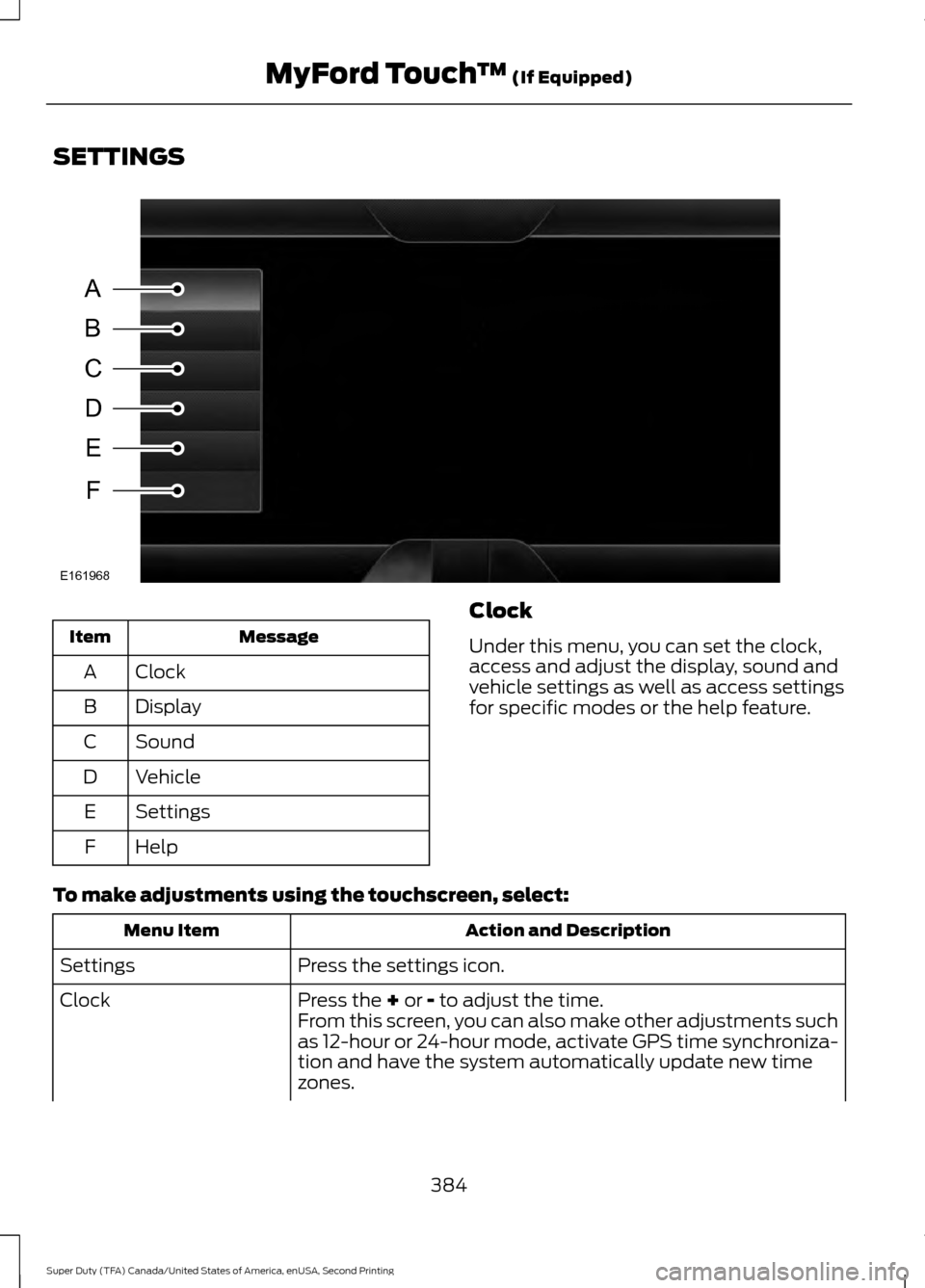
SETTINGS
Message
Item
Clock
A
Display
B
Sound
C
Vehicle
D
Settings
E
Help
F Clock
Under this menu, you can set the clock,
access and adjust the display, sound and
vehicle settings as well as access settings
for specific modes or the help feature.
To make adjustments using the touchscreen, select: Action and Description
Menu Item
Press the settings icon.
Settings
Press the + or - to adjust the time.
Clock
From this screen, you can also make other adjustments such
as 12-hour or 24-hour mode, activate GPS time synchroniza-
tion and have the system automatically update new time
zones.
384
Super Duty (TFA) Canada/United States of America, enUSA, Second Printing MyFord Touch
™
(If Equipped)A
B
C
D
E
F
E161968
Page 388 of 510
Action and Description
Menu Item
You can also switch the outside air temperature display off
and on. It appears at the top center of the touchscreen, next
to the time and date.
Note: You cannot manually set the date. Your vehicle ’s GPS does this for you.
Note: If the battery has been disconnected, your vehicle needs to acquire a GPS signal to
update the clock. Once your vehicle acquires the signal, it may take a few minutes for the
update to display the correct time.
Display
You can adjust the display using the
touchscreen or the voice button on the
steering wheel controls.
To make adjustments using the touchscreen, select: Action and Description
Menu Item
Press the settings icon.
Settings
Display
Then select from the following:
When set to On, lets you use the automatic dimming feature.
Auto Dim
When set to Off you are able to adjust the brightness of the screen.
Make the screen display brighter or dimmer.
Brightness
Allows you to switch the display off. It also allows you to set the screen
to a certain brightness or have the system automatically change based
on the outside light level.
Mode
If you also select:These features will allow you to adjust the dimming of
your screen.
Auto
Night
Allows you to adjust screen dimming as the outside lighting conditions
change from day to night.
Auto Dim
Manual Offset
Allows you to display the default photo or upload your own.
Edit Wallpaper
385
Super Duty (TFA) Canada/United States of America, enUSA, Second Printing MyFord Touch
™
(If Equipped)
Page 437 of 510
Touch the + or – to increase or decrease the air temperature on the passenger
side of the vehicle.
Touch the heated seat icon to turn the heated seat off and on (if equipped).
Touch the climate-controlled seat icon to turn the climate-controlled seat off
and on (if equipped).
Note: If your vehicle is equipped with a
wood-trimmed steering wheel, it does not
heat between the 10 o'clock and 2 o'clock
positions. Climate Control Voice Commands Press the voice button on the
steering wheel controls. When
prompted, say any of the
following or a similar command: Voice commands
Climate On
Climate Off Adjust the temperature between
59.0°F
(15°C)-86.0°F (30°C).
Set temperature
NAVIGATION
Note: The navigation SD card must be in
the SD card slot to operate the navigation
system. If you need a replacement SD card,
see an authorized dealer.
Note: The SD card slot is spring-loaded. To
remove the SD card, just push the card in
and release it. Do not attempt to pull the
card out to remove it; this could cause
damage.
Your navigation system is comprised of
two main features, destination mode and
map mode. Destination Mode
To set a destination, press the green
corner of your touchscreen, then press: Menu Item
Dest.
Choose any of the following:
My Home
Favorites
Previous Destinations
Point of Interest
Emergency
Street Address
Intersection
City Center
434
Super Duty (TFA) Canada/United States of America, enUSA, Second Printing MyFord Touch
™
(If Equipped)E142599
Page 507 of 510
Roadside Assistance....................................211
Vehicles Sold in Canada: Getting Roadside
Assistance......................................................... 211
Vehicles Sold in Canada: Roadside Assistance Program Coverage.................. 212
Vehicles Sold in Canada: Using Roadside Assistance......................................................... 212
Vehicles Sold in the United States: Getting Roadside Assistance..................................... 211
Vehicles Sold in the United States: Using Roadside Assistance..................................... 211
Roadside Emergencies................................211
Running-In See: Breaking-In................................................ 206
Running Out of Fuel....................................144
S
Safety Canopy ™
............................................43
Safety Precautions.......................................142
Satellite Radio..............................................325
Satellite Radio Electronic Serial Number
(ESN)................................................................ 326
Satellite Radio Reception Factors...............326
SIRIUS® Satellite Radio Service.................. 326
Troubleshooting.................................................. 327
Scheduled Maintenance Record...........465
Scheduled Maintenance
..........................456
Seatbelt Height Adjustment......................32
Seatbelt Reminder
.........................................33
Belt-Minder™........................................................ 33
Seatbelts...........................................................28 Principle of Operation........................................ 28
Seatbelt Warning Lamp and Indicator Chime...............................................................32
Conditions of operation..................................... 33
Seats...................................................................115
Security..............................................................63
Settings...........................................................384 Clock...................................................................... 384
Display................................................................... 385
Settings................................................................. 388
Sound.................................................................... 386
Vehicle................................................................... 386
Side Airbags.....................................................42
Sitting in the Correct Position...................115
Sliding Windows.............................................78 Power Sliding Back Window............................ 78Snow Chains
See: Using Snow Chains................................. 284
Snowplowing................................................208 Engine temperature while plowing............209
Installing the Snowplow................................. 208
Operating the Vehicle with the Snowplow Attached.......................................................... 209
Snowplowing with your Airbag Equipped Vehicle.............................................................. 209
Transmission operation while plowing.............................................................. 210
Special Notices................................................12 New Vehicle Limited Warranty......................... 12
On-board Diagnostics (OBD-II)....................... 12
Special Instructions.............................................. 12
Using your Vehicle as an Ambulance.............12
Using your Vehicle as a Stationary Power Source................................................................... 13
Using your Vehicle With a Snowplow............12
Special Operating Conditions Scheduled Maintenance..............................................460
6.2L and 6.8L Gasoline Engines.................. 460
6.7L Diesel Engine............................................. 463
Exceptions............................................................ 463
Speed Control See: Cruise Control............................................. 181
Stability Control
.............................................172
Principle of Operation........................................ 172
Starter Switch See: Ignition Switch........................................... 138
Starting a Gasoline Engine
.......................139
Cold Weather Starting (Flexible Fuel
Vehicles Only)................................................. 139
Failure to Start..................................................... 139
Guarding Against Exhaust Fumes...............140
Important Ventilating Information..............140
Stopping the Engine When Your Vehicle is Moving............................................................... 139
Stopping the Engine When Your Vehicle is Stationary......................................................... 139
Starting and Stopping the Engine..........138 General Information.......................................... 138
Steering............................................................182
Steering Wheel...............................................65
Storage Compartments.............................137
Sunroof See: Moonroof....................................................... 79
504
Super Duty (TFA) Canada/United States of America, enUSA, Second Printing Index