2016 FORD FUSION (AMERICAS) start
[x] Cancel search: startPage 392 of 518
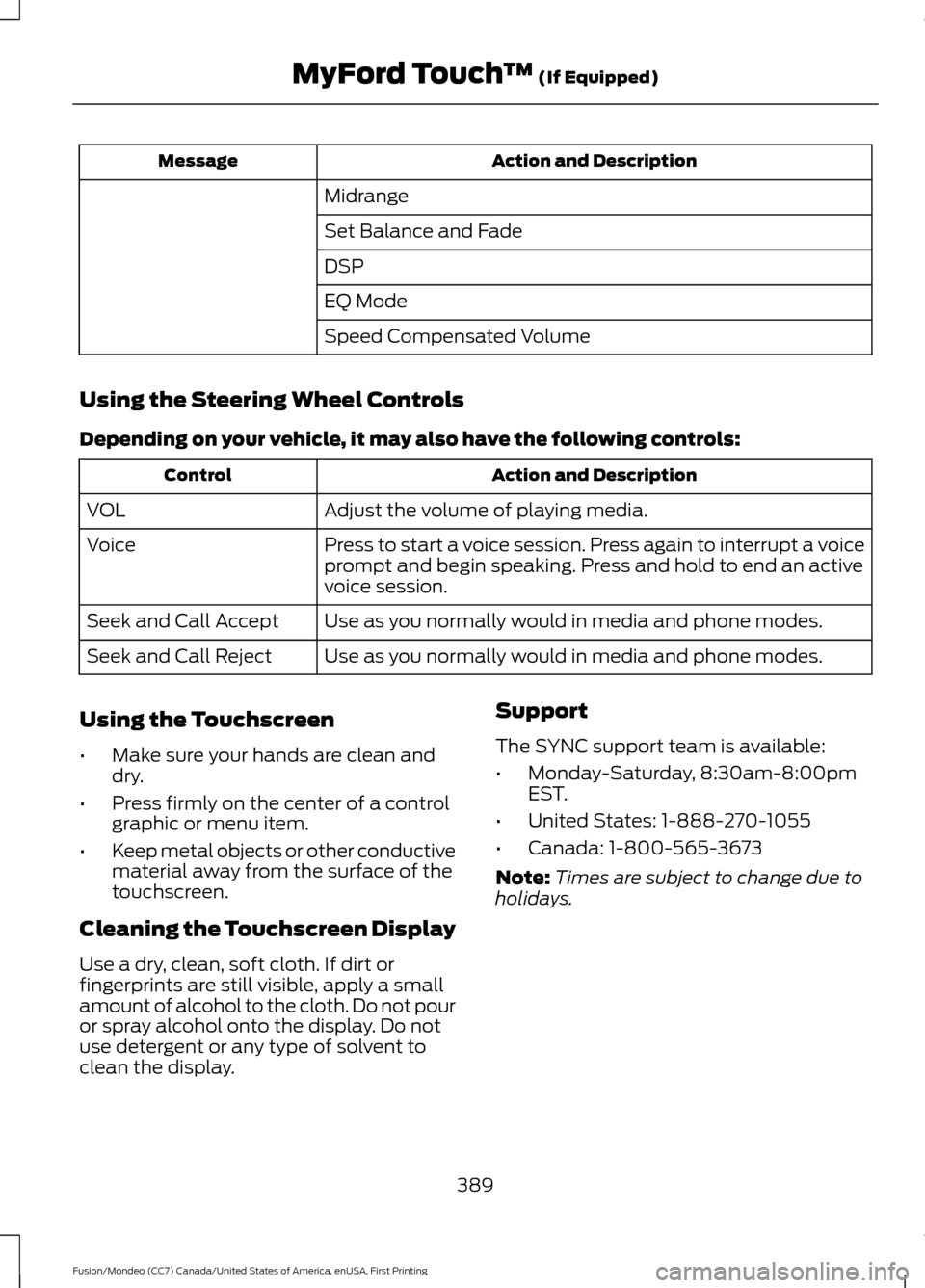
Action and Description
Message
Midrange
Set Balance and Fade
DSP
EQ Mode
Speed Compensated Volume
Using the Steering Wheel Controls
Depending on your vehicle, it may also have the following controls: Action and Description
Control
Adjust the volume of playing media.
VOL
Press to start a voice session. Press again to interrupt a voice
prompt and begin speaking. Press and hold to end an active
voice session.
Voice
Use as you normally would in media and phone modes.
Seek and Call Accept
Use as you normally would in media and phone modes.
Seek and Call Reject
Using the Touchscreen
• Make sure your hands are clean and
dry.
• Press firmly on the center of a control
graphic or menu item.
• Keep metal objects or other conductive
material away from the surface of the
touchscreen.
Cleaning the Touchscreen Display
Use a dry, clean, soft cloth. If dirt or
fingerprints are still visible, apply a small
amount of alcohol to the cloth. Do not pour
or spray alcohol onto the display. Do not
use detergent or any type of solvent to
clean the display. Support
The SYNC support team is available:
•
Monday-Saturday, 8:30am-8:00pm
EST.
• United States: 1-888-270-1055
• Canada: 1-800-565-3673
Note: Times are subject to change due to
holidays.
389
Fusion/Mondeo (CC7) Canada/United States of America, enUSA, First Printing MyFord Touch
™ (If Equipped)
Page 441 of 518
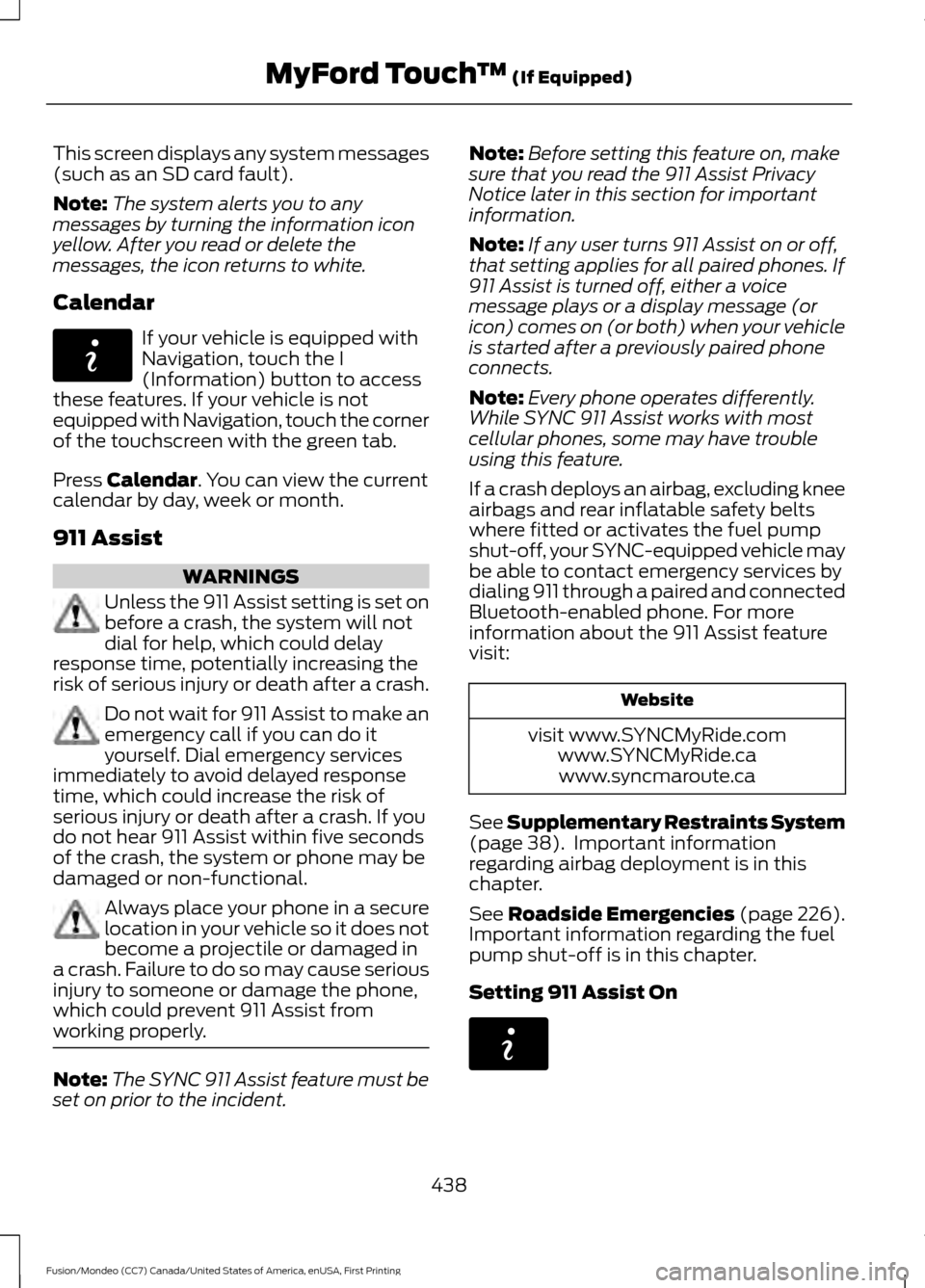
This screen displays any system messages
(such as an SD card fault).
Note:
The system alerts you to any
messages by turning the information icon
yellow. After you read or delete the
messages, the icon returns to white.
Calendar If your vehicle is equipped with
Navigation, touch the I
(Information) button to access
these features. If your vehicle is not
equipped with Navigation, touch the corner
of the touchscreen with the green tab.
Press Calendar. You can view the current
calendar by day, week or month.
911 Assist WARNINGS
Unless the 911 Assist setting is set on
before a crash, the system will not
dial for help, which could delay
response time, potentially increasing the
risk of serious injury or death after a crash. Do not wait for 911 Assist to make an
emergency call if you can do it
yourself. Dial emergency services
immediately to avoid delayed response
time, which could increase the risk of
serious injury or death after a crash. If you
do not hear 911 Assist within five seconds
of the crash, the system or phone may be
damaged or non-functional. Always place your phone in a secure
location in your vehicle so it does not
become a projectile or damaged in
a crash. Failure to do so may cause serious
injury to someone or damage the phone,
which could prevent 911 Assist from
working properly. Note:
The SYNC 911 Assist feature must be
set on prior to the incident. Note:
Before setting this feature on, make
sure that you read the 911 Assist Privacy
Notice later in this section for important
information.
Note: If any user turns 911 Assist on or off,
that setting applies for all paired phones. If
911 Assist is turned off, either a voice
message plays or a display message (or
icon) comes on (or both) when your vehicle
is started after a previously paired phone
connects.
Note: Every phone operates differently.
While SYNC 911 Assist works with most
cellular phones, some may have trouble
using this feature.
If a crash deploys an airbag, excluding knee
airbags and rear inflatable safety belts
where fitted or activates the fuel pump
shut-off, your SYNC-equipped vehicle may
be able to contact emergency services by
dialing 911 through a paired and connected
Bluetooth-enabled phone. For more
information about the 911 Assist feature
visit: Website
visit www.SYNCMyRide.com www.SYNCMyRide.cawww.syncmaroute.ca
See
Supplementary Restraints System
(page 38). Important information
regarding airbag deployment is in this
chapter.
See
Roadside Emergencies (page 226).
Important information regarding the fuel
pump shut-off is in this chapter.
Setting 911 Assist On 438
Fusion/Mondeo (CC7) Canada/United States of America, enUSA, First Printing MyFord Touch
™
(If Equipped)E142608 E142608
Page 448 of 518

For an address destination entry, press:
Action and Descrip-
tion
Menu Item
Pressing this button
makes the address
location appear on
the map.
Go To choose a previous destination,
press: Action and Descrip-
tion
Menu Item
The last 20 destina-
tions you have
selected appear.
Previous Destina-
tions
Once you have chosen your destination press: Action and Description
Menu Item
To make this your destination. You can also choose to set this
as a waypoint (have the system route to this point on the way
to your current destination) or save it as a favorite. You can
then choose your route from three different options.
Set as Dest
Uses the fastest moving roads
possible.
Fastest Route
Uses the shortest distance possible.
Shortest Route
Uses the most fuel-efficient route.
Eco Route
To begin navigation press: Action and Description
Menu Item
You can cancel the route or have the system demo the route
for you.
Start Route
During route guidance, you can press the talking bubble icon
that appears in the upper right navigation corner (green bar) if
you want the system to repeat route guidance information.
When the system repeats the last guidance instruction, it
updates the distance to the next guidance instruction, since it
detects when the vehicle is moving.
Note: If your vehicle is on a recognized road
and you do not press the Start Route
button, the system defaults to the Fastest
Route option and begins guidance.
445
Fusion/Mondeo (CC7) Canada/United States of America, enUSA, First Printing MyFord Touch
™
(If Equipped)
Page 455 of 518
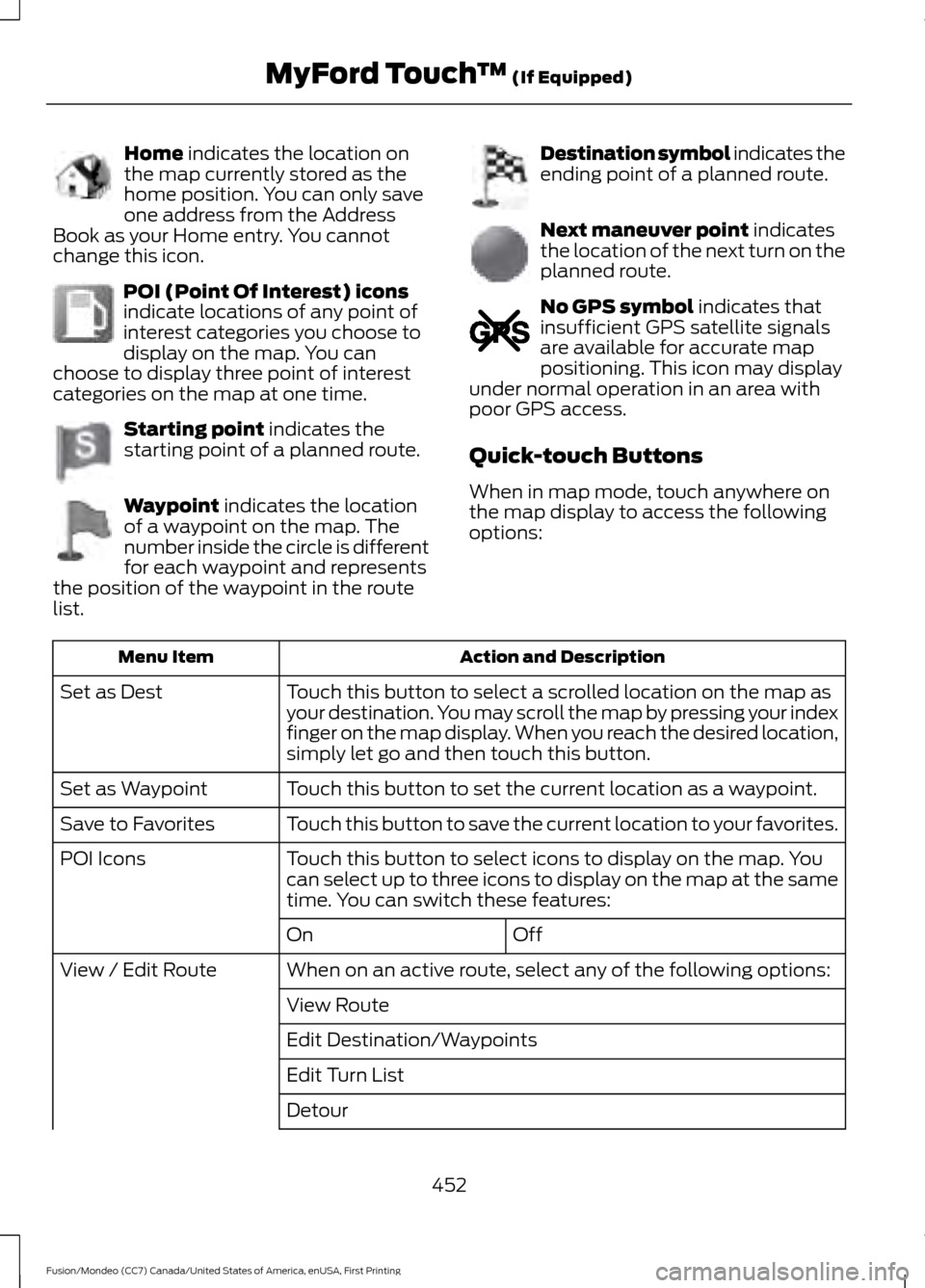
Home indicates the location on
the map currently stored as the
home position. You can only save
one address from the Address
Book as your Home entry. You cannot
change this icon. POI (Point Of Interest) icons
indicate locations of any point of
interest categories you choose to
display on the map. You can
choose to display three point of interest
categories on the map at one time. Starting point
indicates the
starting point of a planned route. Waypoint
indicates the location
of a waypoint on the map. The
number inside the circle is different
for each waypoint and represents
the position of the waypoint in the route
list. Destination symbol indicates the
ending point of a planned route.
Next maneuver point
indicates
the location of the next turn on the
planned route. No GPS symbol
indicates that
insufficient GPS satellite signals
are available for accurate map
positioning. This icon may display
under normal operation in an area with
poor GPS access.
Quick-touch Buttons
When in map mode, touch anywhere on
the map display to access the following
options: Action and Description
Menu Item
Touch this button to select a scrolled location on the map as
your destination. You may scroll the map by pressing your index
finger on the map display. When you reach the desired location,
simply let go and then touch this button.
Set as Dest
Touch this button to set the current location as a waypoint.
Set as Waypoint
Touch this button to save the current location to your favorites.
Save to Favorites
Touch this button to select icons to display on the map. You
can select up to three icons to display on the map at the same
time. You can switch these features:
POI Icons
Off
On
When on an active route, select any of the following options:
View / Edit Route
View Route
Edit Destination/Waypoints
Edit Turn List
Detour
452
Fusion/Mondeo (CC7) Canada/United States of America, enUSA, First Printing MyFord Touch
™
(If Equipped)E142649 E142650 E142651 E142652 E142653 E142654 E142655
Page 463 of 518
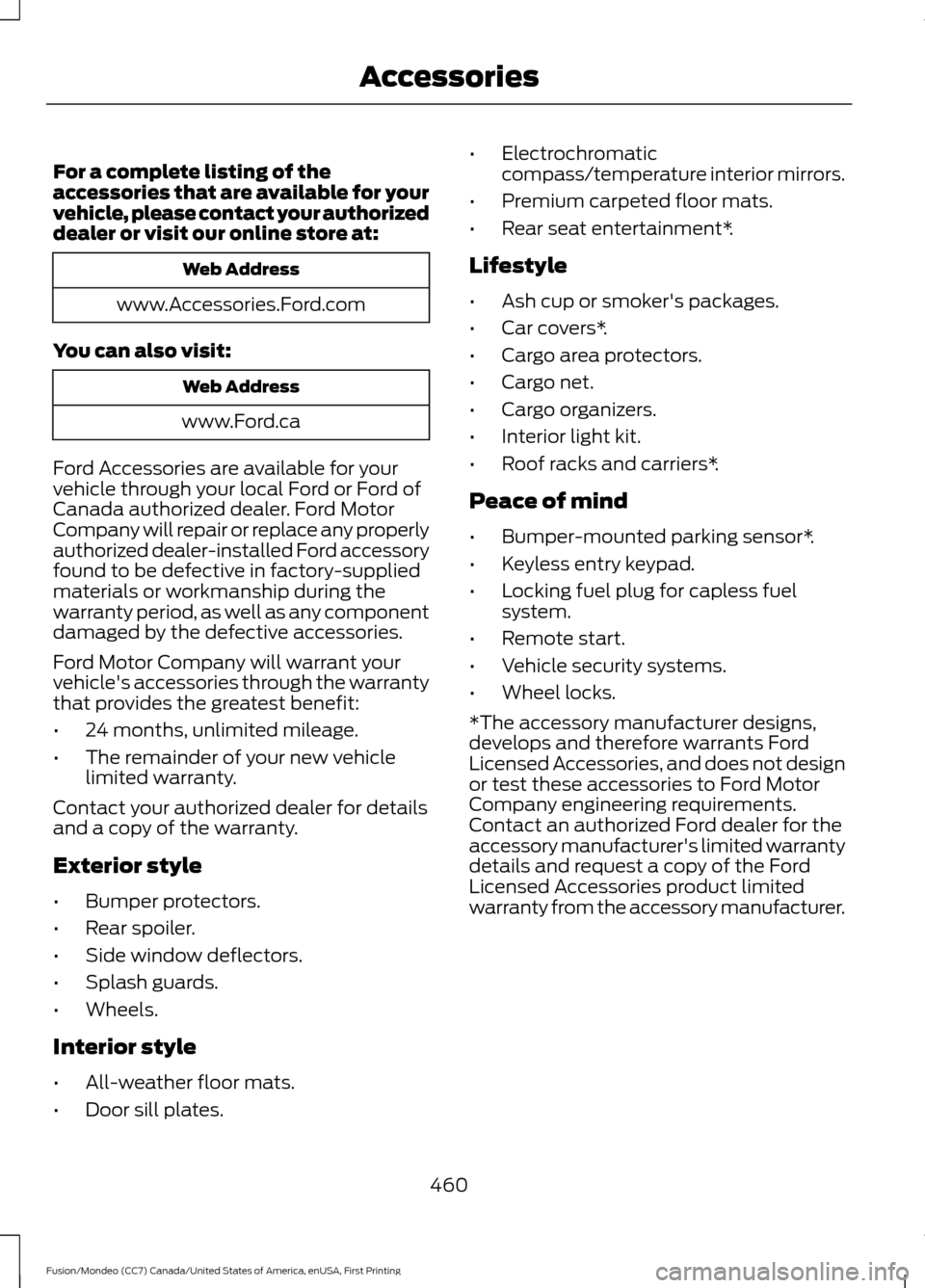
For a complete listing of the
accessories that are available for your
vehicle, please contact your authorized
dealer or visit our online store at:
Web Address
www.Accessories.Ford.com
You can also visit: Web Address
www.Ford.ca
Ford Accessories are available for your
vehicle through your local Ford or Ford of
Canada authorized dealer. Ford Motor
Company will repair or replace any properly
authorized dealer-installed Ford accessory
found to be defective in factory-supplied
materials or workmanship during the
warranty period, as well as any component
damaged by the defective accessories.
Ford Motor Company will warrant your
vehicle's accessories through the warranty
that provides the greatest benefit:
• 24 months, unlimited mileage.
• The remainder of your new vehicle
limited warranty.
Contact your authorized dealer for details
and a copy of the warranty.
Exterior style
• Bumper protectors.
• Rear spoiler.
• Side window deflectors.
• Splash guards.
• Wheels.
Interior style
• All-weather floor mats.
• Door sill plates. •
Electrochromatic
compass/temperature interior mirrors.
• Premium carpeted floor mats.
• Rear seat entertainment*.
Lifestyle
• Ash cup or smoker's packages.
• Car covers*.
• Cargo area protectors.
• Cargo net.
• Cargo organizers.
• Interior light kit.
• Roof racks and carriers*.
Peace of mind
• Bumper-mounted parking sensor*.
• Keyless entry keypad.
• Locking fuel plug for capless fuel
system.
• Remote start.
• Vehicle security systems.
• Wheel locks.
*The accessory manufacturer designs,
develops and therefore warrants Ford
Licensed Accessories, and does not design
or test these accessories to Ford Motor
Company engineering requirements.
Contact an authorized Ford dealer for the
accessory manufacturer's limited warranty
details and request a copy of the Ford
Licensed Accessories product limited
warranty from the accessory manufacturer.
460
Fusion/Mondeo (CC7) Canada/United States of America, enUSA, First Printing Accessories
Page 465 of 518

PROTECT YOURSELF FROM THE RISING
COST OF VEHICLE REPAIRS WITH A FORD
EXTENDED SERVICE PLAN.
SERVICE PLANS (U.S. Only)
More than 32 million Ford owners have
discovered the powerful protection of Ford
Extended Service Plan. It is the extended
service plan backed by Ford Motor
Company, and provides peace of mind
protection beyond the New Vehicle Limited
Warranty coverage.
Ford ESP Can Quickly Pay for Itself
One service bill – the cost of parts and
labor – can easily exceed the price of your
Ford Extended Service Plan. With Ford ESP
you minimize your risk for unexpected
repair bills and rising repair costs.
Up to 1,000+ Covered Vehicle
Components
There are four core Extended Service Plans
with different levels of coverage. Ask your
authorized dealer for details.
1. PremiumCARE - Our most
comprehensive coverage. With over
1,000 covered components, this plan
is so complete that we generally only
discuss what’ s not covered.
2. ExtraCARE - Covers 113 components, and includes many high-tech items.
3. BaseCARE - Covers 84 components.
4. PowertrainCARE - Covers 29 critical components.
Ford Extended Service Plan is honored by
all authorized Ford dealers in the U.S.,
Canada and Mexico. It is the extended
service plan authorized and backed by Ford
Motor Company. That means you get:
•
Reliable, quality service at any Ford or
Lincoln dealership
• Repairs performed by factory trained
technicians, using genuine parts
Rental Car Reimbursement
1st day Rental Benefit
You take advantage of replacement
transportation if your vehicle is at your
authorized dealer for same day covered
repairs.
Extended Rental Benefits
If your vehicle is kept overnight for covered
repairs, you are eligible for rental car
coverage, including bumper to bumper
warranty repairs, and Field Service Actions.
Roadside Assistance
Exclusive 24/7 roadside assistance,
including:
• Towing, flat-tire change and battery
jump starts
• Out of fuel and lock-out assistance.
• Travel expense reimbursement for
lodging, meals and rental car.
• Destination assistance for taxi, shuttle,
rental car coverage and emergency
transportation.
Transferable Coverage
If you sell your vehicle before your Ford
Extended Service Plan coverage expires,
you can transfer any remaining coverage
to the new owner. Whenever you sell your
vehicle, prospective buyers may have a
higher degree of confidence that vehicle
was properly maintained with Ford ESP,
thereby improving resale value.
462
Fusion/Mondeo (CC7) Canada/United States of America, enUSA, First Printing Extended Service Plan (ESP)
Page 508 of 518

A
A/C
See: Climate Control......................................... 120
About This Manual...........................................7
ABS See: Brakes............................................................ 172
ABS driving hints See: Hints on Driving With Anti-Lock
Brakes................................................................. 172
Accessories...................................................460 Exterior style....................................................... 460
Interior style........................................................ 460
Lifestyle................................................................ 460
Peace of mind.................................................... 460
Accessories See: Replacement Parts
Recommendation............................................. 11
ACC See: Using Adaptive Cruise Control............189
Active Park Assist..........................................181 Automatic Steering into Parking
Space................................................................. 182
Deactivating the Park Assist Feature..........183
Troubleshooting the System.......................... 183
Using Active Park Assist.................................... 181
Adjusting the Headlamps........................258 Horizontal Aim Adjustment........................... 259
Vertical Aim Adjustment................................ 258
Adjusting the Steering Wheel.....................71
Airbag Disposal
..............................................46
Air Conditioning See: Climate Control......................................... 120
Alarm See: Anti-Theft Alarm........................................ 70
All-Wheel Drive
..............................................167
Ambient Lighting............................................83
Anti-Theft Alarm............................................70 Arming the Alarm................................................. 70
Disarming the Alarm........................................... 70
Appendices...................................................480
Audible Warnings and Indicators.............95 Headlamps On Warning Chime...................... 95
Key in Ignition Warning Chime........................ 95
Keyless Warning Alert........................................ 95
Parking Brake On Warning Chime.................95 Audio Control....................................................71
MEDIA........................................................................\
71
Seek, Next or Previous......................................... 71
Audio System.................................................327 General Information.......................................... 327
Audio Unit - Vehicles With: AM/FM/CD/ SYNC/Satellite Radio.............................329
Audio Unit - Vehicles With: AM/FM/CD/ SYNC.............................................................328
Audio Unit - Vehicles With: Sony AM/ FM/CD
...........................................................332
Menu Structure................................................... 333
Autolamps........................................................78 Windshield Wiper Activated
Headlamps........................................................ 78
Automatic Climate Control - Vehicles With: Sony Audio System/Sony Audio
System...........................................................123
Automatic Climate Control - Vehicles Without: Sony Audio System
................122
Automatic High Beam Control.................80 Activating the System......................................... 81
Manually Overriding the System..................... 81
Automatic Transmission............................163 Automatic Transmission Adaptive
Learning............................................................ 166
Brake-Shift Interlock......................................... 164
If Your Vehicle Gets Stuck In Mud or Snow.................................................................. 166
SelectShift Automatic ™
Transmission................................................... 163
Understanding the Positions of Your Automatic Transmission............................. 163
Automatic Transmission Fluid Check.............................................................255
Auto-Start-Stop
............................................152
Disabling Auto StartStop................................. 153
Enabling Auto StartStop.................................. 152
Autowipers........................................................74
Auxiliary Power Points................................143 110 Volt AC Power Point................................... 143
12 Volt DC Power Point..................................... 143
Locations............................................................... 143
AWD See: All-Wheel Drive.......................................... 167
505
Fusion/Mondeo (CC7) Canada/United States of America, enUSA, First Printing Index
Page 511 of 518

Exterior Mirrors................................................85
Auto-Dimming Feature...................................... 85
Blind Spot Monitor.............................................. 86
Fold-Away Exterior Mirrors............................... 85
Heated Exterior Mirrors...................................... 85
Integrated Blind Spot Mirrors.......................... 86
Memory Mirrors..................................................... 85
Power Exterior Mirrors........................................ 85
Puddle Lamps ...................................................... 86
Signal Indicator Mirrors...................................... 86
F
Fastening the Safety Belts
.........................30
Rear Inflatable Safety Belt................................ 32
Safety Belt Extension Assembly..................... 33
Safety Belt Locking Modes................................ 31
Using Safety Belts During Pregnancy...........30
Flat Tire Inflation See: Temporary Mobility Kit........................... 273
Floor Mats
.......................................................224
Fog Lamps - Front See: Front Fog Lamps........................................ 82
Ford Credit
..........................................................11
(U.S. Only)................................................................. 11
Front Fog Lamps
............................................82
Front Parking Aid..........................................180
Front Passenger Sensing System............40
Fuel and Refueling.......................................154
Fuel Consumption
.......................................159
Calculating Fuel Economy.............................. 159
Filling the Tank.................................................... 159
Fuel Filler Funnel Location
........................155
Fuel Filter........................................................256
Fuel Quality.....................................................155 Choosing the Right Fuel................................... 155
Fuel Shutoff
....................................................227
Fuses.................................................................237
Fuse Specification Chart...........................237 Passenger Compartment Fuse
Panel
.................................................................. 243
Power Distribution Box..................................... 237
G
Garage Door Opener See: Universal Garage Door Opener............139 Gauges...............................................................89
Engine Coolant Temperature Gauge............90
Fuel Gauge............................................................. 90
Information Display............................................. 89
Left Information Display..................................... 91
Type 1 and 2............................................................ 89
Type 3........................................................................\
91
General Information on Radio Frequencies...................................................47
Intelligent Access.................................................. 47
General Maintenance Information
.......464
Multi-Point Inspection.................................... 466
Owner Checks and Services......................... 465
Protecting Your Investment.......................... 464
Why Maintain Your Vehicle?......................... 464
Why Maintain Your Vehicle at Your Dealership?.................................................... 464
Getting Assistance Outside the U.S. and Canada.........................................................234
Getting the Services You Need................231 Away From Home............................................... 231
Global Opening and Closing......................85 Closing the Windows.......................................... 85
Opening the Windows....................................... 85
H
Hazard Warning Flashers..........................227
Headlamp Exit Delay
....................................79
Head Restraints............................................130 Adjusting the Head Restraint.......................... 131
Tilting Head Restraints ..................................... 131
Heated Seats
..................................................137
Heated Steering Wheel................................73
Heated Windows and Mirrors..................128
Heated Exterior Mirror....................................... 128
Heated Rear Window........................................ 128
Heating See: Climate Control......................................... 120
Hill Start Assist
..............................................175
Switching the System On and Off................176
Using Hill Start Assist........................................ 176
508
Fusion/Mondeo (CC7) Canada/United States of America, enUSA, First Printing Index