2016 FORD FOCUS battery
[x] Cancel search: batteryPage 7 of 385

Hazard Warning Flashers..........................190
Fuel Shutoff
...................................................190
Jump Starting the Vehicle..........................191
Post-Crash Alert System...........................193
Customer Assistance
Getting the Services You Need...............194
In California (U.S. Only).............................195
The Better Business Bureau (BBB) Auto Line Program (U.S. Only)......................196
Utilizing the Mediation/Arbitration Program (Canada Only)........................197
Getting Assistance Outside the U.S. and Canada.........................................................197
Ordering Additional Owner's Literature.....................................................198
Reporting Safety Defects (U.S. Only)
.............................................................199
Reporting Safety Defects (Canada Only)
.............................................................199
Fuses
Fuse Specification Chart...........................201
Changing a Fuse...........................................210
Maintenance
General Information.....................................212
Opening and Closing the Hood...............212
Under Hood Overview - 1.0L EcoBoost™.................................................214
Under Hood Overview - 2.0L....................215
Engine Oil Dipstick - 1.0L EcoBoost™.................................................216
Engine Oil Dipstick - 2.0L...........................216
Engine Oil Check...........................................216
Engine Coolant Check.................................217
Automatic Transmission Fluid Check............................................................218
Brake Fluid Check.........................................219
Clutch Fluid Check - Manual Transmission..............................................219
Washer Fluid Check
.....................................219 Fuel Filter
........................................................220
Changing the 12V Battery.........................220
Checking the Wiper Blades
.......................221
Changing the Wiper Blades
......................221
Adjusting the Headlamps
.........................223
Removing a Headlamp..............................224
Changing a Bulb...........................................225
Bulb Specification Chart
..........................230
Changing the Engine Air Filter.................232
Vehicle Care
General Information
...................................234
Cleaning Products
.......................................234
Cleaning the Exterior..................................234
Waxing.............................................................235
Cleaning the Engine....................................236
Cleaning the Windows and Wiper Blades..........................................................236
Cleaning the Interior....................................237
Cleaning the Instrument Panel and Instrument Cluster Lens........................237
Cleaning Leather Seats.............................238
Repairing Minor Paint Damage..............238
Cleaning the Alloy Wheels.......................238
Vehicle Storage
............................................239
Wheels and Tires
Tire Care
...........................................................241
Using Snow Chains.....................................256
Tire Pressure Monitoring System...........257
Changing a Road Wheel...........................260
Driving at High Speed................................263
Lug Nuts
..........................................................264
Capacities and Specific- ations
Engine Specifications - 1.0L EcoBoost™................................................265
Engine Specifications - 2.0L....................265
Motorcraft Parts - 1.0L EcoBoost™......266
4
Focus (CDH) Canada/United States of America, enUSA, First Printing Table of Contents
Page 10 of 385
ABOUT THIS MANUAL
Thank you for choosing Ford. We
recommend that you take some time to
get to know your vehicle by reading this
manual. The more that you know about
your vehicle, the greater the safety and
pleasure you will get from driving it.
WARNING
Driving while distracted can result in
loss of vehicle control, crash and
injury. We strongly recommend that
you use extreme caution when using any
device that may take your focus off the
road. Your primary responsibility is the safe
operation of your vehicle. We recommend
against the use of any hand-held device
while driving and encourage the use of
voice-operated systems when possible.
Make sure you are aware of all applicable
local laws that may affect the use of
electronic devices while driving. Note:
This manual describes product
features and options available throughout
the range of available models, sometimes
even before they are generally available. It
may describe options not fitted to the
vehicle you have purchased.
Note: Some of the illustrations in this
manual may show features as used in
different models, so they may appear
different to you on your vehicle.
Note: Always use and operate your vehicle
in line with all applicable laws and
regulations.
Note: Pass on this manual when selling
your vehicle. It is an integral part of your
vehicle.
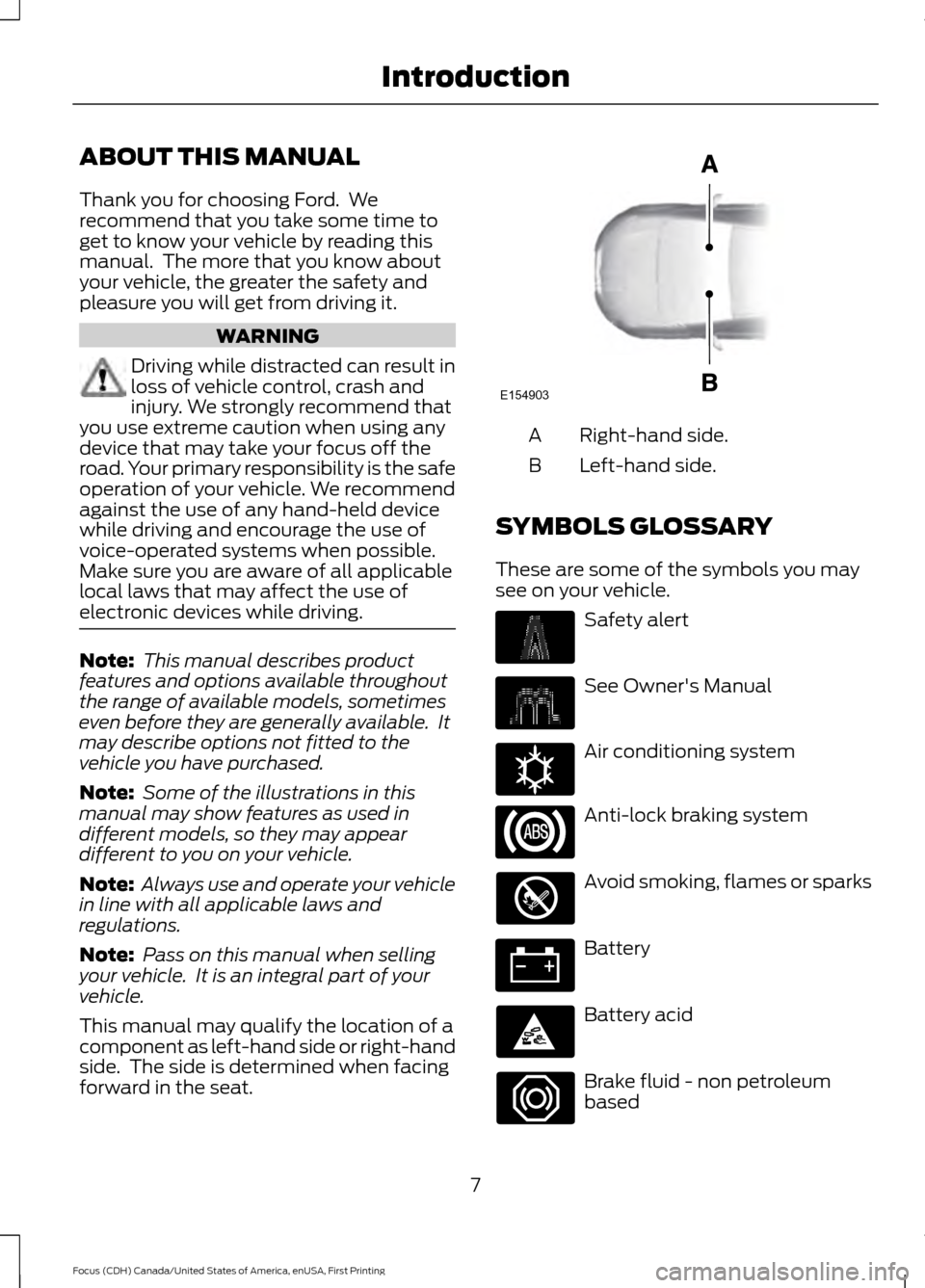
This manual may qualify the location of a
component as left-hand side or right-hand
side. The side is determined when facing
forward in the seat. Right-hand side.
A
Left-hand side.
B
SYMBOLS GLOSSARY
These are some of the symbols you may
see on your vehicle. Safety alert
See Owner's Manual
Air conditioning system
Anti-lock braking system
Avoid smoking, flames or sparks
Battery
Battery acid
Brake fluid - non petroleum
based
7
Focus (CDH) Canada/United States of America, enUSA, First Printing IntroductionE154903 E162384
Page 14 of 385

CALIFORNIA PROPOSITION 65
WARNINGS
Some constituents of engine
exhaust, certain vehicle components,
certain fluids contained in vehicles
and certain products of component wear
contain or emit chemicals known to the
State of California to cause cancer and
birth defects or other reproductive harm. Battery posts, terminals and related
accessories contain lead and lead
compounds, chemicals known to the
State of California to cause cancer and
reproductive harm. Batteries also contain
other chemicals known to the State of
California to cause cancer. Wash your
hands after handling. PERCHLORATE
Certain components in your vehicle such
as airbag modules, safety belt
pretensioners and remote control batteries
may contain perchlorate material. Special
handling may apply for service or vehicle
end of life disposal.
For more information visit:
Web Address
www.dtsc.ca.gov/hazardouswaste/ perchlorate
FORD CREDIT
(U.S. Only)
Ford Credit offers a full range of financing
and lease plans to help you acquire your
vehicle. If you have financed or leased your
vehicle through Ford Credit, thank you for
your business. For your convenience we offer a number
of ways to contact us, as well as to help
manage your account.
Phone: 1-800-727-7000
For more information regarding Ford Credit,
as well as to access Account Manager,
please go to www.fordcredit.com.
REPLACEMENT PARTS
RECOMMENDATION
Your vehicle has been built to the highest
standards using quality parts. We
recommend that you demand the use of
genuine Ford and Motorcraft parts
whenever your vehicle requires scheduled
maintenance or repair. You can clearly
identify genuine Ford and Motorcraft parts
by looking for the Ford, FoMoCo or
Motorcraft branding on the parts or their
packaging.
Scheduled Maintenance and
Mechanical Repairs
One of the best ways for you to make sure
that your vehicle provides years of service
is to have it maintained in line with our
recommendations using parts that
conform to the specifications detailed in
this Owner
’s Manual. Genuine Ford and
Motorcraft parts meet or exceed these
specifications.
Collision Repairs
We hope that you never experience a
collision, but accidents do happen. Genuine
Ford replacement collision parts meet our
stringent requirements for fit, finish,
structural integrity, corrosion protection
and dent resistance. During vehicle
11
Focus (CDH) Canada/United States of America, enUSA, First Printing Introduction
Page 49 of 385
Programming a New Remote
Control
To program an additional remote control
See Security (page 66).
Reprogramming the Unlocking
Function
Note: When you press the unlock button,
either all the doors are unlocked or only the
driver door is unlocked. Pressing the unlock
button again unlocks all the doors.
Press and hold the unlock and lock buttons
on the remote control simultaneously for
at least four seconds with the ignition off.
The direction indicators flash twice to
confirm the change.
To return to the original unlocking function,
repeat the process.
Changing the Remote Control
Battery
The remote control uses one coin-type
three-volt lithium battery CR2032 or
equivalent. Make sure that you dispose of
old batteries in an
environmentally friendly way.
Seek advice from your local authority
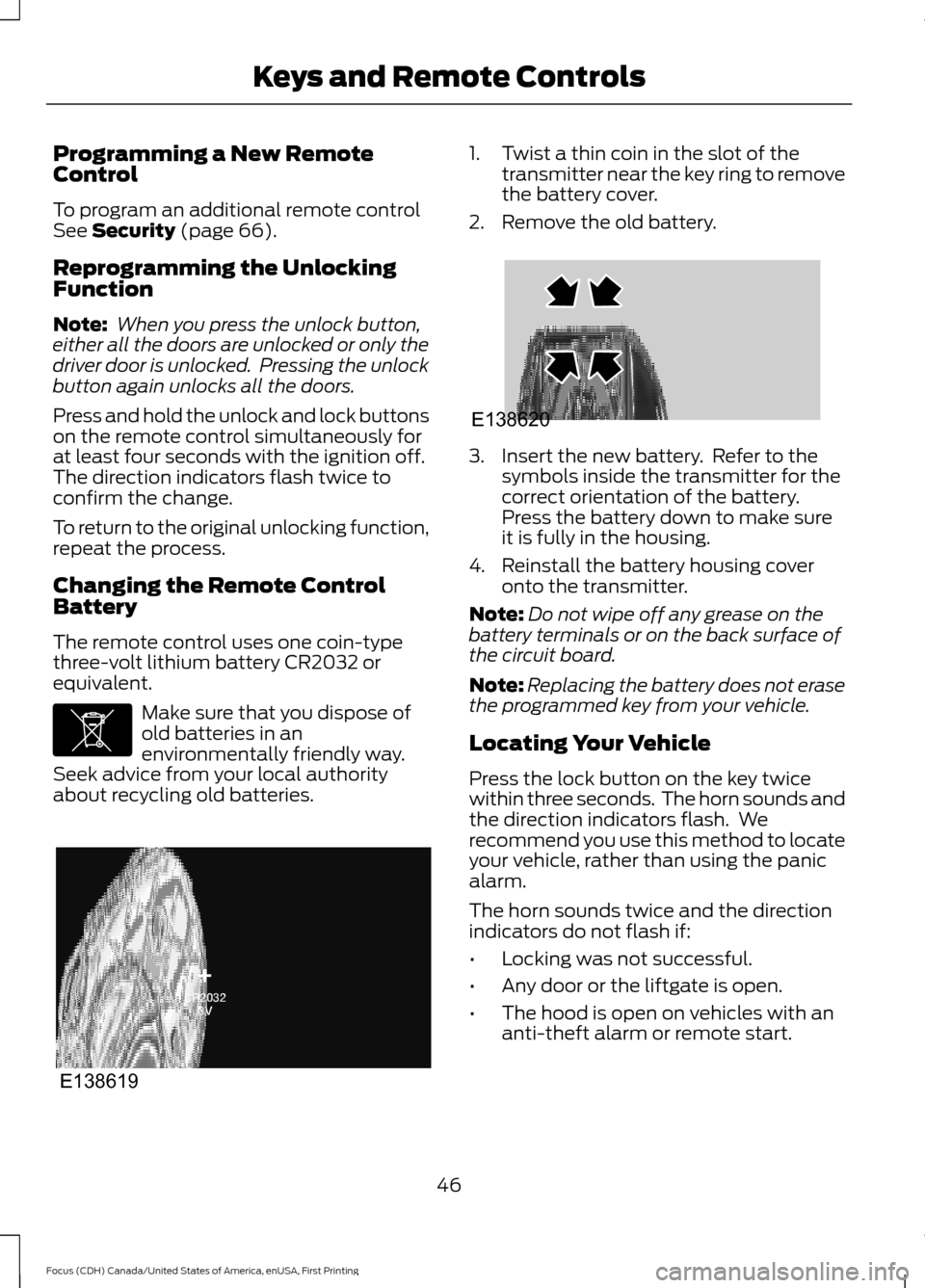
about recycling old batteries. 1. Twist a thin coin in the slot of the
transmitter near the key ring to remove
the battery cover.
2. Remove the old battery. 3. Insert the new battery. Refer to the
symbols inside the transmitter for the
correct orientation of the battery.
Press the battery down to make sure
it is fully in the housing.
4. Reinstall the battery housing cover onto the transmitter.
Note: Do not wipe off any grease on the
battery terminals or on the back surface of
the circuit board.
Note: Replacing the battery does not erase
the programmed key from your vehicle.
Locating Your Vehicle
Press the lock button on the key twice
within three seconds. The horn sounds and
the direction indicators flash. We
recommend you use this method to locate
your vehicle, rather than using the panic
alarm.
The horn sounds twice and the direction
indicators do not flash if:
• Locking was not successful.
• Any door or the liftgate is open.
• The hood is open on vehicles with an
anti-theft alarm or remote start.
46
Focus (CDH) Canada/United States of America, enUSA, First Printing Keys and Remote ControlsE107998 E138619 E138620
Page 50 of 385
Sounding the Panic Alarm (If Equipped)
Press the button to sound the
panic alarm. Press the button
again or switch the ignition on to
silence it.
Note: The panic alarm only operates when
the ignition is off.
REMOTE CONTROL - VEHICLES
WITH: KEYLESS ENTRY (If
Equipped)
Intelligent Access Key Key Blade
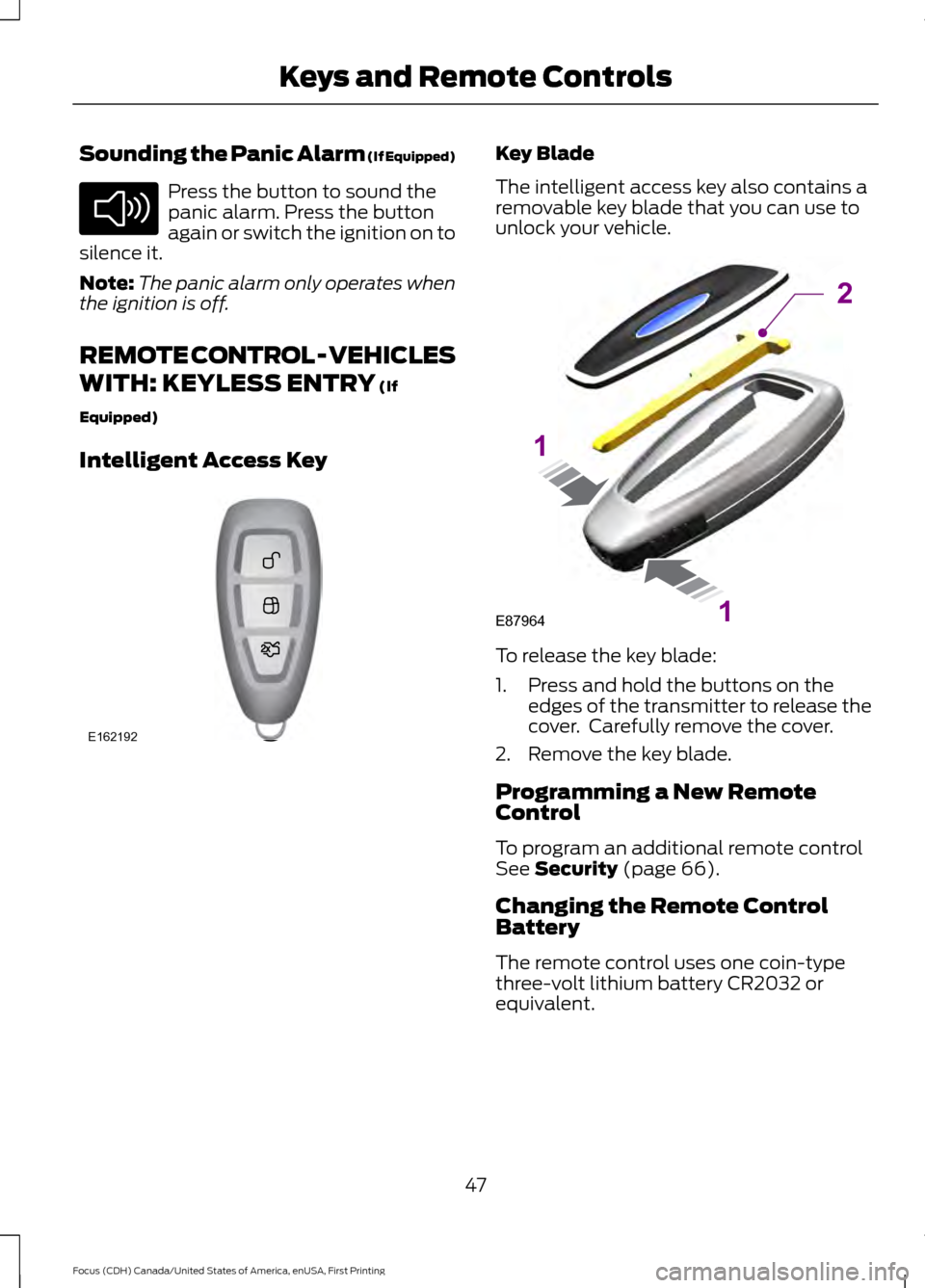
The intelligent access key also contains a
removable key blade that you can use to
unlock your vehicle.
To release the key blade:
1. Press and hold the buttons on the
edges of the transmitter to release the
cover. Carefully remove the cover.
2. Remove the key blade.
Programming a New Remote
Control
To program an additional remote control
See
Security (page 66).
Changing the Remote Control
Battery
The remote control uses one coin-type
three-volt lithium battery CR2032 or
equivalent.
47
Focus (CDH) Canada/United States of America, enUSA, First Printing Keys and Remote ControlsE138624 E162192 E87964
2
1
1
Page 51 of 385
Make sure that you dispose of
old batteries in an
environmentally friendly way.
Seek advice from your local authority
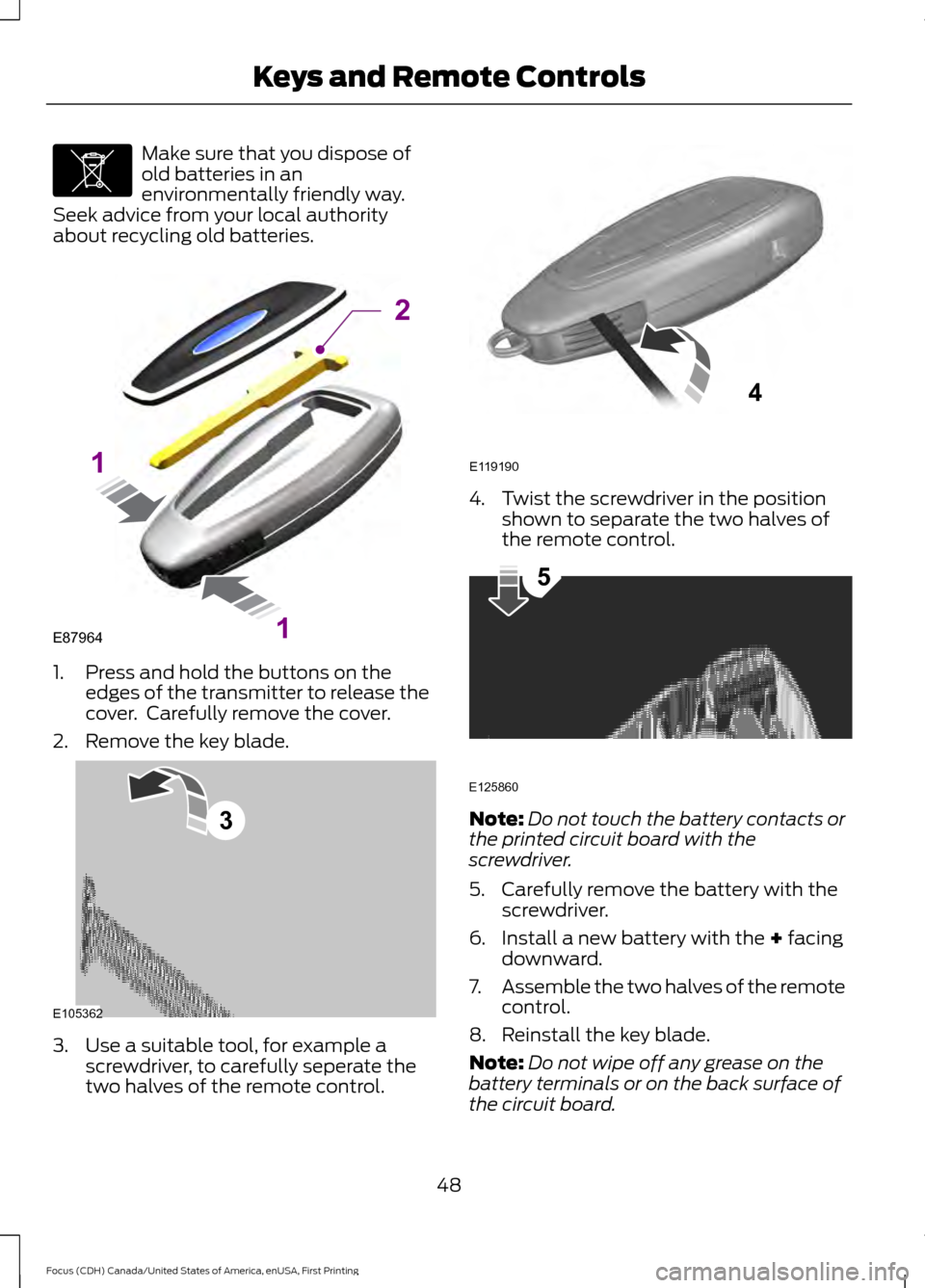
about recycling old batteries. 1. Press and hold the buttons on the
edges of the transmitter to release the
cover. Carefully remove the cover.
2. Remove the key blade. 3. Use a suitable tool, for example a
screwdriver, to carefully seperate the
two halves of the remote control. 4. Twist the screwdriver in the position
shown to separate the two halves of
the remote control. Note:
Do not touch the battery contacts or
the printed circuit board with the
screwdriver.
5. Carefully remove the battery with the screwdriver.
6. Install a new battery with the + facing
downward.
7. Assemble the two halves of the remote
control.
8. Reinstall the key blade.
Note: Do not wipe off any grease on the
battery terminals or on the back surface of
the circuit board.
48
Focus (CDH) Canada/United States of America, enUSA, First Printing Keys and Remote ControlsE107998 E87964
2
1
1 E105362
3 E119190
4 E125860
5
Page 52 of 385
Note:
Replacing the battery does not delete
the transmitter from the vehicle. The
transmitter should operate normally.
Locating Your Vehicle
Press the lock button on the key twice
within three seconds. The horn may sound
and the direction indicators flash.
The horn may sound twice and the
direction indicators do not flash if:
• Locking was not successful.
• Any door or the liftgate is open.
• The hood is open on vehicles with an
anti-theft alarm or remote start.
REMOTE CONTROL - VEHICLES
WITH: KEYLESS ENTRY WITH
REMOTE START (If Equipped)
Intelligent Access Key
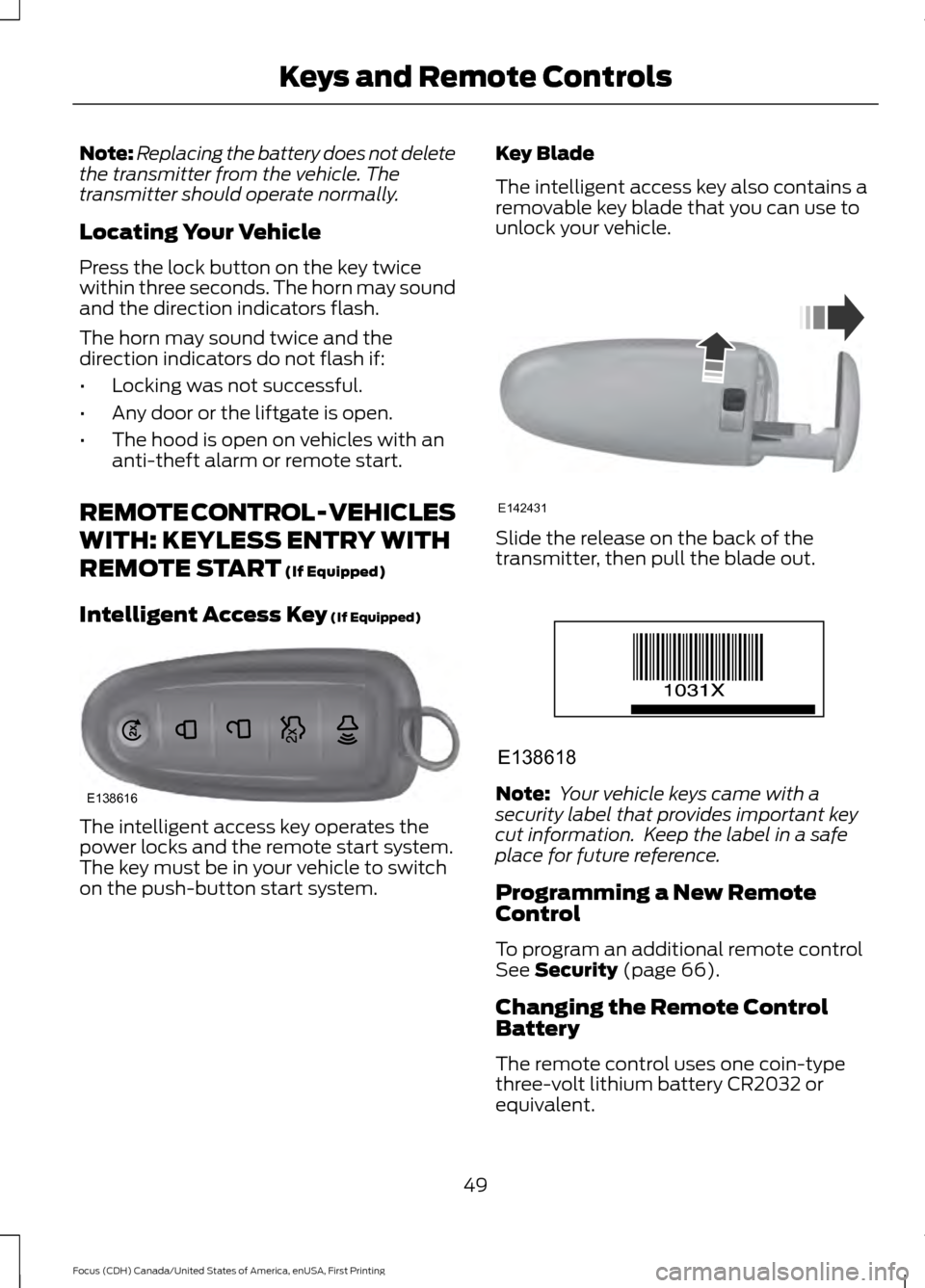
(If Equipped) The intelligent access key operates the
power locks and the remote start system.
The key must be in your vehicle to switch
on the push-button start system. Key Blade
The intelligent access key also contains a
removable key blade that you can use to
unlock your vehicle.
Slide the release on the back of the
transmitter, then pull the blade out.
Note:
Your vehicle keys came with a
security label that provides important key
cut information. Keep the label in a safe
place for future reference.
Programming a New Remote
Control
To program an additional remote control
See
Security (page 66).
Changing the Remote Control
Battery
The remote control uses one coin-type
three-volt lithium battery CR2032 or
equivalent.
49
Focus (CDH) Canada/United States of America, enUSA, First Printing Keys and Remote ControlsE138616 E142431 E138618
Page 53 of 385
Make sure that you dispose of
old batteries in an
environmentally friendly way.
Seek advice from your local authority
about recycling old batteries.
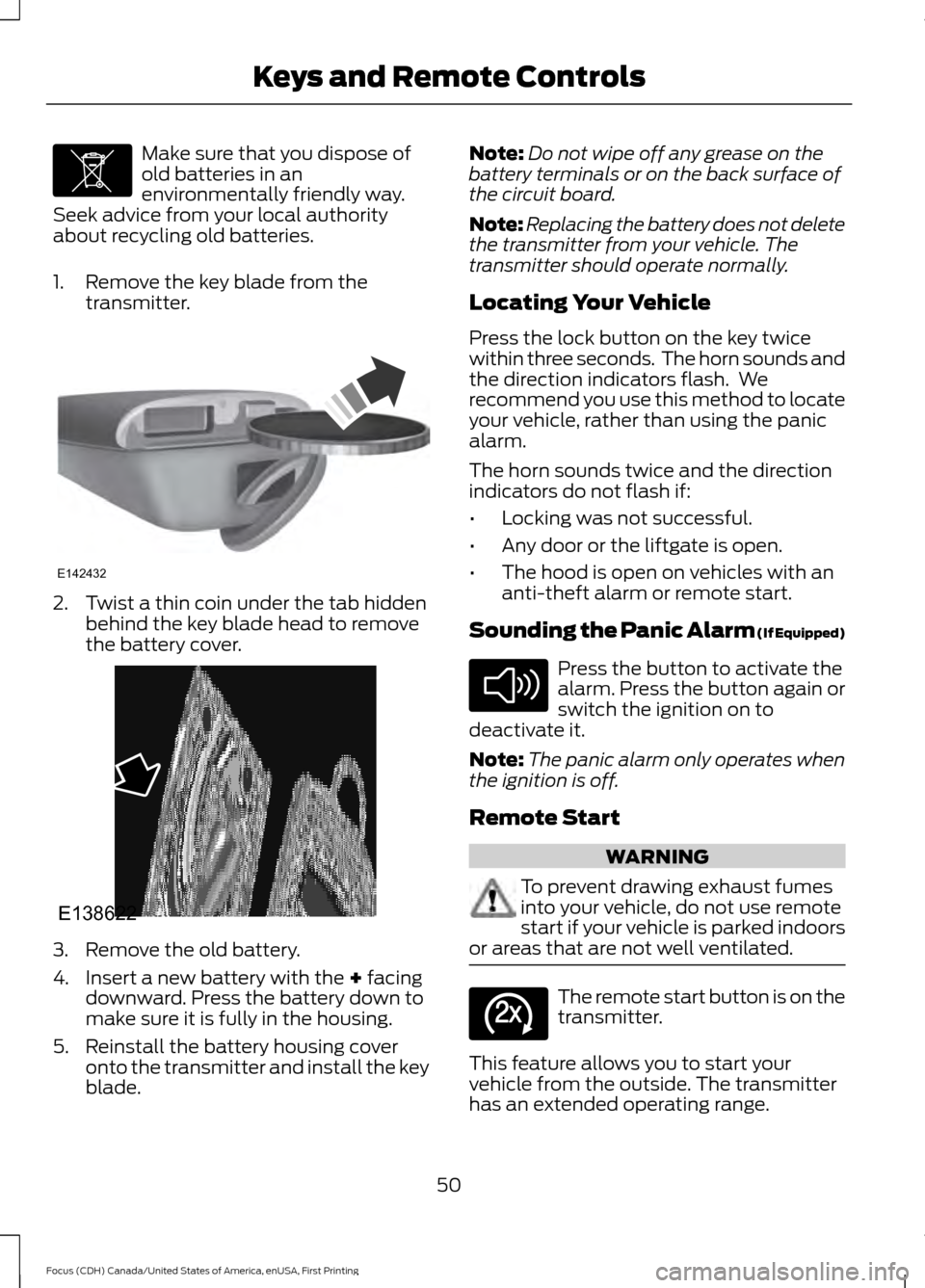
1. Remove the key blade from the transmitter. 2. Twist a thin coin under the tab hidden
behind the key blade head to remove
the battery cover. 3. Remove the old battery.
4. Insert a new battery with the + facing
downward. Press the battery down to
make sure it is fully in the housing.
5. Reinstall the battery housing cover onto the transmitter and install the key
blade. Note:
Do not wipe off any grease on the
battery terminals or on the back surface of
the circuit board.
Note: Replacing the battery does not delete
the transmitter from your vehicle. The
transmitter should operate normally.
Locating Your Vehicle
Press the lock button on the key twice
within three seconds. The horn sounds and
the direction indicators flash. We
recommend you use this method to locate
your vehicle, rather than using the panic
alarm.
The horn sounds twice and the direction
indicators do not flash if:
• Locking was not successful.
• Any door or the liftgate is open.
• The hood is open on vehicles with an
anti-theft alarm or remote start.
Sounding the Panic Alarm (If Equipped) Press the button to activate the
alarm. Press the button again or
switch the ignition on to
deactivate it.
Note: The panic alarm only operates when
the ignition is off.
Remote Start WARNING
To prevent drawing exhaust fumes
into your vehicle, do not use remote
start if your vehicle is parked indoors
or areas that are not well ventilated. The remote start button is on the
transmitter.
This feature allows you to start your
vehicle from the outside. The transmitter
has an extended operating range.
50
Focus (CDH) Canada/United States of America, enUSA, First Printing Keys and Remote ControlsE107998 E142432 E138622 E138624 E138625