2016 FORD FOCUS key
[x] Cancel search: keyPage 295 of 385
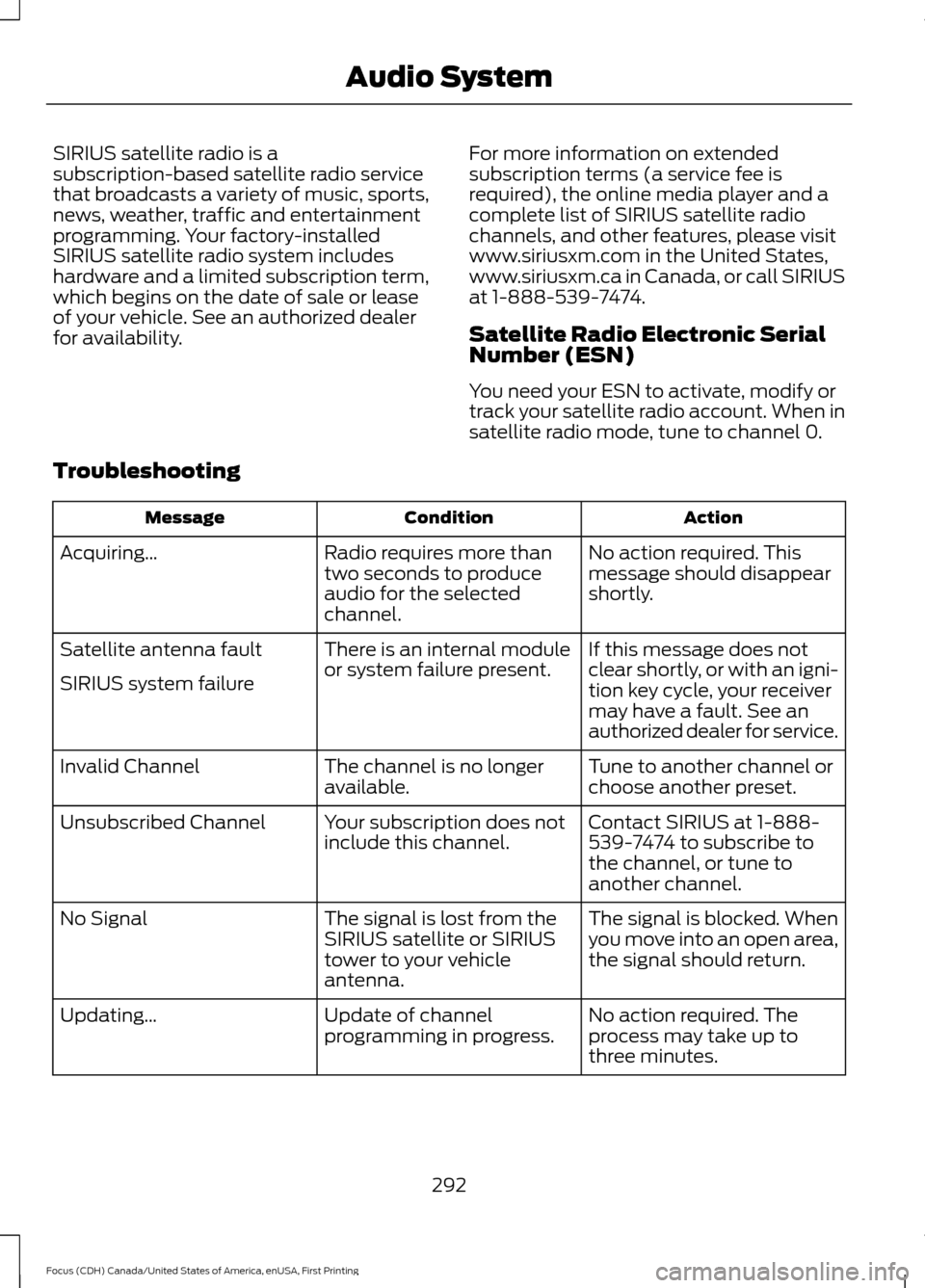
SIRIUS satellite radio is a
subscription-based satellite radio service
that broadcasts a variety of music, sports,
news, weather, traffic and entertainment
programming. Your factory-installed
SIRIUS satellite radio system includes
hardware and a limited subscription term,
which begins on the date of sale or lease
of your vehicle. See an authorized dealer
for availability.
For more information on extended
subscription terms (a service fee is
required), the online media player and a
complete list of SIRIUS satellite radio
channels, and other features, please visit
www.siriusxm.com in the United States,
www.siriusxm.ca in Canada, or call SIRIUS
at 1-888-539-7474.
Satellite Radio Electronic Serial
Number (ESN)
You need your ESN to activate, modify or
track your satellite radio account. When in
satellite radio mode, tune to channel 0.
Troubleshooting Action
Condition
Message
No action required. This
message should disappear
shortly.
Radio requires more than
two seconds to produce
audio for the selected
channel.
Acquiring\b
If this message does not
clear shortly, or with an igni-
tion key cycle, your receiver
may have a fault. See an
authorized dealer for service.
There is an internal module
or system failure present.
Satellite antenna fault
SIRIUS system failure
Tune to another channel or
choose another preset.
The channel is no longer
available.
Invalid Channel
Contact SIRIUS at 1-888-
539-7474 to subscribe to
the channel, or tune to
another channel.
Your subscription does not
include this channel.
Unsubscribed Channel
The signal is blocked. When
you move into an open area,
the signal should return.
The signal is lost from the
SIRIUS satellite or SIRIUS
tower to your vehicle
antenna.
No Signal
No action required. The
process may take up to
three minutes.
Update of channel
programming in progress.
Updating\b
292
Focus (CDH) Canada/United States of America, enUSA, First Printing Audio System
Page 305 of 385
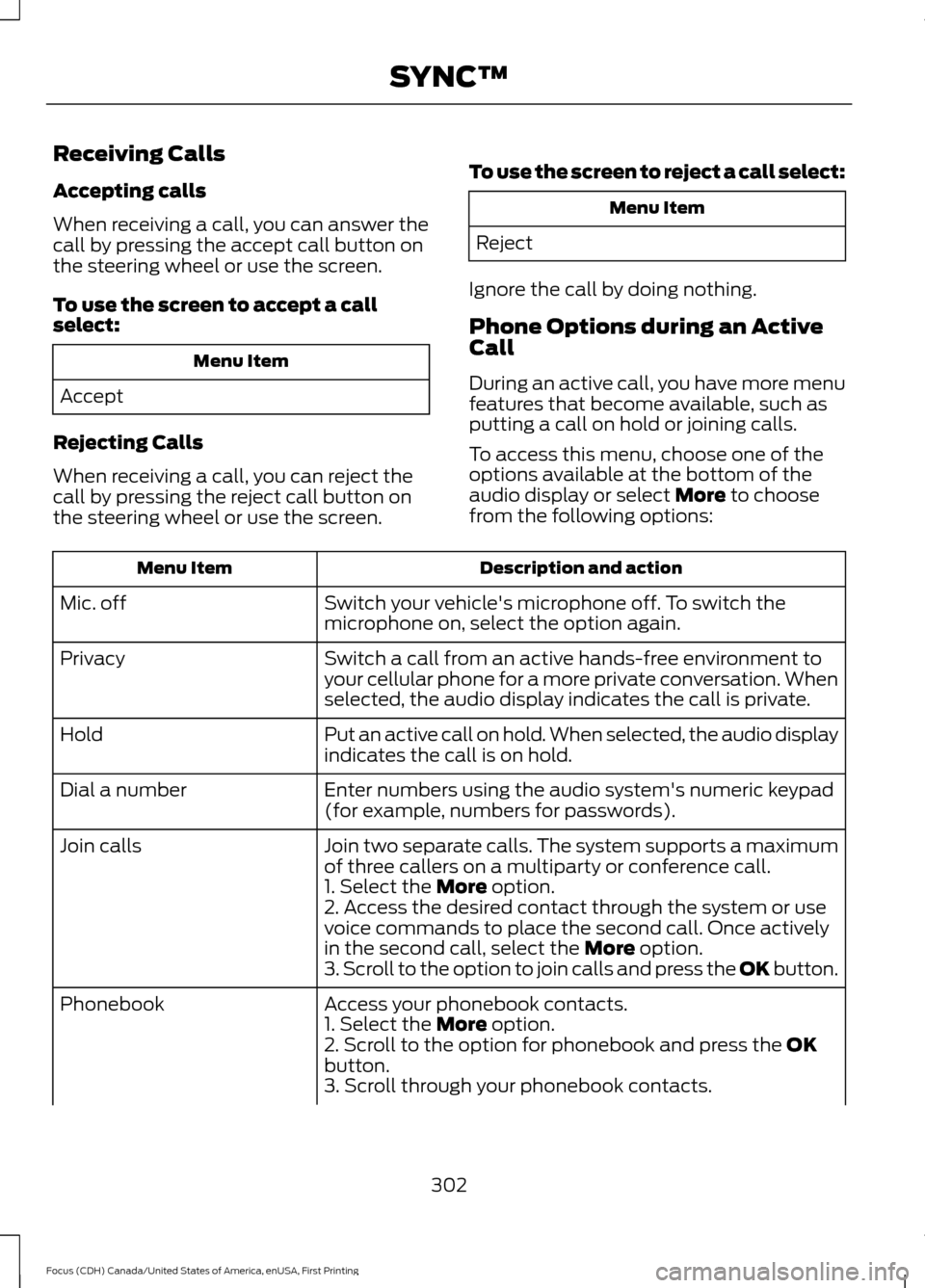
Receiving Calls
Accepting calls
When receiving a call, you can answer the
call by pressing the accept call button on
the steering wheel or use the screen.
To use the screen to accept a call
select:
Menu Item
Accept
Rejecting Calls
When receiving a call, you can reject the
call by pressing the reject call button on
the steering wheel or use the screen. To use the screen to reject a call select: Menu Item
Reject
Ignore the call by doing nothing.
Phone Options during an Active
Call
During an active call, you have more menu
features that become available, such as
putting a call on hold or joining calls.
To access this menu, choose one of the
options available at the bottom of the
audio display or select More to choose
from the following options: Description and action
Menu Item
Switch your vehicle's microphone off. To switch the
microphone on, select the option again.
Mic. off
Switch a call from an active hands-free environment to
your cellular phone for a more private conversation. When
selected, the audio display indicates the call is private.
Privacy
Put an active call on hold. When selected, the audio display
indicates the call is on hold.
Hold
Enter numbers using the audio system's numeric keypad
(for example, numbers for passwords).
Dial a number
Join two separate calls. The system supports a maximum
of three callers on a multiparty or conference call.
Join calls
1. Select the
More option.
2. Access the desired contact through the system or use
voice commands to place the second call. Once actively
in the second call, select the
More option.
3. Scroll to the option to join calls and press the OK button.
Access your phonebook contacts.
Phonebook
1. Select the
More option.
2. Scroll to the option for phonebook and press the OK
button.
3. Scroll through your phonebook contacts.
302
Focus (CDH) Canada/United States of America, enUSA, First Printing SYNC™
Page 306 of 385
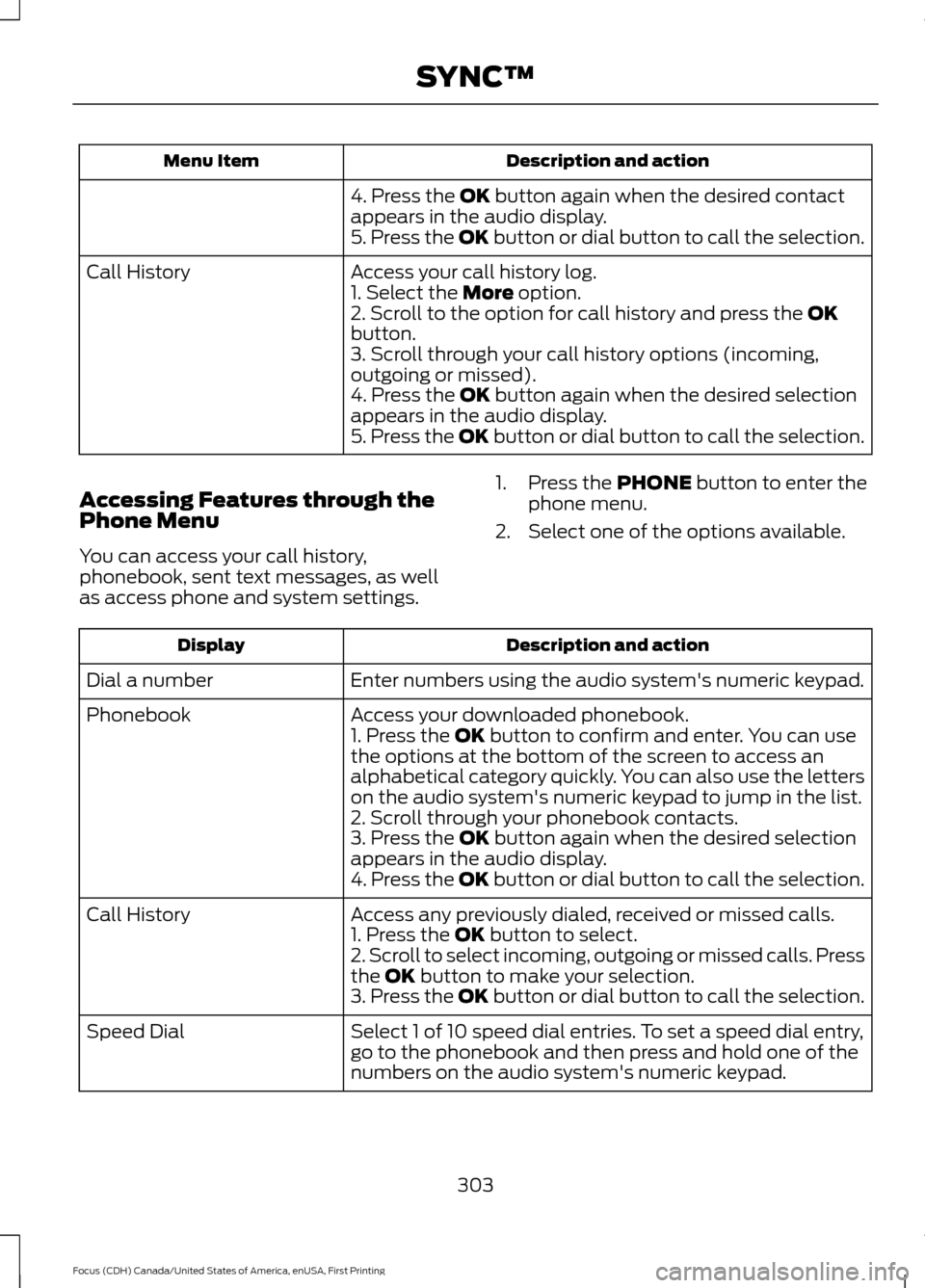
Description and action
Menu Item
4. Press the OK button again when the desired contact
appears in the audio display.
5. Press the OK button or dial button to call the selection.
Access your call history log.
Call History
1. Select the
More option.
2. Scroll to the option for call history and press the OK
button.
3. Scroll through your call history options (incoming,
outgoing or missed).
4. Press the
OK button again when the desired selection
appears in the audio display.
5. Press the OK button or dial button to call the selection.
Accessing Features through the
Phone Menu
You can access your call history,
phonebook, sent text messages, as well
as access phone and system settings. 1. Press the
PHONE button to enter the
phone menu.
2. Select one of the options available. Description and action
Display
Enter numbers using the audio system's numeric keypad.
Dial a number
Access your downloaded phonebook.
Phonebook
1. Press the
OK button to confirm and enter. You can use
the options at the bottom of the screen to access an
alphabetical category quickly. You can also use the letters
on the audio system's numeric keypad to jump in the list.
2. Scroll through your phonebook contacts.
3. Press the
OK button again when the desired selection
appears in the audio display.
4. Press the OK button or dial button to call the selection.
Access any previously dialed, received or missed calls.
Call History
1. Press the
OK button to select.
2. Scroll to select incoming, outgoing or missed calls. Press
the
OK button to make your selection.
3. Press the OK button or dial button to call the selection.
Select 1 of 10 speed dial entries. To set a speed dial entry,
go to the phonebook and then press and hold one of the
numbers on the audio system's numeric keypad.
Speed Dial
303
Focus (CDH) Canada/United States of America, enUSA, First Printing SYNC™
Page 316 of 385
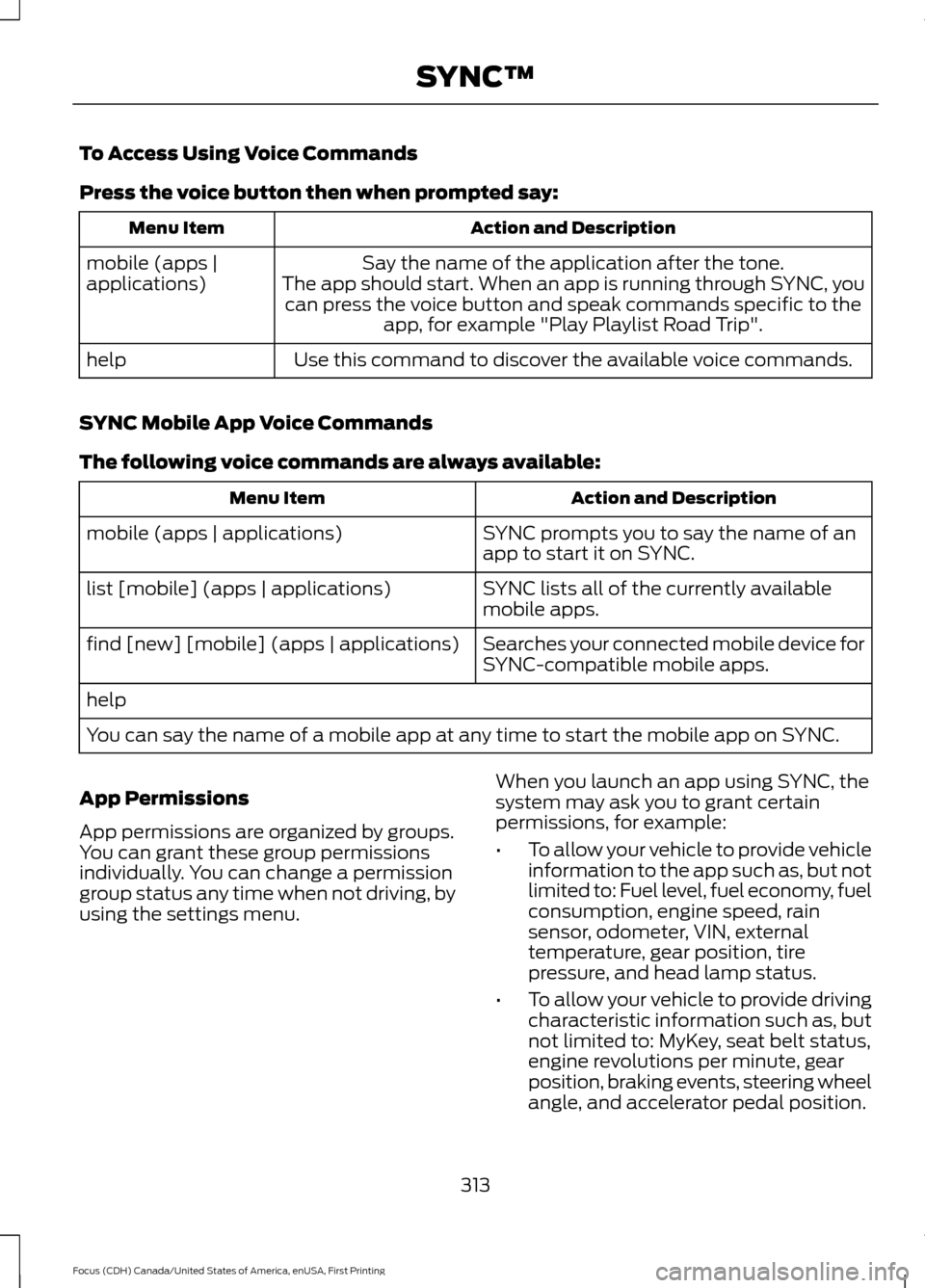
To Access Using Voice Commands
Press the voice button then when prompted say:
Action and Description
Menu Item
Say the name of the application after the tone.
The app should start. When an app is running through SYNC, you can press the voice button and speak commands specific to the app, for example "Play Playlist Road Trip".
mobile (apps |
applications)
Use this command to discover the available voice commands.
help
SYNC Mobile App Voice Commands
The following voice commands are always available: Action and Description
Menu Item
SYNC prompts you to say the name of an
app to start it on SYNC.
mobile (apps | applications)
SYNC lists all of the currently available
mobile apps.
list [mobile] (apps | applications)
Searches your connected mobile device for
SYNC-compatible mobile apps.
find [new] [mobile] (apps | applications)
help
You can say the name of a mobile app at any time to start the mobile app on SYNC.
App Permissions
App permissions are organized by groups.
You can grant these group permissions
individually. You can change a permission
group status any time when not driving, by
using the settings menu. When you launch an app using SYNC, the
system may ask you to grant certain
permissions, for example:
•
To allow your vehicle to provide vehicle
information to the app such as, but not
limited to: Fuel level, fuel economy, fuel
consumption, engine speed, rain
sensor, odometer, VIN, external
temperature, gear position, tire
pressure, and head lamp status.
• To allow your vehicle to provide driving
characteristic information such as, but
not limited to: MyKey, seat belt status,
engine revolutions per minute, gear
position, braking events, steering wheel
angle, and accelerator pedal position.
313
Focus (CDH) Canada/United States of America, enUSA, First Printing SYNC™
Page 324 of 385
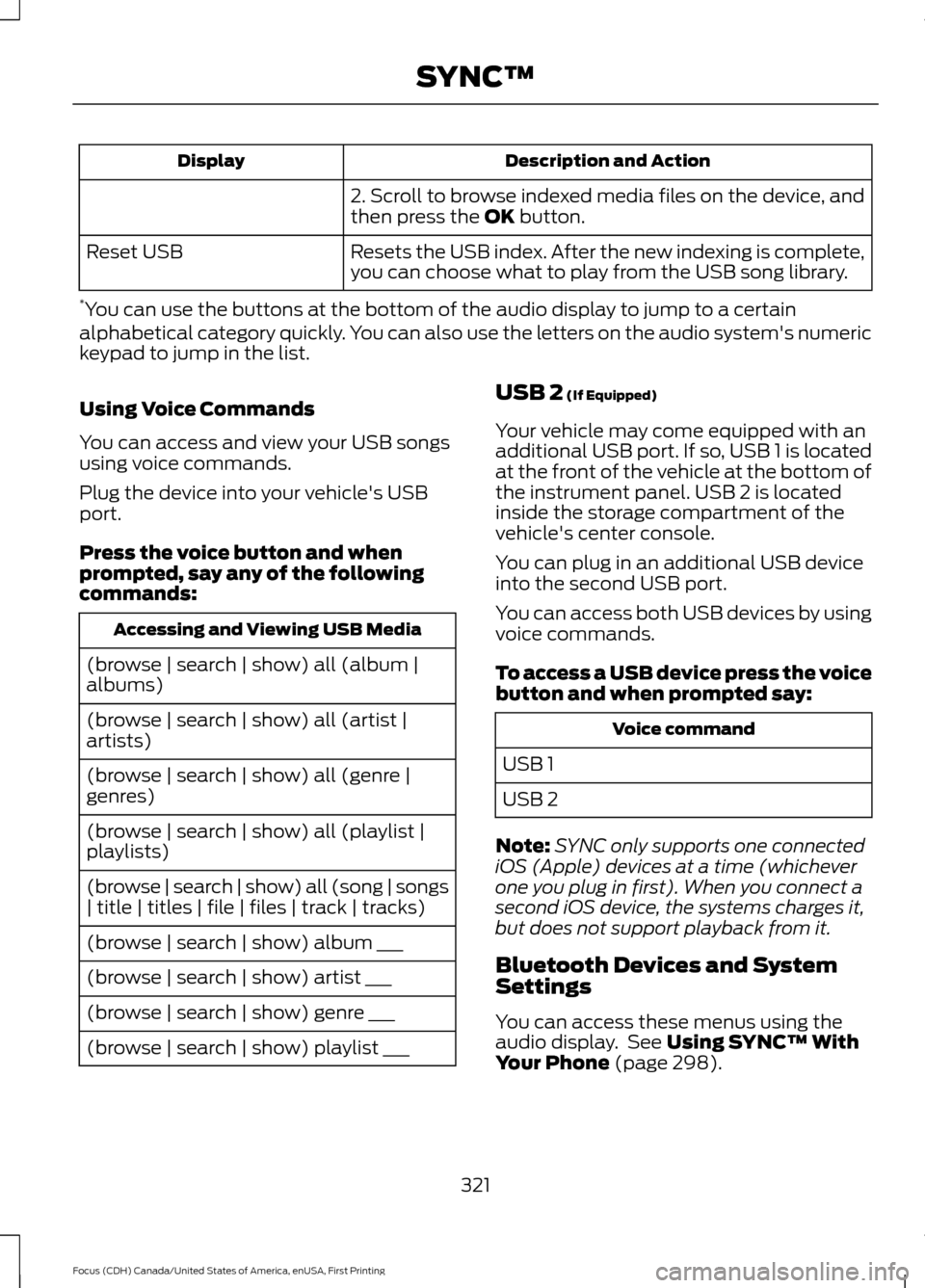
Description and Action
Display
2. Scroll to browse indexed media files on the device, and
then press the OK button.
Resets the USB index. After the new indexing is complete,
you can choose what to play from the USB song library.
Reset USB
* You can use the buttons at the bottom of the audio display to jump to a certain
alphabetical category quickly. You can also use the letters on the audio system's numeric
keypad to jump in the list.
Using Voice Commands
You can access and view your USB songs
using voice commands.
Plug the device into your vehicle's USB
port.
Press the voice button and when
prompted, say any of the following
commands: Accessing and Viewing USB Media
(browse | search | show) all (album |
albums)
(browse | search | show) all (artist |
artists)
(browse | search | show) all (genre |
genres)
(browse | search | show) all (playlist |
playlists)
(browse | search | show) all (song | songs
| title | titles | file | files | track | tracks)
(browse | search | show) album ___
(browse | search | show) artist ___
(browse | search | show) genre ___
(browse | search | show) playlist ___ USB 2
(If Equipped)
Your vehicle may come equipped with an
additional USB port. If so, USB 1 is located
at the front of the vehicle at the bottom of
the instrument panel. USB 2 is located
inside the storage compartment of the
vehicle's center console.
You can plug in an additional USB device
into the second USB port.
You can access both USB devices by using
voice commands.
To access a USB device press the voice
button and when prompted say: Voice command
USB 1
USB 2
Note: SYNC only supports one connected
iOS (Apple) devices at a time (whichever
one you plug in first). When you connect a
second iOS device, the systems charges it,
but does not support playback from it.
Bluetooth Devices and System
Settings
You can access these menus using the
audio display. See
Using SYNC™ With
Your Phone (page 298).
321
Focus (CDH) Canada/United States of America, enUSA, First Printing SYNC™
Page 335 of 385
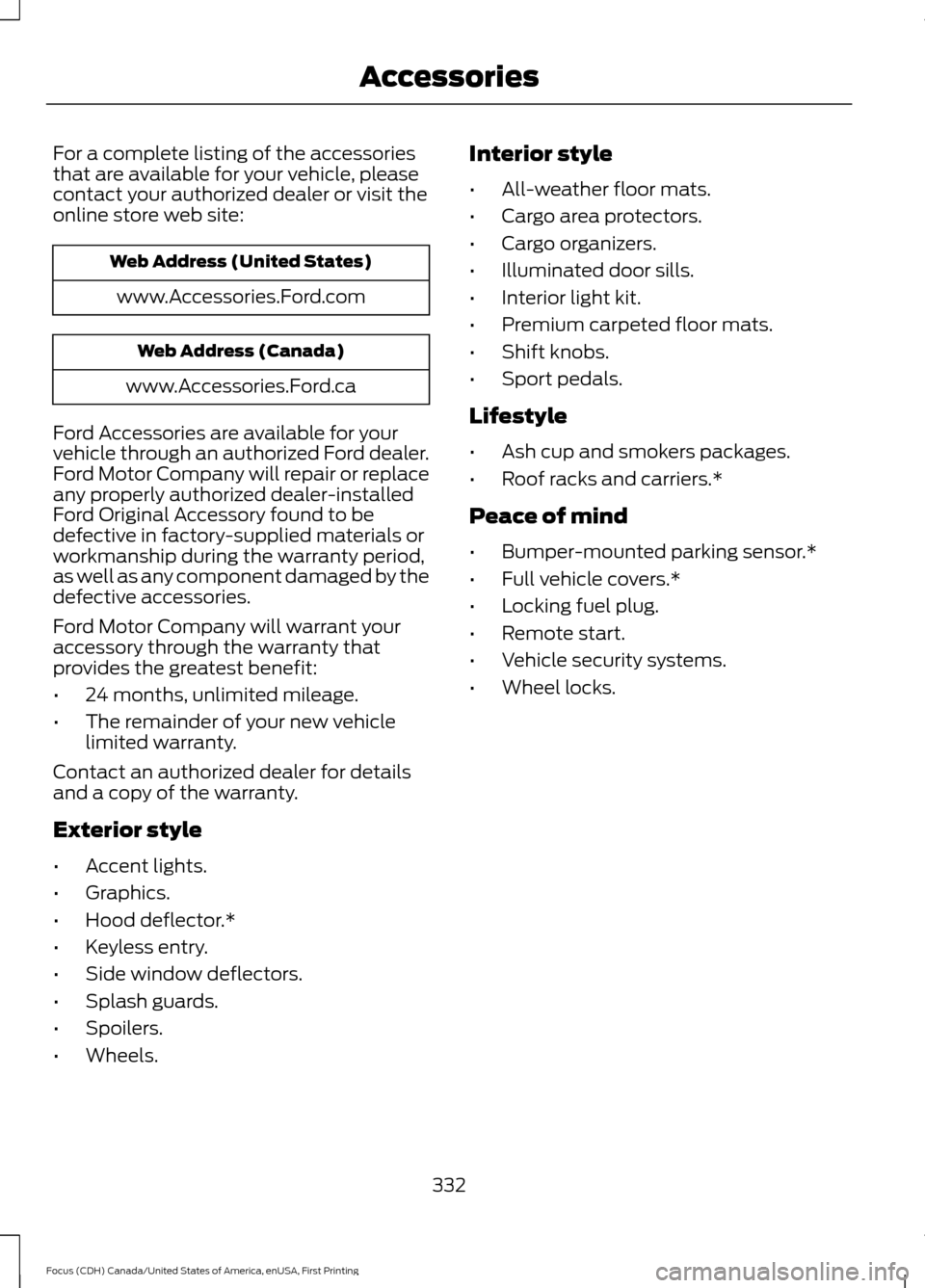
For a complete listing of the accessories
that are available for your vehicle, please
contact your authorized dealer or visit the
online store web site:
Web Address (United States)
www.Accessories.Ford.com Web Address (Canada)
www.Accessories.Ford.ca
Ford Accessories are available for your
vehicle through an authorized Ford dealer.
Ford Motor Company will repair or replace
any properly authorized dealer-installed
Ford Original Accessory found to be
defective in factory-supplied materials or
workmanship during the warranty period,
as well as any component damaged by the
defective accessories.
Ford Motor Company will warrant your
accessory through the warranty that
provides the greatest benefit:
• 24 months, unlimited mileage.
• The remainder of your new vehicle
limited warranty.
Contact an authorized dealer for details
and a copy of the warranty.
Exterior style
• Accent lights.
• Graphics.
• Hood deflector.*
• Keyless entry.
• Side window deflectors.
• Splash guards.
• Spoilers.
• Wheels. Interior style
•
All-weather floor mats.
• Cargo area protectors.
• Cargo organizers.
• Illuminated door sills.
• Interior light kit.
• Premium carpeted floor mats.
• Shift knobs.
• Sport pedals.
Lifestyle
• Ash cup and smokers packages.
• Roof racks and carriers.*
Peace of mind
• Bumper-mounted parking sensor.*
• Full vehicle covers.*
• Locking fuel plug.
• Remote start.
• Vehicle security systems.
• Wheel locks.
332
Focus (CDH) Canada/United States of America, enUSA, First Printing Accessories
Page 376 of 385

A
A/C
See: Climate Control......................................... 103
About This Manual...........................................7
ABS See: Brakes........................................................... 144
ABS driving hints See: Hints on Driving With Anti-Lock
Brakes................................................................ 144
Accessories....................................................332 Exterior style........................................................ 332
Interior style......................................................... 332
Lifestyle................................................................. 332
Peace of mind..................................................... 332
Accessories See: Replacement Parts
Recommendation............................................. 11
Active Park Assist
.........................................152
Automatic Steering into Parking
Space................................................................. 153
Deactivating the Park Assist Feature..........154
Troubleshooting the System.......................... 154
Using Active Park Assist................................... 152
Adjusting the Headlamps
.........................223
Horizontal Aim Adjustment........................... 224
Vertical Aim Adjustment................................. 223
Adjusting the Steering Wheel...................69
Airbag Disposal...............................................44
Air Conditioning See: Climate Control......................................... 103
Air Filter See: Changing the Engine Air Filter.............232
Alarm See: Anti-Theft Alarm........................................ 68
Ambient Lighting............................................79
Anti-Theft Alarm
...........................................68
Arming the Alarm................................................ 68
Disarming the Alarm........................................... 68
Appendices....................................................354
Audible Warnings and Indicators............90 Fasten Safety Belt............................................... 90
Headlamps On Warning Chime..................... 90
Key in Ignition Warning Chime........................ 90
Keyless Warning Alert........................................ 90
Low Fuel Minder................................................... 90
Parking Brake On Warning Chime.................90 Audio Control
..................................................69
Seek, Next or Previous........................................ 70
Audio System
................................................278
General Information.......................................... 278
Audio Unit - Vehicles With: Satellite Radio.............................................................282
Audio Unit - Vehicles With: Sony Audio System..........................................................285
Menu Structure.................................................. 286
Audio Unit - Vehicles With: SYNC..........279
Autolamps.........................................................75 Windshield Wiper Activated
Headlamps......................................................... 75
Automatic Climate Control......................104 Dual Zone Temperature Control.................. 106
Single Zone Temperature Control...............105
Temperature Control........................................ 105
Automatic High Beam Control..................77 Activating the System......................................... 77
Manually Overriding the System.................... 78
Automatic Transmission
............................139
Automatic Transmission Adaptive
Learning............................................................. 143
Brake-Shift Interlock......................................... 142
If Your Vehicle Gets Stuck In Mud or Snow................................................................... 143
SelectShift Automatic ™
Transmission.................................................... 141
Understanding the Positions of Your Automatic Transmission............................ 140
Automatic Transmission Fluid Check.............................................................218
Auto-Start-Stop...........................................126 Limitations of Use.............................................. 126
Switching the System On and Off................127
Using Auto-Start-Stop with a Manual Transmission................................................... 126
Using Auto-Start-Stop with an Automatic Transmission................................................... 126
Auxiliary Power Points
.................................116
12 Volt DC Power Point...................................... 116
Location.................................................................. 116
B
Battery See: Changing the 12V Battery..................... 220
373
Focus (CDH) Canada/United States of America, enUSA, First Printing Index
Page 377 of 385

Blind Spot Information System..............166
Switching the System Off and On...............168
System Errors....................................................... 168
Using the System............................................... 166
Bonnet Lock See: Opening and Closing the Hood............212
Booster Seats..................................................23
Types of Booster Seats...................................... 23
Brake Fluid Check
.........................................219
Brakes...............................................................144 General Information.......................................... 144
Breaking-In.....................................................186
Bulb Specification Chart
..........................230
C
Cabin Air Filter
...............................................108
California Proposition 65..............................11
Capacities and Specifications - 1.0L EcoBoost™.................................................270
Specifications....................................................... 271
Capacities and Specifications - 2.0L
.................................................................273
Specifications...................................................... 274
Capacities and Specifications
................265
Car Wash See: Cleaning the Exterior.............................. 234
Center Console
................................................117
Changing a Bulb...........................................225 Front Fog Lamp................................................... 227
Headlamp............................................................. 225
LED Rear Lamps................................................ 230
Rear Lamps - 4 Door........................................ 228
Rear Lamps - 5 Door........................................ 229
Replacing Licence Plate and High Mounted Brake Lamp Bulbs........................................ 230
Changing a Fuse...........................................210 Fuses....................................................................... 210
Changing a Road Wheel
...........................260
Dissimilar Spare Wheel and Tire Assembly
Information..................................................... 260
Tire Change Procedure..................................... 261
Changing the 12V Battery.........................220
Changing the Engine Air Filter.................232
Changing the Wiper Blades
......................221 Checking MyKey System Status...............56
MyKey Distance.................................................... 56
Number of Admin Keys...................................... 56
Number of MyKeys.............................................. 56
Checking the Wiper Blades
.......................221
Child Restraint and Seatbelt Maintenance.................................................34
Child Restraint Positioning.........................25
Child Safety
.......................................................15
General Information............................................. 15
Child Safety Locks.........................................26 Left-Hand Side...................................................... 27
Right-Hand Side................................................... 27
Cleaning Leather Seats.............................238
Cleaning Products
.......................................234
Cleaning the Alloy Wheels.......................238
Cleaning the Engine....................................236
Cleaning the Exterior..................................234 Exterior Chrome Parts...................................... 235
Exterior Plastic Parts........................................ 235
Stripes or Graphics............................................ 235
Underbody............................................................ 235
Cleaning the Instrument Panel and Instrument Cluster Lens.........................237
Cleaning the Interior....................................237
Cleaning the Windows and Wiper Blades...........................................................236
Clearing All MyKeys.......................................55
Climate Control
.............................................103
Clutch Fluid Check - Manual Transmission...............................................219
Cold Weather Precautions
........................186
Coolant Check See: Engine Coolant Check............................. 217
Crash Sensors and Airbag Indicator........43
Creating a MyKey
...........................................54
Programming/Changing Configurable
Settings............................................................... 54
Cross Traffic Alert
.........................................168
False Alerts............................................................. 171
Switching the System Off and On.................171
System Errors......................................................... 171
System Lights, Messages and Audible Alerts.................................................................. 170
System Limitations............................................ 170
Using the System............................................... 168
Cruise Control
..................................................70
Principle of Operation....................................... 159
374
Focus (CDH) Canada/United States of America, enUSA, First Printing Index