2016 FORD FOCUS key
[x] Cancel search: keyPage 70 of 385
1.
Insert the first previously programmed
coded key into the ignition.
2. Switch the ignition from off to on. Keep
the ignition on for at least 3 seconds,
but no more than 10 seconds.
3. Switch the ignition off and remove the
first coded key from the ignition.
4. After at least 3 seconds but within 10 seconds of switching the ignition off,
insert the second previously coded key
into the ignition.
5. Switch the ignition from off to on. Keep
the ignition on for at least 3 seconds,
but no more than 10 seconds.
6. Switch the ignition off and remove the
second previously programmed coded
key from the ignition.
7. After at least 3 seconds but within 10 seconds of switching the ignition off
and removing the previously
programmed coded key, insert the new
unprogrammed key into the ignition.
8. Switch the ignition from off to on. Keep
the ignition on for at least six seconds.
9. Remove the newly programmed coded
key from the ignition.
If you have successfully programmed the
coded key, it will start your vehicle and
operate the remote entry system.
If programming was unsuccessful, wait 10
seconds and repeat Steps 1 through 8. If
programming remains unsuccessful, have
your vehicle checked by an authorized
dealer.
Wait 20 seconds and repeat Steps 1
through 9 to program an additional key. Programming a Spare Intelligent
Access Key
You must have two previously
programmed coded keys and the new
unprogrammed key readily accessible.
Contact an authorized dealer to have the
spare key programmed if two previously
programmed keys are not available.
Make sure that the ignition is switched off
before beginning this procedure. Make sure
that you close all the doors before
beginning and that they remain closed
throughout the procedure. Carry out all
steps within 30 seconds of starting the
sequence. Stop and wait for at least one
minute before starting again if you carry
out any steps out of sequence.
Note:
You can program a maximum of eight
intelligent access keys to your vehicle.
Read and understand the entire procedure
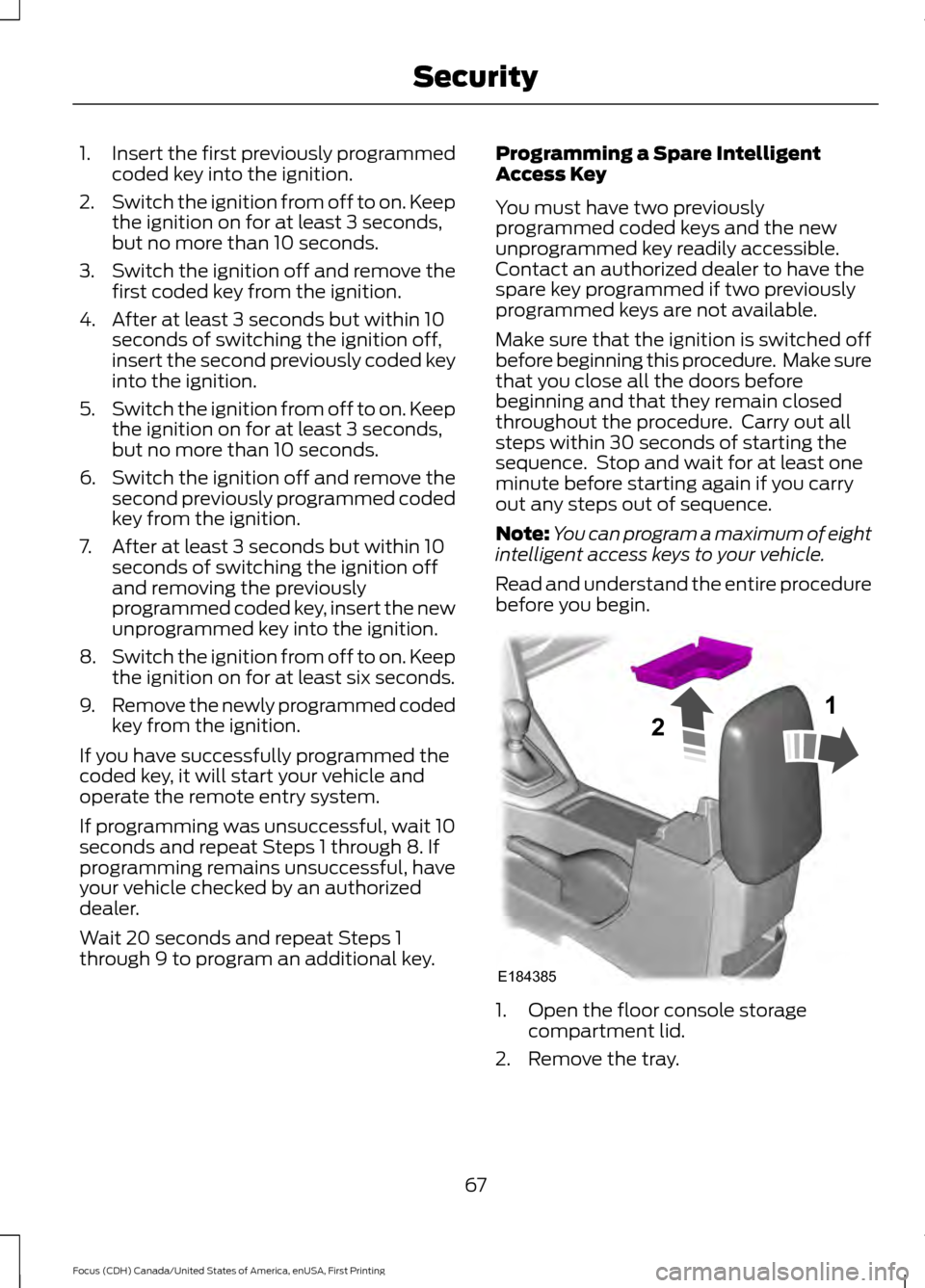
before you begin. 1. Open the floor console storage
compartment lid.
2. Remove the tray.
67
Focus (CDH) Canada/United States of America, enUSA, First Printing SecurityE184385
21
Page 71 of 385
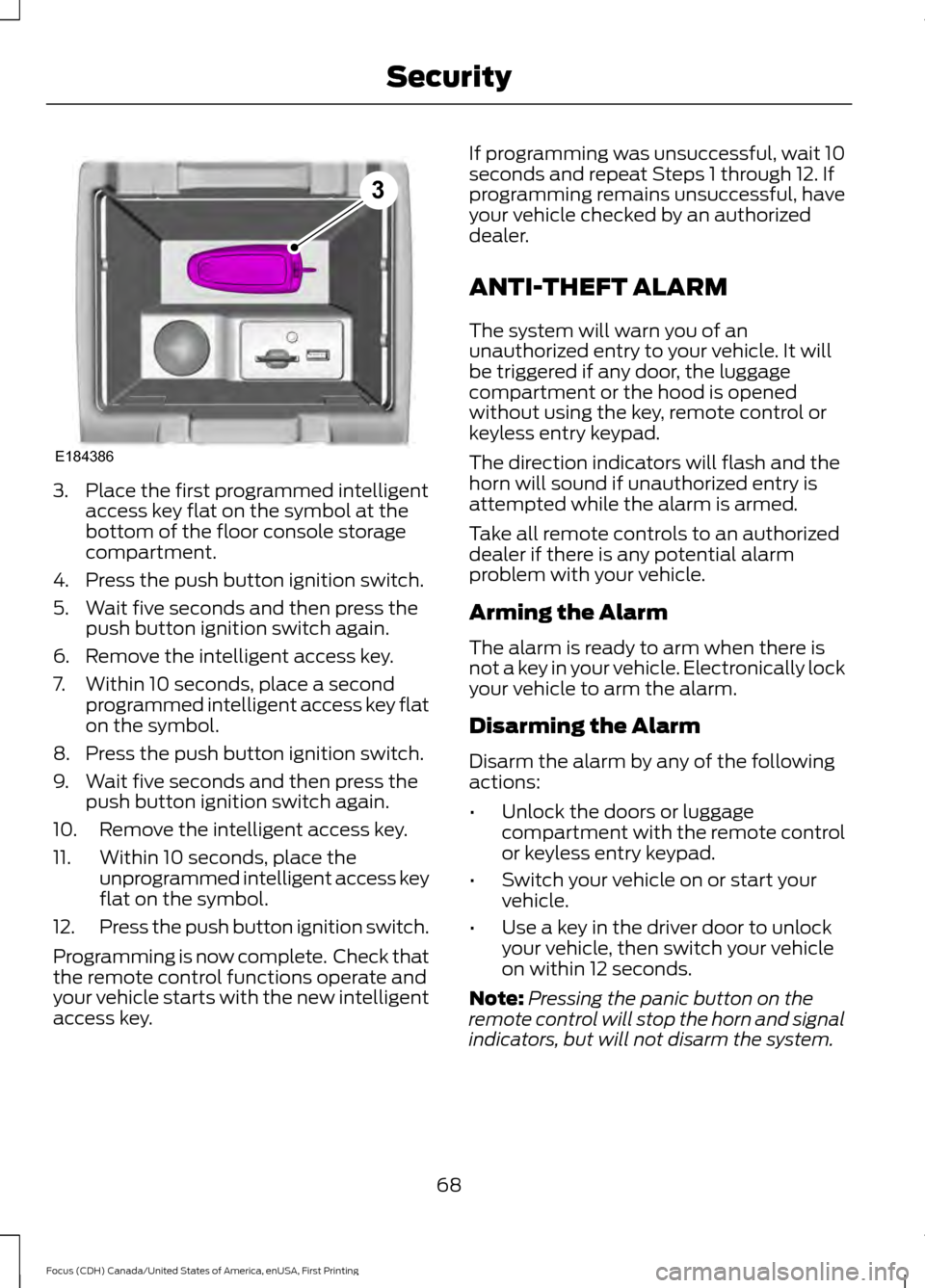
3. Place the first programmed intelligent
access key flat on the symbol at the
bottom of the floor console storage
compartment.
4. Press the push button ignition switch.
5. Wait five seconds and then press the push button ignition switch again.
6. Remove the intelligent access key.
7. Within 10 seconds, place a second programmed intelligent access key flat
on the symbol.
8. Press the push button ignition switch.
9. Wait five seconds and then press the push button ignition switch again.
10. Remove the intelligent access key.
11. Within 10 seconds, place the unprogrammed intelligent access key
flat on the symbol.
12. Press the push button ignition switch.
Programming is now complete. Check that
the remote control functions operate and
your vehicle starts with the new intelligent
access key. If programming was unsuccessful, wait 10
seconds and repeat Steps 1 through 12. If
programming remains unsuccessful, have
your vehicle checked by an authorized
dealer.
ANTI-THEFT ALARM
The system will warn you of an
unauthorized entry to your vehicle. It will
be triggered if any door, the luggage
compartment or the hood is opened
without using the key, remote control or
keyless entry keypad.
The direction indicators will flash and the
horn will sound if unauthorized entry is
attempted while the alarm is armed.
Take all remote controls to an authorized
dealer if there is any potential alarm
problem with your vehicle.
Arming the Alarm
The alarm is ready to arm when there is
not a key in your vehicle. Electronically lock
your vehicle to arm the alarm.
Disarming the Alarm
Disarm the alarm by any of the following
actions:
•
Unlock the doors or luggage
compartment with the remote control
or keyless entry keypad.
• Switch your vehicle on or start your
vehicle.
• Use a key in the driver door to unlock
your vehicle, then switch your vehicle
on within 12 seconds.
Note: Pressing the panic button on the
remote control will stop the horn and signal
indicators, but will not disarm the system.
68
Focus (CDH) Canada/United States of America, enUSA, First Printing SecurityE184386
3
Page 93 of 385

The service engine soon indicator light
illuminates when you first switch the
ignition on before engine start to check the
bulb and to indicate whether the vehicle
is ready for Inspection/Maintenance (I/M)
testing.
Normally, the service engine soon light
stays on until you crank the engine, then
turns itself off if no malfunctions are
present. However, if after 15 seconds the
service engine soon light blinks eight times,
it means that the vehicle is not ready for
I/M testing. See Emission Control
System (page 134).
Stability Control Lights when the system is active.
If it remains on or does not light
when you power your vehicle on,
this indicates a malfunction. During a
malfunction, the system turns off. Have
the system checked by an authorized
dealer immediately.
See (page 148).
Stability Control Off Lights when you switch the
system off. It goes out when you
switch the system back on or
when you power off your vehicle.
See
(page 148).
AUDIBLE WARNINGS AND
INDICATORS
Key in Ignition Warning Chime
Sounds when you open the driver's door
and you have left the key in the ignition. Keyless Warning Alert
(If Equipped)
Sounds the horn twice when you exit your
vehicle with the intelligent access key, after
the last door is closed and your keyless
vehicle is in RUN, indicating your vehicle is
still on.
Headlamps On Warning Chime
Sounds when you remove the key from the
ignition and open the driver's door and you
have left the headlamps or parking lamps
on.
Parking Brake On Warning Chime
Sounds when you have left the parking
brake on and drive your vehicle. If the
warning chime remains on after you have
released the parking brake, have the
system checked by an authorized dealer
immediately.
Low Fuel Minder
A low fuel reminder triggers at about 50
miles (80 km). The low fuel warning light
will light, a warning chime will sound and
a pop up will be shown in the display
indicating the remaining distance to empty.
You will also get a subsequent reminder
at 20, 10 and 0 miles.
Fasten Safety Belt
Sounds as a reminder to fasten your safety
belt.
90
Focus (CDH) Canada/United States of America, enUSA, First Printing Instrument ClusterE138639
Page 95 of 385
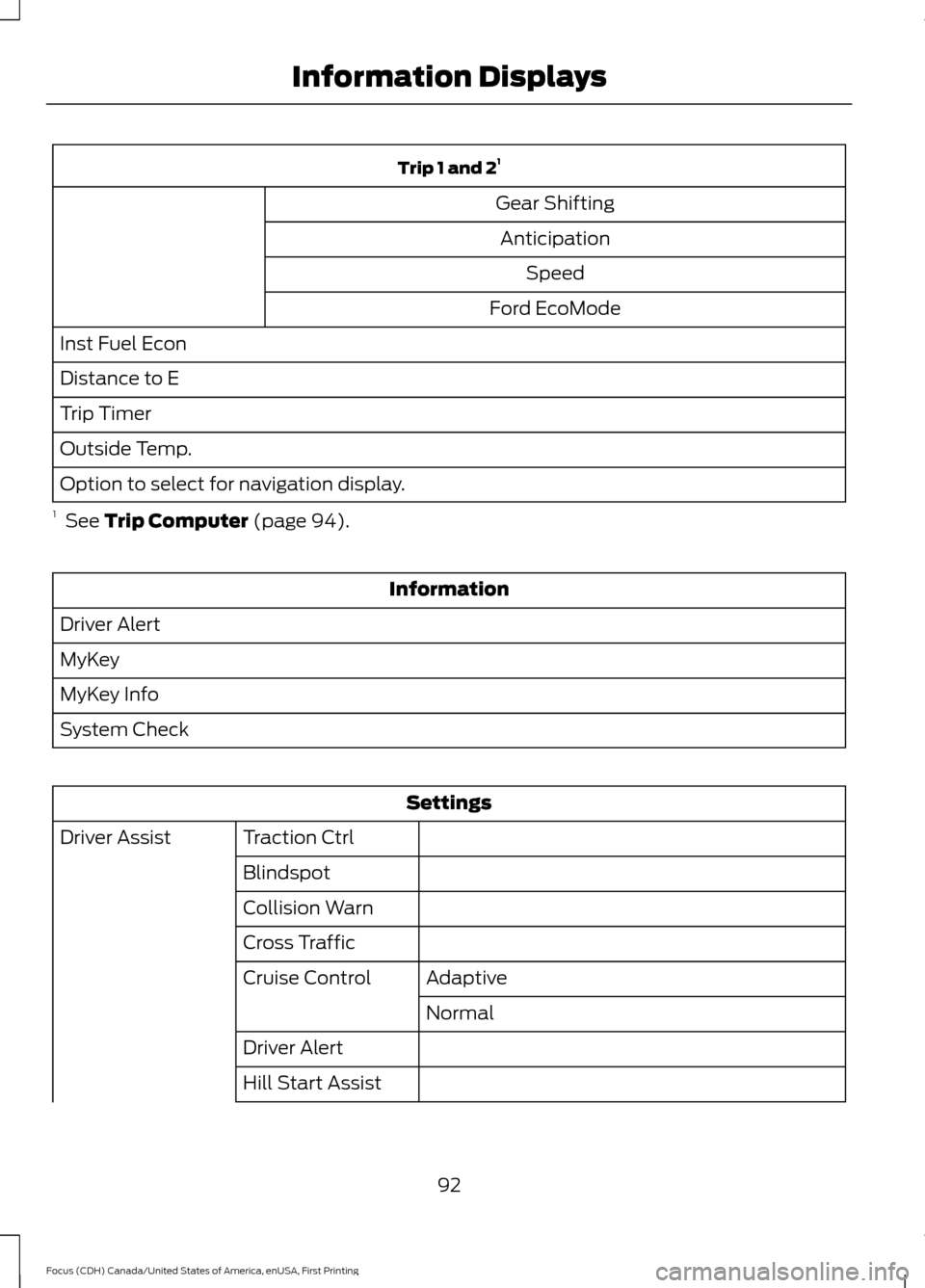
Trip 1 and 2
1
Gear Shifting Anticipation Speed
Ford EcoMode
Inst Fuel Econ
Distance to E
Trip Timer
Outside Temp.
Option to select for navigation display.
1 See Trip Computer (page 94). Information
Driver Alert
MyKey
MyKey Info
System Check Settings
Traction Ctrl
Driver Assist
Blindspot
Collision Warn
Cross TrafficAdaptive
Cruise Control
Normal
Driver Alert
Hill Start Assist
92
Focus (CDH) Canada/United States of America, enUSA, First Printing Information Displays
Page 96 of 385
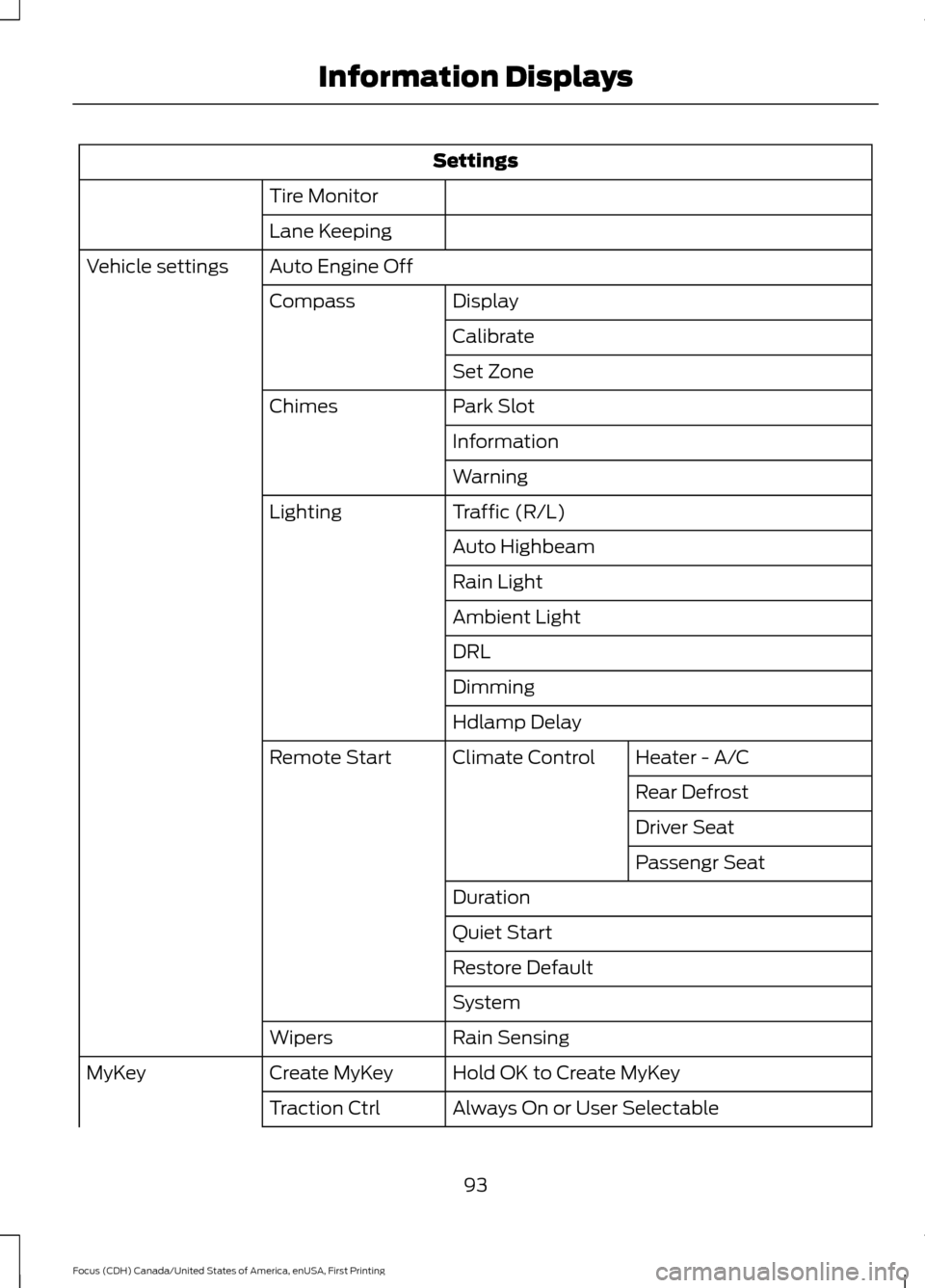
Settings
Tire Monitor
Lane Keeping
Auto Engine Off
Vehicle settings
Display
Compass
Calibrate
Set Zone
Park Slot
Chimes
Information
Warning
Traffic (R/L)
Lighting
Auto Highbeam
Rain Light
Ambient Light
DRL
Dimming
Hdlamp DelayHeater - A/C
Climate Control
Remote Start
Rear Defrost
Driver Seat
Passengr Seat
Duration
Quiet Start
Restore Default
System
Rain Sensing
Wipers
Hold OK to Create MyKey
Create MyKey
MyKey
Always On or User Selectable
Traction Ctrl
93
Focus (CDH) Canada/United States of America, enUSA, First Printing Information Displays
Page 97 of 385
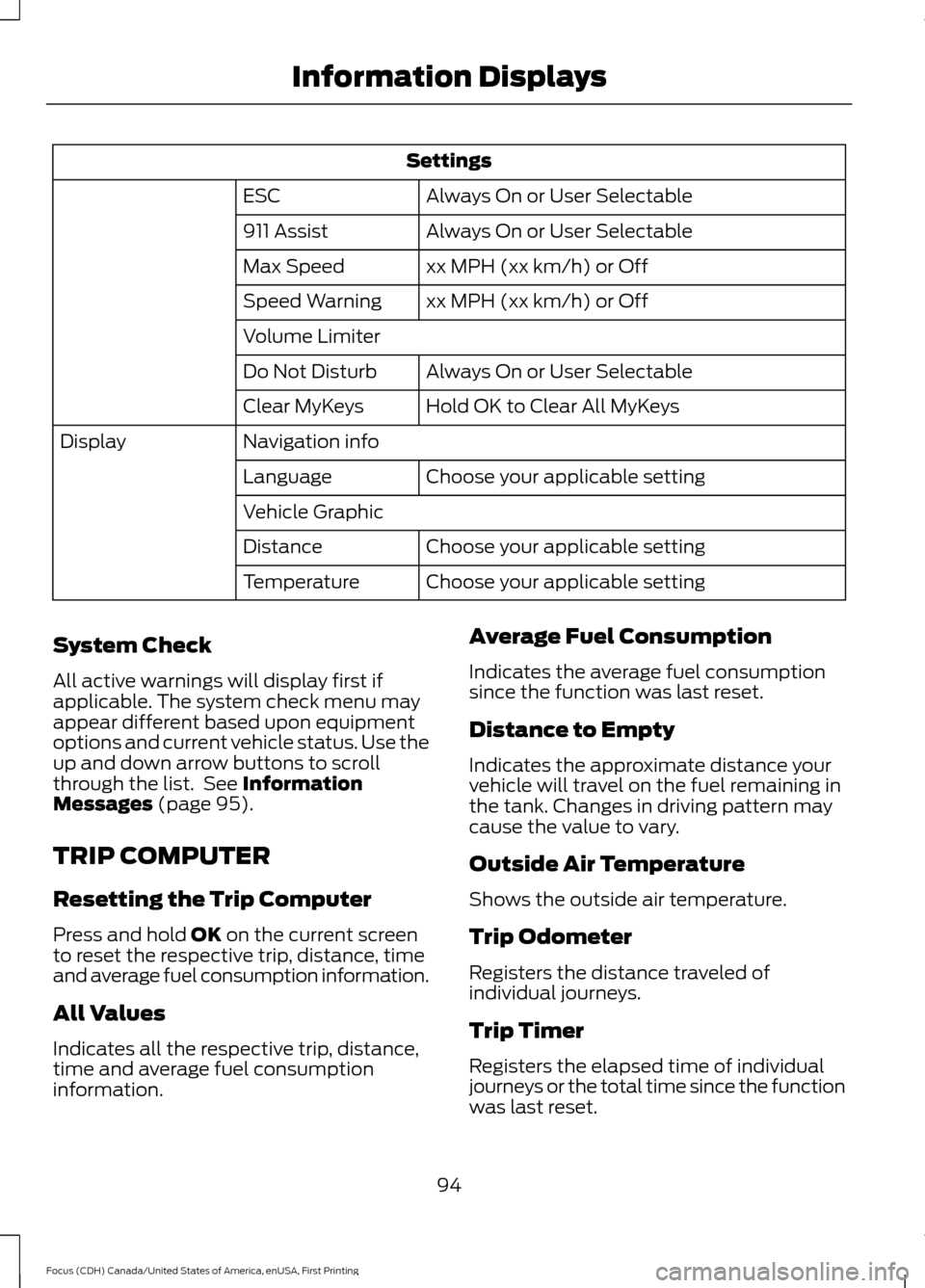
Settings
Always On or User Selectable
ESC
Always On or User Selectable
911 Assist
xx MPH (xx km/h) or Off
Max Speed
xx MPH (xx km/h) or Off
Speed Warning
Volume Limiter
Always On or User Selectable
Do Not Disturb
Hold OK to Clear All MyKeys
Clear MyKeys
Navigation info
Display
Choose your applicable setting
Language
Vehicle Graphic
Choose your applicable setting
Distance
Choose your applicable setting
Temperature
System Check
All active warnings will display first if
applicable. The system check menu may
appear different based upon equipment
options and current vehicle status. Use the
up and down arrow buttons to scroll
through the list. See Information
Messages (page 95).
TRIP COMPUTER
Resetting the Trip Computer
Press and hold
OK on the current screen
to reset the respective trip, distance, time
and average fuel consumption information.
All Values
Indicates all the respective trip, distance,
time and average fuel consumption
information. Average Fuel Consumption
Indicates the average fuel consumption
since the function was last reset.
Distance to Empty
Indicates the approximate distance your
vehicle will travel on the fuel remaining in
the tank. Changes in driving pattern may
cause the value to vary.
Outside Air Temperature
Shows the outside air temperature.
Trip Odometer
Registers the distance traveled of
individual journeys.
Trip Timer
Registers the elapsed time of individual
journeys or the total time since the function
was last reset.
94
Focus (CDH) Canada/United States of America, enUSA, First Printing Information Displays
Page 101 of 385

Hill Start Assist
Action
Message
Displays when hill start assist is not available. Contact
an authorized dealer. See Hill Start Assist (page 145).
Hill start assist not available
Keyless Vehicle Action
Message
Displays to remind you that the key is in the trunk. SeeKeyless Starting (page 118).
Ford KeyFree Key inside vehicle
Displayed if the key is not detected by the system. SeeKeyless Starting
(page 118).
Ford KeyFree No key detected
Displayed as a reminder to turn off the vehicle. SeeKeyless Starting
(page 118).
Switch ign. off Press ENGINE
Start/Stop button
Displayed as a reminder to press the brake whilestarting the vehicle.
Press brake to start
Displayed when a valid key is not detected within thevehicle. See
Keyless Starting (page 118).
Ford KeyFree Key not inside car
Displays when the key battery is low. Change the
battery as soon as possible. See
Remote Control
(page 45).
Key Battery low Replace soon
Lane Keeping Aid Action
Message
Displays when the system has detected a condition that
requires service. Have your vehicle checked by an author- ized dealer.
Lane Keeping Sys Fault
Service required
98
Focus (CDH) Canada/United States of America, enUSA, First Printing Information Displays
Page 102 of 385

Lighting
Action
Message
Displays when the brake lamp bulb has burned out.Contact an authorized dealer.
Brake lamp Bulb fault
Displays when the low beam headlamp bulb hasburned out. Contact an authorized dealer.
Low beam Bulb fault
Displays when an electrical system problem occurswith the headlamp system. Contact an authorized dealer.
Headlamp fault Service required
Maintenance Action
Message
Displays when the engine oil life is depleted and
requires a change. See Engine Oil Check (page 216).
Oil change required
Indicates the brake fluid level is low and the brake
system should be inspected immediately. See Brake
Fluid Check (page 219).
Brake fluid level low Service
now
MyKey Action
Message
Displays when MyKey is active.
MyKey active Drive Safely
Displays when starting the vehicle and MyKey is in useand the MyKey speed limit is on.
MyKey Speed Limited to XX
MPH/km/h
Displays when a MyKey is in use and the MyKey speedlimit is on and the vehicle speed is approaching 80 mph (130 km/h).
MyKey Vehicle Near Top Speed
Displays when a MyKey is in use and the MyKey speedlimit is reached.
MyKey Vehicle at Top Speed
Displays when MyKey is active.
MyKey Check Speed Drive
Safely
Displays when a MyKey is in use and Belt-Minder isactivated.
MyKey Buckle Up to Unmute
Audio
99
Focus (CDH) Canada/United States of America, enUSA, First Printing Information Displays