2016 FORD FOCUS ELECTRIC battery
[x] Cancel search: batteryPage 100 of 276
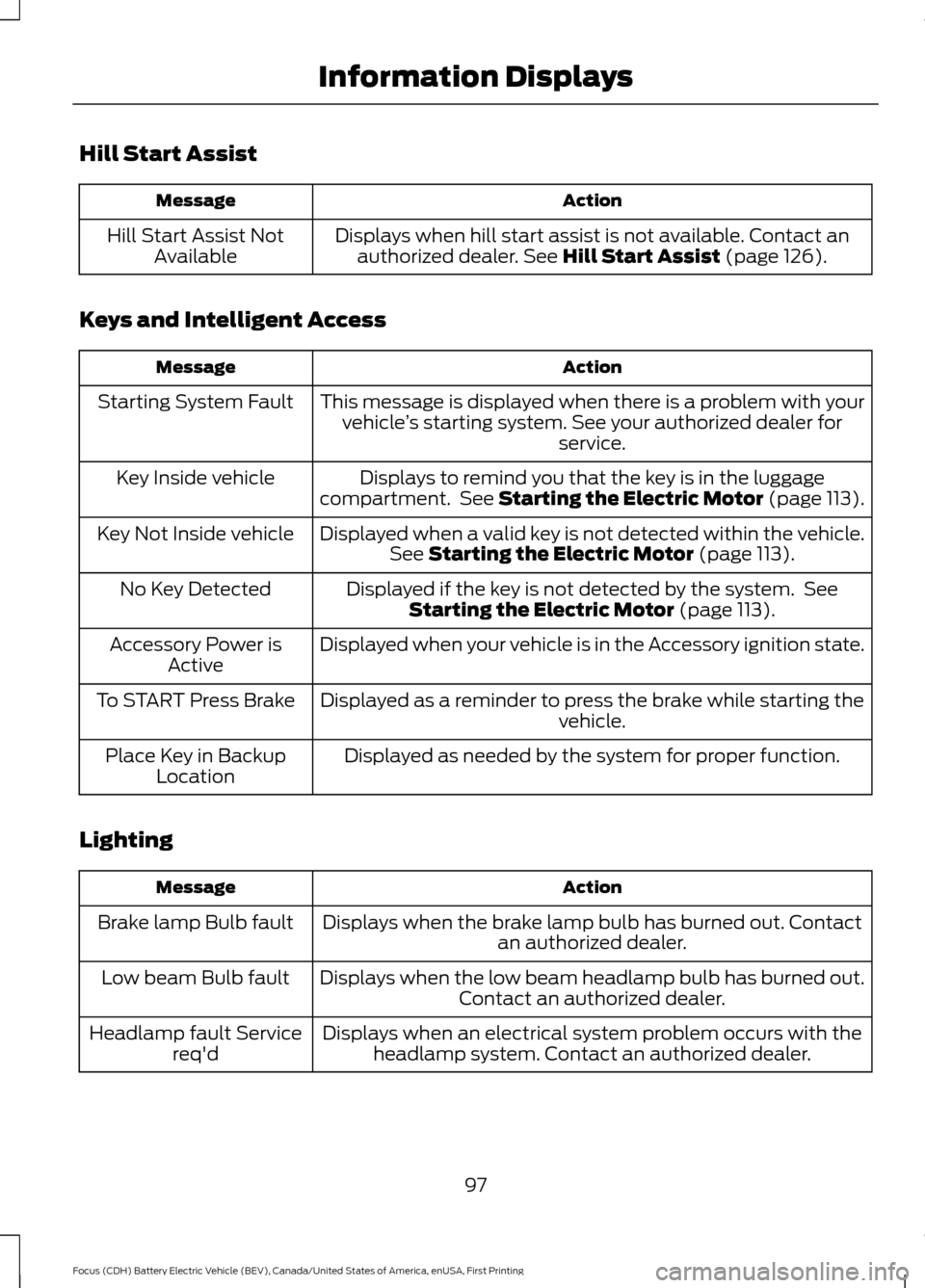
Hill Start Assist
Action
Message
Displays when hill start assist is not available. Contact anauthorized dealer. See Hill Start Assist (page 126).
Hill Start Assist Not
Available
Keys and Intelligent Access Action
Message
This message is displayed when there is a problem with yourvehicle ’s starting system. See your authorized dealer for
service.
Starting System Fault
Displays to remind you that the key is in the luggage
compartment. See Starting the Electric Motor (page 113).
Key Inside vehicle
Displayed when a valid key is not detected within the vehicle.See
Starting the Electric Motor (page 113).
Key Not Inside vehicle
Displayed if the key is not detected by the system. SeeStarting the Electric Motor
(page 113).
No Key Detected
Displayed when your vehicle is in the Accessory ignition state.
Accessory Power is
Active
Displayed as a reminder to press the brake while starting the vehicle.
To START Press Brake
Displayed as needed by the system for proper function.
Place Key in Backup
Location
Lighting Action
Message
Displays when the brake lamp bulb has burned out. Contact an authorized dealer.
Brake lamp Bulb fault
Displays when the low beam headlamp bulb has burned out.Contact an authorized dealer.
Low beam Bulb fault
Displays when an electrical system problem occurs with theheadlamp system. Contact an authorized dealer.
Headlamp fault Service
req'd
97
Focus (CDH) Battery Electric Vehicle (BEV), Canada/United States of America, enUSA, First Printing Information Displays
Page 101 of 276
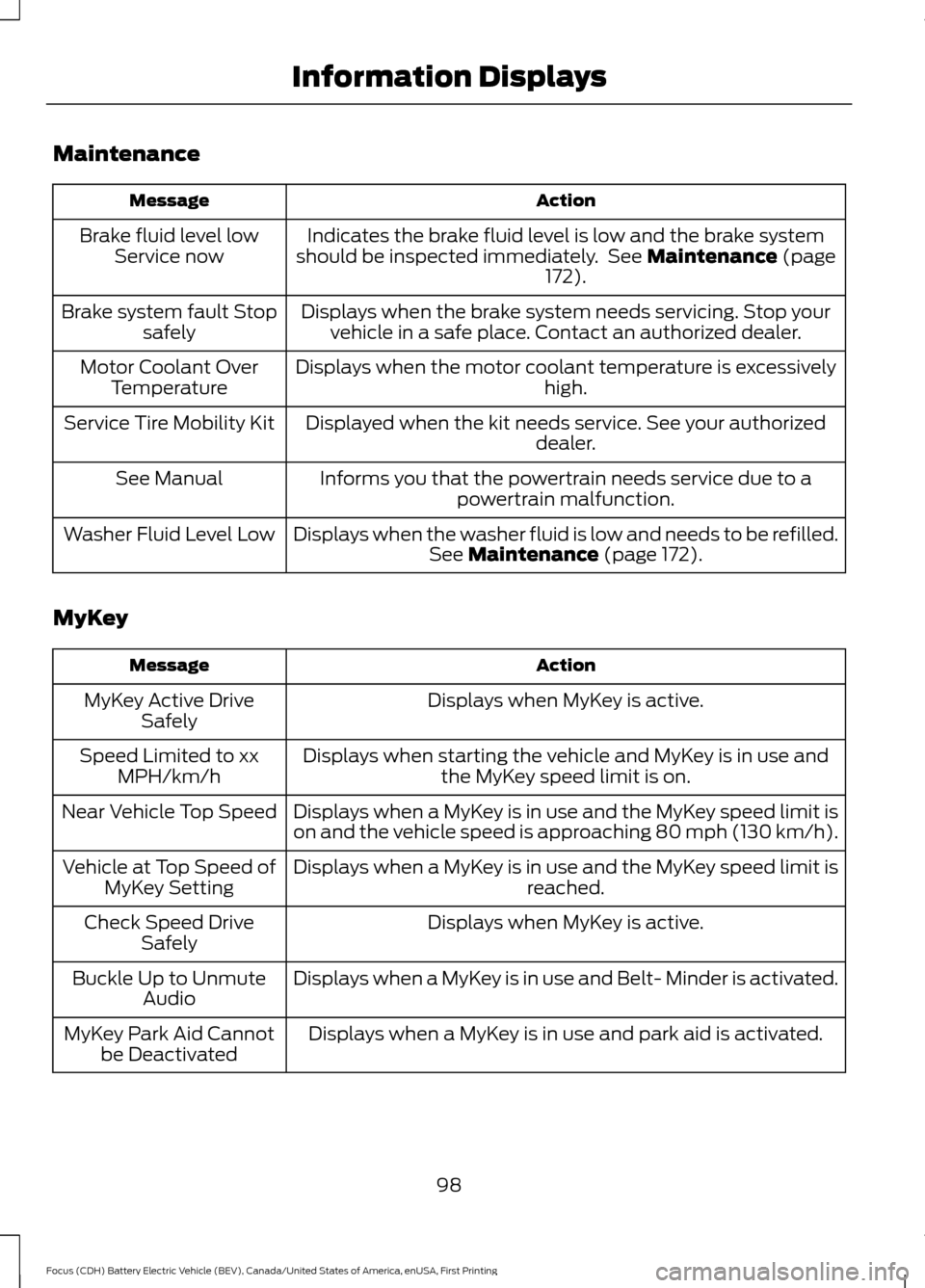
Maintenance
Action
Message
Indicates the brake fluid level is low and the brake system
should be inspected immediately. See Maintenance (page
172).
Brake fluid level low
Service now
Displays when the brake system needs servicing. Stop yourvehicle in a safe place. Contact an authorized dealer.
Brake system fault Stop
safely
Displays when the motor coolant temperature is excessively high.
Motor Coolant Over
Temperature
Displayed when the kit needs service. See your authorized dealer.
Service Tire Mobility Kit
Informs you that the powertrain needs service due to apowertrain malfunction.
See Manual
Displays when the washer fluid is low and needs to be refilled.See
Maintenance (page 172).
Washer Fluid Level Low
MyKey Action
Message
Displays when MyKey is active.
MyKey Active Drive
Safely
Displays when starting the vehicle and MyKey is in use andthe MyKey speed limit is on.
Speed Limited to xx
MPH/km/h
Displays when a MyKey is in use and the MyKey speed limit is
on and the vehicle speed is approaching 80 mph (130 km/h).
Near Vehicle Top Speed
Displays when a MyKey is in use and the MyKey speed limit is reached.
Vehicle at Top Speed of
MyKey Setting
Displays when MyKey is active.
Check Speed Drive
Safely
Displays when a MyKey is in use and Belt- Minder is activated.
Buckle Up to Unmute
Audio
Displays when a MyKey is in use and park aid is activated.
MyKey Park Aid Cannot
be Deactivated
98
Focus (CDH) Battery Electric Vehicle (BEV), Canada/United States of America, enUSA, First Printing Information Displays
Page 102 of 276
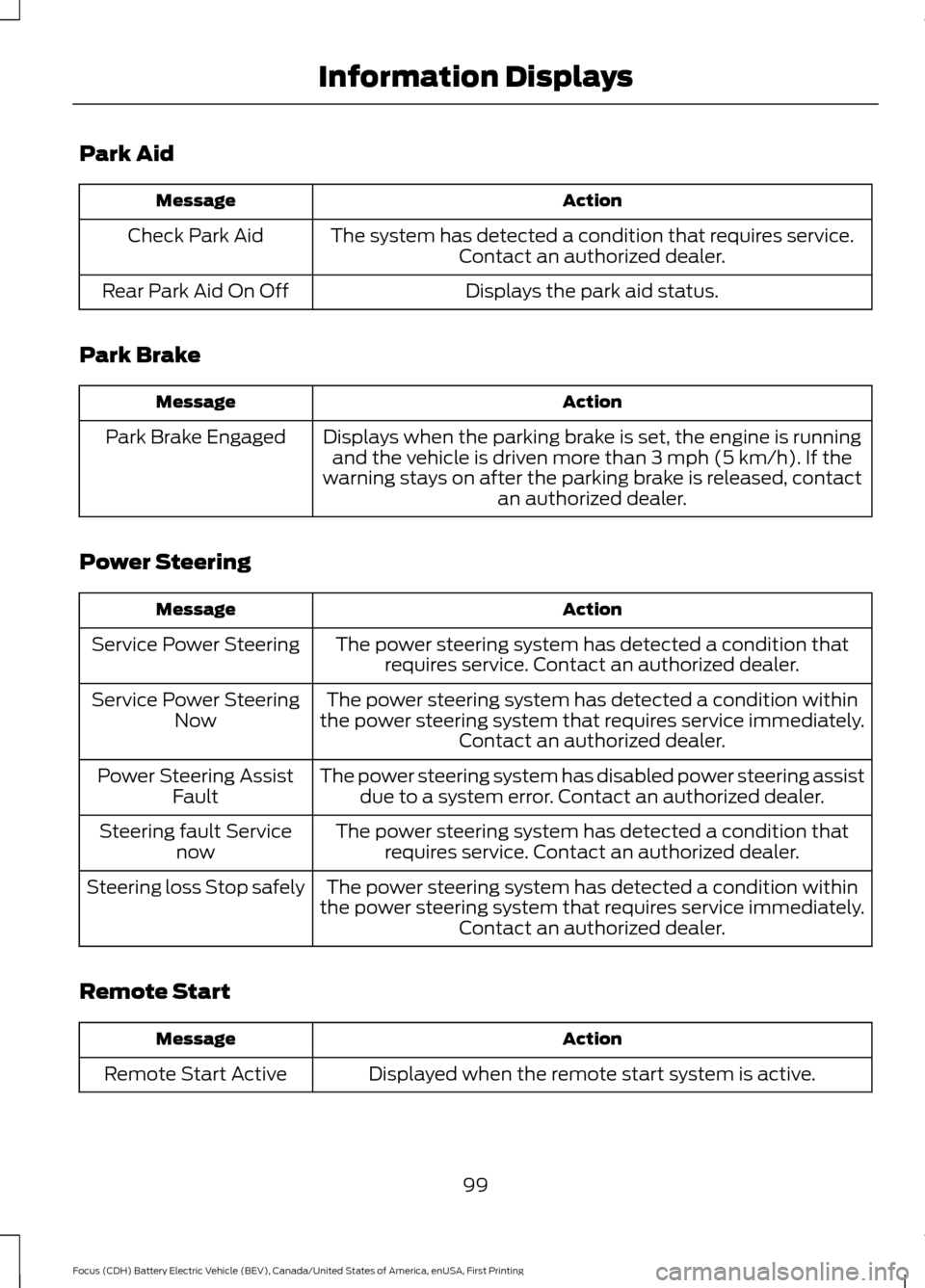
Park Aid
Action
Message
The system has detected a condition that requires service.Contact an authorized dealer.
Check Park Aid
Displays the park aid status.
Rear Park Aid On Off
Park Brake Action
Message
Displays when the parking brake is set, the engine is runningand the vehicle is driven more than 3 mph (5 km/h). If the
warning stays on after the parking brake is released, contact an authorized dealer.
Park Brake Engaged
Power Steering Action
Message
The power steering system has detected a condition thatrequires service. Contact an authorized dealer.
Service Power Steering
The power steering system has detected a condition within
the power steering system that requires service immediately. Contact an authorized dealer.
Service Power Steering
Now
The power steering system has disabled power steering assistdue to a system error. Contact an authorized dealer.
Power Steering Assist
Fault
The power steering system has detected a condition thatrequires service. Contact an authorized dealer.
Steering fault Service
now
The power steering system has detected a condition within
the power steering system that requires service immediately. Contact an authorized dealer.
Steering loss Stop safely
Remote Start Action
Message
Displayed when the remote start system is active.
Remote Start Active
99
Focus (CDH) Battery Electric Vehicle (BEV), Canada/United States of America, enUSA, First Printing Information Displays
Page 103 of 276
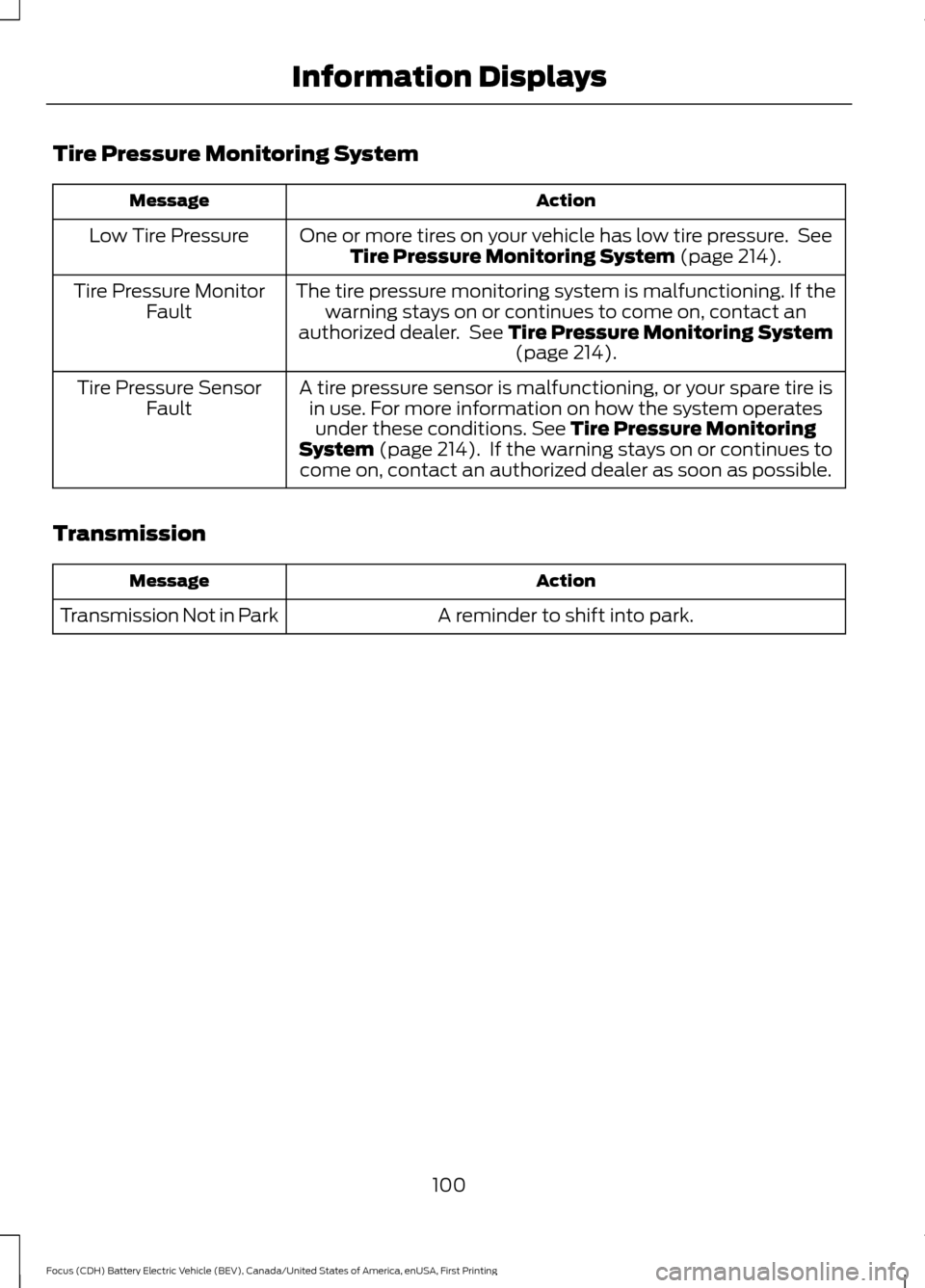
Tire Pressure Monitoring System
Action
Message
One or more tires on your vehicle has low tire pressure. SeeTire Pressure Monitoring System (page 214).
Low Tire Pressure
The tire pressure monitoring system is malfunctioning. If thewarning stays on or continues to come on, contact an
authorized dealer. See
Tire Pressure Monitoring System (page 214).
Tire Pressure Monitor
Fault
A tire pressure sensor is malfunctioning, or your spare tire isin use. For more information on how the system operatesunder these conditions.
See Tire Pressure Monitoring
System (page 214). If the warning stays on or continues to
come on, contact an authorized dealer as soon as possible.
Tire Pressure Sensor
Fault
Transmission Action
Message
A reminder to shift into park.
Transmission Not in Park
100
Focus (CDH) Battery Electric Vehicle (BEV), Canada/United States of America, enUSA, First Printing Information Displays
Page 104 of 276
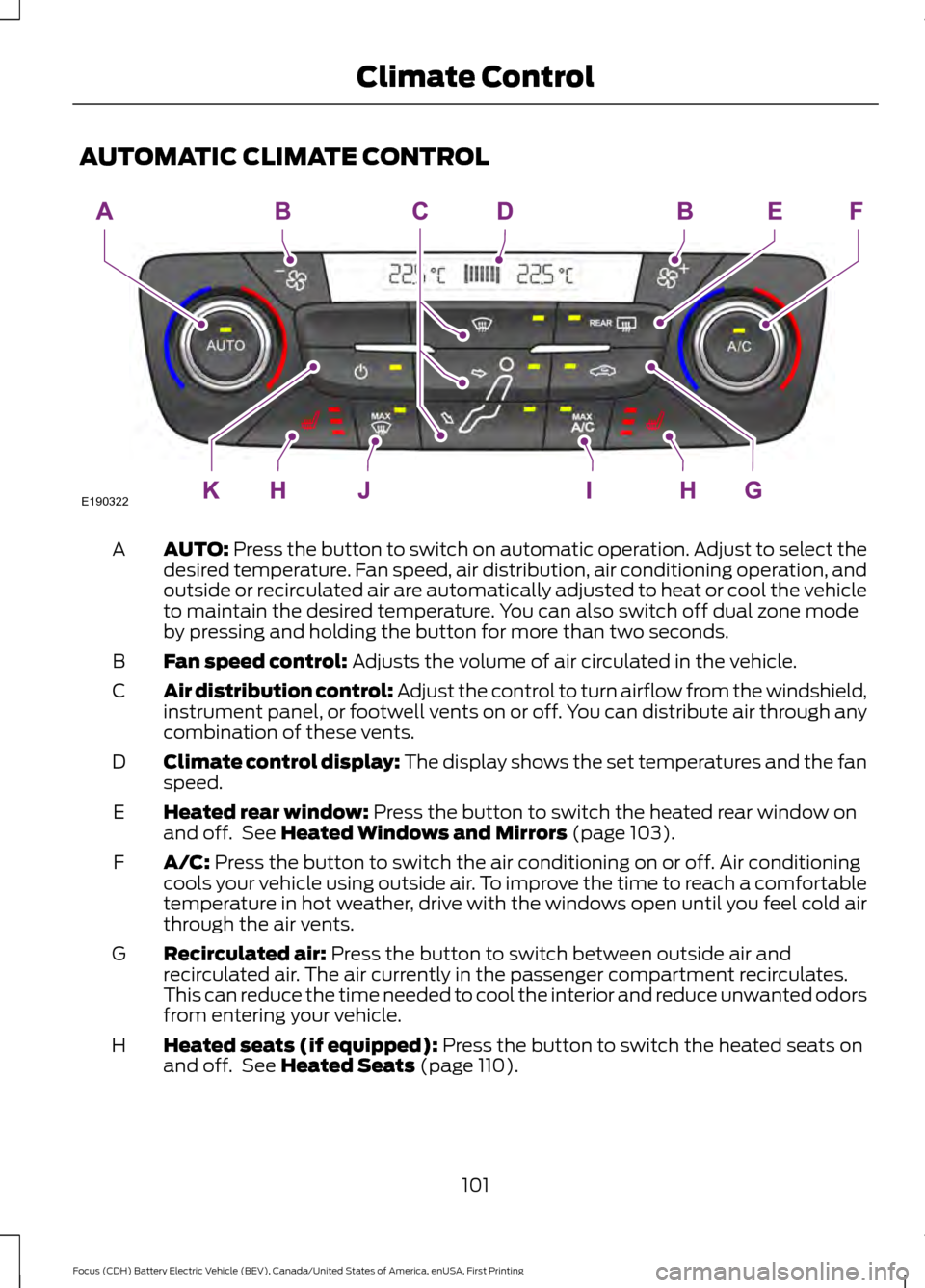
AUTOMATIC CLIMATE CONTROL
AUTO: Press the button to switch on automatic operation. Adjust to select the
desired temperature. Fan speed, air distribution, air conditioning operation, and
outside or recirculated air are automatically adjusted to heat or cool the vehicle
to maintain the desired temperature. You can also switch off dual zone mode
by pressing and holding the button for more than two seconds.
A
Fan speed control:
Adjusts the volume of air circulated in the vehicle.
B
Air distribution control: Adjust the control to turn airflow from the windshield,
instrument panel, or footwell vents on or off. You can distribute air through any
combination of these vents.
C
Climate control display: The display shows the set temperatures and the fan
speed.
D
Heated rear window:
Press the button to switch the heated rear window on
and off. See Heated Windows and Mirrors (page 103).
E
A/C:
Press the button to switch the air conditioning on or off. Air conditioning
cools your vehicle using outside air. To improve the time to reach a comfortable
temperature in hot weather, drive with the windows open until you feel cold air
through the air vents.
F
Recirculated air:
Press the button to switch between outside air and
recirculated air. The air currently in the passenger compartment recirculates.
This can reduce the time needed to cool the interior and reduce unwanted odors
from entering your vehicle.
G
Heated seats (if equipped):
Press the button to switch the heated seats on
and off. See Heated Seats (page 110).
H
101
Focus (CDH) Battery Electric Vehicle (BEV), Canada/United States of America, enUSA, First Printing Climate ControlE190322
Page 105 of 276
MAX A/C: Press the button for maximum cooling. Recirculated air flows through
the instrument panel vents, air conditioning automatically turns on and the fan
automatically adjusts to the highest speed.
I
MAX Defrost: Press the button to switch on defrost. Outside air flows through
the windshield vents, air conditioning automatically turns on, and fan
automatically adjusts to the highest speed. You can also use this setting to
defrost and clear the windshield of a thin covering of ice. The heated rear window
also automatically turns on when you select maximum defrost.
J
Power: Press the button to switch the system on and off. When the system is
off, it prevents outside air from entering the vehicle.
K
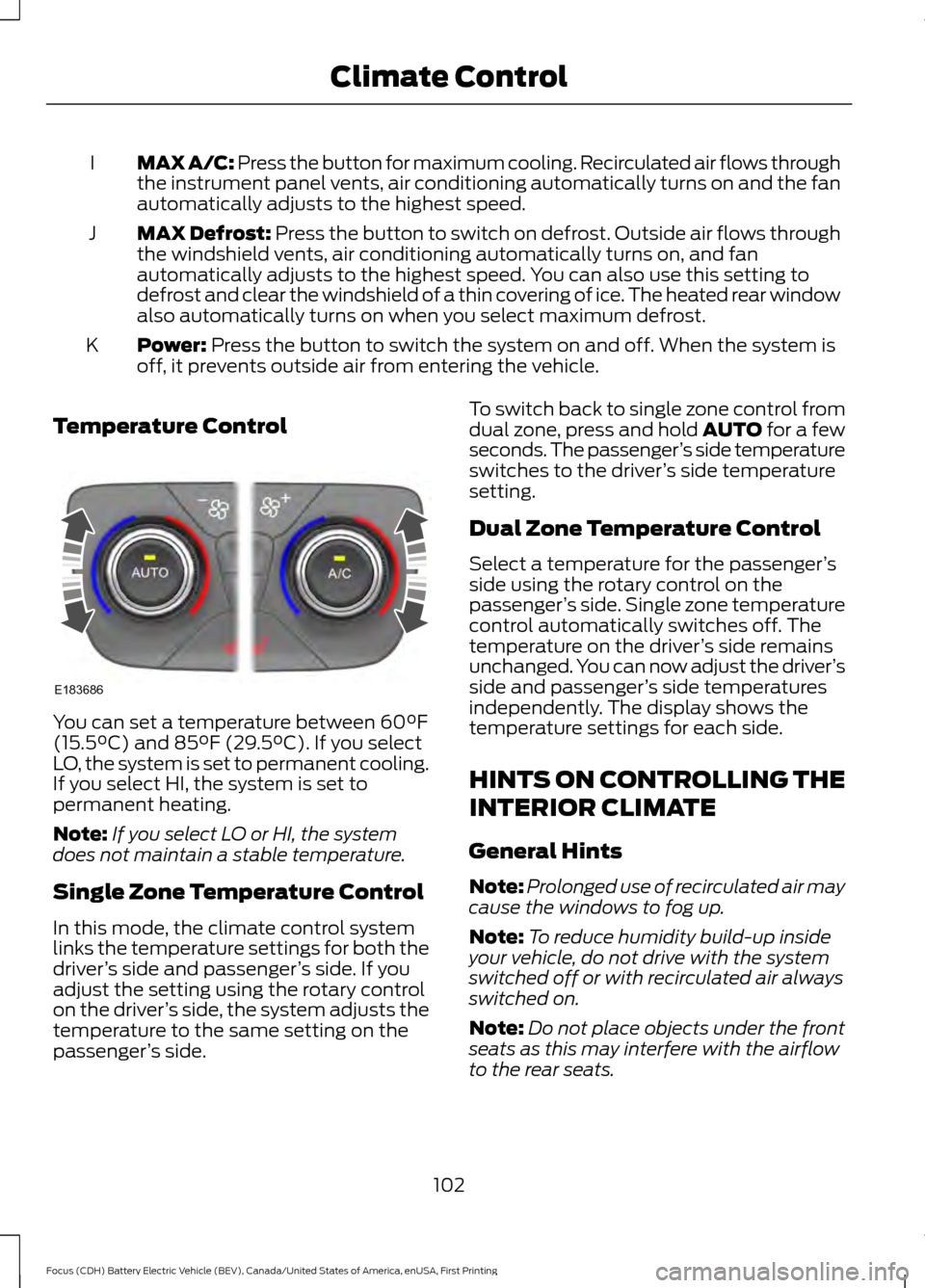
Temperature Control You can set a temperature between
60°F
(15.5°C) and 85°F (29.5°C). If you select
LO, the system is set to permanent cooling.
If you select HI, the system is set to
permanent heating.
Note: If you select LO or HI, the system
does not maintain a stable temperature.
Single Zone Temperature Control
In this mode, the climate control system
links the temperature settings for both the
driver ’s side and passenger ’s side. If you
adjust the setting using the rotary control
on the driver ’s side, the system adjusts the
temperature to the same setting on the
passenger ’s side. To switch back to single zone control from
dual zone, press and hold AUTO for a few
seconds. The passenger
’s side temperature
switches to the driver ’s side temperature
setting.
Dual Zone Temperature Control
Select a temperature for the passenger ’s
side using the rotary control on the
passenger ’s side. Single zone temperature
control automatically switches off. The
temperature on the driver ’s side remains
unchanged. You can now adjust the driver ’s
side and passenger ’s side temperatures
independently. The display shows the
temperature settings for each side.
HINTS ON CONTROLLING THE
INTERIOR CLIMATE
General Hints
Note: Prolonged use of recirculated air may
cause the windows to fog up.
Note: To reduce humidity build-up inside
your vehicle, do not drive with the system
switched off or with recirculated air always
switched on.
Note: Do not place objects under the front
seats as this may interfere with the airflow
to the rear seats.
102
Focus (CDH) Battery Electric Vehicle (BEV), Canada/United States of America, enUSA, First Printing Climate ControlE183686
Page 106 of 276
Note:
Remove any snow, ice, or leaves from
the air intake area at the base of the
windshield.
Note: To improve air conditioning when
starting your vehicle, drive with the windows
slightly open for two to three minutes.
Recommended Settings for
Cooling
1. Press the AUTO button.
2. Adjust the temperature control to the desired setting.
Side Window Defogging in Cold
Weather
1. Select air distribution through the floor
vent.
2. Select air distribution through the panel
vent.
3. Select
A/C.
4. Adjust the temperature control to the desired setting.
5. Adjust the outer panel vents toward the side windows.
Note: To increase airflow to the outer panel
vents, close the vents in the middle of the
instrument panel.
Improving Vehicle Drive Range
Your vehicle is equipped with a high
voltage electric compressor and a high
voltage electric heater. You can increase
your driving range by minimizing the
amount of energy expended to cool or heat
the interior during the drive.
Pre-condition the interior temperature
during vehicle charging reduces the battery
energy use on the interior comfort and
improves range.
Note: Your vehicle may not always reach
the set cabin temperature due to charging
and ambient temperature conditions. Hot and cold temperatures make your
vehicle use more energy to achieve and
maintain a comfortable interior
temperature. Park the vehicle in the shade
or in a parking structure when hot, and in
a garage when cold.
Consider partially opening a window (or
windows) to let fresh air circulate, if
weather conditions permit. You can
achieve maximum energy savings by
switching the climate system off. Do this
only if conditions exist for safe vehicle
operation.
Reduce fan speed.
Set the
AUTO temperature a couple
degrees cooler than you normally do on
cold days and a couple degrees higher on
hot days. Use the heated seats on cold
days to increase interior comfort.
Switch the air conditioning off in mild
temperatures or low humidity conditions.
Defrost mode automatically turns the air
conditioning on to dehumidify the air, and
cannot be switched off. If defogging or
defrosting is not necessary, select a
non-defrost mode and disengage air
conditioning to extend vehicle range.
Air conditioning and heating functions are
automatically switched off (unless in
defrost mode) when driving distance to
empty is zero miles (zero km). The interior
fan will continue to operate.
HEATED WINDOWS AND
MIRRORS
Heated Rear Window
Note: Make sure the vehicle is running
before operating the heated windows.
103
Focus (CDH) Battery Electric Vehicle (BEV), Canada/United States of America, enUSA, First Printing Climate Control
Page 107 of 276
Press the button to clear the
heated rear window of thin ice
and fog. The heated rear
window will automatically turn off after a
short period of time.
Note: Do not use razor blades or other
sharp objects to clean or remove decals
from the inside of the heated rear window.
The vehicle warranty does not cover
damage caused to the heated rear window
grid lines.
Heated Exterior Mirrors When you switch the heated rear
window on, the heated exterior
mirrors will automatically turn
on.
Note: Do not remove ice from the mirrors
with a scraper or adjust the mirror glass
when it is frozen in place.
Note: Do not clean the mirror housing or
glass with harsh abrasives, fuel or other
petroleum-based cleaning products.
CABIN AIR FILTER
Your vehicle is equipped with a cabin air
filter, which gives you and your passengers
the following benefits:
• It improves your driving comfort by
reducing particle concentration.
• It improves the interior compartment
cleanliness.
• It protects the climate control
components from particle deposits.
You can locate the cabin air filter behind
the glove box.
Note: Make sure you have a cabin air filter
installed at all times. This prevents foreign
objects from entering the system. Running
the system without a filter in place could
result in degradation or damage to the
system. Replace the filter at regular intervals. See
Scheduled Maintenance (page 233).
For additional cabin air filter information,
or to replace the filter, see an authorized
dealer.
REMOTE START
You can switch this feature on or off and
adjust the settings using the information
display.
The system adjusts the interior
temperature depending on your chosen
settings during remote start.
You cannot adjust the climate control
setting during remote start operation.
When you switch the ignition on, the
climate control system will return to the
previous settings. You can now make
adjustments.
You can switch on certain
vehicle-dependent features when needed,
such as:
• Heated rear window.
• Heated exterior mirrors.
104
Focus (CDH) Battery Electric Vehicle (BEV), Canada/United States of America, enUSA, First Printing Climate ControlE72507 E72507