2016 FORD F450 SUPER DUTY bluetooth
[x] Cancel search: bluetoothPage 375 of 507

AppLink issues
Possible solution(s)Possible cause(s)Issue
On an iPhone with iOS7+, toforce close an app, doubletab the home button thenswipe up on the app to closeit. Tab the home buttonagain, then select the appagain to restart it. After afew seconds, the app shouldthen appear in SYNC'sMobile App's Menu.
Reset the Bluetooth on yourphone by turning it off andthen turning Bluetooth backon. If you are in your vehicle,SYNC should be able toautomatically re-connect toyour phone if you press the"Phone" button.
There is a bluetooth bug onsome order versions of theAndroid OS that may causeapps that were found onyour previous vehicle driveto not be found again if youhave not turned offbluetooth.
My Android phone isconnected, my app(s) arerunning, I restarted them,but I still cannot find anyapps.
372
Super Duty (TFA) Canada/United States of America, enUSA, First Printing
SYNC™ (If Equipped)
Page 376 of 507
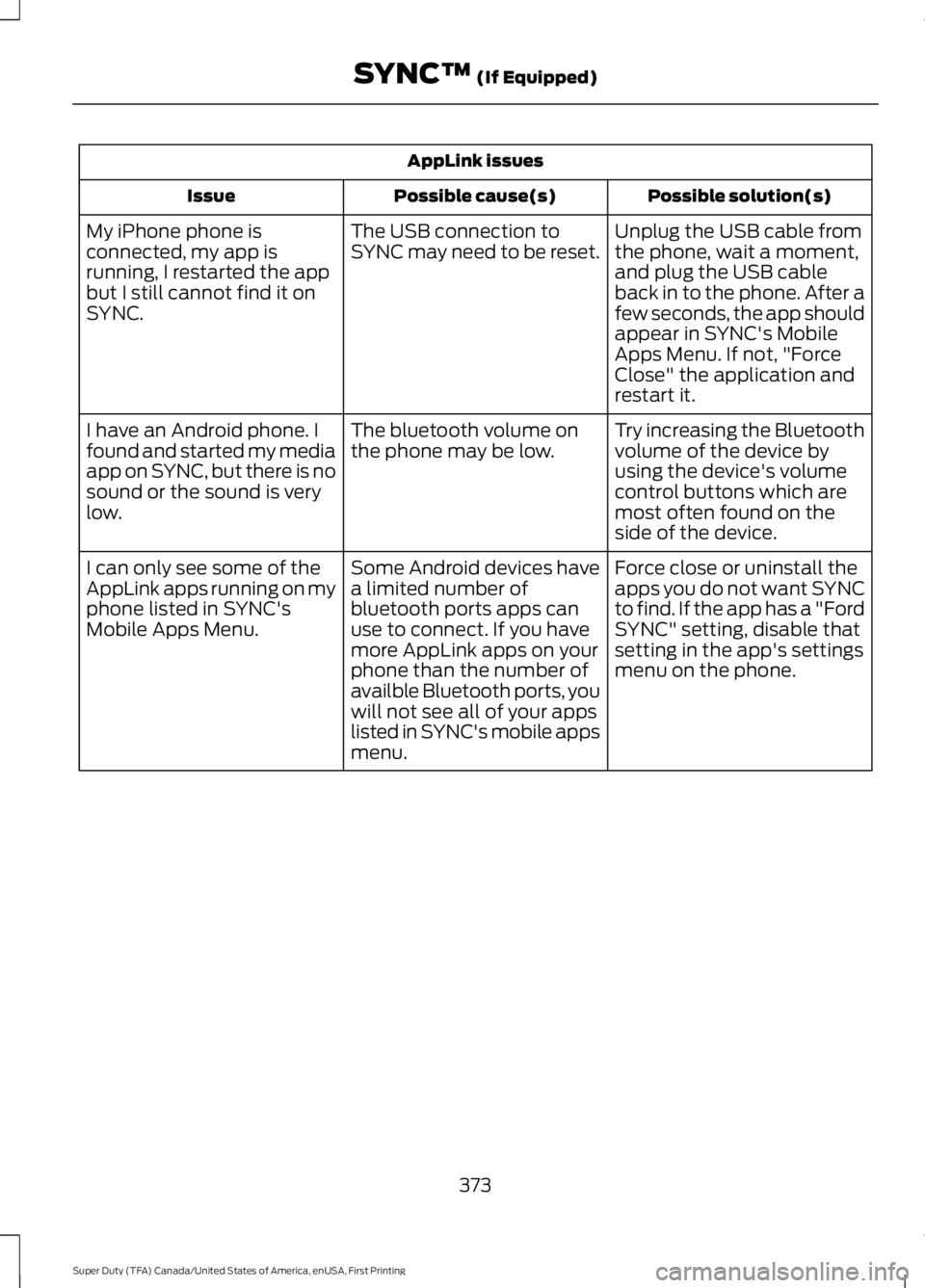
AppLink issues
Possible solution(s)Possible cause(s)Issue
Unplug the USB cable fromthe phone, wait a moment,and plug the USB cableback in to the phone. After afew seconds, the app shouldappear in SYNC's MobileApps Menu. If not, "ForceClose" the application andrestart it.
The USB connection toSYNC may need to be reset.My iPhone phone isconnected, my app isrunning, I restarted the appbut I still cannot find it onSYNC.
Try increasing the Bluetoothvolume of the device byusing the device's volumecontrol buttons which aremost often found on theside of the device.
The bluetooth volume onthe phone may be low.I have an Android phone. Ifound and started my mediaapp on SYNC, but there is nosound or the sound is verylow.
Force close or uninstall theapps you do not want SYNCto find. If the app has a "FordSYNC" setting, disable thatsetting in the app's settingsmenu on the phone.
Some Android devices havea limited number ofbluetooth ports apps canuse to connect. If you havemore AppLink apps on yourphone than the number ofavailble Bluetooth ports, youwill not see all of your appslisted in SYNC's mobile appsmenu.
I can only see some of theAppLink apps running on myphone listed in SYNC'sMobile Apps Menu.
373
Super Duty (TFA) Canada/United States of America, enUSA, First Printing
SYNC™ (If Equipped)
Page 391 of 507
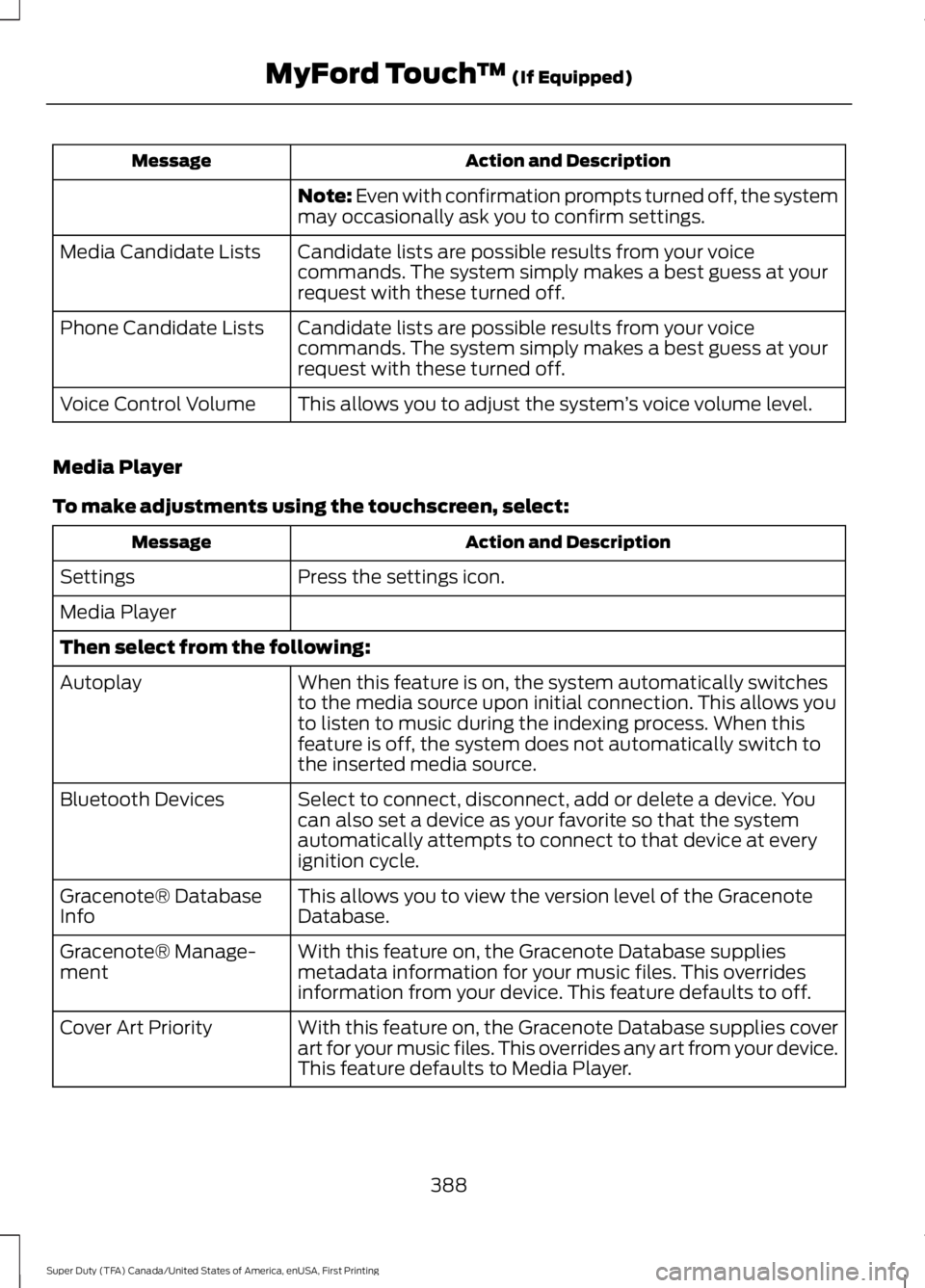
Action and DescriptionMessage
Note: Even with confirmation prompts turned off, the systemmay occasionally ask you to confirm settings.
Candidate lists are possible results from your voicecommands. The system simply makes a best guess at yourrequest with these turned off.
Media Candidate Lists
Candidate lists are possible results from your voicecommands. The system simply makes a best guess at yourrequest with these turned off.
Phone Candidate Lists
This allows you to adjust the system’s voice volume level.Voice Control Volume
Media Player
To make adjustments using the touchscreen, select:
Action and DescriptionMessage
Press the settings icon.Settings
Media Player
Then select from the following:
When this feature is on, the system automatically switchesto the media source upon initial connection. This allows youto listen to music during the indexing process. When thisfeature is off, the system does not automatically switch tothe inserted media source.
Autoplay
Select to connect, disconnect, add or delete a device. Youcan also set a device as your favorite so that the systemautomatically attempts to connect to that device at everyignition cycle.
Bluetooth Devices
This allows you to view the version level of the GracenoteDatabase.Gracenote® DatabaseInfo
With this feature on, the Gracenote Database suppliesmetadata information for your music files. This overridesinformation from your device. This feature defaults to off.
Gracenote® Manage-ment
With this feature on, the Gracenote Database supplies coverart for your music files. This overrides any art from your device.This feature defaults to Media Player.
Cover Art Priority
388
Super Duty (TFA) Canada/United States of America, enUSA, First Printing
MyFord Touch™ (If Equipped)
Page 393 of 507
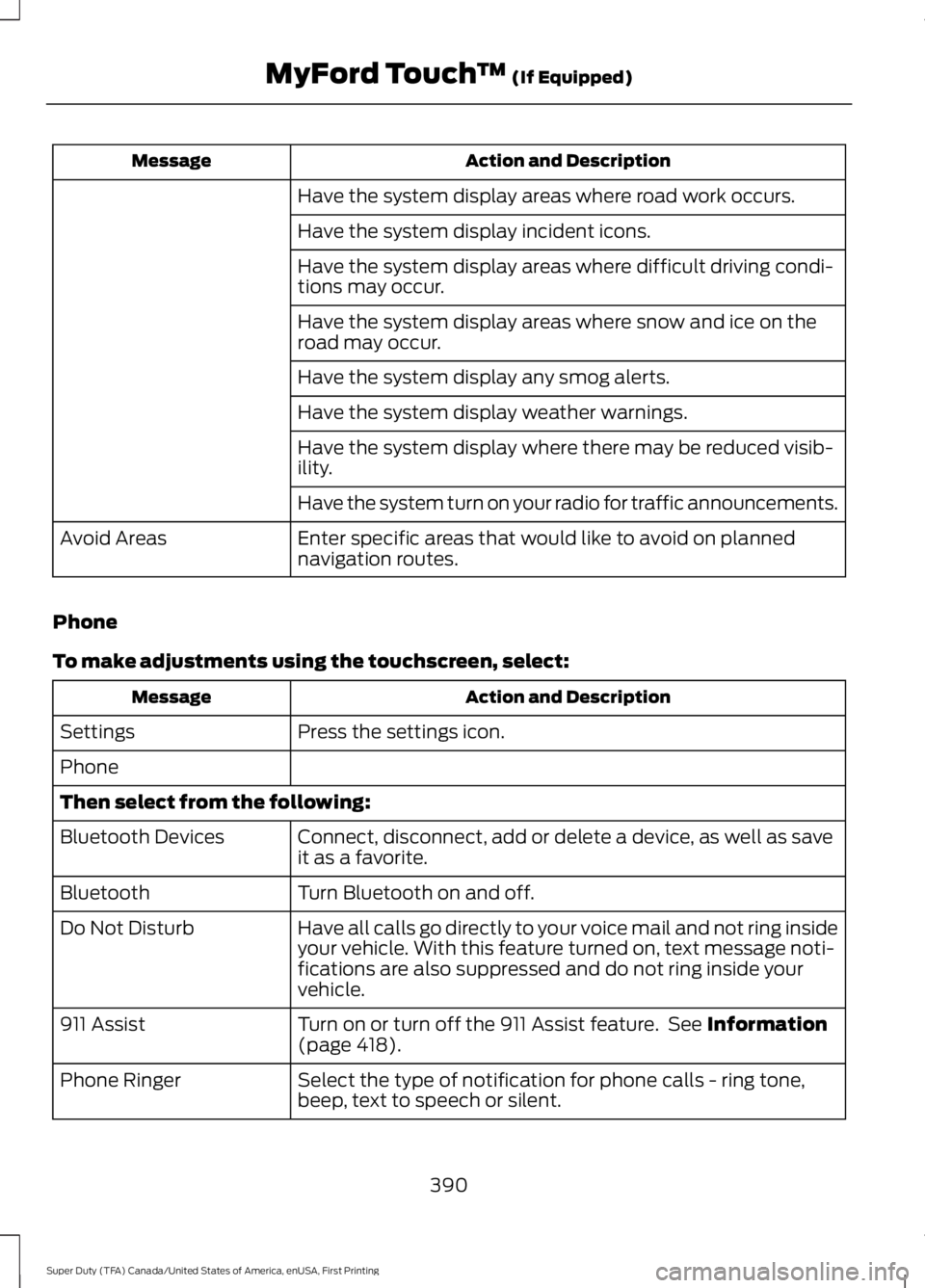
Action and DescriptionMessage
Have the system display areas where road work occurs.
Have the system display incident icons.
Have the system display areas where difficult driving condi-tions may occur.
Have the system display areas where snow and ice on theroad may occur.
Have the system display any smog alerts.
Have the system display weather warnings.
Have the system display where there may be reduced visib-ility.
Have the system turn on your radio for traffic announcements.
Enter specific areas that would like to avoid on plannednavigation routes.Avoid Areas
Phone
To make adjustments using the touchscreen, select:
Action and DescriptionMessage
Press the settings icon.Settings
Phone
Then select from the following:
Connect, disconnect, add or delete a device, as well as saveit as a favorite.Bluetooth Devices
Turn Bluetooth on and off.Bluetooth
Have all calls go directly to your voice mail and not ring insideyour vehicle. With this feature turned on, text message noti-fications are also suppressed and do not ring inside yourvehicle.
Do Not Disturb
Turn on or turn off the 911 Assist feature. See Information(page 418).911 Assist
Select the type of notification for phone calls - ring tone,beep, text to speech or silent.Phone Ringer
390
Super Duty (TFA) Canada/United States of America, enUSA, First Printing
MyFord Touch™ (If Equipped)
Page 395 of 507
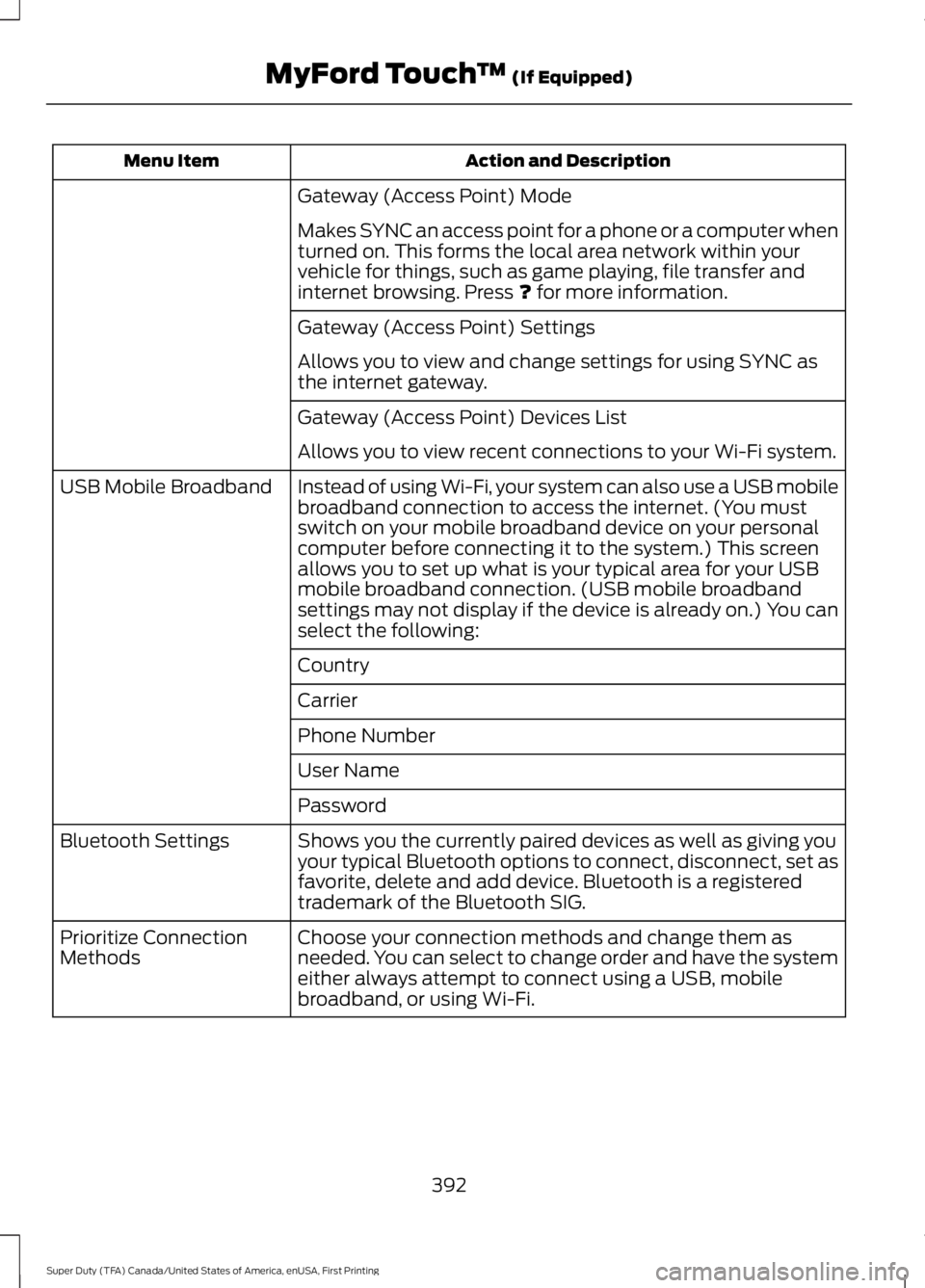
Action and DescriptionMenu Item
Gateway (Access Point) Mode
Makes SYNC an access point for a phone or a computer whenturned on. This forms the local area network within yourvehicle for things, such as game playing, file transfer andinternet browsing. Press ? for more information.
Gateway (Access Point) Settings
Allows you to view and change settings for using SYNC asthe internet gateway.
Gateway (Access Point) Devices List
Allows you to view recent connections to your Wi-Fi system.
Instead of using Wi-Fi, your system can also use a USB mobilebroadband connection to access the internet. (You mustswitch on your mobile broadband device on your personalcomputer before connecting it to the system.) This screenallows you to set up what is your typical area for your USBmobile broadband connection. (USB mobile broadbandsettings may not display if the device is already on.) You canselect the following:
USB Mobile Broadband
Country
Carrier
Phone Number
User Name
Password
Shows you the currently paired devices as well as giving youyour typical Bluetooth options to connect, disconnect, set asfavorite, delete and add device. Bluetooth is a registeredtrademark of the Bluetooth SIG.
Bluetooth Settings
Choose your connection methods and change them asneeded. You can select to change order and have the systemeither always attempt to connect using a USB, mobilebroadband, or using Wi-Fi.
Prioritize ConnectionMethods
392
Super Duty (TFA) Canada/United States of America, enUSA, First Printing
MyFord Touch™ (If Equipped)
Page 413 of 507
Voice command
*Play Artist ___
*Play Song ___
Similar Music
Help
* ___ is a dynamic listing, meaning that it could be the name of anything, such as a group,artist or song. For example you could say "Play artist The Beatles" or "Play song PennyLane".
Supported Media Players, Formatsand Metadata Information
SYNC is capable of hosting nearly anydigital media player, including iPod,Zune™, plays from device players, andmost USB drives. Supported audio formatsinclude MP3, WMA, WAV and AAC.
It is also able to organize your indexedmedia from your playing device bymetadata tags. Metadata tags, which aredescriptive software identifiers embeddedin the media files, provide informationabout the file.
If your indexed media files contain noinformation embedded in these metadatatags, SYNC may classify the emptymetadata tags as unknown.
Bluetooth Audio
The system allows you to stream audioover your vehicle's speakers from yourconnected, Bluetooth-enabled cell phone.
To access, press the lower left corneron the touchscreen, then select:
Message
BT Stereo
Bluetooth Audio Voice Commands
The voice system allows you to controlyour media with a simple voice command.For example to change songs, press thevoice button and follow the systemprompts.
410
Super Duty (TFA) Canada/United States of America, enUSA, First Printing
MyFord Touch™ (If Equipped)E142611 E142599
Page 414 of 507
PHONE
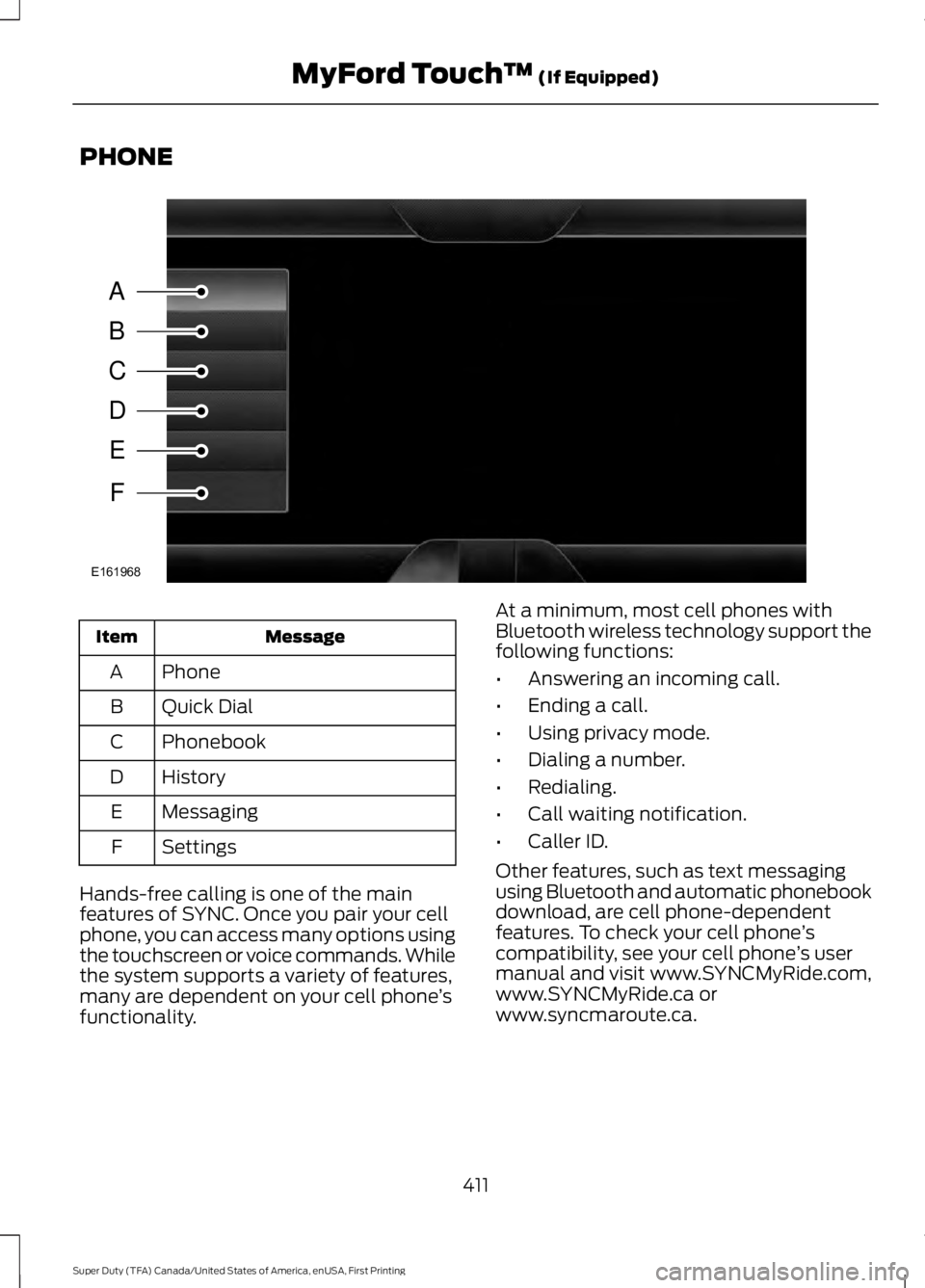
MessageItem
PhoneA
Quick DialB
PhonebookC
HistoryD
MessagingE
SettingsF
Hands-free calling is one of the mainfeatures of SYNC. Once you pair your cellphone, you can access many options usingthe touchscreen or voice commands. Whilethe system supports a variety of features,many are dependent on your cell phone’sfunctionality.
At a minimum, most cell phones withBluetooth wireless technology support thefollowing functions:
•Answering an incoming call.
•Ending a call.
•Using privacy mode.
•Dialing a number.
•Redialing.
•Call waiting notification.
•Caller ID.
Other features, such as text messagingusing Bluetooth and automatic phonebookdownload, are cell phone-dependentfeatures. To check your cell phone’scompatibility, see your cell phone’s usermanual and visit www.SYNCMyRide.com,www.SYNCMyRide.ca orwww.syncmaroute.ca.
411
Super Duty (TFA) Canada/United States of America, enUSA, First Printing
MyFord Touch™ (If Equipped)A
B
C
D
E
F
E161968
Page 415 of 507
Pairing Your Cell Phone for theFirst Time
WARNING
Driving while distracted can result inloss of vehicle control, crash andinjury. We strongly recommend thatyou use extreme caution when using anydevice that may take your focus off theroad. Your primary responsibility is the safeoperation of your vehicle. We recommendagainst the use of any hand-held devicewhile driving and encourage the use ofvoice-operated systems when possible.Make sure you are aware of all applicablelocal laws that may affect the use ofelectronic devices while driving.
The first thing you must do to use thephone features of SYNC is to pair yourBluetooth-enabled cell phone with SYNC.This allows you to use your cell phone in ahands-free manner.
Note:This is a speed-dependent feature.It is unavailable when your vehicle istraveling at speeds over 3 mph (5 km/h).
Touch the upper left corner of the touchscreen:
Action and DescriptionMessage
Add phone
Follow the on-screen instructions.Find SYNCMake sure that Bluetooth is set to On and that your cell phoneis in the correct mode. See your cell phone’s manual ifnecessary.Select SYNC and a six-digit PIN appears on your device.If you are prompted to enter a PIN on your device, it does notsupport Secure Simple Pairing. To pair, enter the PINdisplayed on the touchscreen. Skip the next step.When prompted on your cell phone’s display, confirm thatthe PIN provided by SYNC matches the PIN displayed on yourcell phone.The display indicates when the pairing is successful.SYNC may prompt you with more cell phone options. Formore information on your cell phone's capability, see yourcell phone's manual and visit the website.
Pairing Subsequent Cell Phones
Note:This is a speed-dependent feature.It is unavailable when your vehicle istraveling at speeds over 3 mph (5 km/h).
Make sure that Bluetooth is set to On andthat your cell phone is in the correct mode.See your device's manual if necessary.
412
Super Duty (TFA) Canada/United States of America, enUSA, First Printing
MyFord Touch™ (If Equipped)