2016 FORD EXPLORER head
[x] Cancel search: headPage 390 of 541

To Access Using Voice Commands
Press the voice button then when prompted say:
Action and Description
Menu Item
Say the name of the application after the tone.
The app should start. When an app is running through SYNC, you can press the voice button and speak commands specific to the app, for example "Play Playlist Road Trip".
mobile (apps |
applications)
Use this command to discover the available voice commands.
Help
SYNC Mobile App Voice Commands
The following voice commands are always available: Action and Description
Menu Item
SYNC prompts you to say the name of an
app to start it on SYNC.
mobile (apps | applications)
SYNC lists all of the currently available
mobile apps.
list [mobile] (apps | applications)
Searches your connected mobile device for
SYNC-compatible mobile apps.
find [new] [mobile] (apps | applications)
help
You can say the name of a mobile app at any time to start the mobile app on SYNC.
App Permissions
App permissions are organized by groups.
You can grant these group permissions
individually. You can change a permission
group status any time when not driving, by
using the settings menu. When you launch an app using SYNC, the
system may ask you to grant certain
permissions, for example:
•
To allow your vehicle to provide vehicle
information to the app such as, but not
limited to: Fuel level, fuel economy, fuel
consumption, engine speed, rain
sensor, odometer, VIN, external
temperature, gear position, tire
pressure, and head lamp status.
• To allow your vehicle to provide driving
characteristic information such as, but
not limited to: MyKey, seat belt status,
engine revolutions per minute, gear
position, braking events, steering wheel
angle, and accelerator pedal position.
387
Explorer (TUB), enUSA, First Printing SYNC™ (If Equipped)
Page 453 of 541
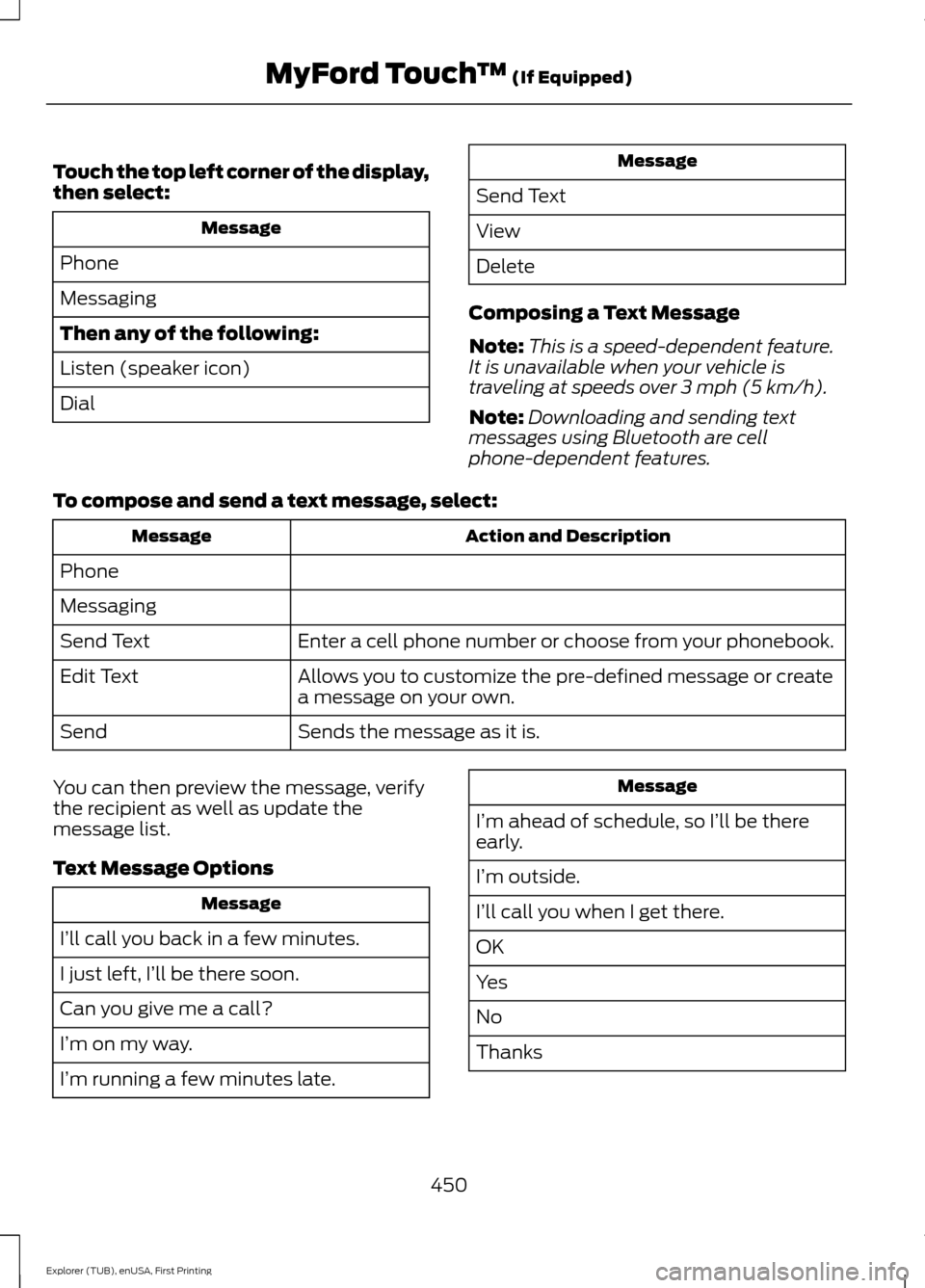
Touch the top left corner of the display,
then select:
Message
Phone
Messaging
Then any of the following:
Listen (speaker icon)
Dial Message
Send Text
View
Delete
Composing a Text Message
Note: This is a speed-dependent feature.
It is unavailable when your vehicle is
traveling at speeds over 3 mph (5 km/h).
Note: Downloading and sending text
messages using Bluetooth are cell
phone-dependent features.
To compose and send a text message, select: Action and Description
Message
Phone
Messaging Enter a cell phone number or choose from your phonebook.
Send Text
Allows you to customize the pre-defined message or create
a message on your own.
Edit Text
Sends the message as it is.
Send
You can then preview the message, verify
the recipient as well as update the
message list.
Text Message Options Message
I’ll call you back in a few minutes.
I just left, I’ll be there soon.
Can you give me a call?
I’m on my way.
I’m running a few minutes late. Message
I’m ahead of schedule, so I’ll be there
early.
I’m outside.
I’ll call you when I get there.
OK
Yes
No
Thanks
450
Explorer (TUB), enUSA, First Printing MyFord Touch
™
(If Equipped)
Page 475 of 541
3D landmarks appear as clear, visible
objects that are typically recognizable and
have a certain tourist value. The 3D
landmarks appear in 3D map mode only.
Coverage varies and improves with
updated map releases.
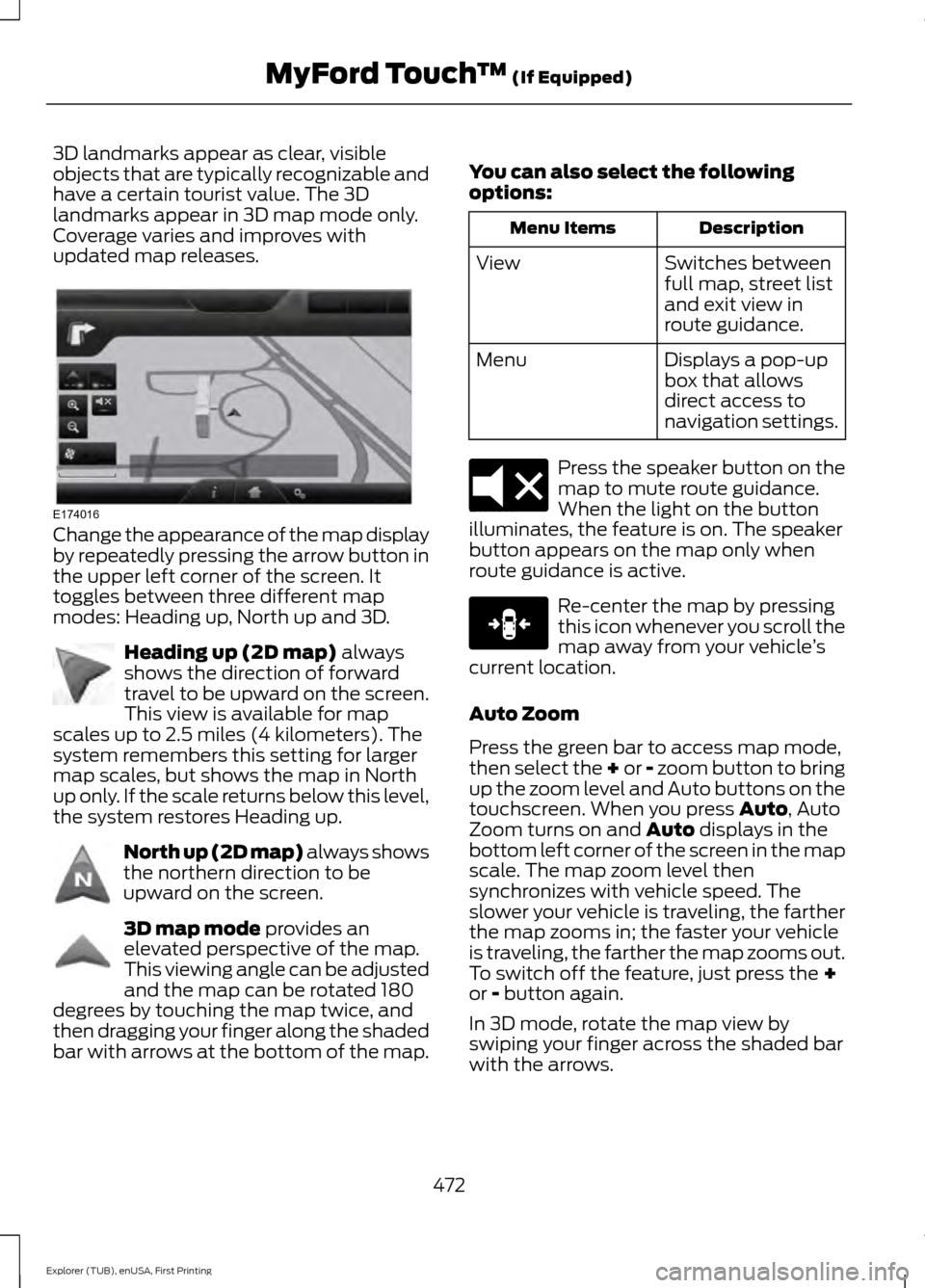
Change the appearance of the map display
by repeatedly pressing the arrow button in
the upper left corner of the screen. It
toggles between three different map
modes: Heading up, North up and 3D.
Heading up (2D map) always
shows the direction of forward
travel to be upward on the screen.
This view is available for map
scales up to 2.5 miles (4 kilometers). The
system remembers this setting for larger
map scales, but shows the map in North
up only. If the scale returns below this level,
the system restores Heading up. North up (2D map) always shows
the northern direction to be
upward on the screen.
3D map mode
provides an
elevated perspective of the map.
This viewing angle can be adjusted
and the map can be rotated 180
degrees by touching the map twice, and
then dragging your finger along the shaded
bar with arrows at the bottom of the map. You can also select the following
options: Description
Menu Items
Switches between
full map, street list
and exit view in
route guidance.
View
Displays a pop-up
box that allows
direct access to
navigation settings.
Menu Press the speaker button on the
map to mute route guidance.
When the light on the button
illuminates, the feature is on. The speaker
button appears on the map only when
route guidance is active. Re-center the map by pressing
this icon whenever you scroll the
map away from your vehicle
’s
current location.
Auto Zoom
Press the green bar to access map mode,
then select the + or - zoom button to bring
up the zoom level and Auto buttons on the
touchscreen. When you press
Auto, Auto
Zoom turns on and Auto displays in the
bottom left corner of the screen in the map
scale. The map zoom level then
synchronizes with vehicle speed. The
slower your vehicle is traveling, the farther
the map zooms in; the faster your vehicle
is traveling, the farther the map zooms out.
To switch off the feature, just press the
+
or - button again.
In 3D mode, rotate the map view by
swiping your finger across the shaded bar
with the arrows.
472
Explorer (TUB), enUSA, First Printing MyFord Touch
™
(If Equipped)E174016 E142642 E142643 E142644 E174017 E146188
Page 517 of 541

Telenav Software agreeing to be bound by
the terms and conditions of this
Agreement. Any such sale, assignment or
transfer that is not expressly permitted
under this paragraph will result in
immediate termination of this Agreement,
without liability to Telenav, in which case
you and all other parties shall immediately
cease all use of the Telenav Software.
Notwithstanding the foregoing, Telenav
may assign this Agreement to any other
party at any time without notice, provided
the assignee remains bound by this
Agreement.
8. Miscellaneous
8.1
This Agreement constitutes the entire
agreement between Telenav and you with
respect to the subject matter hereof.
8.2
Except for the limited licenses expressly
granted in this Agreement, Telenav retains
all right, title and interest in and to the
Telenav Software, including without
limitation all related intellectual property
rights. No licenses or other rights which are
not expressly granted in this Agreement
are intended to, or shall be, granted or
conferred by implication, statute,
inducement, estoppel or otherwise, and
Telenav and its suppliers and licensors
hereby reserve all of their respective rights
other than the licenses explicitly granted
in this Agreement.
8.3
By using the Telenav Software, you
consent to receive from Telenav all
communications, including notices,
agreements, legally required disclosures
or other information in connection with the
Telenav Software (collectively,
“Notices”)
electronically. Telenav may provide such Notices by posting them on Telenav
’s
Website or by downloading such Notices
to your wireless device. If you desire to
withdraw your consent to receive Notices
electronically, you must discontinue your
use of the Telenav Software.
8.4
Telenav ’s or your failure to require
performance of any provision shall not
affect that party ’s right to require
performance at any time thereafter, nor
shall a waiver of any breach or default of
this Agreement constitute a waiver of any
subsequent breach or default or a waiver
of the provision itself.
8.5
If any provision herein is held
unenforceable, then such provision will be
modified to reflect the intention of the
parties, and the remaining provisions of
this Agreement will remain in full force and
effect.
8.6
The headings in this Agreement are for
convenience of reference only, will not be
deemed to be a part of this Agreement,
and will not be referred to in connection
with the construction or interpretation of
this Agreement. As used in this Agreement,
the words “include ” and “including, ” and
variations thereof, will not be deemed to
be terms of limitation, but rather will be
deemed to be followed by the words
“ without limitation. ”
9. Other Vendors Terms and Conditions
The Telenav Software utilizes map and
other data licensed to Telenav by third
party vendors for the benefit of you and
other end users. This Agreement includes
end-user terms applicable to these
companies (included at the end of this
514
Explorer (TUB), enUSA, First Printing Appendices
Page 530 of 541
1
180 Degree Parking Aid Camera..............211
Camera Views...................................................... 212
Using the 180 degree camera system..........211
4
4WD See: Four-Wheel Drive..................................... 184
A
A/C See: Climate Control......................................... 129
About This Manual...........................................7
ABS See: Brakes........................................................... 189
ABS driving hints See: Hints on Driving With Anti-Lock
Brakes................................................................ 189
Accessories
....................................................482
Exterior Style....................................................... 482
Interior Style........................................................ 482
Lifestyle................................................................. 482
Peace of Mind..................................................... 482
Accessories See: Replacement Parts
Recommendation............................................. 11
ACC See: Using Adaptive Cruise Control.............214
Active Park Assist
........................................202
Deactivating the Active Park Assist
Feature............................................................. 206
Parallel Parking, Perpendicular Parking, Park Out Assist.............................................. 202
Troubleshooting the System........................ 206
Adjusting the Headlamps..........................291 Vertical Aim Adjustment.................................. 291
Adjusting the Pedals.....................................76
Adjusting the Steering Wheel - Vehicles With: Manual Adjustable Steering
Column
............................................................72 Adjusting the Steering Wheel - Vehicles
With: Power Adjustable Steering
Column
............................................................72
Easy Entry and Exit Feature.............................. 73
End of Travel Position......................................... 73
Memory Feature.................................................... 73
Airbag Disposal...............................................47
Air Conditioning See: Climate Control......................................... 129
Alarm See: Anti-Theft Alarm.......................................... 71
Anti-Theft Alarm.............................................71 Arming the Alarm.................................................. 71
Disarming the Alarm............................................ 71
Appendices....................................................505
Audible Warnings and Indicators
...........100
Automatic Transmission Warning
Chime................................................................ 100
Engine On Warning Chime............................. 100
Headlamps On Warning Chime................... 100
Key in Ignition Warning Chime...................... 100
Keyless Warning Alert ..................................... 100
Parking Brake On Warning Chime...............100
Audio Control
...................................................73
Seek and Media..................................................... 74
Type 1........................................................................\
. 73
Type 2........................................................................\
73
Audio System................................................353 General Information......................................... 353
Audio Unit - Vehicles With: AM/FM/CD/ SYNC
.............................................................354
Audio Unit - Vehicles With: Premium AM/FM/CD..................................................357
Audio Unit - Vehicles With: Sony AM/ FM/CD..........................................................358
Menu Structure.................................................. 360
Autolamps
.........................................................81
Windshield Wiper Activated
Headlamps......................................................... 81
Automatic Climate Control - Vehicles With: Premium AM/FM/CD.....................131
Automatic Climate Control - Vehicles With: Sony Audio System.......................132
Automatic High Beam Control.................83 Activating the System........................................ 84
Manually Overriding the System.................... 84
527
Explorer (TUB), enUSA, First Printing Index
Page 531 of 541
Automatic Transmission...........................180
Brake-Shift Interlock......................................... 182
If Your Vehicle Gets Stuck In Mud or Snow.................................................................. 183
SelectShift Automatic ™
Transmission.................................................... 181
Understanding the Positions of Your Automatic Transmission............................ 180
Automatic Transmission Fluid Check - 2.3L EcoBoost™.......................................286
Automatic Transmission Fluid Check - 3.5L Duratec/3.5L Ecoboost™...........286
Adding Transmission Fluid............................. 287
Checking the Transmission Fluid Level.................................................................. 286
Autowipers........................................................77
Auxiliary Power Points................................162 110 Volt AC Power Point................................... 162
12 Volt DC Power Point..................................... 162
Locations............................................................... 162
B
Blind Spot Information System..............224 Using the System............................................... 225
Bonnet Lock See: Opening and Closing the Hood...........276
Booster Seats..................................................26 Types of Booster Seats....................................... 27
Brake Fluid Check........................................288
Brakes...............................................................189 General Information.......................................... 189
Breaking-In.....................................................252
Bulb Specification Chart...........................297
C
Cabin Air Filter
...............................................138
California Proposition 65..............................11
Capacities and Specifications - 2.3L EcoBoost™..................................................341
Specifications...................................................... 341
Capacities and Specifications - 3.5L Duratec.........................................................344
Specifications..................................................... 345
Capacities and Specifications - 3.5L Ecoboost™.................................................348
Specifications..................................................... 349Capacities and Specifications
................334
Cargo Nets......................................................233
Car Wash See: Cleaning the Exterior............................. 300
Center Console..............................................164 Rear Seat Armrest.............................................. 164
Changing a Bulb...........................................293 Front Direction Indicator................................. 294
Front Fog Lamp.................................................. 295
Headlamp............................................................ 294
Headlamp High Beam..................................... 294
LED Lamps........................................................... 296
License Plate Lamp.......................................... 296
Rear Direction Indicator and Reversing Lamp
................................................................. 295
Changing a Fuse...........................................274
Fuses....................................................................... 274
Changing a Road Wheel
...........................328
Dissimilar Spare Wheel and Tire Assembly
Information..................................................... 328
Tire Change Procedure.................................... 329
Changing the 12V Battery.........................289
Changing the Engine Air Filter................299
Changing the Wiper Blades
......................291
Front Wiper Blades............................................ 291
Rear Wiper Blade................................................ 291
Checking MyKey System Status
...............57
Checking the Wiper Blades.....................290
Child Restraint and Safety Belt Maintenance.................................................38
Child Safety
.......................................................15
General Information............................................. 15
Child Safety Locks
.........................................29
Left-Hand Side..................................................... 30
Right-Hand Side................................................... 30
Child Seat Positioning
..................................28
Child Seats.........................................................16
Cleaning Leather Seats.............................303
Cleaning Products
......................................300
Cleaning the Alloy Wheels.......................304
Cleaning the Engine
....................................301
Cleaning the Exterior.................................300
Exterior Chrome Parts..................................... 300
Exterior Plastic Parts......................................... 301
Stripes or Graphics............................................ 301
Underbody............................................................ 301
Cleaning the Instrument Panel and Instrument Cluster Lens........................303
528
Explorer (TUB), enUSA, First Printing Index
Page 534 of 541
Getting the Services You Need..............260
Away From Home............................................. 260
H
Handbrake See: Parking Brake............................................. 190
Hazard Warning Flashers.........................256
HDC See: Using Hill Descent Control.................... 196
Headlamp Exit Delay....................................82
Head Restraints............................................140 Adjusting the Head Restraint.......................... 141
Tilting Head Restraints .................................... 142
Heated Seats.................................................154 Front Seats............................................................ 154
Rear Seats............................................................. 155
Heated Steering Wheel
................................75
Heated Windows and Mirrors..................138 Heated Exterior Mirror....................................... 138
Heated Rear Window........................................ 138
Heating See: Climate Control......................................... 129
Hill Start Assist
.............................................190
Switching the System On and Off................191
Using Hill Start Assist....................................... 190
Hints on Controlling the Interior Climate..........................................................134
Cooling the Interior Quickly............................ 136
General Hints....................................................... 134
Heating the Interior Quickly............................ 135
Recommended Settings for Cooling ..........136
Recommended Settings for Heating..........136
Side Window Defogging in Cold Weather............................................................. 137
Hints on Driving With Anti-Lock Brakes............................................................189
Hood Lock See: Opening and Closing the Hood...........276
I
Ignition Switch
...............................................165
In California (U.S. Only).............................261
Information Display Control.......................75
Information Display Control Features...........75
Information Displays
....................................101
General Information........................................... 101Information....................................................453
911 Assist............................................................... 459
Alerts...................................................................... 458
Calendar............................................................... 459
Sirius Travel Link................................................. 457
SYNC Services (If Equipped, United States Only).................................................................. 453
Vehicle Health Report (If Equipped, US Only)................................................................... 461
Information Messages
.................................115
4WD........................................................................\
.. 115
Adaptive Cruise Control.................................... 116
AdvanceTrac ™..................................................... 116
Alarm........................................................................\
116
Automatic Engine Shutdown.......................... 117
Automatic High Beam Control........................ 117
Battery and Charging System......................... 118
Blind Spot Information and Cross Traffic Alert System..................................................... 118
Brake System........................................................ 119
Collision Warning System................................ 119
Doors and Locks.................................................. 119
Driver Alert............................................................ 120
Electronic Stability Control............................. 120
Engine..................................................................... 120
Fuel........................................................................\
.... 121
Hill Descent Control............................................ 121
Hill Start Assist..................................................... 121
Keys and Intelligent Access............................. 122
Lane Keeping System........................................ 123
Maintenance......................................................... 123
MyKey...................................................................... 124
Park Aid.................................................................. 124
Park Brake.............................................................. 124
Power Steering.................................................... 125
Pre-Collision Warning System....................... 125
Remote Start........................................................ 125
Seats........................................................................\
126
Starting System.................................................. 126
Terrain Management System......................... 127
Tire Pressure Monitoring System.................. 126
Traction Control................................................... 127
Trailer....................................................................... 127
Transmission........................................................ 128
531
Explorer (TUB), enUSA, First Printing Index
Page 535 of 541
Installing Child Seats......................................17
Using Lap and Shoulder Belts.......................... 17
Using Lower Anchors and Tethers for CHildren (LATCH)............................................ 22
Using Tether Straps............................................. 24
Instrument Cluster
.........................................93
Instrument Lighting Dimmer.....................82
Interior Lamps
.................................................85
Battery Saver......................................................... 86
Dome Lamp........................................................... 85
Front Row Map Lamps...................................... 85
Second Row Dome and Courtesy Lamps................................................................. 86
Second Row Dome and Map Lamps...........86
Third Row Cargo Lamp...................................... 86
Interior Mirror...................................................90 Auto-Dimming Mirror......................................... 90
Introduction.........................................................7
J
Jump Starting the Vehicle.........................257 Connecting the Jumper Cables..................... 257
Jump Starting...................................................... 258
Preparing Your Vehicle..................................... 257
Removing the Jumper Cables....................... 258
K
Keyless Entry
....................................................67
SECURICODE™ Keyless Entry
Keypad................................................................. 67
Keyless Starting............................................165 Ignition Modes..................................................... 166
Keys and Remote Controls
........................48
Principle of Operation........................................ 48
L
Lane Keeping System
................................220
Switching the System On and Off................221
Lighting Control
..............................................80
Headlamp Flasher................................................ 81
High Beams............................................................ 80
Lighting
..............................................................80
General Information........................................... 80
Load Carriers See: Roof Racks and Load Carriers.............234 Load Carrying
................................................233
Load Limit.......................................................235 Special Loading Instructions for Owners of
Pick-up Trucks and Utility-type
Vehicles............................................................. 242
Vehicle Loading - with and without a Trailer................................................................. 235
Locking and Unlocking................................60 Activating Intelligent Access............................. 61
Autolock................................................................... 62
Autounlock ............................................................ 62
Battery Saver......................................................... 63
Enabling or Disabling Autolock and Autounlock........................................................ 62
Illuminated Entry.................................................. 63
Illuminated Exit..................................................... 63
Locking and Unlocking the Doors with the Key Blade........................................................... 60
Opening a Rear Door from Inside.................. 60
Power Door Locks................................................ 60
Remote Control.................................................... 60
Smart Unlocks for Integrated Keyhead Transmitter......................................................... 61
Smart Unlocks for Intelligent Access Keys....................................................................... 61
Locks..................................................................60
Luggage Covers
............................................234
Lug Nuts See: Changing a Road Wheel....................... 328
M
Maintenance..................................................275 General Information.......................................... 275
Manual Climate Control
.............................129
Manual Liftgate...............................................63 Closing the Liftgate............................................. 64
Opening the Liftgate........................................... 64
Manual Seats
.................................................143
Lumbar Adjustment.......................................... 144
Moving the Seat Backward and Forward............................................................. 143
Recline Adjustment........................................... 143
Media Hub
......................................................367
532
Explorer (TUB), enUSA, First Printing Index