2016 FORD EXPLORER mirror
[x] Cancel search: mirrorPage 270 of 541
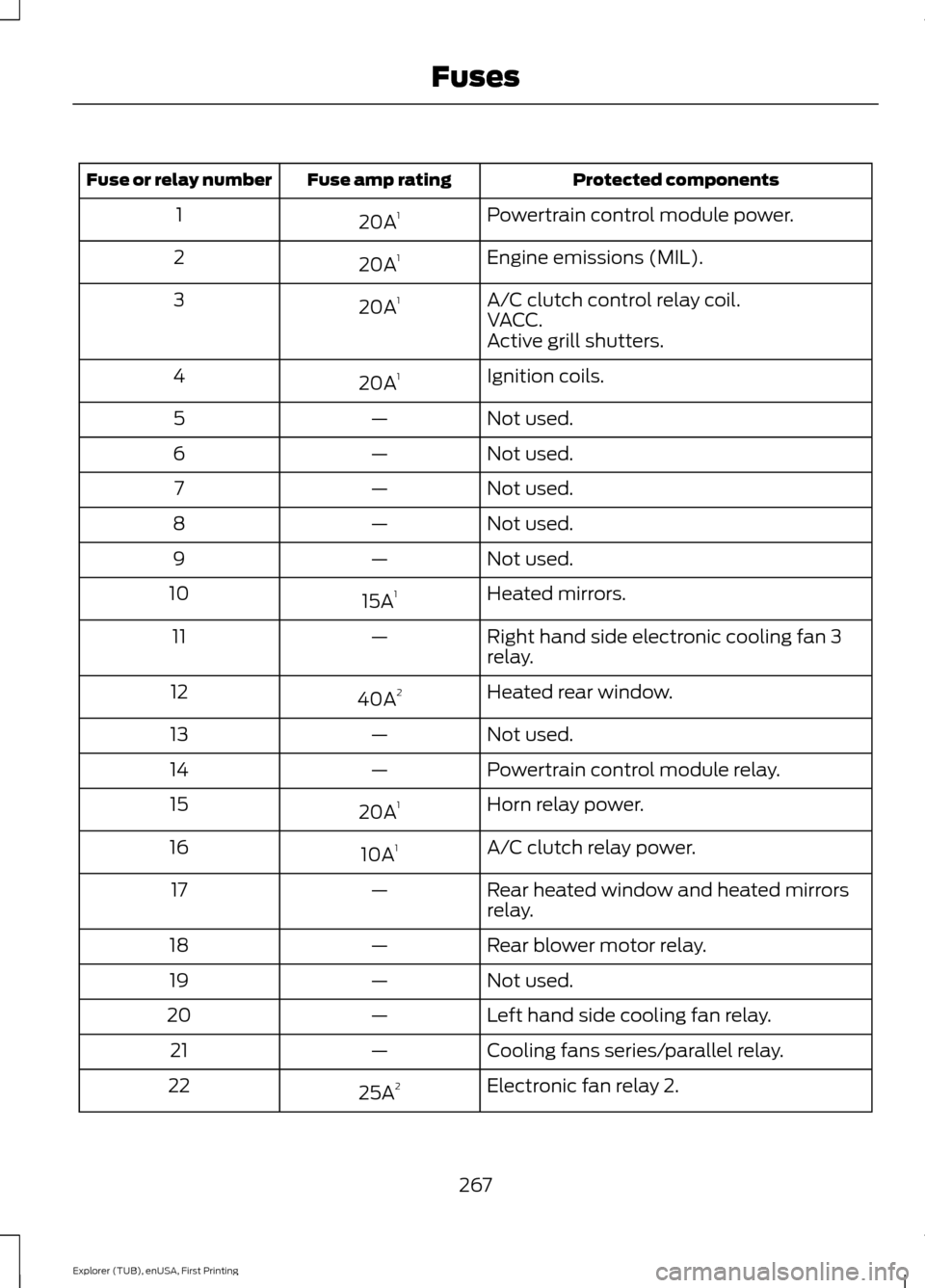
Protected components
Fuse amp rating
Fuse or relay number
Powertrain control module power.
20A 1
1
Engine emissions (MIL).
20A 1
2
A/C clutch control relay coil.
20A 1
3
VACC.
Active grill shutters.
Ignition coils.
20A 1
4
Not used.
—
5
Not used.
—
6
Not used.
—
7
Not used.
—
8
Not used.
—
9
Heated mirrors.
15A 1
10
Right hand side electronic cooling fan 3
relay.
—
11
Heated rear window.
40A 2
12
Not used.
—
13
Powertrain control module relay.
—
14
Horn relay power.
20A 1
15
A/C clutch relay power.
10A 1
16
Rear heated window and heated mirrors
relay.
—
17
Rear blower motor relay.
—
18
Not used.
—
19
Left hand side cooling fan relay.
—
20
Cooling fans series/parallel relay.
—
21
Electronic fan relay 2.
25A 2
22
267
Explorer (TUB), enUSA, First Printing Fuses
Page 276 of 541

Protected components
Fuse amp rating
Fuse or relay number
Instrument cluster.
7.5A 2
13
Smart data link.
Steering column control module.
Not used.
—
14
Smart datalink connector power.
10A 2
15
Heads up display.
Not used.
—
16
Electronic finish panel.
5A 2
17
Push button start switch.
5A 2
18
Ignition switch.
Key inhibit.
Transmission control switch (tow haul).
7.5A 2
19
Not used.
—
20
Terrain management switch.
5A 2
21
Heads up display.
Humidity sensor.
Occupant classification sensor.
5A 2
22
Delayed accessory power.
10A 1
23
Power windows.
Moonroof.
Folding mirror relay.
DC inverter.
Window/moonroof switch illumination.
Central lock relay.
20A 1
24
Left-hand front smart window motor.
30A 1
25
Door zone module.
Right-hand front smart window motor.
30A 1
26
Door zone module.
Moonroof.
30A 1
27
Sony amplifier - 10 channel.
20A 1
28
Sony amplifier - 14 channel.
30A 1
29
273
Explorer (TUB), enUSA, First Printing Fuses
Page 277 of 541
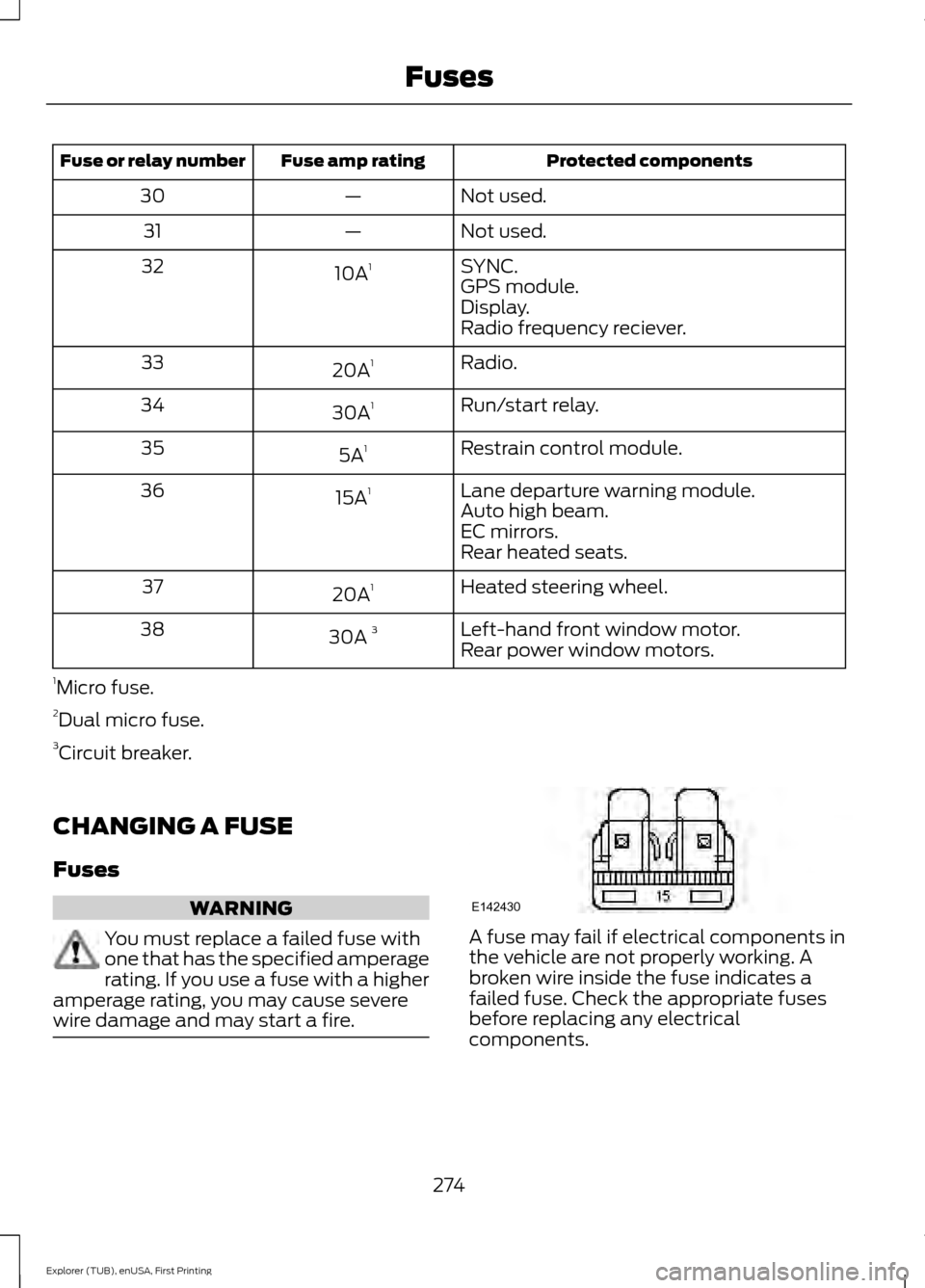
Protected components
Fuse amp rating
Fuse or relay number
Not used.
—
30
Not used.
—
31
SYNC.
10A 1
32
GPS module.
Display.
Radio frequency reciever.
Radio.
20A 1
33
Run/start relay.
30A 1
34
Restrain control module.
5A 1
35
Lane departure warning module.
15A 1
36
Auto high beam.
EC mirrors.
Rear heated seats.
Heated steering wheel.
20A 1
37
Left-hand front window motor.
30A 3
38
Rear power window motors.
1 Micro fuse.
2 Dual micro fuse.
3 Circuit breaker.
CHANGING A FUSE
Fuses WARNING
You must replace a failed fuse with
one that has the specified amperage
rating. If you use a fuse with a higher
amperage rating, you may cause severe
wire damage and may start a fire. A fuse may fail if electrical components in
the vehicle are not properly working. A
broken wire inside the fuse indicates a
failed fuse. Check the appropriate fuses
before replacing any electrical
components.
274
Explorer (TUB), enUSA, First Printing FusesE142430
Page 293 of 541
Note:
If a person adds electrical or
electronic accessories or components to the
vehicle, the accessories or components may
adversely affect the low voltage battery
performance and durability and may also
affect the performance of other electrical
systems in the vehicle.
For longer, trouble-free operation, keep the
top of the battery clean and dry. Also,
make certain the battery cables are always
tightly fastened to the battery terminals.
If you see any corrosion on the battery or
terminals, remove the cables from the
terminals and clean with a wire brush. You
can neutralize the acid with a solution of
baking soda and water.
When a battery replacement is required,
the battery should only be replaced with
a Ford recommended replacement battery
that matches the electrical requirements
of the vehicle.
Because your vehicle ’s engine is
electronically-controlled by a computer,
some engine control settings are
maintained by power from the low voltage
battery. Some engine computer settings,
like the idle trim and fuel trim strategy,
optimize the driveability and performance
of the engine. Some other computer
settings, like the clock and radio station
presets, are also maintained in memory by
power from the low voltage battery. When
a technician disconnects and connects the
low voltage battery, these settings are
erased. Complete the following procedure
in order to restore the settings:
1. With the vehicle at a complete stop, set the parking brake.
2. Shift into park (P).
3. Switch off all accessories.
4. Fully press the brake pedal and start the vehicle. 5. Run the engine until it reaches normal
operating temperature. While the
engine is warming up, complete the
following: Reset the clock. See Audio
System (page 353). Reset the power
windows bounce-back feature. See
Windows and Mirrors
(page 87).
Reset the radio station presets. See
Audio System
(page 353).
6. Allow the engine to idle for at least one
minute. If the engine turns off, press
the accelerator pedal to start the
engine.
7. While the engine is running, press the brake pedal and shift into neutral (N).
8. Allow the engine to run for at least one
minute by pressing on the accelerator
pedal.
9. Drive the vehicle at least 12 mi (20 km)
to completely relearn the idle and fuel
trim strategy.
Note: If you do not allow the engine to
relearn the idle and fuel trim strategy, the
idle quality of your vehicle may be adversely
affected until the engine computer
eventually relearns the idle trim and fuel
trim strategy.
Make sure that you dispose of old batteries
in an environmentally friendly way. Seek
advice from your local authority about
recycling old batteries.
CHECKING THE WIPER
BLADES 290
Explorer (TUB), enUSA, First Printing MaintenanceE142463
Page 300 of 541
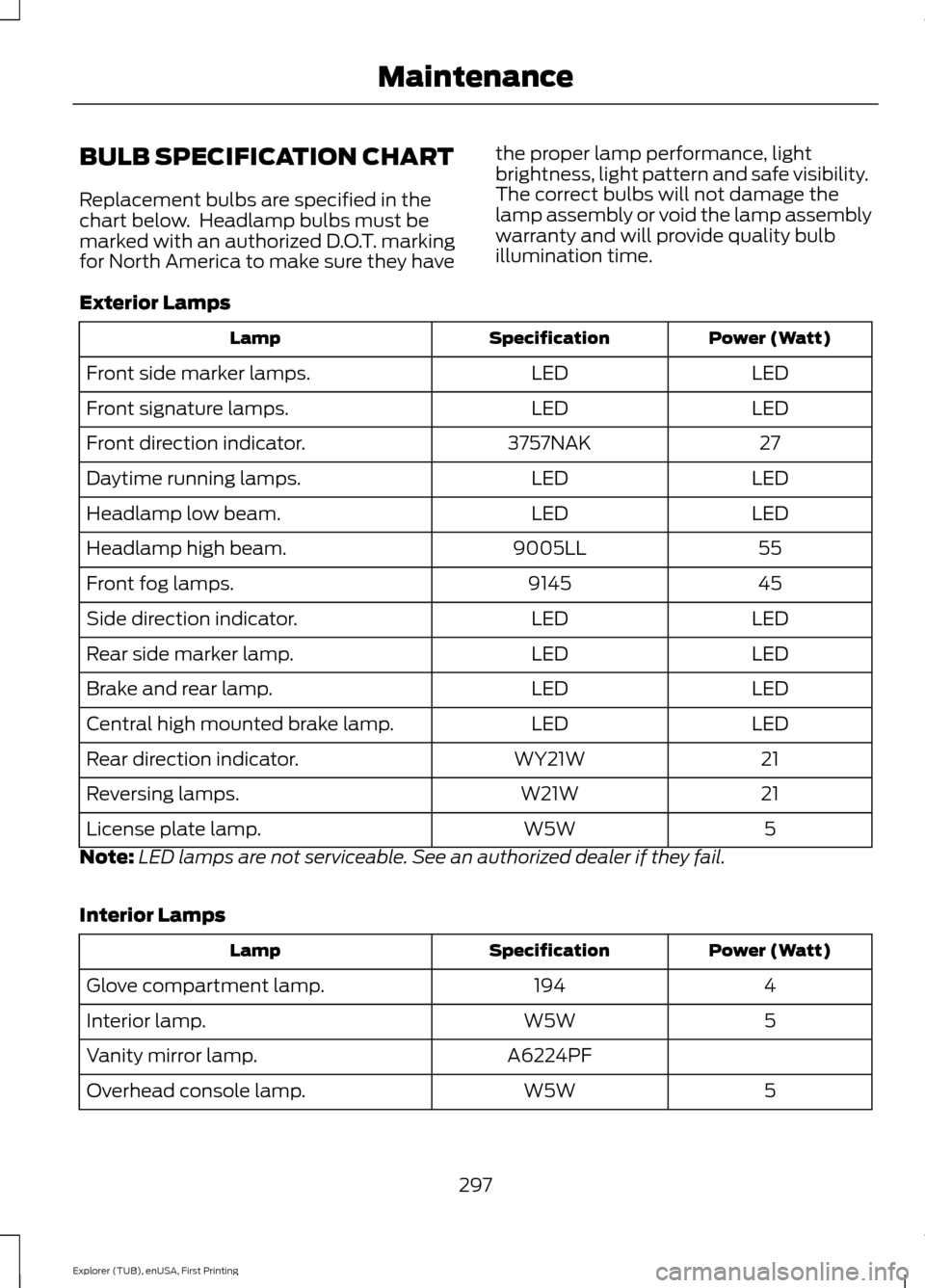
BULB SPECIFICATION CHART
Replacement bulbs are specified in the
chart below. Headlamp bulbs must be
marked with an authorized D.O.T. marking
for North America to make sure they have
the proper lamp performance, light
brightness, light pattern and safe visibility.
The correct bulbs will not damage the
lamp assembly or void the lamp assembly
warranty and will provide quality bulb
illumination time.
Exterior Lamps Power (Watt)
Specification
Lamp
LED
LED
Front side marker lamps.
LED
LED
Front signature lamps.
27
3757NAK
Front direction indicator.
LED
LED
Daytime running lamps.
LED
LED
Headlamp low beam.
55
9005LL
Headlamp high beam.
45
9145
Front fog lamps.
LED
LED
Side direction indicator.
LED
LED
Rear side marker lamp.
LED
LED
Brake and rear lamp.
LED
LED
Central high mounted brake lamp.
21
WY21W
Rear direction indicator.
21
W21W
Reversing lamps.
5
W5W
License plate lamp.
Note: LED lamps are not serviceable. See an authorized dealer if they fail.
Interior Lamps Power (Watt)
Specification
Lamp
4
194
Glove compartment lamp.
5
W5W
Interior lamp.
A6224PF
Vanity mirror lamp.
5
W5W
Overhead console lamp.
297
Explorer (TUB), enUSA, First Printing Maintenance
Page 304 of 541
Note:
Never use abrasive materials, for
example steel wool or plastic pads as they
can scratch the chrome surface.
Note: Do not use chrome cleaner, metal
cleaner or polish on wheels or wheel covers.
Exterior Plastic Parts
For routine cleaning we recommend
Motorcraft Detail Wash. If tar or grease
spots are present, we recommend
Motorcraft Bug and Tar Remover.
Stripes or Graphics (If Equipped)
Do not use a commercial or high-pressure
sprayer on the surface or edge of stripes
and graphics. This can damage them and
cause the edges to peel away from the
vehicle surface.
Underbody
Flush the complete underside of your
vehicle frequently. Keep body and door
drain holes free of debris or foreign
material.
WAXING
Regular waxing is necessary to protect your
car's paint from the elements. We
recommend that you wash and wax the
painted surface once or twice a year.
When washing and waxing, park your
vehicle in a shaded area out of direct
sunlight. Always wash your vehicle before
applying wax.
• Use a quality wax that does not contain
abrasives.
• Follow the manufacturer ’s instructions
to apply and remove the wax.
• Apply a small amount of wax in a
back-and-forth motion, not in circles. •
Do not allow wax to come in contact
with any non-body (low-gloss black)
colored trim. The wax will discolor or
stain the parts over time.
•Roof racks.
• Bumpers.
• Grained door handles.
• Side moldings.
• Mirror housings.
• Windshield cowl area.
• Do not apply wax to glass areas.
• After waxing, your car's paint should
feel smooth, and be free of streaks and
smudges.
CLEANING THE ENGINE
Engines are more efficient when they are
clean because grease and dirt buildup keep
the engine warmer than normal.
When washing:
• Take care when using a power washer
to clean the engine. The high-pressure
fluid could penetrate the sealed parts
and cause damage.
• Do not spray a hot engine with cold
water to avoid cracking the engine
block or other engine components.
• Spray Motorcraft Engine Shampoo and
Degreaser on all parts that require
cleaning and pressure rinse clean. In
Canada, use Motorcraft Engine
Shampoo.
• Never wash or rinse the engine while it
is hot or running; water in the running
engine may cause internal damage.
301
Explorer (TUB), enUSA, First Printing Vehicle Care
Page 467 of 541
Touch Rear to allow the rear seat passengers to adjust the rear climate settings.
Touch it again to prevent the rear seat passengers from adjusting the settings.
Rear Control automatically turns off when you use the touchscreen to adjust
the rear climate settings.
Touch + or – to adjust the temperature.
To adjust fan speed, touch + or – next to the fan icon.
Touch
Rear again to close the rear controls. Closing the rear climate control
functions does not affect their current settings.
Recirculated air:
Touch the button to switch between outside air and
recirculated air. When you select recirculated air, the air currently in the
passenger compartment recirculates. This may reduce the time needed to cool
the interior (when used with
A/C) and may reduce unwanted odors from
entering your vehicle.
E
Note:
Recirculated air may turn off automatically (or be prevented from turning
on) in all airflow modes except Max A/C to reduce risk of fogging. Recirculated
air may also turn on and off automatically in Panel or Panel and Floor airflow
modes during hot weather in order to improve cooling efficiency.
Max A/C:
Touch the button to maximize cooling. Recirculated air flows through
the instrument panel vents, air conditioning automatically turns on, and the fan
automatically adjusts to the highest speed.
F
A/C:
Touch the button to switch air conditioning compressor on or off. Use air
conditioning with recirculated air to improve cooling performance and efficiency.
G
Note:
In certain conditions (such as when using Max Defrost), the air
conditioning compressor may continue to operate even after you switch off the
air conditioning with the
A/C button.
Auto:
Touch the button to switch on automatic operation. Select the desired
temperature using the temperature control. The system adjusts fan speed, air
distribution, air conditioning operation, and selects outside air or recirculated
air to heat or cool the vehicle in order to maintain the desired temperature. You
can also use the
Auto button to switch off dual zone operation by touching
and holding the button for more than two seconds.
H
Heated rear window:
Turns the heated rear window on and off. See Heated
Windows and Mirrors (page 138).
I
Max Defrost:
Touch the button to maximize defrosting. Outside air flows
through the windshield vents, fan automatically adjusts to the highest speed
and the temperature dial returns to the full heat position. You can use this
setting to defog or clear a thin covering of ice from the windshield. The heated
rear window also automatically turns on when you select Max Defrost.
J
Air distribution control:
Touch these buttons to switch airflow from the
windshield, instrument panel, or footwell vents on or off. The system can
distribute air through the following combinations: windshield, windshield/floor,
panel, panel/floor, and floor.
K
464
Explorer (TUB), enUSA, First Printing MyFord Touch
™
(If Equipped)
Page 533 of 541
Entertainment..............................................429
AM/FM Radio...................................................... 430
Bluetooth Audio................................................. 445
CD........................................................................\
... 440
SD Card Slot and USB Port............................ 441
SIRIUS® Satellite Radio (If Activated)........................................................ 435
Supported Media Players, Formats and Metadata Information................................ 445
Environment......................................................14
Essential Towing Checks..........................246 Before Towing a Trailer..................................... 247
Hitches................................................................... 246
Launching or Retrieving a Boat or Personal Watercraft (PWC)........................................ 248
Safety Chains....................................................... 247
Trailer Brakes........................................................ 247
Trailer Lamps....................................................... 247
When Towing a Trailer...................................... 247
Event Data Recording See: Data Recording.............................................. 9
Export Unique Options..................................13
Extended Service Plan (ESP).................484 SERVICE PLANS (CANADA ONLY)............485
SERVICE PLANS (U.S. Only)........................ 484
Exterior Mirrors................................................88
Auto-dimming Feature...................................... 89
Auto-Folding Mirrors........................................... 88
Blind Spot Information System...................... 90
Direction Indicator Mirrors ............................... 89
Fold-Away Exterior Mirrors............................... 88
Heated Exterior Mirrors ..................................... 89
Integrated Blind Spot Mirror............................ 89
Memory Mirrors .................................................... 89
Power Exterior Mirrors........................................ 88
F
Fastening the Safety Belts..........................32 Rear Inflatable Safety Belt................................ 34
Safety Belt Extension Assembly..................... 35
Safety Belt Locking Modes............................... 33
Using Safety Belts During Pregnancy...........32
Floor Mats
.......................................................253
Fog Lamps - Front See: Front Fog Lamps........................................ 84
Foot Pedals See: Adjusting the Pedals................................. 76Ford Credit
..........................................................11
(U.S. Only)................................................................. 11
Four-Wheel Drive
.........................................184
Principle of Operation.......................................184
Front Fog Lamps............................................84
Front Parking Aid
..........................................199
Obstacle Distance Indicator......................... 200
Front Passenger Sensing System............42
Fuel and Refueling.........................................171
Fuel Consumption
........................................176
Calculating Fuel Economy............................... 176
Filling the Tank..................................................... 176
Fuel Filler Funnel Location........................173
Fuel Filter........................................................289
Fuel Quality - E85.........................................172 Choosing the Right Fuel................................... 172
Fuel Quality.....................................................172 Choosing the Right Fuel................................... 172
Fuel Shutoff...................................................256
Fuses................................................................266
Fuse Specification Chart..........................266 Passenger Compartment Fuse Panel.........271
Power Distribution Box.................................... 266
G
Garage Door Opener See: Universal Garage Door Opener............157
Gauges...............................................................93 Engine Coolant Temperature Gauge............96
Fuel Gauge............................................................. 96
Information Display............................................. 95
Type 1........................................................................\
93
Type 2....................................................................... 94
Type 3....................................................................... 95
General Information on Radio Frequencies...................................................48
Intelligent Access................................................. 48
General Maintenance Information
.......486
Multi-Point Inspection.................................... 488
Owner Checks and Services.......................... 487
Protecting Your Investment.......................... 486
Why Maintain Your Vehicle?......................... 486
Why Maintain Your Vehicle at Your Dealership?.................................................... 486
Getting Assistance Outside the U.S. and Canada.........................................................263
530
Explorer (TUB), enUSA, First Printing Index