2016 FORD EXPLORER lighting
[x] Cancel search: lightingPage 421 of 541
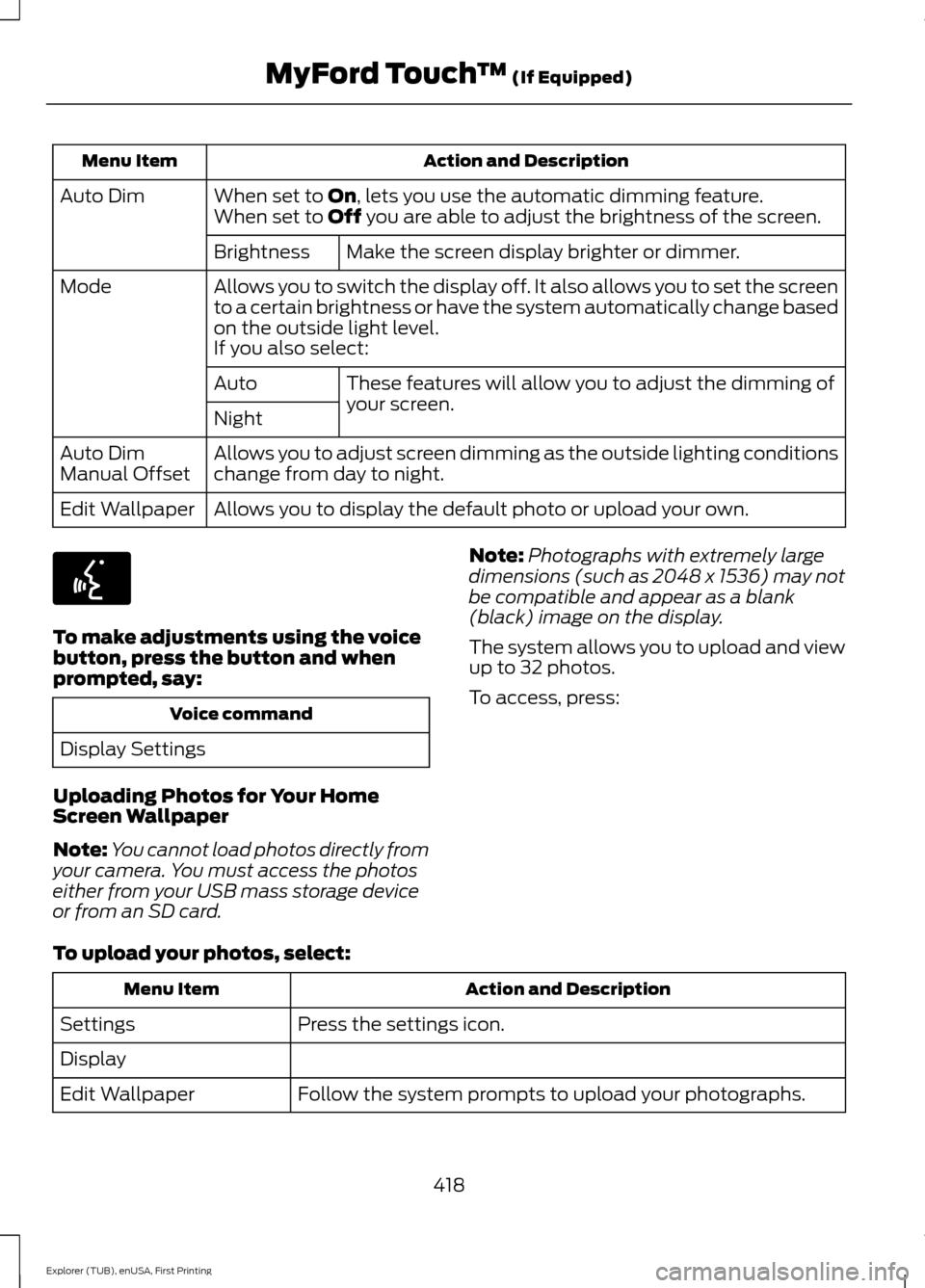
Action and Description
Menu Item
When set to On, lets you use the automatic dimming feature.
Auto Dim
When set to Off you are able to adjust the brightness of the screen.
Make the screen display brighter or dimmer.
Brightness
Allows you to switch the display off. It also allows you to set the screen
to a certain brightness or have the system automatically change based
on the outside light level.
Mode
If you also select:These features will allow you to adjust the dimming of
your screen.
Auto
Night
Allows you to adjust screen dimming as the outside lighting conditions
change from day to night.
Auto Dim
Manual Offset
Allows you to display the default photo or upload your own.
Edit Wallpaper To make adjustments using the voice
button, press the button and when
prompted, say:
Voice command
Display Settings
Uploading Photos for Your Home
Screen Wallpaper
Note: You cannot load photos directly from
your camera. You must access the photos
either from your USB mass storage device
or from an SD card. Note:
Photographs with extremely large
dimensions (such as 2048 x 1536) may not
be compatible and appear as a blank
(black) image on the display.
The system allows you to upload and view
up to 32 photos.
To access, press:
To upload your photos, select: Action and Description
Menu Item
Press the settings icon.
Settings
Display
Follow the system prompts to upload your photographs.
Edit Wallpaper
418
Explorer (TUB), enUSA, First Printing MyFord Touch
™
(If Equipped)E142599
Page 422 of 541
Only the photograph(s), which meets the
following conditions display:
•
Compatible file formats are as follows:
JPG, GIF, PNG, BMP.
• Each file must be 1.5 MB or less.
• Recommended dimensions: 800 x 384.
Sound
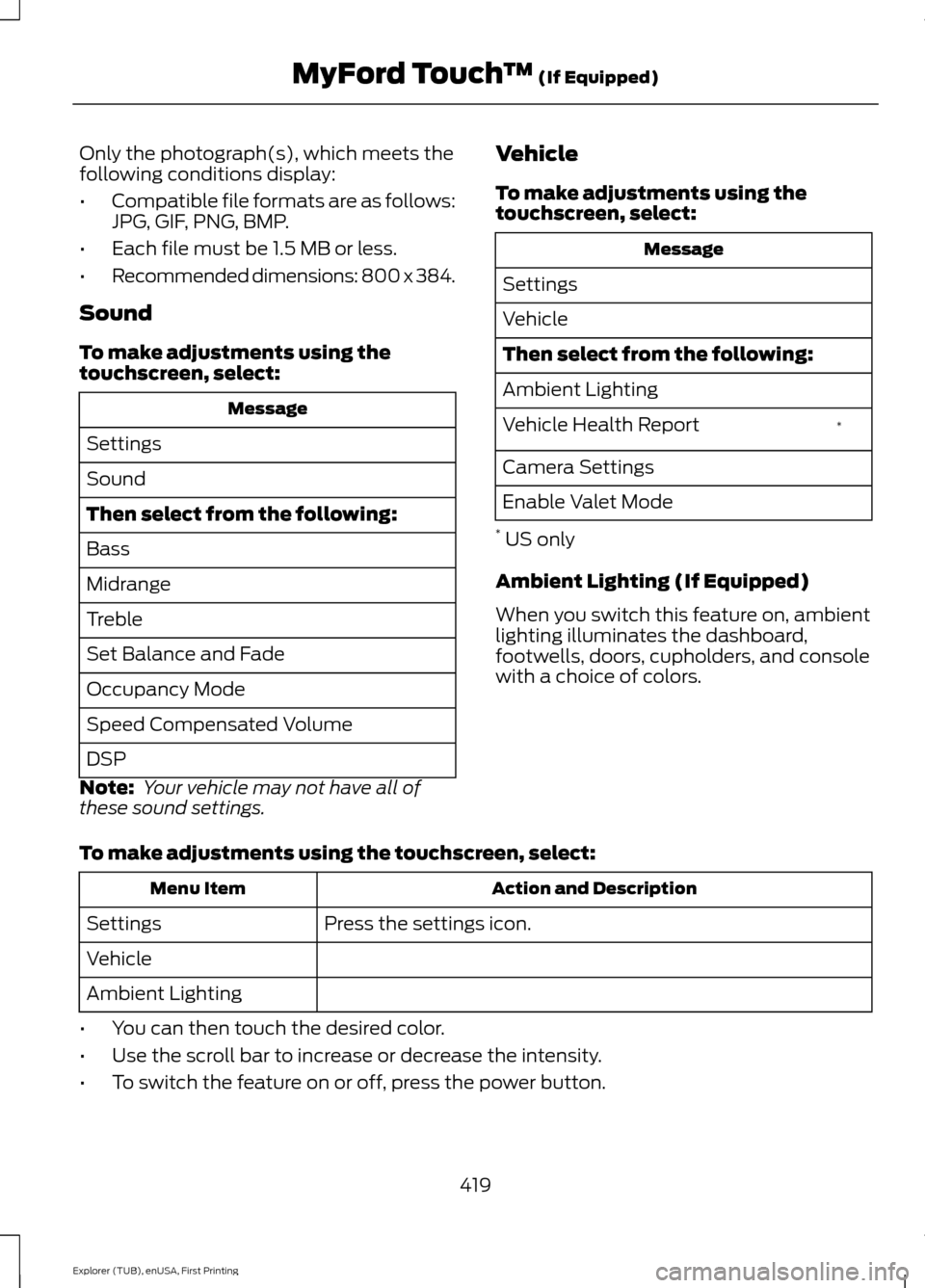
To make adjustments using the
touchscreen, select: Message
Settings
Sound
Then select from the following:
Bass
Midrange
Treble
Set Balance and Fade
Occupancy Mode
Speed Compensated Volume
DSP
Note: Your vehicle may not have all of
these sound settings. Vehicle
To make adjustments using the
touchscreen, select: Message
Settings
Vehicle
Then select from the following:
Ambient Lighting *
Vehicle Health Report
Camera Settings
Enable Valet Mode
* US only
Ambient Lighting (If Equipped)
When you switch this feature on, ambient
lighting illuminates the dashboard,
footwells, doors, cupholders, and console
with a choice of colors.
To make adjustments using the touchscreen, select: Action and Description
Menu Item
Press the settings icon.
Settings
Vehicle
Ambient Lighting
• You can then touch the desired color.
• Use the scroll bar to increase or decrease the intensity.
• To switch the feature on or off, press the power button.
419
Explorer (TUB), enUSA, First Printing MyFord Touch
™ (If Equipped)
Page 485 of 541

For a complete listing of the
accessories that are available for your
vehicle, please contact your authorized
dealer or visit our online store at:
Web Address
www.Accessories.Ford.com
You can also visit: Web Address
www.Ford.ca
Ford Motor Company will repair or replace
any properly authorized dealer-installed
Ford Original Accessory found to be
defective in factory-supplied materials or
workmanship during the warranty period,
as well as any component damaged by the
defective accessories.
Ford Motor Company will warrant your
Ford Original Accessory through the
warranty that provides the greatest
benefit:
• 24 months, unlimited mileage.
• The remainder of your new vehicle
limited warranty.
Contact an authorized dealer for details
and a copy of the warranty.
Exterior Style
• Bumper protector.
• Hood deflectors.
• Side window deflectors.
• Splash guards.
Interior Style
• Ambient lighting.
• Cargo area protector.
• Floor mats.
• Rear console. Lifestyle
•
Ash cup or smoker's package.
• Camping tent*.
• Car covers*.
• Cargo organization and management.
• Rear seat entertainment*.
• Roof crossbars.
• Roof racks and carriers*.
• Trailer hitch balls.
• Trailer hitch drawbars and towing
accessories.
Peace of Mind
• Cargo shade.
• Keyless entry keypad.
• Parking sensors*.
• Remote start.
• Vehicle security systems.
• Wheel locks.
*Ford Licensed Accessories. The accessory
manufacturer designs, develops and
therefore warrants Ford Licensed
Accessories, and does not design or test
these accessories to Ford Motor Company
engineering requirements. Contact an
authorized Ford dealer for the
manufacturer ’s limited warranty details,
and request a copy of the Ford Licensed
Accessories product limited warranty from
the accessory manufacturer.
482
Explorer (TUB), enUSA, First Printing Accessories
Page 535 of 541
Installing Child Seats......................................17
Using Lap and Shoulder Belts.......................... 17
Using Lower Anchors and Tethers for CHildren (LATCH)............................................ 22
Using Tether Straps............................................. 24
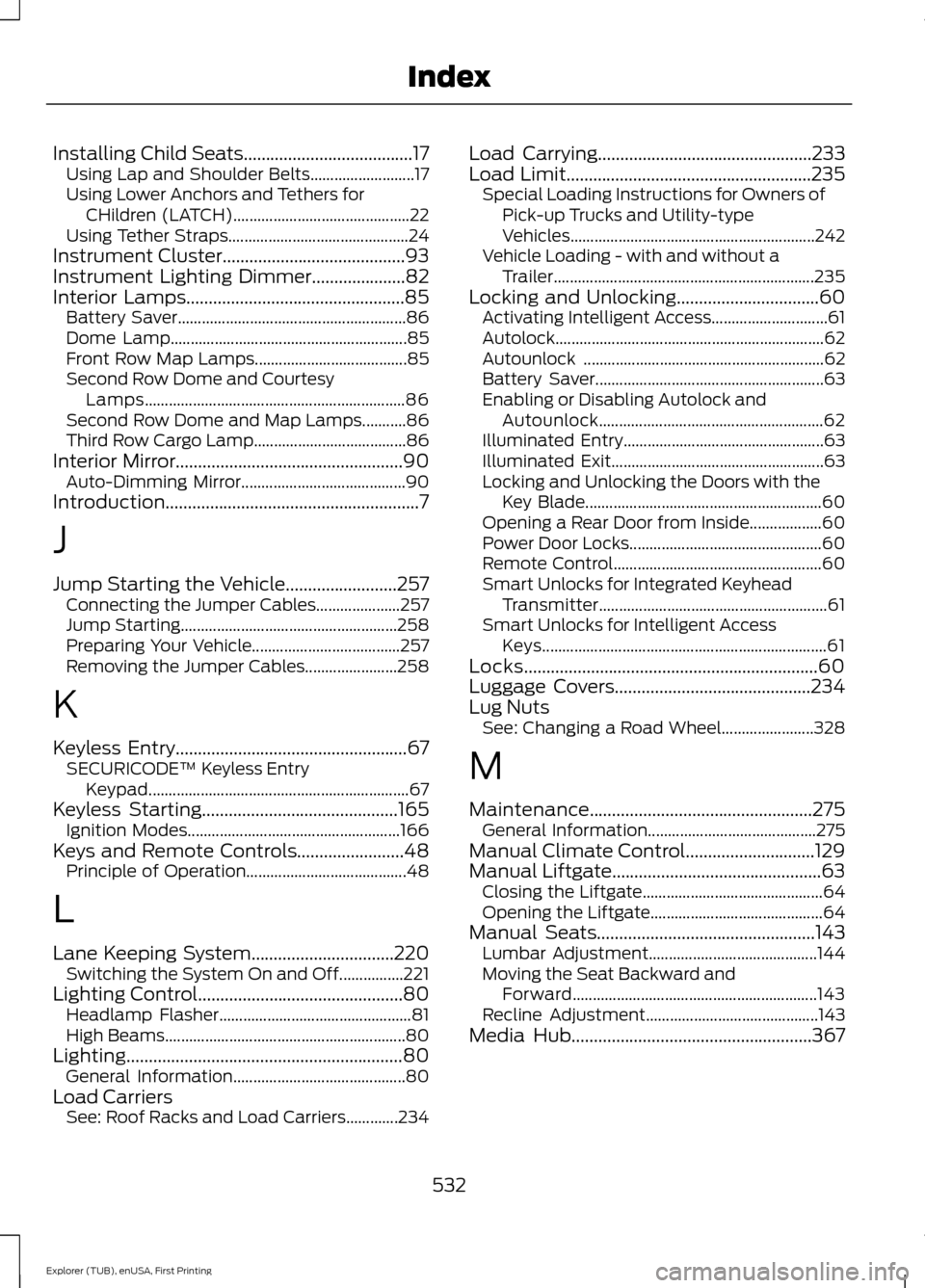
Instrument Cluster
.........................................93
Instrument Lighting Dimmer.....................82
Interior Lamps
.................................................85
Battery Saver......................................................... 86
Dome Lamp........................................................... 85
Front Row Map Lamps...................................... 85
Second Row Dome and Courtesy Lamps................................................................. 86
Second Row Dome and Map Lamps...........86
Third Row Cargo Lamp...................................... 86
Interior Mirror...................................................90 Auto-Dimming Mirror......................................... 90
Introduction.........................................................7
J
Jump Starting the Vehicle.........................257 Connecting the Jumper Cables..................... 257
Jump Starting...................................................... 258
Preparing Your Vehicle..................................... 257
Removing the Jumper Cables....................... 258
K
Keyless Entry
....................................................67
SECURICODE™ Keyless Entry
Keypad................................................................. 67
Keyless Starting............................................165 Ignition Modes..................................................... 166
Keys and Remote Controls
........................48
Principle of Operation........................................ 48
L
Lane Keeping System
................................220
Switching the System On and Off................221
Lighting Control
..............................................80
Headlamp Flasher................................................ 81
High Beams............................................................ 80
Lighting
..............................................................80
General Information........................................... 80
Load Carriers See: Roof Racks and Load Carriers.............234 Load Carrying
................................................233
Load Limit.......................................................235 Special Loading Instructions for Owners of
Pick-up Trucks and Utility-type
Vehicles............................................................. 242
Vehicle Loading - with and without a Trailer................................................................. 235
Locking and Unlocking................................60 Activating Intelligent Access............................. 61
Autolock................................................................... 62
Autounlock ............................................................ 62
Battery Saver......................................................... 63
Enabling or Disabling Autolock and Autounlock........................................................ 62
Illuminated Entry.................................................. 63
Illuminated Exit..................................................... 63
Locking and Unlocking the Doors with the Key Blade........................................................... 60
Opening a Rear Door from Inside.................. 60
Power Door Locks................................................ 60
Remote Control.................................................... 60
Smart Unlocks for Integrated Keyhead Transmitter......................................................... 61
Smart Unlocks for Intelligent Access Keys....................................................................... 61
Locks..................................................................60
Luggage Covers
............................................234
Lug Nuts See: Changing a Road Wheel....................... 328
M
Maintenance..................................................275 General Information.......................................... 275
Manual Climate Control
.............................129
Manual Liftgate...............................................63 Closing the Liftgate............................................. 64
Opening the Liftgate........................................... 64
Manual Seats
.................................................143
Lumbar Adjustment.......................................... 144
Moving the Seat Backward and Forward............................................................. 143
Recline Adjustment........................................... 143
Media Hub
......................................................367
532
Explorer (TUB), enUSA, First Printing Index