Page 91 of 421

WARNING LAMPS AND
INDICATORS
The following warning lamps and
indicators alert you to a vehicle condition
that may become serious. Some lamps
illuminate when you start your vehicle to
make sure they work. If any lamps remain
on after starting your vehicle, refer to the
respective system warning lamp for further
information.
Note:
Some warning indicators appear in
the information display and function the
same as a warning lamp but do not display
when you start your vehicle.
Anti-Lock Braking System If it illuminates when you are
driving, this indicates a
malfunction. You continue to
have the normal braking system (without
ABS) unless the brake warning lamp is also
illuminated. Have the system checked by
an authorized dealer.
Battery If it illuminates while driving, it
indicates a malfunction. Switch
off all unnecessary electrical
equipment and have the system checked
by an authorized dealer.
Brake System It illuminates when you engage
the parking brake and the
ignition is on.
If it illuminates when you are driving, check
that the parking brake is not engaged. If
the parking brake is not engaged, this
indicates low brake fluid level or a brake
system malfunction. Have the system
checked immediately by an authorized
dealer. WARNING
Driving a vehicle with the brake
system warning light on is dangerous.
A significant decrease in braking
performance may occur. It will take you
longer to stop the vehicle. Have the vehicle
checked by your authorized dealer as soon
as possible. Driving extended distances
with the parking brake engaged can cause
brake failure and the risk of personal injury. Cruise Control
It illuminates when you switch
this feature on. See Using
Cruise Control (page 186).
Direction Indicator Illuminates when you switch the
left or right direction indicator or
the hazard warning flasher on. If
the indicators stay on or flash faster, check
for a burned out bulb.
Door Ajar Displays when the ignition is on
and any door is not completely
closed.
Engine Coolant Temperature Illuminates when the engine
coolant temperature is high.
Stop the vehicle as soon as
possible, switch off the engine and let cool.
See
Engine Coolant Check (page 247).
88
Expedition (TB7) Canada/United States of America, enUSA, First Printing Instrument Cluster E144522 E71340
Page 97 of 421

Driver Assist
Normal history used or Towing history used
DTE Calculation
Engine Hours XXXXX
Engine Hours
Engine Idle Hours XXXXX
Engine Idle Hours
Settings
In this mode, you can configure different
driver setting choices. Note:
Some items are optional and may
not appear. Settings
Trlr Sway Control - check enabled or uncheck disabled
Vehicle
Elect., Surge, None
Trlr Brake Mode
Elect. over HydraulicSelect time interval
Autolamp Delay
Lighting
Autolock - check enabled or uncheck
disabled
Locks
Autounlock - check enabled or uncheck
disabledAll Doors or Driver
Remote Unlock
Set to XXX% - Hold OK to Reset
Oil Life Reset
Enable or Disable switch
Power Liftgate
Courtesy Wipe
Wipers
Hold OK to create MyKey
Create MyKey
MyKey*
Always On or User Selectable
911 Assist
Always On or User Selectable
Do Not Disturb
Always On or User Selectable
Traction Control
65 MPH (105 km/h), 70 MPH (110 km/h),
75 MPH (120 km/h), 80 MPH (130 km/h)
or Off
Max Speed
45 mph (72 km/h), 55 mph (89 km/h), 65
mph (105 km/h) or Off
Speed Minder
94
Expedition (TB7) Canada/United States of America, enUSA, First Printing Information Displays
Page 100 of 421
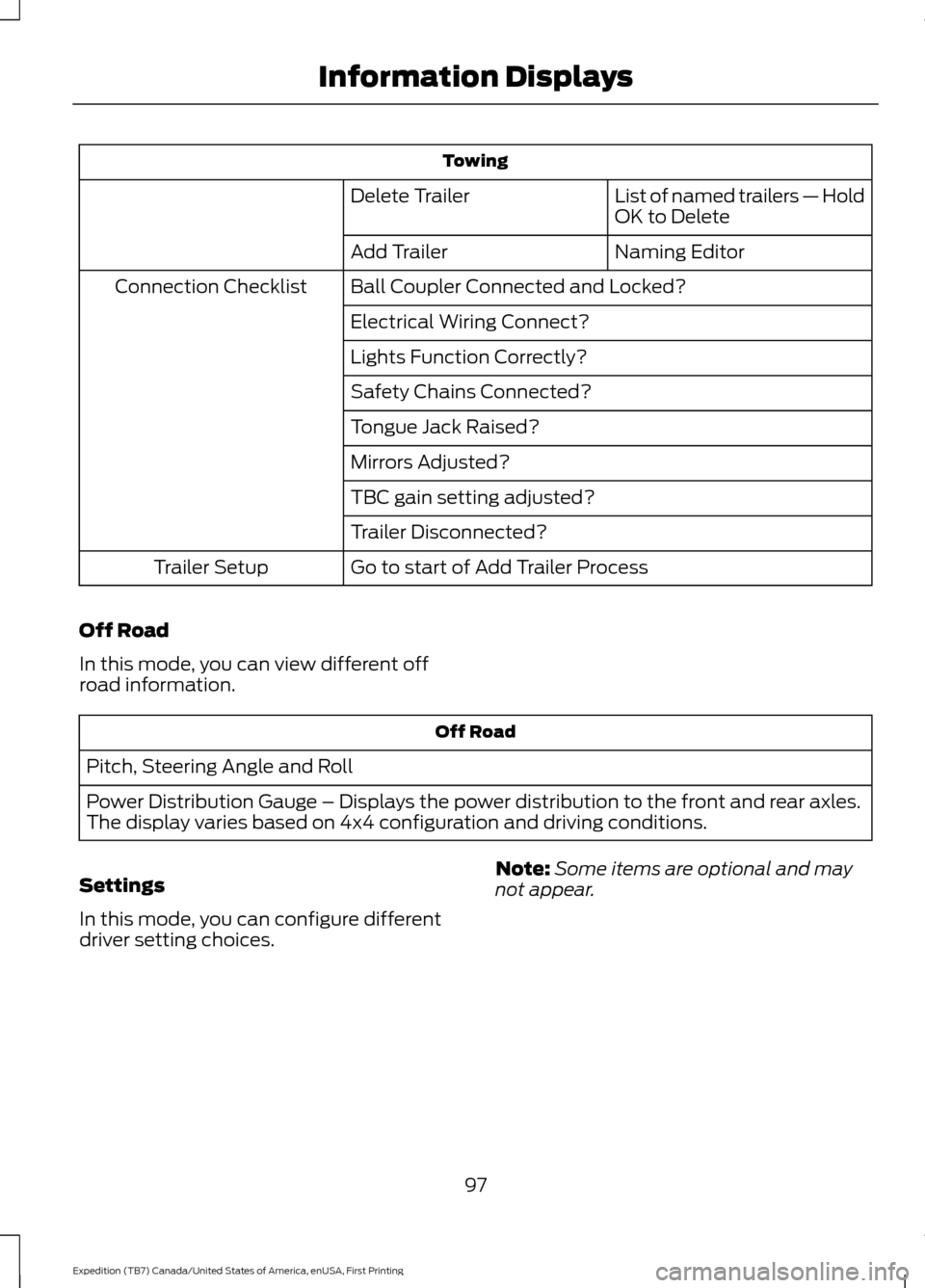
Towing
List of named trailers — Hold
OK to Delete
Delete Trailer
Naming Editor
Add Trailer
Ball Coupler Connected and Locked?
Connection Checklist
Electrical Wiring Connect?
Lights Function Correctly?
Safety Chains Connected?
Tongue Jack Raised?
Mirrors Adjusted?
TBC gain setting adjusted?
Trailer Disconnected?
Go to start of Add Trailer Process
Trailer Setup
Off Road
In this mode, you can view different off
road information. Off Road
Pitch, Steering Angle and Roll
Power Distribution Gauge – Displays the power distribution to the front and rear axles.
The display varies based on 4x4 configuration and driving conditions.
Settings
In this mode, you can configure different
driver setting choices. Note:
Some items are optional and may
not appear.
97
Expedition (TB7) Canada/United States of America, enUSA, First Printing Information Displays
Page 101 of 421
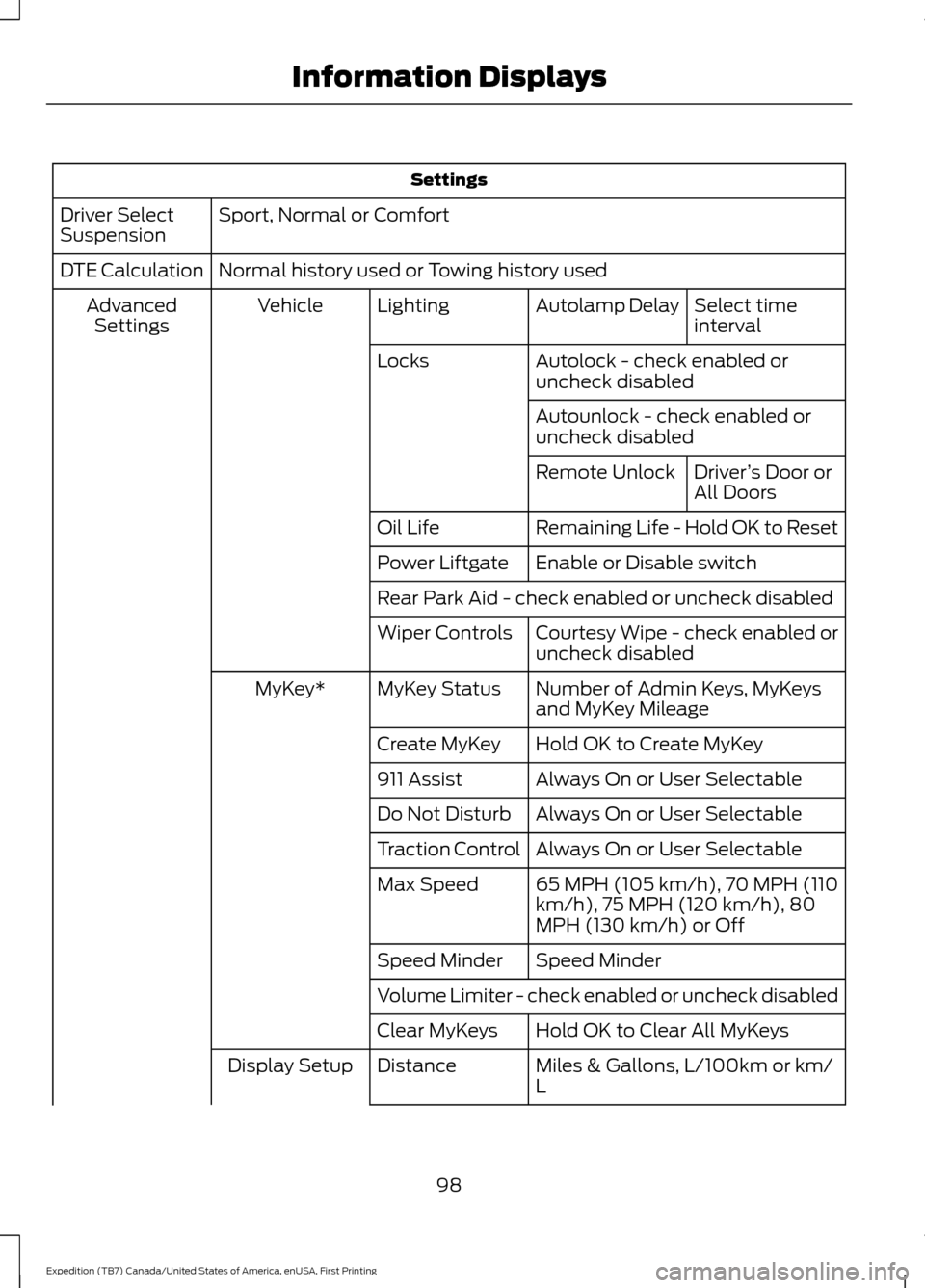
Settings
Sport, Normal or Comfort
Driver Select
Suspension
Normal history used or Towing history used
DTE Calculation
Select time
interval
Autolamp Delay
Lighting
Vehicle
Advanced
Settings
Autolock - check enabled or
uncheck disabled
Locks
Autounlock - check enabled or
uncheck disabledDriver’s Door or
All Doors
Remote Unlock
Remaining Life - Hold OK to Reset
Oil Life
Enable or Disable switch
Power Liftgate
Rear Park Aid - check enabled or uncheck disabled
Courtesy Wipe - check enabled or
uncheck disabled
Wiper Controls
Number of Admin Keys, MyKeys
and MyKey Mileage
MyKey Status
MyKey*
Hold OK to Create MyKey
Create MyKey
Always On or User Selectable
911 Assist
Always On or User Selectable
Do Not Disturb
Always On or User Selectable
Traction Control
65 MPH (105 km/h), 70 MPH (110
km/h), 75 MPH (120 km/h), 80
MPH (130 km/h) or Off
Max Speed
Speed Minder
Speed Minder
Volume Limiter - check enabled or uncheck disabled
Hold OK to Clear All MyKeys
Clear MyKeys
Miles & Gallons, L/100km or km/
L
Distance
Display Setup
98
Expedition (TB7) Canada/United States of America, enUSA, First Printing Information Displays
Page 104 of 421
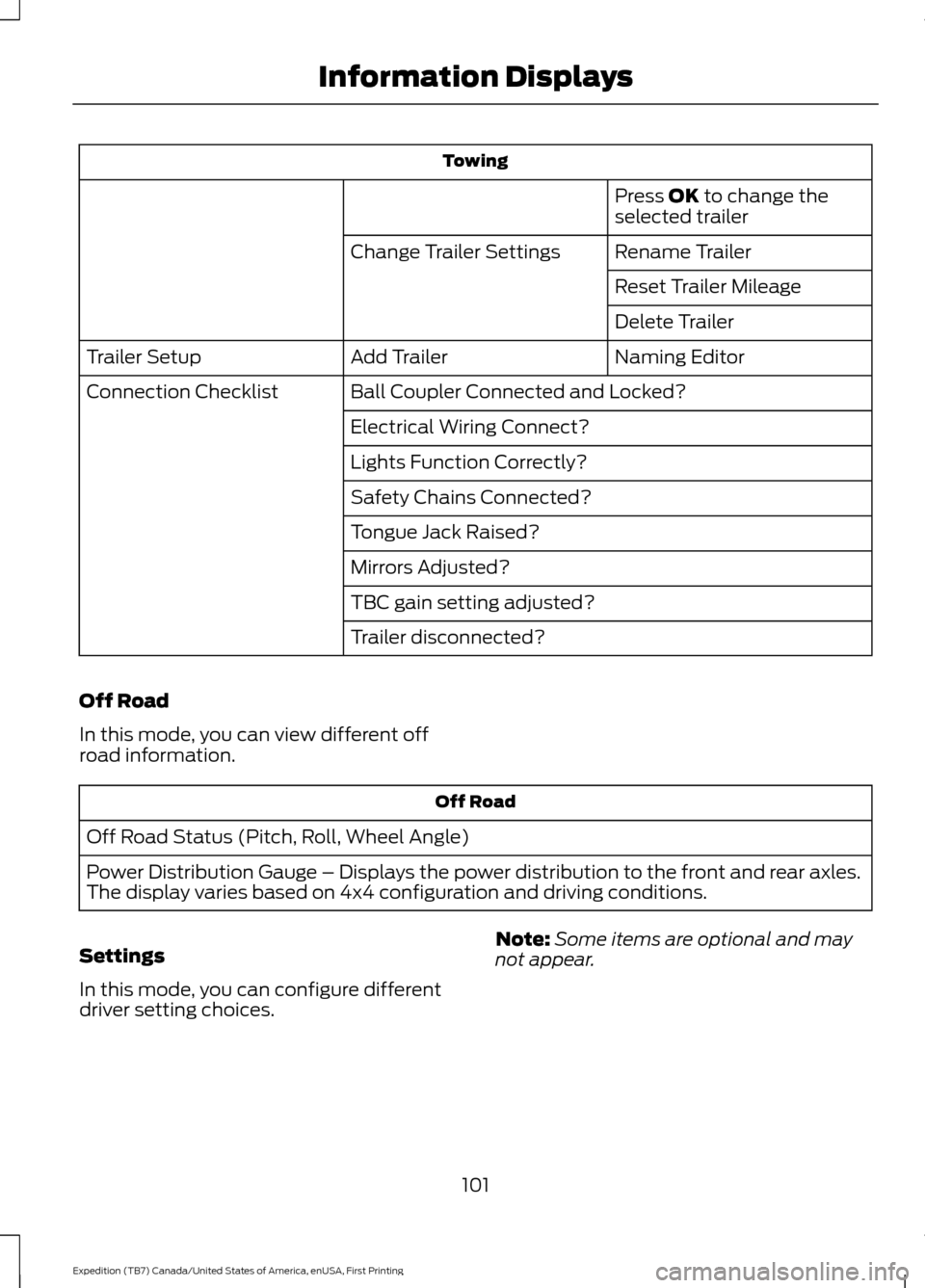
Towing
Press OK to change the
selected trailer
Rename Trailer
Change Trailer Settings
Reset Trailer Mileage
Delete Trailer
Naming Editor
Add Trailer
Trailer Setup
Ball Coupler Connected and Locked?
Connection Checklist
Electrical Wiring Connect?
Lights Function Correctly?
Safety Chains Connected?
Tongue Jack Raised?
Mirrors Adjusted?
TBC gain setting adjusted?
Trailer disconnected?
Off Road
In this mode, you can view different off
road information. Off Road
Off Road Status (Pitch, Roll, Wheel Angle)
Power Distribution Gauge – Displays the power distribution to the front and rear axles.
The display varies based on 4x4 configuration and driving conditions.
Settings
In this mode, you can configure different
driver setting choices. Note:
Some items are optional and may
not appear.
101
Expedition (TB7) Canada/United States of America, enUSA, First Printing Information Displays
Page 105 of 421
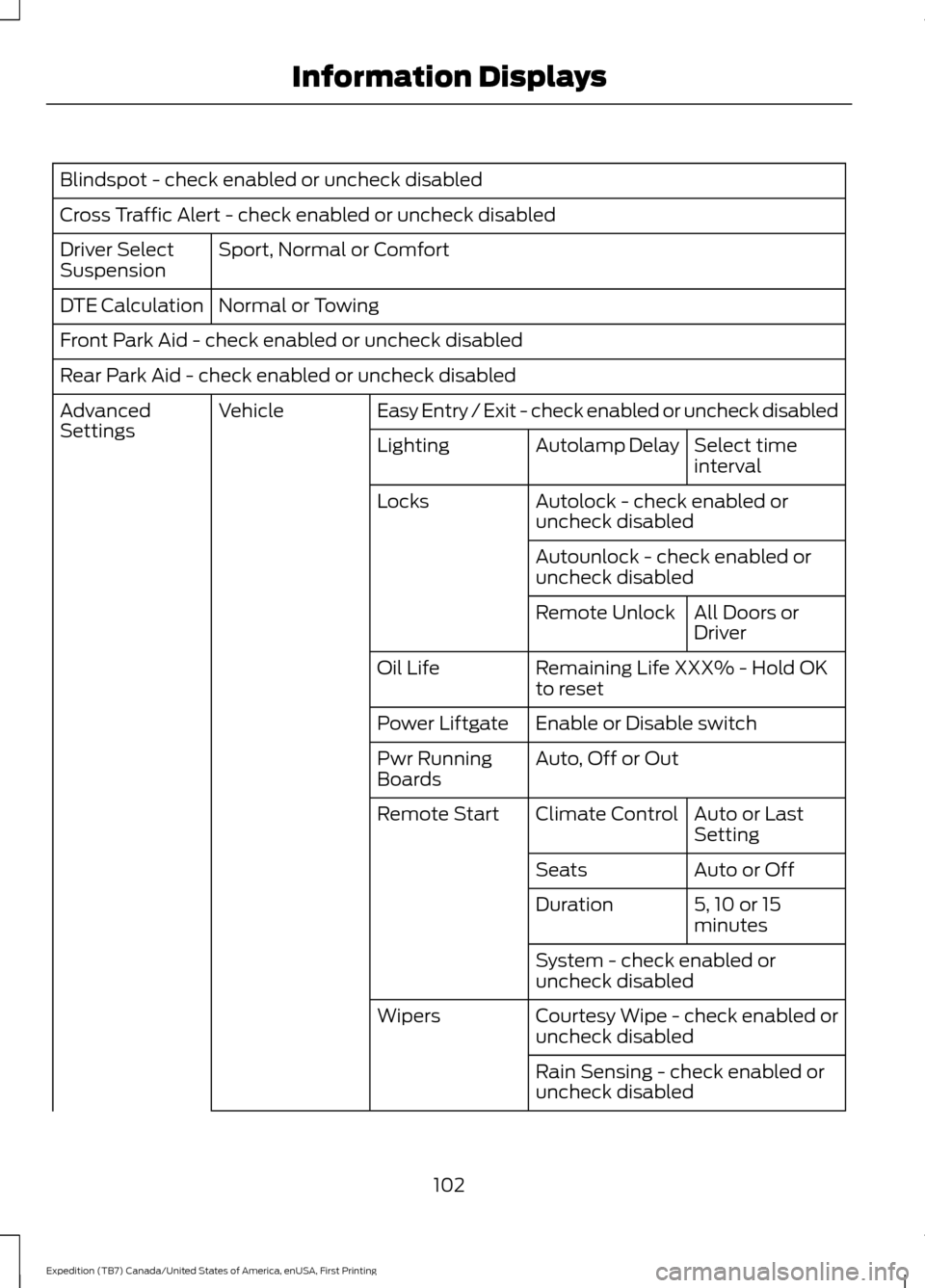
Blindspot - check enabled or uncheck disabled
Cross Traffic Alert - check enabled or uncheck disabled
Sport, Normal or Comfort
Driver Select
Suspension
Normal or Towing
DTE Calculation
Front Park Aid - check enabled or uncheck disabled
Rear Park Aid - check enabled or uncheck disabled
Easy Entry / Exit - check enabled or uncheck disabled
Vehicle
Advanced
Settings
Select time
interval
Autolamp Delay
Lighting
Autolock - check enabled or
uncheck disabled
Locks
Autounlock - check enabled or
uncheck disabledAll Doors or
Driver
Remote Unlock
Remaining Life XXX% - Hold OK
to reset
Oil Life
Enable or Disable switch
Power Liftgate
Auto, Off or Out
Pwr Running
Boards
Auto or Last
Setting
Climate Control
Remote Start
Auto or Off
Seats
5, 10 or 15
minutes
Duration
System - check enabled or
uncheck disabled
Courtesy Wipe - check enabled or
uncheck disabled
Wipers
Rain Sensing - check enabled or
uncheck disabled
102
Expedition (TB7) Canada/United States of America, enUSA, First Printing Information Displays
Page 108 of 421

Blind Spot Information System Messages
Action
Message
Displays when the blind spot information system/cross trafficalert system sensors are blocked. Driver can typically clean the sensor to resolve.
Blindspot Not Available
Sensor Blocked See Manual
Displays when a fault with the blind spot information systemoccurs. Contact an authorized dealer as soon as possible.
Blindspot System Fault
Displays when the blind spot information system/cross trafficalert system sensors are blocked. Driver can typically clean the sensor to resolve.
Cross Traffic Not Avail-
able Sensor Blocked See Manual
Displays when a fault with the cross traffic alert system
occurs. Contact an authorized dealer as soon as possible.
Cross Traffic System
Fault
Displays when the blind spot information system with crosstraffic alert (CTA) system is operating and senses a vehicle.
Cross Traffic Vehicle
Coming From X
Brake System Messages Action
Message
Indicates the brake fluid level is low and the brake systemshould be inspected immediately.
Brake Fluid Level Low
Displays when the brake system needs servicing. If the warning
stays on or continues to come on, contact an authorized dealeras soon as possible.
Check Brake System
Displays when the parking brake is set, the vehicle is in readyto drive and the vehicle is driven more than 3 mph (5 km/h). If the warning stays on after you release the parking brake, contact an authorized dealer as soon as possible.
Park Brake Engaged
Door Messages Action
Message
Displays when the door listed is not completely closed.
X Door Ajar
Displays when the liftgate or liftglass is not completely closed.
Liftgate Ajar
Displays the factory keypad code after the keypad resets.
Factory Keypad Code
XXXXX
105
Expedition (TB7) Canada/United States of America, enUSA, First Printing Information Displays
Page 123 of 421
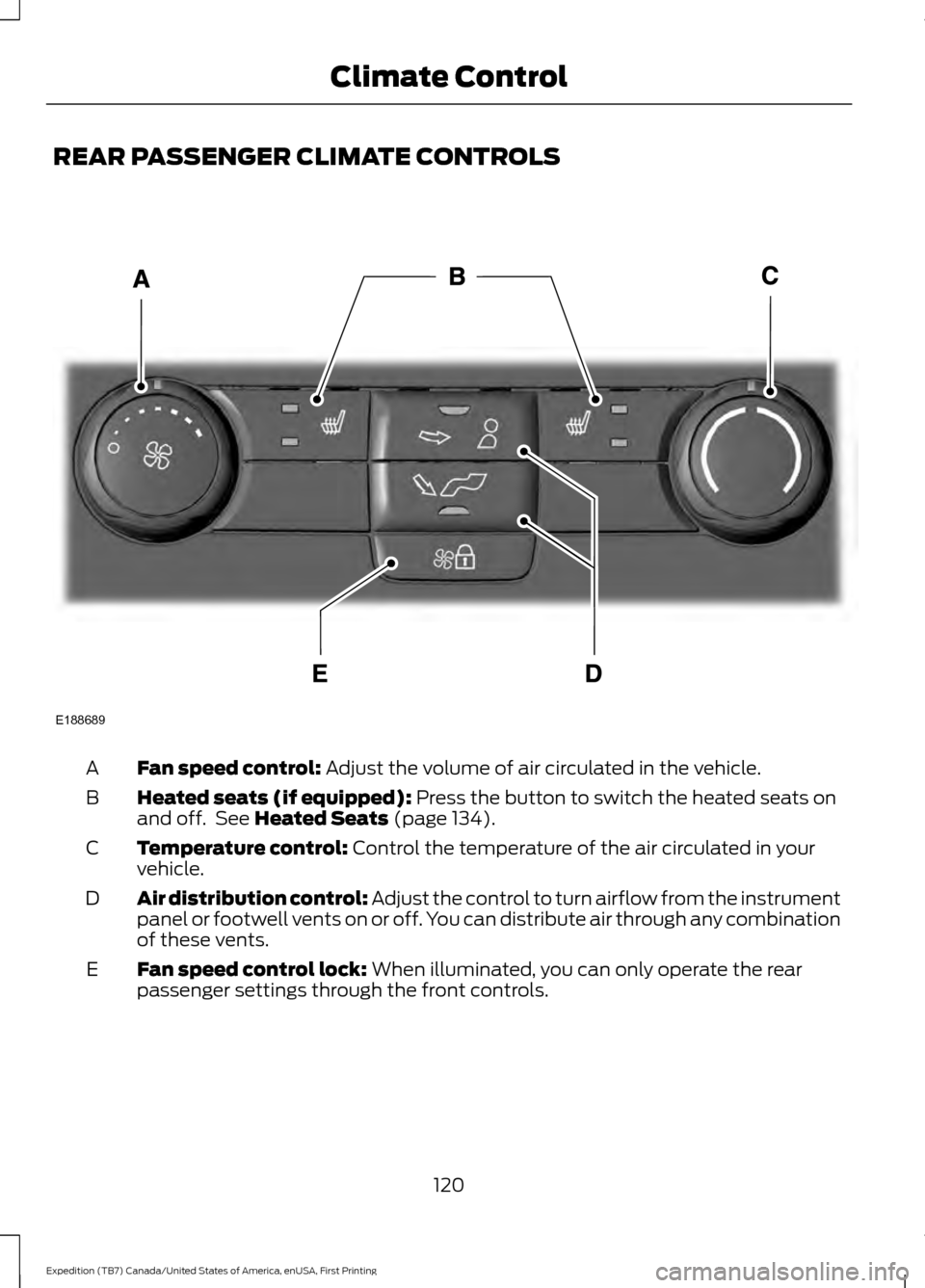
REAR PASSENGER CLIMATE CONTROLS
Fan speed control: Adjust the volume of air circulated in the vehicle.
A
Heated seats (if equipped):
Press the button to switch the heated seats on
and off. See Heated Seats (page 134).
B
Temperature control:
Control the temperature of the air circulated in your
vehicle.
C
Air distribution control:
Adjust the control to turn airflow from the instrument
panel or footwell vents on or off. You can distribute air through any combination
of these vents.
D
Fan speed control lock:
When illuminated, you can only operate the rear
passenger settings through the front controls.
E
120
Expedition (TB7) Canada/United States of America, enUSA, First Printing Climate ControlE188689