2016 FORD EXPEDITION door lock
[x] Cancel search: door lockPage 83 of 421
POWER WINDOWS
WARNINGS
Do not leave children unattended in
your vehicle and do not let them play
with the power windows. They may
seriously injure themselves. When closing the power windows,
you should verify they are free of
obstructions and make sure that
children and pets are not in the proximity
of the window openings. Note:
You may hear a pulsing noise when
just one of the windows is open. Lower the
opposite window slightly to reduce this
noise.
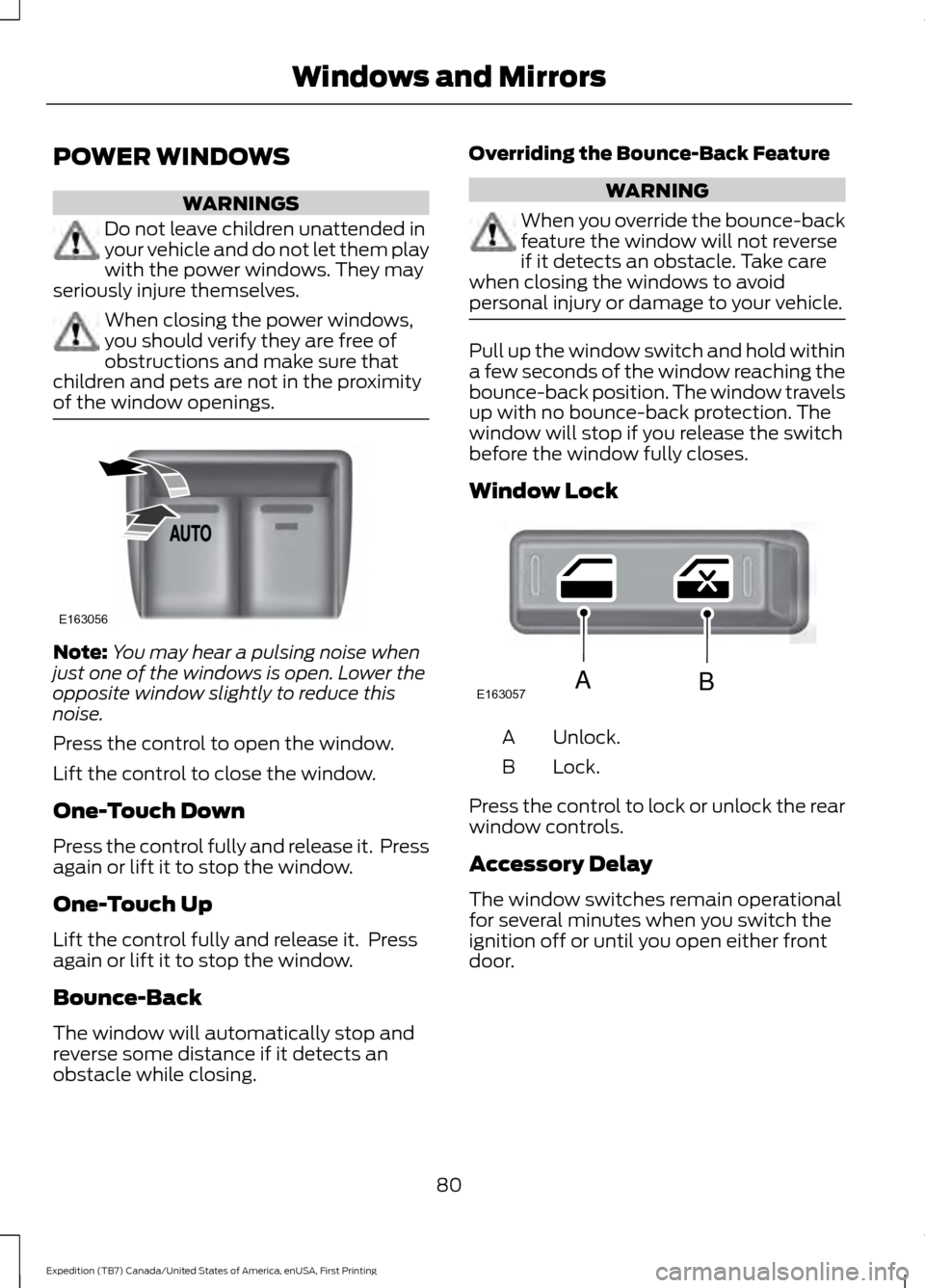
Press the control to open the window.
Lift the control to close the window.
One-Touch Down
Press the control fully and release it. Press
again or lift it to stop the window.
One-Touch Up
Lift the control fully and release it. Press
again or lift it to stop the window.
Bounce-Back
The window will automatically stop and
reverse some distance if it detects an
obstacle while closing. Overriding the Bounce-Back Feature WARNING
When you override the bounce-back
feature the window will not reverse
if it detects an obstacle. Take care
when closing the windows to avoid
personal injury or damage to your vehicle. Pull up the window switch and hold within
a few seconds of the window reaching the
bounce-back position. The window travels
up with no bounce-back protection. The
window will stop if you release the switch
before the window fully closes.
Window Lock
Unlock.
A
Lock.
B
Press the control to lock or unlock the rear
window controls.
Accessory Delay
The window switches remain operational
for several minutes when you switch the
ignition off or until you open either front
door.
80
Expedition (TB7) Canada/United States of America, enUSA, First Printing Windows and MirrorsE163056 E163057AB
Page 84 of 421
EXTERIOR MIRRORS
Power Exterior Mirrors
WARNING
Do not adjust the mirrors when your
vehicle is moving.
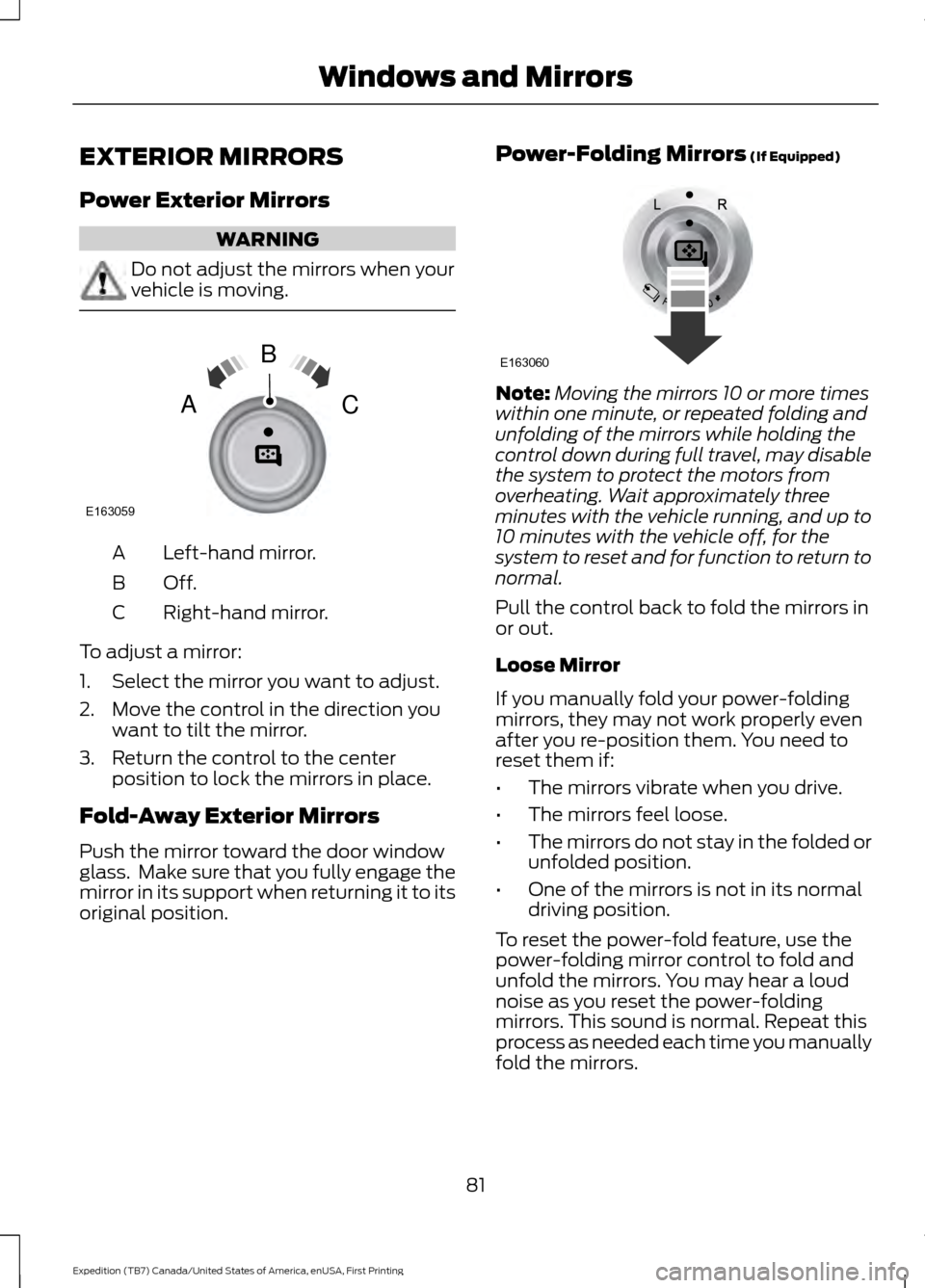
Left-hand mirror.
A
Off.B
Right-hand mirror.
C
To adjust a mirror:
1. Select the mirror you want to adjust.
2. Move the control in the direction you want to tilt the mirror.
3. Return the control to the center position to lock the mirrors in place.
Fold-Away Exterior Mirrors
Push the mirror toward the door window
glass. Make sure that you fully engage the
mirror in its support when returning it to its
original position. Power-Folding Mirrors (If Equipped) Note:
Moving the mirrors 10 or more times
within one minute, or repeated folding and
unfolding of the mirrors while holding the
control down during full travel, may disable
the system to protect the motors from
overheating. Wait approximately three
minutes with the vehicle running, and up to
10 minutes with the vehicle off, for the
system to reset and for function to return to
normal.
Pull the control back to fold the mirrors in
or out.
Loose Mirror
If you manually fold your power-folding
mirrors, they may not work properly even
after you re-position them. You need to
reset them if:
• The mirrors vibrate when you drive.
• The mirrors feel loose.
• The mirrors do not stay in the folded or
unfolded position.
• One of the mirrors is not in its normal
driving position.
To reset the power-fold feature, use the
power-folding mirror control to fold and
unfold the mirrors. You may hear a loud
noise as you reset the power-folding
mirrors. This sound is normal. Repeat this
process as needed each time you manually
fold the mirrors.
81
Expedition (TB7) Canada/United States of America, enUSA, First Printing Windows and MirrorsE163059
B
AC E163060
Page 85 of 421

Heated Exterior Mirrors
See Heated Windows and Mirrors (page
121).
Memory Mirrors
(If Equipped)
You can save and recall the mirror
positions through the memory function.
See
Memory Function (page 126).
Auto-Dimming Feature
The driver exterior mirror automatically
dims with the auto-dimming interior mirror.
Signal Indicator Mirrors
(If Equipped)
The outer portion of the appropriate mirror
housing blinks when you switch on the
direction indicator.
Blind Spot Monitor
(If Equipped)
See
Blind Spot Information System
(page 188).
INTERIOR MIRROR WARNING
Do not adjust the mirror when your
vehicle is moving.
Note:
Do not clean the housing or glass of
any mirror with harsh abrasives, fuel or other
petroleum or ammonia-based cleaning
products.
You can adjust the interior mirror to your
preference. Some mirrors also have a
second pivot point. This lets you move the
mirror head up or down and from side to
side. Auto-Dimming Mirror
Note:
Do not block the sensors on the front
and back of the mirror. Mirror performance
may be affected. A rear center passenger or
raised rear center head restraint may also
block light from reaching the sensor.
The mirror will dim automatically to reduce
glare when bright lights are detected from
behind your vehicle. It will automatically
return to normal reflection when you select
reverse gear to make sure you have a clear
view when backing up.
CHILDMINDER MIRROR
On double bin overhead consoles, the
conversation mirror allows the driver to
view the rear seating area. WARNING
Do not use the childminder mirror to
view rearward traffic, do not allow
rear passengers to distract you from
the driving task, and make sure the rear
view mirror has a clear view of rearward
traffic. Failure to do so could increase the
risk of a crash from an unseen vehicle,
which may result in serious injury. Press the release area on the rear edge of
the bin door to open the childminder mirror.
The door will open to full open position.
82
Expedition (TB7) Canada/United States of America, enUSA, First Printing Windows and MirrorsE205354
Page 91 of 421

WARNING LAMPS AND
INDICATORS
The following warning lamps and
indicators alert you to a vehicle condition
that may become serious. Some lamps
illuminate when you start your vehicle to
make sure they work. If any lamps remain
on after starting your vehicle, refer to the
respective system warning lamp for further
information.
Note:
Some warning indicators appear in
the information display and function the
same as a warning lamp but do not display
when you start your vehicle.
Anti-Lock Braking System If it illuminates when you are
driving, this indicates a
malfunction. You continue to
have the normal braking system (without
ABS) unless the brake warning lamp is also
illuminated. Have the system checked by
an authorized dealer.
Battery If it illuminates while driving, it
indicates a malfunction. Switch
off all unnecessary electrical
equipment and have the system checked
by an authorized dealer.
Brake System It illuminates when you engage
the parking brake and the
ignition is on.
If it illuminates when you are driving, check
that the parking brake is not engaged. If
the parking brake is not engaged, this
indicates low brake fluid level or a brake
system malfunction. Have the system
checked immediately by an authorized
dealer. WARNING
Driving a vehicle with the brake
system warning light on is dangerous.
A significant decrease in braking
performance may occur. It will take you
longer to stop the vehicle. Have the vehicle
checked by your authorized dealer as soon
as possible. Driving extended distances
with the parking brake engaged can cause
brake failure and the risk of personal injury. Cruise Control
It illuminates when you switch
this feature on. See Using
Cruise Control (page 186).
Direction Indicator Illuminates when you switch the
left or right direction indicator or
the hazard warning flasher on. If
the indicators stay on or flash faster, check
for a burned out bulb.
Door Ajar Displays when the ignition is on
and any door is not completely
closed.
Engine Coolant Temperature Illuminates when the engine
coolant temperature is high.
Stop the vehicle as soon as
possible, switch off the engine and let cool.
See
Engine Coolant Check (page 247).
88
Expedition (TB7) Canada/United States of America, enUSA, First Printing Instrument Cluster E144522 E71340
Page 97 of 421

Driver Assist
Normal history used or Towing history used
DTE Calculation
Engine Hours XXXXX
Engine Hours
Engine Idle Hours XXXXX
Engine Idle Hours
Settings
In this mode, you can configure different
driver setting choices. Note:
Some items are optional and may
not appear. Settings
Trlr Sway Control - check enabled or uncheck disabled
Vehicle
Elect., Surge, None
Trlr Brake Mode
Elect. over HydraulicSelect time interval
Autolamp Delay
Lighting
Autolock - check enabled or uncheck
disabled
Locks
Autounlock - check enabled or uncheck
disabledAll Doors or Driver
Remote Unlock
Set to XXX% - Hold OK to Reset
Oil Life Reset
Enable or Disable switch
Power Liftgate
Courtesy Wipe
Wipers
Hold OK to create MyKey
Create MyKey
MyKey*
Always On or User Selectable
911 Assist
Always On or User Selectable
Do Not Disturb
Always On or User Selectable
Traction Control
65 MPH (105 km/h), 70 MPH (110 km/h),
75 MPH (120 km/h), 80 MPH (130 km/h)
or Off
Max Speed
45 mph (72 km/h), 55 mph (89 km/h), 65
mph (105 km/h) or Off
Speed Minder
94
Expedition (TB7) Canada/United States of America, enUSA, First Printing Information Displays
Page 101 of 421
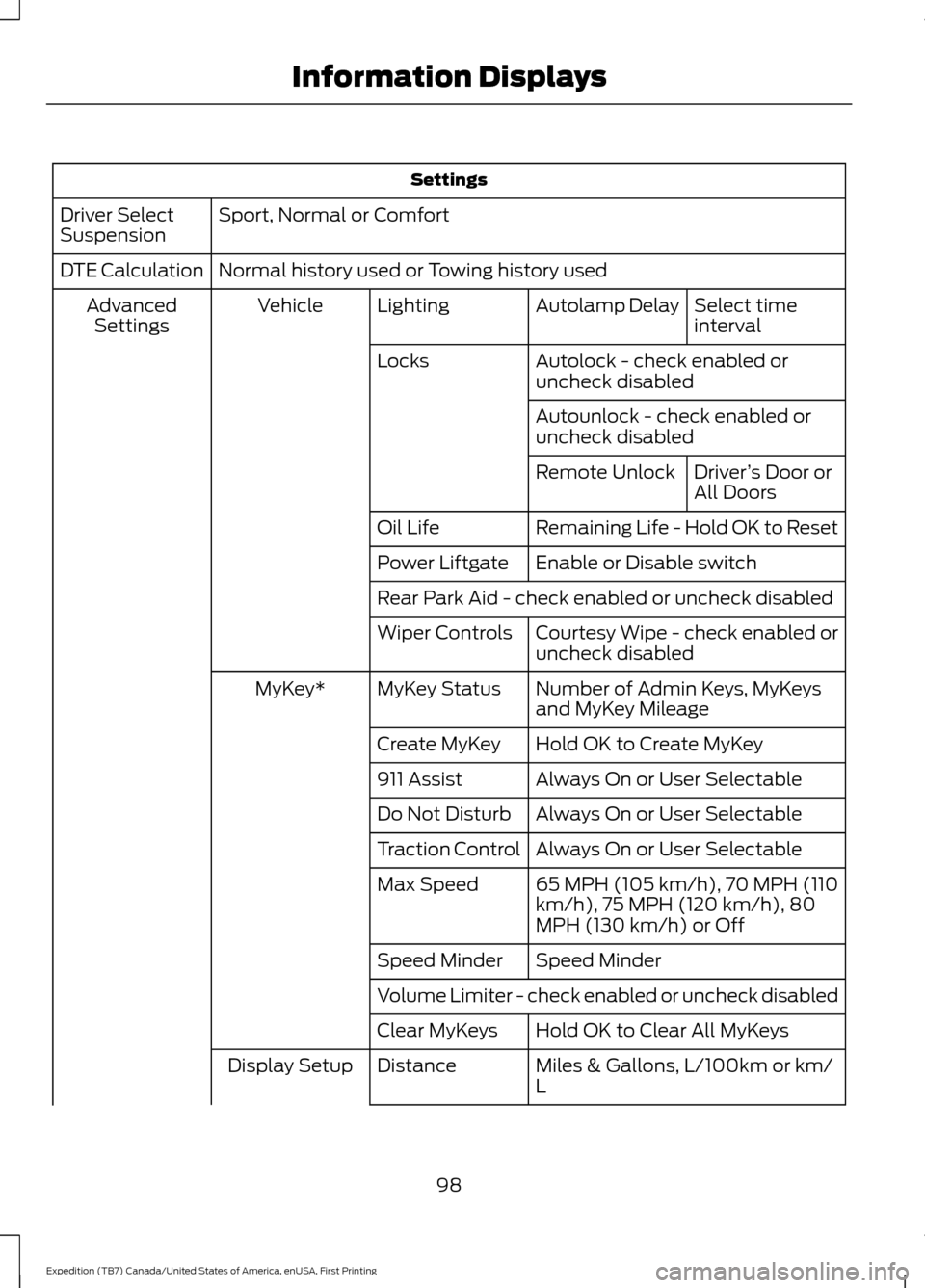
Settings
Sport, Normal or Comfort
Driver Select
Suspension
Normal history used or Towing history used
DTE Calculation
Select time
interval
Autolamp Delay
Lighting
Vehicle
Advanced
Settings
Autolock - check enabled or
uncheck disabled
Locks
Autounlock - check enabled or
uncheck disabledDriver’s Door or
All Doors
Remote Unlock
Remaining Life - Hold OK to Reset
Oil Life
Enable or Disable switch
Power Liftgate
Rear Park Aid - check enabled or uncheck disabled
Courtesy Wipe - check enabled or
uncheck disabled
Wiper Controls
Number of Admin Keys, MyKeys
and MyKey Mileage
MyKey Status
MyKey*
Hold OK to Create MyKey
Create MyKey
Always On or User Selectable
911 Assist
Always On or User Selectable
Do Not Disturb
Always On or User Selectable
Traction Control
65 MPH (105 km/h), 70 MPH (110
km/h), 75 MPH (120 km/h), 80
MPH (130 km/h) or Off
Max Speed
Speed Minder
Speed Minder
Volume Limiter - check enabled or uncheck disabled
Hold OK to Clear All MyKeys
Clear MyKeys
Miles & Gallons, L/100km or km/
L
Distance
Display Setup
98
Expedition (TB7) Canada/United States of America, enUSA, First Printing Information Displays
Page 105 of 421
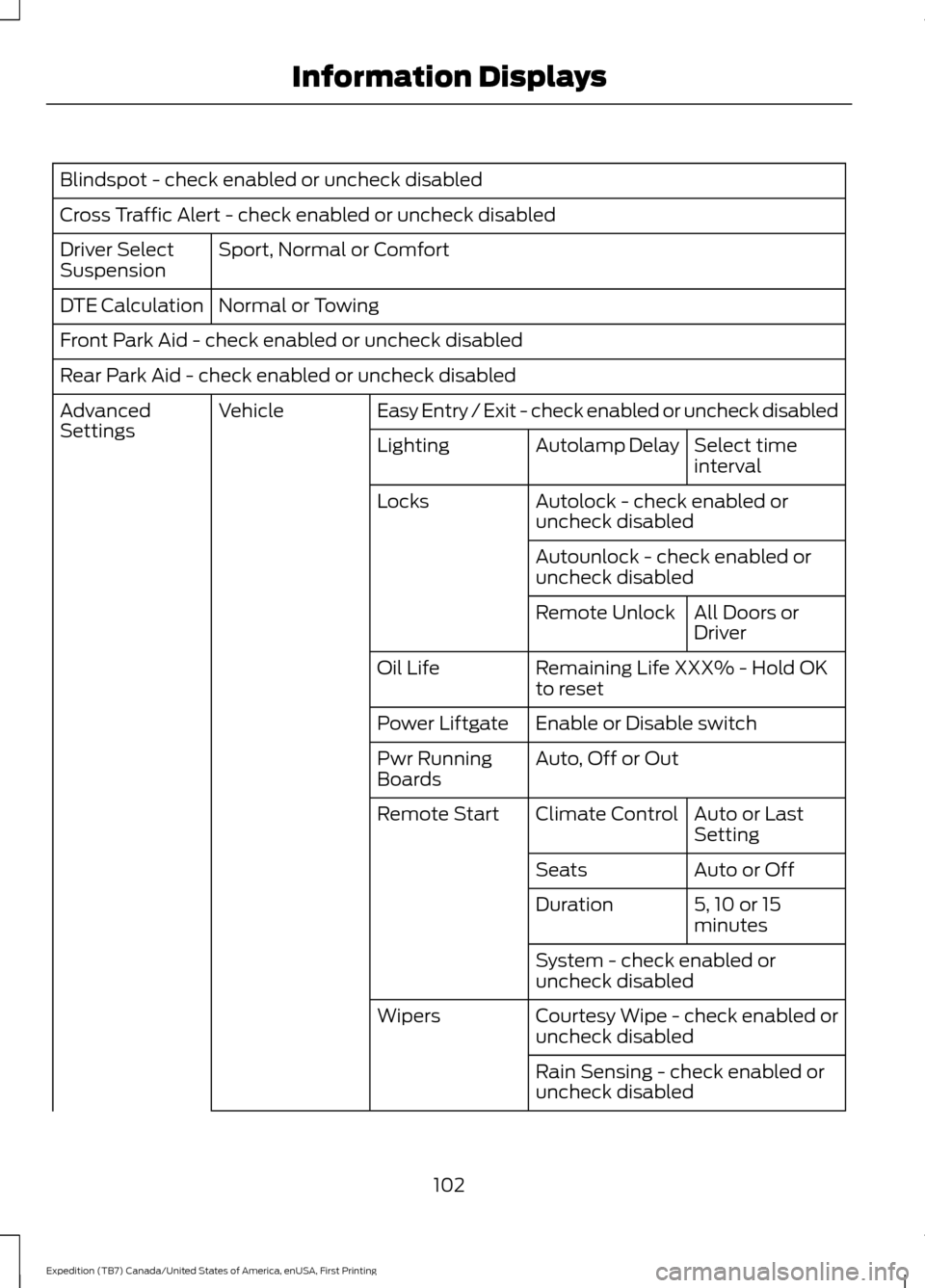
Blindspot - check enabled or uncheck disabled
Cross Traffic Alert - check enabled or uncheck disabled
Sport, Normal or Comfort
Driver Select
Suspension
Normal or Towing
DTE Calculation
Front Park Aid - check enabled or uncheck disabled
Rear Park Aid - check enabled or uncheck disabled
Easy Entry / Exit - check enabled or uncheck disabled
Vehicle
Advanced
Settings
Select time
interval
Autolamp Delay
Lighting
Autolock - check enabled or
uncheck disabled
Locks
Autounlock - check enabled or
uncheck disabledAll Doors or
Driver
Remote Unlock
Remaining Life XXX% - Hold OK
to reset
Oil Life
Enable or Disable switch
Power Liftgate
Auto, Off or Out
Pwr Running
Boards
Auto or Last
Setting
Climate Control
Remote Start
Auto or Off
Seats
5, 10 or 15
minutes
Duration
System - check enabled or
uncheck disabled
Courtesy Wipe - check enabled or
uncheck disabled
Wipers
Rain Sensing - check enabled or
uncheck disabled
102
Expedition (TB7) Canada/United States of America, enUSA, First Printing Information Displays
Page 108 of 421

Blind Spot Information System Messages
Action
Message
Displays when the blind spot information system/cross trafficalert system sensors are blocked. Driver can typically clean the sensor to resolve.
Blindspot Not Available
Sensor Blocked See Manual
Displays when a fault with the blind spot information systemoccurs. Contact an authorized dealer as soon as possible.
Blindspot System Fault
Displays when the blind spot information system/cross trafficalert system sensors are blocked. Driver can typically clean the sensor to resolve.
Cross Traffic Not Avail-
able Sensor Blocked See Manual
Displays when a fault with the cross traffic alert system
occurs. Contact an authorized dealer as soon as possible.
Cross Traffic System
Fault
Displays when the blind spot information system with crosstraffic alert (CTA) system is operating and senses a vehicle.
Cross Traffic Vehicle
Coming From X
Brake System Messages Action
Message
Indicates the brake fluid level is low and the brake systemshould be inspected immediately.
Brake Fluid Level Low
Displays when the brake system needs servicing. If the warning
stays on or continues to come on, contact an authorized dealeras soon as possible.
Check Brake System
Displays when the parking brake is set, the vehicle is in readyto drive and the vehicle is driven more than 3 mph (5 km/h). If the warning stays on after you release the parking brake, contact an authorized dealer as soon as possible.
Park Brake Engaged
Door Messages Action
Message
Displays when the door listed is not completely closed.
X Door Ajar
Displays when the liftgate or liftglass is not completely closed.
Liftgate Ajar
Displays the factory keypad code after the keypad resets.
Factory Keypad Code
XXXXX
105
Expedition (TB7) Canada/United States of America, enUSA, First Printing Information Displays