2016 FORD EXPEDITION oil
[x] Cancel search: oilPage 103 of 421

Display Mode
Oil Life
Distance to Empty
Digital Speedometer - Press OK to change the currently units displayed
Trip/Fuel
Use the arrow buttons to choose between
the following trip and fuel options. Note:
Press and hold OK to reset the
currently displayed information. Trip/Fuel
Trip 1 or Trip 2
Fuel Economy
Fuel History
• Fuel Economy - Shows your
instantaneous fuel usage as a bar
graph and average mpg.
• Fuel History - Shows your fuel usage
based on time. The graph updates each
minute with the fuel economy that you
achieved during 30 minutes of driving. Towing
Use the arrow buttons to configure
different towing setting choices. Towing
No trailer connected
Trailer Status
Active trailer name or Default Trailer
Accumulated trailer miles
Trailer brake gain
Trailer Sway Control - check enabled or uncheck disabled
Trailer Options
Elect. Surge, None or Elec.
Over Hydraulic
Trailer Brake Mode
Trailers Created
Change Trailer Selected
Default Trailer
No active trailer
100
Expedition (TB7) Canada/United States of America, enUSA, First Printing Information Displays
Page 105 of 421
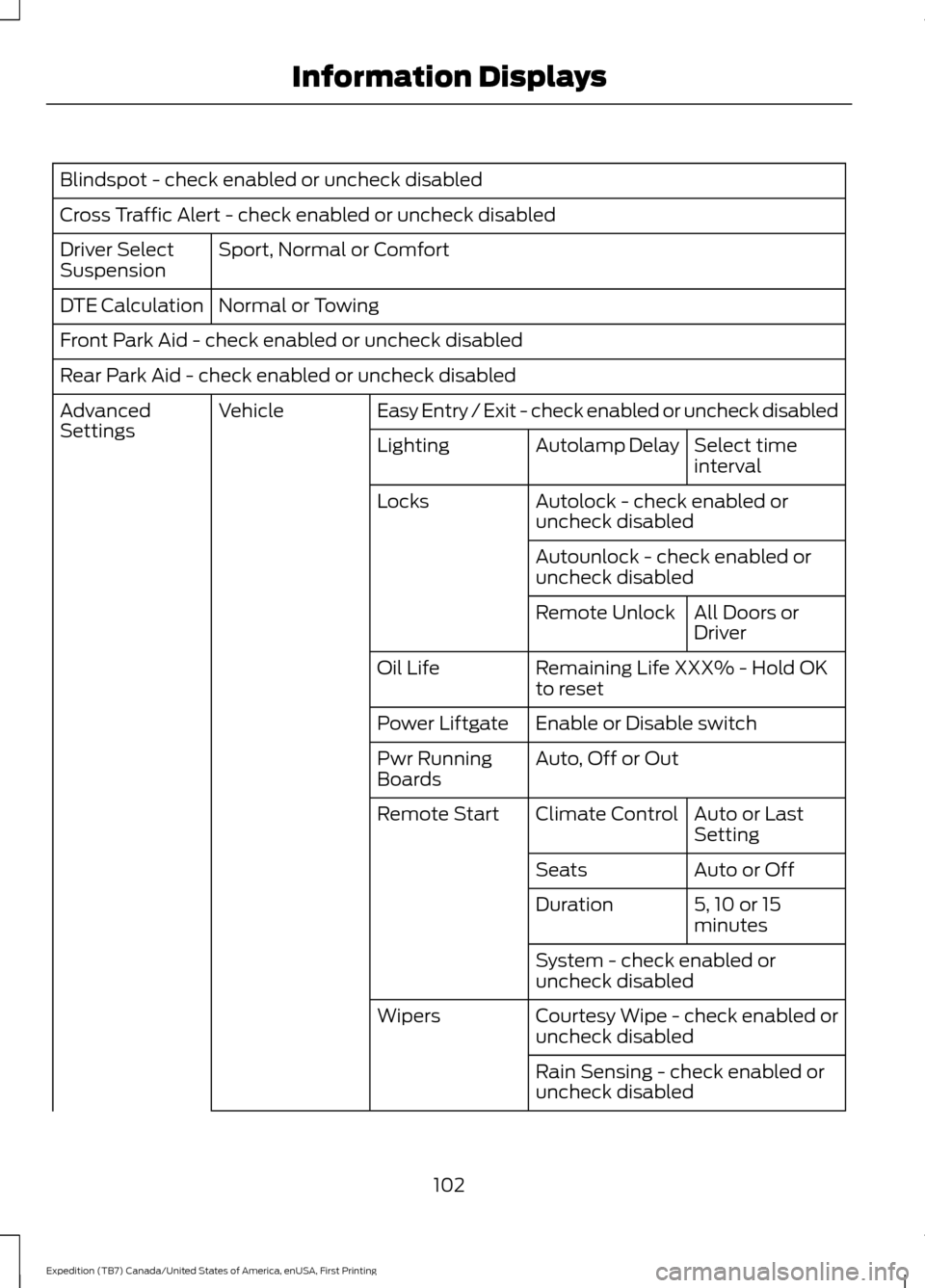
Blindspot - check enabled or uncheck disabled
Cross Traffic Alert - check enabled or uncheck disabled
Sport, Normal or Comfort
Driver Select
Suspension
Normal or Towing
DTE Calculation
Front Park Aid - check enabled or uncheck disabled
Rear Park Aid - check enabled or uncheck disabled
Easy Entry / Exit - check enabled or uncheck disabled
Vehicle
Advanced
Settings
Select time
interval
Autolamp Delay
Lighting
Autolock - check enabled or
uncheck disabled
Locks
Autounlock - check enabled or
uncheck disabledAll Doors or
Driver
Remote Unlock
Remaining Life XXX% - Hold OK
to reset
Oil Life
Enable or Disable switch
Power Liftgate
Auto, Off or Out
Pwr Running
Boards
Auto or Last
Setting
Climate Control
Remote Start
Auto or Off
Seats
5, 10 or 15
minutes
Duration
System - check enabled or
uncheck disabled
Courtesy Wipe - check enabled or
uncheck disabled
Wipers
Rain Sensing - check enabled or
uncheck disabled
102
Expedition (TB7) Canada/United States of America, enUSA, First Printing Information Displays
Page 110 of 421
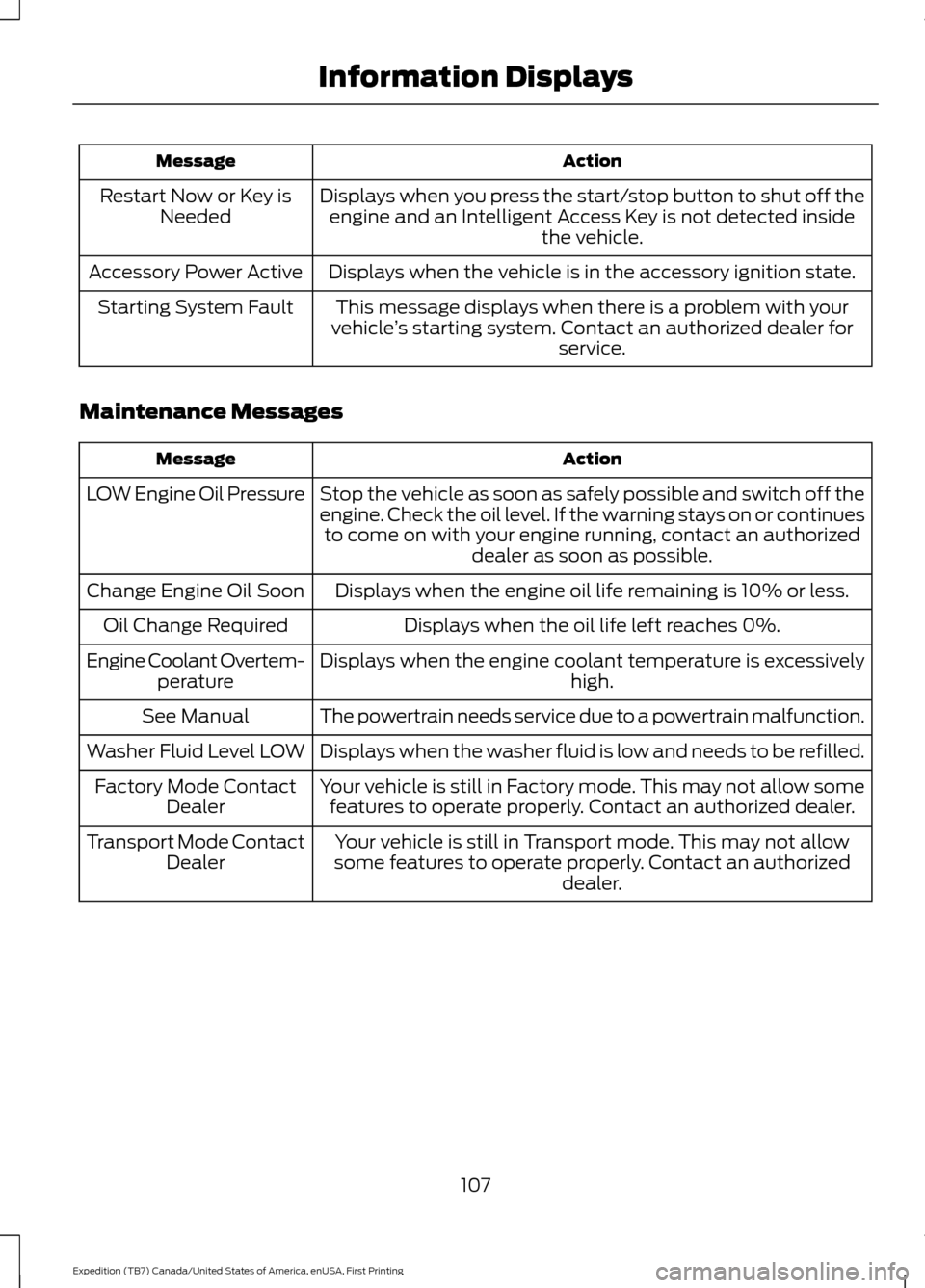
Action
Message
Displays when you press the start/stop button to shut off theengine and an Intelligent Access Key is not detected inside the vehicle.
Restart Now or Key is
Needed
Displays when the vehicle is in the accessory ignition state.
Accessory Power Active
This message displays when there is a problem with your
vehicle ’s starting system. Contact an authorized dealer for
service.
Starting System Fault
Maintenance Messages Action
Message
Stop the vehicle as soon as safely possible and switch off the
engine. Check the oil level. If the warning stays on or continuesto come on with your engine running, contact an authorized dealer as soon as possible.
LOW Engine Oil Pressure
Displays when the engine oil life remaining is 10% or less.
Change Engine Oil Soon
Displays when the oil life left reaches 0%.
Oil Change Required
Displays when the engine coolant temperature is excessively high.
Engine Coolant Overtem-
perature
The powertrain needs service due to a powertrain malfunction.
See Manual
Displays when the washer fluid is low and needs to be refilled.
Washer Fluid Level LOW
Your vehicle is still in Factory mode. This may not allow somefeatures to operate properly. Contact an authorized dealer.
Factory Mode Contact
Dealer
Your vehicle is still in Transport mode. This may not allow
some features to operate properly. Contact an authorized dealer.
Transport Mode Contact
Dealer
107
Expedition (TB7) Canada/United States of America, enUSA, First Printing Information Displays
Page 223 of 421
BREAKING-IN
You need to break in new tires for
approximately 300 miles (480
kilometers). During this time, your vehicle
may exhibit some unusual driving
characteristics.
Avoid driving too fast during the first 1000
miles (1600 kilometers). Vary your speed
frequently and change up through the
gears early. Do not labor the engine.
Do not tow during the first 1000 miles
(1600 kilometers).
REDUCED ENGINE
PERFORMANCE
WARNING
Continued operation will increase the
engine temperature and cause the
engine to shut down completely.
If the engine coolant temperature gauge
needle moves to the upper limit position,
the engine is overheating. See Gauges
(page 85).
You must only drive your vehicle for a short
distance if the engine overheats. The
distance you can travel depends on
ambient temperature, vehicle load and
terrain. The engine will continue to operate
with limited power for a short time.
If the engine temperature continues to rise,
the fuel supply to the engine will reduce.
The air conditioning will switch off and the
engine cooling fan will operate continually.
1. Reduce your speed gradually and stop
your vehicle as soon as it is safe to do
so.
2. Switch the engine off immediately to prevent severe engine damage.
3. Wait for the engine to cool down. 4. Check the coolant level. See
Engine
Coolant Check (page 247).
5. Have your vehicle checked by an authorized dealer as soon as possible.
ECONOMICAL DRIVING
Fuel economy is affected by several things
such as how you drive, the conditions you
drive under and how you maintain your
vehicle.
There are some things to keep in mind that
may improve your fuel economy:
• Accelerate and slow down in a smooth,
moderate fashion.
• Drive at steady speeds.
• Anticipate stops; slowing down may
eliminate the need to stop.
• Combine errands and minimize
stop-and-go driving(When running
errands, go to the furthest destination
first and then work your way back
home).
• Close the windows for high-speed
driving.
• Drive at reasonable speeds.
• Keep the tires properly inflated and use
only the recommended size.
• Use the recommended engine oil.
• Perform all regularly scheduled
maintenance.
There are also some things you may want
to avoid doing because they reduce your
fuel economy:
• Avoid sudden or hard accelerations.
• Avoid revving the engine before turning
off the car.
• Avoid long idle periods.
• Do not warm up your vehicle on cold
mornings.
• Reduce the use of air conditioning and
heat.
220
Expedition (TB7) Canada/United States of America, enUSA, First Printing Driving Hints
Page 240 of 421

Protected components
Fuse amp rating
Fuse or relay number
Blower motor run/start.
5A**
57
Not used.
—
58
Heated mirrors.
15A**
59
Not used.
—
60
Not used.
—
61
Not used.
—
62
Electronic fan.
25A*
63
Moonroof.
30A*
64
Not used.
—
65
Auxiliary power point (rear of center
console).
20A*
66
Front row climate controlled seats.
40A*
67
Anti-lock brake system valves.
30A*
68
Anti-lock brake system pump.
60A*
69
Third row power fold seat.
30A*
70
Auxiliary power point/cigar lighter.
20A*
71
Auxiliary power point (right rear quarter
panel).
20A*
72
Rear seat climate module.
20A*
73
Driver power seat.
30A*
74
Vehicle power 1 – powertrain control
module.
25A**
75
Vehicle power 2 – powertrain control
module.
20A**
76
Vehicle power 4 – ignition coils.
20A**
77
Not used.
—
78
Vehicle power 3 – powertrain control
module.
15A**
79
Not used.
—
80
237
Expedition (TB7) Canada/United States of America, enUSA, First Printing Fuses
Page 248 of 421

Engine oil filler cap. See Engine Oil Check (page 245).
C.
Engine oil dipstick. See
Engine Oil Dipstick (page 245).
D.
Brake fluid reservoir. See
Brake Fluid Check (page 251).
E.
Engine coolant reservoir. See
Engine Coolant Check (page 247).
F.
Air filter assembly. See
Changing the Engine Air Filter (page 262).
G.
Power distribution box. See
Fuses (page 234).
H.
ENGINE OIL DIPSTICK MINA
MAX
B
ENGINE OIL CHECK
1. Make sure that your vehicle is on level ground.
2. Switch the engine off and wait 15 minutes for the oil to drain into the oil
pan.
3. Set the parking brake and ensure the gearshift is in park (P).
4. Open the hood. Protect yourself from engine heat.
5. Locate and carefully remove the engine
oil level dipstick.
See Under Hood
Overview (page 244). 6. Wipe the dipstick clean. Insert the
dipstick fully, then remove it again.
•If the oil level is between the lower
and upper holes, the oil level is
acceptable. DO NOT ADD OIL.
• If the oil level is below the lower
hole, add enough oil to raise the
level within the lower and upper
holes.
• Oil levels above the upper hole may
cause engine damage. Some oil
must be removed from the engine
by an authorized dealer.
7. Put the oil level dipstick back into the oil dipstick tube and ensure it is fully
seated.
Adding Engine Oil
Note: Do not remove the filler cap when
the engine is running.
Note: Do not remove the engine oil level
dipstick when the engine is running.
Note: Do not add oil further than the MAX
mark. Oil levels above the MAX mark may
cause engine damage.
245
Expedition (TB7) Canada/United States of America, enUSA, First Printing MaintenanceE161560
AB
Page 249 of 421

Only use oils certified for gasoline engines
by the American Petroleum Institute (API).
An oil with this trademark symbol
conforms to the current engine and
emission system protection standards and
fuel economy requirements of the
International Lubricants Specification
Advisory Council (ILSAC), comprised of
U.S. and Japanese automobile
manufacturers.
1. Check the engine oil level.
2. If the engine oil level is not within the
normal range, add engine oil that
meets Ford specifications. See
Capacities and Specifications (page
303
).
3. Remove the engine oil filler cap and use a funnel to pour the engine oil into
the opening.
4. Wipe off any spilled oil.
5. Recheck the engine oil level. Make sure
the oil level is not above the normal
operating range on the engine oil level
dipstick.
6. Install the engine oil level dipstick and ensure it is fully seated.
7. Fully install the engine oil filler cap by turning the filler cap clockwise until
three clicks are heard or until the cap
is fully seated. OIL CHANGE INDICATOR
RESET
Use the information display controls on
the steering wheel to reset the oil change
indicator.
From the main menu scroll to:
Action and description
Message
Press the right arrow button,
then from this menu scroll
to the following message.
Settings
Press the right arrow button,
then from this menu scroll
to the following message.
Vehicle
Press the right arrow button,
then from this menu scroll
to the following message.
Oil Life
Press and hold the
OK
button until the instrument
cluster displays the
following message.
Hold OK to
Reset
Reset Successful
When the oil change indic-
ator resets the instrument
cluster displays 100%.
Remaining Life
{00}%
If the instrument cluster
displays one of the following
messages, repeat the
process.
Not Reset
Reset Cancelled
246
Expedition (TB7) Canada/United States of America, enUSA, First Printing MaintenanceE142732
Page 269 of 421
•
Never wash or rinse any ignition coil,
spark plug wire or spark plug well, or
the area in and around these locations.
• Cover the battery, power distribution
box, and air filter assembly to prevent
water damage when cleaning the
engine.
CLEANING THE WINDOWS AND
WIPER BLADES
Car wash chemicals and environmental
fallout can result in windshield and wiper
blade contamination. Dirty windshield and
wipers will result in poor windshield wiper
operation. Keep the windshield and wiper
blades clean to maintain windshield wiper
performance.
To clean the windshield and wiper blades:
• Clean the windshield with a
non-abrasive glass cleaner. When
cleaning the interior of the windshield,
avoid getting any glass cleaner on the
instrument panel or door panels. Wipe
any glass cleaner off these surfaces
immediately.
• For windshields contaminated with
tree sap, chemicals, wax or bugs, clean
the entire windshield using steel wool
(no greater than 0000 grade) in a
circular motion and rinse with water.
• Clean the wiper blades with isopropyl
rubbing alcohol or windshield washer
concentrate.
Note: Do not use razor blades or other
sharp objects to clean or remove decals
from the inside of the heated rear window.
The vehicle warranty does not cover
damage caused to the heated rear window
grid lines. CLEANING THE INTERIOR WARNINGS
Do not use cleaning solvents, bleach
or dye on the vehicle
’s safety belts,
as these actions may weaken the
belt webbing. On vehicles equipped with
seat-mounted airbags, do not use
chemical solvents or strong
detergents. Such products could
contaminate the side airbag system and
affect performance of the side airbag in a
collision. For fabric, carpets, cloth seats, safety belts
and seats equipped with side airbags:
•
Remove dust and loose dirt with a
vacuum cleaner.
• Remove light stains and soil with
Motorcraft Professional Strength
Carpet & Upholstery Cleaner.
• If grease or tar is present on the
material, spot-clean the area first with
Motorcraft Spot and Stain Remover. In
Canada, use Motorcraft Multi-Purpose
Cleaner.
• If a ring forms on the fabric after spot
cleaning, clean the entire area
immediately (but do not oversaturate)
or the ring will set.
• Do not use household cleaning
products or glass cleaners, which can
stain and discolor the fabric and affect
the flame retardant abilities of the seat
materials.
266
Expedition (TB7) Canada/United States of America, enUSA, First Printing Vehicle Care