2016 FORD EXPEDITION key battery
[x] Cancel search: key batteryPage 150 of 421
Note:
You must have your intelligent access
key in your vehicle in order to shift the
transmission out of park (P).
1. Fully depress the brake pedal.
2. Press the push button ignition switch.
The system does not function if:
• The passive key frequencies are
jammed.
• The key battery has no charge.
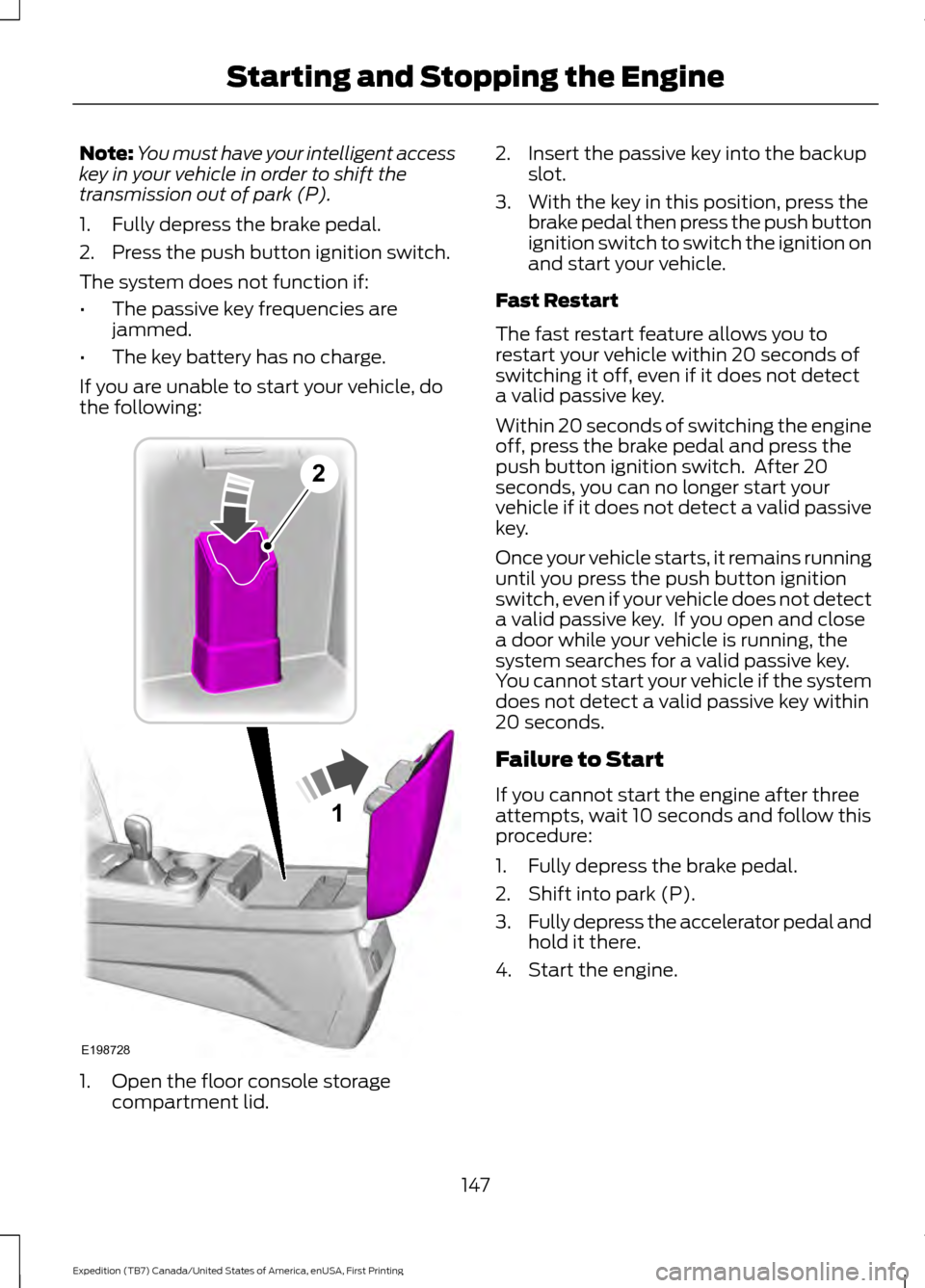
If you are unable to start your vehicle, do
the following: 1. Open the floor console storage
compartment lid. 2. Insert the passive key into the backup
slot.
3. With the key in this position, press the brake pedal then press the push button
ignition switch to switch the ignition on
and start your vehicle.
Fast Restart
The fast restart feature allows you to
restart your vehicle within 20 seconds of
switching it off, even if it does not detect
a valid passive key.
Within 20 seconds of switching the engine
off, press the brake pedal and press the
push button ignition switch. After 20
seconds, you can no longer start your
vehicle if it does not detect a valid passive
key.
Once your vehicle starts, it remains running
until you press the push button ignition
switch, even if your vehicle does not detect
a valid passive key. If you open and close
a door while your vehicle is running, the
system searches for a valid passive key.
You cannot start your vehicle if the system
does not detect a valid passive key within
20 seconds.
Failure to Start
If you cannot start the engine after three
attempts, wait 10 seconds and follow this
procedure:
1. Fully depress the brake pedal.
2. Shift into park (P).
3. Fully depress the accelerator pedal and
hold it there.
4. Start the engine.
147
Expedition (TB7) Canada/United States of America, enUSA, First Printing Starting and Stopping the Engine1
E198728
2
Page 151 of 421
Automatic Engine Shutdown
For vehicles with a keyless ignition, this
feature automatically shuts down the
engine if it has been idling for an extended
period. The ignition also turns off in order
to save battery power. Before your vehicle
shuts down, a message appears in the
information display showing a timer
counting down from 30 seconds. If you do
not intervene within 30 seconds, your
vehicle shuts down. Another message
appears in the information display to
inform you that your vehicle has shut down
to save fuel. Start your vehicle as you
normally do.
Automatic Engine Shutdown Override
Note:
You cannot permanently switch off
the automatic shutdown feature. When you
switch it off temporarily, it turns on at the
next ignition cycle.
You can stop the shutdown, or reset the
timer, at any point before the 30-second
countdown has expired by doing any of the
following:
• You can reset the timer by interacting
with your vehicle, for example pressing
the brake or accelerator pedal.
• You can temporarily switch off the
shutdown feature any time the ignition
is on using the information display. See
Information Displays (page 92). The
feature only remains off for the current
ignition cycle.
• During the 30-second countdown, the
system prompts you to press OK or
RESET to temporarily switch the
feature off for the current ignition cycle
only.
Stopping the Engine When Your
Vehicle is Stationary
Vehicles with an Ignition Key
1. Shift into park (P). 2. Switch the ignition off.
3. Apply the parking brake.
Vehicles with Keyless Start
1. Shift into park (P).
2. Press the push button ignition switch.
3. Apply the parking brake.
Note:
The ignition, all electrical circuits and
all warning lamps and indicators will be
turned off.
Note: If the engine is idling for 30 minutes,
the ignition and engine automatically shut
down.
Stopping the Engine When Your
Vehicle is Moving WARNING
Switching off the engine when the
vehicle is still moving will result in a
loss of brake and steering assistance.
The steering will not lock, but higher effort
will be required. When the ignition is
switched off, some electrical circuits,
including air bags, warning lamps and
indicators may also be off. If the ignition
was turned off accidentally, you can shift
into neutral (N) and re-start the engine. Vehicles with an Ignition Key
1.
Shift into neutral and use the brakes to
bring your vehicle to a safe stop.
2. When your vehicle has stopped, shift into park (P) and switch the ignition
off.
3. Apply the parking brake.
Vehicles with Keyless Start
1. Shift into neutral and use the brakes to
bring your vehicle to a safe stop.
2. When your vehicle has stopped, shift into park (P).
148
Expedition (TB7) Canada/United States of America, enUSA, First Printing Starting and Stopping the Engine
Page 161 of 421
Readiness for
Inspection/Maintenance (I/M)
Testing
Some state/provincial and local
governments may have
Inspection/Maintenance (I/M) programs
to inspect the emission control equipment
on your vehicle. Failure to pass this
inspection could prevent you from getting
a vehicle registration.
If the service engine soon
indicator is on or the bulb does
not work, you may need to have
the vehicle serviced. See On-Board
Diagnostics (OBD-II).
Your vehicle may not pass the I/M test if
the service engine soon indicator is on or
not working properly (bulb is burned out),
or if the OBD-II system has determined
that some of the emission control systems
have not been properly checked. In this
case, your vehicle is not ready for I/M
testing.
If the vehicle ’s engine or transmission has
just been serviced, or the battery has
recently run down or been replaced, the
OBD-II system may indicate that the
vehicle is not ready for I/M testing. To
determine if the vehicle is ready for I/M
testing, turn the ignition key to the on
position for 15 seconds without cranking
the engine. If the service engine soon
indicator blinks eight times, it means that
the vehicle is not ready for I/M testing; if
the service engine soon indicator stays on
solid, it means that the vehicle is ready for
I/M testing.
The OBD-II system monitors the emission
control system during normal driving. A
complete check may take several days. If
the vehicle is not ready for I/M testing, you
may need to perform the following driving
cycle consisting of mixed city and highway
driving: Drive on an expressway or highway for a
steady 15 minutes, followed by 20 minutes
of stop-and-go driving with at least four
30-second idle periods.
Allow the vehicle to sit for at least eight
hours without starting the engine. Then,
start the engine and complete the above
driving cycle. The engine must warm up to
its normal operating temperature. Once
started, do not turn off the engine until the
above driving cycle is complete. If the
vehicle is still not ready for I/M testing, you
will have to repeat the above driving cycle.
158
Expedition (TB7) Canada/United States of America, enUSA, First Printing Fuel and Refueling
Page 221 of 421
Note:
If completed successfully, the
information display shows NEUTRAL TOW
LEAVE IN N or NEUTRAL TOW ENABLED
LEAVE TRANSMISSION IN NEUTRAL.
This indicates that your vehicle is safe to
tow with all wheels on the ground.
Note: If you do not see the message in the
display, you must perform the procedure
again from the beginning.
Note: You may hear an audible noise as the
transfer case shifts into its neutral position.
This is normal.
6. Leave the transmission in position
N
and turn the ignition as far as it will go
toward the off position (it will not turn
fully off when the transmission is in
position
N). If your vehicle has an
ignition key, you must leave the key in
the ignition while towing. To lock and
unlock your vehicle, use the keyless
entry keypad or extra set of keys. If your
vehicle has intelligent access, press the
engine
START/STOP button once
without pressing the brake pedal. You
do not need to leave your keys in the
vehicle. You can lock and unlock your
vehicle as you normally do.
7. Release the brake pedal. WARNINGS
Do not disconnect the battery during
recreational towing. Doing so will
prevent the transfer case from
shifting properly and may cause the vehicle
to roll even if the transmission is in P
(Park). Shifting the transfer case to its
neutral position for recreational
towing may cause the vehicle to be
able to roll even if the transmission is in P
(Park). The driver or others could be
injured. Make sure the foot brake is
depressed and the vehicle is in a secure
and safe position while the transfer case
is being shifted to its neutral position. WARNINGS
Failing to put the transfer case in its
neutral position will damage vehicle
components.
Note:
You can check four-wheel-down
towing status at any time by opening the
driver's door or turning the ignition to the
accessory or on position and verifying the
NEUTRAL TOW ENABLED
message
displays in the cluster.
Exiting Four-wheel-down Towing
To exit four-wheel-down towing and return
the transfer case to its
2H position:
1. With your vehicle still properly secured
to the tow vehicle, put the ignition in
the on position, but do not start the
engine. If your vehicle has an ignition
key, turn the key to on. If your vehicle
has intelligent access, press the engine
START/STOP
button twice without
pressing the brake pedal.
2. Press and hold the brake pedal.
3. Shift the transmission out of N and into
any gear.
4. Release the brake pedal.
Note: If completed successfully, the
instrument cluster displays
4X2, and
NEUTRAL TOW DISABLED.
Note: If the indicator light and message do
not display, you must perform the procedure
again from the beginning.
Note: You may hear an audible noise as the
transfer case shifts out of its neutral
position. This is normal.
Note: If
SHIFT DELAY PULL FORWARD
displays in the instrument cluster, transfer
case gear tooth blockage is present. See the
instructions after this section.
5. Apply the parking brake, and then disconnect the vehicle from the tow
vehicle.
218
Expedition (TB7) Canada/United States of America, enUSA, First Printing Towing
Page 226 of 421
ROADSIDE ASSISTANCE
Vehicles Sold in the United States:
Getting Roadside Assistance
To fully assist you should you have a
vehicle concern, Ford Motor Company
offers a complimentary roadside
assistance program. This program is
separate from the New Vehicle Limited
Warranty. The service is available:
•
24 hours a day, seven days a week.
• For the coverage period listed on the
Roadside Assistance Card included in
your Owner's Manual portfolio.
Roadside Assistance covers:
• A flat tire change with a good spare, if
provided with the vehicle (except
vehicles supplied with a tire inflation
kit).
• Battery jump start.
• Lock-out assistance (key replacement
cost is the customer's responsibility).
• Fuel delivery — independent service
contractors, if not prohibited by state,
local or municipal law, shall deliver up
to 2 gal (7.6 L) of gasoline or 5 gal
(18.9 L) of diesel fuel to a disabled
vehicle. Roadside Assistance limits fuel
delivery service to two no-charge
occurrences within a 12-month period.
• Winch out — available within
100 ft
(30.5 m) of a paved or county
maintained road, no recoveries.
• Towing — independent service
contractors, if not prohibited by state,
local or municipal law, shall tow Ford
eligible vehicles to an authorized dealer
within
35 mi (56 km) of the
disablement location or to the nearest authorized dealer. If a member
requests a tow to an authorized dealer
that is more than
35 mi (56 km) from
the disablement location, the member
shall be responsible for any mileage
costs in excess of
35 mi (56 km).
Roadside Assistance includes up to $200
for a towed trailer if the disabled eligible
vehicle requires service at the nearest
authorized dealer. If the towing vehicle is
operational but the trailer is not, then the
trailer does not qualify for any roadside
services.
Vehicles Sold in the United States:
Using Roadside Assistance
Complete the roadside assistance
identification card and place it in your
wallet for quick reference. This card is in
the owner's information portfolio in the
glove compartment.
United States Ford vehicle customers who
require Roadside Assistance, call
1-800-241-3673.
If you need to arrange roadside assistance
for yourself, Ford Motor Company
reimburses a reasonable amount for
towing to the nearest dealership within
35 mi (56 km)
. To obtain reimbursement
information, United States Ford vehicle
customers call 1-800-241-3673.
Customers need to submit their original
receipts.
Vehicles Sold in Canada: Getting
Roadside Assistance
Canadian customers who require roadside
assistance, call 1-800-665-2006.
Vehicles Sold in Canada: Using
Roadside Assistance
For your convenience, you may complete
the roadside assistance identification card
found in the centerfold of your warranty
guide and retain for future reference.
223
Expedition (TB7) Canada/United States of America, enUSA, First Printing Roadside Emergencies
Page 227 of 421
Canadian roadside coverage and benefits
may differ from the U.S. coverage. If you
require more information, please refer to
the coverage section of your warranty
guide, call us in Canada at
1-800-665-2006, or visit our website at
www.ford.ca.
Sykes Assistance Services Corporation
administers the Roadside Assistance
program. You must receive covered
services in Canada or the continental
United States. Coverage extends to
vehicles that use public, non-seasonal,
annually traveled roadways. Roadside
Assistance coverage does not extend to
vehicles involved in cross-country driving,
logging, autocross and any other form of
off-road use. Well maintained roads and
surfaces help ensure safe travel for the
supplier, and allow their representatives
to perform service as per the standard
operating procedures.
In Remote Locations
If our supplier cannot take your vehicle by
road to the nearest authorized dealership,
transportation by rail or water may be
necessary. The program covers a tow to
the dock or rail terminal and also to the
dealership at the end of the trip.
For rail or water transportation, however,
contact your authorized dealer to confirm
if you are eligible for additional coverage
before you authorize or pay for the service.
Call Ford Roadside Assistance at
1-800-665-2006 for additional
information.
HAZARD WARNING FLASHERS
Note:
If used when the vehicle is not
running, the battery will lose charge. There
may be insufficient power to restart your
vehicle. The hazard warning button is
located on the instrument panel.
Use it when your vehicle is
creating a safety hazard for other
motorists.
• Press the button to turn on the hazard
warning function, and the front and
rear direction indicators will flash.
• Press the button again to turn them
off.
FUEL SHUTOFF WARNING
Failure to inspect and, if necessary,
repair fuel leaks after a collision may
increase the risk of fire and serious
injury. Ford Motor Company recommends
that the fuel system be inspected by an
authorized dealer after any collision. In the event of a moderate to severe
collision, this vehicle includes a fuel pump
shutoff feature that stops the flow of fuel
to the engine. Not every impact will cause
a shutoff.
Should your vehicle shut off after a
collision, you may restart your vehicle. For
vehicles equipped with a key system:
1. Switch off the ignition.
2. Switch on the ignition.
3. Repeat Steps 1 and 2 to re-enable the
fuel pump.
For vehicles equipped with a push button
start system:
1. Press the START/STOP button to
switch off the ignition.
2. Press the brake pedal and press the START/STOP
button to switch on the
ignition.
224
Expedition (TB7) Canada/United States of America, enUSA, First Printing Roadside Emergencies
Page 410 of 421

4
4WD
See: Four-Wheel Drive..................................... 164
A
A/C See: Climate Control.......................................... 113
About This Manual...........................................7
ABS See: Brakes............................................................ 172
ABS driving hints See: Hints on Driving With Anti-Lock
Brakes................................................................. 172
Accessories....................................................368 Exterior Style....................................................... 368
Interior Style........................................................ 368
Lifestyle................................................................. 368
Peace of Mind..................................................... 368
Accessories See: Replacement Parts
Recommendation............................................. 11
Adjusting the Headlamps.........................255 Horizontal Aim Adjustment........................... 256
Vertical Aim Adjustment................................. 255
Adjusting the Pedals......................................71
Adjusting the Steering Wheel - Vehicles With: Column Shift/Manual Adjustable
Steering Column
.........................................66
Adjusting the Steering Wheel - Vehicles With: Floor Shift/Manual Adjustable
Steering Column
.........................................66
Adjusting the Steering Wheel - Vehicles With: Power Adjustable Steering
Column............................................................67
Easy Entry and Exit Feature............................. 68
End of Travel Position........................................ 68
Memory Feature................................................... 68
Airbag Disposal..............................................40
Air Conditioning See: Climate Control.......................................... 113
Air Filter See: Changing the Engine Air Filter.............262
Alarm See: Anti-Theft Alarm........................................ 63
Ambient Lighting............................................79 Anti-Theft Alarm
............................................63
Arming the Alarm................................................. 63
Disarming the Alarm........................................... 63
Appendices.....................................................391
Audible Warnings and Indicators..............91 Direction Indicator Chime.................................. 91
Headlamps On Warning Chime....................... 91
Key in Ignition Warning Chime......................... 91
Parking Brake On Warning Chime................... 91
Audio Control..................................................68 Media........................................................................\
69
Seek, Next or Previous....................................... 69
Type One................................................................. 68
Type Two................................................................. 69
Audio System
.................................................312
General Information........................................... 312
Audio Unit - Vehicles With: AM/FM/CD/ SYNC/Satellite Radio...............................313
Audio Unit - Vehicles With: Sony AM/ FM/CD............................................................315
Rear Seat Audio Controls................................. 317
Autolamps.........................................................75 Windshield Wiper Activated
Headlamps......................................................... 75
Automatic Climate Control
.......................116
Automatic Transmission...........................159
Brake-Shift Interlock......................................... 162
If Your Vehicle Gets Stuck In Mud or Snow.................................................................. 163
Selector Lever Positions.................................. 159
Understanding your SelectShift Automatic ™ Transmission........................ 160
Automatic Transmission Fluid Check............................................................250
Autowipers
........................................................72
Auxiliary Power Points................................142
110 Volt AC Power Point................................... 142
12 Volt DC Power Point..................................... 142
Locations............................................................... 142
B
Battery See: Changing the 12V Battery...................... 252
Blind Spot Information System
..............188
Switching the System Off and On...............190
System Errors...................................................... 190
Using the System............................................... 188
407
Expedition (TB7) Canada/United States of America, enUSA, First Printing Index
Page 411 of 421

Bonnet Lock
See: Opening and Closing the Hood..........243
Booster Seats..................................................23
Types of Booster Seats...................................... 24
Brake Fluid Check.........................................251
Brakes................................................................172 General Information........................................... 172
Breaking-In.....................................................220
Bulb Specification Chart
..........................260
C
California Proposition 65..............................11
Capacities and Specifications - 3.5L Ecoboost™.................................................307
Specifications..................................................... 308
Capacities and Specifications................303
Car Wash See: Cleaning the Exterior.............................. 264
Center Console
..............................................144
Changing a Bulb...........................................257 Central High-mounted Brake Lamp
Bulb.................................................................... 259
Fog Lamp Bulb................................................... 258
Front Direction Indicator Bulb....................... 258
Headlamp Bulb................................................... 257
LED Central High-mounted Brake Lamp Bulb.................................................................... 259
LED Direction Indicator and Side Marker Bulbs.................................................................. 258
LED Headlamp Bulb.......................................... 257
LED Rear Lamp, Brake Lamp, Rear Direction Indicator and Reverse Lamp
Bulbs.................................................................. 259
License Plate Lamp Bulb............................... 260
Rear Lamp, Brake Lamp, Rear Direction Indicator and Reverse Lamp
Bulbs.................................................................. 259
Side Direction Indicator Bulb........................ 260
Side Marker Bulb............................................... 258
Changing a Fuse...........................................242 Fuses....................................................................... 242
Changing a Road Wheel...........................296 Dissimilar Spare Wheel and Tire Assembly
Information..................................................... 296
Location of the Spare Tire and Tools.........297
Tire Change Procedure.................................... 298Changing the 12V Battery.........................252
Battery Management System....................... 254
Changing the Engine Air Filter.................262
Changing the Wiper Blades.....................255
Checking MyKey System Status..............49
Checking the Wiper Blades.....................254
Childminder Mirror.........................................82
Child Restraint and Seatbelt Maintenance.................................................34
Child Restraint Positioning.........................25
Child Safety
.......................................................15
General Information............................................. 15
Child Safety Locks.........................................26
Cleaning Leather Seats..............................267 With King Ranch Edition................................. 268
Without King Ranch Edition........................... 267
Cleaning Products
.......................................264
Cleaning the Alloy Wheels.......................269
Cleaning the Engine....................................265
Cleaning the Exterior..................................264 Exterior Chrome Parts..................................... 264
Exterior Plastic Parts........................................ 265
Stripes or Graphics............................................ 265
Underbody........................................................... 265
Cleaning the Instrument Panel and Instrument Cluster Lens
.........................267
Cleaning the Interior...................................266
Cleaning the Windows and Wiper Blades...........................................................266
Clearing All MyKeys.......................................48
Climate Control..............................................113
Climate Controlled Seats
..........................135
Cooled Seats........................................................ 135
Coolant Check See: Engine Coolant Check............................ 247
Crash Sensors and Airbag Indicator........39
Creating a MyKey............................................47 Programming/Changing Configurable
Settings............................................................... 47
Cross Traffic Alert
........................................190
False Alerts........................................................... 193
Switching the System Off and On...............193
System Errors....................................................... 193
System Lights, Messages and Audible Alerts.................................................................. 192
System Limitations............................................ 192
Using the System............................................... 190
408
Expedition (TB7) Canada/United States of America, enUSA, First Printing Index