2016 FORD EXPEDITION Gas
[x] Cancel search: GasPage 6 of 421

Starting and Stopping the
Engine
General Information....................................145
Ignition Switch...............................................145
Keyless Starting............................................145
Starting a Gasoline Engine.......................146
Engine Block Heater....................................149
Fuel and Refueling
Safety Precautions........................................151
Fuel Quality
.....................................................152
Fuel Filler Funnel Location
........................152
Running Out of Fuel.....................................152
Refueling..........................................................153
Fuel Consumption
........................................155
Emission Control System..........................156
Transmission
Automatic Transmission
...........................159
Four-Wheel Drive
Using Four-Wheel Drive.............................164
Rear Axle
Limited Slip Differential...............................171
Brakes
General Information.....................................172
Hints on Driving With Anti-Lock Brakes............................................................172
Parking Brake..................................................173
Hill Start Assist..............................................173
Traction Control
Principle of Operation
.................................175
Using Traction Control................................175
Stability Control
Principle of Operation.................................176 Using Stability Control................................177
Terrain Response
Using Hill Descent Control........................179
Parking Aids
Principle of Operation..................................181
Rear Parking Aid.............................................181
Front Parking Aid
..........................................182
Rear View Camera.......................................183
Cruise Control
Principle of Operation................................186
Using Cruise Control...................................186
Driving Aids
Blind Spot Information System
..............188
Cross Traffic Alert........................................190
Steering............................................................193
Drive Control
..................................................194
Self-Leveling Suspension
.........................195
Load Carrying
Rear Under Floor Storage.........................196
Roof Racks and Load Carriers..................197
Load Limit.......................................................198
Towing
Towing a Trailer............................................205
Trailer Sway Control
...................................206
Recommended Towing Weights...........206
Essential Towing Checks..........................208
Towing Points.................................................215
Transporting the Vehicle............................216
Towing the Vehicle on Four Wheels.......217
Driving Hints
Breaking-In.....................................................220
Reduced Engine Performance
................220
3
Expedition (TB7) Canada/United States of America, enUSA, First Printing Table of Contents
Page 11 of 421

Brake system
Cabin air filter
Check fuel cap
Child safety door lock or unlock
Child seat lower anchor
Child seat tether anchor
Cruise control
Do not open when hot
Engine air filter
Engine coolant
Engine coolant temperature
Engine oil
Explosive gas
Fan warning
Fasten seatbelt Front airbag
Front fog lamps
Fuel pump reset
Fuse compartment
Hazard warning flashers
Heated rear window
Heated windshield
Interior luggage compartment
release
Jack
Keep out of reach of children
Lighting control
Low tire pressure warning
Maintain correct fluid level
Note operating instructions
Panic alarm
8
Expedition (TB7) Canada/United States of America, enUSA, First Printing Introduction E71340 E161353
Page 50 of 421

•
Various vehicle speed minders can be
set. Once you select a speed, it will be
shown in the display, followed by an
audible tone when the preselected
vehicle speed is exceeded.
• Audio system maximum volume of
45%. A message will be shown in the
display when you attempt to exceed
the limited volume. Also, the
speed-sensitive or compensated
automatic volume control will be
disabled.
• Always on setting. When this is
selected, you will not be able to turn
off Advance Trac or traction control,
911 Assist or Emergency Assistance, or
Do Not Disturb (if your vehicle is
equipped with these features). CREATING A MYKEY
Use the information display to create a
MyKey:
1.
Insert the key you want to program into
the ignition. If your vehicle is equipped
with a push-button start, place the
remote control into the backup slot.
The location of your backup slot is in
another chapter. See Starting a
Gasoline Engine (page 146).
2. Switch the ignition on.
3. Access the main menu on the information display controls. Use the
arrow keys to get to the following menu
selections: Action and Description
Message
Press the OK button or the right arrow key.
Settings
Press the OK button or the right arrow key.
MyKey
Press the OK button or the right arrow key.
Create MyKey
When prompted, hold the OK button until
you see a message informing you to label
this key as a MyKey. The key will be
restricted at the next start.
MyKey is successfully created. Make sure
you label it so you can distinguish it from
the admin keys.
You can also program configurable
settings for the key(s). See
Programming/Changing Configurable
Settings
. Programming/Changing
Configurable Settings
Use the information display to access your
configurable MyKey settings.
1. Switch the ignition on using an admin
key or remote control.
2. Access the main menu on the information display controls. Use the
arrow keys to get to the following menu
selections: Action and Description
Message
Press the OK button or the right arrow key.
Settings
Press the OK button or the right arrow key.
MyKey
47
Expedition (TB7) Canada/United States of America, enUSA, First Printing MyKey
™
Page 54 of 421
2. Start your vehicle using your
non-Ford-approved remote start
system transmitter.
3. See Clearing All MyKeys (page 48).
Follow Steps 1-3. After clearing your MyKeys, you can create
a new MyKey. See
Creating a MyKey
(page 47).
Note: With push-button start, you cannot
program the remote start system
transmitter as a MyKey. Always treat the
remote start system transmitter as you
would any other admin key.
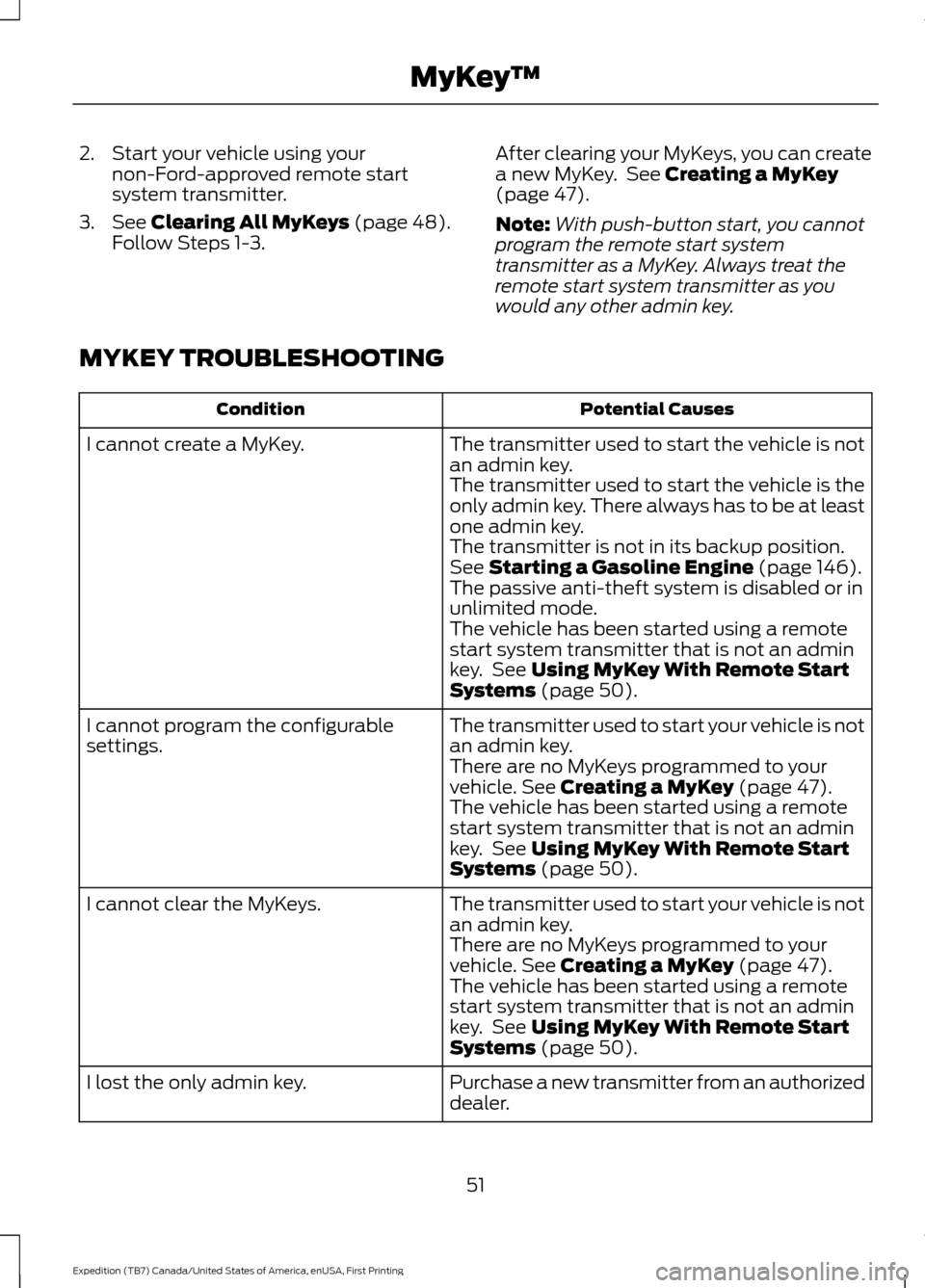
MYKEY TROUBLESHOOTING Potential Causes
Condition
The transmitter used to start the vehicle is not
an admin key.
I cannot create a MyKey.
The transmitter used to start the vehicle is the
only admin key. There always has to be at least
one admin key.
The transmitter is not in its backup position.
See
Starting a Gasoline Engine (page 146).
The passive anti-theft system is disabled or in
unlimited mode.
The vehicle has been started using a remote
start system transmitter that is not an admin
key. See
Using MyKey With Remote Start
Systems (page 50).
The transmitter used to start your vehicle is not
an admin key.
I cannot program the configurable
settings.
There are no MyKeys programmed to your
vehicle.
See Creating a MyKey (page 47).
The vehicle has been started using a remote
start system transmitter that is not an admin
key. See
Using MyKey With Remote Start
Systems (page 50).
The transmitter used to start your vehicle is not
an admin key.
I cannot clear the MyKeys.
There are no MyKeys programmed to your
vehicle.
See Creating a MyKey (page 47).
The vehicle has been started using a remote
start system transmitter that is not an admin
key. See
Using MyKey With Remote Start
Systems (page 50).
Purchase a new transmitter from an authorized
dealer.
I lost the only admin key.
51
Expedition (TB7) Canada/United States of America, enUSA, First Printing MyKey
™
Page 60 of 421
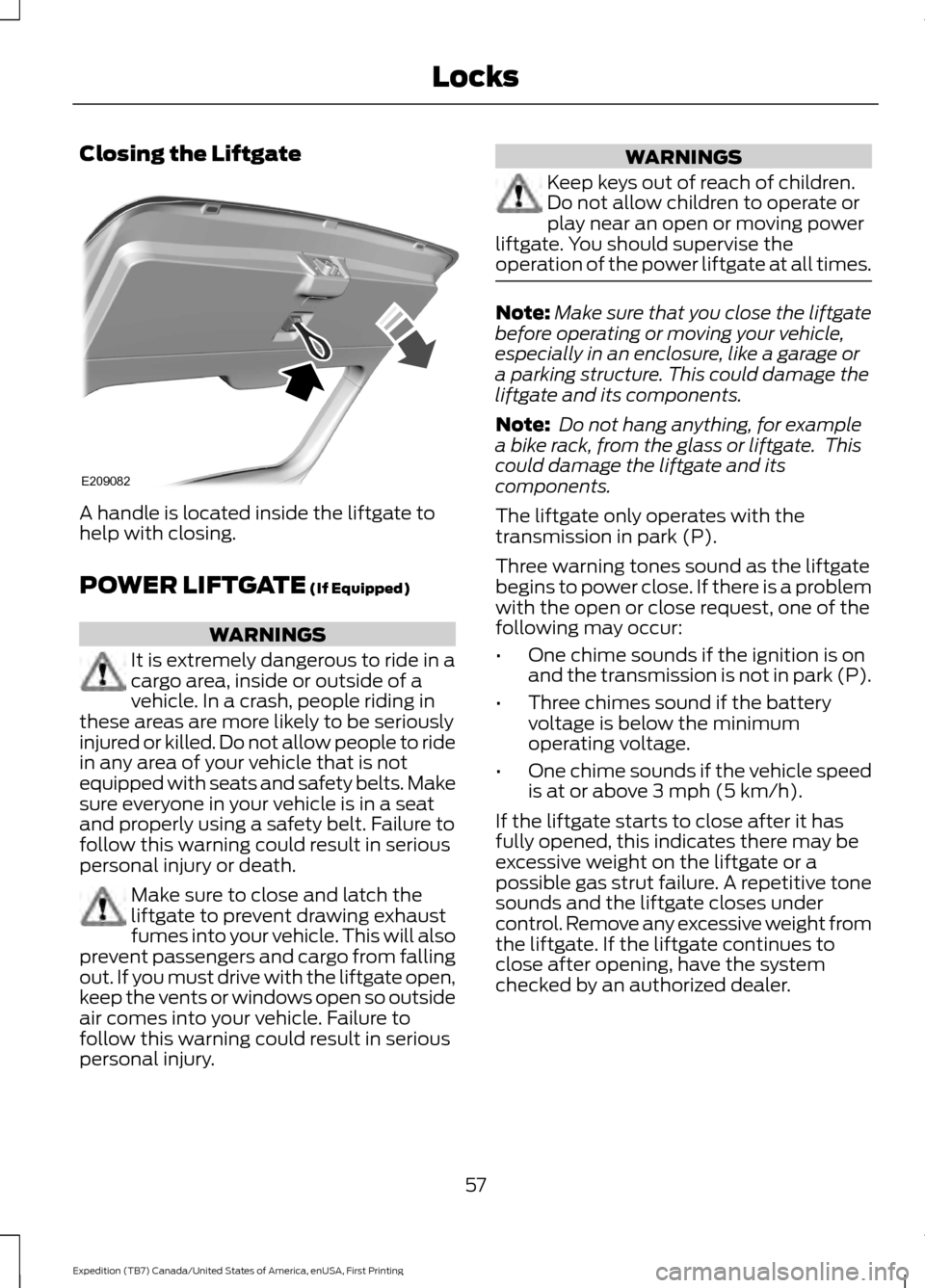
Closing the Liftgate
A handle is located inside the liftgate to
help with closing.
POWER LIFTGATE (If Equipped)
WARNINGS
It is extremely dangerous to ride in a
cargo area, inside or outside of a
vehicle. In a crash, people riding in
these areas are more likely to be seriously
injured or killed. Do not allow people to ride
in any area of your vehicle that is not
equipped with seats and safety belts. Make
sure everyone in your vehicle is in a seat
and properly using a safety belt. Failure to
follow this warning could result in serious
personal injury or death. Make sure to close and latch the
liftgate to prevent drawing exhaust
fumes into your vehicle. This will also
prevent passengers and cargo from falling
out. If you must drive with the liftgate open,
keep the vents or windows open so outside
air comes into your vehicle. Failure to
follow this warning could result in serious
personal injury. WARNINGS
Keep keys out of reach of children.
Do not allow children to operate or
play near an open or moving power
liftgate. You should supervise the
operation of the power liftgate at all times. Note:
Make sure that you close the liftgate
before operating or moving your vehicle,
especially in an enclosure, like a garage or
a parking structure. This could damage the
liftgate and its components.
Note: Do not hang anything, for example
a bike rack, from the glass or liftgate. This
could damage the liftgate and its
components.
The liftgate only operates with the
transmission in park (P).
Three warning tones sound as the liftgate
begins to power close. If there is a problem
with the open or close request, one of the
following may occur:
• One chime sounds if the ignition is on
and the transmission is not in park (P).
• Three chimes sound if the battery
voltage is below the minimum
operating voltage.
• One chime sounds if the vehicle speed
is at or above
3 mph (5 km/h).
If the liftgate starts to close after it has
fully opened, this indicates there may be
excessive weight on the liftgate or a
possible gas strut failure. A repetitive tone
sounds and the liftgate closes under
control. Remove any excessive weight from
the liftgate. If the liftgate continues to
close after opening, have the system
checked by an authorized dealer.
57
Expedition (TB7) Canada/United States of America, enUSA, First Printing LocksE209082
Page 61 of 421
Opening and Closing the Liftgate
WARNING
Make sure all persons are clear of the
power liftgate area before using the
power liftgate control.
Note:
Be careful when opening or closing
the liftgate in a garage or other enclosed
area to avoid damaging the liftgate.
Note: Do not leave the liftgate open while
driving. This could damage the liftgate and
its components.
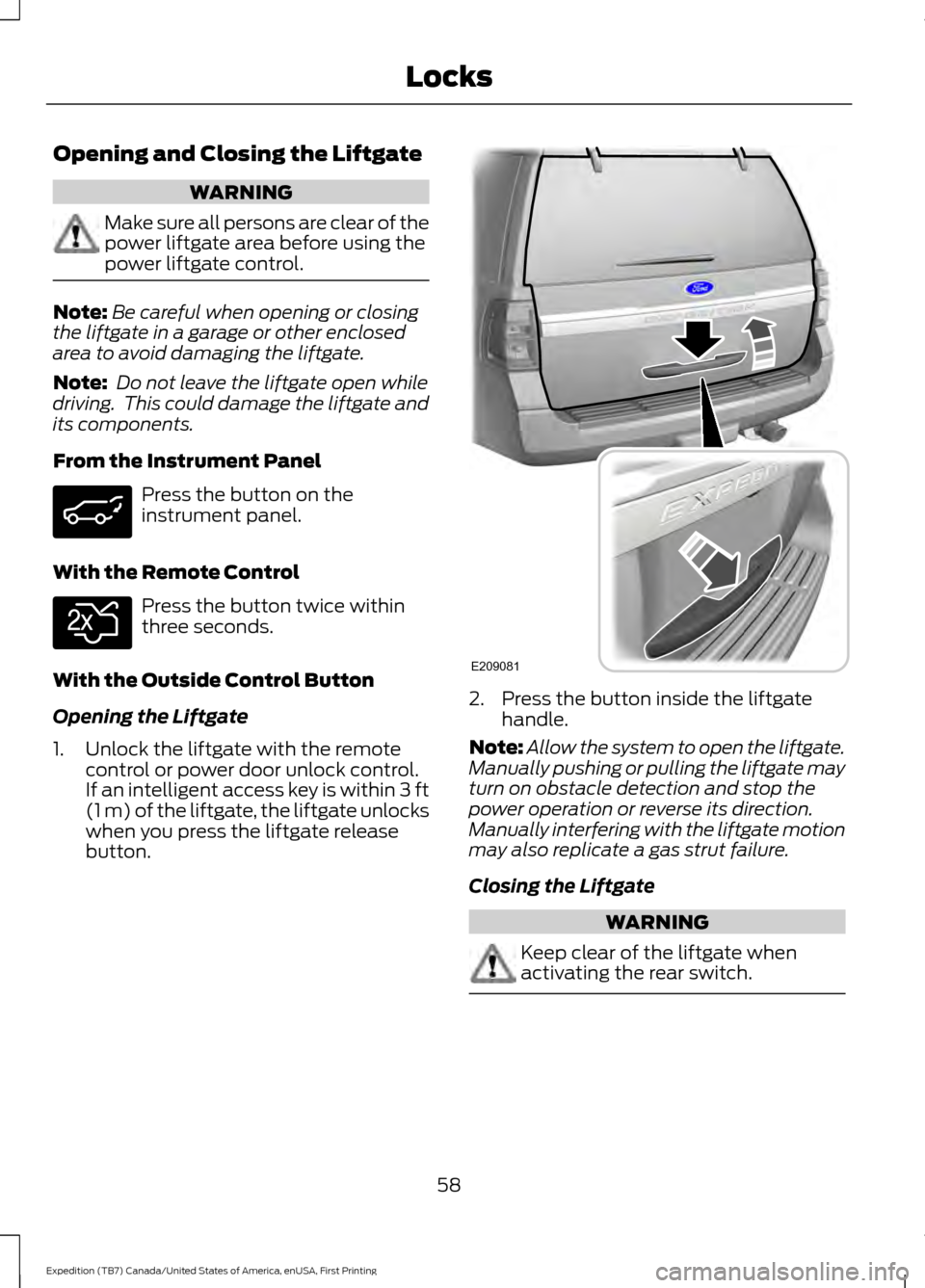
From the Instrument Panel Press the button on the
instrument panel.
With the Remote Control Press the button twice within
three seconds.
With the Outside Control Button
Opening the Liftgate
1. Unlock the liftgate with the remote control or power door unlock control.
If an intelligent access key is within 3 ft
(1 m) of the liftgate, the liftgate unlocks
when you press the liftgate release
button. 2. Press the button inside the liftgate
handle.
Note: Allow the system to open the liftgate.
Manually pushing or pulling the liftgate may
turn on obstacle detection and stop the
power operation or reverse its direction.
Manually interfering with the liftgate motion
may also replicate a gas strut failure.
Closing the Liftgate WARNING
Keep clear of the liftgate when
activating the rear switch.
58
Expedition (TB7) Canada/United States of America, enUSA, First Printing Locks E138630 E209081
Page 89 of 421

Vehicle Settings and Personalization
See General Information (page 92).
Fuel Gauge
Note: The fuel gauge may vary slightly
when your vehicle is moving or on a gradient.
Switch the ignition on. The fuel gauge
indicates approximately how much fuel
remains in the fuel tank. The arrow
adjacent to the fuel pump symbol
indicates on which side of your vehicle the
fuel filler door is located.
The needle should move toward F when
you refuel your vehicle. If the needle points
to E after adding fuel, this indicates your
vehicle needs service soon.
After refueling, the needle may not always
return to the exact same position. This is
normal.
Note: It may take a short time for the
needle to reach F after leaving the gas
station. This is normal and depends upon
the slope of pavement at the gas station.
Note: The fuel amount dispensed into the
tank is a little less or more than the gauge
indicated. This is normal and depends upon
the slope of pavement at the gas station. Note:
If the gas station nozzle shuts off
before the tank is full, try a different gas
pump nozzle.
Note: There is a small reserve left in the
tank when the fuel gauge reaches empty.
Low Fuel Reminder
A low reminder displays when the distance
to empty reaches 50 miles (80 km) to
empty.
Note: The low fuel reminder can appear at
different fuel gauge positions depending on
fuel economy conditions. This variation is
normal.
Engine Coolant Temperature Gauge
Shows the temperature of the engine
coolant. At normal operating temperature,
the needle remains in the center section.
If the needle enters the red section, the
engine is overheating. Stop the engine,
switch the ignition off and determine the
cause once the engine has cooled down.
Note: Do not restart the engine until you
conclude the cause of overheating. WARNING
Never remove the coolant reservoir
cap while the engine is running or hot.
The hot coolant is under pressure
and may cause serious burns. 86
Expedition (TB7) Canada/United States of America, enUSA, First Printing Instrument Cluster
Page 149 of 421

Ignition Modes
The keyless starting system has three
modes:
Off: Turns the ignition off.
• Without applying the brake pedal,
press and release the button once
when the ignition is in the on mode, or
when the engine is running but your
vehicle is not moving.
On:
All electrical circuits are operational
and the warning lamps and indicators
illuminate.
• Without applying the brake pedal,
press and release the button twice.
Start:
Starts the engine.
• Press the brake pedal, and then press
the button for any length of time. An
indicator light on the button illuminates
when then ignition is on and when the
engine starts.
STARTING A GASOLINE
ENGINE
When you start the engine, the idle speed
increases. This helps to warm up the
engine. If the engine idle speed does not
slow down automatically, have your
vehicle checked by an authorized dealer. Note:
You can crank the engine for a total
of 60 seconds without the engine starting
before the starting system temporarily
disables. The 60 seconds does not have to
be all at once. For example, if you crank the
engine three times for 20 seconds each
time, without the engine starting, you
reached the 60-second time limit. A
message appears in the information display
alerting you that you exceeded the cranking
time. You cannot attempt to start the
engine for at least 15 minutes. After 15
minutes, you are limited to a 15-second
engine cranking time. You need to wait 60
minutes before you can crank the engine for
60 seconds again.
Before starting your vehicle, check the
following:
• Make sure all occupants have fastened
their safety belts.
• Make sure the headlamps and
electrical accessories are off.
• Make sure the parking brake is on.
• Make sure the transmission is in park
(P).
• Switch the ignition on. For vehicles with
a keyless ignition, see the following
instructions.
Vehicles with an Ignition Key
Note: Do not touch the accelerator pedal.
1. Fully depress the brake pedal.
2. Turn the key to the start position to start the engine.
Note: The engine may continue cranking
for up to 15 seconds or until it starts.
Note: If you cannot start the engine on the
first try, wait for a short period and try again.
Vehicles with Keyless Start
Note: Do not touch the accelerator pedal.
146
Expedition (TB7) Canada/United States of America, enUSA, First Printing Starting and Stopping the EngineE144447