2016 FORD EXPEDITION EL battery
[x] Cancel search: batteryPage 339 of 421
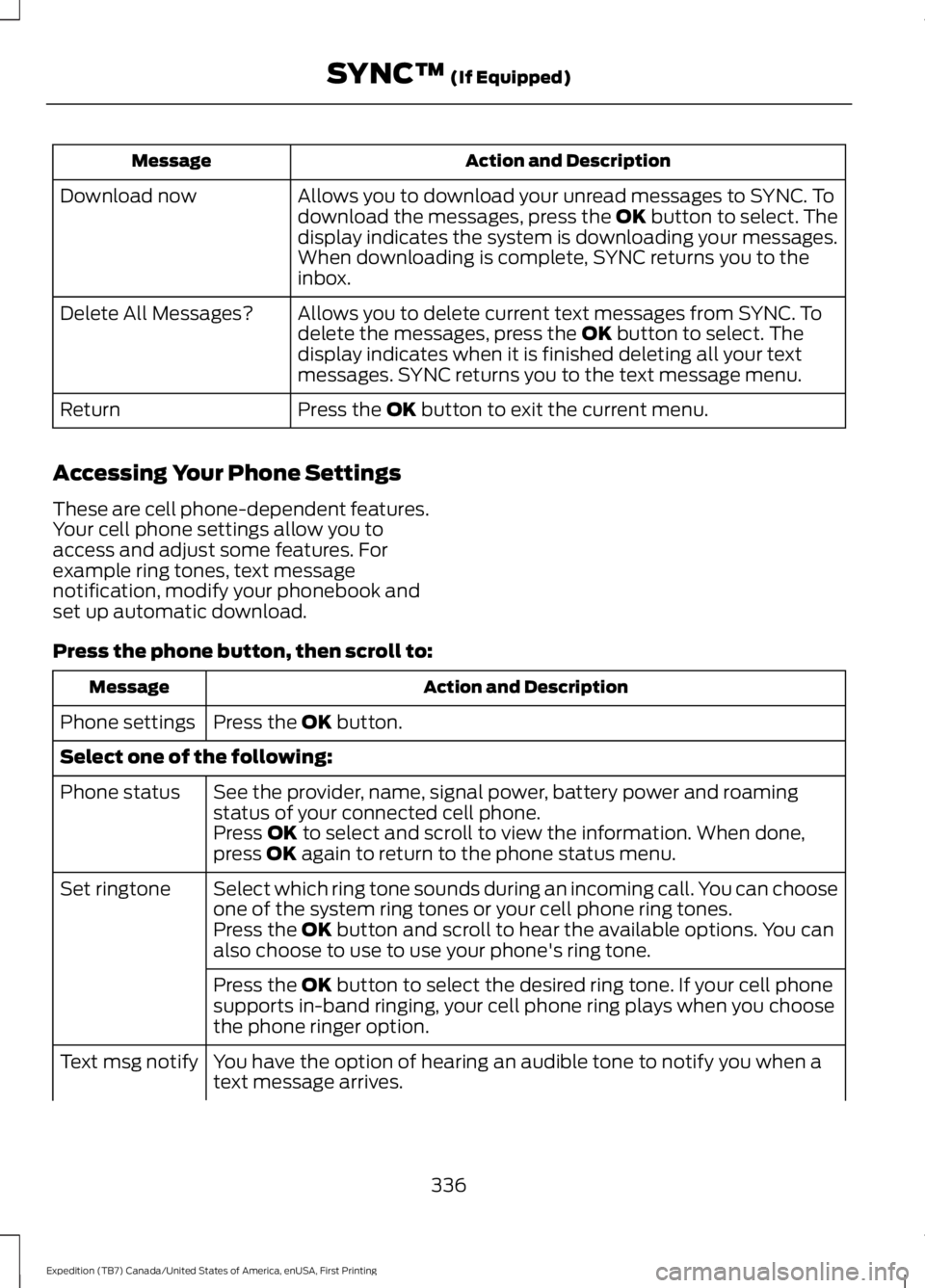
Action and DescriptionMessage
Allows you to download your unread messages to SYNC. Todownload the messages, press the OK button to select. Thedisplay indicates the system is downloading your messages.When downloading is complete, SYNC returns you to theinbox.
Download now
Allows you to delete current text messages from SYNC. Todelete the messages, press the OK button to select. Thedisplay indicates when it is finished deleting all your textmessages. SYNC returns you to the text message menu.
Delete All Messages?
Press the OK button to exit the current menu.Return
Accessing Your Phone Settings
These are cell phone-dependent features.Your cell phone settings allow you toaccess and adjust some features. Forexample ring tones, text messagenotification, modify your phonebook andset up automatic download.
Press the phone button, then scroll to:
Action and DescriptionMessage
Press the OK button.Phone settings
Select one of the following:
See the provider, name, signal power, battery power and roamingstatus of your connected cell phone.Phone status
Press OK to select and scroll to view the information. When done,press OK again to return to the phone status menu.
Select which ring tone sounds during an incoming call. You can chooseone of the system ring tones or your cell phone ring tones.Set ringtone
Press the OK button and scroll to hear the available options. You canalso choose to use to use your phone's ring tone.
Press the OK button to select the desired ring tone. If your cell phonesupports in-band ringing, your cell phone ring plays when you choosethe phone ringer option.
You have the option of hearing an audible tone to notify you when atext message arrives.Text msg notify
336
Expedition (TB7) Canada/United States of America, enUSA, First Printing
SYNC™ (If Equipped)
Page 344 of 421
![FORD EXPEDITION EL 2016 Owners Manual If a crash deploys an airbag (excludingknee airbags and rear inflatable safetybelts [if equipped]) or activates the fuelpump shut-off, your SYNC-equippedvehicle may be able to contact emergencyservice](/manual-img/11/58754/w960_58754-343.png "FORD EXPEDITION EL 2016 Owners Manual If a crash deploys an airbag (excludingknee airbags and rear inflatable safetybelts [if equipped]) or activates the fuelpump shut-off, your SYNC-equippedvehicle may be able to contact emergencyservice")
If a crash deploys an airbag (excludingknee airbags and rear inflatable safetybelts [if equipped]) or activates the fuelpump shut-off, your SYNC-equippedvehicle may be able to contact emergencyservices by dialing 911 through a paired andconnected Bluetooth-enabled phone. Youcan learn more about the 911 Assistfeature, visit www.SYNCMyRide.com,
www.SYNCMyRide.ca orwww.syncmaroute.ca.
See Supplementary Restraints System(page 35). Important information aboutairbag deployment is in this chapter.
See Roadside Emergencies (page 223).Important information about the fuel pumpshut-off is in this chapter.
Switching 911 Assist On or Off
Press the phone button to enter the phone menu and scroll to:
Action and DescriptionMessage
Press the OK button to confirm and enter the 911 Assist menu.911 Assist
Press the OK button when the desired option appears in theradio display.On
Off
Off selections include:
Action and DescriptionMessage
Provides a display and voice reminder at phone connectionat vehicle start.Off with reminder:
Provides a display reminder only without a voice reminder atphone connection.Off without reminder:
To make sure that 911 Assist workscorrectly:
•SYNC must be powered and workingproperly at the time of the incident andthroughout feature activation and use.
•The 911 Assist feature must be set onbefore the incident.
•You must pair and connect aBluetooth-enabled and compatiblecell phone to SYNC.
•A connected Bluetooth-enabled phonemust have the ability to make andmaintain an outgoing call at the timeof the incident.
•A connected Bluetooth-enabled phonemust have adequate network coverage,battery power and signal strength.
•The vehicle must have battery powerand be located in the U.S., Canada orin a territory in which 911 is theemergency number.
341
Expedition (TB7) Canada/United States of America, enUSA, First Printing
SYNC™ (If Equipped)
Page 345 of 421
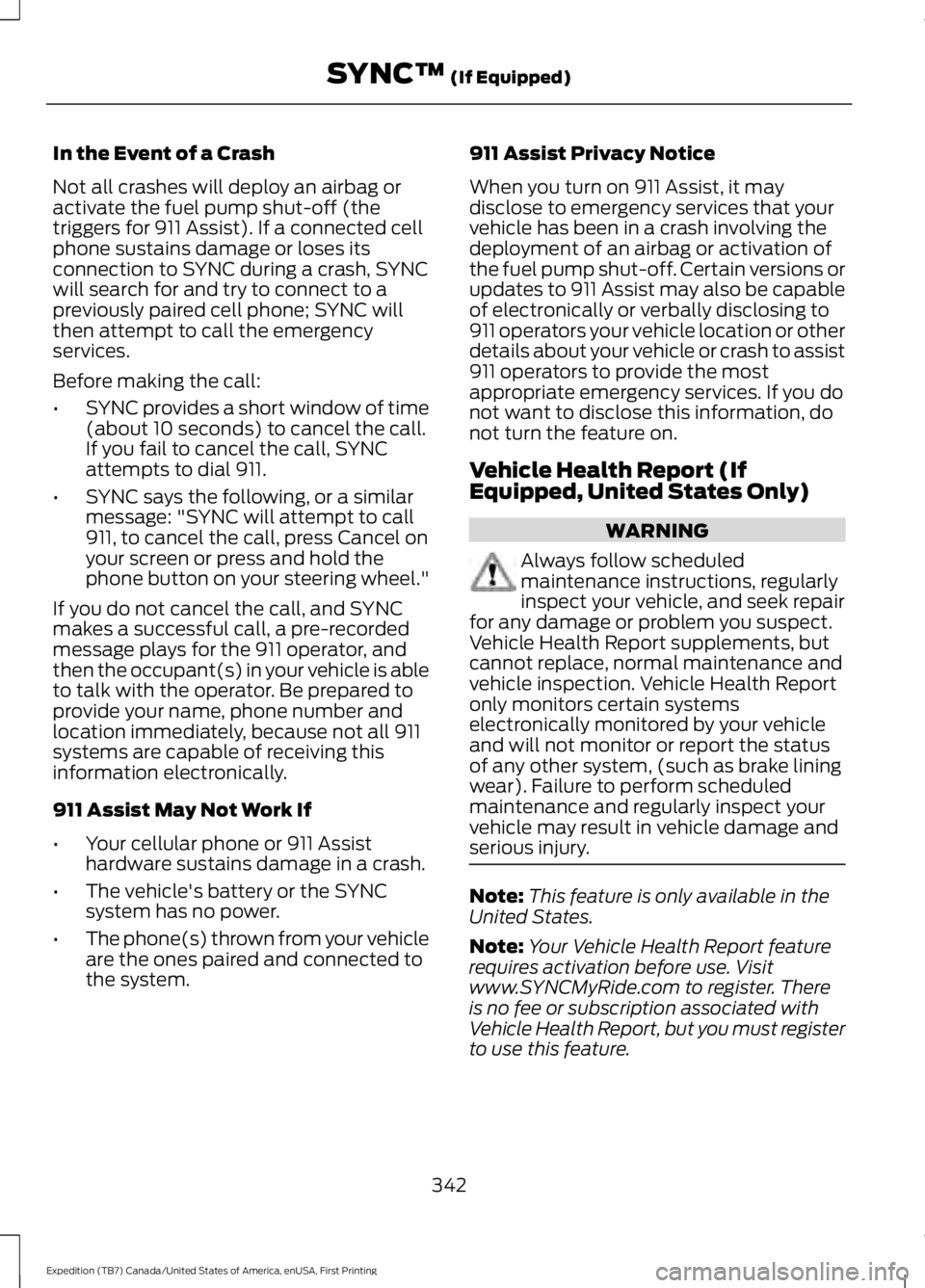
In the Event of a Crash
Not all crashes will deploy an airbag oractivate the fuel pump shut-off (thetriggers for 911 Assist). If a connected cellphone sustains damage or loses itsconnection to SYNC during a crash, SYNCwill search for and try to connect to apreviously paired cell phone; SYNC willthen attempt to call the emergencyservices.
Before making the call:
•SYNC provides a short window of time(about 10 seconds) to cancel the call.If you fail to cancel the call, SYNCattempts to dial 911.
•SYNC says the following, or a similarmessage: "SYNC will attempt to call911, to cancel the call, press Cancel onyour screen or press and hold thephone button on your steering wheel."
If you do not cancel the call, and SYNCmakes a successful call, a pre-recordedmessage plays for the 911 operator, andthen the occupant(s) in your vehicle is ableto talk with the operator. Be prepared toprovide your name, phone number andlocation immediately, because not all 911systems are capable of receiving thisinformation electronically.
911 Assist May Not Work If
•Your cellular phone or 911 Assisthardware sustains damage in a crash.
•The vehicle's battery or the SYNCsystem has no power.
•The phone(s) thrown from your vehicleare the ones paired and connected tothe system.
911 Assist Privacy Notice
When you turn on 911 Assist, it maydisclose to emergency services that yourvehicle has been in a crash involving thedeployment of an airbag or activation ofthe fuel pump shut-off. Certain versions orupdates to 911 Assist may also be capableof electronically or verbally disclosing to911 operators your vehicle location or otherdetails about your vehicle or crash to assist911 operators to provide the mostappropriate emergency services. If you donot want to disclose this information, donot turn the feature on.
Vehicle Health Report (IfEquipped, United States Only)
WARNING
Always follow scheduledmaintenance instructions, regularlyinspect your vehicle, and seek repairfor any damage or problem you suspect.Vehicle Health Report supplements, butcannot replace, normal maintenance andvehicle inspection. Vehicle Health Reportonly monitors certain systemselectronically monitored by your vehicleand will not monitor or report the statusof any other system, (such as brake liningwear). Failure to perform scheduledmaintenance and regularly inspect yourvehicle may result in vehicle damage andserious injury.
Note:This feature is only available in theUnited States.
Note:Your Vehicle Health Report featurerequires activation before use. Visitwww.SYNCMyRide.com to register. Thereis no fee or subscription associated withVehicle Health Report, but you must registerto use this feature.
342
Expedition (TB7) Canada/United States of America, enUSA, First Printing
SYNC™ (If Equipped)
Page 362 of 421
SYNC™ TROUBLESHOOTING
Your SYNC system is easy to use. However,should questions arise, see the tablesbelow.
Use the website at any time to check yourphone's compatibility, register youraccount and set preferences as well asaccess a customer representative via anonline chat (during certain hours). Visitwww.SYNCMyRide.com,www.SYNCMyRide.ca orwww.syncmaroute.ca for moreinformation.
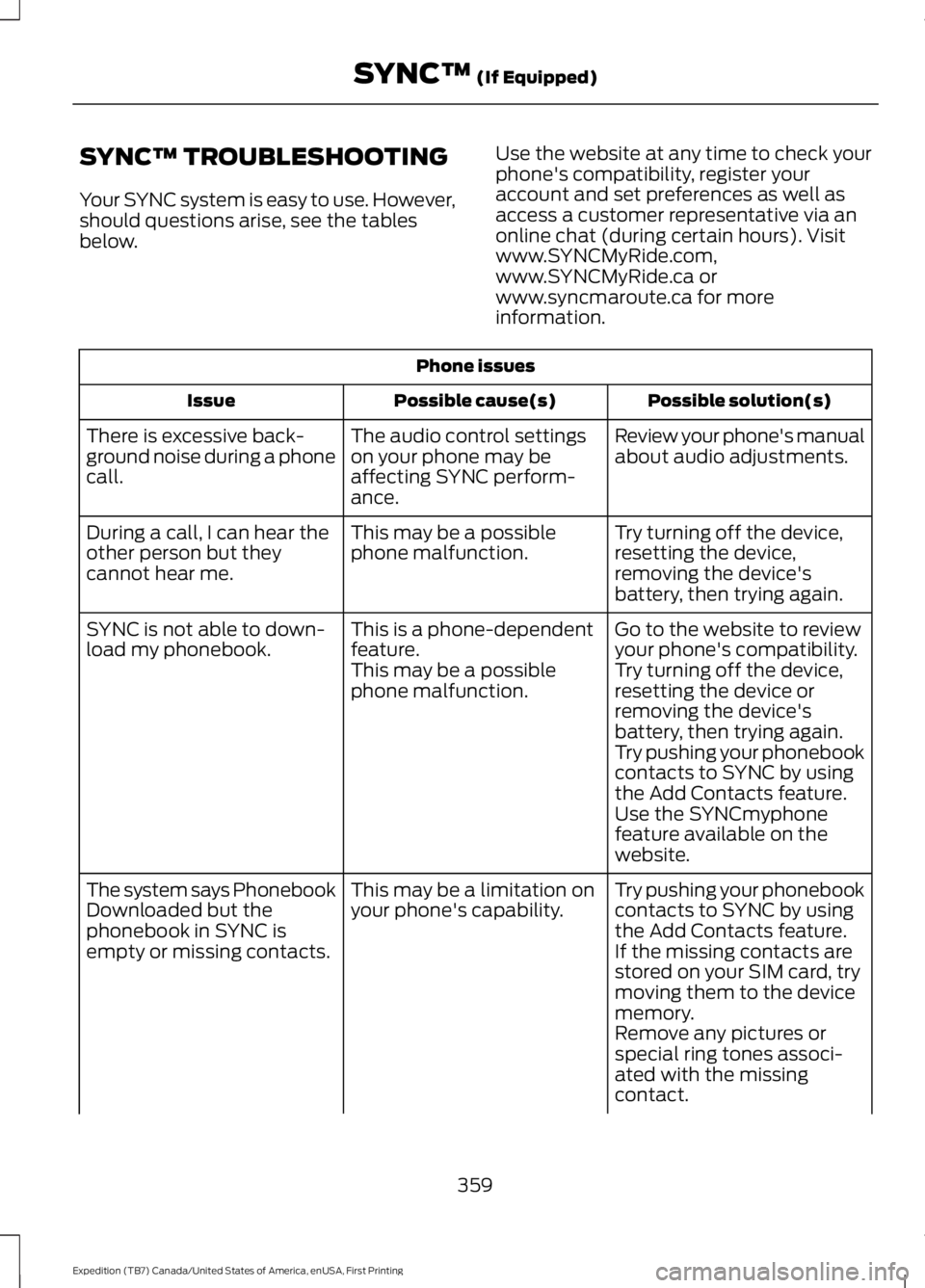
Phone issues
Possible solution(s)Possible cause(s)Issue
Review your phone's manualabout audio adjustments.The audio control settingson your phone may beaffecting SYNC perform-ance.
There is excessive back-ground noise during a phonecall.
Try turning off the device,resetting the device,removing the device'sbattery, then trying again.
This may be a possiblephone malfunction.During a call, I can hear theother person but theycannot hear me.
Go to the website to reviewyour phone's compatibility.This is a phone-dependentfeature.SYNC is not able to down-load my phonebook.Try turning off the device,resetting the device orremoving the device'sbattery, then trying again.
This may be a possiblephone malfunction.
Try pushing your phonebookcontacts to SYNC by usingthe Add Contacts feature.Use the SYNCmyphonefeature available on thewebsite.
Try pushing your phonebookcontacts to SYNC by usingthe Add Contacts feature.
This may be a limitation onyour phone's capability.The system says PhonebookDownloaded but thephonebook in SYNC isempty or missing contacts.If the missing contacts arestored on your SIM card, trymoving them to the devicememory.Remove any pictures orspecial ring tones associ-ated with the missingcontact.
359
Expedition (TB7) Canada/United States of America, enUSA, First Printing
SYNC™ (If Equipped)
Page 363 of 421
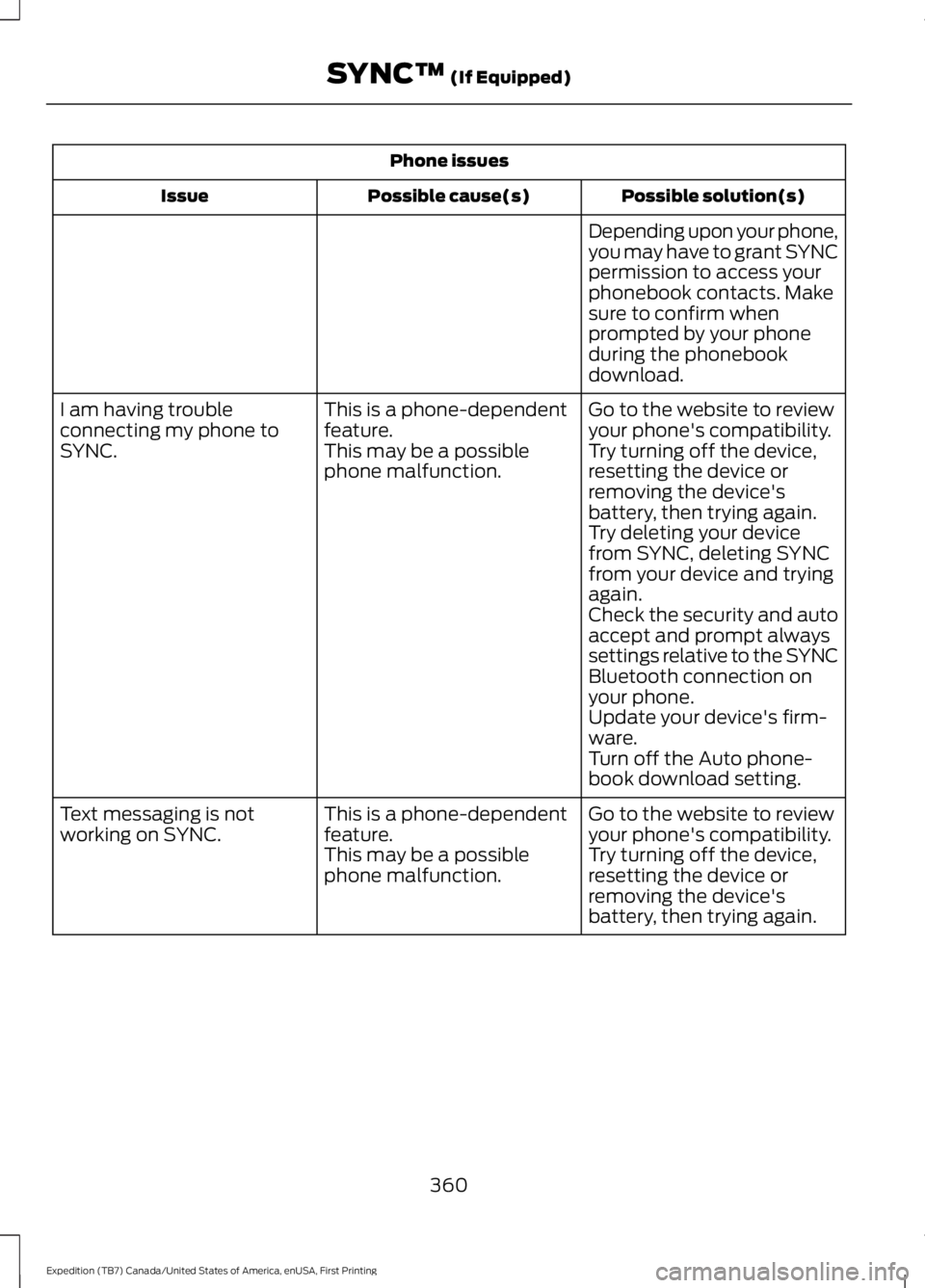
Phone issues
Possible solution(s)Possible cause(s)Issue
Depending upon your phone,you may have to grant SYNCpermission to access yourphonebook contacts. Makesure to confirm whenprompted by your phoneduring the phonebookdownload.
Go to the website to reviewyour phone's compatibility.This is a phone-dependentfeature.I am having troubleconnecting my phone toSYNC.Try turning off the device,resetting the device orremoving the device'sbattery, then trying again.
This may be a possiblephone malfunction.
Try deleting your devicefrom SYNC, deleting SYNCfrom your device and tryingagain.Check the security and autoaccept and prompt alwayssettings relative to the SYNCBluetooth connection onyour phone.Update your device's firm-ware.Turn off the Auto phone-book download setting.
Go to the website to reviewyour phone's compatibility.This is a phone-dependentfeature.Text messaging is notworking on SYNC.Try turning off the device,resetting the device orremoving the device'sbattery, then trying again.
This may be a possiblephone malfunction.
360
Expedition (TB7) Canada/United States of America, enUSA, First Printing
SYNC™ (If Equipped)
Page 364 of 421
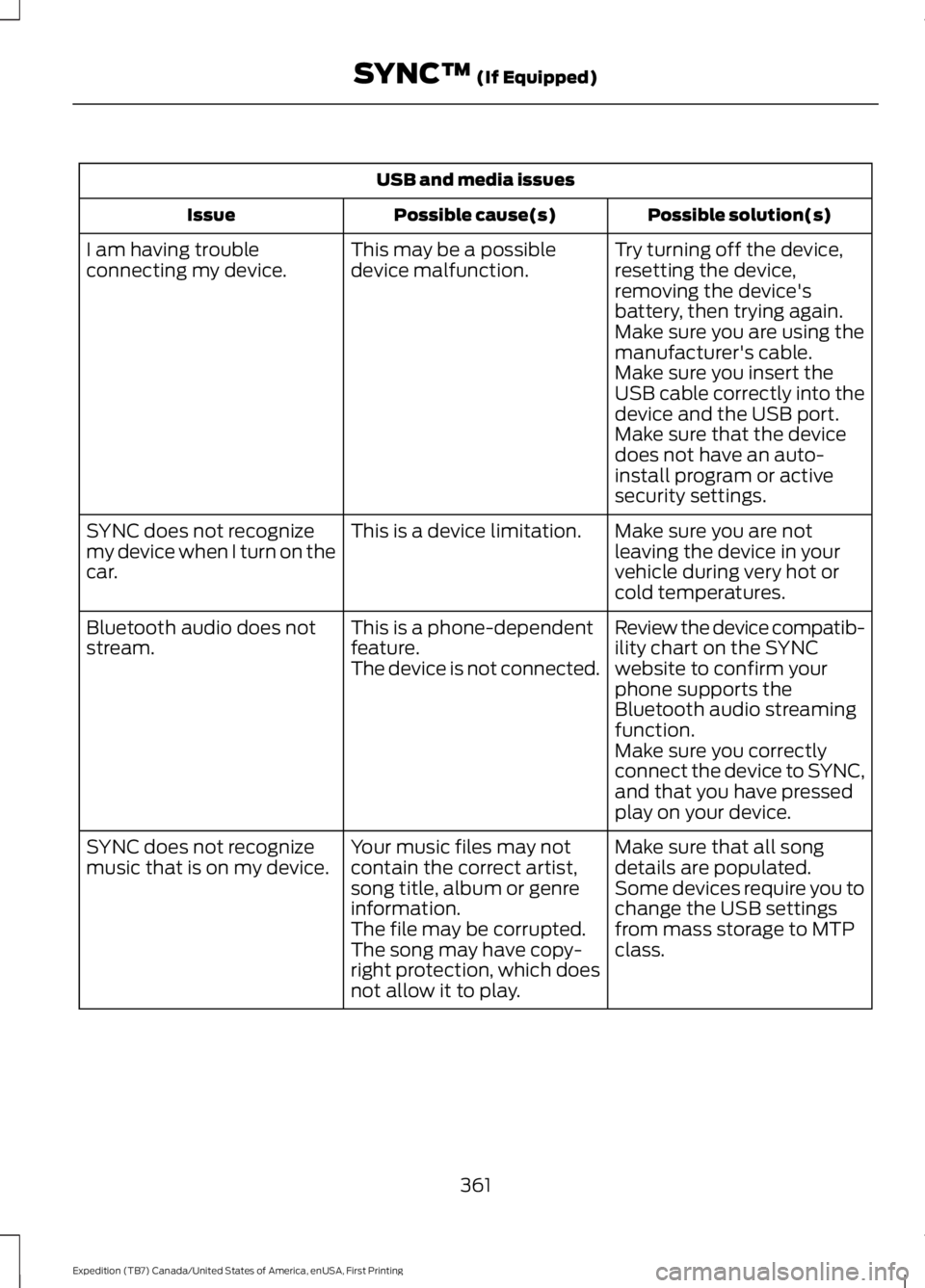
USB and media issues
Possible solution(s)Possible cause(s)Issue
Try turning off the device,resetting the device,removing the device'sbattery, then trying again.
This may be a possibledevice malfunction.I am having troubleconnecting my device.
Make sure you are using themanufacturer's cable.Make sure you insert theUSB cable correctly into thedevice and the USB port.Make sure that the devicedoes not have an auto-install program or activesecurity settings.
Make sure you are notleaving the device in yourvehicle during very hot orcold temperatures.
This is a device limitation.SYNC does not recognizemy device when I turn on thecar.
Review the device compatib-ility chart on the SYNCwebsite to confirm yourphone supports theBluetooth audio streamingfunction.
This is a phone-dependentfeature.The device is not connected.
Bluetooth audio does notstream.
Make sure you correctlyconnect the device to SYNC,and that you have pressedplay on your device.
Make sure that all songdetails are populated.Your music files may notcontain the correct artist,song title, album or genreinformation.
SYNC does not recognizemusic that is on my device.Some devices require you tochange the USB settingsfrom mass storage to MTPclass.The file may be corrupted.The song may have copy-right protection, which doesnot allow it to play.
361
Expedition (TB7) Canada/United States of America, enUSA, First Printing
SYNC™ (If Equipped)
Page 372 of 421
For maximum vehicle performance, keepthe following information in mind whenadding accessories or equipment to yourvehicle:
•When adding accessories, equipment,passengers and luggage to yourvehicle, do not exceed the total weightcapacity of the vehicle or of the frontor rear axle (GVWR or GAWR asindicated on the Safety ComplianceCertification label). Ask an authorizeddealer for specific weight information.
•The Federal CommunicationsCommission (FCC) and CanadianRadio TelecommunicationsCommission (CRTC) regulate the useof mobile communications systemsthat are equipped with radiotransmitters, for example, two-wayradios, telephones and theft alarms.Any such equipment installed in yourvehicle should comply with FederalCommunications Commission (FCC)and Canadian RadioTelecommunications Commission(CRTC) regulations and should beinstalled only by an authorized dealer.
•Mobile communications systems mayharm the operation of your vehicle,particularly if their manufacturer didnot design them specifically forautomotive use.
•If you or an authorized Ford dealer addany non-Ford electrical or electronicaccessories or components to yourvehicle, you may adversely affectbattery performance and durability. Inaddition, you may also adversely affectthe performance of other electricalsystems in the vehicle.
369
Expedition (TB7) Canada/United States of America, enUSA, First Printing
Accessories
Page 373 of 421
PROTECT YOURSELF FROM THE RISINGCOST OF VEHICLE REPAIRS WITH A FORDEXTENDED SERVICE PLAN.
SERVICE PLANS (U.S. Only)
More than 32 million Ford owners havediscovered the powerful protection of FordExtended Service Plan. It is the extendedservice plan backed by Ford MotorCompany, and provides peace of mindprotection beyond the New Vehicle LimitedWarranty coverage.
Ford ESP Can Quickly Pay for Itself
One service bill – the cost of parts andlabor – can easily exceed the price of yourFord Extended Service Plan. With Ford ESPyou minimize your risk for unexpectedrepair bills and rising repair costs.
Up to 1,000+ Covered VehicleComponents
There are four core Extended Service Planswith different levels of coverage. Ask yourauthorized dealer for details.
1. PremiumCARE - Our mostcomprehensive coverage. With over1,000 covered components, this planis so complete that we generally onlydiscuss what’s not covered.
2. ExtraCARE - Covers 113 components,and includes many high-tech items.
3. BaseCARE - Covers 84 components.
4. PowertrainCARE - Covers 29 criticalcomponents.
Ford Extended Service Plan is honored byall authorized Ford dealers in the U.S.,Canada and Mexico. It is the extendedservice plan authorized and backed by FordMotor Company.
That means you get:
•Reliable, quality service at any Ford orLincoln dealership
•Repairs performed by factory trainedtechnicians, using genuine parts
Rental Car Reimbursement
1st day Rental Benefit
You take advantage of replacementtransportation if your vehicle is at yourauthorized dealer for same day coveredrepairs.
Extended Rental Benefits
If your vehicle is kept overnight for coveredrepairs, you are eligible for rental carcoverage, including bumper to bumperwarranty repairs, and Field Service Actions.
Roadside Assistance
Exclusive 24/7 roadside assistance,including:
•Towing, flat-tire change and batteryjump starts
•Out of fuel and lock-out assistance.
•Travel expense reimbursement forlodging, meals and rental car.
•Destination assistance for taxi, shuttle,rental car coverage and emergencytransportation.
Transferable Coverage
If you sell your vehicle before your FordExtended Service Plan coverage expires,you can transfer any remaining coverageto the new owner. Whenever you sell yourvehicle, prospective buyers may have ahigher degree of confidence that vehiclewas properly maintained with Ford ESP,thereby improving resale value.
370
Expedition (TB7) Canada/United States of America, enUSA, First Printing
Extended Service Plan (ESP)