2016 FORD EXPEDITION EL USB
[x] Cancel search: USBPage 364 of 421
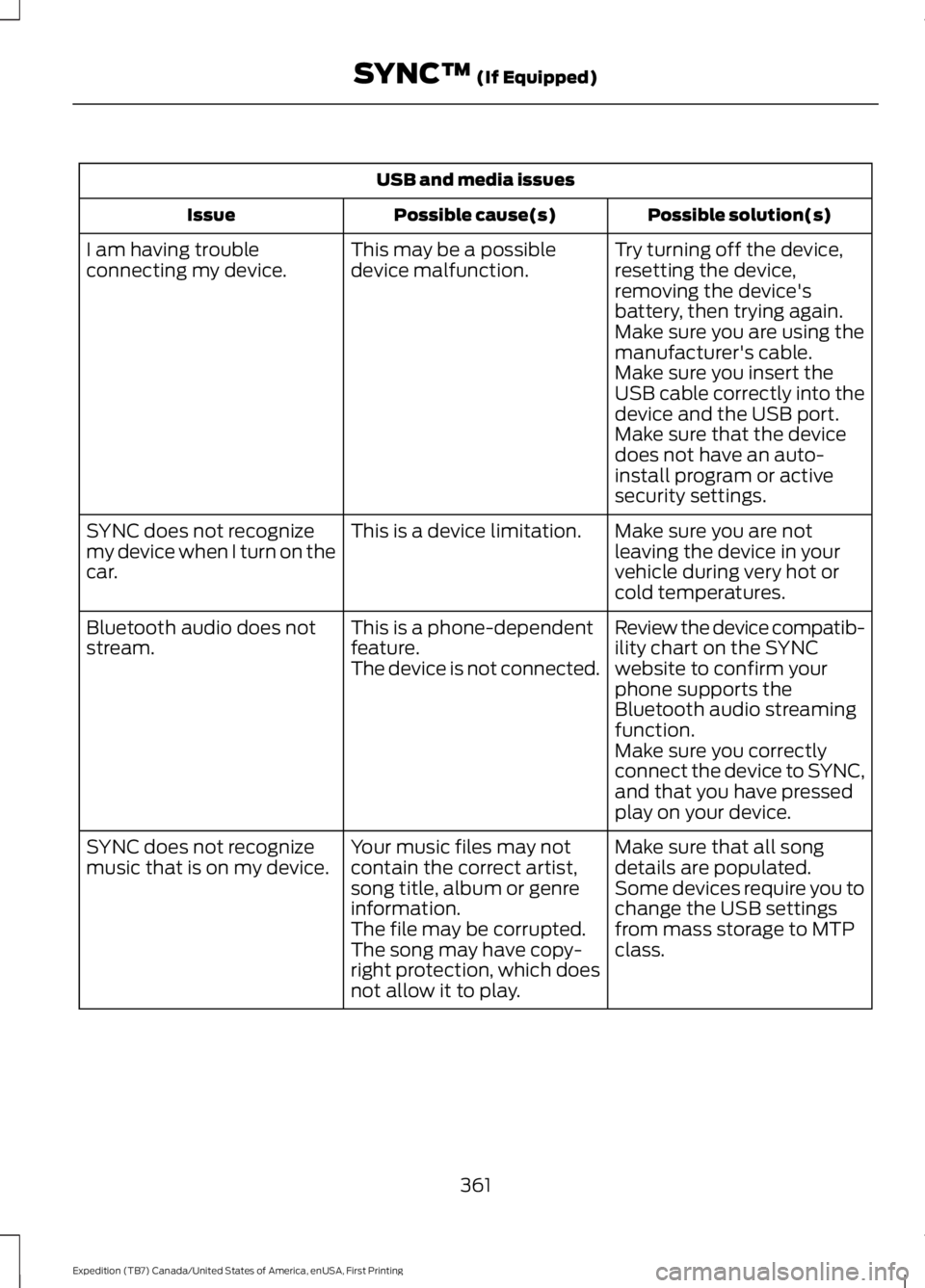
USB and media issues
Possible solution(s)Possible cause(s)Issue
Try turning off the device,resetting the device,removing the device'sbattery, then trying again.
This may be a possibledevice malfunction.I am having troubleconnecting my device.
Make sure you are using themanufacturer's cable.Make sure you insert theUSB cable correctly into thedevice and the USB port.Make sure that the devicedoes not have an auto-install program or activesecurity settings.
Make sure you are notleaving the device in yourvehicle during very hot orcold temperatures.
This is a device limitation.SYNC does not recognizemy device when I turn on thecar.
Review the device compatib-ility chart on the SYNCwebsite to confirm yourphone supports theBluetooth audio streamingfunction.
This is a phone-dependentfeature.The device is not connected.
Bluetooth audio does notstream.
Make sure you correctlyconnect the device to SYNC,and that you have pressedplay on your device.
Make sure that all songdetails are populated.Your music files may notcontain the correct artist,song title, album or genreinformation.
SYNC does not recognizemusic that is on my device.Some devices require you tochange the USB settingsfrom mass storage to MTPclass.The file may be corrupted.The song may have copy-right protection, which doesnot allow it to play.
361
Expedition (TB7) Canada/United States of America, enUSA, First Printing
SYNC™ (If Equipped)
Page 368 of 421
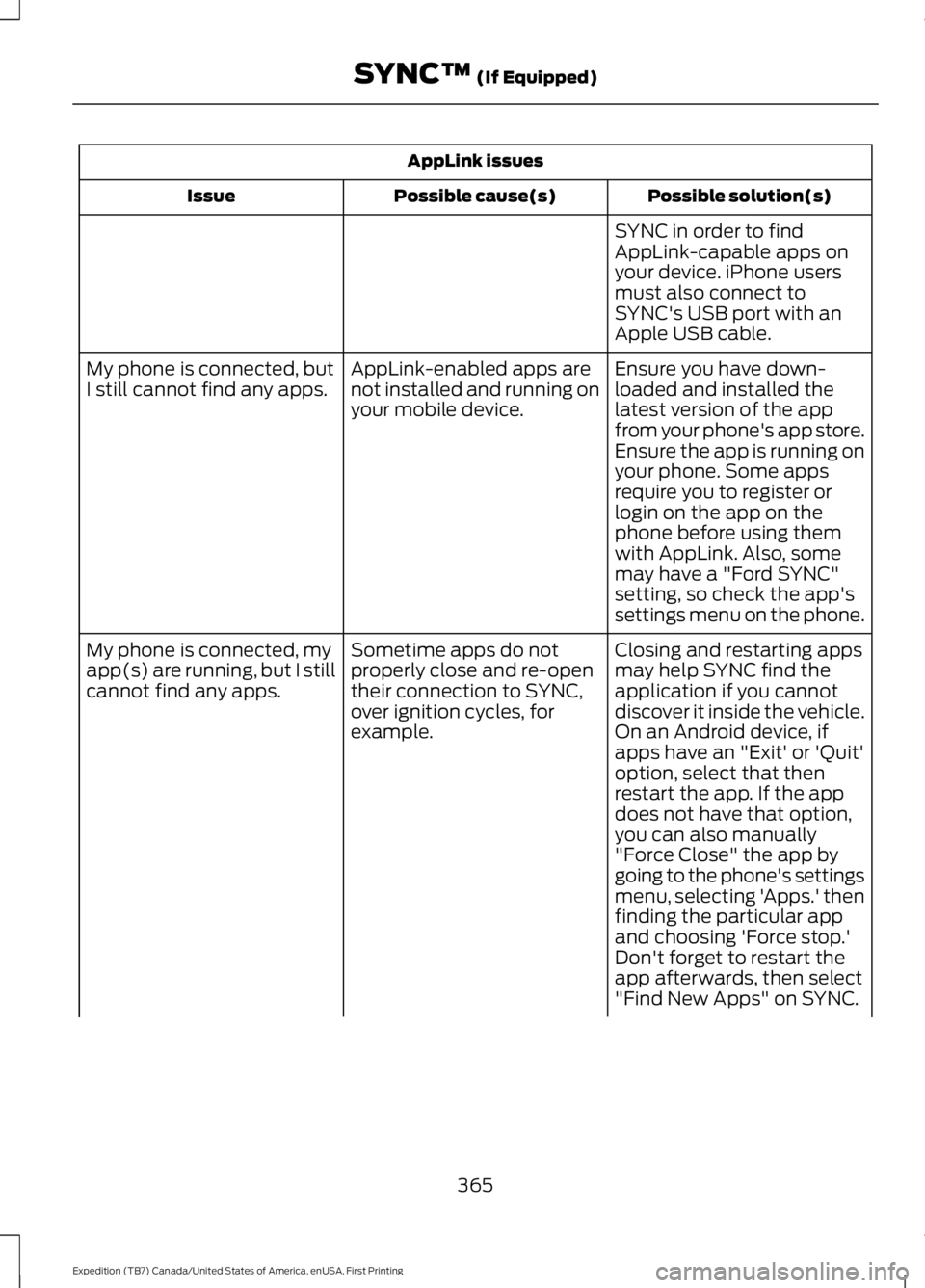
AppLink issues
Possible solution(s)Possible cause(s)Issue
SYNC in order to findAppLink-capable apps onyour device. iPhone usersmust also connect toSYNC's USB port with anApple USB cable.
Ensure you have down-loaded and installed thelatest version of the appfrom your phone's app store.Ensure the app is running onyour phone. Some apps
AppLink-enabled apps arenot installed and running onyour mobile device.
My phone is connected, butI still cannot find any apps.
require you to register orlogin on the app on thephone before using themwith AppLink. Also, somemay have a "Ford SYNC"setting, so check the app'ssettings menu on the phone.
Closing and restarting appsmay help SYNC find theapplication if you cannotdiscover it inside the vehicle.On an Android device, ifapps have an "Exit' or 'Quit'
Sometime apps do notproperly close and re-opentheir connection to SYNC,over ignition cycles, forexample.
My phone is connected, myapp(s) are running, but I stillcannot find any apps.
option, select that thenrestart the app. If the appdoes not have that option,you can also manually"Force Close" the app bygoing to the phone's settingsmenu, selecting 'Apps.' thenfinding the particular appand choosing 'Force stop.'Don't forget to restart theapp afterwards, then select"Find New Apps" on SYNC.
365
Expedition (TB7) Canada/United States of America, enUSA, First Printing
SYNC™ (If Equipped)
Page 370 of 421
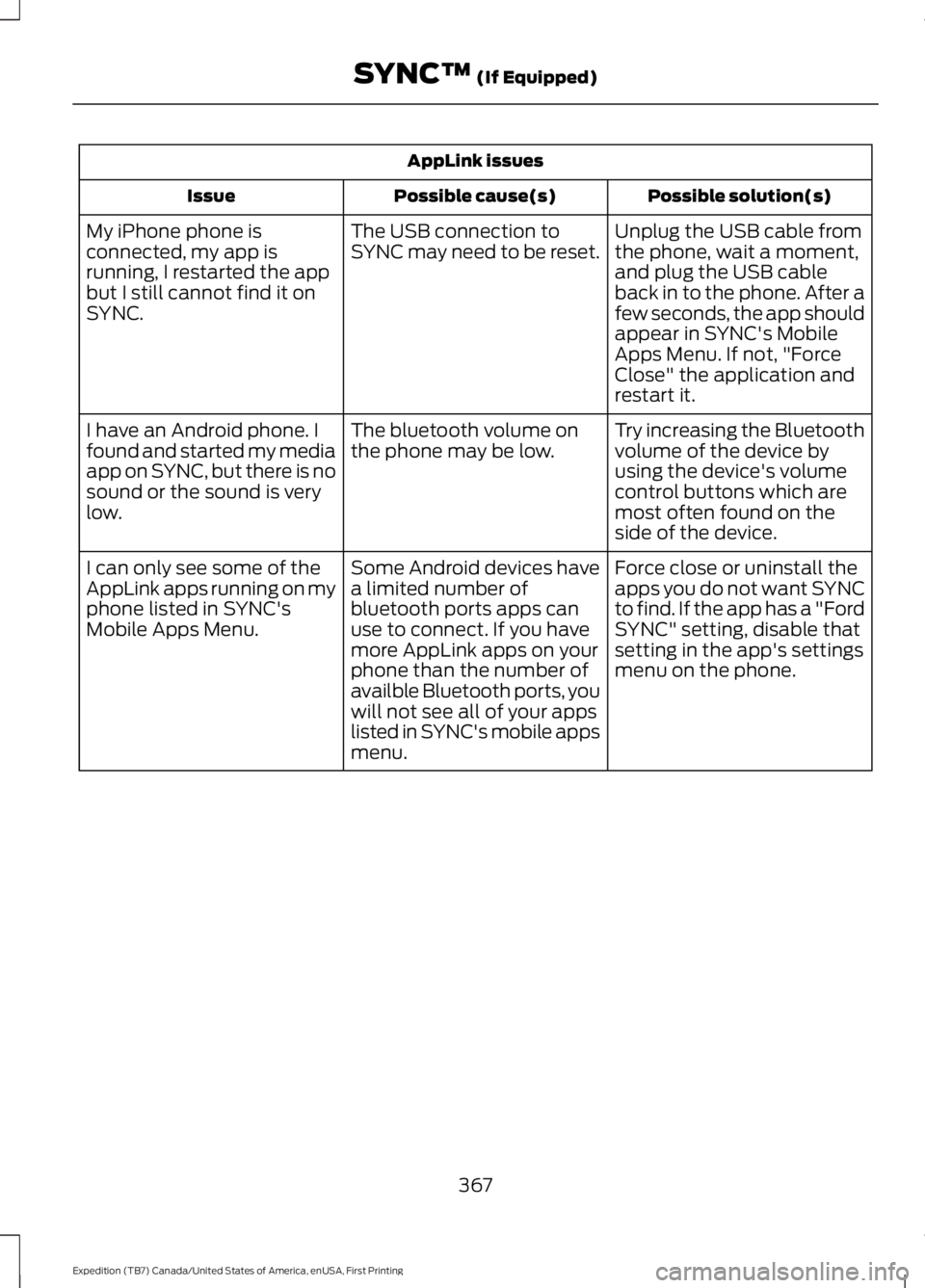
AppLink issues
Possible solution(s)Possible cause(s)Issue
Unplug the USB cable fromthe phone, wait a moment,and plug the USB cableback in to the phone. After afew seconds, the app shouldappear in SYNC's MobileApps Menu. If not, "ForceClose" the application andrestart it.
The USB connection toSYNC may need to be reset.My iPhone phone isconnected, my app isrunning, I restarted the appbut I still cannot find it onSYNC.
Try increasing the Bluetoothvolume of the device byusing the device's volumecontrol buttons which aremost often found on theside of the device.
The bluetooth volume onthe phone may be low.I have an Android phone. Ifound and started my mediaapp on SYNC, but there is nosound or the sound is verylow.
Force close or uninstall theapps you do not want SYNCto find. If the app has a "FordSYNC" setting, disable thatsetting in the app's settingsmenu on the phone.
Some Android devices havea limited number ofbluetooth ports apps canuse to connect. If you havemore AppLink apps on yourphone than the number ofavailble Bluetooth ports, youwill not see all of your appslisted in SYNC's mobile appsmenu.
I can only see some of theAppLink apps running on myphone listed in SYNC'sMobile Apps Menu.
367
Expedition (TB7) Canada/United States of America, enUSA, First Printing
SYNC™ (If Equipped)
Page 418 of 421
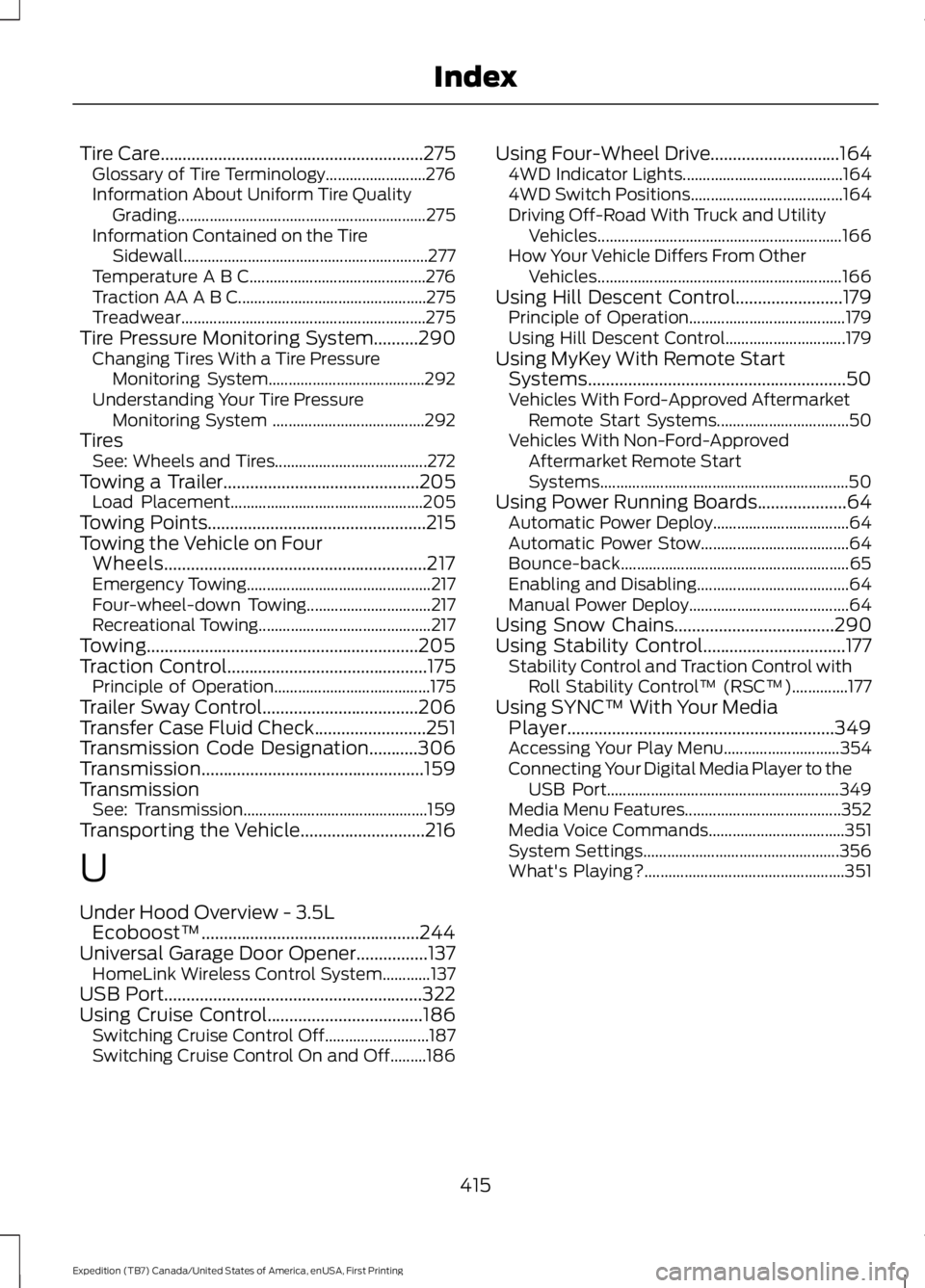
Tire Care...........................................................275Glossary of Tire Terminology.........................276Information About Uniform Tire QualityGrading..............................................................275Information Contained on the TireSidewall.............................................................277Temperature A B C............................................276Traction AA A B C...............................................275Treadwear.............................................................275Tire Pressure Monitoring System..........290Changing Tires With a Tire PressureMonitoring System.......................................292Understanding Your Tire PressureMonitoring System ......................................292TiresSee: Wheels and Tires......................................272Towing a Trailer............................................205Load Placement................................................205Towing Points.................................................215Towing the Vehicle on FourWheels...........................................................217Emergency Towing..............................................217Four-wheel-down Towing...............................217Recreational Towing...........................................217Towing.............................................................205Traction Control.............................................175Principle of Operation.......................................175Trailer Sway Control...................................206Transfer Case Fluid Check.........................251Transmission Code Designation...........306Transmission..................................................159TransmissionSee: Transmission..............................................159Transporting the Vehicle............................216
U
Under Hood Overview - 3.5LEcoboost™.................................................244Universal Garage Door Opener................137HomeLink Wireless Control System............137USB Port..........................................................322Using Cruise Control...................................186Switching Cruise Control Off..........................187Switching Cruise Control On and Off.........186
Using Four-Wheel Drive.............................1644WD Indicator Lights........................................1644WD Switch Positions......................................164Driving Off-Road With Truck and UtilityVehicles.............................................................166How Your Vehicle Differs From OtherVehicles.............................................................166Using Hill Descent Control........................179Principle of Operation.......................................179Using Hill Descent Control..............................179Using MyKey With Remote StartSystems..........................................................50Vehicles With Ford-Approved AftermarketRemote Start Systems.................................50Vehicles With Non-Ford-ApprovedAftermarket Remote StartSystems..............................................................50Using Power Running Boards....................64Automatic Power Deploy..................................64Automatic Power Stow.....................................64Bounce-back.........................................................65Enabling and Disabling......................................64Manual Power Deploy........................................64Using Snow Chains....................................290Using Stability Control................................177Stability Control and Traction Control withRoll Stability Control™ (RSC™)..............177Using SYNC™ With Your MediaPlayer............................................................349Accessing Your Play Menu.............................354Connecting Your Digital Media Player to theUSB Port..........................................................349Media Menu Features.......................................352Media Voice Commands..................................351System Settings.................................................356What's Playing?..................................................351
415
Expedition (TB7) Canada/United States of America, enUSA, First Printing
Index