2016 FORD EXPEDITION EL tow bar
[x] Cancel search: tow barPage 212 of 421
Integrated Hitch Rating
WARNING
Towing trailers beyond the maximumtongue weight exceeds the limit ofthe towing system and could resultin vehicle structural damage, loss of vehiclecontrol and personal injury.
The standard integrated hitch has tworatings depending on mode of operation:
•Weight-carrying mode requires a drawbar and hitch ball. The draw barsupports all the vertical tongue load ofthe trailer.
•Weight-distributing mode requires anaftermarket weight-distributingsystem, which includes draw bar, hitchball, spring bars and snap-up brackets.This system distributes the verticaltongue load of the trailer between thetruck and the trailer.
Maximum Tongue WeightMaximum Trailer WeightMode
600 lb (272 kg)6000 lb (2721 kg)Weight carrying
920 lb (417 kg)9200 lb (4173 kg)Weight distributing
Note:These are hitch ratings only. Actualvehicle ratings are dependent on engine,transmission and axle combinations.
Weight-distributing Hitch - Vehicleswithout Automatic LevelingSuspension
WARNING
Do not adjust a weight-distributinghitch to any position where the rearbumper of the vehicle is higher thanit was before attaching the trailer. Doingso will defeat the function of theweight-distributing hitch, which may causeunpredictable handling, and could resultin serious personal injury.
When hooking-up a trailer using aweight-distributing hitch, always use thefollowing procedure:
1. Park the loaded vehicle, without thetrailer, on a level surface.
2. Measure the height to the top of yourvehicle's front wheel opening on thefender. This is H1.
3.Attach the loaded trailer to your vehiclewithout the weight-distributing barsconnected.
4. Measure the height to the top of yourvehicle's front wheel opening on thefender a second time. This is H2.
5. Install and adjust the tension in theweight-distributing bars so that theheight of your vehicle's front wheelopening on the fender is approximatelyhalf the way down from H2, toward H1.
6.Check that the trailer is level or slightlynose down toward your vehicle. If not,adjust the ball height accordingly andrepeat Steps 2-6.
When the trailer is level or slightly nosedown toward the vehicle:
•Lock the bar tension adjuster in place.
•Check that the trailer tongue securelyattaches and locks onto the hitch.
•Install safety chains, lighting, and trailerbrake controls as required by law or thetrailer manufacturer.
209
Expedition (TB7) Canada/United States of America, enUSA, First Printing
Towing
Page 213 of 421
Weight-distributing Hitch - Vehicleswith Automatic Leveling Suspension
WARNING
Do not adjust a weight-distributinghitch to any position where the rearbumper of the vehicle is higher thanit was before attaching the trailer. Doingso will defeat the function of theweight-distributing hitch, which may causeunpredictable handling, and could resultin serious personal injury.
Note:If you do not move the loaded vehiclefor approximately 12 hours, the levelingsystem may bleed down to a lower height.This can be especially apparent if you leavea trailer attached to the parked vehicle forlong periods. You must drive your vehicle inorder to re-level the suspension.
When hooking-up a trailer using aweight-distributing hitch, always use thefollowing procedure:
1. Load the interior of the vehicle to aweight similar to that which you intendto carry when towing. This includesthings such as passenger weight andcargo.
2. Drive the vehicle for approximately 2miles (3 kilometers) to re-level thesuspension.
3. Park the loaded vehicle, without thetrailer, on a level surface.
4. Measure the height to the top of yourvehicle's front wheel opening on thefender. This is H1.
5.Attach the loaded trailer to your vehiclewithout the weight-distributing barsconnected.
6.Make sure you securely attach and lockthe trailer tongue to the hitch.
7.Install safety chains, lighting, and trailerbrake controls as required by law or thetrailer manufacturer.
8. Drive the vehicle and trailer at 20–25mph (32–40 km/h) for approximately2 miles (3 kilometers) to re-level thesuspension.
9. Park your vehicle and trailer on a levelsurface.
10.Measure the height to the top of yourvehicle's front wheel opening on thefender a second time. This is H2.
11. Install and adjust the tension in theweight-distributing bars so that theheight of your vehicle's front wheelopening on the fender isapproximately half the way downfrom H2, toward H1.
12. Check that the trailer is level orslightly nose down toward yourvehicle. If not, remove the trailer,adjust the ball height accordingly andrepeat Steps 5-11.
When the trailer is level or slightly nosedown toward the vehicle:
•Lock the bar tension adjuster in place.
•Check that the trailer tongue securelyattaches and locks onto the hitch.
•Install safety chains, lighting, and trailerbrake controls as required by law or thetrailer manufacturer.
Safety Chains
Note:Do not attach safety chains to thebumper.
Always connect the safety chains to theframe or hook retainers of your vehiclehitch.
To connect the safety chains, cross thechains under the trailer tongue and allowenough slack for turning tight corners. Donot allow the chains to drag on the ground.
210
Expedition (TB7) Canada/United States of America, enUSA, First Printing
Towing
Page 215 of 421
The controller shows gain setting, outputbar graph, and trailer connectivity statusin the information display. They appear inthe information display as follows:
•Trailer Brake Controller Gain (withouttrailer connected): Shows the currentgain setting during a given ignition cycleand when adjusting the gain. This alsodisplays if you use the manual controllever or make gain adjustments withno trailer connected.
•Trailer Brake Controller Gain Output:Displays when you push your vehicle'sbrake pedal, or upon use of the manualcontrol. Bar indicators illuminate in theinformation display to indicate theamount of power going to the trailerbrakes relative to the brake pedal ormanual control input. One bar indicatesthe least amount of output; six barsindicate maximum output.
•Trailer Connected: Displays when thesystem senses a correct trailer wiringconnection (a trailer with electric trailerbrakes) during a given ignition cycle.
•Trailer Disconnected: Displays,accompanied by a single audible time,when the system senses a trailerconnection and then a disconnection,either intentional or unintentional,during a given ignition cycle. It alsodisplays if a truck or trailer-wiring faultoccurs causing the trailer to appeardisconnected. This message can alsodisplay if you use the manual controllever without a trailer connected. Afterdisconnecting the trailer connector,press the brake pedal forapproximately five seconds to allowthe system to detect and update thetrailer status.
B: Manual control lever: Slide the controllever to the left to turn on the trailer'selectric brakes independent of the towvehicle's. See the following Procedure foradjusting gain section for instructions onproper use of this feature. If you use themanual control while the brake is alsoapplied, the greater of the two inputsdetermines the power sent to the trailerbrakes.
•Stop lamps: Using the manual controllever illuminates both the trailer brakelamps and your vehicle brake lampsexcept the center high-mount stoplamp, if you make the proper electricalconnection to the trailer. Pressing yourvehicle brake pedal also illuminatesboth trailer and vehicle brake lamps.
Procedure for Adjusting Gain
Note:Only perform this procedure in atraffic-free environment at speeds ofapproximately 20-25 mph (30-40 km/h).
The gain setting sets the trailer brakecontroller for the specific towing condition.You should change the setting as towingconditions change. Changes to towingconditions include trailer load, vehicle load,road conditions and weather.
The gain should be set to provide themaximum trailer braking assistance whilemaking sure the trailer wheels do not lockwhen using the brakes. Locked trailerwheels may lead to trailer instability.
1.Make sure the trailer brakes are in goodworking condition, functioning normallyand properly adjusted. See your trailerdealer if necessary.
2. Hook up the trailer and make theelectrical connections according to thetrailer manufacturer's instructions.
3. When you plug in a trailer with electricor electric-over-hydraulic brakes, amessage confirming connectionappears in the information display.
212
Expedition (TB7) Canada/United States of America, enUSA, First Printing
Towing
Page 288 of 421
it needs to be repaired or replaced.For your safety, tires that aredamaged or show signs ofexcessive wear should not be usedbecause they are more likely toblow out or fail.
Improper or inadequate vehiclemaintenance can cause tires towear abnormally. Inspect all yourtires, including the spare,frequently, and replace them ifone or more of the followingconditions exist:
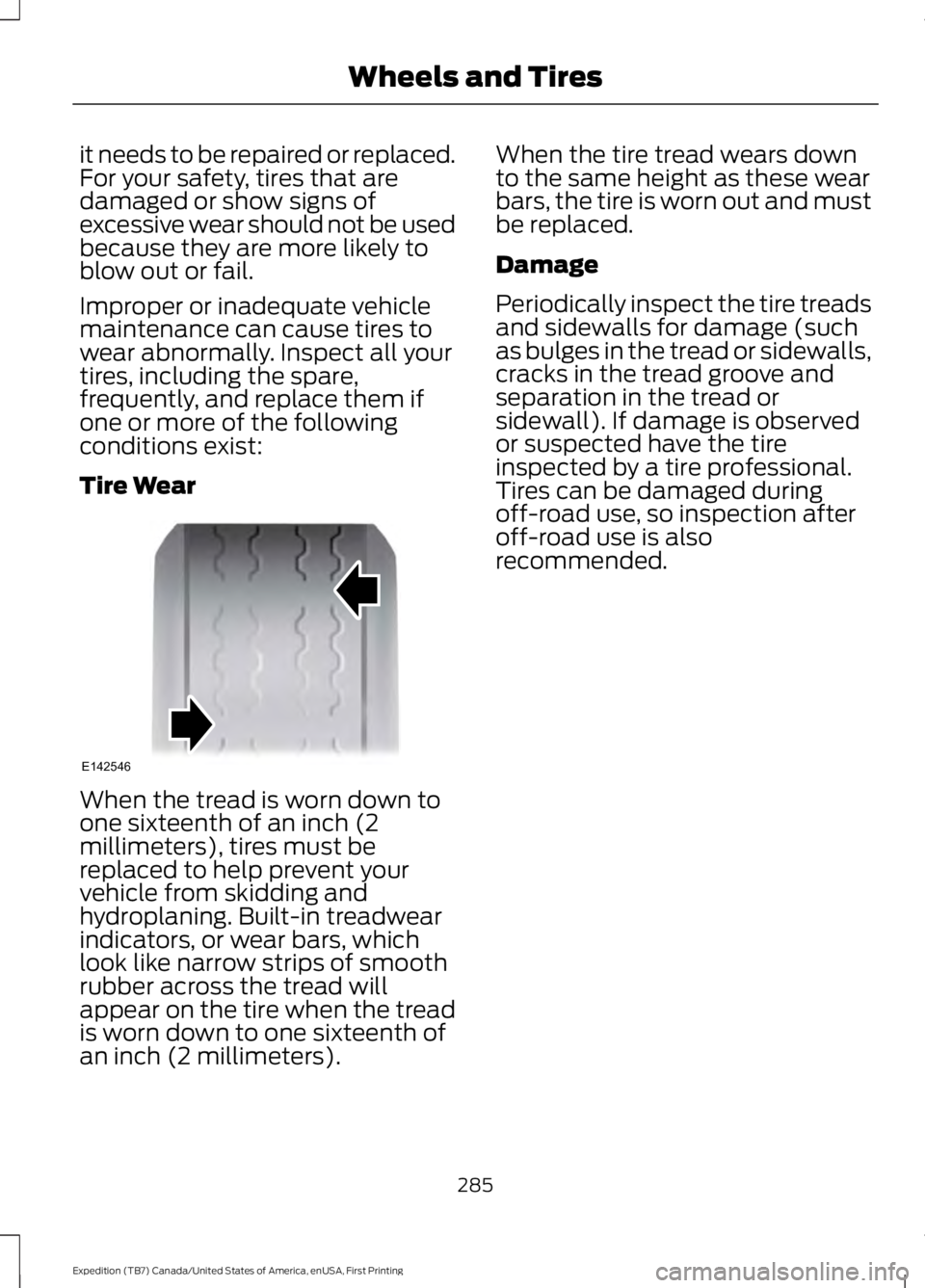
Tire Wear
When the tread is worn down toone sixteenth of an inch (2millimeters), tires must bereplaced to help prevent yourvehicle from skidding andhydroplaning. Built-in treadwearindicators, or wear bars, whichlook like narrow strips of smoothrubber across the tread willappear on the tire when the treadis worn down to one sixteenth ofan inch (2 millimeters).
When the tire tread wears downto the same height as these wearbars, the tire is worn out and mustbe replaced.
Damage
Periodically inspect the tire treadsand sidewalls for damage (suchas bulges in the tread or sidewalls,cracks in the tread groove andseparation in the tread orsidewall). If damage is observedor suspected have the tireinspected by a tire professional.Tires can be damaged duringoff-road use, so inspection afteroff-road use is alsorecommended.
285
Expedition (TB7) Canada/United States of America, enUSA, First Printing
Wheels and TiresE142546
Page 416 of 421
Power Windows.............................................80Accessory Delay...................................................80Bounce-Back.........................................................80One-Touch Down................................................80One-Touch Up......................................................80Window Lock.........................................................80Protecting the Environment........................14
R
Rear Axle...........................................................171Rear Parking Aid.............................................181Rear Passenger Climate Controls..........120Rear Quarter Windows................................83Rear Seats........................................................127Adjusting the Second Row Center 20%Seat.....................................................................132Adjusting the Second Row Outboard 40%Seat for E-Z Entry..........................................129Exiting the Third Row........................................130Folding Down the Second Row 40% Seat...............................................................................127Folding Down the Third Row Seats to theLoad Floor.........................................................132Folding the Second Row Center 20% Seat...............................................................................131Placing the Second Row Outboard 40%Seats in Cargo Mode....................................128PowerFold™ Third Row Seat.........................133Reclining the Second Row Outboard 40%Seatback...........................................................130Returning to the Upright Position from theFull Lowered Load Floor Position............129Third Row Seats..................................................132Rear Under Floor Storage.........................196Cargo Management System..........................196Cargo Shelf and Divider...................................196Third Row Storage Bin......................................197Rear View Camera.......................................183Using the Rear View Camera System.........183Rear View CameraSee: Rear View Camera....................................183Rear Window Wiper and Washers...........73Rear Window Washer.........................................73Rear Window Wiper.............................................73Recommended Towing Weights...........206Reduced Engine Performance................220
Refueling..........................................................153Easy Fuel™ Capless Fuel System................154Remote Control..............................................42Car Finder................................................................44Integrated Keyhead Transmitter.....................42Intelligent Access Key.........................................42Memory Feature...................................................45Remote Start.........................................................44Replacing the Battery.........................................43Sounding the Panic Alarm................................44Remote Start...................................................121Automatic Settings.............................................121Removing a Headlamp..............................256Repairing Minor Paint Damage..............269Replacement PartsRecommendation.........................................11Collision Repairs.....................................................11Scheduled Maintenance and MechanicalRepairs...................................................................11Warranty on Replacement Parts.....................12Replacing a Lost Key or RemoteControl............................................................45Reporting Safety Defects (CanadaOnly)..............................................................233Reporting Safety Defects (U.S.Only)..............................................................232Roadside Assistance..................................223Vehicles Sold in Canada: Getting RoadsideAssistance........................................................223Vehicles Sold in Canada: Using RoadsideAssistance........................................................223Vehicles Sold in the United States: GettingRoadside Assistance...................................223Vehicles Sold in the United States: UsingRoadside Assistance...................................223Roadside Emergencies..............................223Roof Racks and Load Carriers..................197Adjusting the Crossbar.....................................197Running-InSee: Breaking-In.................................................220Running Out of Fuel.....................................152Adding Fuel From a Portable FuelContainer..........................................................153Filling a Portable Fuel Container..................153
S
Safety Canopy™............................................38
413
Expedition (TB7) Canada/United States of America, enUSA, First Printing
Index