2016 FORD EXPEDITION EL display
[x] Cancel search: displayPage 57 of 421
At the Liftgate
The liftgate unlocks and opensautomatically when you press the liftgaterelease button.
Smart Unlocks for IntegratedKeyhead Transmitter (If Equipped)
This helps to prevent you from lockingyourself out of your vehicle if the key is stillin the ignition.
When you open one of the front doors andlock your vehicle with the power door lockcontrol, all the doors will lock then unlockand the horn will sound twice if the key isstill in the ignition.
Your can still lock your vehicle with the keyin the ignition by:
•Using the manual lock on the door.
•Locking the driver door with a key.
•Using the keyless entry keypad.
•Pressing the lock button on anotherremote control.
Smart Unlocks for IntelligentAccess Keys (If Equipped)
This helps to prevent you from locking yourkey inside the passenger compartment orrear cargo area.
When you electronically lock your vehiclewith any door open, the transmission is inpark (P) and the ignition is off, the systemsearches for an intelligent access keyinside your vehicle after you close the lastdoor. If the system finds a key, all of thedoors will immediately unlock and the hornwill sound twice, indicating that a key isinside.
You can override the smart unlock featureand intentionally lock the intelligent accesskey inside your vehicle.
To do this, lock your vehicle after you haveclosed all the doors by:
•Using the keyless entry keypad.
•Pressing the lock button on anotherintelligent access key.
When you open one of the front doors andlock your vehicle using the power door lockcontrol, all doors will lock then unlock if:
•The ignition is on.
•The ignition is off and the transmissionis not in park (P).
Auto Relock
If you press the unlock button on theremote control and do not open a doorwithin 45 seconds, your vehicle will lockand the alarm will arm. You can switch thisfeature on or off in the information display.See Information Displays (page 92).
Autolock
Autolock locks all the doors when all of thefollowing occur:
•All doors are closed.
•The ignition is on.
•You shift into any gear putting yourvehicle in motion.
•Your vehicle's speed is greater than12 mph (20 km/h).
Autolock repeats when:
•You open then close any door while theignition is on and your vehicle's speedis less than 9 mph (15 km/h).
•Your vehicle's speed is greater than12 mph (20 km/h).
Enabling or Disabling
To enable or disable the autolock feature,contact an authorized dealer.
54
Expedition (TB7) Canada/United States of America, enUSA, First Printing
Locks
Page 58 of 421

Autounlock
Autounlock unlocks all the doors when allof the following occur:
•The ignition is on, all the doors areclosed, and your vehicle has beenmoving at a speed greater than 12 mph(20 km/h).
•You stop your vehicle and switch theignition off or to accessory.
•You open the driver door within 10minutes of switching the ignition off orto accessory.
Note:The doors do not autounlock if youelectronically lock your vehicle after youswitch the ignition off and before you openthe driver door.
Enabling or Disabling
You can enable or disable the autounlockfeature in the information display or anauthorized dealer can do it for you. SeeGeneral Information (page 92).
Illuminated Entry
The interior lamps and some exteriorlamps illuminate when you unlock thedoors with the remote control.
The lamps turn off if:
•The ignition is on.
•You press the remote control lockbutton.
•25 seconds have elapsed.
The lamps do not turn off if:
•You turn them on with the lampcontrol.
•Any door is open.
Illuminated Exit
The interior lamps and some exteriorlamps illuminate when all doors are closedand you switch the ignition off.
The lamps will turn off if all the doorsremain closed and:
•25 seconds have elapsed.
•You press the push button ignitionswitch.
Battery Saver
If you leave the courtesy lamps, interiorlamps or headlamps on, the battery savershuts them off 10 minutes after you switchthe ignition off.
Battery Saver for Intelligent AccessKeys (If Equipped)
If you leave the ignition switched on, itshuts off when it detects a certain amountof battery drain, or after 45 minutes.
MANUAL LIFTGATE (If Equipped)
WARNINGS
It is extremely dangerous to ride in acargo area, inside or outside of yourvehicle. In a crash, people riding inthese areas are more likely to be seriouslyinjured or killed. Do not allow people to ridein any area of your vehicle that is notequipped with seats and safety belts. Makesure everyone in your vehicle is in a seatand properly using a safety belt. Failure tofollow this warning could result in seriouspersonal injury or death.
Make sure to close and latch theliftgate to prevent drawing exhaustfumes into your vehicle. This will alsoprevent passengers and cargo from fallingout. If you must drive with the liftgate open,keep the vents or windows open so outsideair comes into your vehicle. Failure tofollow this warning could result in seriouspersonal injury.
55
Expedition (TB7) Canada/United States of America, enUSA, First Printing
Locks
Page 63 of 421
You can use the keypad to lock or unlockthe doors without using a key.
For vehicles without intelligent access, youcan operate the keypad with thefactory-set 5-digit entry code. The code islocated on the owner’s wallet card in theglove box and is available from anauthorized dealer. You can also create upto five of your own 5-digit personal entrycodes.
For vehicles with intelligent access, you donot need to enter a 5-digit entry code.Press any button on keyless entry keypadonce to unlock all doors.
Note:You must have an intelligent accesskey within 3 ft (1 m) of your vehicle.
Programming a Personal Entry Code
To create your own personal entry code:
1. Enter the factory-set code.
2. Press 1·2 on the keypad within fiveseconds.
3. Enter your personal 5-digit code. Youmust enter each number within fiveseconds of each other.
4. Press 1·2 on the keypad to savepersonal code 1.
The doors will lock then unlock to confirmthat programming was successful.
To program additional personal entrycodes, repeat Steps 1-3, then for Step 4:
•press 3·4 to save personal code 2
•press 5·6 to save personal code 3
•press 7·8 to save personal code 4
•press 9·0 to save personal code 5.
You may also program a personal entrycode through the information display.
Tips:
•Do not set a code that uses five of thesame number.
•Do not use five numbers in sequentialorder.
•The factory-set code will work even ifyou have set your own personal code.
Recalling Memory Positions (IfEquipped)
The programmed entry codes will recalldriver memory positions as follows:
•Entry code 1 will recall driver 1 memorypositions.
•Entry code 2 will recall driver 2 memorypositions.
Note:Personal entry codes 3, 4 and 5 willnot recall memory positions.
Erasing a Personal Code
1. Enter the factory-set 5-digit code.
2. Press and release 1·2 on the keypadwithin five seconds.
3. Press and hold 1·2 for two seconds.You must do this within five secondsof completing Step 2.
All personal codes will erase and only thefactory-set 5-digit code will work.
Anti-Scan Feature
The keypad will go into an anti-scan modeif you enter the wrong code seven times(35 consecutive button presses). Thismode disables the keypad for one minuteand the keypad lamp will flash.
The anti-scan feature will turn off after:
•one minute of keypad inactivity
•pressing the unlock button on theremote control
•switching the ignition on.
60
Expedition (TB7) Canada/United States of America, enUSA, First Printing
Locks
Page 64 of 421
Displaying the Factory Set Code
Note:You will need to have twoprogrammed passive anti-theft keys for thisprocedure.
To display the factory-set code in theinformation display:
1.Insert a key into the ignition and switchthe ignition on for a few seconds.
2.Switch the ignition off and remove thekey.
3. Insert the second key into the ignitionand switch the ignition on.
The factory-set code will display for a fewseconds.
Note:The code may not display until afterany other warning messages first display.
Unlocking and Locking the Doors
Vehicles Without Intelligent Access
To Unlock the Driver Door
Enter the factory-set 5-digit code or yourpersonal code. You must press eachnumber within five seconds of each other.The interior lamps will illuminate.
Note:All doors will unlock if you disablethe two-stage unlocking mode. SeeLocking and Unlocking (page 53).
To Unlock All Doors
Enter the factory-set code or your personalcode, then press 3·4 within five seconds.
To Lock All Doors
Press and hold 7·8 and 9·0 at the sametime (with the driver door closed). You donot need to enter the keypad code first.
Vehicles With Intelligent Access
Press any button on keyless entry keypadonce to unlock all doors.
Note:You must have an intelligent accesskey within 3 ft (1 m) of your vehicle.
61
Expedition (TB7) Canada/United States of America, enUSA, First Printing
Locks
Page 65 of 421
PASSIVE ANTI-THEFT
SYSTEM
Note:The system is not compatible withnon-Ford aftermarket remote start systems.Use of these systems may result in vehiclestarting problems and a loss of securityprotection.
Note:Metallic objects, electronic devicesor a second coded key on the same keychain may cause vehicle starting problemsif they are too close to the key when startingthe engine. Prevent these objects fromtouching the coded key while starting theengine. Switch the ignition off, move allobjects on the key chain away from thecoded key and restart the engine if aproblem occurs.
Note:Do not leave a duplicate coded keyin the vehicle. Always take your keys andlock all doors when leaving the vehicle.
SecuriLock®
The system is an engine immobilizationsystem. It is designed to help prevent theengine from being started unless a codedkey programmed to your vehicle is used.Using the wrong key may prevent theengine from starting. A message mayappear in the information display.
If you are unable to start the engine with acorrectly coded key, a malfunction hashappened and a message may appear inthe information display.
Automatic Arming
The vehicle arms immediately after youswitch the ignition off.
Automatic Disarming
Switching the ignition on with a coded keydisarms the vehicle.
Replacement Keys
Note:Your vehicle comes equipped withtwo integrated keyhead transmitters or twointelligent access keys.
The integrated keyhead transmitterfunctions as a programmed ignition keythat operates all the locks and starts thevehicle, as well as a remote control.
The intelligent access key functions as aprogrammed key that operates the driverdoor lock and activates the intelligentaccess with push button start system, aswell as a remote control.
If your programmed transmitters orstandard SecuriLock coded keys(integrated keyhead transmitters only) arelost or stolen and you do not have an extracoded key, you will need to have yourvehicle towed to an authorized dealer. Youneed to erase the key codes from yourvehicle and program new coded keys.
Store an extra programmed key away fromthe vehicle in a safe place to help preventany inconveniences. See your authorizeddealer to purchase additional spare orreplacement keys.
Programming a Spare IntegratedKeyhead Transmitter
Note:You can program a maximum of eightcoded keys to your vehicle. All eight can beintegrated keyhead transmitters.
You can program your own integratedkeyhead transmitter or standardSecuriLock coded keys to your vehicle. Thisprocedure will program both the engineimmobilizer keycode and the remote entryportion of the remote control to yourvehicle
Only use integrated keyhead transmittersor standard SecuriLock keys.
62
Expedition (TB7) Canada/United States of America, enUSA, First Printing
Security
Page 67 of 421

USING POWER RUNNING
BOARDS
WARNINGS
In extreme climates, excessive icebuildup may occur, causing therunning boards not to deploy. Makesure that the running boards havedeployed, and have finished moving beforeattempting to step on them. The runningboards will resume normal function oncethe blockage is cleared.
Turn off the running boards beforejacking or placing any object underyour vehicle. Never place your handbetween the extended running board andyour vehicle. A moving running board maycause injury.
Note:Do not use the running boards, frontand rear hinge assemblies, running boardmotors, or the running board underbodymounts to lift your vehicle when jacking.Always use proper jacking points.
Note:The running boards may operatemore slowly in cool temperatures.
Note:The running board mechanism maytrap debris such as mud, dirt, snow, ice andsalt. This may cause unwanted noise. If thishappens, manually set the running boardsto the deployed position. Then, wash thesystem, in particular the front and rear hingearms, with a high-pressure car wash wand.
Automatic Power Deploy
The running boards automatically extenddown and out when you open the door.This can help you enter and exit yourvehicle.
Automatic Power Stow
When you close the doors, the runningboards return to the stowed position aftera two-second delay.
Manual Power Deploy
You can manually operate the runningboards in the information display. SeeGeneral Information (page 92).
Set the running boards in the deployedposition to access the roof.
The running boards return to the stowedposition and enter automatic mode whenthe vehicle speed exceeds 5 mph (8 km/h).
Enabling and Disabling
You can enable and disable the powerrunning board feature in the informationdisplay. See General Information (page92).
64
Expedition (TB7) Canada/United States of America, enUSA, First Printing
Power Running Boards (If Equipped)E166682
Page 71 of 421
End of Travel Position
The steering column sets a stoppingposition just short of the end of the columnposition to prevent damage to the steeringcolumn. A new stopping position sets if thesteering column encounters an objectwhen tilting or telescoping.
To reset the steering column to its normalstopping position:
1. Confirm there is nothing obstructingthe motion of the steering column.
2. Press and hold the steering columncontrol until the steering column stopsmoving.
3. Press the steering column controlagain. The steering column may beginto move again.
4. When the steering column stops,continue holding the control for anadditional few seconds.
5.Repeat for each direction as necessary.
A new stopping position is set. The nexttime you tilt or telescope the steeringcolumn, it will stop just short of the end ofthe column position.
Memory Feature
You can save and recall the steeringcolumn position with the memory function.See Memory Function (page 126).
Note:Pressing the adjustment controlduring memory recall cancels the operation.
Easy Entry and Exit Feature
When you switch the ignition off, thesteering column will move to allow extraroom to exit your vehicle. The column willreturn to the previous setting when youswitch the ignition on. You can enable ordisable this feature in the informationdisplay. See Information Displays (page92).
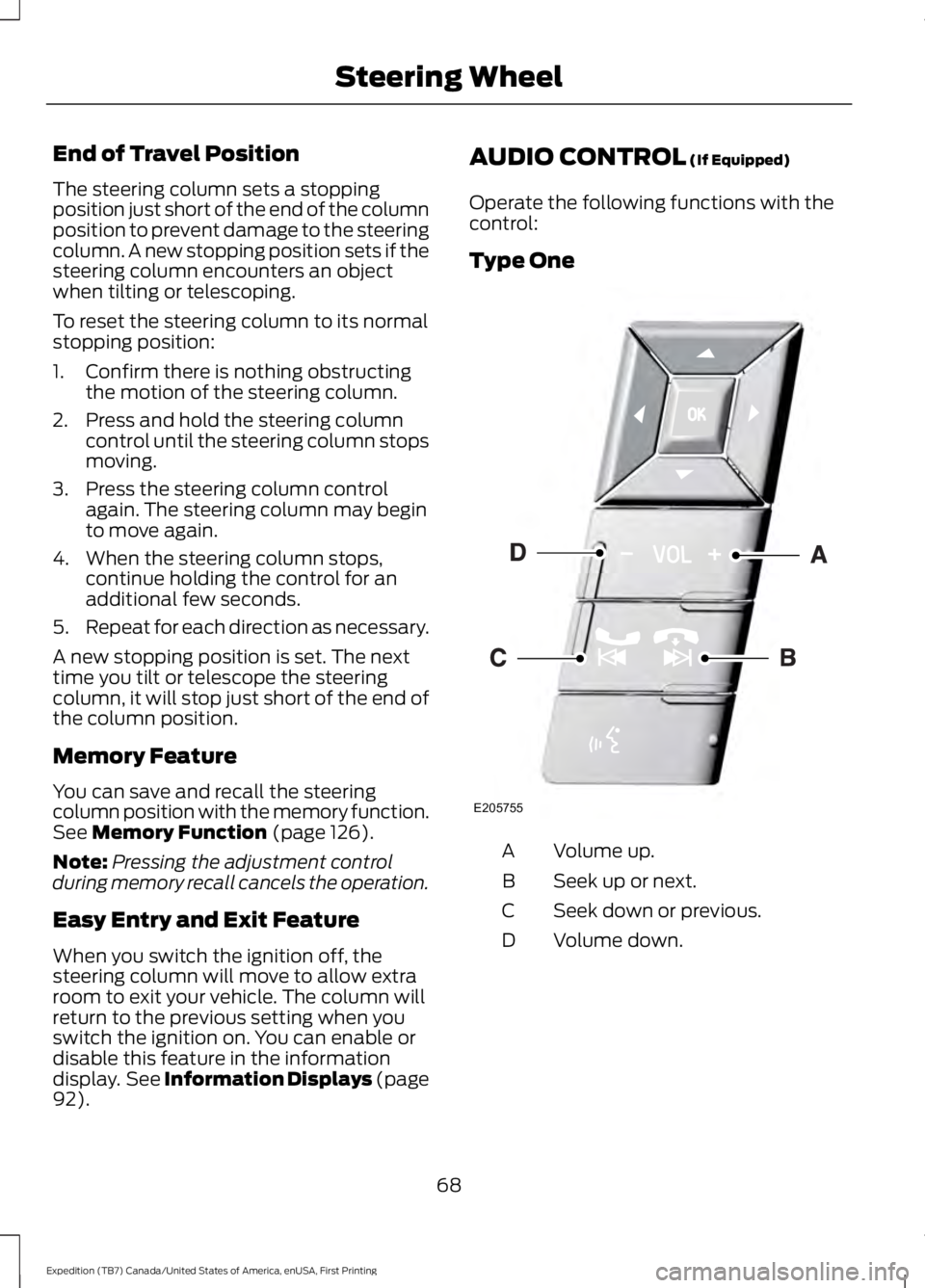
AUDIO CONTROL (If Equipped)
Operate the following functions with thecontrol:
Type One
Volume up.A
Seek up or next.B
Seek down or previous.C
Volume down.D
68
Expedition (TB7) Canada/United States of America, enUSA, First Printing
Steering WheelE205755
Page 73 of 421
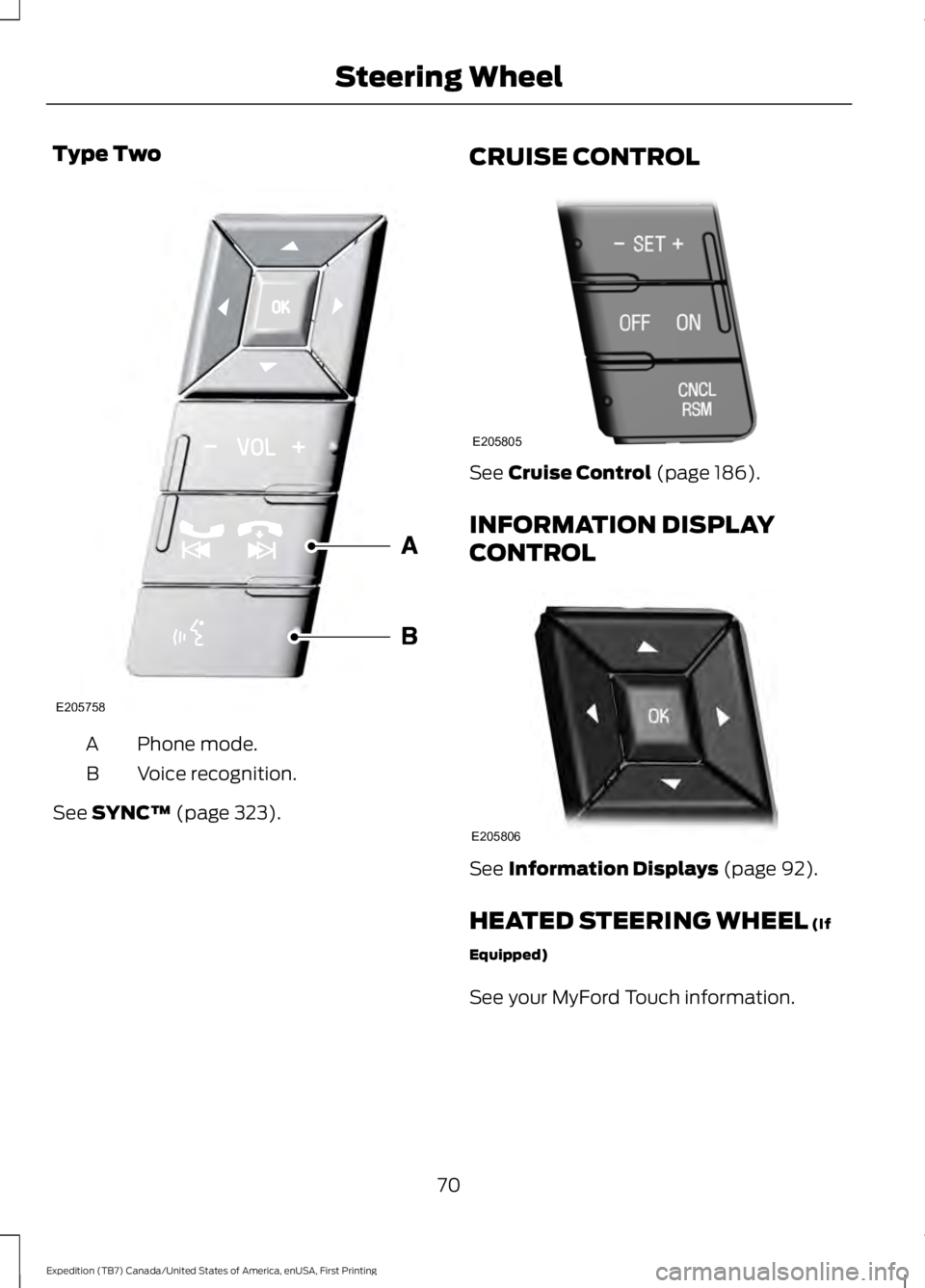
Type Two
Phone mode.A
Voice recognition.B
See SYNC™ (page 323).
CRUISE CONTROL
See Cruise Control (page 186).
INFORMATION DISPLAY
CONTROL
See Information Displays (page 92).
HEATED STEERING WHEEL (If
Equipped)
See your MyFord Touch information.
70
Expedition (TB7) Canada/United States of America, enUSA, First Printing
Steering WheelE205758 E205805 E205806