2016 FORD C MAX ENERGI wheel
[x] Cancel search: wheelPage 161 of 395

Charge Port
The charge port is located between thefront left-hand side door and the frontleft-hand side wheel well. Press theindentation on the charge port door toopen and close it.
Note:Do not force the charge port dooropen or closed. Forcing the door open orclosed damages the charge port.
You can modify the light ring illuminationsettings. The light ring located around thecharge port indicates the charge status ofthe high voltage battery in your vehicle.Divided into four quadrants, the chargeport light ring displays the state of chargein 25 percent increments.
You can press the unlock button on yourkey fob to view the charge status of yourvehicle. Based on which quadrants light,you can determine the current state ofcharge. If the charge is below 25 percent,the light ring does not light. Do not forgetto press the lock button on your key fob tore-lock your vehicle.
The light ring also displays the currentstate of charge when opening the doors.
The cord acknowledgment featureactivates when you initiate a charge cycle.The four light quadrants each individuallyflash in a clockwise motion, starting withthe top right-hand side light and endingwith the top left-hand side, two timesconfirming that the system detects thecharging coupler.
Charging
Note:Your vehicle must be in park (P) tocharge.
To charge your high voltage battery:
1.Put your vehicle in park (P) and switchoff your vehicle.
2. Press the indentation on the chargeport door to open it.
3. Plug the charging coupler into thecharge port on your vehicle. Make surethe button clicks confirming you havecompletely engaged the coupler.
4. Verify that the cord acknowledgmentfeature activates. The cordacknowledgment feature activateswhen you initiate a charge cycle.
5. If using a 240 volt charging station,follow the instructions on the chargestation to begin the charging process.
158
C-MAX (CCG) Canada/United States of America, enUSA, First Printing
High Voltage BatteryE144779 E144780
Page 164 of 395

AUTOMATIC TRANSMISSION
WARNINGS
Always set the parking brake fullyand make sure the gearshift islatched in park (P). Turn the ignitionto the off position and remove the keywhenever you leave your vehicle.
Do not apply the brake pedal andaccelerator pedal simultaneously.Applying both pedals simultaneouslyfor more than three seconds will limitengine rpm, which may result in difficultymaintaining speed in traffic and could leadto serious injury.
Note:Do not leave your vehicle with thetransmission in neutral (N). Leaving yourvehicle with the transmission in neutral (N)will drain the battery and you may not beable to start your vehicle.
Automatic Transmission
Putting your vehicle in gear:
1. Fully press down the brake pedal.
2.Move the gearshift lever to the desiredgear.
3. Come to a complete stop.
4. Move the gearshift lever and securelylatch it in park (P).
Park (P)
This position locks the transmission andprevents the front wheels from turning.Come to a complete stop before puttingyour vehicle into and out of park (P).
Reverse (R)
With the gearshift lever in reverse (R), yourvehicle will move backward. Always cometo a complete stop before shifting into andout of reverse (R).
Neutral (N)
With the gearshift lever in neutral (N), yourvehicle can be started and is free to roll.Hold the brake pedal down while in thisposition.
Drive (D)
Drive (D) is the normal driving position forthe best fuel economy.
Low (L)
•Provides maximum engine braking.
•The transmission may be shifted intolow (L) at any vehicle speed.
•Is not intended for use under extendedor normal driving conditions and resultsin lower fuel economy.
Grade assist:
Press the transmission control switch onthe side of the gearshift lever to activategrade assist.
161
C-MAX (CCG) Canada/United States of America, enUSA, First Printing
TransmissionE144820
Page 165 of 395
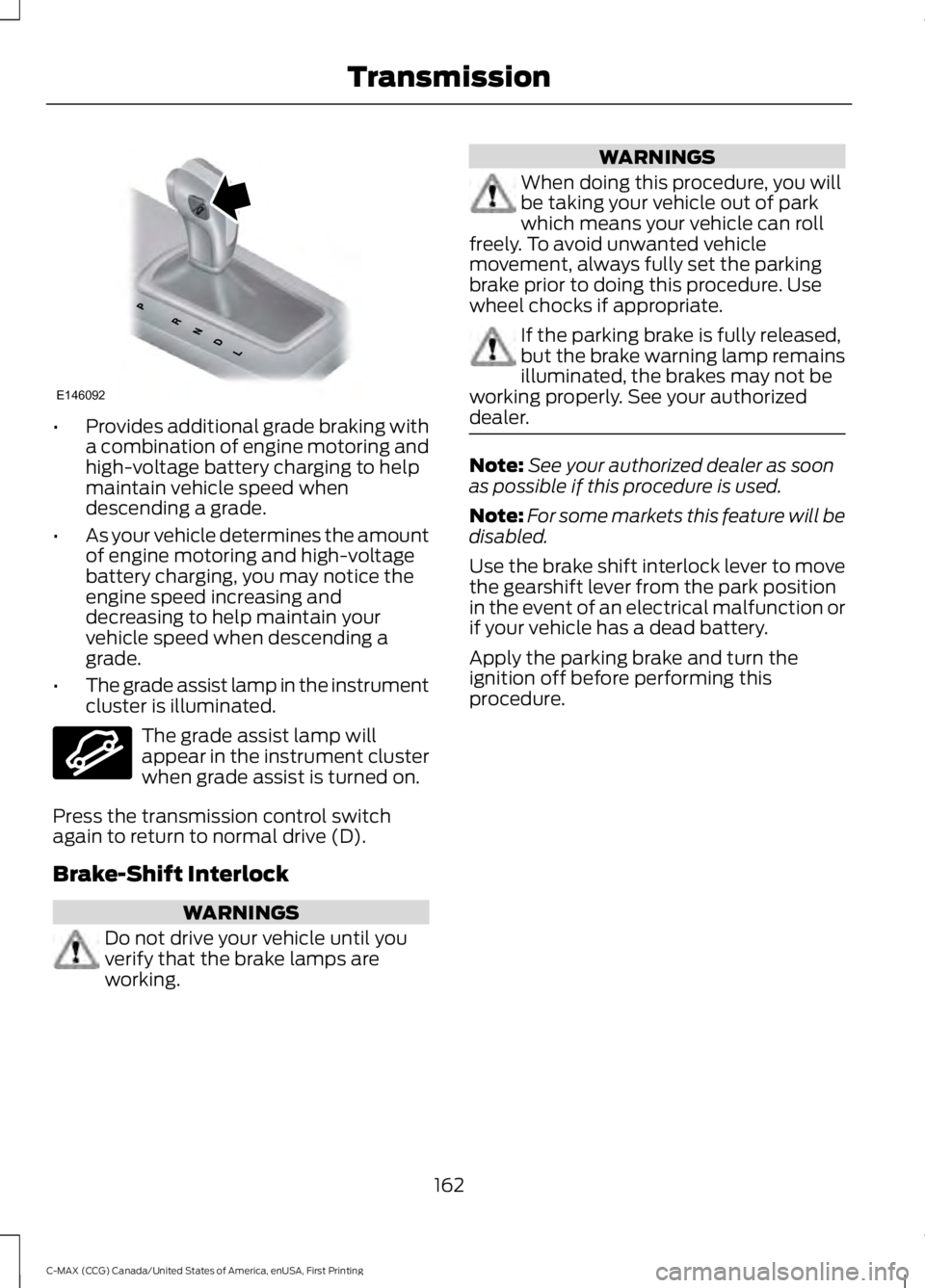
•Provides additional grade braking witha combination of engine motoring andhigh-voltage battery charging to helpmaintain vehicle speed whendescending a grade.
•As your vehicle determines the amountof engine motoring and high-voltagebattery charging, you may notice theengine speed increasing anddecreasing to help maintain yourvehicle speed when descending agrade.
•The grade assist lamp in the instrumentcluster is illuminated.
The grade assist lamp willappear in the instrument clusterwhen grade assist is turned on.
Press the transmission control switchagain to return to normal drive (D).
Brake-Shift Interlock
WARNINGS
Do not drive your vehicle until youverify that the brake lamps areworking.
WARNINGS
When doing this procedure, you willbe taking your vehicle out of parkwhich means your vehicle can rollfreely. To avoid unwanted vehiclemovement, always fully set the parkingbrake prior to doing this procedure. Usewheel chocks if appropriate.
If the parking brake is fully released,but the brake warning lamp remainsilluminated, the brakes may not beworking properly. See your authorizeddealer.
Note:See your authorized dealer as soonas possible if this procedure is used.
Note:For some markets this feature will bedisabled.
Use the brake shift interlock lever to movethe gearshift lever from the park positionin the event of an electrical malfunction orif your vehicle has a dead battery.
Apply the parking brake and turn theignition off before performing thisprocedure.
162
C-MAX (CCG) Canada/United States of America, enUSA, First Printing
TransmissionE146092 E144523
Page 167 of 395

GENERAL INFORMATION
Note:Occasional brake noise is normal. Ifa metal-to-metal, continuous grinding orcontinuous squeal sound is present, thebrake linings may be worn-out. Have thesystem checked by an authorized dealer. Ifthe vehicle has continuous vibration orshudder in the steering wheel while braking,have it checked by an authorized dealer.
Note:Brake dust may accumulate on thewheels, even under normal drivingconditions. Some dust is inevitable as thebrakes wear and does not contribute tobrake noise. See Cleaning the AlloyWheels (page 245).
See Warning Lamps andIndicators (page 89).
Wet brakes result in reduced brakingefficiency. Gently press the brake pedal afew times when driving from a car wash orstanding water to dry the brakes.
Brake Over Accelerator
In the event the accelerator pedalbecomes stuck or entrapped, apply steadyand firm pressure to the brake pedal toslow the vehicle and reduce engine power.If you experience this condition, apply thebrakes and bring your vehicle to a safestop. Move the transmission to park (P),switch the engine off and apply the parkingbrake. Inspect the accelerator pedal forany interference. If none are found and thecondition persists, have your vehicle towedto the nearest authorized dealer.
Brake Assist
Brake assist detects when you brakeheavily by measuring the rate at which youpress the brake pedal. It providesmaximum braking efficiency as long as youpress the pedal. Brake assist can reducestopping distances in critical situations.
Anti-lock Brake System
This system helps you maintain steeringcontrol during emergency stops by keepingthe brakes from locking.
This lamp momentarilyilluminates when you turn theignition on. If the light does notilluminate during start up, remains on orflashes, the system may be disabled. Havethe system checked by an authorizeddealer. If the anti-lock brake system isdisabled, normal braking is still effective.
If the brake warning lampilluminates when you release theparking brake, have the systemchecked by an authorized dealer.
Regenerative Braking System
This feature is used to simulate the enginebraking of an internal combustion engineand assist the standard brake system whilerecovering some of the energy of motionand storing it in the battery to improve therange of your vehicle. The standard brakesystem is designed to fully stop the car ifregenerative braking is not available.During regenerative braking, the motor isspun as a generator to create electricalcurrent. This recharges the battery andslows the vehicle. In effect, once theaccelerator pedal is released, the motorchanges from an energy user to an energyproducer.
When the accelerator pedal is released orthe brake pedal is applied, the brakecontroller automatically detects theamount of deceleration requested andoptimizes how much of the decelerationwill be produced by regenerative braking.The remaining portion is generated by
164
C-MAX (CCG) Canada/United States of America, enUSA, First Printing
BrakesE144522 E144522
Page 168 of 395

standard friction braking. When the batteryis almost fully charged, the amount ofregenerative braking is limited to avoidovercharging, and the requesteddeceleration is produced by standardfriction braking alone.
Regenerative braking does not take theplace of the standard friction brakes; it onlyassists them. Regenerative braking hasalso been designed to interact with theanti-lock brake system. Regenerativebraking is disabled when the anti-lockbrake system is activated or the battery isfully charged.
HINTS ON DRIVING WITH
ANTI-LOCK BRAKES
Note:When the system is operating, thebrake pedal may pulse and may travelfurther. Maintain pressure on the brakepedal. You may also hear a noise from thesystem. This is normal.
The anti-lock braking system will noteliminate the risks when:
•You drive too closely to the vehicle infront of you.
•Your vehicle is hydroplaning.
•You take corners too fast.
•The road surface is poor.
PARKING BRAKE
WARNING
Always set the parking brake fullyand make sure you shift the gearshiftlever to park (P). Switch the ignitionoff and remove the key whenever you leaveyour vehicle.
Note:Do not press the release button whilepulling the lever up.
To apply the parking brake:
1. Press the foot brake pedal firmly.
2. Pull the parking brake lever up to itsfullest extent.
Note:If you park your vehicle on a hill andfacing uphill, shift the gearshift lever to park(P) and turn the steering wheel away fromthe curb.
Note:If you park your vehicle on a hill andfacing downhill, shift the gearshift lever topark (P) and turn the steering wheel towardthe curb.
To release the parking brake:
1. Press the brake pedal firmly.
2. Pull the lever up slightly.
3. Press the release button and push thelever down.
HILL START ASSIST
WARNINGS
The system does not replace theparking brake. When you leave yourvehicle, always apply the parkingbrake and shift the transmission into park(P) (automatic transmission) or first gear(1) (manual transmission).
You must remain in your vehicle onceyou have activated the system.
During all times, you are responsiblefor controlling your vehicle,supervising the system andintervening, if required.
If the engine is revved excessively, orif a malfunction is detected, thesystem will be deactivated.
The system makes it easier to pull awaywhen your vehicle is on a slope without theneed to use the parking brake.
165
C-MAX (CCG) Canada/United States of America, enUSA, First Printing
Brakes
Page 170 of 395

PRINCIPLE OF OPERATION
The traction control system helps avoiddrive wheel spin and loss of traction.
If your vehicle begins to slide, the systemapplies the brakes to individual wheelsand, when needed, reduces engine powerat the same time. If the wheels spin whenaccelerating on slippery or loose surfaces,the system reduces engine power in orderto increase traction.
USING TRACTION CONTROL
WARNING
The stability and traction controllight illuminates steadily if thesystem detects a failure. Make sureyou did not manually disable the tractioncontrol system using the informationdisplay controls or the switch. If thestability control and traction control lightis still illuminating steadily, have thesystem serviced by an authorized dealerimmediately. Operating your vehicle withthe traction control disabled could lead toan increased risk of loss of vehicle control,vehicle rollover, personal injury and death.
The system automatically turns on eachtime you switch the ignition on.
If your vehicle is stuck in mud or snow,switching traction control off may bebeneficial as this allows the wheels to spin.
Note:When you switch traction control off,stability control remains fully active.
Switching the System Off
When you switch the system off or on, amessage appears in the informationdisplay showing system status.
You can switch the system off by eitherusing the information display controls orthe switch.
Using the Information DisplayControls
You can switch this feature off or on in theinformation display. See GeneralInformation (page 93).
Using a Switch (If Equipped)
Use the traction control switch on theinstrument panel to switch the system offor on.
The switch illuminates when tractioncontrol is off.
System Indicator Lights andMessages
The stability and traction controllight:
•Temporarily illuminates on enginestart-up.
•Flashes when a driving conditionactivates either of the systems.
•Illuminates if a problem occurs in eitherof the systems.
The stability and traction controloff light temporarily illuminateson engine start-up and stays onwhen you switch the traction controlsystem off.
167
C-MAX (CCG) Canada/United States of America, enUSA, First Printing
Traction ControlE138639
Page 171 of 395

PRINCIPLE OF OPERATION
WARNINGS
Vehicle modifications involvingbraking system, aftermarket roofracks, suspension, steering system,tire construction and wheel and tire sizemay change the handling characteristicsof your vehicle and may adversely affectthe performance of the electronic stabilitycontrol system. In addition, installing anystereo loudspeakers may interfere withand adversely affect the electronic stabilitycontrol system. Install any aftermarketstereo loudspeaker as far as possible fromthe front center console, the tunnel, andthe front seats in order to minimize the riskof interfering with the electronic stabilitycontrol sensors. Reducing theeffectiveness of the electronic stabilitycontrol system could lead to an increasedrisk of loss of vehicle control, vehiclerollover, personal injury and death.
Remember that even advancedtechnology cannot defy the laws ofphysics. It’s always possible to losecontrol of a vehicle due to inappropriatedriver input for the conditions. Aggressivedriving on any road condition can causeyou to lose control of your vehicleincreasing the risk of personal injury orproperty damage. Activation of theelectronic stability control system is anindication that at least some of the tireshave exceeded their ability to grip the road;this could reduce the operator’s ability tocontrol the vehicle potentially resulting ina loss of vehicle control, vehicle rollover,personal injury and death. If your electronicstability control system activates, SLOWDOWN.
The system automatically turns on eachtime you switch the ignition on.
If a driving condition activates either thestability control or the traction controlsystem you may experience the followingconditions:
•The stability and traction control lightflashes.
•Your vehicle slows down.
•Reduced engine power.
•A vibration in the brake pedal.
•The brake pedal is stiffer than usual.
•If the driving condition is severe andyour foot is not on the brake, the brakepedal may move as the systemsapplies higher brake forces.
The stability control system has severalfeatures built into it to help you maintaincontrol of your vehicle:
Electronic Stability Control
The system enhances your vehicle’s abilityto prevent skids or lateral slides byapplying brakes to one or more of thewheels individually and, if necessary,reducing engine power.
Roll Stability Control
The system enhances your vehicle’s abilityto prevent rollovers by detecting yourvehicle’s roll motion and the rate at whichit changes by applying the brakes to oneor more wheels individually.
Traction Control
The system enhances your vehicle’s abilityto maintain traction of the wheels bydetecting and controlling wheel spin. SeeUsing Traction Control (page 167).
168
C-MAX (CCG) Canada/United States of America, enUSA, First Printing
Stability Control
Page 176 of 395

When a suitable space is found, the touchscreen displays a message and a chimesounds. Slow down and stop atapproximately position (A), then followthe instructions on the touch screen.
Note:You must observe that the selectedspace remains clear of obstructions at alltimes in the maneuver.
Note:Vehicles with overhanging loads (forexample, a bus or a truck), street furnitureand other items may not be detected byactive park assist. You must make sure theselected space is suitable for parking.
Note:The vehicle should be driven asparallel to other vehicles as possible whilepassing a parking space.
Note:The system always offers the lastdetected parking space (i.e. if the vehicledetects multiple spaces while you aredriving, it offers the last one).
Note:If driven above approximately 22 mph(35 km/h), the touch screen shows amessage to alert you to reduce vehiclespeed.
Automatic Steering into ParkingSpace
Note:If vehicle speed exceeds 6 mph (10km/h), the system switches off and youneed to take full control of the vehicle.
Note:If a maneuver is interrupted beforecompletion, the system switches off. Thesteering wheel position will not indicate theactual position of the steering and you haveto full take control of the vehicle.
When you shift the transmission intoreverse (R), with your hands off the wheel(and nothing obstructing its movement),your vehicle steers itself into the space.The system displays instructions to moveyour vehicle back and forth in the space.
173
C-MAX (CCG) Canada/United States of America, enUSA, First Printing
Parking AidsA
E130107 E130108