2016 FIAT FULLBACK steering wheel
[x] Cancel search: steering wheelPage 158 of 312

When the vehicle is moving, and only
while it can be steered straight ahead,
release the accelerator pedal beforeo
perating the transfer shift lever.
To shift from 4H to 4L
Stop the vehicle, depress the clutch
pedal to the floor and operate the
transfer shift lever.
To shift from 4L to 4H
Stop the vehicle, depress the clutch
pedal to the floor and operate the
transfer shift lever.
Shifting of the transfer shift lever
between “2H” and “4H” should only be
done at speeds below 100 km/h.
During driving, never attempt to shift
from “4H” to “4L”.
When shifting from “2H” to “4H” in cold
weather while the vehicle is in motion,
the transmission gear may make some
noise. In cold weather, try to shift the
gear while the vehicle is stopped.
There may be a case that the transfer
shift lever feels heavy when it is moved
from “4H” to “2H” with the steering
wheel in turned position. This is normal
and not any indication of trouble.
208)
2WD/4WD operation indicator lamp
When the ignition switch is in the “ON”
position or the operation mode is put in
ON, the 2WD/4WD operation indicator
lamp shows the shifting condition. The
2WD/4WD operation indicator lamp
comes on at each transfer shift lever
position as follows:Shifting between 2H and 4H
Transfer
shift
lever
positionIndicator lamp
2H
Drive
mode
switching
in
progress
4H
— Illuminate
— Remain off
When the transfer shift lever is shifted
between 2H and 4H, the 2WD/4WD
operation indicator lamp does not
switch to illuminate or remain off while
the selection is in process. Take the
following precautions when the
indicator lamp is remains on or off.
247AHA106199
156
STARTING AND DRIVING
Page 159 of 312

Keep the steering wheel in the straight
ahead position while making range
selections. If you attempt to drive
forward with the steering wheel turned,
gear rattling may occur and the desired
range may not actually be selected.
When the transfer shift lever is shifted
between 2H and 4H while the vehicle is
stopped, the 2WD/4WD operation
indicator lamp does not switch to
illuminate or remain off while the
selection is in process. Drive slowly and
normally after confirming that the lamp
is switched.
Do not move the selector lever while
the 2WD/4WD operation indicator lamp
is switched.
If the 2WD/4WD operation indicator
lamp does not switch after a selection
has been made between 2H and 4H
with the vehicle moving, hold the
steering wheel in the straight ahead
position and slowly depress the
accelerator pedal several times.Shifting between 4H and 4L
Transfer
shift lever
positionIndicator lamp
2H
Drive mode
switching in
progress
4H
— Illuminate
— Remain off
The 2WD/4WD operation indicator
lamp will go out momentarily during
shifting process from 4H to 4L or vice
versa, as the transfer shift lever passes
through the neutral position. Be sure to
operate the transfer shift lever until the
2WD/4WD operation indicator lamp
illuminates again.If, after a selection between 4H and 4L
has been made, the 2WD/4WD
operation indicator lamp remains off
and the desired range is not actually
selected, return the transfer shift lever
to its previous position. Place the
steering wheel in the straight ahead
position, drive the vehicle forward, and
release the accelerator pedal. Next,
hold down the clutch pedal make the
range selection again.
209)
157
Page 162 of 312

2WD/4WD operation indicator lamp
and low-range indicator lamp
When the ignition switch is in the “ON”
position or the operation mode is put in
ON, the 2WD/4WD operation indicator
lamp (1) and the low-range indicator
lamp (2) shows the shifting condition.
The 2WD/4WD operation indicator
lamp comes on at each drive mode
selector position as follows:“2H” <-> “4H”
Selector
positionIndicator lamp
2H
Drive
mode
switching
in
progress
4H
— Blink
— Illuminate
— Remain off
When the drive mode selector is set
between 2H <–> 4H, the 2WD/4WD
operation indicator lamp blinks while
the selection is in process. Take thefollowing precautions when the
indicator lamp is blinking.
Keep the steering wheel in the straight
ahead position while making range
selections. If you attempt to drive
forward with the steering wheel turned,
gear rattling or shock may occur and
the desired range may not actually be
selected.
When the drive mode-selector is set
between “2H” <–> “4H” while the
vehicle is stopped, the 2WD/4WD
operation indicator lamp blinks while
the selection is in process. Drive slowly
and normally after confirming that the
lamp is switched.
If the 2WD/4WD operation indicator
lamp continues blinking after a “2H”
<–> “4H” selection has been made with
the vehicle moving, hold the steering
wheel in the straight ahead position and
slowly depress the accelerator pedal
several times.
AB
249AHA103651
160
STARTING AND DRIVING
Page 163 of 312
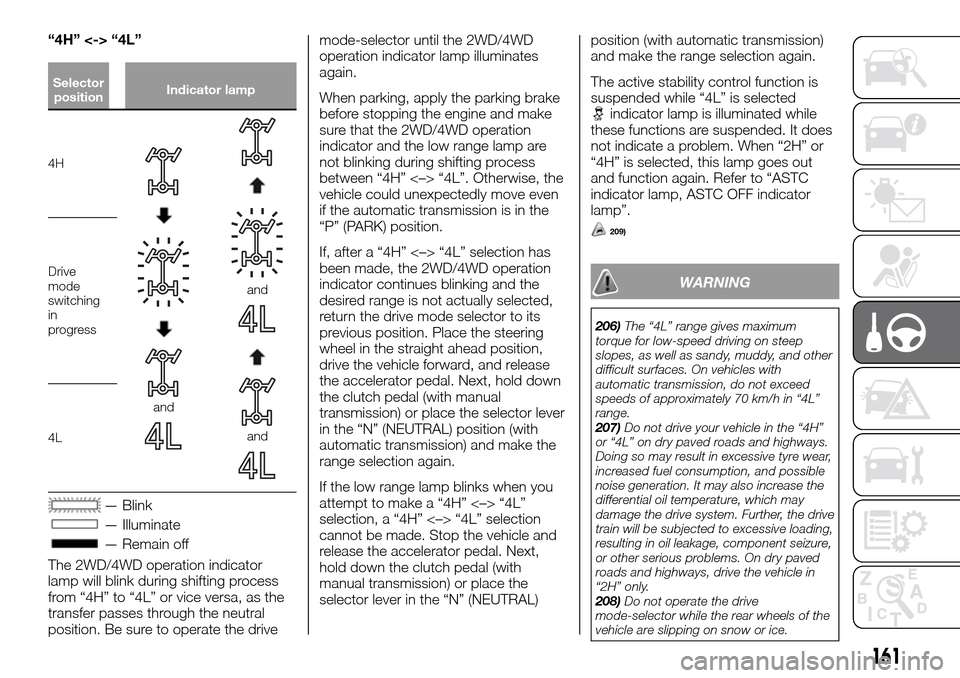
“4H” <-> “4L”
Selector
positionIndicator lamp
4H
and
and
and
Drive
mode
switching
in
progress
4L
— Blink
— Illuminate
— Remain off
The 2WD/4WD operation indicator
lamp will blink during shifting process
from “4H” to “4L” or vice versa, as the
transfer passes through the neutral
position. Be sure to operate the drivemode-selector until the 2WD/4WD
operation indicator lamp illuminates
again.
When parking, apply the parking brake
before stopping the engine and make
sure that the 2WD/4WD operation
indicator and the low range lamp are
not blinking during shifting process
between “4H” <–> “4L”. Otherwise, the
vehicle could unexpectedly move even
if the automatic transmission is in the
“P” (PARK) position.
If, after a “4H” <–> “4L” selection has
been made, the 2WD/4WD operation
indicator continues blinking and the
desired range is not actually selected,
return the drive mode selector to its
previous position. Place the steering
wheel in the straight ahead position,
drive the vehicle forward, and release
the accelerator pedal. Next, hold down
the clutch pedal (with manual
transmission) or place the selector lever
in the “N” (NEUTRAL) position (with
automatic transmission) and make the
range selection again.
If the low range lamp blinks when you
attempt to make a “4H” <–> “4L”
selection, a “4H” <–> “4L” selection
cannot be made. Stop the vehicle and
release the accelerator pedal. Next,
hold down the clutch pedal (with
manual transmission) or place the
selector lever in the “N” (NEUTRAL)position (with automatic transmission)
and make the range selection again.
The active stability control function is
suspended while “4L” is selected
indicator lamp is illuminated while
these functions are suspended. It does
not indicate a problem. When “2H” or
“4H” is selected, this lamp goes out
and function again. Refer to “ASTC
indicator lamp, ASTC OFF indicator
lamp”.
209)
WARNING
206)The “4L” range gives maximum
torque for low-speed driving on steep
slopes, as well as sandy, muddy, and other
difficult surfaces. On vehicles with
automatic transmission, do not exceed
speeds of approximately 70 km/h in “4L”
range.
207)Do not drive your vehicle in the “4H”
or “4L” on dry paved roads and highways.
Doing so may result in excessive tyre wear,
increased fuel consumption, and possible
noise generation. It may also increase the
differential oil temperature, which may
damage the drive system. Further, the drive
train will be subjected to excessive loading,
resulting in oil leakage, component seizure,
or other serious problems. On dry paved
roads and highways, drive the vehicle in
“2H” only.
208)Do not operate the drive
mode-selector while the rear wheels of the
vehicle are slipping on snow or ice.
161
Page 167 of 312

Switching between 4HL and 4LLc
Drive mode
selector positionIndicator lamp
4HLc
Drive mode
switching in
progress
and
4LLcand
Blink
Illuminate
Remain off
When the drive mode-selector is set
between “2H”, “4H” and “4HLc”, the
front wheel and/or centre differential
lock lamps blink while the selection is in
process. Take the following precautionswhen the indicator lamp is blinking.
Keep the steering wheel in the
straight ahead position while making
range selections. If you attempt to drive
forward with the steering wheel turned,
gear rattling or shock may occur and
the desired range may not actually be
selected.
When the drive mode-selector is set
between “2H”, “4H” and “4HLc”, while
the vehicle is stopped, the front wheel
and/or centre differential lock lamps
blink while the selection is in process.
Drive slowly and normally after
confirming that the lamp is switched.
If the front wheel and/or centre
differential lock lamps blinking after a
“2H” <-> “4H” <-> “4HLc” selection
has been made with the vehicle
moving, hold the steering wheel in the
straight ahead position and slowly
depress the accelerator pedal several
times.
The front and the rear wheel lamps will
blink during shifting process from
“4HLc” to “4LLc” or vice versa, as the
transfer passes through the neutral
position. Be sure to operate the drive
mode-selector until the front and the
rear wheel lamps illuminate again.
When parking, apply the parking brake
before stopping the engine and make
sure that the front and the rear wheel
lamps and the low range lamp are not
blinking during shifting processbetween “4HLc” <-> “4LLc”.
Otherwise, the vehicle could
unexpectedly move even if the
automatic transmission is in the “P”
(PARK) position
If, after a “4HLc” <-> “4LLc” selection
has been made, front and the rear
wheel lamps continue blinking and the
desired range is not actually selected,
return the drive modeselector to its
previous position. Place the steering
wheel in the straight ahead position,
drive the vehicle forward, and release
the accelerator pedal. Next, hold down
the clutch pedal (with manual
transmission) or place the selector lever
in the “N” (NEUTRAL) position (with
automatic transmission) and make the
range selection again.
If the low range lamp blinks when you
attempt to make a “4HLc” <-> “4LLc”
selection, a “4HLc” <-> “4LLc”
selection cannot be made. Stop the
vehicle and release the accelerator
pedal. Next, hold down the clutch pedal
(with manual transmission) or place the
selector lever in the “N” (NEUTRAL)
position (with automatic transmission)
and make the range selection again.
The active stability control function is
suspended while “4LLc” is selected
indicator lamp is illuminated while
these functions are suspended. It does
not indicate a problem. When “2H” or
“4H” or “4HLc” is selected, this lamp
goes out and function again. Refer to
“ASTC indicator lamp, ASTC OFF
indicator lamp”.
213)
165
Page 170 of 312

differential lock is disengaged, these
lamps go out and function again. Refer
to “ABS warning lamp”, “ASTC
indicator lamp, ASTC OFF indicator
lamp”.
If the indicator lamp continues blinking
after the switch has been pressed to
deactivate the rear differential lock, hold
the steering wheel in the straight ahead
position then slowly depress and
release the accelerator pedal several
times.
If the indicator lamp continues blinking
after the switch has been pressed to
activate the rear differential lock, bear in
mind the following instructions:
If the vehicle speed is 12 km/h or
higher, decelerate to a speed of
2.5 km/h or lower. The indicator lamp
will illuminate steadily and the rear
differential lock will be activated.
If the vehicle speed is 12 km/h or lower,
turn the steering wheel from side to
side until the indicator lamp illuminates
steadily. If the vehicle is stuck in soft
ground, make sure the area around the
vehicle is clear then repeatedly attempt
to drive forward and backward. The
indicator lamp will illuminate steadily
and the rear differential lock will be
activated.
111)
Examples of effective use of the
rear differential lock
112)
When one of the wheels has fallen
in a ditch
When driving on rocky roads
When the vehicle is unable to move
because one of the wheels is
suspended in the air.When getting out of snow
When the vehicle is unable to get going
because one of the wheels is on the
snow and the other on a paved road.
257AHA105206
258AHA105219
259AHA105222
168
STARTING AND DRIVING
Page 171 of 312

Examples of incorrect use of the
rear differential lock
214)
215)
216) 217)
WARNING
214)If the “4L” or “4H” position (Easy
select 4WD), “4LLc” or “4HLc” position
(Super select 4WD II) is selected along with
the rear differential lock, the following
phenomena appear and it is very
dangerous. Please be sure to release the
rear differential lock on normal roads. If the
rear differential lock is used by mistake
when driving on a paved road: With the
rear differential lock on, the power to drive
the vehicle straight ahead becomes very
strong, which may make it difficult to turn
the steering wheel.
215)If the rear differential lock is used by
mistake when turning a curve or making a
right or left turn at a crossing or the like:
The vehicle is unable to make a turn and
may go straight ahead.216)If the rear differential lock is used by
mistake except when making an
emergency escape on snow or frozen
road: It becomes difficult to make a steady
turn.
217)In the case where the condition of the
road is different for the right tyre to drive
from the left tyre (such as one tyre on a
paved road and the other on ice), direction
of the vehicle may change abruptly when
engine braking or accelerating. Do not use
the rear differential lock except when
making an emergency escape on a snow
or frozen road, but drive with 4WD.
IMPORTANT
110)Operate the rear differential switch
after the wheels are stopped. Operating the
switch with the wheels turning may cause
the vehicle to dart in unexpected directions.
111)If a problem is detected in the rear
differential lock system, a safety device will
activate. The rear differential lock indicator
lamp will blink rapidly (twice per second),
and the rear differential lock will deactivate.
Park your vehicle in a safe place, turn off
the engine for a few moments. Restart the
engine. It is safe to continue driving if the
lamps resume normal operation. If the rear
differential lock indicator lamp blinks when
the rear differential lock is reactivated, have
the vehicle checked by a Fiat Dealership as
soon as possible.
260AHA105235
261AHA105248
262AHA105251
169
Page 172 of 312

112)Use the rear differential lock only as an
emergency measure when the vehicle is
stuck and cannot be freed with the drive
mode-selector in “4L” or “4H” position
(Easy select 4WD) or in “4LLc” or “4HLc”
position (Super select 4WD II). Deactivate
the rear differential lock immediately after
using it.4 WHEEL DRIVE
OPERATION
By selecting 4-wheel drive, both axles
of the vehicle are rigidly connected with
each other. This improves the traction
characteristics. When turning sharp
corners or moving forward and
backward repeatedly, however, the
drive line is stressed, which is felt as a
braking effect. A 4-wheel drive vehicle
can accelerate more quickly and
smoothly.
However, note that the braking distance
is not shorter than that of a rear-wheel
drive vehicle.
When using 4-wheel drive on rough
roads (snow, mud, sand, etc.), it is
important to operate the vehicle
correctly.
The driving posture should be more
upright and closer to the wheel than
usual; adjust the seat to a good
position for easy steering and pedal
operation. Be sure to wear the seat belt
After driving on rough roads, check
each part of the vehicle and wash it
thoroughly with water. Refer to the
“Vehicle care” section and “Inspection
and maintenance following rough road
operation”.Driving on dry paved road and
highway
Select “2H” position (Easy select 4WD),
“2H” or “4H” position (Super select
4WD II) to drive on the dry paved road.
Especially on dry highway, never select
the “4H” or “4L” position (Easy select
4WD), “4HLc” or “4LLc” position (Super
select 4WD II).
113)
Driving on snowy or icy roads
Set the drive mode-selector to “4H”
position (Easy select 4WD), “4H” or
“4HLc” position in accordance with the
road conditions (Super select 4WD II)
and then gradually depress the
accelerator pedal for a smooth start.
Keep the pressure on the accelerator
pedal as constant as possible, and
drive at low speed. The use of snow
tyres and/or tyre chains is
recommended.
Maintain a safe distance between
vehicles, avoid sudden braking, and
use engine braking (downshifting).
114)
170
STARTING AND DRIVING