Page 122 of 296

When the device is turned on, the
warning light turns on together with
the corresponding message on the
instrument panel.
Storing vehicle speed
Proceed as follows:
turn the ring A fig. 110 - fig. 111 to
the ON position or
(depending
on the version) and press the
accelerator pedal to take the vehicle to
the desired speed;
move the stalk upwards (+) for at
least one second, then release it. The
vehicle speed is now stored and you
can therefore release the accelerator
pedal.
Increasing/reducing the stored
speed
Once the Cruise Control is activated,
you can increase the speed by moving
the lever upwards (+) or decrease it
by moving the lever downwards (-).
Each movement of the stalk will
correspond to a slight reduction in
speed of about 1 km/h, while keeping
the stalk held downwards will decrease
the speed continuously.
Turning the device off
The device can be switched off by the
driver in the following ways:
turning ring nut A to OFF orO
(according to the version);
by switching off the engine;
Deactivating the function
The device can be switched off by the
driver in the following ways:
turning ring nut A to OFF orO
(according to the version);
pressing the button B, both with
symbolIIand symbol CANC/RES, the
system pauses;
by switching off the engine;
by pressing the brake pedal or
operating the handbrake;
by pressing the clutch pedal;
requesting a gear shift with an
automatic transmission in sequential
mode;
with the vehicle speed below the set
limit
by pressing the accelerator pedal; in
this case the system is not actually
turned off but the acceleration request
takes priority; the Cruise Control
remains activated, without the need to
press the CANC/RES button to restore
the previous conditions once the
acceleration is over.
The device is automatically switched off
in the following cases:
if the ABS or ESC systems
intervene;
in the event of system failure.
120) 121)
SPEED LIMITER
This device allows the vehicle speed to
be limited to a value set by the driver.
The maximum speed can be set both
with vehicle stationary and in motion.
The minimum speed that can be set is
30 km/h.
110 - Versions without Speed LimiterF1A0364
111 - Versions with Speed LimiterF1A0363
120
STARTING AND DRIVING
Page 173 of 296

position the jack at the lifting support
nearest the wheel to be replaced, at
the points shown in fig. 157. For short
wheelbase versions with a retractable
footboard, the jack must be position at
the lifting point shown in fig. 159,
turned by 45° so that it does
not interfere with the retractable
platform;
warn all bystanders that the vehicle
is about to be lifted. They must stay
clear and not touch the vehicle until it is
back on the ground.
for versions equipped with
self-levelling pneumatic suspension,
before using the jack to raise the
vehicle, press the buttons A and B fig.
160 simultaneously for at least 5
seconds. The operating mode for
raising the vehicle is activated: the
LEDs on the buttons come on
constantly. To exit this mode, press
buttons A and B simultaneously for
another 5 seconds; both LEDs on the
buttons will go out and full system
operation will be restored. This mode
deactivates automatically when the
speed of approx. 5 km/h is exceeded.
151)
lift the vehicle.
After lifting the vehicle:
for all versions, access the rear right
wheel arch, operate the screw A fig.
161 on the spare wheel retaining
device, using the supplied wrench
assembled correctly with the dedicated
extension B fig. 161.
turn the tool anticlockwise fig. 162
to allow the spare wheel to descend;
continue turning anticlockwise until
the stop point, indicated by the
stiffening of the manoeuvre or a click
from the clutch present in the device;
152) 153)
after unwinding the whole cable of
the spare wheel lifting device, remove
the wheel from the vehicle;
undo the retaining knob D fig. 163
and free the wheel by sliding out the
support E.
159F1A0169
160F1A0170
161F1A0171
171
Page 181 of 296

VERSIONS WITH
START&STOP SYSTEM
To recharge, proceed as follows:
disconnect the connector A
(pressing the button B) from the sensor
C monitoring the battery conditions,
on the negative pole D of the battery;
connect the positive battery charger
lead to the positive battery terminal E
and the negative lead to the sensor
terminal F as in fig. 178;
turn on the charger;
at the end of the charging process,
switch the battery charger off;
after disconnecting the charger,
reconnect the connector A to the
sensor C as in fig. 178.
WARNING
168)Battery fluid is poisonous and
corrosive: avoid contact with your skin and
eyes. The battery should be charged in a
well ventilated place, away from naked
flames or possible sources of sparks:
danger of explosion and fire.
169)Do not attempt to charge a frozen
battery: it must be thawed first, otherwise it
may explode. If freezing has occurred, the
battery should be checked by skilled
personnel to make sure that the internal
elements are not damaged and that the
body is not cracked, with the risk of leaking
poisonous and corrosive acid.
FUEL CUT-OFF
SWITCH
The vehicle is fitted with a safety switch
that, in the event of a crash, comes
into operation by cutting off the fuel
supply and turning off the engine as a
consequence.
When the inertia switch cuts in, it cuts
off the fuel supply and also activates
the hazard warning lights, side lights
and courtesy lights while releasing
all the doors and displaying the relevant
message; they are deactivated by
pressing button A. On some versions,
there is also a safety relay that activates
in the event of impact to cut off the
electrical supply. In this way, fuel is
prevented from escaping if the pipes
are broken and the formation of sparks
or electrical discharges following
damage to the vehicle electrical
components is avoided.
170) 171)
IMPORTANT After an accident,
remember to remove the key from the
ignition device to prevent the battery
from running down. If no fuel leaks
or damage to vehicle's electrical
devices (e.g. headlights) are detected
after the impact and the vehicle is
able to set off again, reactivate the
automatic fuel cut-off switch.
178F1A0219
179
Page 182 of 296
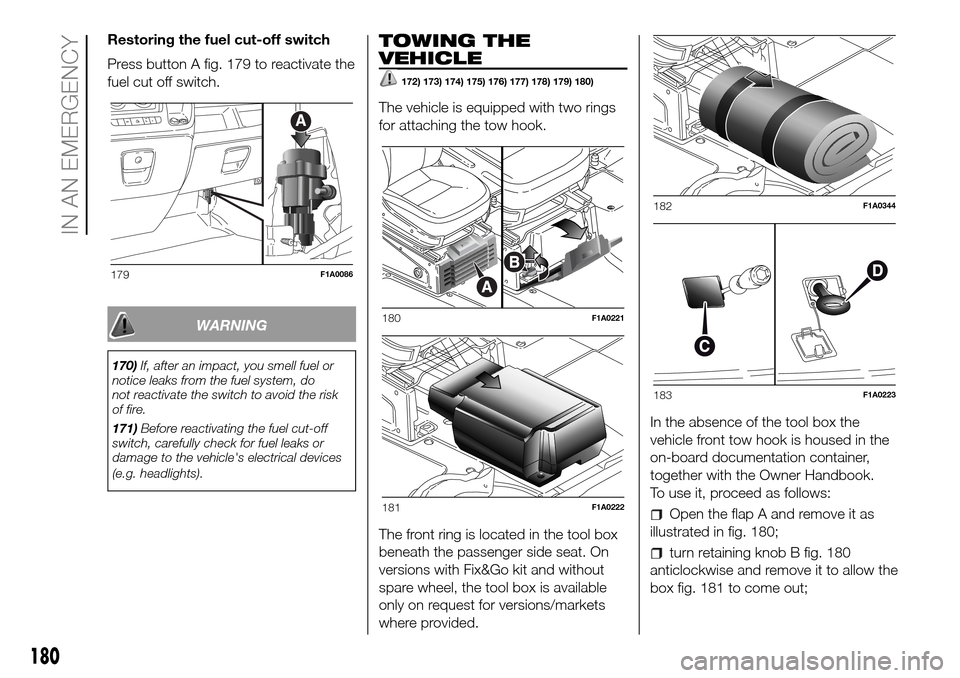
Restoring the fuel cut-off switch
Press button A fig. 179 to reactivate the
fuel cut off switch.
WARNING
170)If, after an impact, you smell fuel or
notice leaks from the fuel system, do
not reactivate the switch to avoid the risk
of fire.
171)Before reactivating the fuel cut-off
switch, carefully check for fuel leaks or
damage to the vehicle's electrical devices
(e.g. headlights).
TOWING THE
VEHICLE
172) 173) 174) 175) 176) 177) 178) 179) 180)
The vehicle is equipped with two rings
for attaching the tow hook.
The front ring is located in the tool box
beneath the passenger side seat. On
versions with Fix&Go kit and without
spare wheel, the tool box is available
only on request for versions/markets
where provided.In the absence of the tool box the
vehicle front tow hook is housed in the
on-board documentation container,
together with the Owner Handbook.
To use it, proceed as follows:
Open the flap A and remove it as
illustrated in fig. 180;
turn retaining knob B fig. 180
anticlockwise and remove it to allow the
box fig. 181 to come out;
179F1A0086
180F1A0221
181F1A0222
182F1A0344
183F1A0223
180
IN AN EMERGENCY
Page 266 of 296

FRONT PANEL CONTROL SUMMARY TABLE
Button Functions Mode
Switching on Short button press
Switching off
Short button press
Volume adjustment
Turning the knob clockwise/anticlockwise
Volume activation/deactivation (Mute/Pause) Short button press
Exit the selection/return to previous screen Short button press
BROWSE
ENTERScrolling the list or tuning to a radio station or select
previous/next trackTurning the knob clockwise/anticlockwise
Confirmation of the option displayed
Short button press
INFOConfirmation of the option displayed Display mode selection (Radio, Media Player)
PHONEAccess to the Phone mode Short button press
MENUAccess to the Infotelematic System/Settings menu Short button press
MEDIASource selection: USB/iPod or AUX Short button press
RADIOAccess to the Radio mode Short button press
1-2-3-4-5-6Store current radio station Long button press
Stored radio station recall
Short button press
A-B-CSelection of the group of radio presets or selection of the
desired letter in each listShort button press
Search for previous radio station or selection of USB/iPod
previous trackShort button press
Scan of lower frequencies until released/Fast rewind of
USB/iPod track
Long button press
264
MULTIMEDIA
Page 267 of 296
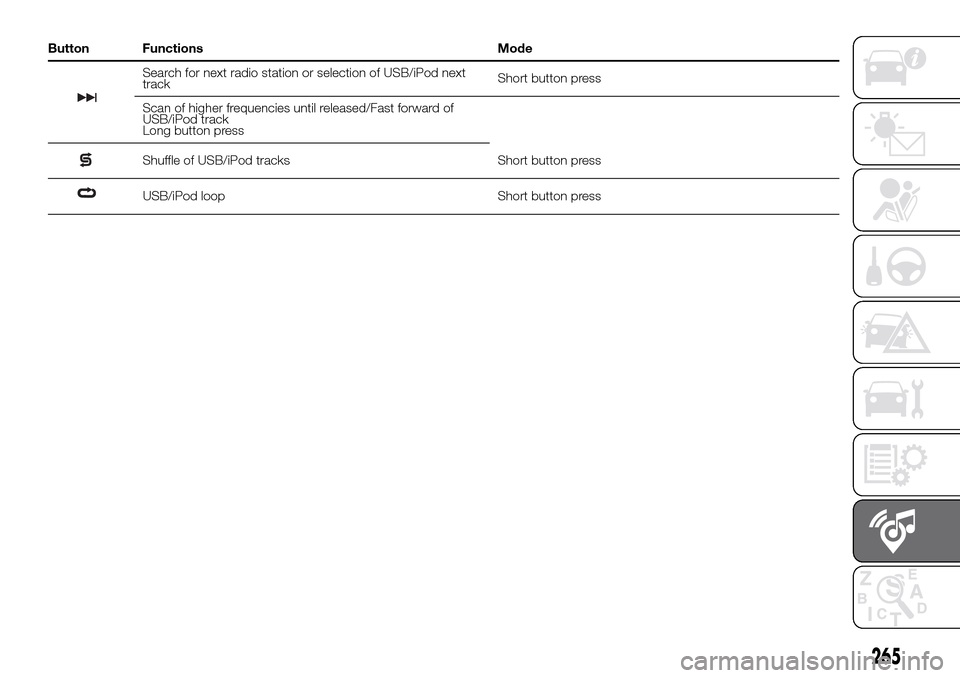
Button Functions Mode
Search for next radio station or selection of USB/iPod next
trackShort button press
Scan of higher frequencies until released/Fast forward of
USB/iPod track
Long button press
Shuffle of USB/iPod tracks Short button press
USB/iPod loop Short button press
265
Page 268 of 296
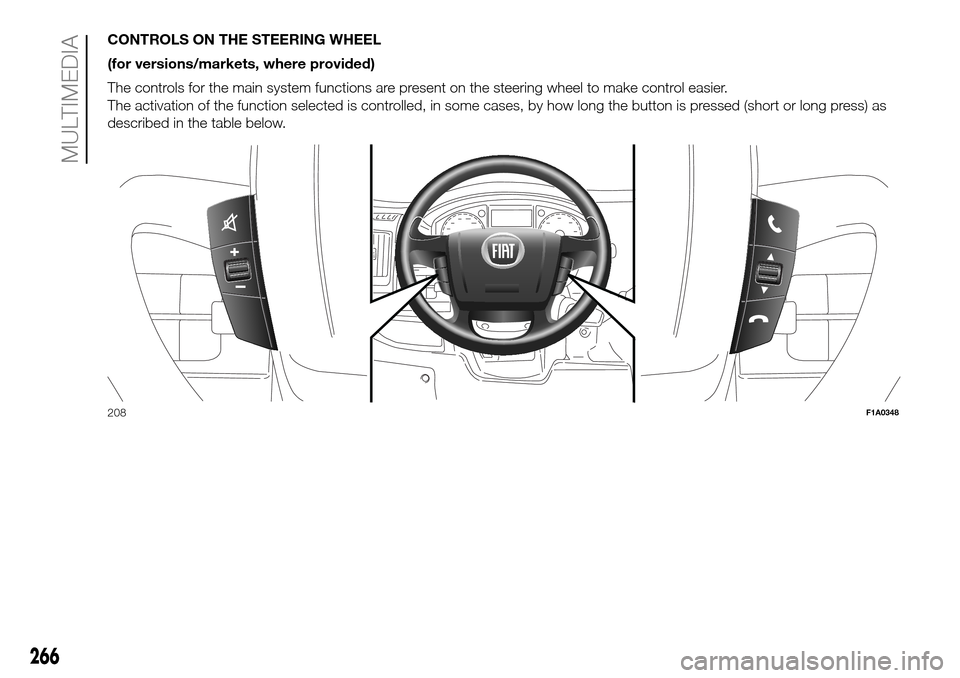
CONTROLS ON THE STEERING WHEEL
(for versions/markets, where provided)
The controls for the main system functions are present on the steering wheel to make control easier.
The activation of the function selected is controlled, in some cases, by how long the button is pressed (short or long press) as
described in the table below.
208F1A0348
266
MULTIMEDIA
Page 269 of 296
Button Interaction (pressure/rotation)
Acceptance of incoming call
Answering the second incoming call and putting the active call on hold
Rejection of incoming call
Ending of call in progress
Deactivate/reactivate the microphone during a phone conversation
Activation/deactivation of the USB/iPod source Pause
Activation/deactivation of radio/AUX source Mute function
+/–Turning left wheel upwards or downwards: audio volume adjustment
Short press: volume increase/decrease in single steps
Long press: volume continuous increase/decrease until released
Turning right wheel upwards or downwards:Short press (Radio mode): selection of next/previous station
Long press (Radio mode): scan higher/lower frequencies until released
Short press (USB/iPod mode): selection of previous/next track
Long press (USB/iPod mode): fast forward/rewind until released
267