Page 171 of 587
The information displayed is:
•“Radio (AM or FM)”
• View Radio Station Name (if equipped), frequency,
and graphical icon
• �MP3”
• Title display or number song playing
• �USB�
• Title display or number song playing
• �Ipod�
• Display song title (if equipped)
Messages (Stored)
This menu item allows you to display the information
messages/malfunction stored. The background color of the display varies according to
the priorities of the failure:
•
Failed Messages with low priority displays in yellow
• Failed Messages with high priority displays in red
Settings
This menu item allows you to change the settings for the
following:
•Display
• Units
• Clock and Date
• Security
• Safety and Assistance
• Lights
• Doors and Locks5
GETTING TO KNOW YOUR INSTRUMENT CLUSTER 169
Page 389 of 587
Cavity Mini FuseDescription
F31 7.5 Amp Brown Fan Air Conditioning, Power Socket
F33 20 Amp Yellow Power Window Front (Passenger Side)
F34 20 Amp Yellow Power Window Front (Drivers Side)
F36 15 Amp Blue Supply Uconnect System, Air Conditioning, USB Port, Rear lateral ceiling light in case of open roof, EOBD port
F37 10 Amp Red System Power Forward Collision Warning Plus, All Wheel Drive (AWD), IPC, Central stack switches, Brake Pedal Switch (NC)
F38 20 Amp Yellow Central Locking
F42 7.5 Amp Brown BSM - Brake Control Module, EPS - Electric Power-Assisted Steering
F43 20 Amp Yellow Bi-directional Pump Washer
F47 20 Amp Yellow Power Rear Window (Driver Side)
F48 20 Amp Yellow Power Rear Window (Passenger Side)
F49 7.5 Amp Brown Supply ParkSense, Spot Lights Front Dome, Internal Electocromic Mirror, Heated Front Seats
F50 7.5 Amp Brown Supply Air Bag
8
IN CASE OF EMERGENCY 387
Page 515 of 587
MULTIMEDIA
CONTENTS
�UCONNECT SETTINGS ..................515
▫ Buttons On The Faceplate ................516
▫ Buttons On The Touchscreen ..............517
▫ Customer Programmable Features — Uconnect 5.0
Settings ........................... .517
▫ Customer Programmable Features — Uconnect
6.5AN Settings ...................... .531
� UCONNECT RADIOS ...................548
� USB/MEDIA PLAYER CONTROL — IF
EQUIPPED .......................... .548
� STEERING WHEEL AUDIO CONTROLS ......549▫
Radio Operation ..................... .550
▫ Media Mode ........................ .551
� RADIO OPERATION AND MOBILE DEVICES . .551
▫ Regulatory And Safety Information .........551
� UCONNECT VOICE RECOGNITION
QUICK TIPS ......................... .553
▫ Introducing Uconnect ...................553
▫ Get Started ......................... .554
▫ Basic Voice Commands ..................556
▫ Radio ............................. .557
11
Page 550 of 587
UCONNECT RADIOS
For detailed information about your Uconnect radio,
refer to your Uconnect Supplement Manual.
USB/MEDIA PLAYER CONTROL — IF EQUIPPED
This feature allows an external device to be plugged into
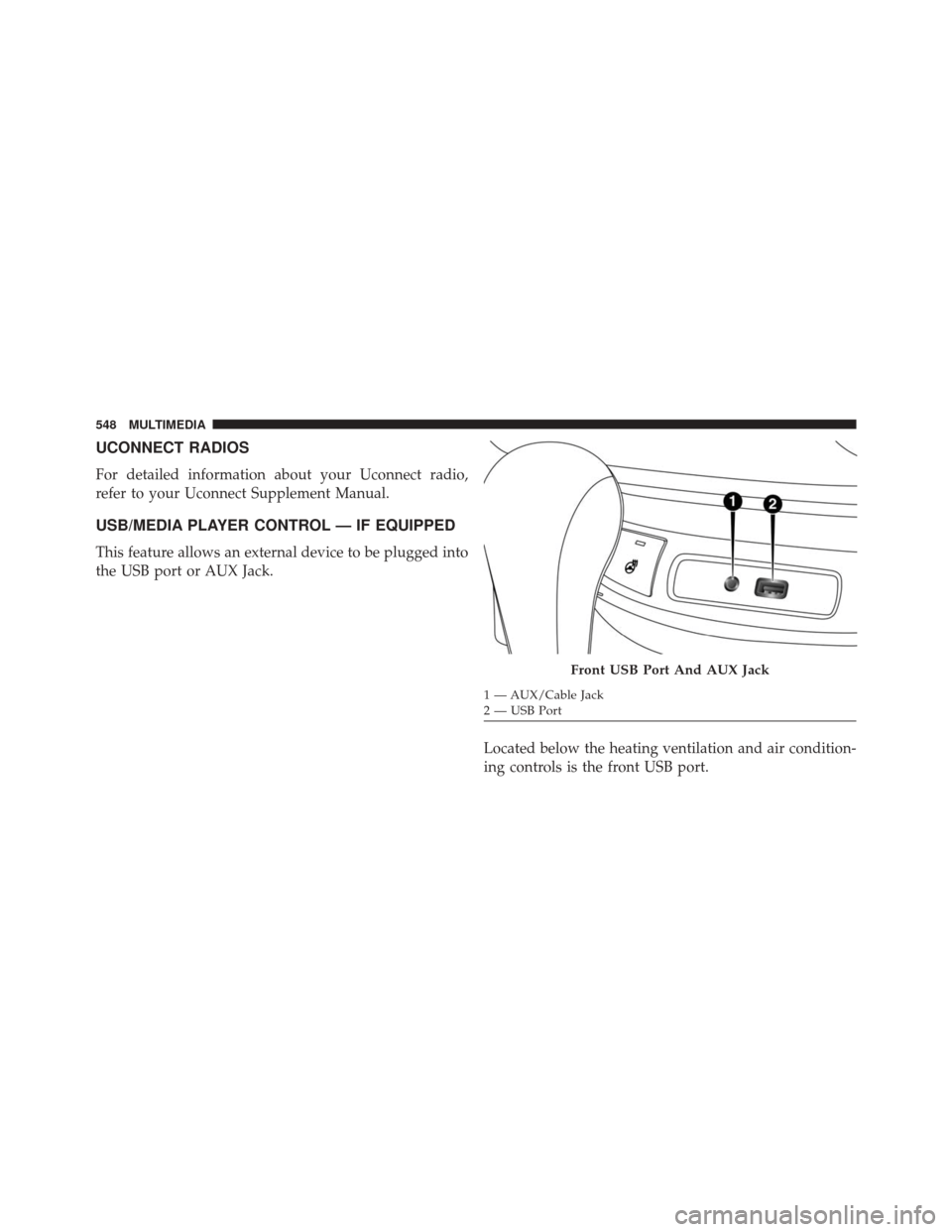
the USB port or AUX Jack.Located below the heating ventilation and air condition-
ing controls is the front USB port.
Front USB Port And AUX Jack
1 — AUX/Cable Jack
2 — USB Port
548 MULTIMEDIA
Page 551 of 587
Refer to the Uconnect Radio Supplement for external
USB support capability.
Center Console USB Port
Located in the center console is a second USB port.
NOTE:Depending on vehicle configuration, the USB
port may be charge only, or media file capable.
STEERING WHEEL AUDIO CONTROLS
The remote sound system controls are located at the rear
of the steering wheel. Reach behind the wheel to access
the switches.
Center Console USB (Charge Only) Port — If Equipped
11
MULTIMEDIA 549
Page 553 of 587
Media Mode
Pushing the top of the switch once will go to the next
track on the selected media (USB, Bluetooth). Pushing the
bottom of the switch once will go to the beginning of the
current track, or to the beginning of the previous track if
it is within eight seconds after the current track begins to
play.
If you push the switch up or down twice, it plays the
second track; three times, it will play the third, etc.
RADIO OPERATION AND MOBILE DEVICES
Under certain conditions, the mobile device being on in
your vehicle can cause erratic or noisy performance from
your radio. This condition may be lessened or eliminated
by relocating the mobile device antenna. This condition is
not harmful to the radio. If your radio performance does
not satisfactorily “clear” by the repositioning of theantenna, it is recommended that the radio volume be
turned down or off during mobile device operation when
not using Uconnect (if equipped).
Regulatory And Safety Information
USA/CANADA
Exposure to Radio Frequency Radiation
The radiated output power of the internal wireless radio
is far below the FCC radio frequency exposure limits.
Nevertheless, the wireless radio will be used in such a
manner that the radio is 20 cm or further from the human
body.
The internal wireless radio operates within guidelines
found in radio frequency safety standards and recom-
mendations, which reflect the consensus of the scientific
community.
11
MULTIMEDIA 551
Page 555 of 587
by turning the equipment off and on, the user is
encouraged to try to correct the interference by one or
more of the following measures:
• Increase the separation between the equipment and
receiver.
• Consult the dealer or an experienced radio technician
for help.
UCONNECT VOICE RECOGNITION QUICK TIPS
Introducing Uconnect
Start using Uconnect Voice Recognition with these help-
ful quick tips. It provides the key Voice Commands and
tips you need to know to control your Uconnect 5.0 or
6.5AN system. Key Features:
•
Five-inch Color Touchscreen Display with AM/FM/
USB/Bluetooth
• Bluetooth with integrated voice controlUconnect 5.0
11
MULTIMEDIA 553
Page 556 of 587
Key Features:
•6.5-inch Color Touchscreen Display with AM/FM/
USB/SD Card/Bluetooth
• Bluetooth with integrated voice control
• GPS navigation (if equipped)
Get Started
All you need to control your Uconnect system with your
voice are the buttons on your steering wheel.
1. Visit UconnectPhone.com to check mobile device and
feature compatibility and to find phone pairing
instructions.
2. Reduce background noise. Wind and passenger con- versations are examples of noise that may impact
recognition.
3. Speak clearly at a normal pace and volume while facing straight ahead. The microphone is positioned
on the rearview mirror and aimed at the driver.
Uconnect 6.5AN
554 MULTIMEDIA