Page 84 of 432

�TO OPEN AND CLOSE THE HOOD .........98
� LIGHTS ............................ .100
▫ Multifunction Lever ...................100
▫ Headlights ......................... .100
▫ High Beams ........................ .101
▫ Flash-To-Pass ....................... .101
▫ Parking Lights ...................... .101
▫ Daytime Running Lights ................102
▫ Turn Signals ........................ .102
▫ Lane Change Assist ...................103
▫ Follow Me Home/Headlight Delay .........103
▫ Interior Lights ...................... .103
▫ Fog Lights — If Equipped ...............105�
WINDSHIELD WIPERS AND WASHERS ......105
▫ Front Windshield Wiper Operation .........106
▫ Rear Windshield Wiper .................108
� TILT STEERING COLUMN — IF EQUIPPED . . .109
� ELECTRONIC SPEED CONTROL ...........110
▫ To Activate ..........................111
▫ To Set A Desired Speed ..................111
▫ To Deactivate .........................112
▫ To Resume Speed ......................112
▫ To Vary The Speed Setting ...............112
▫ To Accelerate For Passing ...............113
� REAR PARK ASSIST — IF EQUIPPED ........114
▫ Rear Park Assist Sensors .................115
82 UNDERSTANDING THE FEATURES OF YOUR VEHICLE
Page 85 of 432
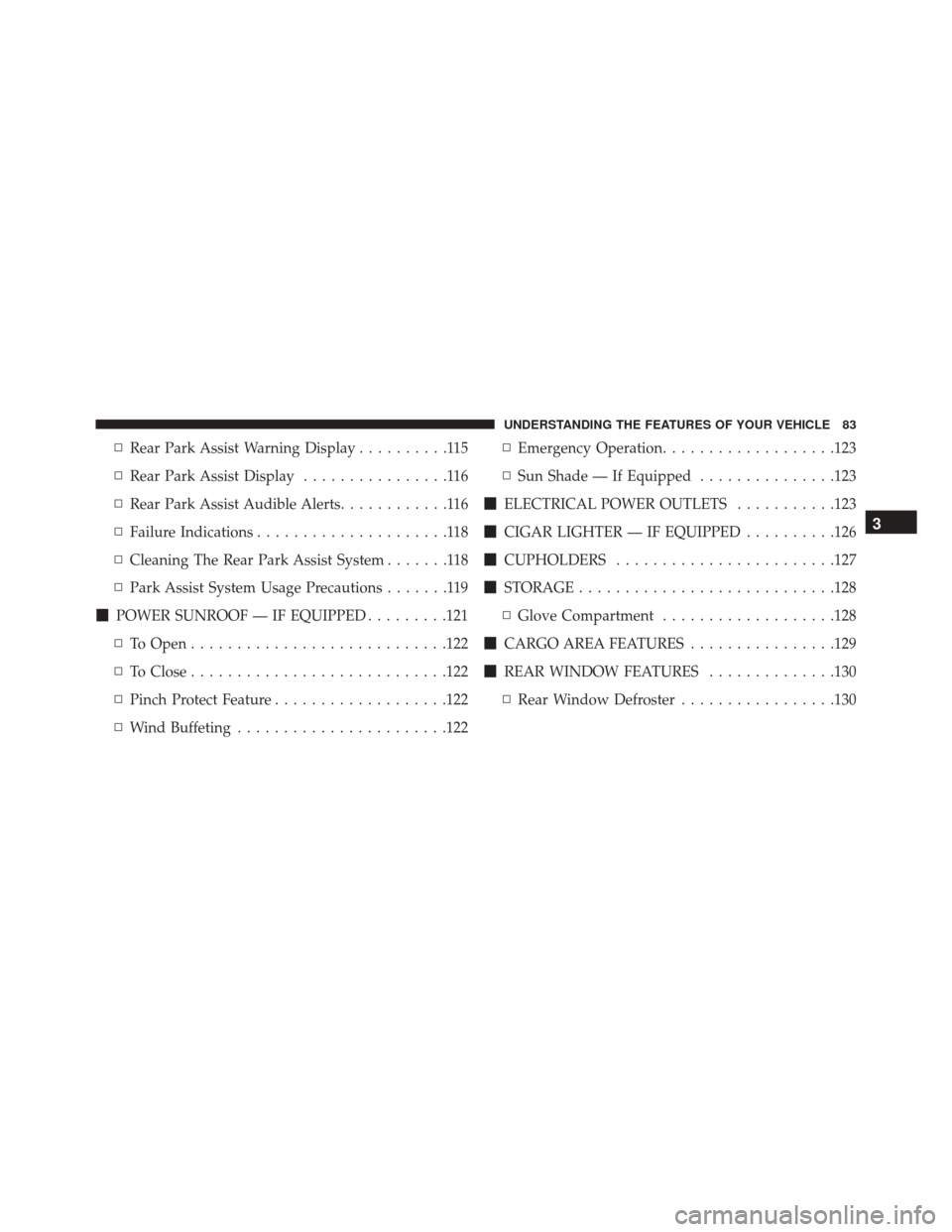
▫Rear Park Assist Warning Display ..........115
▫ Rear Park Assist Display ................116
▫ Rear Park Assist Audible Alerts ............116
▫ Failure Indications .....................118
▫ Cleaning The Rear Park Assist System .......118
▫ Park Assist System Usage Precautions .......119
� POWER SUNROOF — IF EQUIPPED .........121
▫ To Open ........................... .122
▫ To Close ........................... .122
▫ Pinch Protect Feature ...................122
▫ Wind Buffeting ...................... .122▫
Emergency Operation ...................123
▫ Sun Shade — If Equipped ...............123
� ELECTRICAL POWER OUTLETS ...........123
� CIGAR LIGHTER — IF EQUIPPED ..........126
� CUPHOLDERS ....................... .127
� STORAGE ........................... .128
▫ Glove Compartment ...................128
� CARGO AREA FEATURES ................129
� REAR WINDOW FEATURES ..............130
▫ Rear Window Defroster .................130
3
UNDERSTANDING THE FEATURES OF YOUR VEHICLE 83
Page 116 of 432
NOTE:The Electronic Speed Control system maintains
speed up and down hills. A slight speed change on
moderate hills is normal.
On steep hills, a greater speed loss or gain may occur so
it may be preferable to drive without Electronic Speed
Control.
WARNING!
Electronic Speed Control can be dangerous where the
system cannot maintain a constant speed. Your ve-
hicle could go too fast for the conditions, and you
could lose control and have an accident. Do not use
Electronic Speed Control in heavy traffic or on roads
that are winding, icy, snow-covered or slippery.
REAR PARK ASSIST — IF EQUIPPED
The Rear Park Assist system provides visual and audible
indications of the distance between the rear fascia/
bumper and a detected obstacle when backing up, e.g.
during a parking maneuver. Refer to the “Park Assist
System Usage Precautions” for the limitations of this
system and recommendations.
The Rear Park Assist is automatically activated when the
transmission is placed into REVERSE.
114 UNDERSTANDING THE FEATURES OF YOUR VEHICLE
Page 117 of 432

Rear Park Assist Sensors
The four Rear Park Assist sensors, located in the rear
fascia/bumper, monitor the area behind the vehicle that
is within the sensors’ field of view. The sensors can detect
obstacles, in the horizontal direction, from approximately
12 in (30 cm) up to 55 in (140 cm) from the center of the
rear fascia/bumper and up to 24 in (60 cm) from the
corners of the rear fascia/bumper, depending on the
location, type and orientation of the obstacle.
If several obstacles are detected, the Rear Park Assist
system indicates the nearest obstacle.
The minimum height of a detectable obstacle corre-
sponds to the maximum height of an obstacle that would
clear the underside of the car during the parking maneu-
ver.
Rear Park Assist Warning Display
The Rear Park Assist Warning screen is located within the
Uconnect Settings. It provides audible and visual warn-
ings to indicate the distance between the rear fascia/
bumper and the detected obstacle. Refer to�Uconnect
Settings� in “Understanding Your Instrument Panel �for
further information.
3
UNDERSTANDING THE FEATURES OF YOUR VEHICLE 115
Page 118 of 432
Rear Park Assist Display
When the vehicle is in REVERSE, the warning display
will turn ON indicating the system status.
The system will indicate a detected obstacle by showing
arcs in one or more regions based on the obstacle’s
distance and location relative to the vehicle.
If an obstacle is detected in the center rear region, the
display will show solid arcs in the center rear region and
will produce an audible alert. As the vehicle moves closer
to the obstacle, the display will show fewer arcs and the
audible alert becomes more frequent.
If an obstacle is detected in the left and/or right rear
region, the display will show solid arcs in the left and/or
right rear region and will produce an audible alert. As the
vehicle moves closer to the obstacle, the display will
show fewer arcs and the audible alert becomes more
frequent.
Rear Park Assist Audible Alerts
If an obstacle is behind the vehicle when the transmission
is placed into REVERSE, an audible alert is activated.
The tones emitted by the loudspeaker inform the driver
that the vehicle is approaching an obstacle. The pauses
between the tones are directly proportional to the dis-
tance from the obstacle. Pulses emitted in quick succes-
sion indicate the presence of a very close obstacle. A
continuous tone indicates that the obstacle is less than 12
in (30 cm) away.
116 UNDERSTANDING THE FEATURES OF YOUR VEHICLE
Page 119 of 432
Audible And Visual Signals Supplied By The Rear Park Assist System
SIGNALMEANING INDICATION
Obstacle Distance An obstacle is present
within the sensors’ field of view Audible signal
(dashboard loudspeaker)
• Sound pulses emitted at a rate that increases as the
distance decreases.
• Emits continuous tone at 12 in (30 cm).
• Adjustable volume level. (Refer to “Electronic Ve-
hicle Information Center (EVIC)” in “Understanding
Your Instrument Panel” for further information).
Visual signal (EVIC)
• Arcs are shown based on the obstacle’s distance and
location relative to the vehicle. (Refer to “Rear Park
Assist Display” for further information).
Failure Sensor or System failures Visual Signal(instrument panel)
• Icon appears on display.
• Message is displayed on the Electronic Vehicle Infor-
mation Center (EVIC) (where provided).
3
UNDERSTANDING THE FEATURES OF YOUR VEHICLE 117
Page 120 of 432

While audible signals are emitted, the audio system is not
muted.
The audible signal is turned off immediately if the
distance increases. The tone cycle remains constant if the
distance measured by the inner sensors is constant. If this
condition occurs for the external sensors, the signal is
turned off after 3 seconds (stopping warnings during
maneuvers parallel to walls).
Failure Indications
A malfunction of the Rear Park Assist sensors or system
is indicated, during REVERSE gear engagement, by the
instrument panel warning icon and message displayed
on the Electronic Vehicle Information Center (EVIC)
display.The warning icon is illuminated and a message
is displayed on the EVIC display (if equipped). Refer to
�Electronic Vehicle Information Center (EVIC)� in
“Understanding Your Instrument Panel” for further
information.
The sensors and wiring are tested continuously when the
ignition is in the ON/RUN position. Failures are indi-
cated immediately if they occur when the system is ON.
Even if the system is able to identify that a specific sensor
is in failure condition, the EVIC shall indicate that the
Rear Park Assist system is unavailable, without reference
to the sensor in failure condition. If even a single sensor
fails, the entire system must be disabled. The system is
turned off automatically.
Cleaning The Rear Park Assist System
Clean the Rear Park Assist sensors with water, car wash
soap and a soft cloth. Do not use rough or hard cloths. In
washing stations, clean sensors quickly keeping the va-
por jet/high pressure washing nozzles at least 4 in (10
118 UNDERSTANDING THE FEATURES OF YOUR VEHICLE
Page 121 of 432

cm) from the sensors. Do not scratch or poke the sensors.
Otherwise, you could damage the sensors.
Park Assist System Usage Precautions
NOTE:
•Ensure that the outer surface and the underside of the
rear bumper is clean and clear of snow, ice, mud, dirt
or other obstruction to keep the Rear Park Assist
system operating properly.
• Jackhammers, large trucks, and other vibrations could
affect the performance of Rear Park Assist.
• Clean the Rear Park Assist sensors regularly, taking
care not to scratch or damage them. The sensors must
not be covered with ice, snow, slush, mud, dirt or
debris. Failure to do so can result in the system not
working properly. The Rear Park Assist system might not detect an obstacle behind the fascia/bumper, or it
could provide a false indication that an obstacle is
behind the fascia/bumper.
• Objects such as bicycle carriers, etc., must not be
placed within 12 in (30 cm) from the rear fascia/
bumper while driving the vehicle. Failure to do so can
result in the system misinterpreting a close object as a
sensor problem, causing a failure indication to be
displayed in the instrument cluster.
CAUTION!
• Rear Park Assist is only a parking aid and it is
unable to recognize every obstacle, including small
obstacles. Parking curbs might be temporarily de-
tected or not detected at all. Obstacles located
above or below the sensors will not be detected
when they are in close proximity.
(Continued)
3
UNDERSTANDING THE FEATURES OF YOUR VEHICLE 119
