Page 188 of 432
To view this information, proceed as follows:
1. Briefly push and release theMENUbutton to enter the
Main MENU.
2. Push and release the UP
orDOWNarrow
button to select Service. Push and release the
MENU button, push and release the UP
or
DOWN
arrow button to select Speed Limit
activation (On) or deactivation (Off).
NOTE: IMPORTANT The “Scheduled Servicing Plan”
includes car maintenance at fixed intervals.
This is displayed automatically, with ignition key at
MAR-ON, before servicing or, where provided, 30 days
before servicing.
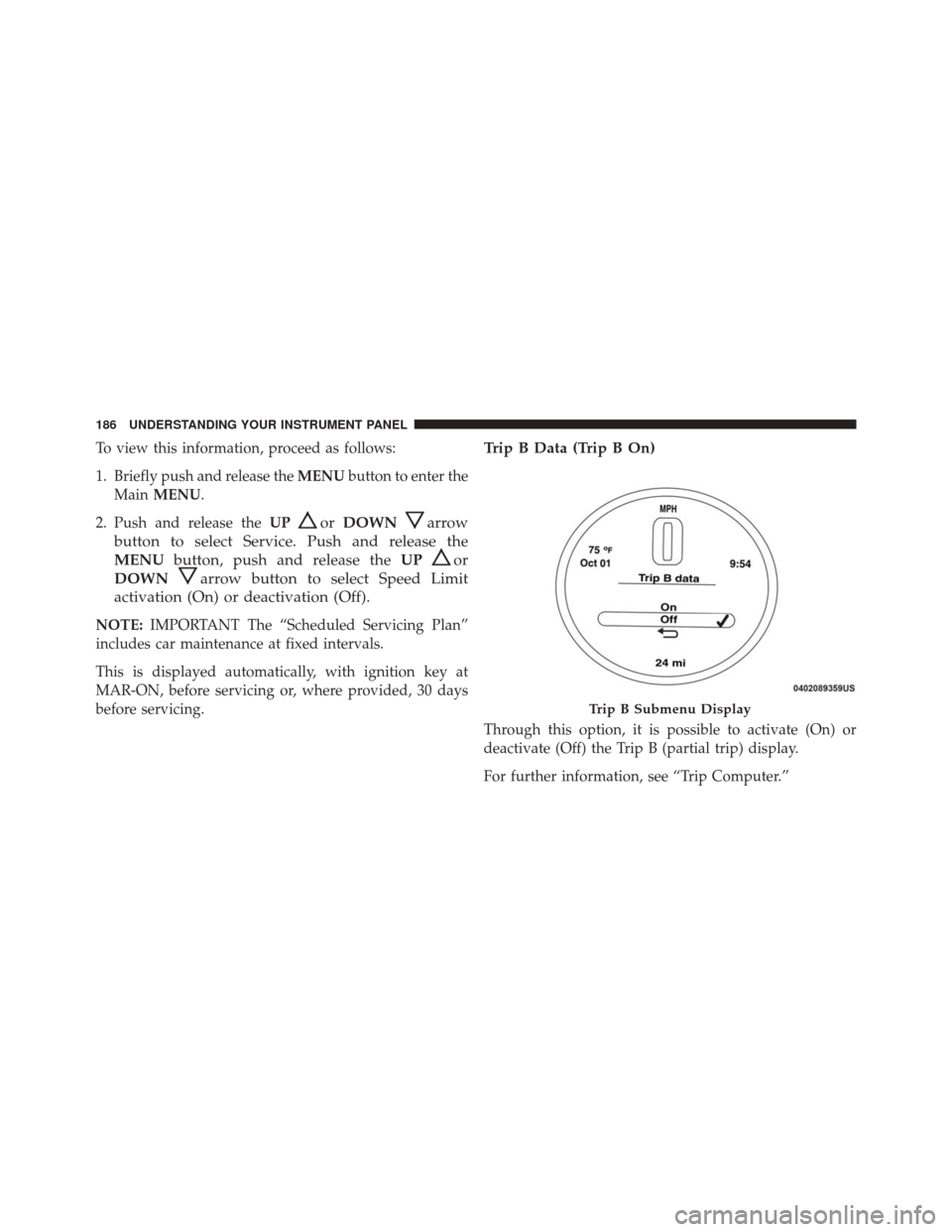
Trip B Data (Trip B On)
Through this option, it is possible to activate (On) or
deactivate (Off) the Trip B (partial trip) display.
For further information, see “Trip Computer.”
Trip B Submenu Display
186 UNDERSTANDING YOUR INSTRUMENT PANEL
Page 206 of 432

services, it will be necessary to access the information on
the Subscription Information screen to re-subscribe.
Press the “Subscription Info” button on the touchscreen
to access the Subscription Information screen.
Write down the SIRIUS ID numbers for your receiver. To
reactivate your service, either call the number listed on
the screen or visit the provider online.
NOTE:SiriusXM Travel Link is a separate subscription
and is available for U.S. residents only.
Restore Settings
After pressing the “Restore Settings” button on the
touchscreen the following settings will be available:
• Restore Settings
When this feature is selected it will reset the Display,
Clock, Audio, and Radio Settings to their default settings. To restore the settings to their default setting, press the
Restore Settings button. A pop-up will appear asking
�Are you sure you want to reset your settings to default?”
select “Yes” to restore, or “No” to exit. Once the settings
are restored, a pop up appears stating
�settings reset to
default.�
Clear Personal Data
After pressing the “Clear Personal Data Settings” button
on the touchscreen the following settings will be avail-
able:
• Clear Personal Data
When this feature is selected it will remove personal data
including Bluetooth devices and presets. To remove
personal information, press the “Clear Personal Data”
button and a pop-up will appear asking �Are you sure
you want to clear all personal data?” select “Yes” or “No”
to exit. Once the data has been cleared, a pop up appears
stating �Personal data cleared”.
204 UNDERSTANDING YOUR INSTRUMENT PANEL
Page 224 of 432

Regular cleaning of the inside of the windows with a
non-filming cleaning solution (vinegar and water works
very well) will help prevent contaminates (cigarette
smoke, perfumes, etc.) from sticking to the windows.
Contaminates increase the rate of window fogging.
NOTE:Automatic Temperature Controls (ATC) will au-
tomatically adjust the climate control settings to reduce
or eliminate window fogging on the front windshield.
When this occurs, recirculation will be unavailable.
Summer Operation
Your air conditioning system is also equipped with an
automatic recirculation system. When the system senses
a heavy load or high heat conditions, it may use Recir-
culation A/C mode to provide additional comfort while
in automatic mode.
Winter Operation
When operating the system during the winter months,
make sure the air intake, located directly in front of the
windshield, is free of ice, slush, snow, or other obstruc-
tions.
Vacation Storage
Anytime you store your vehicle, or keep it out of service
(i.e., vacation) for two weeks or more, run the air
conditioning system at idle for about five minutes in the
fresh air using the high blower setting. This will ensure
adequate system lubrication to minimize the possibility
of compressor damage when the air conditioning system
is started again.
222 UNDERSTANDING YOUR INSTRUMENT PANEL
Page 244 of 432

DRIVE (D)
This range should be used for most city and highway
driving. It provides the smoothest upshifts and down-
shifts, and the best fuel economy. The transmission
automatically upshifts through all forward gears. The
DRIVE position provides optimum driving characteris-
tics under all normal operating conditions.
When frequent transmission shifting occurs (such as
when operating the vehicle under heavy loading condi-
tions, in hilly terrain, or traveling into strong head
winds), use the AutoStick shift control (refer to AutoStick
in this section for further information) to select a lower
gear. Under these conditions, using a lower gear will
improve performance and extend transmission life by
reducing excessive shifting and heat buildup.
If the transmission temperature exceeds normal operat-
ing limits, the transmission controller will expand therange of torque converter clutch engagement. This is
done to prevent transmission damage due to overheat-
ing.
During cold temperatures, transmission operation may
be modified depending on engine coolant temperature.
Normal operation will resume once the engine tempera-
ture has risen to a suitable level.
Transmission Limp Home Mode
Transmission function is monitored electronically for
abnormal conditions. If a condition is detected that could
result in transmission damage, Transmission Limp Home
Mode is activated. In this mode, the transmission remains
in third gear regardless of which forward gear is selected.
PARK, REVERSE, and NEUTRAL will continue to oper-
ate. The Malfunction Indicator Light (MIL) may be illu-
minated. Limp Home Mode allows the vehicle to be
driven to an authorized dealer for service without dam-
aging the transmission.
242 STARTING AND OPERATING
Page 245 of 432

In the event of a momentary problem, the transmission
can be reset to regain all forward gears by performing the
following steps:
1. Stop the vehicle.
2. Shift the transmission into PARK.
3. Turn the ignition switch to the OFF position.
4. Wait approximately 10 seconds.
5. Restart the engine.
6. Shift into the desired gear range. If the problem is nolonger detected, the transmission will return to normal
operation.
NOTE: Even if the transmission can be reset, we recom-
mend that you visit your authorized dealer at your
earliest possible convenience. Your authorized dealer has
diagnostic equipment to determine if the problem could
recur. If the transmission cannot be reset, authorized dealer
service is required.
AUTOSTICK
AutoStick is a driver-interactive transmission feature
providing manual shift control, giving you more control
of the vehicle. AutoStick allows you to maximize engine
braking, eliminate undesirable upshifts and downshifts,
and improve overall vehicle performance. This system
can also provide you with more control during passing,
city driving, cold slippery conditions, mountain driving,
and many other situations.
Operation
When the gear selector is in the AutoStick position
(beside the Drive position), it can be moved forward and
rearward. This allows the driver to manually select the
transmission gear being used. Moving the gear selector
5
STARTING AND OPERATING 243
Page 250 of 432

CAUTION!(Continued)
damage is not covered by the New Vehicle Limited
Warranty.
• Getting water inside your vehicle’s engine can
cause it to lock up and stall out, and cause serious
internal damage to the engine. Such damage is not
covered by the New Vehicle Limited Warranty.
POWER STEERING
The electric power steering system will give you good
vehicle response and increased ease of maneuverability
in tight spaces. The system will vary its assist to provide
light efforts while parking and good feel while driving. If
the electric steering system experiences a fault that
prevents it from providing assist, you will still have the
ability to steer the vehicle manually.
WARNING!
Continued operation with reduced or no power steer-
ing assist could pose a safety risk to yourself and
others. Service should be obtained as soon as pos-
sible.
If the Steering icon is flashing, it indicates that the vehicle
needs to be taken to an authorized dealer for service. It is
likely the vehicle has lost power steering assistance.
If the Steering icon is displayed and the “POWER STEER-
ING SYSTEM OVER TEMP” message is displayed on the
EVIC screen, they indicate that extreme steering maneu-
vers may have occurred which caused an over tempera-
ture condition in the power steering system. Once driv-
ing conditions are safe, pull over and let the vehicle idle
for a few moments until the icon and message turn off.
248 STARTING AND OPERATING
Page 251 of 432

Refer to “Electronic Vehicle Information (EVIC)” in “Un-
derstanding Your Instrument Panel” for further informa-
tion.
If the Steering icon is displayed and the “SERVICE
POWER STEERING – ASSIST OFF” message is displayed
on the EVIC screen, they indicate the vehicle needs to be
taken to an authorized dealer for service. Refer to “Elec-
tronic Vehicle Information (EVIC)” in “Understanding
Your Instrument Panel” for further information.
NOTE:
•Even if the power steering assistance is no longer
operational, it is still possible to steer the vehicle.
Under these conditions there will be a substantial
increase in steering effort, especially at low speeds and
during parking maneuvers.
• If the condition persists, see your authorized dealer for
service.PARKING BRAKE
Before leaving the vehicle, make sure that the parking
brake is fully applied. Also, be certain to leave the
manual transmission in REVERSE or first gear.
The parking brake lever is located in the center console.
To apply the parking brake, pull the lever up as firmly as
possible. To release the parking brake, pull the lever up
slightly, press the center button, then lower the lever
completely.
5
STARTING AND OPERATING 249
Page 253 of 432
WARNING!(Continued)
•Be sure the parking brake is fully disengaged
before driving; failure to do so can lead to brake
failure and a collision.
• Always fully apply the parking brake when leav-
ing your vehicle, or it may roll and cause damage or
injury. Also be certain to leave a manual transmis-
sion in FIRST gear or REVERSE gear. Failure to do
so may allow the vehicle to roll and cause damage
or injury.
CAUTION!
If the Brake Warning Light remains on with the
parking brake released, a brake system malfunction
is indicated. Have the brake system serviced by an
authorized dealer immediately.
SPORT MODE
Manual Transmission — If Equipped
In Sport mode, the engine is more responsive to the
throttle pedal, and provides more maximum torque by
increasing turbo boost pressure. Steering feedback is
improved, and steering effort is slightly higher. This
driving mode is useful for spirited driving.
1. To activate the Sport mode, push the SPORT button.
5
STARTING AND OPERATING 251