Page 163 of 432
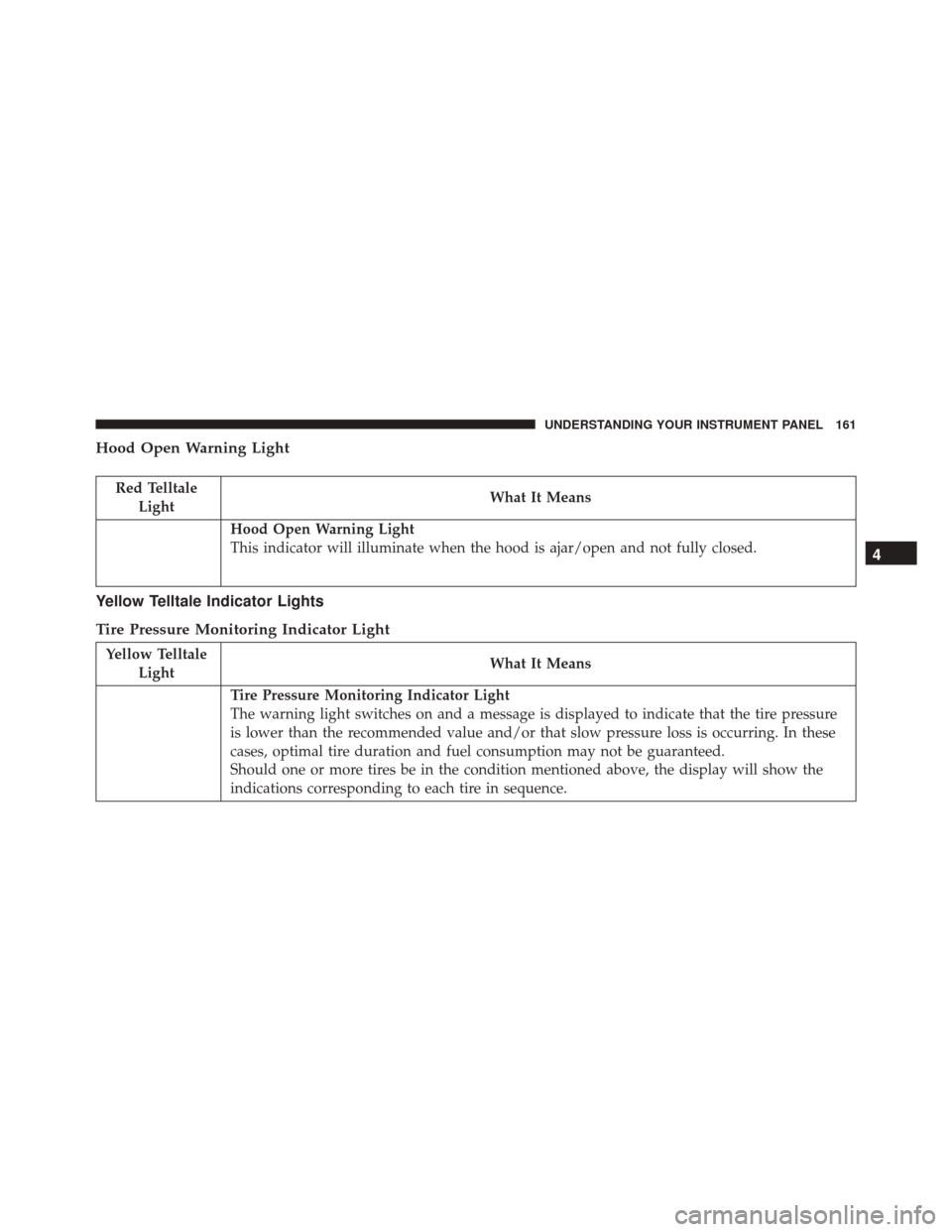
Hood Open Warning Light
Red TelltaleLight What It Means
Hood Open Warning Light
This indicator will illuminate when the hood is ajar/open and not fully closed.
Yellow Telltale Indicator Lights
Tire Pressure Monitoring Indicator Light
Yellow Telltale
Light What It Means
Tire Pressure Monitoring Indicator Light
The warning light switches on and a message is displayed to indicate that the tire pressure
is lower than the recommended value and/or that slow pressure loss is occurring. In these
cases, optimal tire duration and fuel consumption may not be guaranteed.
Should one or more tires be in the condition mentioned above, the display will show the
indications corresponding to each tire in sequence.
4
UNDERSTANDING YOUR INSTRUMENT PANEL 161
Page 164 of 432
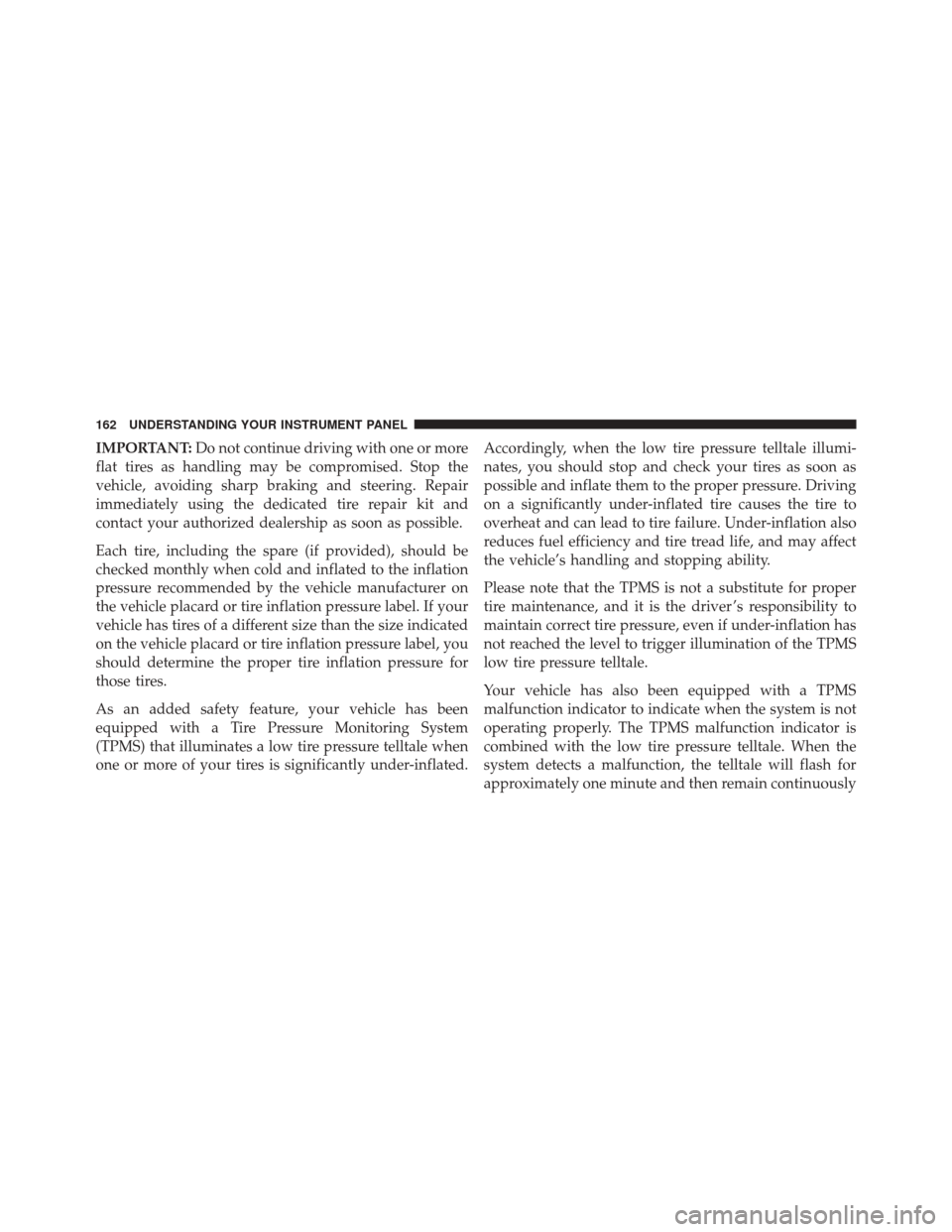
IMPORTANT:Do not continue driving with one or more
flat tires as handling may be compromised. Stop the
vehicle, avoiding sharp braking and steering. Repair
immediately using the dedicated tire repair kit and
contact your authorized dealership as soon as possible.
Each tire, including the spare (if provided), should be
checked monthly when cold and inflated to the inflation
pressure recommended by the vehicle manufacturer on
the vehicle placard or tire inflation pressure label. If your
vehicle has tires of a different size than the size indicated
on the vehicle placard or tire inflation pressure label, you
should determine the proper tire inflation pressure for
those tires.
As an added safety feature, your vehicle has been
equipped with a Tire Pressure Monitoring System
(TPMS) that illuminates a low tire pressure telltale when
one or more of your tires is significantly under-inflated. Accordingly, when the low tire pressure telltale illumi-
nates, you should stop and check your tires as soon as
possible and inflate them to the proper pressure. Driving
on a significantly under-inflated tire causes the tire to
overheat and can lead to tire failure. Under-inflation also
reduces fuel efficiency and tire tread life, and may affect
the vehicle’s handling and stopping ability.
Please note that the TPMS is not a substitute for proper
tire maintenance, and it is the driver ’s responsibility to
maintain correct tire pressure, even if under-inflation has
not reached the level to trigger illumination of the TPMS
low tire pressure telltale.
Your vehicle has also been equipped with a TPMS
malfunction indicator to indicate when the system is not
operating properly. The TPMS malfunction indicator is
combined with the low tire pressure telltale. When the
system detects a malfunction, the telltale will flash for
approximately one minute and then remain continuously
162 UNDERSTANDING YOUR INSTRUMENT PANEL
Page 200 of 432

press the “X” button on the touchscreen to close out of
the settings screen. Pressing the Up or Down Arrow
buttons on the right side of the screen will allow you to
toggle up or down through the available settings.
NOTE:All settings should be changed with the ignition
in the “AVV/ACC” position.
Display
After pressing the “Display” button on the touchscreen
the following settings will be available.
• Display Mode
When in this display you may select the “Auto” or
“Manual” display settings. To change Mode status, press
and release the “Auto” or “Manual” button on the
touchscreen. •
Brightness
When in this display, you may select the overall screen
brightness with the headlights on or off. Adjust the
brightness with the “+” and “–” setting buttons on the
touchscreen or by selecting any point on the scale be-
tween the “+” and “–” buttons on the touchscreen.
• Language
When in this display, you may select one of multiple
languages (English/Español/Français) for all display no-
menclature, including the trip functions and the naviga-
tion system (if equipped). Press the “Language” button
on the touchscreen, then press the desired language
button on the touchscreen.
• Touchscreen Beep
When in this display, you may turn on or shut off the
sound heard when a touchscreen button is pressed. Press
the “Touchscreen Beep” button on the touchscreen then
“On” or “Off.”
198 UNDERSTANDING YOUR INSTRUMENT PANEL
Page 201 of 432
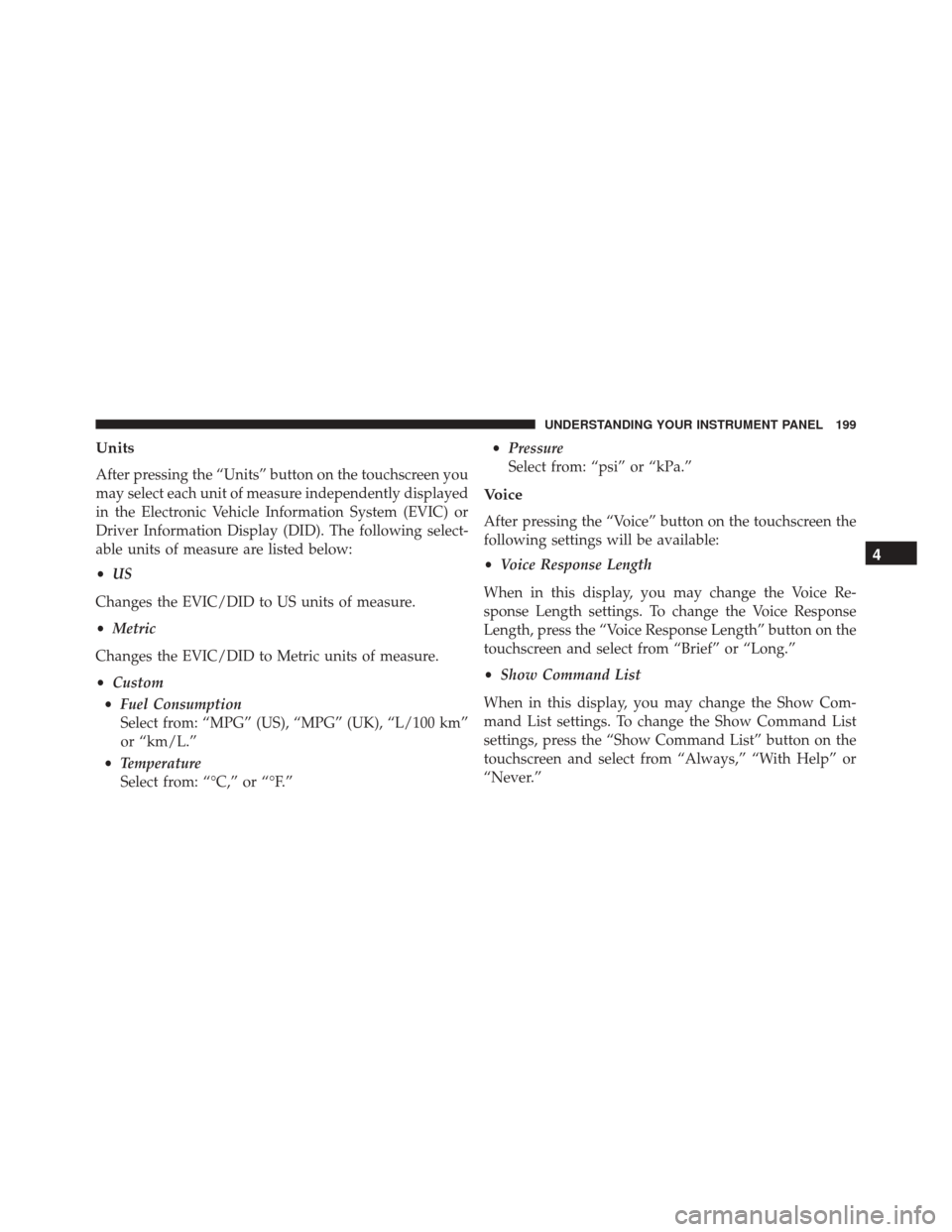
Units
After pressing the “Units” button on the touchscreen you
may select each unit of measure independently displayed
in the Electronic Vehicle Information System (EVIC) or
Driver Information Display (DID). The following select-
able units of measure are listed below:
•US
Changes the EVIC/DID to US units of measure.
• Metric
Changes the EVIC/DID to Metric units of measure.
• Custom
• Fuel Consumption
Select from: “MPG” (US), “MPG” (UK), “L/100 km”
or “km/L.”
• Temperature
Select from: “°C,” or “°F.” •
Pressure
Select from: “psi” or “kPa.”
Voice
After pressing the “Voice” button on the touchscreen the
following settings will be available:
• Voice Response Length
When in this display, you may change the Voice Re-
sponse Length settings. To change the Voice Response
Length, press the “Voice Response Length” button on the
touchscreen and select from “Brief” or “Long.”
• Show Command List
When in this display, you may change the Show Com-
mand List settings. To change the Show Command List
settings, press the “Show Command List” button on the
touchscreen and select from “Always,” “With Help” or
“Never.”
4
UNDERSTANDING YOUR INSTRUMENT PANEL 199
Page 202 of 432

Clock & Date
After pressing the “Clock & Date” button on the touch-
screen the following settings will be available:
•Set Time and Format
When in this display, you may set the time and format
manually. Press the “Set Time and Format” button then
choose from a 12 hour or 24 hour format. Press the
corresponding arrow above and below the current time
to adjust, then select “AM” or “PM.”
• Show Time Status
When in this display, you may turn on or shut off the
digital clock in the status bar. To change the Show Time
Status setting press the “Show Time Status” button on the
touchscreen and select from “ON” or “OFF.” •
Set Date
When in this display, you may set the date manually.
Press the “Set Date” button on the touchscreen then press
the corresponding arrows above and below the current
date to adjust.
• Sync Time — If Equipped
When in this display, you may sync the time with GPS.
Press the “Sync Time” button on the touchscreen and
select from “ON” or “OFF.”
Safety/Assistance
After pressing the “Safety/Assistance” button on the
touchscreen the following setting will be available:
• Hill Start Assist
When this feature is selected, the Hill Start Assist (HSA)
system is active. Refer to “Electronic Brake Control
System” in “Starting And Operating” for system function
200 UNDERSTANDING YOUR INSTRUMENT PANEL
Page 212 of 432
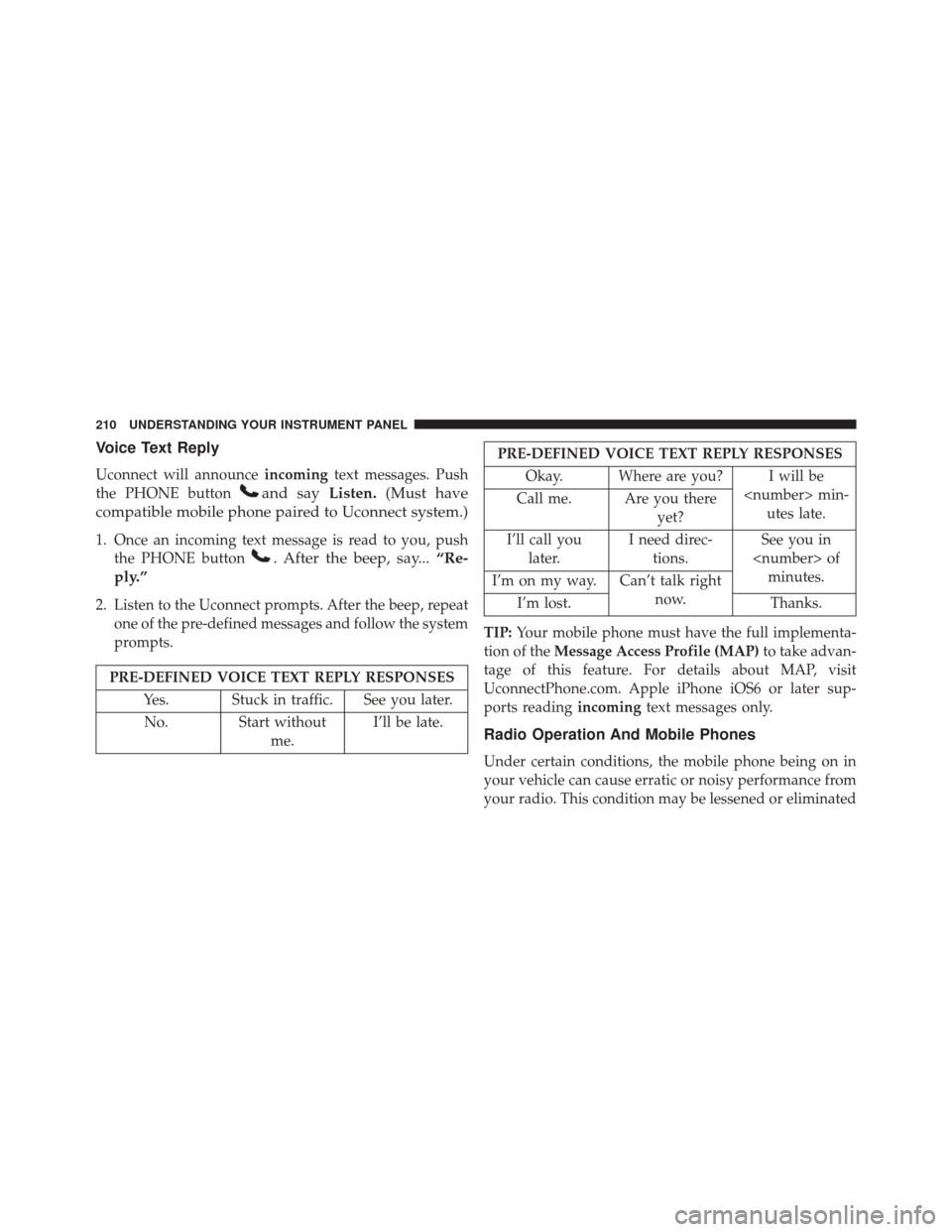
Voice Text Reply
Uconnect will announceincomingtext messages. Push
the PHONE button
and say Listen.(Must have
compatible mobile phone paired to Uconnect system.)
1. Once an incoming text message is read to you, push the PHONE button
. After the beep, say... “Re-
ply.”
2. Listen to the Uconnect prompts. After the beep, repeat one of the pre-defined messages and follow the system
prompts.
PRE-DEFINED VOICE TEXT REPLY RESPONSES
Yes. Stuck in traffic. See you later.No. Start without me.I’ll be late.
PRE-DEFINED VOICE TEXT REPLY RESPONSES
Okay. Where are you? I will be min-utes late.
Call me. Are you there
yet?
I’ll call you later. I need direc-
tions. See you in
of minutes.
I’m on my way. Can’t talk right
now.
I’m lost. Thanks.
TIP: Your mobile phone must have the full implementa-
tion of the Message Access Profile (MAP) to take advan-
tage of this feature. For details about MAP, visit
UconnectPhone.com. Apple iPhone iOS6 or later sup-
ports reading incomingtext messages only.
Radio Operation And Mobile Phones
Under certain conditions, the mobile phone being on in
your vehicle can cause erratic or noisy performance from
your radio. This condition may be lessened or eliminated
210 UNDERSTANDING YOUR INSTRUMENT PANEL
Page 213 of 432

by relocating the mobile phone antenna. This condition is
not harmful to the radio. If your radio performance does
not satisfactorily “clear” by the repositioning of the
antenna, it is recommended that the radio volume be
turned down or off during mobile phone operation.
Harmful Interference Statement
This device complies with Part 15 of the FCC rules and
RSS 210 of Industry Canada. Operation is subject to the
following conditions:
•This device may not cause harmful interference.
• This device must accept any interference received,
including interference that may cause undesired op-
eration.
NOTE: Changes or modifications not expressly approved
by the party responsible for compliance could void the
user ’s authority to operate the equipment.
Additional Information
© 2016 FCA US LLC. All rights reserved. Mopar and
Uconnect are registered trademarks and Mopar Owner
Connect is a trademark of FCA US LLC. Android is a
trademark of Google Inc. SiriusXM and all related marks
and logos are trademarks of SiriusXM Radio Inc.
For Uconnect system support, call 1-877-855-8400 (24
hours a day 7 days a week) or visit DriveUconnect.com.
STEERING WHEEL AUDIO CONTROLS
The remote sound system controls are located on the rear
surface of the steering wheel. Reach behind the wheel to
access the switches.
4
UNDERSTANDING YOUR INSTRUMENT PANEL 211
Page 234 of 432
After Starting
The idle speed will automatically decrease as the engine
warms up.
Turbocharger “Cool Down”
This vehicle is equipped with an after-run pump to cool
the turbocharger after the engine is shut off. Depending
on the type of driving and the amount of cargo, the pump
will run for up to 10 minutes after the engine has been
shut off to circulate coolant through the turbocharger.
Although the pump is rubber-mounted for quiet opera-
tion, it is normal to hear it running during this time.
MANUAL TRANSMISSION — IF EQUIPPED
Five-Speed Manual Transmission
WARNING!
You or others could be injured if you leave the
vehicle unattended without having the parking
brake fully applied. The parking brake should al-
ways be applied when the driver is not in the vehicle,
especially on an incline.
232 STARTING AND OPERATING