Page 390 of 707
the next screen of data for that track. Once all screens
have been viewed, the lastINFObutton push will go
back to the play mode screen on the radio.
• Pushing the REPEATbutton will change the audio
device mode to repeat the current playing track or
push the VR button and say �Repeat ON�or�Repeat
Off.�
• Push the SCANbutton to use iPod/USB/MP3 device
scan mode, which will play the first ten seconds of
each track in the current list and then forward to the
next song. To stop SCAN mode and start playing the
desired track, when it is playing the track, push the
SCAN button again. During Scan mode, pushing the
<< SEEK andSEEK >> buttons will select the previous
and next tracks.
• RND button (available on sales code RES radio only):
Pushing this button toggles between Shuffle ON and
Shuffle OFF modes for the iPod or external USB device, or push the VR button and say
�Shuffle ON�or
�Shuffle Off.� If theRND icon is showing on the radio
display, then the shuffle mode is ON.
List Or Browse Mode
During Play mode, pushing any of the buttons described
below, will bring up List mode. List mode enables
scrolling through the list of menus and tracks on the
audio device.
TUNE control knob: The TUNEcontrol knob functions in
a similar manner as the scroll wheel on the audio device
or external USB device.
• Turning it clockwise (forward) and counterclockwise
(backward) scrolls through the lists, displaying the
track detail on the radio display. Once the track to be
played is highlighted on the radio display, push the
TUNE control knob to select and start playing the
track. Turning the TUNEcontrol knob fast will scroll
388 UNDERSTANDING YOUR INSTRUMENT PANEL
Page 391 of 707

through the list faster. During fast scroll, a slight delay
in updating the information on the radio display may
be noticeable.
During all List modes, the iPod displays all lists in
“wrap-around” mode. So if the track is at the bottom of
the list, just turn the wheel backward (counterclockwise)
to get to the track faster.
In List mode, the radio PRESETbuttons are used as
shortcuts to the following lists on the iPod or external
USB device:
• Preset 1 – Playlists
• Preset 2 – Artists
• Preset 3 – Albums
• Preset 4 – Genres
• Preset 5 – Audiobooks
• Preset 6 – Podcasts Pushing a PRESET button will display the current list on
the top line and the first item in that list on the second
line.
To exit List mode without selecting a track, push the
same
PRESET button again to go back to Play mode.
LIST button: The LISTbutton will display the top level
menu of the iPod or external USB device.
• Turn the TUNEcontrol knob to list the top-menu item
to be selected and push the TUNEcontrol knob. This
will display the next sub-menu list item on the audio
device, then follow the same steps to go to the desired
track in that list. Not all iPod or external USB device
sub-menu levels are available on this system.
MUSIC TYPE button: TheMUSIC TYPE button is
another shortcut button to the genre listing on your audio
device.
4
UNDERSTANDING YOUR INSTRUMENT PANEL 389
Page 439 of 707
Trademark
•Blu-ray Disc, Blu-ray and the logos are trademarks of
the Blu-ray Disc Association.
• Java is a registered trademark of Oracle and/or its
affiliates.
CAUTION!
Use of controls or adjustments or performance of
procedures other than those specified herein may
result in hazardous radiation exposure.
STEERING WHEEL AUDIO CONTROLS — IF
EQUIPPED
Remote Sound System Controls (Back View Of Steering
Wheel)
4
UNDERSTANDING YOUR INSTRUMENT PANEL 437
Page 440 of 707

The remote sound system controls are located on the rear
surface of the steering wheel, at the three and nine
o’clock positions.
The right-hand rocker switch has a push-button in the
center, and controls the volume and mode of the sound
system. Pushing the top of the rocker switch will increase
the volume. Pushing the bottom of the rocker switch will
decrease the volume. Pushing the center button changes
the operation of the radio from AM to FM, or to CD
mode, depending on which radio is in the vehicle.
The left-hand rocker switch has a push-button in the
center. The function of the left-hand switch is different,
depending on which mode you are in.
The following describes the left-hand rocker switch op-
eration in each mode.Radio Operation
Pushing the top of the switch will SEEK up for the next
listenable station, and pushing the bottom of the switch
will SEEK down for the next listenable station.
The button located in the center of the left-hand switch
will tune to the next preset station that you have pro-
grammed in the radio preset push-button.
CD Player
Pushing the top of the switch once will go to the next
track on the CD. Pushing the bottom of the switch once
will go to the beginning of the current track, or to the
beginning of the previous track if it is within one second
after the current track begins to play.
If you push the switch up or down twice it plays the
second track; three times, it will play the third, etc.
The button in the center of the left-hand switch has no
function in this mode.
438 UNDERSTANDING YOUR INSTRUMENT PANEL
Page 475 of 707
The transmission shift lever has only PARK, REVERSE,
NEUTRAL, and DRIVE shift positions. Manual down-
shifts can be made using the Electronic Range Select
(ERS) shift control (refer to “Electronic Range Select (ERS)
Operation” in this section for further information). Mov-
ing the shift lever to the left or right (–/+) while in the
DRIVE position will select the highest available transmis-
sion gear, and will display that gear in the instrument
cluster as 1, 2, 3, etc.
Gear Ranges
DO NOT race the engine when shifting from PARK or
NEUTRAL into another gear range.
NOTE:After selecting any gear range, wait a moment to
allow the selected gear to engage before accelerating.
This is especially important when the engine is cold.
PARK (P)
This range supplements the parking brake by locking the
transmission. The engine can be started in this range.
Never attempt to use PARK while the vehicle is in
motion. Apply the parking brake when leaving the
vehicle in this range.
When parking on a level surface, you may shift the
transmission into PARK first, and then apply the parking
brake.
When parking on a hill, apply the parking brake before
shifting the transmission to PARK, otherwise the load on
the transmission locking mechanism may make it diffi-
cult to move the shift lever out of PARK. As an added
precaution, turn the front wheels toward the curb on a
downhill grade, and away from the curb on an uphill
grade.
5
STARTING AND OPERATING 473
Page 481 of 707
You can switch between DRIVE and ERS mode at any
vehicle speed. When the shift lever is in the DRIVE
position, the transmission will operate automatically,
shifting between all available gears. Tapping the shift
lever to the left (-) will activate ERS mode, display the
current gear in the instrument cluster, and set that gear as
the top available gear. Once in ERS mode, tapping the
shift lever to the left (-) or right (+) will change the top
available gear.To exit ERS mode, simply hold the shift lever to the right
(+) until the gear limit display disappears from the
instrument cluster.
WARNING!
Do not downshift for additional engine braking on a
slippery surface. The drive wheels could lose their
grip and the vehicle could skid, causing a collision or
personal injury.
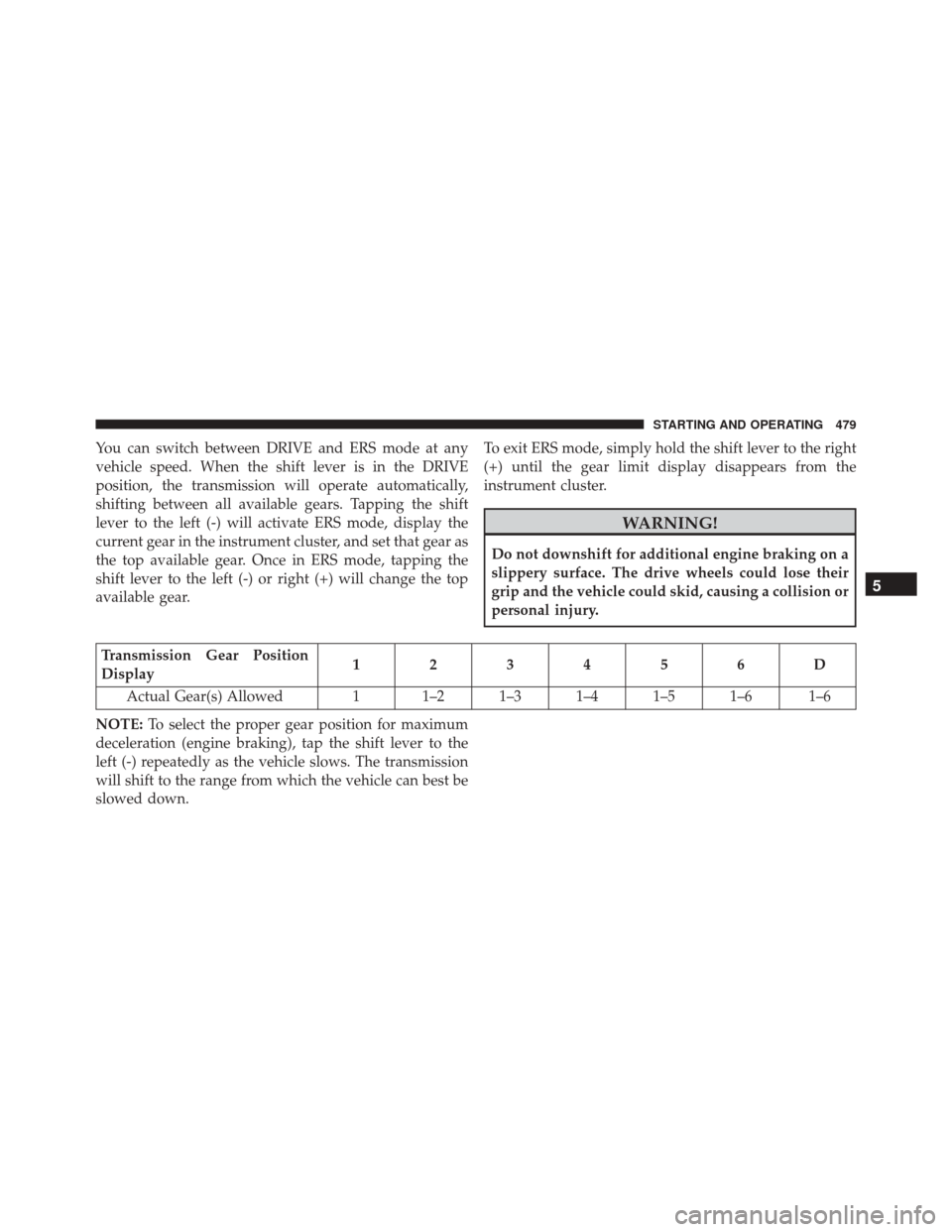
Transmission Gear Position
Display
123456D
Actual Gear(s) Allowed 1 1–2 1–3 1–4 1–5 1–6 1–6
NOTE: To select the proper gear position for maximum
deceleration (engine braking), tap the shift lever to the
left (-) repeatedly as the vehicle slows. The transmission
will shift to the range from which the vehicle can best be
slowed down.
5
STARTING AND OPERATING 479
Page 483 of 707

DRIVING ON SLIPPERY SURFACES
Acceleration
Rapid acceleration on snow covered, wet, or other slip-
pery surfaces may cause the driving wheels to pull
erratically to the right or left. This phenomenon occurs
when there is a difference in the surface traction under
the front (driving) wheels.
WARNING!
Rapid acceleration on slippery surfaces is dangerous.
Unequal traction can cause sudden pulling of the
front wheels. You could lose control of the vehicle
and possibly have a collision. Accelerate slowly and
carefully whenever there is likely to be poor traction
(ice, snow, wet, mud, loose sand, etc.).
Traction
When driving on wet or slushy roads, it is possible for a
wedge of water to build up between the tire and road
surface. This is hydroplaning and may cause partial or
complete loss of vehicle control and stopping ability. To
reduce this possibility, the following precautions should
be observed:
1. Slow down during rainstorms or when the roads areslushy.
2. Slow down if the road has standing water or puddles.
3. Replace the tires when tread wear indicators first become visible.
4. Keep tires properly inflated.
5. Maintain sufficient distance between your vehicle and the vehicle in front of you to avoid a collision in a
sudden stop.
5
STARTING AND OPERATING 481
Page 486 of 707
If for some reason the power assist is interrupted, it will
still be possible to steer your vehicle. Under these condi-
tions, you will observe a substantial increase in steering
effort, especially at very low vehicle speeds and during
parking maneuvers.
NOTE:
•Increased noise levels at the end of the steering wheel
travel are considered normal and do not indicate that
there is a problem with the power steering system.
• Upon initial start-up in cold weather, the power steer-
ing pump may make noise for a short amount of time.
This is due to the cold, thick fluid in the steering
system. This noise should be considered normal, and it
does not in any way damage the steering system.CAUTION!
Prolonged operation of the steering system at the end
of the steering wheel travel will increase the steering
fluid temperature and it should be avoided when
possible. Damage to the power steering pump may
occur.
Power Steering Fluid Check
Checking the power steering fluid level at a defined
service interval is not required. The fluid should only be
checked if a leak is suspected, abnormal noises are
apparent, and/or the system is not functioning as antici-
pated. Coordinate inspection efforts through an autho-
rized dealer.
484 STARTING AND OPERATING