Page 182 of 707
•“Bluetooth Streaming” (to switch to Bluetooth Stream-
ing mode)
• “Memo” (to switch to the memo recorder)
• “System Setup” (to switch to system setup)
Radio AM
To switch to the AM band, say “AM” or “Radio AM.” In
this mode, you may say the following commands:
•“Frequency #” (to change the frequency)
• “Next Station” (to select the next station)
• “Previous Station” (to select the previous station)
• “Radio Menu” (to switch to the radio menu)
• “Main Menu” (to switch to the main menu)
Radio FM
To switch to the FM band, say “FM” or “Radio FM.” In
this mode, you may say the following commands:
•“Frequency #” (to change the frequency)
• “Next Station” (to select the next station)
• “Previous Station” (to select the previous station)
• “Menu Radio” (to switch to the radio menu)
• “Main Menu” (to switch to the main menu)
Satellite Radio
To switch to satellite radio mode, say “Sat” or “Satellite
Radio.” In this mode, you may say the following com-
mands:
•“Channel Number” (to change the channel by its
spoken number)
• “Next Channel” (to select the next channel)
180 UNDERSTANDING THE FEATURES OF YOUR VEHICLE
Page 183 of 707
•“Previous Channel” (to select the previous channel)
• “List Channel” (to hear a list of available channels)
• “Select Name” (to say the name of a channel)
• “Menu Radio” (to switch to the radio menu)
• “Main Menu” (to switch to the main menu)
Disc Mode
To switch to the disc mode, say “Disc.” In this mode, you
may say the following commands:
•“Track” (#) (to change the track)
• “Next Track” (to play the next track)
• “Previous Track” (to play the previous track)
• “Main Menu” (to switch to the main menu)
USB Mode
To switch to USB mode, say “USB.” In this mode, you
may say the following commands:
•“Next Track” (to play the next track)
• “Previous Track” (to play the previous track)
• “Play” (to play an Artist Name, Playlist Name, Album
Name, Track Name, etc.)
Bluetooth Streaming (BT) Mode
To switch to Bluetooth Streaming (BT) mode, say
“Bluetooth Streaming.” In this mode, you may say the
following commands:
• “Play” (to play the current track)
• “Pause” (to pause the current track)
• “Next Track” (to play the next track)
• “Previous Track” (to play the previous track)
3
UNDERSTANDING THE FEATURES OF YOUR VEHICLE 181
Page 218 of 707
DRIVER MEMORY SEAT — IF EQUIPPED
The Memory Buttons 1 and 2 on the driver’s door panel
can be programmed to recall the driver’s seat, outside
mirrors, adjustable brake and accelerator pedals (if
equipped), and radio station preset settings. Your Remote
Keyless Entry (RKE) transmitters can also be pro-
grammed to recall the same positions when the UN-
LOCK button is pushed.Your vehicle may have been delivered with two RKE
transmitters, one RKE transmitter can be linked to each of
the memory positions.
Driver Memory Switch
216 UNDERSTANDING THE FEATURES OF YOUR VEHICLE
Page 219 of 707

Programming The Memory Feature
NOTE:To create a new memory profile, perform the
following:
1. Cycle the vehicles ignition to the ON/RUN position (do not start the engine).
2. Adjust all memory profile settings to desired prefer- ences (i.e., driver ’s seat, outside mirrors, adjustable
pedals [if equipped] and radio station presets).
3. Push and release the S (Set) button on the memory switch.
4. Within five seconds, push and release either of the memory buttons (1) or (2). The Electronic Vehicle
Information Center (EVIC) will display which
memory position has been set. NOTE:
•
Memory profiles can be set without the vehicle in
PARK, but the vehicle must be in PARK to recall a
memory profile.
• To set a memory profile to your RKE transmitter, refer
to “Linking And Unlinking The Remote Keyless Entry
Transmitter To Memory” in this section.
Linking And Unlinking The Remote Keyless Entry
Transmitter To Memory
Your RKE transmitters can be programmed to recall one
of two pre-programmed memory profiles by pushing the
UNLOCK button on the RKE transmitter.
3
UNDERSTANDING THE FEATURES OF YOUR VEHICLE 217
Page 228 of 707
Interior Lighting On
Rotate the left dimmer control completely upward to the
second detent (extreme top position) to turn on the
interior lights. The interior lights will remain on when the
dimmer control is in this position.
Interior lights are also turned on when a door or liftgate
is opened, the Remote Keyless Entry (RKE) transmitter is
activated, or when the dimmer control is moved to the
extreme top.
The interior lights will automatically turn off in approxi-
mately 10 minutes for the first activation and 90 seconds
every activation thereafter until the engine is started, if
one of the following occur:
•A door, sliding door or the liftgate is left open.
• Any overhead reading light is left on. NOTE:
The ignition must be cycled to the OFF position
for this feature to operate.
Interior Lighting Off
Rotate the left dimmer control to the off position (extreme
bottom). The interior lights will remain off when the
doors or liftgate are open.
Parade Mode (Daytime Brightness Feature)
Rotate the left dimmer control to the first detent. This
feature brightens the odometer, radio and overhead
displays when the parking lights or headlights are on.
Halo Lights — If Equipped
Halo lights are strategically placed soft lighting that help
to illuminate specific areas to aid the occupants in
locating specific features while driving at night.
The Halo control switch is located to the right of the
dimmer switch.
226 UNDERSTANDING THE FEATURES OF YOUR VEHICLE
Page 246 of 707
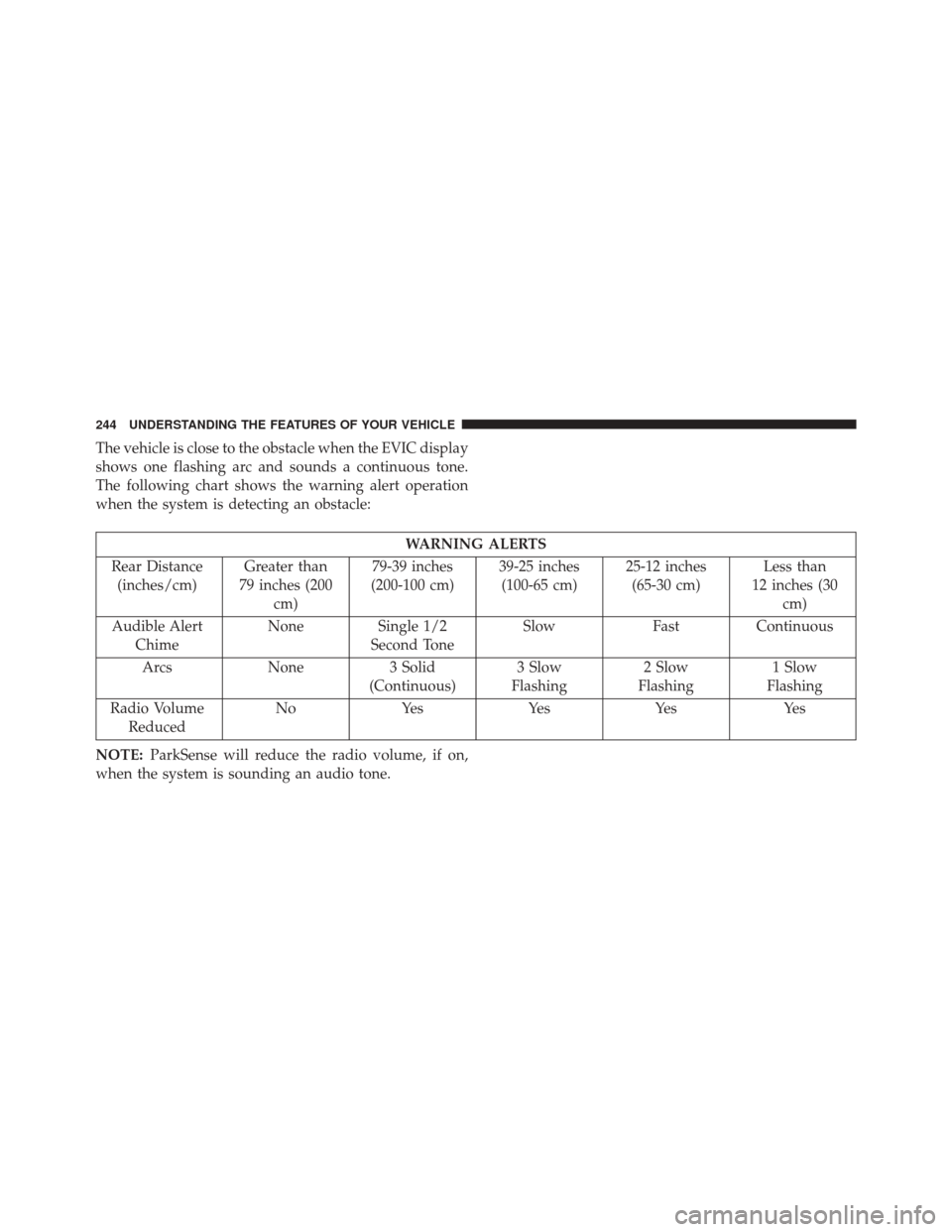
The vehicle is close to the obstacle when the EVIC display
shows one flashing arc and sounds a continuous tone.
The following chart shows the warning alert operation
when the system is detecting an obstacle:
WARNING ALERTS
Rear Distance (inches/cm) Greater than
79 inches (200 cm) 79-39 inches
(200-100 cm) 39-25 inches
(100-65 cm) 25-12 inches
(65-30 cm) Less than
12 inches (30 cm)
Audible Alert Chime None
Single 1/2
Second Tone Slow
FastContinuous
Arcs None3 Solid
(Continuous) 3 Slow
Flashing 2 Slow
Flashing 1 Slow
Flashing
Radio Volume Reduced No
Yes YesYes Yes
NOTE: ParkSense will reduce the radio volume, if on,
when the system is sounding an audio tone.
244 UNDERSTANDING THE FEATURES OF YOUR VEHICLE
Page 248 of 707

Cleaning The ParkSense System
Clean the ParkSense sensors with water, car wash soap
and a soft cloth. Do not use rough or hard cloths. Do not
scratch or poke the sensors. Otherwise, you could dam-
age the sensors.
ParkSense System Usage Precautions
NOTE:
•Ensure that the rear bumper is free of snow, ice, mud,
dirt and debris to keep the ParkSense system operating
properly.
• Jackhammers, large trucks, and other vibrations could
affect the performance of ParkSense.
• When you turn ParkSense OFF, the instrument cluster
will display “PARK ASSIST SYSTEM OFF.” Further-
more, once you turn ParkSense off, it remains off until
you turn it on again, even if you cycle the ignition key. •
When you move the shift lever to the REVERSE
position and ParkSense is turned OFF, the EVIC will
display “PARK ASSIST SYSTEM OFF” message for as
long as the vehicle is in REVERSE.
• ParkSense, when on, will reduce the radio volume
when it is sounding a tone.
•Clean the ParkSense sensors regularly, taking care not to
scratch or damage them. The sensors must not be cov-
ered with ice, snow, slush, mud, dirt or debris. Failure to
do so can result in the system not working properly. The
ParkSense system might not detect an obstacle behind
the fascia/bumper, or it could provide a false indication
that an obstacle is behind the fascia/bumper.
•Ensure the ParkSense system is OFF if objects such as
bicycle carriers, trailer hitches, etc. are placed within 12
inches (30 cm) from the rear fascia/bumper. Failure to do
so can result in the system misinterpreting a close object
as a sensor problem, causing the “SERVICE PARK AS-
SIST SYSTEM” message to be displayed in the EVIC.
246 UNDERSTANDING THE FEATURES OF YOUR VEHICLE
Page 258 of 707
Before You Begin Programming HomeLink
Be sure that your vehicle is parked outside of the garage
before you begin programming.
For more efficient programming and accurate transmis-
sion of the radio-frequency signal it is recommended that
a new battery be placed in the hand-held transmitter of
the device that is being programmed to the HomeLink
system.
To erase the channels place the ignition in the ON/RUN
position and push and hold the two outside HomeLink
buttons (I and III) for up 20 seconds or until the red
indicator flashes.NOTE:
•
Erasing all channels should only be performed when
programming HomeLink for the first time. Do not
erase channels when programming additional buttons.
• If you have any problems, or require assistance, please
call toll-free 800-355-3515 or, on the Internet at
HomeLink.com for information or assistance.
Programming A Rolling Code
For programming garage door openers that were manu-
factured after 1995. These garage door openers can be
identified by the “LEARN” or “TRAIN” button located
where the hanging antenna is attached to the garage door
opener. It is NOT the button that is normally used to
open and close the door. The name and color of the
button may vary by manufacturer.
256 UNDERSTANDING THE FEATURES OF YOUR VEHICLE