Page 10 of 292
8
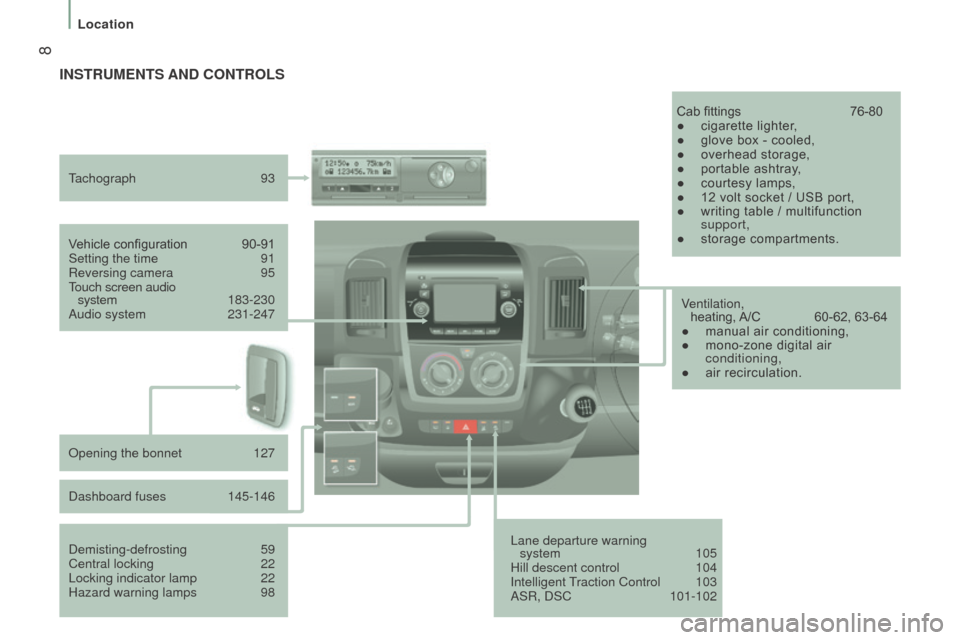
Lane departure warning system 105
Hill descent control
104
Intelligent T
raction Control
103
ASR, DSC
101-102
V
ehicle configuration
90-91
Setting the time
91
Reversing camera
95
T
ouch screen audio
system
1
83-230
Audio system
231-247
T
achograph
93
Cab fittings
76-80
●
cigarette lighter
,
●
glove box - cooled,
●
overhead storage,
●
portable ashtray
,
●
courtesy lamps,
●
12 volt socket / USB port,
●
writing table / multifunction
support,
●
storage compartments.
Demisting-defrosting
59
Central locking
22
Locking indicator lamp
22
Hazard warning lamps
98 V
entilation,
heating, A/C
60-62, 63-64
●
manual air conditioning,
●
mono-zone digital air
conditioning,
●
air recirculation.
Opening the bonnet
127
Dashboard fuses
145-146
InStruMEntS And cOntrOLS
Location
Page 16 of 292
14
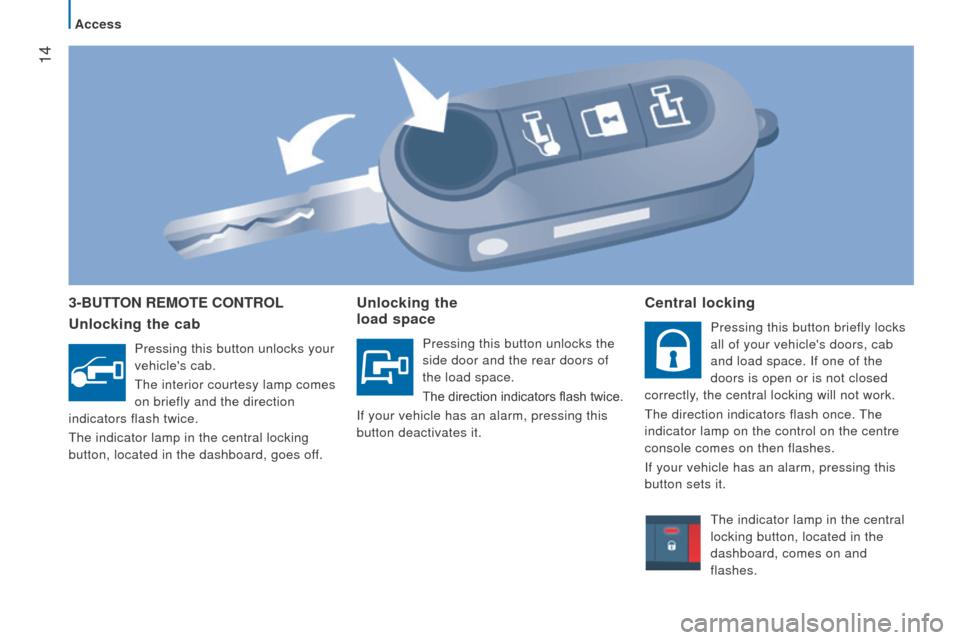
3-ButtOn r EMO t E c O ntr OL
u nlocking the cab
Pressing this button unlocks your
vehicle's cab.
The interior courtesy lamp comes
on briefly and the direction
indicators flash twice.
The indicator lamp in the central locking
button, located in the dashboard, goes off.
unlocking the
load space
Pressing this button unlocks the
side door and the rear doors of
the load space.
The direction indicators flash twice.
If your vehicle has an alarm, pressing this
button deactivates it.
central locking
Pressing this button briefly locks
all of your vehicle's doors, cab
and load space. If one of the
doors is open or is not closed
correctly, the central locking will not work.
The direction indicators flash once. The
indicator lamp on the control on the centre
console comes on then flashes.
If your vehicle has an alarm, pressing this
button sets it.
The indicator lamp in the central
locking button, located in the
dashboard, comes on and
flashes.
Access
Page 17 of 292
15
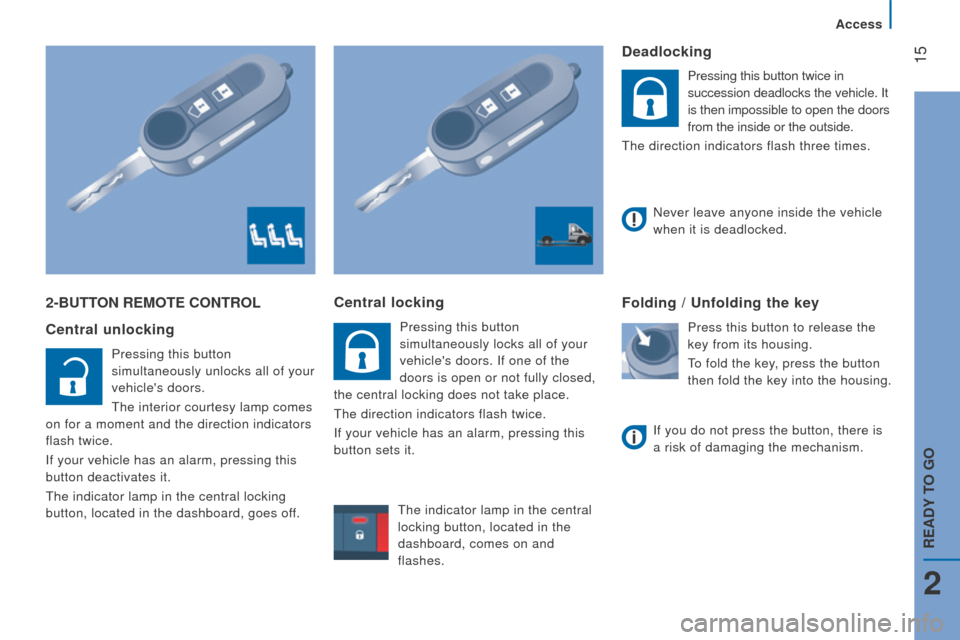
2-ButtOn r EMO t E c O ntr OL
c entral unlocking
Pressing this button
simultaneously unlocks all of your
vehicle's doors.
The interior courtesy lamp comes
on for a moment and the direction indicators
flash twice.
If your vehicle has an alarm, pressing this
button deactivates it.
The indicator lamp in the central locking
button, located in the dashboard, goes off.
central locking
Pressing this button
simultaneously locks all of your
vehicle's doors. If one of the
doors is open or not fully closed,
the central locking does not take place.
The direction indicators flash twice.
If your vehicle has an alarm, pressing this
button sets it.
deadlocking
Pressing this button twice in
succession deadlocks the vehicle. It
is then impossible to open the doors
from the inside or the outside.
The direction indicators flash three times.
Folding / unfolding the key
Press this button to release the
key from its housing.
To fold the key, press the button
then fold the key into the housing.
Never leave anyone inside the vehicle
when it is deadlocked.
If you do not press the button, there is
a risk of damaging the mechanism.
The indicator lamp in the central
locking button, located in the
dashboard, comes on and
flashes.
2
Access
rEAdY tO GO
Page 19 of 292
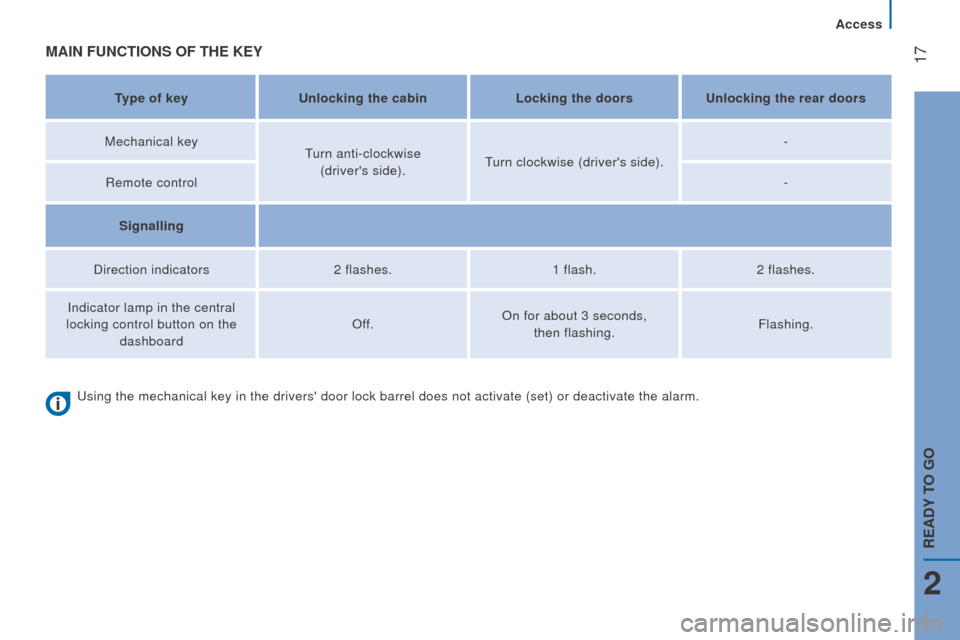
17MAIn FunctIOnS OF tHE KEY
type of keyunlocking the cabin Locking the doorsu nlocking the rear doors
Mechanical key Turn anti-clockwise
(driver's side). Turn clockwise (driver's side). -
Remote control -
Signalling
Direction indicators 2 flashes.1 flash.2 flashes.
Indicator lamp in the central
locking control button on the dashboard Off.
On for about 3 seconds,
then flashing. Flashing.
Using the mechanical key in the drivers' door lock barrel does not activ\
ate (set) or deactivate the alarm.
2
Access
rEAdY tO GO
Page 49 of 292

47
HEAdLAMP BEAM
You are advised to adjust the height of the
headlamp beams in accordance with the
load in your vehicle.
This function works in the dipped and main
beam headlamps position.Press these controls, located
on the dashboard, several times
in succession to adjust the
headlamps.
An indicator in the screen shows
the adjustment position selected
(0, 1, 2, 3).
PArKInG LAMPS
This system enables you to leave the lamps
on when parked; with the ignition off, key in
the STOP position or key removed.
Move the ring on the lighting stalk to
position
O then to dipped or main beam
headlamps.
t
he indicator lamp in the
instrument panel comes on.
The lamps will remain on while
you are parked.
Leaving the lighting on for long periods may
significantly reduce the state of charge of
your vehicle's battery.
travelling abroad
If using your vehicle in a country
that drives on the other side of the road,
the headlamps must be adjusted to avoid
dazzling on-coming drivers.
Contact a CITROËN dealer or a qualified
workshop.
3
EASE OF uSE and cOMFOrt
Steering mounted controls
Page 57 of 292
55
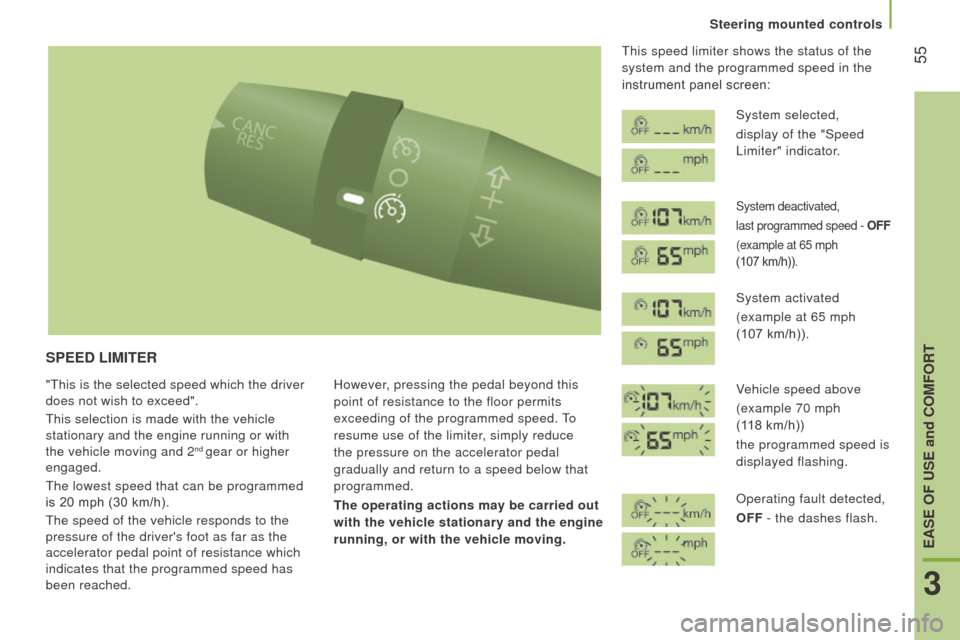
SPEEd LIMItEr
"This is the selected speed which the driver
does not wish to exceed".
This selection is made with the vehicle
stationary and the engine running or with
the vehicle moving and 2
nd gear or higher
engaged.
The lowest speed that can be programmed
is 20 mph (30 km/h).
The speed of the vehicle responds to the
pressure of the driver's foot as far as the
accelerator pedal point of resistance which
indicates that the programmed speed has
been reached. However, pressing the pedal beyond this
point of resistance to the floor permits
exceeding of the programmed speed. To
resume use of the limiter, simply reduce
the pressure on the accelerator pedal
gradually and return to a speed below that
programmed.
t
he operating actions may be carried out
with the vehicle stationary and the engine
running, or with the vehicle moving. This speed limiter shows the status of the
system and the programmed speed in the
instrument panel screen:
System selected,
display of the "Speed
Limiter" indicator.
System deactivated,
last programmed speed - OFF
(example at 65 mph
(107
km/h)).
System activated
(example at 65 mph
(107 km/h)).
Vehicle speed above
(example 70 mph
(118
km/h))
the programmed speed is
displayed flashing.
Operating fault detected,
OFF - the dashes flash.
3
EASE OF uSE and cOMFOrt
Steering mounted controls
Page 59 of 292
57
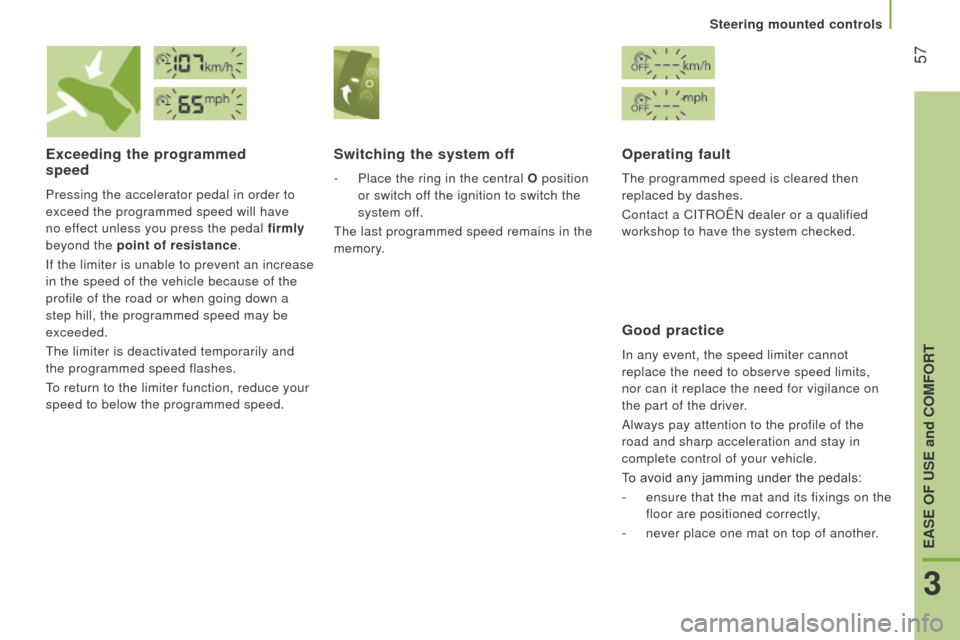
Exceeding the programmed
speed
Pressing the accelerator pedal in order to
exceed the programmed speed will have
no effect unless you press the pedal firmly
beyond the point of resistance.
If the limiter is unable to prevent an increase
in the speed of the vehicle because of the
profile of the road or when going down a
step hill, the programmed speed may be
exceeded.
The limiter is deactivated temporarily and
the programmed speed flashes.
To return to the limiter function, reduce your
speed to below the programmed speed.
Switching the system off
- Place the ring in the central O position
or switch off the ignition to switch the
system off.
The last programmed speed remains in the
memory.
Operating fault
The programmed speed is cleared then
replaced by dashes.
Contact a CITROËN dealer or a qualified
workshop to have the system checked.
Good practice
In any event, the speed limiter cannot
replace the need to observe speed limits,
nor can it replace the need for vigilance on
the part of the driver.
Always pay attention to the profile of the
road and sharp acceleration and stay in
complete control of your vehicle.
To avoid any jamming under the pedals:
-
ensure that the mat and its fixings on the
floor are positioned correctly,
-
never place one mat on top of another
.
3
EASE OF uSE and cOMFOrt
Steering mounted controls
Page 63 of 292
61
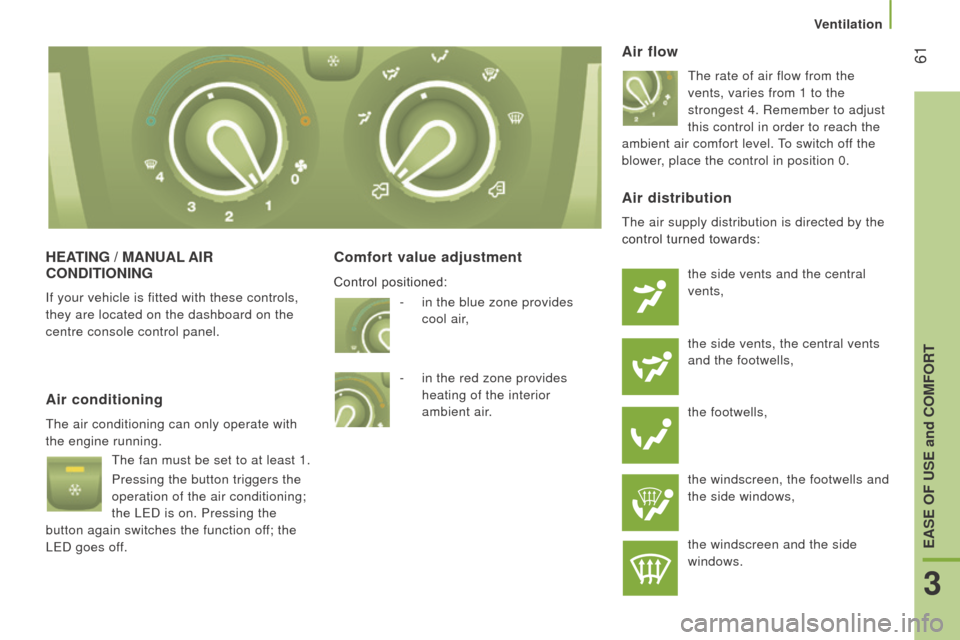
HEAtI n G / M A nu AL AI r
c O nd I t IO n I n G
If your vehicle is fitted with these controls,
they are located on the dashboard on the
centre console control panel.
comfort value adjustment Air flow
The rate of air flow from the
vents, varies from 1 to the
strongest 4. Remember to adjust
this control in order to reach the
ambient air comfort level. To switch off the
blower, place the control in position 0.
Air conditioning
The air conditioning can only operate with
the engine running.
The fan must be set to at least 1.
Pressing the button triggers the
operation of the air conditioning;
the LED is on. Pressing the
button again switches the function off; the
LED goes off.
Air distribution
The air supply distribution is directed by the
control turned towards:
the side vents and the central
vents,
the side vents, the central vents
and the footwells,
the footwells,
the windscreen, the footwells and
the side windows,
the windscreen and the side
windows.
-
in the blue zone provides
cool
air,
-
in the red zone provides
heating of the interior
ambient
air.
Control positioned:
3
EASE OF uSE and cOMFOrt
Ventilation